2018 INFINITI Q50 Switch
[x] Cancel search: SwitchPage 280 of 458

JVS0244X
System set display with a vehicle ahead
System set display without a vehicle
ahead
System set display with a vehicle ahead
(brake operation is necessary)
The DCA system helps assist the driver to
keep a following distance to the vehicle
ahead by braking and moving the accelera-
tor pedal upward in the normal driving
condition.
When a vehicle ahead is detected:
The vehicle ahead detection indicator ap-
pears. When the vehicle approaches a vehicle
ahead:
.
If the driver’s foot is not on the accel-
erator pedal, the system activates the
brakes to decelerate smoothly as neces-
sary. If the vehicle ahead comes to a
stop, the vehicle decelerates to a stand-
still within the limitations of the system.
. If the driver’s foot is on the accelerator
pedal, the system moves the accelerator
pedal upward to assist the driver to
release the accelerator pedal.
When brake operation by the driver is
required:
The system alerts the driver by a warning
chime and blinking the vehicle ahead detec- tion indicator. If the driver’s foot is on the
accelerator pedal after the warning, the
system moves the accelerator pedal upward
to assist the driver to switch to the brake
pedal.
NOTE:
.
The stop lights of the vehicle come on
when braking is performed by the DCA
system.
. When the brake operates, a noise may be
heard. This is not a malfunction.
Overriding the system:
The following driver’s operation overrides
the system operation.
. When the driver depresses the accelera-
tor pedal even further while the system is
moving the accelerator pedal upward,
the DCA system control of the accel-
erator pedal is canceled.
. When the driver’s foot is on the accel-
erator pedal, the brake control by the
system is not operated.
. When the driver’s foot is on the brake
pedal, neither the brake control nor the
alert by the system operates.
. When the Intelligent Cruise Control (ICC)
system is set, the DCA system will be
inactive.
Starting and driving5-97
Page 282 of 458

JVS0845X
Dynamic driver assistance switch
Driver assist system forward indicator
(green) (on the vehicle information dis-
play)
Lower display
TURNING THE DCA SYSTEM ON/
OFF
To turn on the DCA system, push the
dynamic driver assistance switchon the
steering wheel after starting the engine. The
driver assistance switch indicator
in the
vehicle information display will appear. Push
the dynamic driver assistance switch
again
to turn off the DCA system. The driver
assistance switch indicator
will turn off.
The system will start to operate after the
vehicle speed is above approximately 3 MPH
(5 km/h).
The dynamic driver assistance switch
is
used for the DCA, Active Lane Control (if so
equipped), LDP and BSI systems. When the
dynamic driver assistance switch
is
pushed, Active Lane Control, LDP and BSI
systems will also turn on or off simulta-
neously. The DCA system can be individually
set to on or off on the lower display
. If the
system is set to off, the system will not turn
on even if the dynamic driver assistance
switch
is pushed to on. To set the system
to on or off on the display, see “How to
enable/disable the DCA system” (P.5-100).
When the conventional (fixed speed) cruise
control mode is operating, the DCA system
will not operate. (To use the DCA system,
turn the conventional (fixed speed) cruise
control mode off, then push the dynamic
Starting and driving5-99
Page 283 of 458
5-100Starting and driving
driver assistance switch.)
For details about the conventional (fixed
speed) cruise control mode, see “Intelligent
Cruise Control (ICC)” (P.5-73).
When the engine is turned off, the DCA
system is automatically turned off.
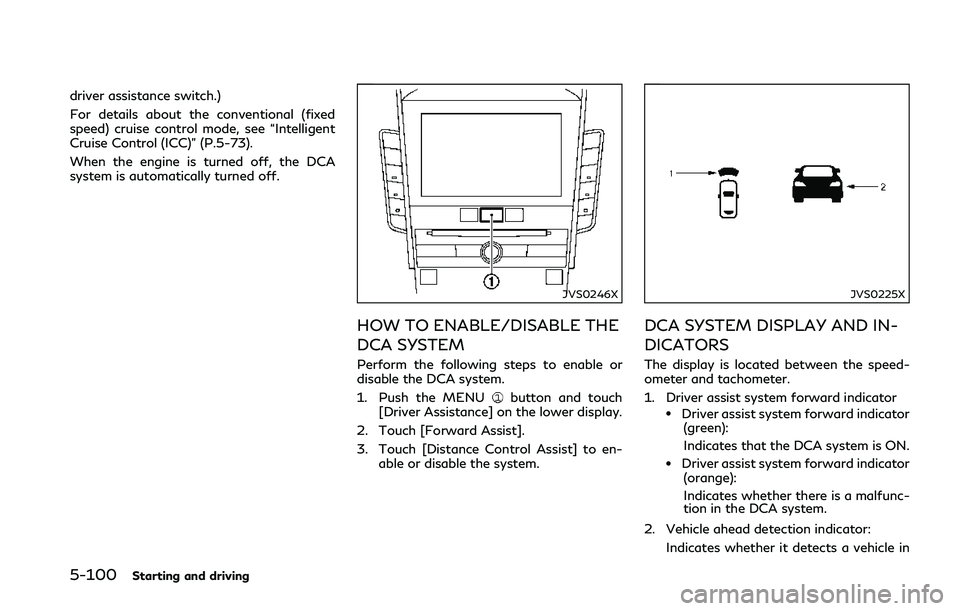
JVS0246X
HOW TO ENABLE/DISABLE THE
DCA SYSTEM
Perform the following steps to enable or
disable the DCA system.
1. Push the MENU
button and touch
[Driver Assistance] on the lower display.
2. Touch [Forward Assist].
3. Touch [Distance Control Assist] to en- able or disable the system.
JVS0225X
DCA SYSTEM DISPLAY AND IN-
DICATORS
The display is located between the speed-
ometer and tachometer.
1. Driver assist system forward indicator
.Driver assist system forward indicator(green):
Indicates that the DCA system is ON.
.Driver assist system forward indicator(orange):
Indicates whether there is a malfunc-
tion in the DCA system.
2. Vehicle ahead detection indicator: Indicates whether it detects a vehicle in
Page 286 of 458

SSD0253
When driving on some roads, such as wind-
ing, hilly, curved, narrow roads, or roads
which are under construction, the sensor
may detect vehicles in a different lane, or
may temporarily not detect a vehicle travel-
ing ahead. This may cause the system to
work inappropriately.
The detection of vehicles may also be
affected by vehicle operation (steering man-
euver or traveling position in the lane, etc.) or
vehicle condition.If this occurs, the system
may warn you by blinking the system
indicator and sounding the chime unexpect-
edly. You will have to manually control the
proper distance away from the vehicle
traveling ahead.
JVS0826X
Vehicle information display
Dynamic driver assistance switch
SYSTEM TEMPORARILY UNA-
VAILABLE
Condition A
Under the following conditions, the DCA
system is automatically canceled. The chime
will sound and the “currently unavailable”
warning message will appear in the vehicle
information display. The system will not be
able to be set.
. When the VDC system is off (To use the
DCA system, turn on the VDC, then push
the dynamic driver assistance switch
.)
Starting and driving5-103
Page 287 of 458

5-104Starting and driving
For details about the VDC system, see
“Vehicle Dynamic Control (VDC) system”
(P.5-132)
. When the VDC or ABS (including the
traction control system) operates
. When the INFINITI Drive Mode Selector
is turned to the SNOW mode (To use the
DCA system, turn the INFINITI Drive
Mode Selector to a mode other than the
SNOW mode, then turn on the dynamic
driver assistance switch
.) For details
about the INFINITI Drive Mode Selector,
see “INFINITI Drive Mode Selector” (P.5-
22)
. When the radar signal is temporarily
interrupted
Action to take:
When the conditions listed above are no
longer present, turn the DCA system back on
to use the system.
Condition B
Under the following conditions, making it
impossible to detect a vehicle ahead, the
DCA system is automatically canceled.
The chime will sound, the driver assist
system forward indicator (orange) and the
“front radar obstruction” warning message
will appear in the vehicle information display. .
When the radar sensor area of the front
bumper is covered with dirt or is ob-
structed
Action to take:
If the driver assist system forward indicator
(orange) and the warning message appear,
stop the vehicle in a safe place, place the
shift lever in the P (Park) position and turn
the engine off. When the radar signal is
temporarily interrupted, clean the sensor
area of the front bumper and restart the
engine. If the warning message continues to
be displayed, have the DCA system checked.
It is recommended you visit an INFINITI
retailer for this service.
. When driving on roads with limited road
structures or buildings (for example, long
bridges, deserts, snow fields, driving next
to long walls)
Action to take:
When the above conditions no longer exist,
the DCA system will resume automatically.SYSTEM MALFUNCTION
When the DCA system is not operating
properly, the chime sounds, the driver assist
system forward indicator (orange) and the
system “malfunction” warning message will
appear in the vehicle information display. Action to take:
If the driver assist system forward indicator
(orange) and the warning message appear,
stop the vehicle in a safe place and place the
shift lever in the P (Park) position. Turn the
engine off, restart the engine, and turn on
the DCA system again.
If it is not possible to set the system or the
indicator stays on, it may indicate that the
system is malfunctioning. Although the
vehicle is still driveable under normal con-
ditions, have the vehicle checked. It is
recommended you visit an INFINITI retailer
for this service.
SYSTEM MAINTENANCE
The sensor for the DCA system is common
with the Intelligent Cruise Control (ICC)
system and is located behind the lower grille
of the front bumper.
For the sensor maintenance, see “Intelligent
Cruise Control (ICC)” (P.5-73).
FCC Notice:
For USA:
This device complies with Part 15 of the
FCC Rules. Operation is subject to the
following two conditions:
1.
This device may not cause harmful
interference, and
Page 309 of 458

5-126Starting and driving
SD1006MA
WARNING
.Do not stop or park the vehicle over
flammable materials such as dry
grass, waste paper or rags. They
may ignite and cause a fire.
. Never leave the engine running while
the vehicle is unattended.
. Do not leave children unattended
inside the vehicle. They could un-
knowingly activate switches or con-
trols. Unattended children could
become involved in serious accidents. .
To help avoid risk of injury or death
through unintended operation of the
vehicle and/or its systems, do not
leave children, people who require the
assistance of others or pets unat-
tended in your vehicle. Additionally,
the temperature inside a closed ve-
hicle on a warm day can quickly
become high enough to cause a sig-
nificant risk of injury or death to
people and pets.
. Safe parking procedures require that
both the parking brake be applied
and the transmission placed into P
(Park). Failure to do so could cause the vehicle to move unexpectedly or
roll away and result in an accident.
. Make sure the automatic transmis-
sion shift lever has been pushed as far
forward as it can go and cannot be
moved without depressing the foot
brake pedal.
1. Firmly apply the parking brake.
2. Move the shift lever to the P (Park) position.
3. To help prevent the vehicle from rolling into the street when parked on a sloping
drive way, it is a good practice to turn the
wheels as illustrated.
.HEADED DOWNHILL WITH CURB:
Turn the wheels into the curb and
move the vehicle forward until the
curb side wheel gently touches the
curb.
.HEADED UPHILL WITH CURB:
Turn the wheels away from the curb
and move the vehicle back until the
curb side wheel gently touches the
curb.
.HEADED UPHILL OR DOWNHILL,
NO CURB:
Turn the wheels toward the side of
the road so the vehicle will move away
from the center of the road if it
PARKING/PARKING ON HILLS
Page 310 of 458

moves.
4. Push the ignition switch to the OFF position.ELECTRIC POWER STEERING
TYPE
WARNING
.If the engine is not running or is
turned off while driving, the power
assist for the steering will not work.
Steering will be harder to operate.
. When the power steering warning
light illuminates with the engine run-
ning, the power assist for the steer-
ing will cease operation. You will still
have control of the vehicle but the
steering will be harder to operate.
The electric power steering is designed to
provide power assist while driving to oper-
ate the steering wheel with light force.
When the steering wheel is operated re-
peatedly or continuously while parking or
driving at a very low speed, the power assist
for the steering wheel will be reduced. This is
to prevent overheating of the electric power
steering and protect it from getting da-
maged. While the power assist is reduced,
steering wheel operation will become heavy.
When the temperature of the electric power
steering goes down, the power assist level
will return to normal. Avoid repeating such steering wheel operations that could cause
the electric power steering to overheat.
You may hear a sound when the steering
wheel is operated quickly. However, this is
not a malfunction.
If the power steering warning light illumi-
nates while the engine is running, it may
indicate the electric power steering is not
functioning properly and may need servicing.
It is recommended you have the electric
power steering checked by an INFINITI
retailer. (See “Power steering warning light”
(P.2-14).)
When the power steering warning light
illuminates with the engine running, the
power assist for the steering will cease
operation. You will still have control of the
vehicle. However, greater steering effort is
needed, especially in sharp turns and at low
speeds.
HYDRAULIC PUMP ELECTRIC
POWER STEERING TYPE
WARNING
When the power steering warning light
illuminates with the engine running, the
power assist for the steering will cease
operation. You will still have control of
Starting and driving5-127
POWER STEERING
Page 311 of 458

5-128Starting and driving
the vehicle, but the steering will be much
harder to operate.
The hydraulic pump electric power steering
is designed to provide power assistance
while driving to operate the steering wheel
with light force.
When the steering wheel is operated re-
peatedly or continuously while parking or
driving at a very low speed, the power assist
for the steering wheel will be reduced. This is
to prevent overheating of the hydraulic
pump electric power steering and protect it
from getting damaged. While the power
assist is reduced, steering wheel operation
will become heavy. If the steering wheel
operation is still performed, the power
steering may stop and the power steering
warning light will illuminate. Stop the engine
and place the ignition switch in the OFF
position. The temperature of the hydraulic
pump electric power steering will go down
and the power assist level will return to
normal after starting the engine. The power
steering warning light will go off. Avoid
repeating such steering wheel operations
that could cause the hydraulic pump electric
power steering to overheat.
You may hear a noise from the front of the
vehicle when the steering wheel is operated.
This is not a malfunction. If the power steering warning light illumi-
nates while the engine is running, it may
indicate the hydraulic pump electric power
steering is not functioning properly and may
need servicing. It is recommended you have
the hydraulic pump electric power steering
checked by an INFINITI retailer.
When the power steering warning light
illuminates with the engine running, the
power assist for the steering will cease
operation but you will still have control of
the vehicle. At this time, greater steering
efforts are required to operate the steering
wheel, especially in sharp turns and at low
speeds.
DIRECT ADAPTIVE STEERING
TYPE
WARNING
.
When the power steering warning
light illuminates with the engine run-
ning, the power assist for the steer-
ing will cease operation. You will still
have control of the vehicle, but the
steering will be harder to operate.
. If wheels or tires other than the
INFINITI recommended ones are
used, Direct Adaptive Steering may
not operate properly and the power steering warning light may illumi-
nate.
. Do not modify the vehicle’s suspen-
sion. If suspension parts such as
shock absorbers, struts, springs, sta-
bilizer bars, bushings and wheels are
not INFINITI recommended for your
vehicle or are extremely deteriorated,
Direct Adaptive Steering may not
operate properly and the power
steering warning light may illumi-
nate.
. Do not modify the vehicle’s steering.
If steering parts are not INFINITI
recommended for your vehicle or are
extremely deteriorated, Direct Adap-
tive Steering may not operate prop-
erly and the power steering warning
light may illuminate.
. If the VDC warning light illuminates,
the power steering warning light may
also illuminate at the same time. Stop
the vehicle in a safe location, turn the
engine off and restart the engine. If
the power steering warning light
continues to illuminate, have the
system checked. It is recommended
you visit an INFINITI retailer for this
service. For VDC system, see “Vehicle
Dynamic Control (VDC) system”
(P.5-132).