2018 Hyundai Santa Fe deactivate
[x] Cancel search: deactivatePage 39 of 570

Safety features of your vehicle
18
3
Easy access function
(if equipped)
The system will move the driver's
seat automatically as follows:
Without smart key system
- It will move the driver’s seat rear-ward when the ignition key is
removed.
- It will move the driver’s seat for- ward when the ignition key is
inserted.
With smart key system - It will move the driver’s seat rear-ward when the engine start/stop
button is changed to the OFF
position.
- It will move the driver’s seat for- ward when the engine start/stop
button is changed to the ACC or
START position.
You can activate or deactivate this
feature. Refer to "User settings" in
section 4.
Rear seat adjustment
Forward and backward (if equipped)
To move the seat forward or back-
ward:
1. Pull the seat slide adjustment lever up and hold it. 2. Slide the seat to the position you
desire.
3. Release the lever and make sure the seat is locked in place.
Adjust the seat before driving, and
make sure the seat is locked secure-
ly by trying to move forward and
backward without using the lever. If
the seat moves, it is not locked prop-
erly.
OANNSA2021
ONCDSA2113
■7-seater
■6-seater
Page 82 of 570
361
Safety features of your vehicle
Your vehicle is equipped with an
occupant classification system in the
front passenger's seat.
The occupant classification system
is designed to detect the presence of
a properly-seated front passenger
and determine if the passenger's
front air bag should be enabled (may
inflate) or not. The driver's front air
bag is not affected or controlled by
the occupant classification system.
Main components of occupant
classification system
A detection device located withinthe front passenger seat cushion.
Electronic system to determine whether the front passenger air
bag system should be activated or
deactivated.
An indicator light located on the instrument panel which illuminates
the words PASSENGER AIR BAG
"OFF" indicating the front passen-
ger air bag system is deactivated.
The instrument panel air bag indi- cator light is interconnected with
the occupant classification system. If the front passenger seat is occu-
pied by a person that the system
determines to be of adult size, and
he/she sits properly (sitting upright
with the seatback in an upright posi-
tion, centered on the seat cushion
with their seat belt on, legs comfort-
ably extended and their feet on the
floor), the PASSENGER AIR BAG
"OFF" indicator will be turned off and
the front passenger's air bag will be
able to inflate, if necessary, in frontal
crashes.
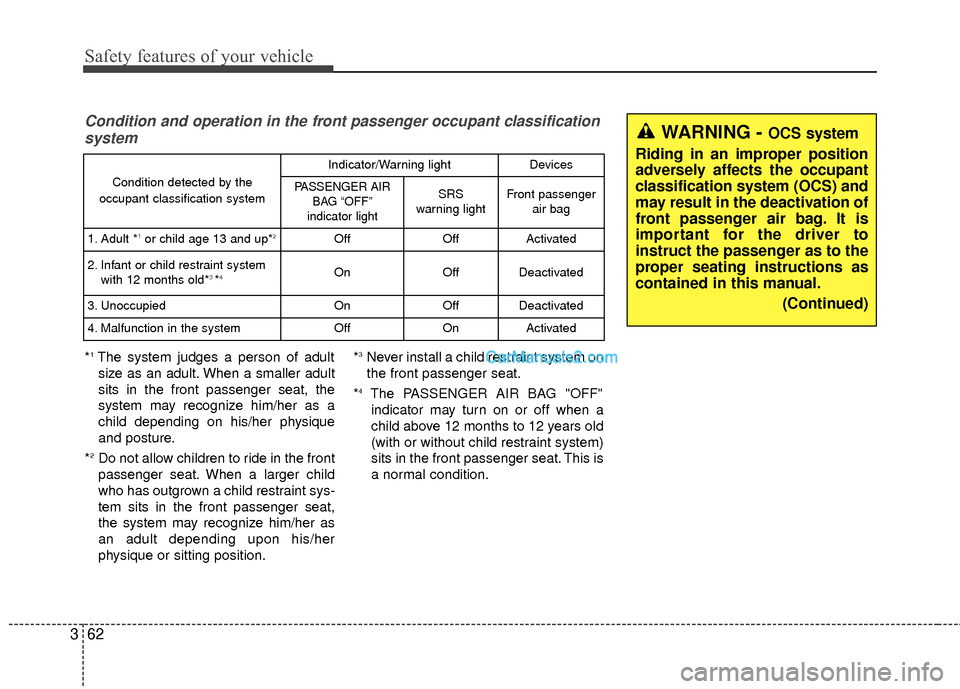
You will find the PASSENGER AIR
BAG "OFF" indicator on the center
facia panel. This system detects the
conditions 1~4 in the following table
and activates or deactivates the front
passenger air bag based on these
conditions.
Always be sure that you and all vehi-
cle occupants are seated and
restrained properly (sitting upright
with the seat in an upright position,
centered on the seat cushion, with
the person's legs comfortably
extended, feet on the floor, and wear-
ing the safety belt properly) for the
most effective protection by the air
bag and the safety belt. The OCS may not function proper-
ly if the passenger takes actions
which can affect the classification
system. These include:
(1) Failing to sit in an upright posi- tion.
(2) Leaning against the door or center console.
(3) Sitting towards the sides or the front of the seat.
(4) Putting legs on the dashboard or resting them on other loca-
tions which reduce the passen-
ger weight on the front seat.
(5) Improperly wearing the safety belt.
(6) Reclining the seat back.
(7) Wearing a thick cloth like ski wear or hip protection wear.
(8) Put on the seat an additional thick cushion.
Page 83 of 570
Safety features of your vehicle
62
3
Condition and operation in the front passenger occupant classification
system
*1The system judges a person of adult
size as an adult. When a smaller adult
sits in the front passenger seat, the
system may recognize him/her as a
child depending on his/her physique
and posture.
*
2Do not allow children to ride in the front
passenger seat. When a larger child
who has outgrown a child restraint sys-
tem sits in the front passenger seat,
the system may recognize him/her as
an adult depending upon his/her
physique or sitting position. *
3Never install a child restraint system on
the front passenger seat.
*
4The PASSENGER AIR BAG "OFF" indicator may turn on or off when a
child above 12 months to 12 years old
(with or without child restraint system)
sits in the front passenger seat. This is
a normal condition.
Condition detected by the
occupant classification system
Indicator/Warning lightDevices
PASSENGER AIR BAG “OFF”
indicator lightSRS
warning lightFront passenger air bag
1. Adult *1or child age 13 and up*2OffOffActivated
2. Infant or child restraint system with 12 months old*3 *4OnOffDeactivated
3. Unoccupied OnOffDeactivated
4. Malfunction in the systemOffOnActivated
WARNING - OCS system
Riding in an improper position
adversely affects the occupant
classification system (OCS) and
may result in the deactivation of
front passenger air bag. It is
important for the driver to
instruct the passenger as to the
proper seating instructions as
contained in this manual. (Continued)
Page 108 of 570
45
Features of your vehicle
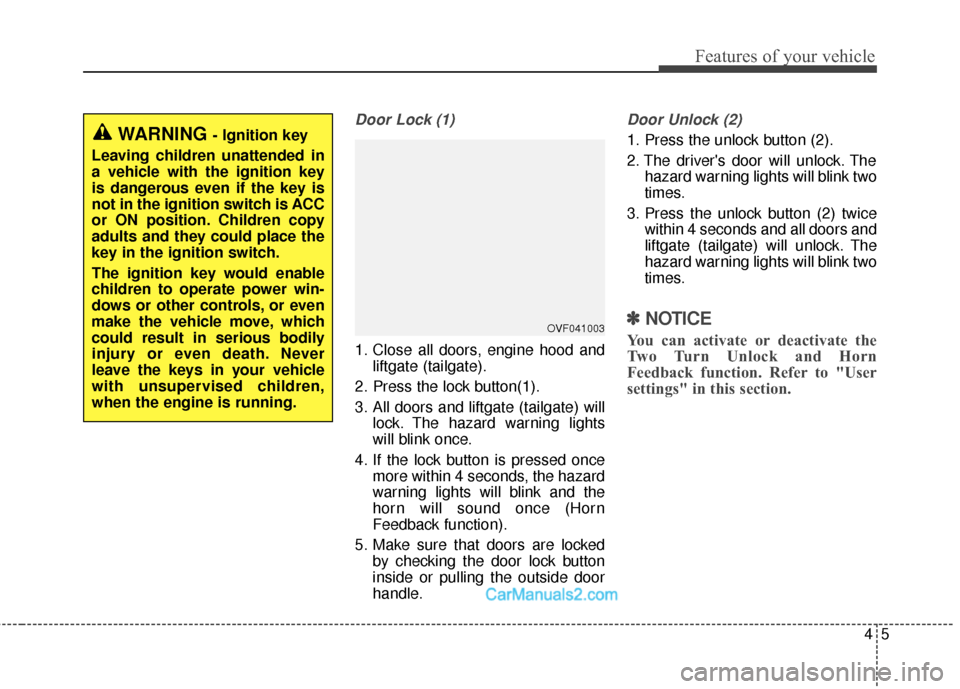
Door Lock (1)
1. Close all doors, engine hood andliftgate (tailgate).
2. Press the lock button(1).
3. All doors and liftgate (tailgate) will lock. The hazard warning lights
will blink once.
4. If the lock button is pressed once more within 4 seconds, the hazard
warning lights will blink and the
horn will sound once (Horn
Feedback function).
5. Make sure that doors are locked by checking the door lock button
inside or pulling the outside door
handle.
Door Unlock (2)
1. Press the unlock button (2).
2. The driver's door will unlock. Thehazard warning lights will blink two
times.
3. Press the unlock button (2) twice within 4 seconds and all doors and
liftgate (tailgate) will unlock. The
hazard warning lights will blink two
times.
✽ ✽NOTICE
You can activate or deactivate the
Two Turn Unlock and Horn
Feedback function. Refer to "User
settings" in this section.
WARNING - Ignition key
Leaving children unattended in
a vehicle with the ignition key
is dangerous even if the key is
not in the ignition switch is ACC
or ON position. Children copy
adults and they could place the
key in the ignition switch.
The ignition key would enable
children to operate power win-
dows or other controls, or even
make the vehicle move, which
could result in serious bodily
injury or even death. Never
leave the keys in your vehicle
with unsupervised children,
when the engine is running.
OVF041003
Page 111 of 570

Features of your vehicle
84
Immobilizer system
(if equipped)
Your vehicle is equipped with an
electronic engine immobilizer system
to reduce the risk of unauthorized
vehicle use.
Your immobilizer system is com-
prised of a small transponder in the
ignition key and electronic devices
inside the vehicle.
With the immobilizer system, when-
ever you insert your ignition key into
the ignition switch and turn it to ON,
it checks and determines and verifies
if the ignition key is valid.
If the key is determined to be valid,
the engine will start.
If the key is determined to be invalid,
the engine will not start.
To activate the immobilizer sys-tem:
Turn the ignition key to the OFF posi-
tion. The immobilizer system acti-
vates automatically. Without a valid
ignition key for your vehicle, the
engine will not start.
To deactivate the immobilizersystem:
Insert the ignition key into the key
cylinder and turn it to the ON position.
✽ ✽ NOTICE
When starting the engine, do not use
the key with other immobilizer keys
around. Otherwise the engine may
not start or may stop soon after it
starts. Keep each key separate in
order to avoid a starting malfunction.
✽ ✽NOTICE
If you need additional keys or lose
your keys, contact an authorized
HYUNDAI dealer.
WARNING
In order to prevent theft of your
vehicle, do not leave spare keys
anywhere in your vehicle. Your
Immobilizer password is a cus-
tomer unique password and
should be kept confidential. Do
not leave this number anywhere
in your vehicle.
CAUTION
Do not put metal accessories
near the ignition switch.
Metal accessories may interruptthe transponder signal and mayprevent the engine from beingstarted.
Page 115 of 570
Features of your vehicle
12
4
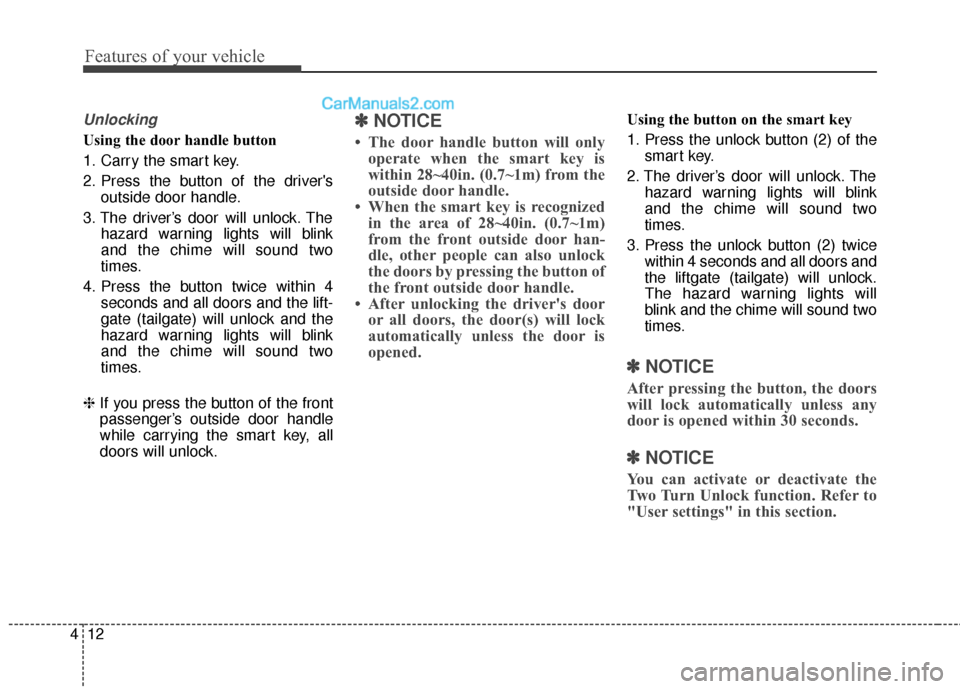
Unlocking
Using the door handle button
1. Carry the smart key.
2. Press the button of the driver's
outside door handle.
3. The driver’s door will unlock. The hazard warning lights will blink
and the chime will sound two
times.
4. Press the button twice within 4 seconds and all doors and the lift-
gate (tailgate) will unlock and the
hazard warning lights will blink
and the chime will sound two
times.
❈ If you press the button of the front
passenger’s outside door handle
while carrying the smart key, all
doors will unlock.
✽ ✽
NOTICE
• The door handle button will only
operate when the smart key is
within 28~40in. (0.7~1m) from the
outside door handle.
• When the smart key is recognized in the area of 28~40in. (0.7~1m)
from the front outside door han-
dle, other people can also unlock
the doors by pressing the button of
the front outside door handle.
• After unlocking the driver's door or all doors, the door(s) will lock
automatically unless the door is
opened.
Using the button on the smart key
1. Press the unlock button (2) of the
smart key.
2. The driver’s door will unlock. The hazard warning lights will blink
and the chime will sound two
times.
3. Press the unlock button (2) twice within 4 seconds and all doors and
the liftgate (tailgate) will unlock.
The hazard warning lights will
blink and the chime will sound two
times.
✽ ✽NOTICE
After pressing the button, the doors
will lock automatically unless any
door is opened within 30 seconds.
✽ ✽NOTICE
You can activate or deactivate the
Two Turn Unlock function. Refer to
"User settings" in this section.
Page 118 of 570
415
Features of your vehicle
To deactivate the immobilizersystem:
Turn the engine start/stop button to
the ON position by pressing the but-
ton while carrying the smart key.
To activate the immobilizer system:
Turn the engine start/stop button to
the OFF position. The immobilizer
system activates automatically.
Without a valid smart key for your
vehicle, the engine will not start.
✽ ✽ NOTICE
When starting the engine, do not use
the key with other immobilizer keys
around. Otherwise the engine may
not start or may stop soon after it
starts. Keep each key separate in
order to avoid a starting malfunction.
✽ ✽NOTICE
If you need additional keys or lose
your keys, contact an authorized
HYUNDAI dealer.
CAUTION
In order to prevent theft of your
vehicle, do not leave spare keysanywhere in your vehicle. YourImmobilizer password is a cus-tomer unique password andshould be kept confidential. Donot leave this number anywherein your vehicle.
CAUTION
The transponder in your smartkey is an important part of theimmobilizer system. It isdesigned to give years of trou-ble-free service, however youshould avoid exposure to mois-ture, static electricity and roughhandling. Immobilizer systemmalfunction could occur.
CAUTION
Do not change, alter or adjustthe immobilizer system becauseit could cause the immobilizersystem to malfunction andshould only be serviced by anauthorized HYUNDAI dealer.
Malfunctions caused by improp-er alterations, adjustments ormodifications to the immobilizersystem are not covered by yourvehicle manufacturer warranty.
CAUTION
Do not put metal accessoriesnear the smart key.
The engine may not startbecause the metal accessoriesmay interrupt the transpondersignal from transmitting normal-ly.
Page 125 of 570
Features of your vehicle
22
4
Using the mechanical key in an
emergency situation
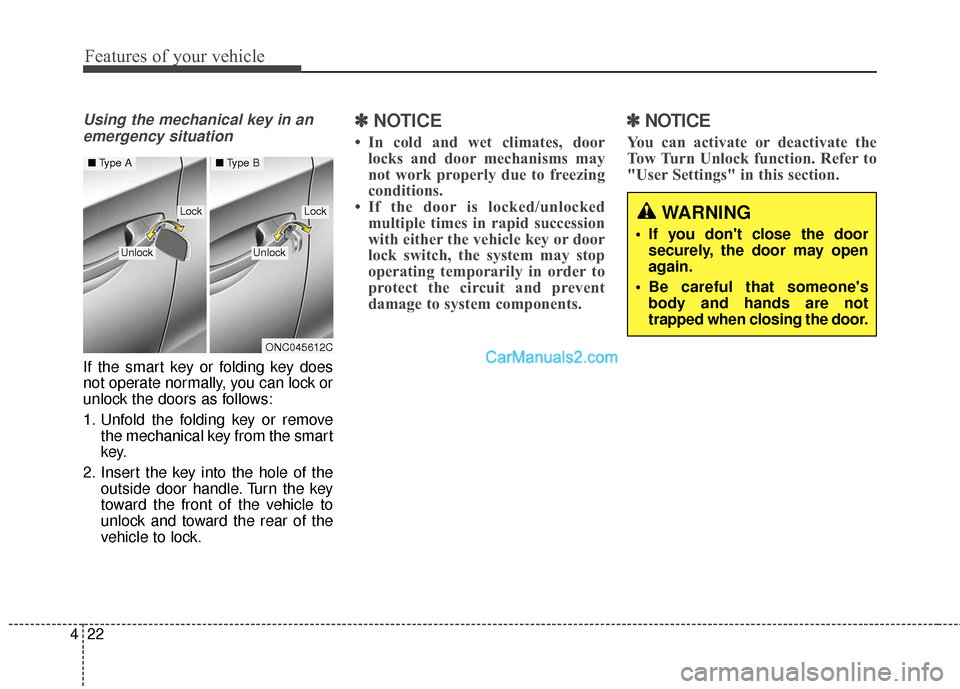
If the smart key or folding key does
not operate normally, you can lock or
unlock the doors as follows:
1. Unfold the folding key or remove the mechanical key from the smart
key.
2. Insert the key into the hole of the outside door handle. Turn the key
toward the front of the vehicle to
unlock and toward the rear of the
vehicle to lock.
✽ ✽NOTICE
• In cold and wet climates, door
locks and door mechanisms may
not work properly due to freezing
conditions.
• If the door is locked/unlocked multiple times in rapid succession
with either the vehicle key or door
lock switch, the system may stop
operating temporarily in order to
protect the circuit and prevent
damage to system components.
✽ ✽ NOTICE
You can activate or deactivate the
Tow Turn Unlock function. Refer to
"User Settings" in this section.
WARNING
• If you don't close the door
securely, the door may open
again.
Be careful that someone's body and hands are not
trapped when closing the door.
ONC045612C
■ Type A■Type B
LockLock
UnlockUnlock