Page 223 of 570
Features of your vehicle
120
4
Battery saver function
• The purpose of this feature is to
prevent the battery from being dis-
charged. The system automatically
turns off the parking lights when
the driver removes the ignition key
(smart key : turns off the engine)
and opens the driver-side door.
With this feature, the parking lights will be turned off automatically if
the driver parks on the side of the
road at night.
If necessary, to keep the lights on
when the ignition key is removed
(smart key : turns off the engine),
perform the following:
1) Open the driver-side door.
2) Turn the parking lights OFF and ON again using the light switch
on the steering column.
Headlamp delay (if equipped)
If you turn the ignition switch to the
ACC or OFF position with the head-
lights ON, the headlights remain on
for about 5 minutes. However, if the
driver's door is opened and closed,
the headlights are turned off after 15
seconds.
The headlights can be turned off by
pressing the lock button on the trans-
mitter (or smart key) twice or turning
the light switch to the OFF or Auto
position.
However, if you turn the light switch
to the Auto position when it is dark
outside, the headlights will not be
turned off.
You can activate or deactivate this
feature. Refer to "User Settings" in
this section.
LIGHTING
CAUTION
If the driver gets out of the vehi-cle through other doors (otherthan the driver's door), the bat-tery saver function does notoperate and the headlamp delaydoes not turn off automatically.This will cause the battery to bedischarged. In this case, makesure to turn off the lamp beforegetting out of the vehicle.
Page 237 of 570

Features of your vehicle
134
4
DOOR (5):
- The map lamp and room lampcomes on for approximately 30
seconds when doors are unlocked
with a transmitter or smart key as
long as the doors are not opened.
- When the ignition switch is in the ACC or LOCK/OFF position, if
any door is opened, the map
lamp and room lamp will stay on
for approximately 20 minutes. If
the door is closed, the lamps will
go out in 30 seconds.
- The map lamp and room lamp will go out immediately if the ignition
switch is changed to the ON posi-
tion with all doors closed.
- When the ignition switch is in the ON position, if any door is opened,
the map lamp and room lamp will
stay on continuously. If the door is
closed, the lamps will go out
immediately.
✽ ✽ NOTICE
When the lamp is turned on by
pressing the lens (1), the lamp does
not turn off even if the switch is in
the OFF position (3).
Room lamp
Press the button to turn the light on
or off.
ODM042341
■Type B ODM042260
■Type ACAUTION
Do not leave the lamp switches
on for an extended period oftime when the vehicle is not run-ning because the battery maydrain.
Page 239 of 570
Features of your vehicle
136
4
Headlamp welcome
When the headlight(light switch in
the headlight or AUTO position) is on
and all doors (and liftgate (tailgate))
are locked and closed, the headlight,
position light and tail light will come
on for 15 seconds if any of the below
is performed.
Without smart key system
- When the door unlock button ispressed on the transmitter.
With the smart key system - When the door unlock button ispressed on the smart key.
At this time, if you press the door lock
button (on the transmitter or smart
key), the lights will turn off immedi-
ately.
Interior light
When the interior light switch is in the
DOOR position and all doors (and
liftgate (tailgate)) are locked and
closed, the room lamp will come on
for 30 seconds if any of the below is
performed.
Without smart key system - When the door unlock button ispressed on the transmitter.
With the smart key system - When the door unlock button ispressed on the smart key.
- When the button of the outside door handle is pressed.
At this time, if you press the door lock
button, the lamps will turn off imme-
diately.
Pocket lamp
When all doors are locked and
closed, the pocket lamp will come on
for 15 seconds if any of the below is
performed.
Without smart key system - When the door unlock button ispressed on the transmitter.
With the smart key system - When the door unlock button ispressed on the smart key.
- When the button of the outside door handle is pressed.
- When the vehicle is approached with the smart key in possession.
At this time, if you press the door lock
button, the lamps will turn off imme-
diately.
WELCOME SYSTEM
Page 240 of 570
4137
Features of your vehicle
✽
✽NOTICE
If you want to defrost and defog the
front windshield, refer to
"Windshield defrosting and defog-
ging" in this section.
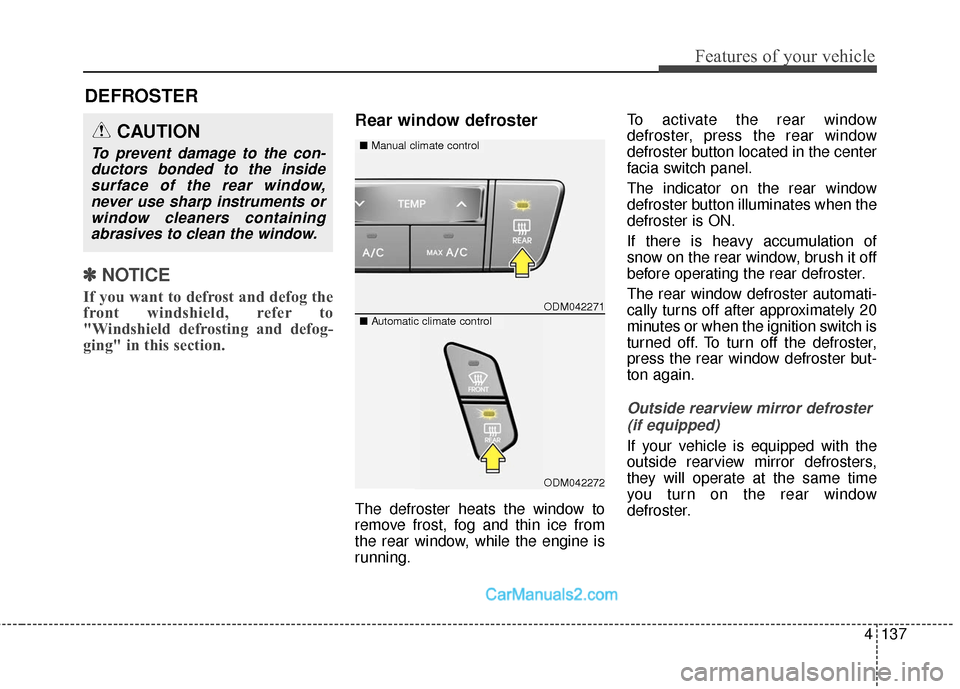
Rear window defroster
The defroster heats the window to
remove frost, fog and thin ice from
the rear window, while the engine is
running. To activate the rear window
defroster, press the rear window
defroster button located in the center
facia switch panel.
The indicator on the rear window
defroster button illuminates when the
defroster is ON.
If there is heavy accumulation of
snow on the rear window, brush it off
before operating the rear defroster.
The rear window defroster automati-
cally turns off after approximately 20
minutes or when the ignition switch is
turned off. To turn off the defroster,
press the rear window defroster but-
ton again.
Outside rearview mirror defroster
(if equipped)
If your vehicle is equipped with the
outside rearview mirror defrosters,
they will operate at the same time
you turn on the rear window
defroster.
DEFROSTER
ODM042271
■ Manual climate controlCAUTION
To prevent damage to the con-
ductors bonded to the insidesurface of the rear window,never use sharp instruments orwindow cleaners containingabrasives to clean the window.
■ Automatic climate control
ODM042272
Page 242 of 570
4139
Features of your vehicle
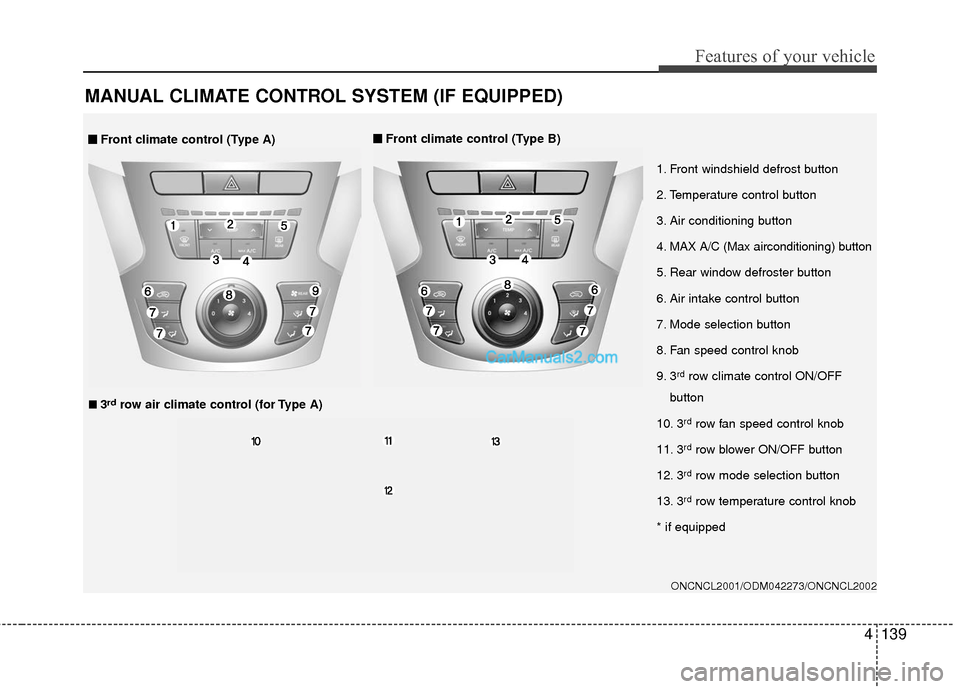
MANUAL CLIMATE CONTROL SYSTEM (IF EQUIPPED)
ONCNCL2001/ODM042273/ONCNCL2002
1. Front windshield defrost button
2. Temperature control button
3. Air conditioning button
4. MAX A/C (Max airconditioning) button
5. Rear window defroster button
6. Air intake control button
7. Mode selection button
8. Fan speed control knob
9. 3
rdrow climate control ON/OFF
button
10. 3
rdrow fan speed control knob
11. 3
rdrow blower ON/OFF button
12. 3
rdrow mode selection button
13. 3
rdrow temperature control knob
* if equipped
■
■ Front climate control (Type A) ■
■
Front climate control (Type B)
■
■3rdrow air climate control (for Type A)
Page 244 of 570
4141
Features of your vehicle
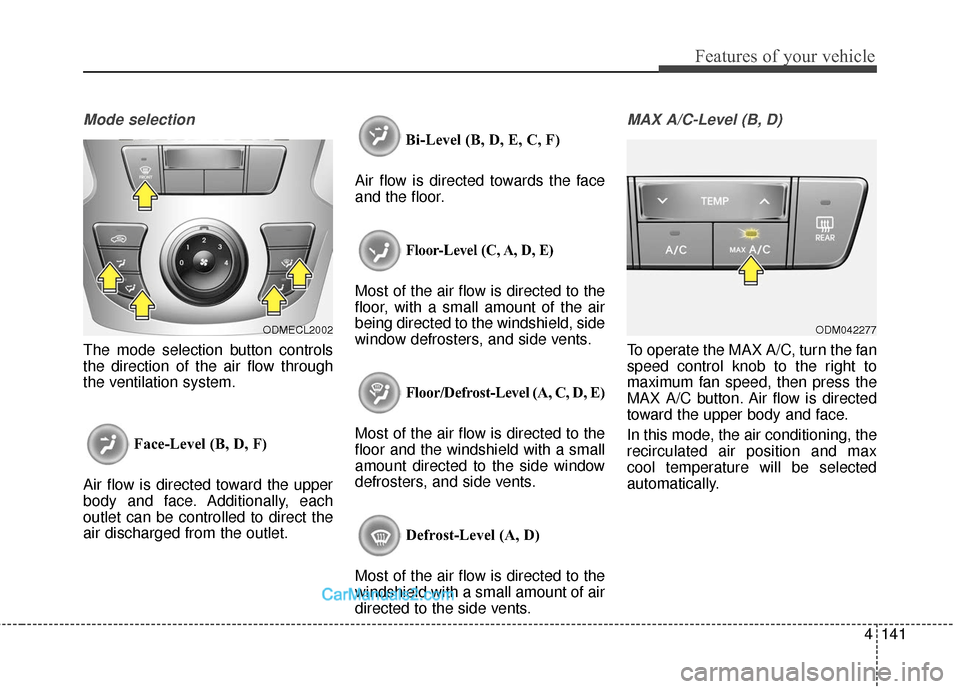
Mode selection
The mode selection button controls
the direction of the air flow through
the ventilation system.Face-Level (B, D, F)
Air flow is directed toward the upper
body and face. Additionally, each
outlet can be controlled to direct the
air discharged from the outlet. Bi-Level (B, D, E, C, F)
Air flow is directed towards the face
and the floor.
Floor-Level (C, A, D, E)
Most of the air flow is directed to the
floor, with a small amount of the air
being directed to the windshield, side
window defrosters, and side vents.
Floor/Defrost-Level (A, C, D, E)
Most of the air flow is directed to the
floor and the windshield with a small
amount directed to the side window
defrosters, and side vents.
Defrost-Level (A, D)
Most of the air flow is directed to the
windshield with a small amount of air
directed to the side vents.
MAX A/C-Level (B, D)
To operate the MAX A/C, turn the fan
speed control knob to the right to
maximum fan speed, then press the
MAX A/C button. Air flow is directed
toward the upper body and face.
In this mode, the air conditioning, the
recirculated air position and max
cool temperature will be selected
automatically.
ODMECL2002ODM042277
Page 245 of 570
Features of your vehicle
142
4
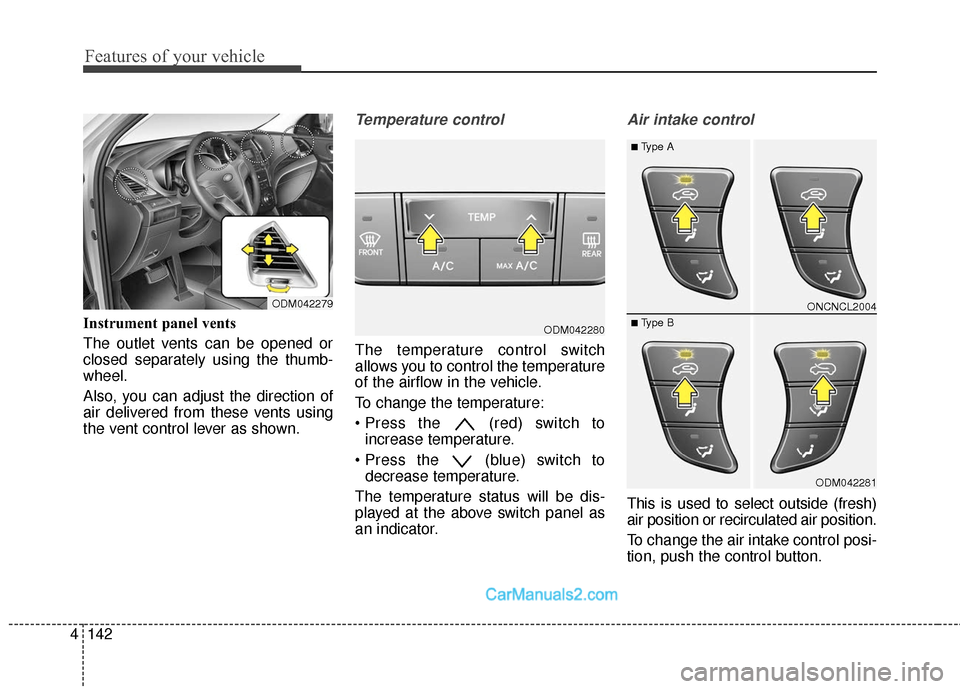
Instrument panel vents
The outlet vents can be opened or
closed separately using the thumb-
wheel.
Also, you can adjust the direction of
air delivered from these vents using
the vent control lever as shown.
Temperature control
The temperature control switch
allows you to control the temperature
of the airflow in the vehicle.
To change the temperature:
(red) switch to
increase temperature.
(blue) switch to decrease temperature.
The temperature status will be dis-
played at the above switch panel as
an indicator.
Air intake control
This is used to select outside (fresh)
air position or recirculated air position.
To change the air intake control posi-
tion, push the control button.
ODM042280
ODM042279ONCNCL2004
ODM042281
■Type A
■ Type B
Page 246 of 570
4143
Features of your vehicle
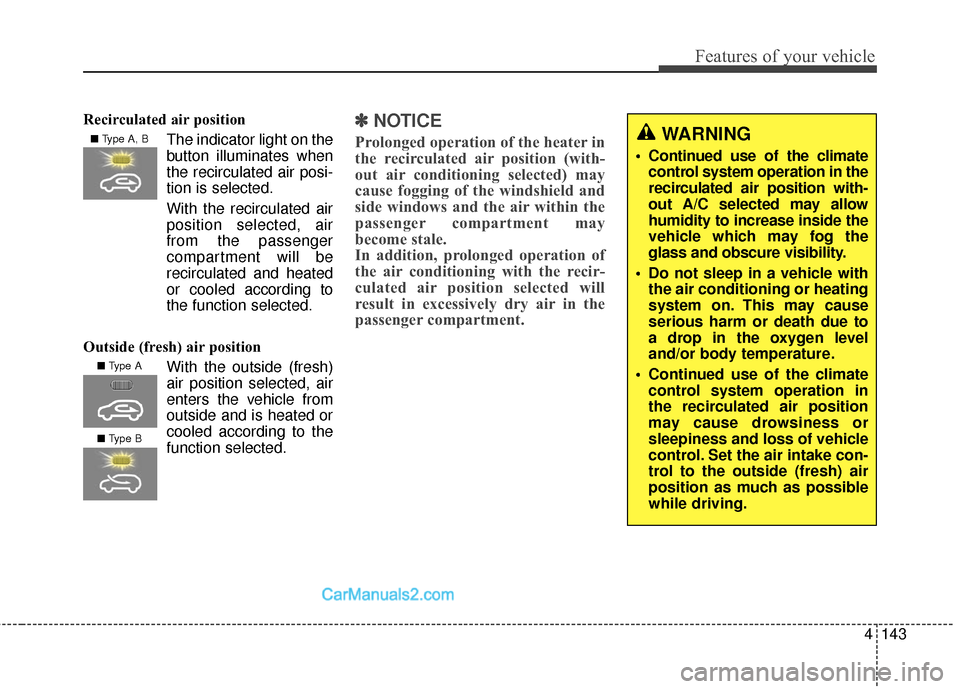
Recirculated air positionThe indicator light on the
button illuminates when
the recirculated air posi-
tion is selected.
With the recirculated air position selected, air
from the passenger
compartment will be
recirculated and heated
or cooled according to
the function selected.
Outside (fresh) air position With the outside (fresh)
air position selected, air
enters the vehicle from
outside and is heated or
cooled according to the
function selected.✽ ✽NOTICE
Prolonged operation of the heater in
the recirculated air position (with-
out air conditioning selected) may
cause fogging of the windshield and
side windows and the air within the
passenger compartment may
become stale.
In addition, prolonged operation of
the air conditioning with the recir-
culated air position selected will
result in excessively dry air in the
passenger compartment. ■ Type A, B
■ Type B
■
Type A
WARNING
Continued use of the climate
control system operation in the
recirculated air position with-
out A/C selected may allow
humidity to increase inside the
vehicle which may fog the
glass and obscure visibility.
Do not sleep in a vehicle with the air conditioning or heating
system on. This may cause
serious harm or death due to
a drop in the oxygen level
and/or body temperature.
Continued use of the climate control system operation in
the recirculated air position
may cause drowsiness or
sleepiness and loss of vehicle
control. Set the air intake con-
trol to the outside (fresh) air
position as much as possible
while driving.