2018 Hyundai Kona Replace
[x] Cancel search: ReplacePage 306 of 523
![Hyundai Kona 2018 Owners Manual 5-52
Driving your vehicle
The battery sensor deactiva- tion
[A] : Battery sensor
The battery sensor is deactivated,
when the battery is disconnected
from the negative pole for mainte-
nance purpose.](/manual-img/35/16231/w960_16231-305.png "Hyundai Kona 2018 Owners Manual 5-52
Driving your vehicle
The battery sensor deactiva- tion
[A] : Battery sensor
The battery sensor is deactivated,
when the battery is disconnected
from the negative pole for mainte-
nance purpose.")
5-52
Driving your vehicle
The battery sensor deactiva- tion
[A] : Battery sensor
The battery sensor is deactivated,
when the battery is disconnected
from the negative pole for mainte-
nance purpose.
In this case, the ISG system is limit-
edly operated due to the battery sen-
sor deactivation. Thus, the driver
needs to take the following proce-
dures to reactivate the battery sen-
sor after disconnecting the battery.
Prerequisites to reactivate thebattery sensor
Keep the engine in the OFF status
for 4 hours, and attempt to restart the
engine 3 to 4 times for the battery-
sensor reactivation.
Pay extreme caution not to connect
any accessories (i.e. navigation and
black box) to the vehicle with the
engine in the OFF status. If not, the
battery sensor may not be reactivat-ed.
Information
The ISG system may not operate in
the following situations.
- There is a malfunction with the IGS system.
- The battery is weak.
- The brake vacuum pressure is low.
In those cases, we recommend that
you have the ISG system checked by
an authorized HYUNDAI dealer. Use only the genuine HYUNDAI
ISG battery for replacement. If
not, the ISG system may not nor-
mally operate.
Do not recharge the ISG battery with a general battery charger. If
not, it may damage or explode
the ISG battery.
Do not remove the battery cap. If not, the battery electrolyte,
which is harmful to the human
body, may leak out.
NOTICE
iOOS057015L
Page 314 of 523

5-60
Driving your vehicle
The system may not work prop-erly when the bumper has been
damaged, or if the rear bumperhas been replaced or repaired.
The sensing range differs some- what according to the width of
the road. When the road is nar-
row, the system may detect
other vehicles in the next lane
OR when the road is wide, the
system may not detect other
vehicles in the next lane.
The system may turn off due to strong electromagnetic waves.
Detecting sensor
The sensors are located inside the
rear bumper.
Always keep the rear bumper clean
for proper operation of the system.
Warning message
Blind-Spot Collision Warning
(BCW) system disabled.
Radar blocked
This warning message may appearwhen :
- One or both of the sensors on therear bumper is blocked by dirt or
snow or a foreign object.
- Driving in rural areas where the BCW sensor does not detect
another vehicle for an extended
period of time.
- When there is inclement weather such as heavy snow or rain.
NOTICE
The Blind-spot Collision
Warning (BCW) system and
Rear Cross-Traffic Collisionwarning (RCCW) are not a
substitute for proper and safe
driving practices. Always
drive safely and use caution
when changing lanes or back-
ing up your vehicle. The Blind-
spot Collision Warning (BCW)
system may not detect every
object alongside the vehicle.
OOS057027OOS057077L
Page 317 of 523
5-63
Driving your vehicle
5
The Forward Collision-avoidance Assist (FCA) system is designed to
help detect and monitor the vehicle
ahead or detect a pedestrian (if
equipped) in the roadway through
radar signals and camera recognition
to warn the driver that a collision is
imminent, and if necessary, apply
emergency braking.System setting and activation
System setting
The driver can activate the FCA byplacing the ignition switch to the
ON position and by selecting: "User Settings Driver assistance
Forward Collision-avoidance
Assist (FCA)"
The FCA deactivates, when the driv- er cancels the system setting. The warning light illumi-
nates on the LCD display,
when you cancel the FCA
system. The driver can
monitor the FCA ON/OFF status on
the LCD display. Also, the warninglight illuminates when the ESC(Electronic Stability Control) is
turned off. If the warning lightremains ON when the FCA is acti-
vated, we recommend that you have
the system checked by an authorized
HYUNDAI dealer.
FF OO RRWW AARRDD CC OO LLLLIISS IIOO NN--AA VVOO IIDD AA NN CCEE AA SSSS IISS TT (( FF CC AA )) SS YY SSTT EEMM
-
- SS EE NN SSOO RR FF UU SSIIOO NN TT YY PPEE (( FF RR OO NNTT RR AA DDAA RR ++ FF RR OO NNTT CC AA MM EERR AA )) (( IIFF EE QQ UUIIPP PPEEDD ))
Take the following precautions
when using the Forward
Collision-avoidance Assist(FCA) system:
This system is only a supple- mental system and it is not
intended to, nor does it
replace the need for extremecare and attention of the driv-
er. The sensing range and
objects detectable by the sen-
sors are limited. Pay attention
to the road conditions at alltimes.
NEVER drive too fast in accor-
dance with the road condi-tions or while cornering.
Always drive cautiously to
prevent unexpected and sud-
den situations from occur-
ring. FCA does not stop the
vehicle completely and is not
a collision avoidance system.
WARNING
Page 321 of 523

5-67
Driving your vehicle
5
FCA sensor
In order for the FCA system to oper-
ate properly, always make sure the
sensor cover or sensor is clean and
free of dirt, snow, and debris.Dirt, snow, or foreign substances on
the lens may adversely affect the
sensing performance of the sensor.
Do not apply license plate mold-
ing or foreign objects such as a
bumper sticker or a bumper
guard near the radar sensor.
Doing so may adversely affect
the sensing performance of the
radar.
Always keep the radar sensor and cover clean and free of dirtand debris.
Use only a soft cloth to wash the vehicle. Do not spray pressur-
ized water directly on the sensor
or sensor cover. Be careful not to apply unneces-
sary force on the radar sensor or
sensor cover. If the sensor is
forcibly moved out of proper
alignment, the FCA system may
not operate correctly. In this
case, a warning message may
not be displayed. Have the vehi-
cle inspected by an authorized
HYUNDAI dealer.
If the front bumper becomes damaged in the area around the
radar sensor, the FCA system
may not operate properly. We
recommend that you have the
vehicle inspected by authorized
HYUNDAI dealer.
Use only genuine parts to repair or replace a damaged sensor or
sensor cover. Do not apply paint
to the sensor cover.
NOTICE
OOS057018
OOS057033
■ Front radar
■ Front camera
Page 322 of 523

5-68
Driving your vehicle
NEVER install any accessoriesor stickers on the front wind-
shield, nor tint the front wind-shield.
NEVER locate any reflective objects (i.e. white paper, mirror)
over the dashboard. Any light
reflection may cause a malfunc-tion of the system.
Pay extreme caution to keep the camera out of water.
NEVER arbitrarily disassemble the camera assembly, nor apply
any impact on the camera
assembly.
Playing the vehicle audio sys- tem at high volume may offsetthe system warning sounds.
Information
We recommend that you have the sys-
tem checked by an authorized
HYUNDAI dealer when:
The windshield glass is replaced.
The radar sensor or cover gets dam- aged or replaced.
Warning message and warning
light
Forward Collision Avoidance Assist
(FCA) system disabled.
Radar blocked
When the sensor cover is blocked
with dirt, snow, or debris, the FCA
system operation may stop tem-
porarily. If this occurs, a warningmessage will appear on the LCD dis-
play.
Remove any dirt, snow, or debris and
clean the radar sensor cover before
operating the FCA system.
The system will operate normally
when such dirt, snow or debris is
removed. The FCA may not properly operate in
an area (e.g. open terrain), where
any substances are not detected
after turning ON the engine.
i
NOTICE
OOS057080L
Page 329 of 523
5-75
Driving your vehicle
Information
In some instances, the FCA system
may be cancelled when subjected to
electromagnetic interference.i
5
Never try to test the operation
of the FCA system. Doing so
may cause severe injury ordeath.
If the front bumper, front
glass, radar or camera have
been replaced or repaired, we
recommend that you have
your vehicle inspected by an
authorized HYUNDAI dealer.
Do not use the Forward
Collision avoidance Assist
(FCA) system when towing a
vehicle. Application of the
FCA system while towing may
adversely affect the safety of
your vehicle or the towing
vehicle.
Use extreme caution when the
vehicle in front of you has
cargo that extends rearward
from the cab, or when the
vehicle in front of you has
higher ground clearance.
The FCA system is designed to detect and monitor the
vehicle ahead or detect a
pedestrian in the roadway
through radar signals and
camera recognition. It is not
designed to detect bicycles,
motorcycles, or smaller
wheeled objects such as lug-
gage bags, shopping carts, or
strollers.
WARNING
Page 330 of 523
5-76
Driving your vehicleL
L AA NN EE KK EEEEPP IINN GG AA SSSSIISS TT (( LL KK AA )) SS YY SSTT EEMM
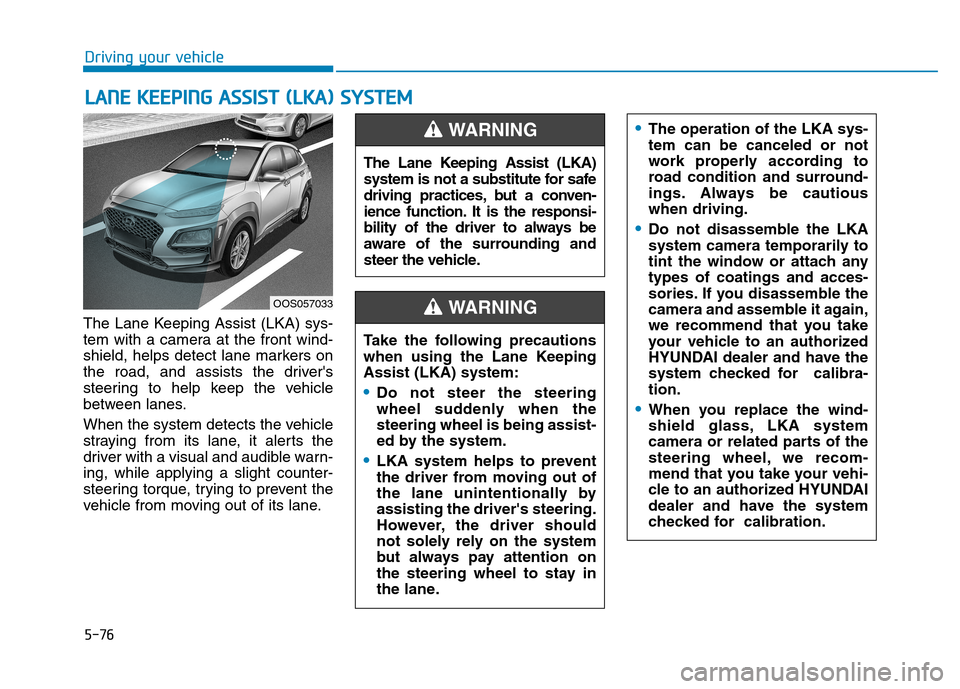
The Lane Keeping Assist (LKA) sys-
tem with a camera at the front wind-
shield, helps detect lane markers on
the road, and assists the driver's
steering to help keep the vehicle
between lanes.
When the system detects the vehicle
straying from its lane, it alerts the
driver with a visual and audible warn-ing, while applying a slight counter-
steering torque, trying to prevent the
vehicle from moving out of its lane.
OOS057033 The Lane Keeping Assist (LKA)
system is not a substitute for safe
driving practices, but a conven-
ience function. It is the responsi-
bility of the driver to always be
aware of the surrounding and
steer the vehicle.
WARNING
Take the following precautions
when using the Lane KeepingAssist (LKA) system:
Do not steer the steering
wheel suddenly when thesteering wheel is being assist-
ed by the system.
LKA system helps to prevent
the driver from moving out of
the lane unintentionally byassisting the driver's steering.
However, the driver should
not solely rely on the system
but always pay attention on
the steering wheel to stay in
the lane.
WARNING
The operation of the LKA sys- tem can be canceled or not
work properly according to
road condition and surround-
ings. Always be cautiouswhen driving.
Do not disassemble the LKA
system camera temporarily to
tint the window or attach anytypes of coatings and acces-
sories. If you disassemble the
camera and assemble it again,
we recommend that you take
your vehicle to an authorized
HYUNDAI dealer and have the
system checked for calibra-tion.
When you replace the wind-
shield glass, LKA system
camera or related parts of the
steering wheel, we recom-
mend that you take your vehi-
cle to an authorized HYUNDAI
dealer and have the system
checked for calibration.
Page 351 of 523
5-97
Driving your vehicle
5
Information
The ESC system (if equipped) must be
turned OFF before rocking the vehi-
cle.
If you are still stuck after rocking
the vehicle a few times, have the
vehicle pulled out by a tow vehicle
to avoid engine overheating, pos-
sible damage to the transmission,
and tire damage. See "Towing" in
chapter 6.Smooth cornering
Avoid braking or gear changing in
corners, especially when roads are
wet. Ideally, corners should always
be taken under gentle acceleration.
Driving at night
Night driving presents more hazards
than driving in the daylight. Here are
some important tips to remember:
Slow down and keep more dis- tance between you and other vehi-
cles, as it may be more difficult tosee at night, especially in areas
where there may not be any street
lights.
Adjust your mirrors to reduce the glare from other drivers' head-
lamps.
Keep your headlamps clean and properly aimed. Dirty or improperly
aimed headlamps will make it
much more difficult to see at night.
Avoid staring directly at the head- lamps of oncoming vehicles. You
could be temporarily blinded, and it
will take several seconds for your
eyes to readjust to the darkness.
Driving in the rain
Rain and wet roads can make driving
dangerous. Here are a few things to
consider when driving in the rain or
on slick pavement:
Slow down and allow extra follow-ing distance. A heavy rainfall
makes it harder to see and increas-es the distance needed to stop
your vehicle.
Turn OFF your Cruise Control. (if equipped)
Replace your windshield wiper blades when they show signs ofstreaking or missing areas on thewindshield.
Be sure your tires have enough tread. If your tires do not have
enough tread, making a quick stop
on wet pavement can cause a skid
and possibly lead to an accident.
See "Tire Tread" in chapter 7 .
Turn on your headlamps to make it easier for others to see you.
Driving too fast through large pud- dles can affect your brakes. If you
must go through puddles, try to
drive through them slowly.
NOTICE
i