2018 Hyundai Ioniq Hybrid brake light
[x] Cancel search: brake lightPage 207 of 642

3-57
Convenient features of your vehicle
3
Electronic Brake Force
Distribution (EBD)
System Warning Light
These two warning lights illuminate
at the same time while driving:
• When the ABS and regular brake
system may not work normally.
In this case, we recommend that
you have the vehicle inspected by
an authorized HYUNDAI dealer.Information - Electronic
Brake Force Distribution
(EBD) System Warning Light
When the ABS Warning Light is on or
both ABS and Parking Brake & Brake
Fluid Warning Lights are on, the
speedometer, odometer, or tripmeter
may not work. Also, the EPS Warning
Light may illuminate and the steering
effort may increase or decrease.
In this case, we recommend you have
the vehicle inspected by an authorized
HYUNDAI dealer as soon as possible.
Electric Power Steering
(EPS) Warning Light
This warning light illuminates:
• Once you turn the ignition switch or
the Engine Start/Stop button to the
ON position.
- It illuminates for approximately 3
seconds and then goes off.
• When there is a malfunction with
the EPS.
In this case, we recommend that
you have the vehicle inspected by
an authorized HYUNDAI dealer.
i
Electronic Brake Force
Distribution (EBD) System
Warning Light
When both ABS and Parking
Brake & Brake Fluid Warning
Lights are on, the brake system
will not work normally and you
may experience an unexpected
and dangerous situation during
sudden braking.
(Continued)
WARNING
(Continued)
In this case, avoid high speed
driving and abrupt braking.
We recommend you have the
vehicle inspected by an author-
ized HYUNDAI dealer as soon
as possible.
Page 211 of 642

3-61
Convenient features of your vehicle
3
This warning light remains ON
after blinking for approximately 60
seconds, or repeatedly blinks ON
and OFF in 3 second intervals:
• When there is a malfunction with
the TPMS.
In this case, we recommend that
you have the vehicle inspected by
an authorized HYUNDAI dealer as
soon as possible.
For more information, refer to
“Tire Pressure Monitoring System
(TPMS)” in chapter 6.
Electronic Stability
Control (ESC) Indicator
Light
This indicator light illuminates:
• Once you turn the ignition switch or
the Engine Start/Stop button to the
ON position.
- It illuminates for approximately 3
seconds and then goes off.
• When there is a malfunction with
the ESC system.
In this case, we recommend that
you have the vehicle inspected by
an authorized HYUNDAI dealer.
This indicator light blinks:
• While the ESC is operating.
For more information, refer to
“Electronic Stability Control (ESC)”
in chapter 5.
Electronic Stability
Control (ESC) OFF
Indicator Light
This indicator light illuminates:
• Once you turn the ignition switch or
the Engine Start/Stop button to the
ON position.
- It illuminates for approximately
3 seconds and then goes off.
• When you deactivate the ESC sys-
tem by pressing the ESC OFF but-
ton.
For more information, refer to
“Electronic Stability Control (ESC)”
in chapter 5.
Safe Stopping
•The TPMS cannot alert you to
severe and sudden tire damage
caused by external factors.
•If you notice any vehicle insta-
bility, immediately take your
foot off the accelerator pedal,
apply the brakes gradually with
light force, and slowly move to
a safe position off the road.
WARNING
Page 217 of 642

3-67
Convenient features of your vehicle
Key not detected
(for smart key system)
This warning message is displayed if
the smart key is not detected when you
press the Engine Start/Stop button.
Press START button again
(for smart key system)
This message is displayed if you
were unable to start the vehicle when
the Engine Start/Stop button was
pressed.
If this occurs, attempt to start the
engine by pressing the Engine
Start/Stop button again.
If the warning message appears
each time you press the Engine
Start/Stop button, we recommend
that you have the vehicle inspected
by an authorized HYUNDAI dealer.
Press START button with key
(for smart key system)
This warning message is displayed if
you press the Engine Start/Stop but-
ton while the warning message “Key
not detected” is displayed.
At this time, the immobilizer indicator
light blinks.
Check BRAKE SWITCH fuse
(for smart key system)
This warning message is displayed if
the brake switch fuse is disconnected.
You need to replace the fuse with a
new one before starting the engine.
If that is not possible, you can start the
engine by pressing the Engine
Start/Stop button for 10 seconds in the
ACC position.
Shift to P to start vehicle
(for smart key system)
This warning message is displayed if
you try to start the engine with the
shift lever not in the P (Park) position.
Door, Hood, Tailgate Open
This warning is displayed indicating
which door, or hood, or tailgate is
open.
3
OAE046165
Before driving the vehicle, you
should confirm that the door/
hood/tailgate is fully closed.
Also, check there is no door
/hood/tailgate open warning light
or message displayed on the
instrument cluster.
CAUTION
Page 272 of 642

3-122
Convenient features of your vehicle
• The indicator may differ from the
illustration depending on objects
or sensors status. If the indicator
blinks, we recommend that you
have your vehicle checked by an
authorized HYUNDAI dealer.
• If the audible warning does not
sound or if the buzzer sounds
intermittently when shifting into R
(Reverse) position, this may indi-
cate a malfunction with the
Parking Assist System. If this
occurs, we recommend that you
have your vehicle checked by an
authorized HYUNDAI dealer as
soon as possible.
To turn off the Rear Parking
Assist System (if equipped)
Push the button to turn off the Rear
Parking Assist System. The indicator
light on the button will turn on.
Non-operational conditions of
Parking Assist System
The Rear Parking Assist System
may not operate normally when:
• Moisture is frozen to the sensor.
• The sensor is covered with dirt or
debris such as snow or ice, or the
sensor cover is blocked.
There is a possibility of the Rear
Parking Assist System malfunction
when:
• Driving on uneven road surfaces
such as unpaved roads, gravel,
bumps, or gradient.
• Objects generating excessive noise
such as vehicle horns, loud motor-
cycle engines, or truck air brakes
can interfere with the sensor.
• Heavy rain or water spray is present.
• Wireless transmitters or mobile
phones are present near the sensor.
• The sensor is covered with snow.
• Any non-factory equipment or acces-
sories have been installed, or if the
vehicle bumper height or sensor
installation has been modified.
NOTICE
OAE046405L
Page 348 of 642

Driving your vehicle
Before driving.........................................................5-4
Before entering the vehicle ...........................................5-4
Before starting...................................................................5-4
Ignition switch ........................................................5-5
Key ignition switch ............................................................5-6
Engine Start/Stop button ................................................5-9
Dual clutch transmission .....................................5-15
Dual clutch transmission operation ............................5-15
Paddle shifter ...................................................................5-23
Parking ...............................................................................5-24
Good driving practices ...................................................5-24
Coasting guide (Plug-in hybrid vehicle) ..........5-26
Braking system.....................................................5-27
Power brakes ...................................................................5-27
Disc brakes wear indicator ...........................................5-28
Parking brake ...................................................................5-28
Anti-lock Brake System (ABS) ....................................5-31
Electronic Stability Control (ESC)................................5-33
Vehicle Stability Management (VSM).........................5-36
Hill-Start Assist Control (HAC) ....................................5-38
Emergency Stop Signal (ESS) ......................................5-38
Good braking practices..................................................5-39
Blind Spot Detection system (BSD) ..................5-40
BSD (Blind Spot Detection) /
LCA (Lane Change Assist) .............................................5-41
RCTA (Rear Cross Traffic Alert) ..................................5-43
Detecting sensor .............................................................5-46
Limitations of the system .............................................5-47
Autonomous Emergency Braking (AEB)...........5-49
System setting and activation......................................5-49
AEB warning message and system control ..............5-51
AEB sensor .......................................................................5-54
System malfunction ........................................................5-55
Limitations of the system .............................................5-57
Lane Keeping Assist System (LKAS) .................5-62
LKAS operation ................................................................5-63
Warning light and message ..........................................5-67
Limitations of the System .............................................5-68
LKAS function change ...................................................5-70
Speed limit control system .................................5-71
Speed Limit Control operation .....................................5-71
Cruise control .......................................................5-73
Cruise Control operation ...............................................5-73
5
Page 353 of 642

5-6
Driving your vehicle
Key ignition switch
(if equipped)
Illuminated ignition switch
(if equipped)
Whenever the front door is opened,
the ignition switch will illuminate, pro-
vided the ignition switch is not in the
ON position. The light will go off
immediately when the ignition switch
is turned on or go off after about 30
seconds when the door is closed.
•NEVER turn the ignition
switch to the LOCK or ACC
position while the vehicle is in
motion except in an emer-
gency. This will result in
engine turning off and loss of
power assist for the steering
and brake systems. This may
lead to loss of directional con-
trol and braking function,
which could cause an acci-
dent.
(Continued)
WARNING
(Continued)
•Before leaving the driver's
seat, always make sure the
shift lever is in the P (Park)
position, apply the parking
brake, and turn the ignition
switch to the LOCK position.
Unexpected vehicle move-
ment may occur if these pre-
cautions are not followed.
■Type A■Type B
OAE056172L/OAE056173L
■Type A■Type B
OAE056175L/OAE056174L
Page 358 of 642
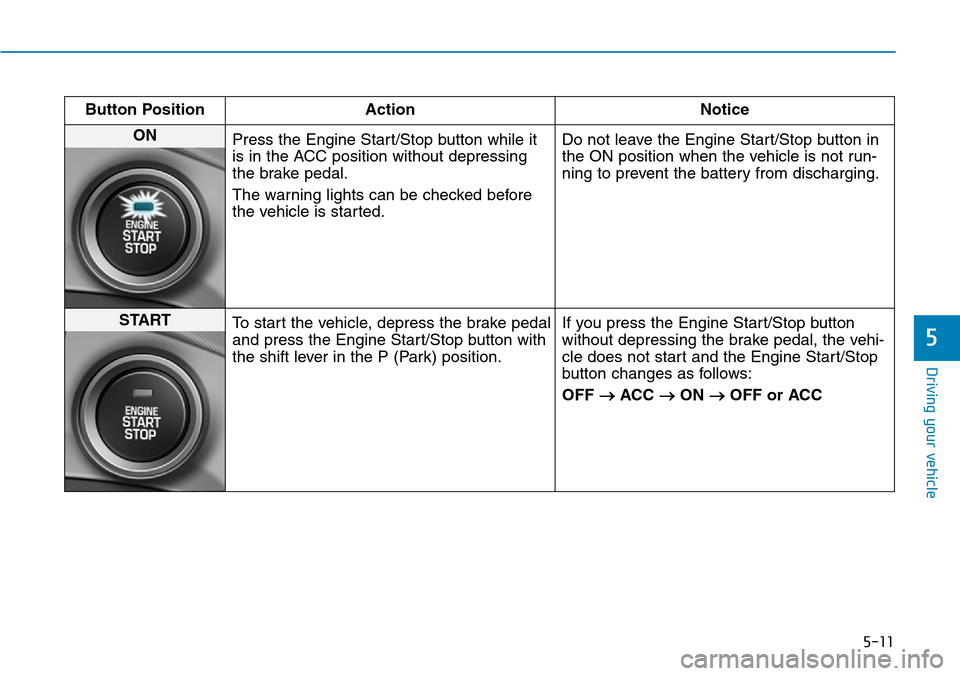
5-11
Driving your vehicle
5
Button Position Action Notice
ON
Press the Engine Start/Stop button while it
is in the ACC position without depressing
the brake pedal.
The warning lights can be checked before
the vehicle is started.Do not leave the Engine Start/Stop button in
the ON position when the vehicle is not run-
ning to prevent the battery from discharging.
START
To start the vehicle, depress the brake pedal
and press the Engine Start/Stop button with
the shift lever in the P (Park) position.If you press the Engine Start/Stop button
without depressing the brake pedal, the vehi-
cle does not start and the Engine Start/Stop
button changes as follows:
OFF
→ACC →ON →OFF or ACC
Page 363 of 642

5-16
Driving your vehicle
• The dual clutch transmission can
be thought of as an automatically
shifting manual transmission. It
gives the driving feel of a manual
transmission, yet provides the
ease of a fully automatic transmis-
sion.
• When D (Drive) is selected, the
transmission will automatically shift
through the gears similar to a con-
ventional automatic transmission.
Unlike a traditional automatic
transmission, the gear shifting can
sometimes be felt and heard as the
actuators engage the clutches and
the gears are selected.
• The dual clutch transmission incor-
porates a dry-type dual clutch
mechanism, which allows for better
acceleration performance and
increased fuel efficiency while driv-
ing. But it differs from a conven-
tional automatic transmission
because it does not incorporate a
torque converter. Instead, the tran-
sition from one gear to the next is
managed by clutch slip, especially
at lower speeds.As a result, shifts are sometimes
more noticeable, and a light vibra-
tion can be felt as the transmission
shaft speed is matched with the
engine shaft speed. This is a nor-
mal condition of the dual clutch
transmission.
• The dry-type clutch transfers
torque more directly and provides
a direct-drive feeling which may
feel different from a conventional
automatic transmission. This may
be more noticeable when launch-
ing the vehicle from a stop or when
traveling at low, stop-and-go vehi-
cle speeds.
• When rapidly accelerating from a
lower vehicle speed, the engine
rpm may increase dramatically as
a result of clutch slip as the dual
clutch transmission selects the cor-
rect gear. This is a normal condi-
tion.
• When accelerating from a stop on
an incline, press the accelerator
smoothly and gradually to avoid
any shudder feeling or jerkiness.• When traveling at a lower vehicle
speed, if you release the accelera-
tor pedal quickly, you may feel
engine braking before the trans-
mission changes gears. This
engine braking feeling is similar to
operating a manual transmission at
low speed.
• When driving downhill, you may
wish to move the gear shift lever to
Manual Shift mode and downshift
to a lower gear in order to control
your speed without using the brake
pedal excessively.
• When you turn the engine on and
off, you may hear clicking sounds
as the system goes through a self-
test. This is a normal sound for the
dual clutch transmission.
• During the first 1,500 km (1000
miles), you may feel that the vehi-
cle may not be smooth when accel-
erating at low speed. During this
break-in period, the shift quality
and performance of your new vehi-
cle is continuously optimized.