Page 99 of 659
3-97
Convenient features of your vehicle
W
W I
I P
P E
E R
R S
S
A
A N
N D
D
W
W A
A S
S H
H E
E R
R S
S
3
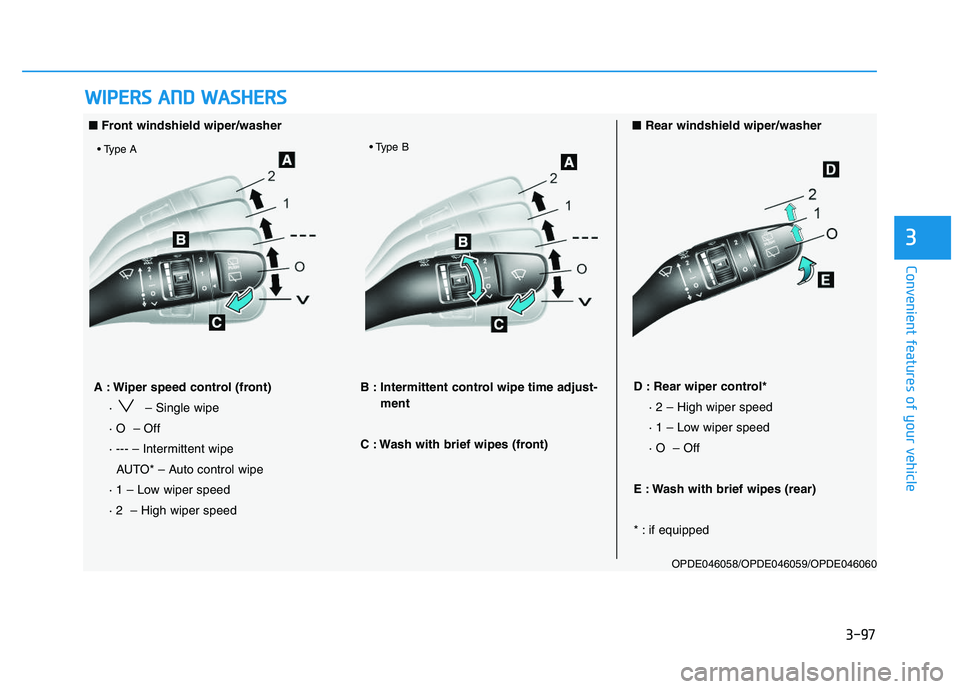
■ Front windshield wiper/washer ■Rear windshield wiper/washer
OPDE046058/OPDE046059/OPDE046060
A : Wiper speed control (front)
· – Single wipe
· O – Off
· --- – Intermittent wipe AUTO* – Auto control wipe
· 1 – Low wiper speed
· 2 – High wiper speed B : Intermittent control wipe time adjust-
ment
C : Wash with brief wipes (front) D : Rear wiper control* · 2 – High wiper speed
· 1 – Low wiper speed
· O – Off
E : Wash with brief wipes (rear)
* : if equipped
Page 102 of 659
3-100
Convenient features of your vehicle
Rear window wiper and wash-
er switch (if equipped)
The rear window wiper and washer
switch is located at the end of the
wiper and washer switch lever.
Turn the switch to the desired posi-
tion to operate the rear wiper and
washer.
2 – High wiper speed
1 – Low wiper speed
O – OffPush the lever away from you to
spray rear washer fluid and to run the
rear wipers 1~3 cycles. The spray
and wiper operation will continue until
you release the lever. (if equipped)
Auto rear wiper (if equipped)
The rear wiper will operate while the
vehicle is in reverse with the front
wiper ON by selecting the function on
the LCD display.
Go to ‘User Settings
→
Convenience
→ Auto Rear Wiper (reverse)’.
OTLE045167
OTLE045168
Page 108 of 659

3-106
Convenient features of your vehicle
Parking assist system
(if equipped)
The Parking Assist System assists
the driver during movement of the
vehicle by chiming if any object is
sensed within the distance of 100 cm
(39 inches) in front and 120 cm (47
inches) behind the vehicle.This system is a supplemental sys-
tem that senses objects within the
range and location of the sensors, it
cannot detect objects in other areas
where sensors are not installed.
Operation of the Parking Assist
System
Operating condition
This system will activate when the
Parking Assist System button is
pressed with the engine running.
ALWAYS look around your vehi-
cle to make sure there are not
any objects or obstacles before
moving the vehicle in any direc-
tion to prevent a collision.
Always pay close attention
when the vehicle is driven close
to objects, particularly pedestri-
ans, and especially children.
Be aware that some objects
may not be visible on the
screen or be detected by the
sensors, due to the objects
distance, size or material, all of
which can limit the effective-
ness of the sensor.
WARNING
OPDE046401
OPD046400
■ Front sensor
■Rear sensor
Sensors
Sensor
OPDE046403
Page 109 of 659

3-107
Convenient features of your vehicle
3
The Parking Assist System buttonturns on automatically and acti-
vates the Parking Assist System
when you move the shift lever to
the R (Reverse) position. However,
if vehicle speed exceeds 10 km/h
(6 mph), the system will not warn
you even though objects are
detected, and if vehicle speed
exceeds 20 km/h (12 mph), the
system will turn off automatically.
To turn on the system, press the
Parking Assist System button.
When more than two objects are sensed at the same time, the clos-
est one will be recognized first.
The indicator may differ from the illustration as objects or sensorsstatus. If the indicator blinks, we recommend that the system be
checked by an authorized HYUNDAI dealer.
If the audible warning does not sound or if the buzzer sounds inter- mittently when shifting into R (Reverse) position, this may indicate a
malfunction with the Parking Assist System. If this occurs, we rec-
ommend that you have your vehicle checked by an authorized
HYUNDAI dealer as soon as possible.
NOTICE
Distance
from object Warning indicator
Warning soundWhen driving forwardWhen driving rearward
61 ~ 100(24 ~39)Front-Buzzer beeps intermittently
61 ~ 120(24 ~47)Rear-Buzzer beeps intermittently
31 ~ 60
(12 ~24)FrontBuzzer beeps frequently
Rear-Buzzer beeps frequently
30
(12)FrontBuzzer sounds continuously
Rear-Buzzer sounds continuously
Types of warning sound and indicatorcm (in)
Page 111 of 659

3-109
Convenient features of your vehicle
3
D
D E
E F
F R
R O
O S
S T
T E
E R
R
To prevent damage to the conduc-
tors bonded to the inside surface
of the rear window, never use
sharp instruments or window
cleaners containing abrasives to
clean the window.
Information
If you want to defrost and defog the
front windshield, refer to “Windshield
Defrosting and Defogging” in this
chapter.
Rear window defroster
The defroster heats the window to
remove frost, fog and thin ice from
the interior and exterior of the rear
window, while engine is running. To activate the rear window defroster,
press the rear window defroster but-
ton located in the center facia switch
panel. The indicator on the rear win-
dow defroster button illuminates
when the defroster is ON.
To turn off the defroster, press the rear window defroster button again.
Information
• If there is heavy accumulation ofsnow on the rear window, brush it off
before operating the rear defroster.
• The rear window defroster automati- cally turns off after approximately 20
minutes or when the ignition switch is
in the OFF position.
NOTICE
ii
OPDE046318
OPDE046319
■ Manual climate control system
■Automatic climate control system
Page 112 of 659
3-110
Convenient features of your vehicle
Outside mirror defroster (if equipped)
If your vehicle is equipped with the
outside mirror defrosters, they will
operate at the same time you turn on
the rear window defroster.
Front wiper deicer (if equipped)
If your vehicle is equipped with the
wiper deicer, it will operate at the
same time you turn on the rear win-
dow defroster.
Page 113 of 659
3-111
Convenient features of your vehicle
3
M
M A
A N
N U
U A
A L
L
C
C L
L I
I M
M A
A T
T E
E
C
C O
O N
N T
T R
R O
O L
L
S
S Y
Y S
S T
T E
E M
M
(
( I
I F
F
E
E Q
Q U
U I
I P
P P
P E
E D
D )
)
OPDE046301/OPDE046300
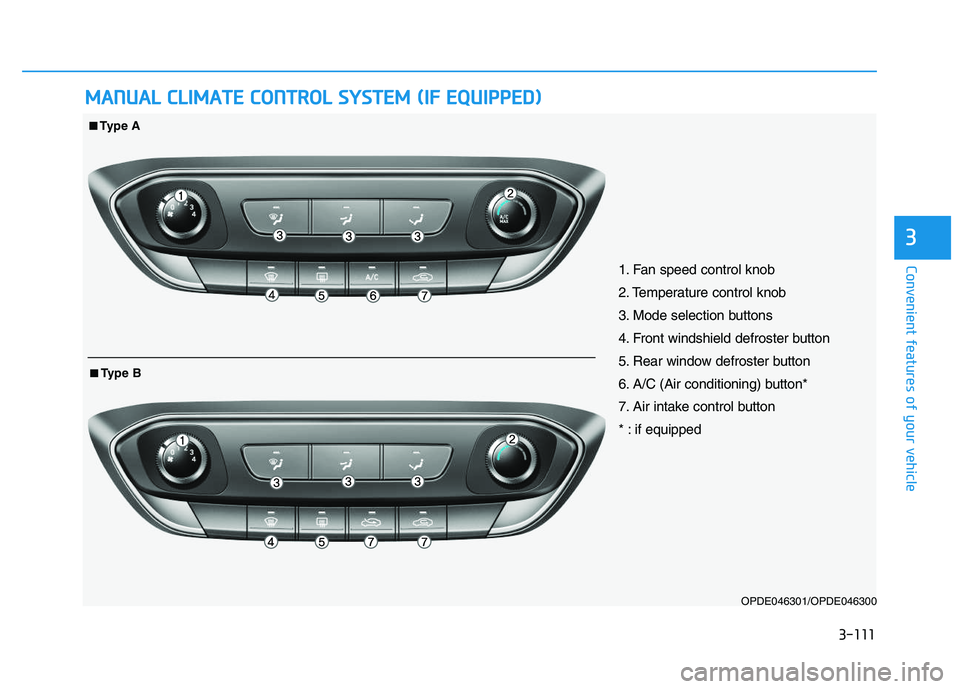
1. Fan speed control knob
2. Temperature control knob
3. Mode selection buttons
4. Front windshield defroster button
5. Rear window defroster button
6. A/C (Air conditioning) button*
7. Air intake control button
* : if equipped
■
■Type A
■
■Type B
Page 115 of 659
3-113
Convenient features of your vehicle
3
Defrost-Level (A, D)
Most of the air flow is directed to the
windshield.
Face-Level (B, D, F)
Air flow is directed toward the upper
body and face. Additionally, each
outlet can be controlled to direct the
air discharged from the outlet.
Floor-Level (A, C, D, E, F)
Most of the air flow is directed to the
floor.
Also you may select 2~3 modes at
the same time.
- face ( ) + floor ( ) mode
- face ( ) + defrost ( ) mode
- floor ( ) + defrost ( ) mode
- face ( ) + floor ( ) + defrost ( ) mode
MAX A/C-Level (B, D, F)
(if equipped)
To operate the MAX A/C, turn the
mode selection knob to extreme left.
Air flow is directed toward the upper
body and face.
In this mode, the air conditioning and
the recirculated air position will be
selected automatically.
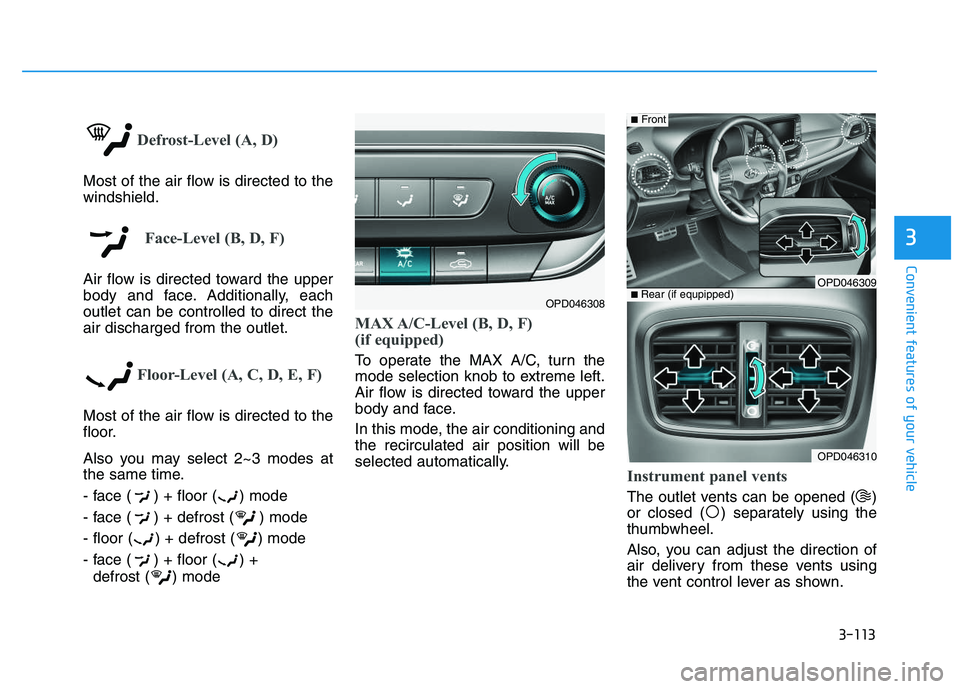
Instrument panel vents
The outlet vents can be opened ( )
or closed ( ) separately using the
thumbwheel.
Also, you can adjust the direction of
air delivery from these vents using
the vent control lever as shown.
OPD046308
OPD046310
■ Rear (if equpipped)
■Front
OPD046309