2018 HYUNDAI I30 Camera
[x] Cancel search: CameraPage 408 of 659

5-104
Driving your vehicle
Check SLIF
The warning message appears for a
few seconds, when the SLIF does
not properly operate. Then, the mas-
ter warning light ( ) will illuminate.
We recommend you to have the sys-
tem checked by an authorized
HYUNDAI dealer.
Limitations of the system
The SLIF may not operate or may
not provide correct information in the
following situations.
• The traffic sign is located on asharp curve.
The traffic sign is improperly posi- tioned (i.e. turned over, blocked by
an object, and damaged).
The traffic sign is uncommon or the combination between traffic signs
are uncommon.
The traffic sign is contrary to Vienna convention.
Another vehicle blocks the traffic sign.
The LED light of the traffic sign is broken.
The weather is bad, such as rain- ing, snowing, and fogging.
There is sunlight glare around the traffic sign due to low solar altitude.
It is dark at night.
There is bright light around the traf- fic sign. There is dirt, ice or frost on the
front windshield, where the camera
is installed.
The camera lens is blocked by an object, such as sticker, paper, or
fallen leaf.
Your vehicle drives right after another vehicle.
There is a malfunction with the navigation.
The bus or truck, on which the speed sticker is attached, passes
by your vehicle.
Your vehicle drives in an area, which is uncovered by the naviga-
tion system.
Your navigation has not been updated.
OTLE055080
Page 409 of 659
5-105
Driving your vehicle
5
The driver must be cautious in the fol-
lowing situations. The SLIF may not
assist the driver and may not proper-
ly operate.
Do not attach anything, such assticker, on the front windshield,
where the camera is installed. It
may adversely affect the SLIF and
cause a malfunction with the SLIF.
Do not place any objects, which have reflective surface, such as a
mirror and white paper, on the
dashboard.
Do not arbitrarily modify or manipu- late the camera, such as touching
the lens and unscrewing the cam-
era unit.
Page 410 of 659

5-106
Driving your vehicle
The Lane Keeping Assist System
detects lane lines on the road, and
assists the driver's steering to help
keep the vehicle between lanes.
When the system detects the vehicle
straying from its lane, it alerts the
driver with a visual and audible warn-
ing, while applying a slight counter-
steering torque, trying to prevent the
vehicle from moving out of its lane.
L
L A
A N
N E
E
K
K E
E E
E P
P I
I N
N G
G
A
A S
S S
S I
I S
S T
T
S
S Y
Y S
S T
T E
E M
M
(
( L
L K
K A
A S
S )
)
(
( I
I F
F
E
E Q
Q U
U I
I P
P P
P E
E D
D )
)
OPDE056048
The Lane Keeping Assist
System is not a substitute for
safe driving practices, but a
convenience function. It is the
responsibility of the driver to
always be aware of the sur-
rounding and steer the vehicle.
WARNING
Take the following precautions
when using the Lane Keeping
Assist System (LKAS):
The steering wheel is not con-
tinuously controlled so if the
vehicle speed is at a higher
rate when leaving a lane the
vehicle may not be controlled
by the system.
Do not steer the steering
wheel suddenly when the
steering wheel is being assist-
ed by the system.
(Continued)
WARNING
(Continued)
LKAS prevents the driver
from moving out of the lane
unintentionally by assisting
the driver's steering. However,
the driver should not solely
rely on the system but always
pay attention on the steering
wheel to stay in the lane.
Always check the road condi-
tion and surroundings and be
cautious when the system
cancels, does not operate or
malfunctions.
Do not install any accessories
and stickers. Do not tint the
front windshield, especially
near the rearview mirror.
The system detects lane lines
and controls the steering
wheel by a camera, therefore,
if the lane lines are hard to
detect, the system may not
work properly.
Please refer to "Limitations of
the system".(Continued)
Page 411 of 659
5-107
Driving your vehicle
5
Information
We recommend you have the system
checked by an authorized HYUNDAI
dealer when:
• The windshield glass is replaced.
• The LKAS camera or related partsare repaired or removed.
LKAS operation
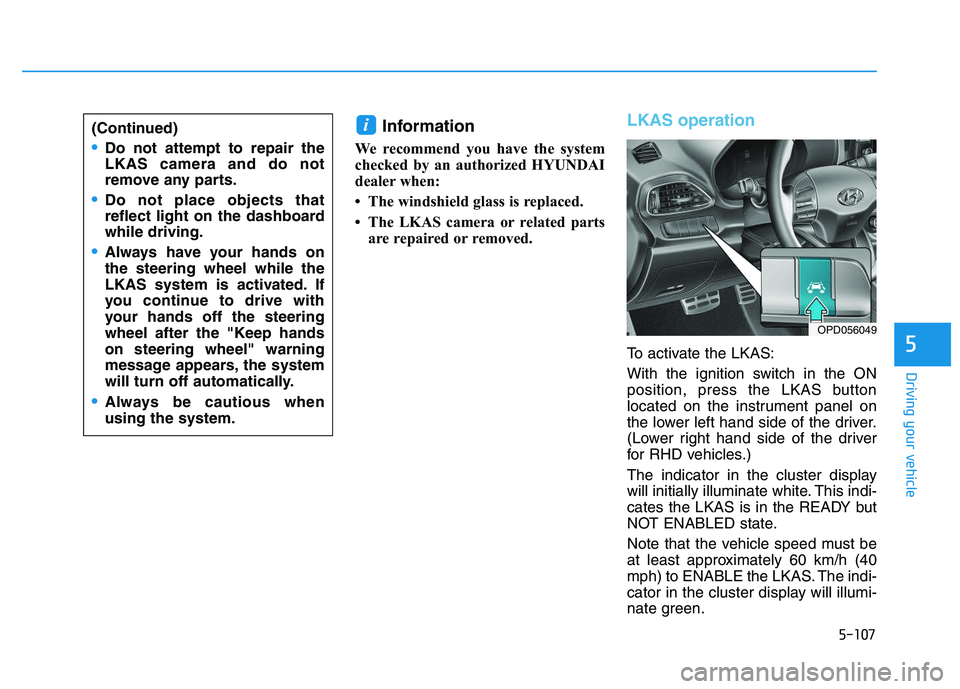
To activate the LKAS:
With the ignition switch in the ON
position, press the LKAS button
located on the instrument panel on
the lower left hand side of the driver.
(Lower right hand side of the driver
for RHD vehicles.)
The indicator in the cluster display
will initially illuminate white. This indi-
cates the LKAS is in the READY but
NOT ENABLED state.
Note that the vehicle speed must be
at least approximately 60 km/h (40
mph) to ENABLE the LKAS. The indi-
cator in the cluster display will illumi-
nate green.
i(Continued)
Do not attempt to repair the
LKAS camera and do not
remove any parts.
Do not place objects that
reflect light on the dashboard
while driving.
Always have your hands on
the steering wheel while the
LKAS system is activated. If
you continue to drive with
your hands off the steering
wheel after the "Keep hands
on steering wheel" warning
message appears, the system
will turn off automatically.
Always be cautious when
using the system.
OPD056049
Page 416 of 659

5-112
Driving your vehicle
LKAS failure indicator
The LKAS failure indica-tor (yellow) will illuminate
if the LKAS is not working
properly. We recommend
that the system be
checked by an authorized
HYUNDAI dealer.
When there is a problem with the
system do one of the following:
Turn the system on after turning the engine off and on again.
Check if the ignition switch is in the ON position.
Check if the system is affected by the weather. (ex: fog, heavy rain,
etc.)
Check if there is foreign matter on the camera lens.
If the problem is not solved, we rec-
ommend that the system be checked
by an authorized HYUNDAI dealer.
LKAS function change
The driver can change LKAS to Lane
Departure Warning System (LDWS)
or change the LKAS mode between
Standard LKA and Active LKA from
the LCD display. Go to the 'User
Settings →Driving Assist →Lane
Keeping Assist System →Lane
Departure Warning/Standard LKA/
Active LKA'.
The system is automatically set to
Standard LKA if a function is not
selected.
Lane Departure Warning
LDWS alerts the driver with a visual
warning and a warning alarm when
the system detects the vehicle
departing the lane. The steering
wheel will not be controlled.
Standard LKA
The Standard LKA mode guides the
driver to keep the vehicle within the
lanes. It rarely controls the steering
wheel, when the vehicle drives well
inside the lanes. However, it starts to
control the steering wheel, when the
vehicle is about to deviate out of the
lanes.
Active LKA
The Active LKA mode provides more
frequent steering wheel control in
comparison with the Standard LKA
mode. The driver may not feel the
onset of the steering wheel control,
because the Active LKA may be con-
stantly controlling the steering with
lighter corrections.
Page 417 of 659

5-113
Driving your vehicle
5
Limitations of the System
The LKAS may operate prematurely
even if the vehicle does not depart
from the intended lane, OR, the
LKAS may not warn you if the vehicle
leaves the intended lane under the
following circumstances:
The lanes ahead are not visibledue to rain, snow, water on the
road, damaged or stained road
surface, or other factors.
The brightness outside changes suddenly such as when entering or
exiting a tunnel.
The brightness outside is too low such as when the headlamps are
not on at night or the vehicle is
going through a tunnel.
The surrounding of the inside rear view mirror temperature is high
due to direct sunlight.
It is difficult to distinguish the lane marking from the road surface or
the lane marking is faded or not
clearly marked.
Driving on a steep grade, over a hill, or when driving on a curved
road. When light coming from a street
light or an oncoming vehicle is
reflected on a wet road surface
such as a puddle in the road.
The windshield or the LKAS cam- era lens is blocked with dirt or
debris.
The field of view in front is obstructed by sun glare.
The lanes are incomplete or the area is in a construction zone.
There are more than two lane lines on the road in front of you.
The lane line is merged or divided. (e.g. tollgate)
The lane number increases or decreases or the lane marker are
crossing complicatedly.
The lane line in a tunnel is stained with oil.
The lane markings are not clearly visible from the road.
The shadow is on the lane marker by a median strip, trees, etc.
The lane width is too wide or too narrow. See previous page. The windshield glass is fogged up;
a clear view of the road is obstruct-
ed.
There are markings on the road surface that look like a lane line
that is inadvertently being detected
by the camera.
There is a boundary structure in the roadway such as a concrete
barrier, guardrail and reflector post
that is inadvertently being detected
by the camera.
There is not enough distance between you and the vehicle in
front to be able to detect the lane
line or the vehicle ahead is driving
on the lane line.
The adverse road conditions cause excessive vehicle vibrations while
driving.
Page 418 of 659

5-114
Driving your vehicle
This Lane Departure Warning System
detects the lane with the sensor at the
front windshield and warns you when
your vehicle leaves the lane.
Information
We recommend you have the system
checked by an authorized HYUNDAI
dealer when:
• The windshield glass is replaced.
• The LDWS camera or related parts are repaired or removed.
i
L
L A
A N
N E
E
D
D E
E P
P A
A R
R T
T U
U R
R E
E
W
W A
A R
R N
N I
I N
N G
G
S
S Y
Y S
S T
T E
E M
M
(
( L
L D
D W
W S
S )
)
(
( I
I F
F
E
E Q
Q U
U I
I P
P P
P E
E D
D )
)
Take the following precautions
when using the Lane Departure
Warning System (LDWS):
ALWAYS check your sur-
roundings and the road condi-
tions before changing lanes.
The LDWS does not control
the vehicle to change lanes or
to stay in the current lane.
(Continued)
(Continued)
Do not make abrupt maneu-
vers or turn the steering
wheel suddenly if the LDWS
alerts you that the vehicle is
departing from the lane.
If the camera recognition sys-
tem does not properly detect
the lane, the LDWS may not
notify you if the vehicle
departs from the lane.
The LDWS does not operate
until the vehicle speed reach-
es approximately 60 km/h (37
mph).
The LDWS camera recogni-
tion system is located in front
of the rear view mirror at the
center of the front windshield.
Do not spray water or any
type of liquid near the camera.
The system may become
damaged.
Do not attempt to repair the
LDWS camera and do not
remove any parts.(Continued)
(Continued)
Do not place objects that
reflect light on the dashboard
while driving.
Do not place any accessories
near the inside rearview mir-
ror.
The operation of the LDWS
may be affected by several
factors including environmen-
tal conditions that affect the
ability of the camera to detect
the lanes in front of you. It is
the responsibility of the driver
to pay careful attention to the
roadway and to maintain the
vehicle in its intended lane at
all times.
WARNING
OPDE056048
Page 420 of 659

5-116
Driving your vehicle
Warning light and message
Check LDWS
If there is a problem with the system
a message will appear for a few sec-
onds.
If the problem continues the LDWS
failure indicator will illuminate.
LDWS failure indicator
The LDWS failure indica-
tor (yellow) will illuminate
if the LDWS is not work-
ing properly. We recom-
mend you to have your vehicle
checked by an authorized HYUNDAI
dealer.
When there is a problem with the
system, do one of the following:
Turn the system on after turning the vehicle off and on again.
Check if the ignition switch is in the ON position.
Check if the system is affected by the weather. (e.g. fog, heavy rain, etc.)
Check if there is foreign matter on the camera lens.
If the problem is not solved, we rec-
ommend you have the system
checked by an authorized HYUNDAI
dealer.
Limitations of the system
The LDWS may operate prematurely
even if the vehicle does not depart
from the intended lane, OR, the
LDWS may not warn you if the vehi-
cle leaves the intended lane under
the following circumstances:
The lanes ahead are not visible due to rain, snow, water on the
road, damaged or stained road
surface, or other factors.
The brightness outside changes suddenly such as when entering or
exiting a tunnel.
The brightness outside is too low such as when the headlamps are
not on at night or the vehicle is
going through a tunnel.
The surrounding of the inside rear view mirror temperature is high
due to direct sunlight.
It is difficult to distinguish the lane marking from the road surface or
the lane marking is faded or not
clearly marked.
Driving on a steep grade, over a hill, or when driving on a curved
road.
OAE056164L