2018 HYUNDAI ELANTRA SPORT turn signal
[x] Cancel search: turn signalPage 191 of 534
3-106
Convenient features of your vehicle
Turn signals and lane changesignals
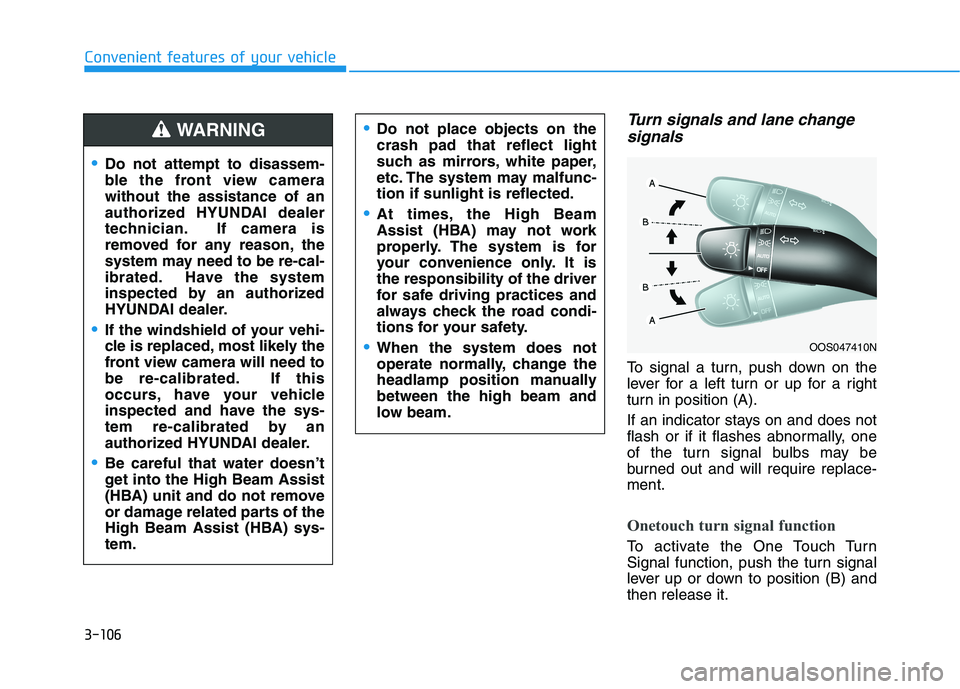
To signal a turn, push down on the
lever for a left turn or up for a right
turn in position (A).
If an indicator stays on and does not
flash or if it flashes abnormally, one
of the turn signal bulbs may be
burned out and will require replace-ment.
Onetouch turn signal function
To activate the One Touch Turn
Signal function, push the turn signal
lever up or down to position (B) andthen release it.
OOS047410N
Do not attempt to disassem-
ble the front view camerawithout the assistance of an
authorized HYUNDAI dealer
technician. If camera is
removed for any reason, the
system may need to be re-cal-
ibrated. Have the system
inspected by an authorized
HYUNDAI dealer.
If the windshield of your vehi-
cle is replaced, most likely the
front view camera will need to
be re-calibrated. If this
occurs, have your vehicle
inspected and have the sys-
tem re-calibrated by an
authorized HYUNDAI dealer.
Be careful that water doesn’t
get into the High Beam Assist
(HBA) unit and do not remove
or damage related parts of the
High Beam Assist (HBA) sys-tem.
Do not place objects on the crash pad that reflect light
such as mirrors, white paper,
etc. The system may malfunc-tion if sunlight is reflected.
At times, the High Beam
Assist (HBA) may not work
properly. The system is for
your convenience only. It isthe responsibility of the driver
for safe driving practices and
always check the road condi-
tions for your safety.
When the system does not
operate normally, change the
headlamp position manuallybetween the high beam and
low beam.
WARNING
Page 192 of 534
3-107
Convenient features of your vehicle
3
The lane change signals will blink 3,
5 or 7 times.
You can activate or deactivate the
One Touch Turn Signal function or
choose the number of blinking (3, 5,or 7) from the User Settings Mode
(Light) on the LCD display (if
equipped with supervision cluster).
For more details, refer to the "LCD
Display" section in this chapter.
Battery saver function
The purpose of this feature is to help
prevent the battery from being dis-
charged. The system automatically
turns off the parking lamp when the
key is removed (remote key) or when
the driver turns the engine off (smart
key) and opens the driver-side door.
With this feature, the parking lamps
will turn off automatically if the driver
parks on the side of road at night.
If necessary, to keep the lamps on
when the engine is turned off, perform
the following:
1) Open the driver-side door.
2) Turn the parking lamps OFF andON again using the light switch on
the steering column.
Headlamp delay function
(if equipped)
If the key is removed from the ignition
switch or placed in the ACC positionor the LOCK/OFF position with theheadlamps ON, the headlamps
(and/or parking lamps) remain on for
about 5 minutes. However, if the dri-
ver's door is opened and closed, the
headlights are turned off after 15
seconds. Also, with the engine off if
the driver's door is opened and
closed, the headlamps (and/or park-
ing lamps) are turned off after 15
seconds.
The headlamps (and/or parking
lamps) can be turned off by pressing
the lock button on the remote key or
smart key twice or turning the light
switch to the OFF or AUTO position.
You can activate or deactivate the
Headlamp Delay function from theUser Settings Mode (Light) on the
LCD display (if equipped with super-vision cluster).
For more details, refer to the "LCD
Display" section in this chapter. If the driver exits the vehicle
through another door besides the
driver door, the battery saver func-tion does not operate and the
headlamp delay function does not
turn OFF automatically.
This may cause the battery to dis-
charge. To avoid battery dis-
charge, turn OFF the headlamps
manually from the headlamp
switch before exiting the vehicle.
NOTICE
Page 227 of 534
3-142
Convenient features of your vehicle
When the Auto Defogging
System operates, the indi-
cator will illuminate.
If higher level of moisture are sensed
in the vehicle, the Auto Defogging
System will operate in the following
order:
Step 1) The A/C button will turn ON.
Step 2) The air intake control will change to Fresh mode.
Step 3) The mode will be changed to defrost to direct airflow to the windshield.
Step 4) The fan speed will be set to MAX.
If the air conditioning is off or recircu-
lated air position is manually select-
ed while Auto Defogging System is
ON, the Auto Defogging System
Indicator will blink 3 times to signal
that the manual operation has beencanceled.To cancel or reset the
Auto Defogging System
Press the front windshield defroster
button for 3 seconds when the igni-
tion switch is in the ON position.
When the Auto Defogging System is
canceled, ADS OFF symbol will blink3 times and the ADS OFF will be dis-
played on the climate control infor-mation screen.
When the Auto Defogging System is
reset, ADS OFF symbol will blink 6times without a signal.
Information
When the air conditioning is turned on by Auto defogging system, if you
try to turn off the air conditioning,
the indicator will blink 3 times and
the air conditioning will not be
turned off.
For efficiency, do not select recircu- lated air position while Auto defog-
ging system is operating.
When Auto defogging mode is selected, fan speed, temperature and
intake mode which is adjusted man-
ually are canceled for better defog-
ging result. Do not remove the sensor coverlocated on the upper end of thedriver side windshield glass.
Damage to system parts could
occur and may not be covered by
your vehicle warranty.
NOTICE
i
Page 296 of 534
5-55
Driving your vehicle
5
System description
Blind-Spot Collision Warning(BCW)
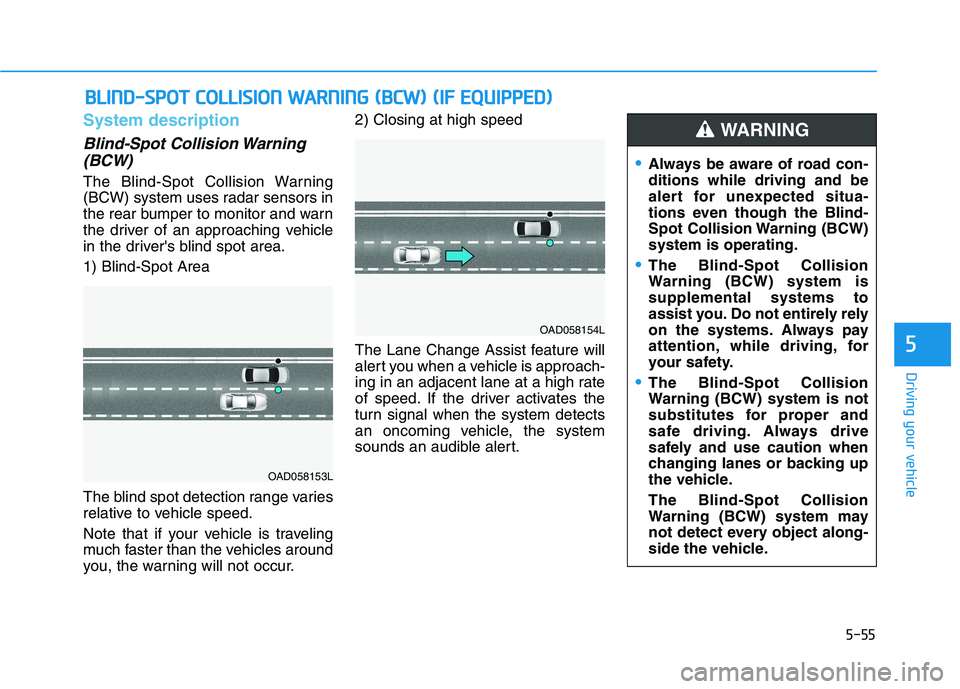
The Blind-Spot Collision Warning
(BCW) system uses radar sensors in
the rear bumper to monitor and warn
the driver of an approaching vehicle
in the driver's blind spot area. 1) Blind-Spot Area
The blind spot detection range varies
relative to vehicle speed.
Note that if your vehicle is traveling
much faster than the vehicles around
you, the warning will not occur. 2) Closing at high speed
The Lane Change Assist feature will
alert you when a vehicle is approach-
ing in an adjacent lane at a high rate
of speed. If the driver activates the
turn signal when the system detects
an oncoming vehicle, the system
sounds an audible alert.
BB
LLIINN DD--SS PP OO TT CC OO LLLLIISS IIOO NN WW AARRNN IINN GG (( BB CCWW )) (( IIFF EE QQ UUIIPP PPEEDD ))
OAD058153L
OAD058154L
Always be aware of road con- ditions while driving and be
alert for unexpected situa-
tions even though the Blind-
Spot Collision Warning (BCW)system is operating.
The Blind-Spot Collision
Warning (BCW) system issupplemental systems to
assist you. Do not entirely rely
on the systems. Always pay
attention, while driving, for
your safety.
The Blind-Spot Collision
Warning (BCW) system is not
substitutes for proper and
safe driving. Always drive
safely and use caution when
changing lanes or backing up
the vehicle. The Blind-Spot Collision
Warning (BCW) system may
not detect every object along-
side the vehicle.
WARNING
Page 299 of 534
![HYUNDAI ELANTRA SPORT 2018 Owners Manual 5-58
Driving your vehicle
OAD055029
■ Left side
OAD055030
■ Right side
[A] : Warning sound
Second stage alert
A warning chime to alert the driver will activate when:
1. A vehicle has been detecte](/manual-img/35/56087/w960_56087-298.png "HYUNDAI ELANTRA SPORT 2018 Owners Manual 5-58
Driving your vehicle
OAD055029
■ Left side
OAD055030
■ Right side
[A] : Warning sound
Second stage alert
A warning chime to alert the driver will activate when:
1. A vehicle has been detecte")
5-58
Driving your vehicle
OAD055029
■ Left side
OAD055030
■ Right side
[A] : Warning sound
Second stage alert
A warning chime to alert the driver will activate when:
1. A vehicle has been detected in the blind spot area by the radar system AND.
2. The turn signal is applied (same side as where the vehicle is being detect- ed).
When this alert is activated, the warning light on the outer side view mir-
ror will also blink. And a warning chime will sound.
If you turn off the turn signal indicator, the second stage alert will be deac-
tivated.
Once the detected vehicle is no longer within the blind spot area, the warn-
ing will turn off according to the driving conditions of the vehicle.
The warning light on the
outer side view mirror will illu-
minate whenever a vehicle is
detected at the rear side bythe system.
To avoid accidents, do not
focus only on the warninglight and neglect to see the
surrounding of the vehicle.
Drive safely even though the
vehicle is equipped with a
Blind-Spot Collision Warning
(BCW) system. Do not solely
rely on the system but check
your surrounding before
changing lanes or backing the
vehicle up.
The system may not alert the driver in some conditions so
always check your surround-ings while driving.
WARNING
Page 337 of 534
5-96
Driving your vehicle
Limitations of the System
The Forward Collision Avoidance Assist (FCA) system is designed to
monitor the vehicle ahead or a
pedestrian on the roadway through
radar signals and camera recogni-
tion to warn the driver that a collision
is imminent, and if necessary, apply
emergency braking.
In certain situations, the radar sen-
sor or the camera may not be able to
detect the vehicle or pedestrian
ahead. In these cases, the FCA sys-
tem may not operate normally. The
driver must pay careful attention in
the following situations where the
FCA operation may be limited.
Detecting vehicles
The sensor may be limited when:
The radar sensor or camera isblocked with a foreign object or
debris
Inclement weather such as heavy rain or snow obscures the field of
view of the radar sensor or camera
There is interference by electro- magnetic waves The vehicle is on unpaved or
uneven rough surfaces, or road
with sudden gradient changes.
The vehicle drives through a con- struction area, on an unpaved
road, or above metal materials,
such as a railway
The vehicle in front is too small to be detected (for example a motor-
cycle or a bicycle, etc.)
The camera’s field of view is not well illuminated (either too dark or
too much reflection or too much
backlight that obscures the field of
view)
The camera does not recognize the entire vehicle in front.
The vehicle in front is an oversize vehicle or trailer that is too big to
be detected by the camera recog-
nition system (for example a tractor
trailer, etc.)
The vehicle in front does not have rear lights or the rear lights are not
turned ON or the rear lights are
located unusually.
The outside brightness changes suddenly, for example when enter-
ing or exiting a tunnel The vehicle drives inside a build-
ing, such as a basement parkinglot
The adverse road conditions cause excessive vehicle vibrations while
driving
You are on a roundabout and the vehicle in front circles
The camera lens is contaminated due to tinted, filmed or coated
windshield, damaged glass, or
stuck of foreign matter (sticker,
bug, etc.) on the glass
The camera is damaged.
The brightness outside is too low such as when the headlamps are
not on at night or the vehicle isgoing through a tunnel.
Light coming from a street light or an oncoming vehicle is reflected on
a wet road surface such as a pud-dle in the road
The field of view in front is obstructed by sun glare
The shadow is on the road by a median strip, trees, etc.
The vehicle drives through a toll- gate.
Page 348 of 534
5-107
Driving your vehicle
5
The LKA system will not be in the
ENABLED state and/or the steering
wheel will not be assisted when:
The turn signal is turned on beforechanging a lane. If you change
lanes without the turn signal on,
the steering wheel might be con-trolled.
The vehicle is not driven in the mid- dle of the lane when the system is
turned on or right after changing a
lane.
ESC (Electronic Stability Control) or VSM (Vehicle Stability
Management) is activated.
The vehicle is driven on a sharp curve.
Vehicle speed is below 64 km/h (40 mph) and over 177 km/h (110mph).
The vehicle makes sharp lane changes.
The vehicle brakes suddenly.
The lane is very wide or narrow.
There are more than two lane markers on the road. (e.g. con-
struction area) Only one side of the lane marker is
detected.
Radius of a curve is too small.
The vehicle is driven on a steep incline.
The steering wheel is turned sud- denly.
Driving on a steep slope or hill.
Limitations of the System
The LKA system may operate pre-
maturely even if the vehicle does not
depart from the intended lane, OR,
the LKA system may not warn you if
the vehicle leaves the intended lane
under the following circumstances:
When the lane and road condi- tions are poor
It is difficult to distinguish the lane marker from the road because the
lane marker is covered with dust orsand.
It is difficult to distinguish the color of the lane marker from the road.
There are markings on the road surface that look like a lane marker
that is inadvertently being detected
by the camera.
The lane marker is indistinct or damaged.
The lane marker is merged or divided. (e.g. tollgate)
The lane number increases or decreases or the lane marker are
crossing complicatedly.
Page 391 of 534
6-2
The hazard warning flasher serves
as a warning to other drivers to exer-
cise extreme caution when
approaching, overtaking, or passing
your vehicle.
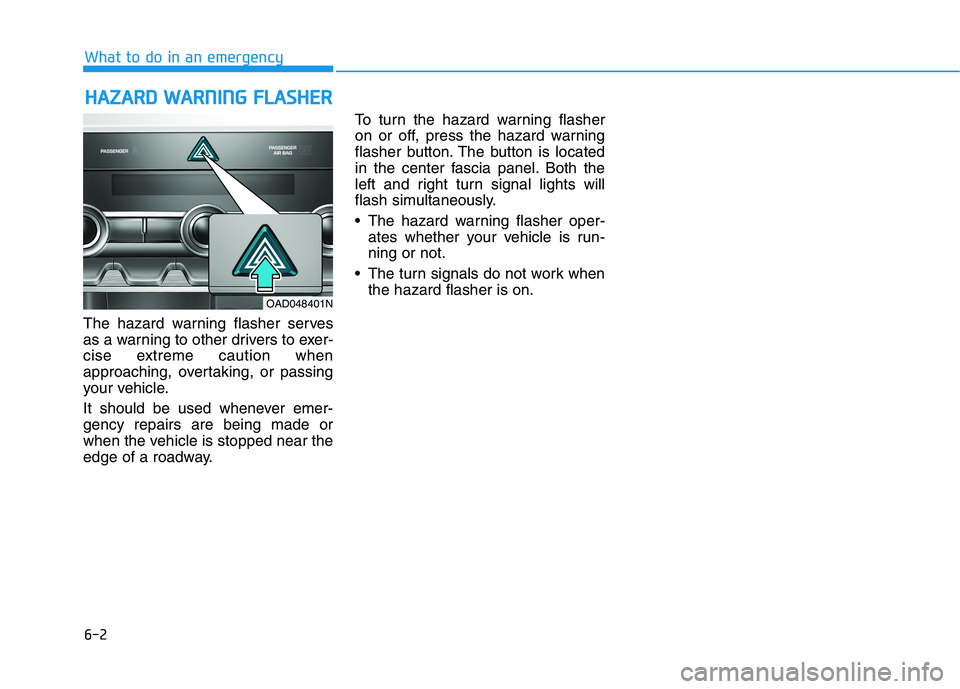
It should be used whenever emer- gency repairs are being made or
when the vehicle is stopped near the
edge of a roadway. To turn the hazard warning flasher
on or off, press the hazard warning
flasher button. The button is located
in the center fascia panel. Both the
left and right turn signal lights will
flash simultaneously.
• The hazard warning flasher oper-
ates whether your vehicle is run- ning or not.
The turn signals do not work when the hazard flasher is on.
HHAAZZAA RRDD WW AARRNN IINN GG FF LLAA SSHH EERR
What to do in an emergency
OAD048401N