Page 80 of 526

3-3
Convenient features of your vehicle
3
Remote Key (if equipped)
Your HYUNDAI uses a remote key, which
you can use to lock or unlock a door (and
trunk) and even start the engine.
1. Door Lock
2. Door Unlock
3. Trunk Unlock
4. Panic
Locking
To lock :
1. Close all doors, engine hood andtrunk.
2. Press the Door Lock button (1) on the remote key.
3. The hazard warning lights will blink and the chime will sound once if the
lock button is pressed once more with-
in four seconds.
4. Make sure the doors are locked by checking the position of the door lock
button inside the vehicle.
Information
After locking the doors, if you press the
Door Lock button again within four sec-
onds, the hazard warning lights will blink
and the horn will sound one time to con-
firm that the doors are locked.
Unlocking
To unlock:
1. Press the Door Unlock button (2) onthe remote key.
2. The driver’s door will unlock. The haz- ard warning lights will blink two times.
Two press unlock setting: If you press the Door Unlock button
again within four seconds, then all the
doors will unlock.
Two press unlock setting can be changed according to owner's prefer-
ence. Press and hold both Door Lock
and Door Unlock buttons at the same
time until hazard warning lights blink.
Now all doors will unlock when Door
Unlock button is pressed one time. To
change the setting back, repeat this
procedure.
Information
After unlocking the doors, the doors will
lock automatically after 30 seconds unless
a door is opened.
i
i
A A C
CC
CE
E S
SS
SI
IN
N G
G
Y
Y O
O U
UR
R
V
V E
EH
H I
IC
C L
LE
E
OAD045047N
Do not leave the keys in your vehi-
cle with unsupervised children.
Unattended children could place
the key in the ignition switch and
may operate power windows or
other controls, or even make the
vehicle move, which could result in
serious injury or death.
WARNING
Page 81 of 526

3-4
Convenient features of your vehicle
Trunk unlocking
To unlock:
1. Press and hold the Trunk Unlock but-ton (3) on the remote key for more
than one second.
2. The hazard warning lights will blink two times.
Once the trunk is opened and then
closed, the trunk will lock automatically.
Information
• After unlocking the trunk, the trunk will lock automatically.
• The word "HOLD" is written on the button to inform you that you must
press and hold the button for more than
one second.
Panic button (if equipped)
Press and hold the Panic button (4) for
more than one second. The horn sounds
and hazard warning lights flash for about
30 seconds.
To cancel the panic mode, press any but-
ton on the remote key.
Start-up
For more information, refer to the "Key
Ignition Switch" section in chapter 5.
To prevent damaging the remote key:
• Keep the remote key away fromwater or any liquid and fire. If the
inside of the remote key gets damp
(due to drinks or moisture), or is
heated, internal circuit may mal-
function, excluding the car from the
warranty.
Avoid dropping or throwing the remote key.
Protect the remote key from extreme temperatures.
Mechanical key
If the remote key does not operate nor-
mally, you can lock or unlock the door by
using the mechanical key.
NOTICE
i
OAD045187N
Page 83 of 526
3-6
Convenient features of your vehicle
If you suspect your remote key might
have sustained some damage, or you
feel your remote key is not working cor-
rectly contact an authorized HYUNDAI
dealer.
Information
An inappropriately disposed bat-tery can be harmful to the envi-
ronment and human health.
Dispose the battery according to
your local law(s) and regulation.
Smart Key (if equipped)
Your HYUNDAI uses a Smart Key, which
you can use to lock or unlock a door (and
trunk) and even start the engine.
1. Door Lock
2. Door Unlock
3. Trunk Unlock
4. Panic
Locking
To lock :
1. Close all doors, engine hood and trunk.
2. Either press the door handle button or press the Door Lock button (1) on the
smart key.
3. The hazard warning lights will blink and the chime will sound once.
4. Make sure the doors are locked by checking the position of the door lock
button inside the vehicle.
i
OLF044003/QOAD045001
Page 85 of 526

3-8
Convenient features of your vehicle
Trunk opening
To open:
1. Carry the smart key.
2. Either press the trunk handle button orpress and hold the Trunk Unlock but-
ton (3) on the smart key for more than
one second.
3. The hazard warning lights will blink two times.
Once the trunk is opened and then
closed, the trunk will lock automatically.
Information
The trunk handle button will only operate
when the smart key is within 28 inches (0.7
m) from the trunk handle.
Panic button
Press and hold the Panic button (4) for
more than one second. The horn sounds
and hazard warning lights blink for about
30 seconds. To cancel the panic mode,
press any button on the Smart Key.
Start-up
You can start the engine without inserting
the key.
For more information, refer to the
"Engine Start/Stop Button" section in
chapter 5.
To prevent damaging the smart key:
Keep the smart key away from any liquid or fire. Internal circuits may
malfunction if the inside of the
remote key gets damp (from liquids
or moisture) or if it is heated. This
can exclude the remote key from
warranty coverage.
Avoid dropping or throwing the smart key.
Protect the smart key from extreme temperatures.
Always have the smart key with you when leaving the vehicle. If the
smart key is left near the vehicle, the
vehicle battery may be discharged.
Mechanical key
If the Smart Key does not operate nor-
mally, you can lock or unlock the door by
using the mechanical key.
Press and hold the release button (1)
and remove the mechanical key (2).
Insert the mechanical key into the key
hole on the door.
To reinstall the mechanical key, put the
key into the hole and push it until a click
sound is heard.
NOTICE
i
OAD045042
Page 127 of 526
3-50
Convenient features of your vehicle
How to deactivate the SmartTrunk function using the smartkey
1. Door lock
2. Door unlock
3. Trunk open
4. Panic
If you press any button of the smart key
during the Detect and Alert stage, the
Smart Trunk function will be deactivated.
Make sure to be aware of how to deacti-
vate the Smart Trunk function for emer-
gency situations.
Information
• If you press the door unlock button (2),
the Smart Trunk function will be deacti-
vated temporarily. But, if you do not
open any door for 30 seconds, the smart
trunk function will be activated again.
• If you press the trunk open button (3) for more than 1 second, the trunk opens.
• If you press the door lock button (1) or trunk open button (3) when the Smart
Trunk function is not in the Detect and
Alert stage, the smart trunk function
will not be deactivated.
• In case you have deactivated the Smart Trunk function by pressing the smart
key button and opened a door, the smart
trunk function can be activated again by
closing and locking all doors.
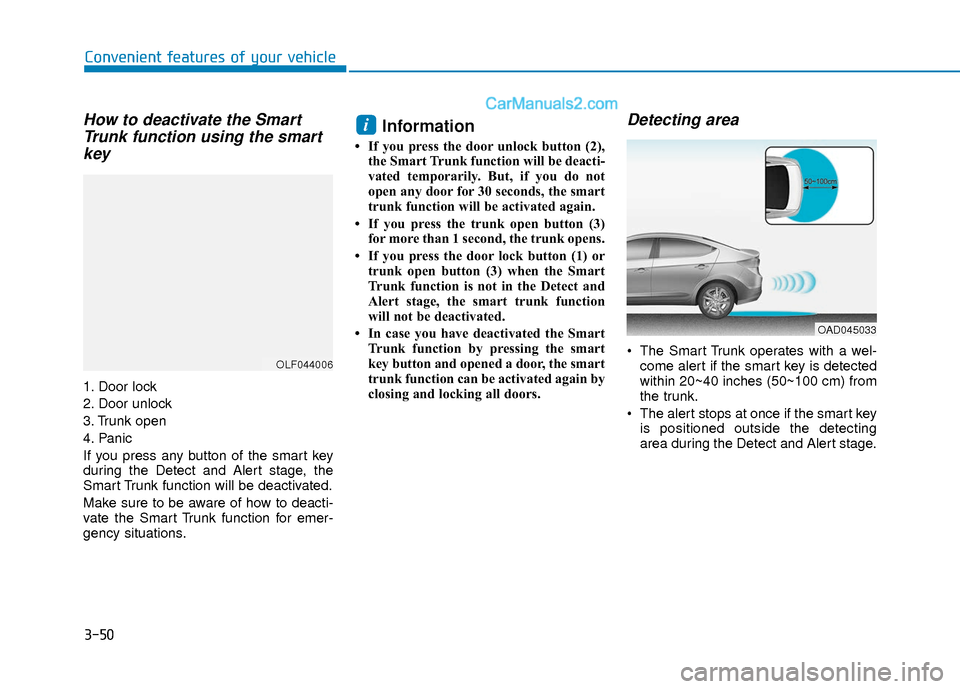
Detecting area
The Smart Trunk operates with a wel-come alert if the smart key is detected
within 20~40 inches (50~100 cm) from
the trunk.
The alert stops at once if the smart key is positioned outside the detecting
area during the Detect and Alert stage.
i
OLF044006
OAD045033
