2018 Hyundai Elantra blind spot warning
[x] Cancel search: blind spot warningPage 111 of 526
3-34
Convenient features of your vehicle
Use your interior side view mirror or
direct observation to determine the actu-
al distance of following vehicles when
changing lanes.
Do not scrape ice off the mirrorface; this may damage the surface
of the glass.
If the mirror is jammed with ice, do not adjust the mirror by force. Use
an approved spray de-icer (not radi-
ator antifreeze) spray, or a sponge
or soft cloth with very warm water,
or move the vehicle to a warm place
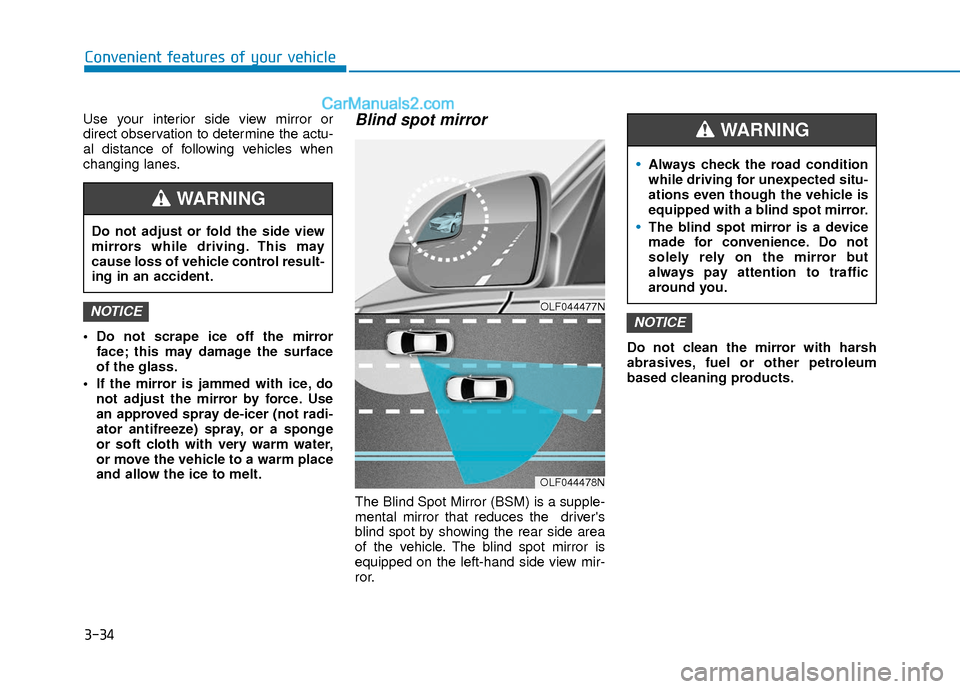
and allow the ice to melt.Blind spot mirror
The Blind Spot Mirror (BSM) is a supple-
mental mirror that reduces the driver's
blind spot by showing the rear side area
of the vehicle. The blind spot mirror is
equipped on the left-hand side view mir-
ror. Do not clean the mirror with harsh
abrasives, fuel or other petroleum
based cleaning products.
NOTICENOTICEOLF044477N
OLF044478N
Do not adjust or fold the side view
mirrors while driving. This may
cause loss of vehicle control result-
ing in an accident.
WARNING
Always check the road condition
while driving for unexpected situ-
ations even though the vehicle is
equipped with a blind spot mirror.
The blind spot mirror is a device
made for convenience. Do not
solely rely on the mirror but
always pay attention to traffic
around you.
WARNING
Page 144 of 526

3-67
Convenient features of your vehicle
3
Adaptive Front LightingSystem (AFLS) WarningLight (if equipped)
This warning light blinks:
Once you set the Engine Start/Stop
Button to the ON position.
- It illuminates for approximately 3 sec-onds and then goes off.
When there is a malfunction with the AFLS.
If there is a malfunction with the
AFLS:
1. Drive carefully to the nearest safe location and stop your vehicle.
2. Turn the engine off and restart the engine. If the warning light remains
on, have your vehicle inspected by an
authorized HYUNDAI dealer.
Master Warning Light
This indicator light illuminates
Once you turn the ignition switch or theEngine Start/Stop button to the ON
position.
- It illuminates for approximately 3 sec-onds and then goes off.
When there is a malfunction in opera- tion in any of the following systems:
- Exterior lamp malfunction
- Blind Spot Detection (BSD) malfunc-tion (if equipped)
- Lane Keeping Assist System (LKAS) malfunction (if equipped)
- Tire Pressure Monitoring System (TPMS)
- Service reminder
To identify the details of the warning, look
at the LCD display.
Door Ajar Warning Light (for conventionalcluster)
This warning light illuminates:
When a door is not closed securely.
Trunk Open WarningLight (for conventional cluster)
This warning light illuminates:
When the trunk is not closed securely.
AFLS
Page 158 of 526

3-81
Convenient features of your vehicle
3
LCD Display Modes
Modes SymbolDescription
Trip Computer This mode displays information related to driving such as tripmeter, fuel
economy, etc.
For more information, refer to "Trip Computer" in this chapter.
Turn By Turn (TBT) (if equipped)This mode displays the state of the navigation.
SCC/LKAS
(If equipped)
This mode displays the state of the Smart Cruise Control (SCC) and Lane
Keeping Assist System (LKAS).
For more information, refer to "Smart Cruise Control (SCC)“ and Lane
Keeping Assist System (LKAS) in chapter 5.
A/VThis mode displays the state of the A/V system.
InformationThis mode displays information such as tire pressure, service intervals,
warning messages related to the Blind Spot Detection system, etc.
User SettingsIn this mode, you can change settings of the doors, lamps, etc.
or or
Page 284 of 526

Driving your vehicle
5
Before Driving ........................................................5-4
Before Entering the Vehicle ...........................................5-4
Before Starting ..................................................................5-4
Ignition Switch ........................................................5-6
Key Ignition Switch ...........................................................5-6
Engine Start/Stop Button................................................5-9
Manual Transmission ...........................................5-16
Manual Transmission Operation ..................................5-16
Good Driving Practices ..................................................5-18
Automatic Transmission ......................................5-19
Automatic Transmission Operation .............................5-19
Good Driving Practices ..................................................5-23
Dual Clutch Transmission ....................................5-24
Dual Clutch Transmission Operation ..........................5-24
Good Driving Practices ..................................................5-32
Braking System ....................................................5-33
Power Brakes ...................................................................5-33
Disc Brakes Wear Indicator ..........................................5-34
Rear Drum Brakes...........................................................5-34
Parking Brake...................................................................5-34
Anti-lock Brake System (ABS) ....................................5-36
Electronic Stability Control (ESC)................................5-38
Vehicle Stability Management (VSM).........................5-41
Hill-Start Assist Control (HAC) ....................................5-42
Good Braking Practices .................................................5-42
Drive Mode Integrated Control System ............5-43
Blind Spot Detection System (BSD) ..................5-45
BSD (Blind Spot Detection) /
LCA (Lane Change Assist) .............................................5-46
RCTA (Rear Cross Traffic Alert) ..................................5-49
Limitations of the System .............................................5-51
Automatic Emergency Braking (AEB) ...............5-52
System Setting and Activation.....................................5-52
AEB Warning Message and System Control ............5-54
AEB Front Radar Sensor ...............................................5-56
System Malfunction .......................................................5-57
Limitations of the System .............................................5-58
Lane Keeping Assist System (LKAS) .................5-62
LKAS Operation ...............................................................5-63
Limitations of the System .............................................5-66
LKAS Malfunction ...........................................................5-67
LKAS Function Change ..................................................5-68
Cruise Control .......................................................5-69
Cruise Control operation ...............................................5-69
Page 328 of 526

5-45
Driving your vehicle
5
The Blind Spot Detection System (BSD)
uses radar sensors in the rear bumper to
monitor and warn the driver of an
approaching vehicle in the driver's blind
spot area.
The system monitors the rear area of the
vehicle and provides information to the
driver with an audible alert and an indi-
cator on the outer side view mirrors.(1) BSD (Blind Spot Detection)
The blind spot detection range varies
relative to vehicle speed. Note that if
your vehicle is traveling much faster
than the vehicles around you, the
warning will not occur.
(2) LCA (Lane Change Assist) The Lane Change Assist feature will
alert you when a vehicle is approach-
ing in an adjacent lane at a high rate
of speed. If the driver activates the
turn signal when the system detects
an oncoming vehicle, the system
sounds an audible alert.
(3) RCTA (Rear Cross Traffic Alert) The Rear Cross Traffic Alert feature
monitors approaching cross traffic
from the left and right side of the vehi-
cle when your vehicle is in reverse.
The feature will operate when the
vehicle is moving in reverse below
about 6 mph (10 km/h). If oncoming
cross traffic is detected a warning
chime will sound.
B BL
LI
IN
N D
D
S
S P
P O
O T
T
D
D E
ET
T E
EC
CT
T I
IO
O N
N
S
S Y
Y S
ST
T E
EM
M
(
( B
B S
SD
D )
)
(
( I
IF
F
E
E Q
Q U
UI
IP
P P
PE
ED
D )
)
OTL055139
Blind spot area
Closing at high speed
Always be aware of road condi-
tions while driving and be alert for
unexpected situations even
though the Blind Spot Detection
System is operating.
The Blind Spot Detection System
(BSD) is not a substitute for prop-
er and safe driving. Always drive
safely and use caution when
changing lanes or backing up the
vehicle. The Blind Spot Detection
System (BSD) may not detect
every object alongside the vehi-
cle.
WARNING
Page 329 of 526

5-46
Driving your vehicle
BSD (Blind Spot Detection) /
LCA (Lane Change Assist)
Operating conditions
To operate:
Press the BSD switch with the ignition
switch in the ON position.
The indicator on the BSD switch will illu-
minate.To cancel:
Press the BSD switch again. The indica-
tor on the switch will go off.
Information
• If the ignition switch is pressed OFF and
then ON again, the BSD system returns
to the previous state.
• When the system is turned on, the warn- ing light will illuminate for 3 seconds on
the outer side view mirror.
The system will activate when:
1. The system is on.
2. The vehicle speed is above about 20 mph (30 km/h).
3. An oncoming vehicle is detected in the blind spot area.
First stage alert
If a vehicle is detected within the bound-
ary of the system, a warning light will illu-
minate on the outer side view mirror.
Once the detected vehicle is no longer
within the blind spot area, the warning
will turn off according to the driving con-
ditions of the vehicle.
i
OAD055027N
OAD055028
■ Left side
■ Right side
Page 330 of 526

5-47
Driving your vehicle
5
Detecting sensor
The sensors are located inside the rear
bumper.
Always keep the rear bumper clean for
the proper operation of the system.
OAD055029
■ Left side
OAD055030
■ Right side
Second stage alert
A warning chime to alert the driver will activate when:
1. A vehicle has been detected in the blind spot area by the radar system (the
warning light will illuminate on the outer side view mirror) AND
2. The turn signal is applied (same side as where the vehicle is being detected).
When this alert is activated, the warning light on the side view mirror will also blink.
If you turn off the turn signal indicator, the warning chime will be deactivated.OAD055031
Page 333 of 526

5-50
Driving your vehicle
Information
• The warning chime will turn off whenthe detected vehicle moves out of the
sensing area or if your vehicle is moved
away from the detected vehicle.
• The system may not operate properly due to other factors or circumstances.
Always pay attention to your surround-
ings.
• If the sensing area near the rear bumper is blocked by either a wall or barrier or
by a parked vehicle, the system sensing
area may be reduced. The system may not work properly
when the bumper has been dam-
aged, or if the rear bumper has been
replaced or repaired.
The sensing range differs some- what according to the width of the
road. When the road is narrow, the
system may detect other vehicles in
the next lane.
The system may turn off due to strong electromagnetic waves.
Non-operating condition
The BSD indicator on the outer side
view mirror may not illuminate
properly when:
- The outer side view mirror housing isdamaged.
- The mirror is covered with dirt, snow, or debris.
- The window is covered with dirt, snow, or debris.
- The window is tinted.
NOTICEi
The warning light on the outer
side view mirror will illuminate
whenever a vehicle is detected at
the rear side by the system.
To avoid accidents, do not focus
only on the warning light and
neglect to see the surrounding of
the vehicle. (Continued)
(Continued)
Drive safely even though the
vehicle is equipped with a Blind
Spot Detection System (BSD) and
Rear Cross Traffic Alert (RCTA).
Do not solely rely on the system
but check your surrounding
before changing lanes or backing
the vehicle up.
The system may not alert the
driver in some conditions so
always check your surroundings
while driving.
The Blind Spot Detection System
(BSD) and Rear Cross Traffic
Alert (RCTA) are not a substitute
for proper and safe driving prac-
tices. Always drive safely and use
caution when changing lanes or
backing up your vehicle. The
Blind Spot Detection System
(BSD) may not detect every
object alongside the vehicle.
WARNING