2018 Hyundai Elantra brakes
[x] Cancel search: brakesPage 338 of 526
5-55
Driving your vehicle
5
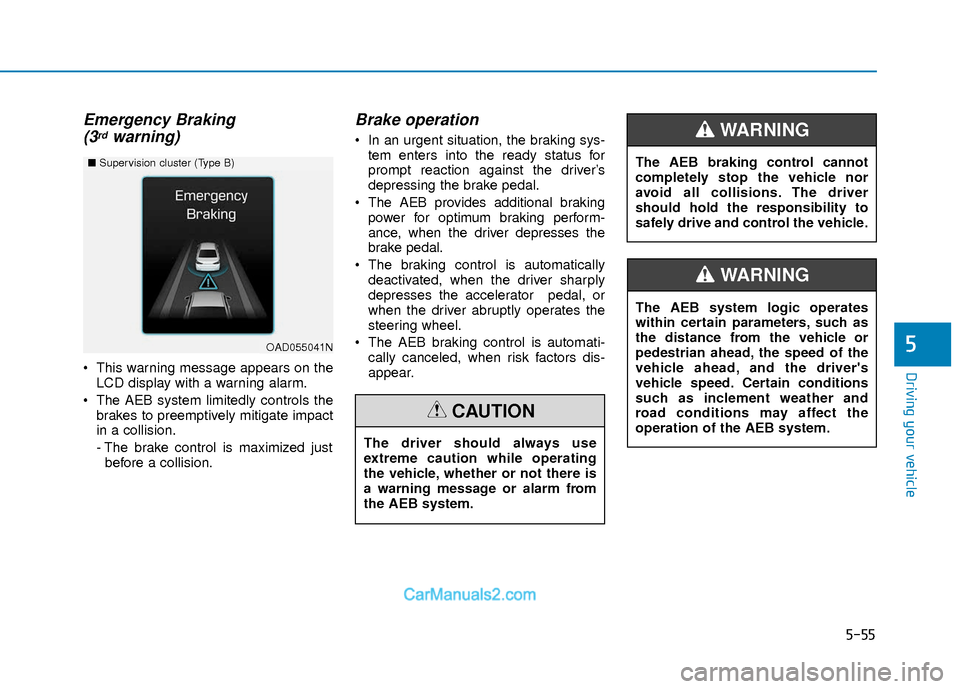
Emergency Braking(3rdwarning)
This warning message appears on the
LCD display with a warning alarm.
The AEB system limitedly controls the brakes to preemptively mitigate impact
in a collision.
- The brake control is maximized justbefore a collision.
Brake operation
In an urgent situation, the braking sys- tem enters into the ready status for
prompt reaction against the driver’s
depressing the brake pedal.
The AEB provides additional braking power for optimum braking perform-
ance, when the driver depresses the
brake pedal.
The braking control is automatically deactivated, when the driver sharply
depresses the accelerator pedal, or
when the driver abruptly operates the
steering wheel.
The AEB braking control is automati- cally canceled, when risk factors dis-
appear.
OAD055041N
■ Supervision cluster (Type B)
The driver should always use
extreme caution while operating
the vehicle, whether or not there is
a warning message or alarm from
the AEB system.
CAUTION
The AEB system logic operates
within certain parameters, such as
the distance from the vehicle or
pedestrian ahead, the speed of the
vehicle ahead, and the driver's
vehicle speed. Certain conditions
such as inclement weather and
road conditions may affect the
operation of the AEB system.
WARNING
The AEB braking control cannot
completely stop the vehicle nor
avoid all collisions. The driver
should hold the responsibility to
safely drive and control the vehicle.
WARNING
Page 349 of 526

5-66
Driving your vehicle
The LKAS system will not be in the
ENABLED state and the steering
wheel will not be assisted when:
Vehicle speed is below 40 mph (60 km/h) and over 110 mph (180
km/h).
Only one lane line is detected.
The turn signal is turned on before changing a lane. If you change lanes
without the turn signal on, the steering
wheel might be controlled.
The hazard warning flasher is on.
The width of the lane is below 10 feet (3.1 m) and over 15 feet (4.5
m).
ESC (Electronic Stability Control) is activated.
The vehicle is driven on a sharp curve.
The vehicle brakes suddenly.
The vehicle makes sharp lane changes.
Information
When the system is turned on or right
after changing a lane, drive in the middle
of the lane. If not, the system will not pro-
vide steering assist function.
Limitations of the System
The LKAS may operate prematurely
even if the vehicle does not depart from
the intended lane, OR, the LKAS may not
warn you if the vehicle leaves the intend-
ed lane under the following circum-
stances:
The lanes ahead are not visible due torain, snow, water on the road, dam-
aged or stained road surface, or other
factors.
The brightness outside changes sud- denly such as when entering or exiting
a tunnel.
The brightness outside is too low such as when the headlamps are not on at
night or the vehicle is going through a
tunnel.
It is difficult to distinguish the lane marking from the road surface or the
lane marking is faded or not clearly
marked.
Driving on a steep grade, over a hill, or when driving on a curved road.
When light coming from a street light or an oncoming vehicle is reflected on a
wet road surface such as a puddle in
the road.
The windshield or the LKAS camera lens is blocked with dirt or debris. The field of view in front is obstructed
by sun glare.
The lanes are incomplete or the area is in a construction zone.
There are more than two lane lines on the road in front of you.
The lane markings are not clearly visi- ble from the road.
The lane width is too wide or too nar- row. See previous page.
The windshield glass is fogged up; a clear view of the road is obstructed.
There are markings on the road sur- face that look like a lane line that is
inadvertently being detected by the
camera.
There is a boundary structure in the roadway such as a concrete barrier,
guardrail and reflector post that is
inadvertently being detected by the
camera.
There is not enough distance between you and the vehicle in front to be able
to detect the lane line or the vehicle
ahead is driving on the lane line.
The adverse road conditions cause excessive vehicle vibrations while driv-
ing.
i
Page 352 of 526

5-69
Driving your vehicle
5
Cruise Control operation
1. CRUISE indicator
2. SET indicator
The Cruise Control system allows you to
drive at speeds above 20 mph (30 km/h)
without depressing the accelerator pedal.
Information
• During normal cruise control operation,when the SET switch is activated or
reactivated after applying the brakes,
the cruise control will energize after
approximately 3 seconds. This delay is
normal.
• Before activating the cruise control function, the system will check to verify
that the brake switch is operating nor-
mally. Depress the brake pedal at least
once after turning ON the ignition or
starting the engine.
i
C CR
R U
U I
IS
S E
E
C
C O
O N
NT
TR
R O
O L
L
OAD055035
Take the following precautions:
If the Cruise Control is left on,
("CRUISE" indicator light in the
instrument cluster is illuminated)
the Cruise Control can be activat-
ed unintentionally. Keep the
Cruise Control system off
("CRUISE" indicator light OFF)
when the Cruise Control is not in
use, to avoid inadvertently set-
ting a speed.
Use the Cruise Control system
only when traveling on open
highways in good weather.
Do not use the Cruise Control
when it may be unsafe to keep
the vehicle at a constant speed:
- When driving in heavy traffic or
when traffic conditions make it
difficult to drive at a constant
speed
- When driving on rainy, icy, or snow-covered roads
- When driving on hilly or windy roads
- When driving in windy areas
- When driving with limited view (possibly due to bad weather
such as fog, snow, rain and
sandstorm)
WARNING
Page 366 of 526
5-83
Driving your vehicle
5
Limitations of the System
The Smart Cruise Control System may
have limits to its ability to detect distance
to the vehicle ahead due to road and traf-
fic conditions.
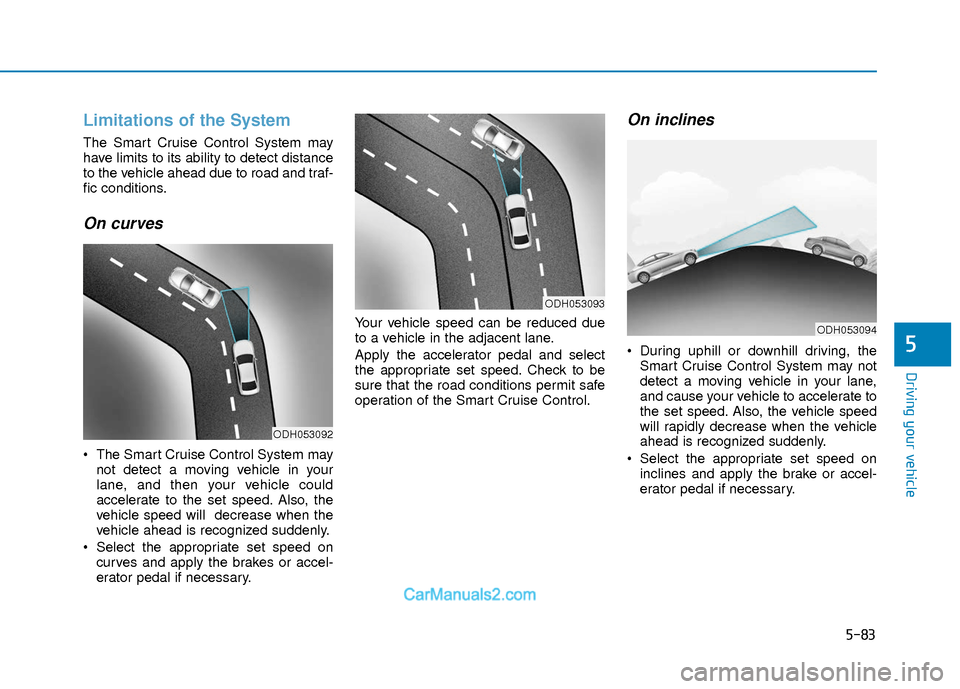
On curves
The Smart Cruise Control System maynot detect a moving vehicle in your
lane, and then your vehicle could
accelerate to the set speed. Also, the
vehicle speed will decrease when the
vehicle ahead is recognized suddenly.
Select the appropriate set speed on curves and apply the brakes or accel-
erator pedal if necessary. Your vehicle speed can be reduced due
to a vehicle in the adjacent lane.
Apply the accelerator pedal and select
the appropriate set speed. Check to be
sure that the road conditions permit safe
operation of the Smart Cruise Control.
On inclines
During uphill or downhill driving, the
Smart Cruise Control System may not
detect a moving vehicle in your lane,
and cause your vehicle to accelerate to
the set speed. Also, the vehicle speed
will rapidly decrease when the vehicle
ahead is recognized suddenly.
Select the appropriate set speed on inclines and apply the brake or accel-
erator pedal if necessary.
ODH053092
ODH053093
ODH053094
Page 369 of 526

5-86
Driving your vehicle
The Smart Cruise Control System may
not operate temporarily due to:
Electrical interference
Modifying the suspension
Differences of tire abrasion or tirepressure
Installing different type of tires
Information
This device complies with Part 15 of the
FCC rules.
Operation is subject to the following three
conditions:
1. This device may not cause harmful interference, and
2. This device must accept any interfer- ence received, including interference
that may cause undesired operation.
3. Changes or modifications not expressly approved by the party responsible for
compliance could void the user’s
authority to operate the device.
Information
Radio frequency radiation exposure infor-
mation:
This equipment complies with FCC radia-
tion exposure limits set forth for an uncon-
trolled environment.
This equipment should be installed and
operated with minimum distance of 8 in.
(20 cm) between the radiator (antenna)
and your body.
This transmitter must not be co-located or
operating in conjunction with any other
antenna or transmitter.
i
i
NOTICE
When using the Smart Cruise
Control take the following precau-
tions:
If an emergency stop is neces-
sary, you must apply the brakes.
The vehicle cannot be stopped by
using the Smart Cruise Control
System.
Keep a safe distance according
to road conditions and vehicle
speed. If the vehicle to vehicle
distance is too close during a
high-speed driving, a serious col-
lision may result.
Always maintain sufficient brak-
ing distance and decelerate your
vehicle by applying the brakes if
necessary.
The Smart Cruise Control System
cannot recognize a stopped vehi-
cle, pedestrians or an oncoming
vehicle. Always look ahead cau-
tiously to prevent unexpected
and sudden situations from
occurring.
(Continued)
WARNING (Continued)
Vehicles moving in front of you
with a frequent lane change may
cause a delay in the system's
reaction or may cause the system
to react to a vehicle actually in an
adjacent lane. Always drive cau-
tiously to prevent unexpected
and sudden situations from
occurring.
Always be aware of the selected
speed and vehicle to vehicle dis-
tance.
The Smart Cruise Control System
may not recognize complex driv-
ing situations so always pay
attention to driving conditions
and control your vehicle speed.
Page 371 of 526

5-88
Driving your vehicle
If you are still stuck after rocking the
vehicle a few times, have the vehicle
pulled out by a tow vehicle to avoid
engine overheating, possible damage
to the transmission, and tire damage.
See "Towing" in chapter 6.
Smooth Cornering
Avoid braking or gear changing in cor-
ners, especially when roads are wet.
Ideally, corners should always be taken
under gentle acceleration.
Driving at Night
Night driving presents more hazards
than driving in the daylight. Here are
some important tips to remember:
Slow down and keep more distancebetween you and other vehicles, as it
may be more difficult to see at night,
especially in areas where there may
not be any street lights.
Adjust your mirrors to reduce the glare from other driver's headlamps.
Keep your headlamps clean and prop- erly aimed. Dirty or improperly aimed
headlamps will make it much more dif-
ficult to see at night.
Avoid staring directly at the headlamps of oncoming vehicles. You could be
temporarily blinded, and it will take
several seconds for your eyes to read-
just to the darkness.
Driving in the Rain
Rain and wet roads can make driving
dangerous. Here are a few things to con-
sider when driving in the rain or on slick
pavement:
Slow down and allow extra followingdistance. A heavy rainfall makes it
harder to see and increases the dis-
tance needed to stop your vehicle.
Turn OFF your Cruise Control.
Replace your windshield wiper blades when they show signs of streaking or
missing areas on the windshield.
Tires should be properly maintained with at least 2/32nds of an inch of tread
depth. If your tires do not have enough
tread, making a quick stop on wet
pavement can cause a skid and possi-
bly lead to an accident. See "Tire
Tread" in chapter 7.
Turn on your headlamps to make it easier for others to see you.
Driving too fast through large puddles can affect your brakes. If you must go
through puddles, try to drive through
them slowly.
If you believe your brakes may be wet, apply them lightly while driving until
normal braking operation returns.
NOTICE
Page 372 of 526

5-89
Driving your vehicle
5
Hydroplaning
If the road is wet enough and you are
going fast enough, your vehicle may have
little or no contact with the road surface
and actually ride on the water. The best
advice is SLOW DOWN when the road is
wet.
The risk of hydroplaning increases as
the depth of tire tread decreases, refer
to "Tire Tread" in chapter 7.
Driving in Flooded Areas
Avoid driving through flooded areas
unless you are sure the water is no high-
er than the bottom of the wheel hub.
Drive through any water slowly. Allow
adequate stopping distance because
brake performance may be reduced.
After driving through water, dry the
brakes by gently applying them several
times while the vehicle is moving slowly.
Highway Driving
Tires
Adjust the tire inflation, as specified.
Under-inflation may overheat or damage
the tires.
Do not install worn-out or damaged tires,
which may reduce traction or adversely
affect vehicle handling. This could lead to
sudden tire failure that may cause loss of
vehicle control resulting in an accident.
Information
Never over-inflate your tires above the
maximum inflation pressure, as specified
on your tires.
Fuel, engine coolant and engineoil
Driving at higher speeds on the highway
consumes more fuel and is less efficient
than driving at a slower, more moderate
speed. Maintain a moderate speed in
order to conserve fuel when driving on
the highway.
Be sure to check both the engine coolant
level and the engine oil before driving.
Drive belt
A loose or damaged drive belt may over-
heat the engine.
i
In a rollover crash, an unbelted per-
son is significantly more likely to
die than a person wearing a seat
belt. Make sure all passengers are
wearing their seat belts.
WARNING
Page 373 of 526

5-90
Driving your vehicle
W
WI
IN
N T
TE
ER
R
D
D R
RI
IV
V I
IN
N G
G
The severe weather conditions of winter
quickly wear out tires and cause other
problems. To minimize winter driving
problems, you should take the following
suggestions:
Snow or Icy Conditions
You need to keep sufficient distance
between your vehicle and the vehicle in
front of you.
Apply the brakes gently. Speeding, rapid
acceleration, sudden brake applications,
and sharp turns are potentially very haz-
ardous practices. During deceleration,
use engine braking to the fullest extent.
Sudden brake applications on snowy or
icy roads may cause the vehicle to skid.
To drive your vehicle in deep snow, it may
be necessary to use snow tires or to
install tire chains on your tires.
Always carry emergency equipment.
Some of the items you may want to carry
include tire chains, tow straps or chains,
a flashlight, emergency flares, sand, a
shovel, jumper cables, a window scraper,
gloves, ground cloth, coveralls, a blanket,
etc.
Snow tires
If you mount snow tires on your vehicle,
make sure to use radial tires of the same
size and load range as the original tires.
Mount snow tires on all four wheels to
balance your vehicle’s handling in all
weather conditions. The traction provided
by snow tires on dry roads may not be as
high as your vehicle's original equipment
tires. Check with the tire dealer for maxi-
mum speed recommendations.
Information
Do not install studded tires without first
checking local, state and municipal regula-
tions for possible restrictions against their
use.
Tire chains
Since the sidewalls of radial tires are
thinner than other types of tires, they may
be damaged by mounting some types of
tire chains on them. Therefore, the use of
snow tires is recommended instead of
tire chains. Do not mount tire chains on
vehicles equipped with aluminum
wheels; if unavoidable use a wire type
chain. If tire chains must be used, use
genuine HYUNDAI parts and install the
tire chain after reviewing the instructions
provided with the tire chains. Damage to
your vehicle caused by improper tire
chain use is not covered by your vehicle
manufacturer’s warranty.
i
Snow tires should be equivalent in
size and type to the vehicle’s stan-
dard tires. Otherwise, the safety
and handling of your vehicle may
be adversely affected.
WARNING
OAD055077