2018 Hyundai Elantra turn signal
[x] Cancel search: turn signalPage 211 of 526

3-134
Convenient features of your vehicle
Auto Defogging System (Only
for Automatic Climate Control
System, if equipped)
Auto defogging reduces the possibility of
fogging up the inside of the windshield by
automatically sensing the moisture of
inside the windshield.
The auto defogging system operates
when the heater or air conditioning is on.
Information
The auto defogging system may not oper-
ate normally, when the outside tempera-
ture is below 50 °F (-10 °C).When the Auto Defogging
System operates, the indica-
tor will illuminate.
If higher level of moisture are sensed in
the vehicle, the Auto Defogging System
will operate in the following order:
Step 1 : Outside air position
Step 2 : Operating the air conditioning
Step 3 : Blo wing air toward the wind-
shield
Step 4 : Increasing air flow toward the windshield
If the air conditioning is off or recirculated
air position is manually selected while
Auto Defogging System is ON, the Auto
Defogging System Indicator will blink 3
times to signal that the manual operation
has been canceled.
To cancel or reset the
Auto Defogging System
Press the front windshield defroster but-
ton for 3 seconds when the ignition
switch is in the ON position. When the
Auto Defogging System is canceled,
ADS OFF symbol will blink 3 times and
the ADS OFF will be displayed on the cli-
mate control information screen.
When the Auto Defogging System is
reset, ADS OFF symbol will blink 6 times
without a signal.
Information
• When the air conditioning is turned on by Auto defogging system, if you try to
turn off the air conditioning, the indica-
tor will blink 3 times and the air condi-
tioning will not be turned off.
• For efficiency, do not select recirculated air position while Auto defogging system
is operating.
• When Auto defogging mode is selected, fan speed, temperature and intake mode
which is adjusted manually are canceled
for better defogging result.
Do not remove the sensor cover locat-
ed on the upper end of the driver side
windshield glass.
Damage to system parts could occur
and may not be covered by your vehi-
cle warranty.
NOTICE
i
i
OAD045331
Page 248 of 526

4-29
Multimedia System
4
(Continued)
• The phone must be paired to the audiosystem to use Bluetooth
®Wireless
Technology related features.
• Pairing and connecting a Bluetooth
®
Wireless Technology enabled mobile
phone will work only when the
Bluetooth
®Wireless Technology option
within your mobile phone has been
turned on. (Methods of turning on the
Bluetooth
®Wireless Technology enabled
feature may differ depending on the
mobile phone.)
• Do not use a cellular phone or perform Bluetooth
®Wireless Technology settings
(e.g. pairing a phone) while driving.
• Even if the phone supports Bluetooth
®
Wireless Technology, the phone will not
be found during device searches if the
phone has been set to hidden state or the
Bluetooth
®Wireless Technology power
is turned off. Disable the hidden state or
turn on the Bluetooth
®Wireless
Technology power prior to
searching/connecting with the car audio
system.
(Continued)(Continued)
• You will not be able to use the hands-
free feature when your phone (in the
car) is outside of the cellular service area
(e.g. in a tunnel, in an underground
location, in a mountainous area, etc.).
• If the cellular phone signal is poor or the vehicle’s interior noise is too loud, it
may be difficult to hear the other per-
son’s voice during a call.
• Do not place the phone near or inside metallic objects, otherwise communica-
tions with Bluetooth
®Wireless
Technology system or cellular service
stations can be disturbed.
• Placing the audio system within an elec- tromagnetic environment may result in
noise interference.
• Some cellular phones or other devices may cause interference noise or a mal-
function to the audio system. In this
case, storing the device in a different
location may resolve the condition.
• While a phone is connected through Bluetooth
®Wireless Technology your
phone may discharge quicker than usual
for additional Bluetooth
®Wireless
Technology-related operations.
(Continued)(Continued)
• If Priority is set upon vehicle ignition
(IGN/ACC ON), the Bluetooth
®
Wireless Technology phone will be auto-
matically connected. Even if you are
outside, the Bluetooth
®Wireless
Technology phone will be automatically
connected once you are in the vicinity of
the vehicle. If you do not want to auto-
matically connect your Bluetooth
®
Wireless Technology phone, try the fol-
lowing.
1) Turn off the Bluetooth
®Wireless
Technology feature in your mobile
phone.
2) Turn off the Bluetooth
®Wireless
Technology feature in your car audio
system.
- To turn off the Bluetooth
®Wireless
Technology feature in your car audio
system, go to [SETUP/CLOCK] >
[Phone] and [turn off] the Bluetooth
®
Wireless Technology feature.
(Continued)
Page 253 of 526
4-34
Multimedia System
NOTE :
SiriusXM services require a subscrip-
tion sold separately, or as a package,
by Sirius XM Radio Inc. If you decide
to continue service after your trial, the
subscription plan you choose will
automatically renew thereafter and
you will be charged according to your
chosen payment method at then-cur-
rent rates. Fees and taxes apply. To
cancel you must call SiriusXM at 1-
866-635-2349. See SiriusXM Customer
Agreement for complete terms at
www.siriusxm.com. SiriusXM U.S.
satellite and data services are avail-
able only in the 48 contiguous states,
DC and Puerto Rico (with coverage
limitations). SiriusXM satellite service
is also available in Canada; see
www.siriusxm.ca. All fees and pro-
gramming subject to change. Sirius,
XM and all related marks and logos
are trademarks of Sirius XM Radio Inc.
SiriusXM Radio Mode
(if equipped)
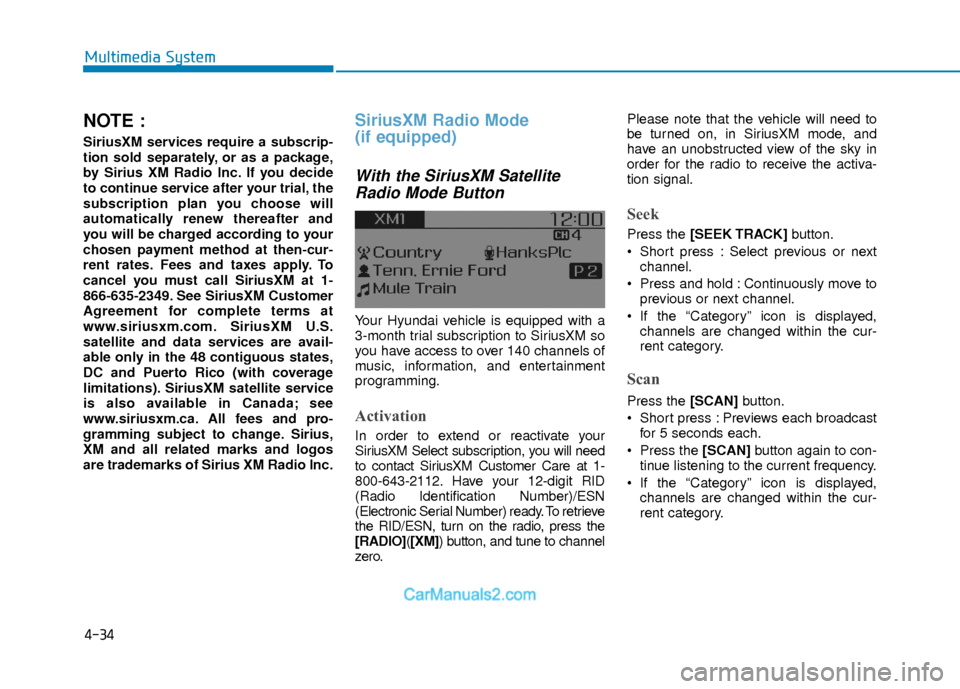
With the SiriusXM SatelliteRadio Mode Button
Your Hyundai vehicle is equipped with a
3-month trial subscription to SiriusXM so
you have access to over 140 channels of
music, information, and entertainment
programming.
Activation
In order to extend or reactivate your
SiriusXM Select subscription, you will need
to contact SiriusXM Customer Care at 1-
800-643-2112. Have your 12-digit RID
(Radio Identification Number)/ESN
(Electronic Serial Number) ready. To retrieve
the RID/ESN, turn on the radio, press the
[RADIO]( [XM]) button, and tune to channel
zero. Please note that the vehicle will need to
be turned on, in SiriusXM mode, and
have an unobstructed view of the sky in
order for the radio to receive the activa-
tion signal.
Seek
Press the [SEEK TRACK]
button.
Short press : Select previous or next channel.
Press and hold : Continuously move to previous or next channel.
If the “Category” icon is displayed, channels are changed within the cur-
rent category.
Scan
Press the [SCAN] button.
Short press : Previews each broadcast for 5 seconds each.
Press the [SCAN] button again to con-
tinue listening to the current frequency.
If the “Category” icon is displayed, channels are changed within the cur-
rent category.
Page 328 of 526

5-45
Driving your vehicle
5
The Blind Spot Detection System (BSD)
uses radar sensors in the rear bumper to
monitor and warn the driver of an
approaching vehicle in the driver's blind
spot area.
The system monitors the rear area of the
vehicle and provides information to the
driver with an audible alert and an indi-
cator on the outer side view mirrors.(1) BSD (Blind Spot Detection)
The blind spot detection range varies
relative to vehicle speed. Note that if
your vehicle is traveling much faster
than the vehicles around you, the
warning will not occur.
(2) LCA (Lane Change Assist) The Lane Change Assist feature will
alert you when a vehicle is approach-
ing in an adjacent lane at a high rate
of speed. If the driver activates the
turn signal when the system detects
an oncoming vehicle, the system
sounds an audible alert.
(3) RCTA (Rear Cross Traffic Alert) The Rear Cross Traffic Alert feature
monitors approaching cross traffic
from the left and right side of the vehi-
cle when your vehicle is in reverse.
The feature will operate when the
vehicle is moving in reverse below
about 6 mph (10 km/h). If oncoming
cross traffic is detected a warning
chime will sound.
B BL
LI
IN
N D
D
S
S P
P O
O T
T
D
D E
ET
T E
EC
CT
T I
IO
O N
N
S
S Y
Y S
ST
T E
EM
M
(
( B
B S
SD
D )
)
(
( I
IF
F
E
E Q
Q U
UI
IP
P P
PE
ED
D )
)
OTL055139
Blind spot area
Closing at high speed
Always be aware of road condi-
tions while driving and be alert for
unexpected situations even
though the Blind Spot Detection
System is operating.
The Blind Spot Detection System
(BSD) is not a substitute for prop-
er and safe driving. Always drive
safely and use caution when
changing lanes or backing up the
vehicle. The Blind Spot Detection
System (BSD) may not detect
every object alongside the vehi-
cle.
WARNING
Page 330 of 526

5-47
Driving your vehicle
5
Detecting sensor
The sensors are located inside the rear
bumper.
Always keep the rear bumper clean for
the proper operation of the system.
OAD055029
■ Left side
OAD055030
■ Right side
Second stage alert
A warning chime to alert the driver will activate when:
1. A vehicle has been detected in the blind spot area by the radar system (the
warning light will illuminate on the outer side view mirror) AND
2. The turn signal is applied (same side as where the vehicle is being detected).
When this alert is activated, the warning light on the side view mirror will also blink.
If you turn off the turn signal indicator, the warning chime will be deactivated.OAD055031
Page 341 of 526

5-58
Driving your vehicle
Limitations of the System
The Automatic Emergency Braking
(AEB) system is designed to monitor the
vehicle ahead or a pedestrian in the
roadway through radar signals and cam-
era recognition to warn the driver that a
collision is imminent, and if necessary,
apply emergency braking.
In certain situations, the radar sensor or
the camera may not be able to detect the
vehicle or pedestrian ahead. In these
cases, the AEB system may not operate
normally. The driver must pay careful
attention in the following situations where
the AEB operation may be limited.
Detecting vehicles
The sensor may be limited when:
- The radar sensor or camera is blockedwith a foreign object or debris.
- Inclement weather such as heavy rain or snow obscures the field of view of
the radar sensor or camera.
- There is interference by electromag- netic waves.
- There is severe irregular reflection from the radar sensor.
- The vehicle in front is too small to be detected by the camera recognition
system (for example a motorcycle or a
bicycle, etc.).
- The vehicle in front is an oversize vehi- cle or trailer that is too big to be detect-
ed by the camera recognition system
(for example a tractor trailer, etc.).
- The driver's field of view is not well illu- minated (either too dark or too much
reflection or too much backlight that
obscures the field of view).
- The vehicle in front does not have their rear lights properly turned ON.
- The outside brightness changes sud- denly, for example when entering or
exiting a tunnel.
(Continued)The brake control may be insuffi-
cient, possibly causing a colli-
sion, if a vehicle in front abruptly
stops. Always pay extreme cau-
tion.
Occupants may get injured, if the
vehicle abruptly stops by the acti-
vated AEB system. Pay extreme
caution.
Page 349 of 526

5-66
Driving your vehicle
The LKAS system will not be in the
ENABLED state and the steering
wheel will not be assisted when:
Vehicle speed is below 40 mph (60 km/h) and over 110 mph (180
km/h).
Only one lane line is detected.
The turn signal is turned on before changing a lane. If you change lanes
without the turn signal on, the steering
wheel might be controlled.
The hazard warning flasher is on.
The width of the lane is below 10 feet (3.1 m) and over 15 feet (4.5
m).
ESC (Electronic Stability Control) is activated.
The vehicle is driven on a sharp curve.
The vehicle brakes suddenly.
The vehicle makes sharp lane changes.
Information
When the system is turned on or right
after changing a lane, drive in the middle
of the lane. If not, the system will not pro-
vide steering assist function.
Limitations of the System
The LKAS may operate prematurely
even if the vehicle does not depart from
the intended lane, OR, the LKAS may not
warn you if the vehicle leaves the intend-
ed lane under the following circum-
stances:
The lanes ahead are not visible due torain, snow, water on the road, dam-
aged or stained road surface, or other
factors.
The brightness outside changes sud- denly such as when entering or exiting
a tunnel.
The brightness outside is too low such as when the headlamps are not on at
night or the vehicle is going through a
tunnel.
It is difficult to distinguish the lane marking from the road surface or the
lane marking is faded or not clearly
marked.
Driving on a steep grade, over a hill, or when driving on a curved road.
When light coming from a street light or an oncoming vehicle is reflected on a
wet road surface such as a puddle in
the road.
The windshield or the LKAS camera lens is blocked with dirt or debris. The field of view in front is obstructed
by sun glare.
The lanes are incomplete or the area is in a construction zone.
There are more than two lane lines on the road in front of you.
The lane markings are not clearly visi- ble from the road.
The lane width is too wide or too nar- row. See previous page.
The windshield glass is fogged up; a clear view of the road is obstructed.
There are markings on the road sur- face that look like a lane line that is
inadvertently being detected by the
camera.
There is a boundary structure in the roadway such as a concrete barrier,
guardrail and reflector post that is
inadvertently being detected by the
camera.
There is not enough distance between you and the vehicle in front to be able
to detect the lane line or the vehicle
ahead is driving on the lane line.
The adverse road conditions cause excessive vehicle vibrations while driv-
ing.
i
Page 383 of 526
6-2
The hazard warning flasher serves as a
warning to other drivers to exercise
extreme caution when approaching,
overtaking, or passing your vehicle.
It should be used whenever emergency
repairs are being made or when the vehi-
cle is stopped near the edge of a road-
way.
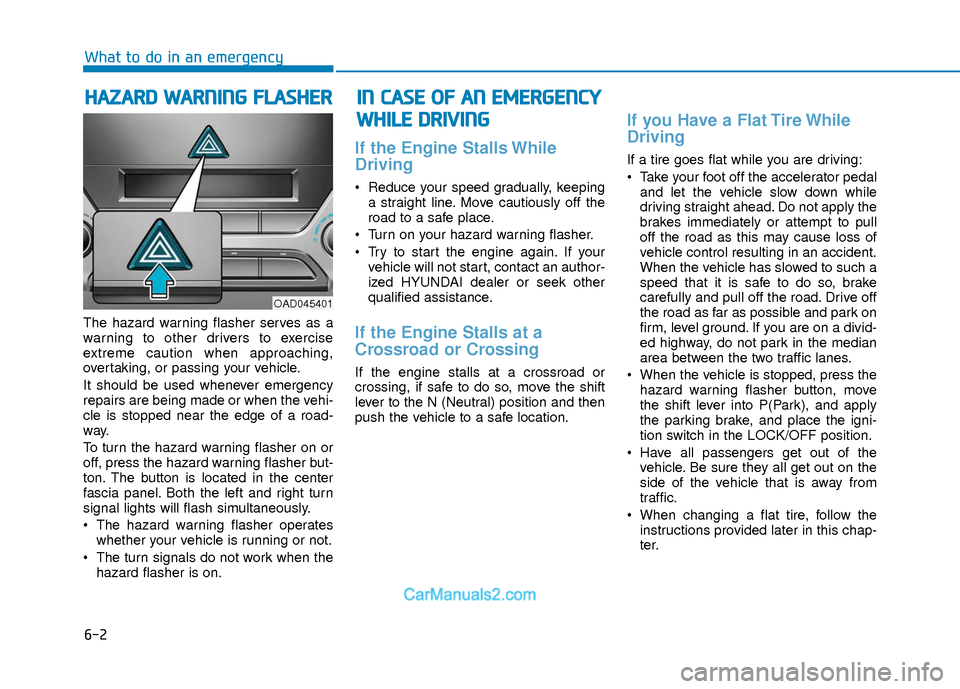
To turn the hazard warning flasher on or
off, press the hazard warning flasher but-
ton. The button is located in the center
fascia panel. Both the left and right turn
signal lights will flash simultaneously.
• The hazard warning flasher operates
whether your vehicle is running or not.
The turn signals do not work when the hazard flasher is on.
If the Engine Stalls While
Driving
Reduce your speed gradually, keepinga straight line. Move cautiously off the
road to a safe place.
Turn on your hazard warning flasher.
Try to start the engine again. If your vehicle will not start, contact an author-
ized HYUNDAI dealer or seek other
qualified assistance.
If the Engine Stalls at a
Crossroad or Crossing
If the engine stalls at a crossroad or
crossing, if safe to do so, move the shift
lever to the N (Neutral) position and then
push the vehicle to a safe location.
If you Have a Flat Tire While
Driving
If a tire goes flat while you are driving:
Take your foot off the accelerator pedaland let the vehicle slow down while
driving straight ahead. Do not apply the
brakes immediately or attempt to pull
off the road as this may cause loss of
vehicle control resulting in an accident.
When the vehicle has slowed to such a
speed that it is safe to do so, brake
carefully and pull off the road. Drive off
the road as far as possible and park on
firm, level ground. If you are on a divid-
ed highway, do not park in the median
area between the two traffic lanes.
When the vehicle is stopped, press the hazard warning flasher button, move
the shift lever into P(Park), and apply
the parking brake, and place the igni-
tion switch in the LOCK/OFF position.
Have all passengers get out of the vehicle. Be sure they all get out on the
side of the vehicle that is away from
traffic.
When changing a flat tire, follow the instructions provided later in this chap-
ter.
H HA
AZ
ZA
A R
RD
D
W
W A
AR
RN
N I
IN
N G
G
F
F L
LA
A S
SH
H E
ER
R
What to do in an emergency
I
IN
N
C
C A
A S
SE
E
O
O F
F
A
A N
N
E
E M
M E
ER
R G
G E
EN
N C
CY
Y
W
W H
HI
IL
L E
E
D
D R
RI
IV
V I
IN
N G
G
OAD045401