Page 275 of 526
![Hyundai Elantra 2018 Owners Manual 4-56
Multimedia System
Phone Menu (if equipped)
Press the [SETUP/CLOCK] button
�
Select [Phone]
Pair Phone
The following steps are the same as
those described in the section “Pairing on
the Steeri](/manual-img/35/14540/w960_14540-274.png "Hyundai Elantra 2018 Owners Manual 4-56
Multimedia System
Phone Menu (if equipped)
Press the [SETUP/CLOCK] button
�
Select [Phone]
Pair Phone
The following steps are the same as
those described in the section “Pairing on
the Steeri")
4-56
Multimedia System
Phone Menu (if equipped)
Press the [SETUP/CLOCK] button
�
Select [Phone]
Pair Phone
The following steps are the same as
those described in the section “Pairing on
the Steering wheel controls” on the previ-
ous page.
Bluetooth®Wireless Technology fea-
tures supported within the vehicle are
as follows. Some features may not be
supported depending on your
Bluetooth®Wireless Technology
device.
- Outgoing/Incoming Handsfree calls
- Operations during a call (Switch to Private, Switch to call waiting, MIC
on/off)
- Downloading Call History
- Downloading Mobile Contacts
-
Bluetooth®Wireless Technology
device auto connection
- Bluetooth
®Audio Streaming Up to five
Bluetooth®Wireless
Technology devices can be paired to
the Car Handsfree system.
Only one
Bluetooth®Wireless
Technology device can be connected
at a time.
Other devices cannot be paired while a
Bluetooth®Wireless Technology device is
connected.
Only
Bluetooth®Wireless Technology
Handsfree and Bluetooth®audio relat-
ed features are supported.
Bluetooth
®related operations are pos-
sible only within devices that support
Handsfree or audio features, such as a
Bluetooth®Wireless Technology
mobile phone or a Bluetooth®audio
device.
If a connected
Bluetooth®Wireless
Technology device becomes discon-
nected due to being out of communica-
tion range, turning the device OFF, or a
Bluetooth®Wireless Technology commu-
nication error, corresponding Bluetooth®
Wireless Technology devices are auto-
matically searched and reconnected. If the system becomes unstable due to
communication errors between the car
Handsfree and the
Bluetooth®
Wireless Technology device, reset the
device by turning off and back on
again. Upon resetting
Bluetooth®
Wireless Technology device, the system
will be restored.
After pairing is complete, a contacts download request is sent once to the
mobile phone. Some mobile phones
may require confirmation upon receiv-
ing a download request, ensure your
mobile phone accepts the connection.
Refer to your phones user’s manual for
additional information regarding phone
pairing and connections.
Page 276 of 526
4-57
Multimedia System
4
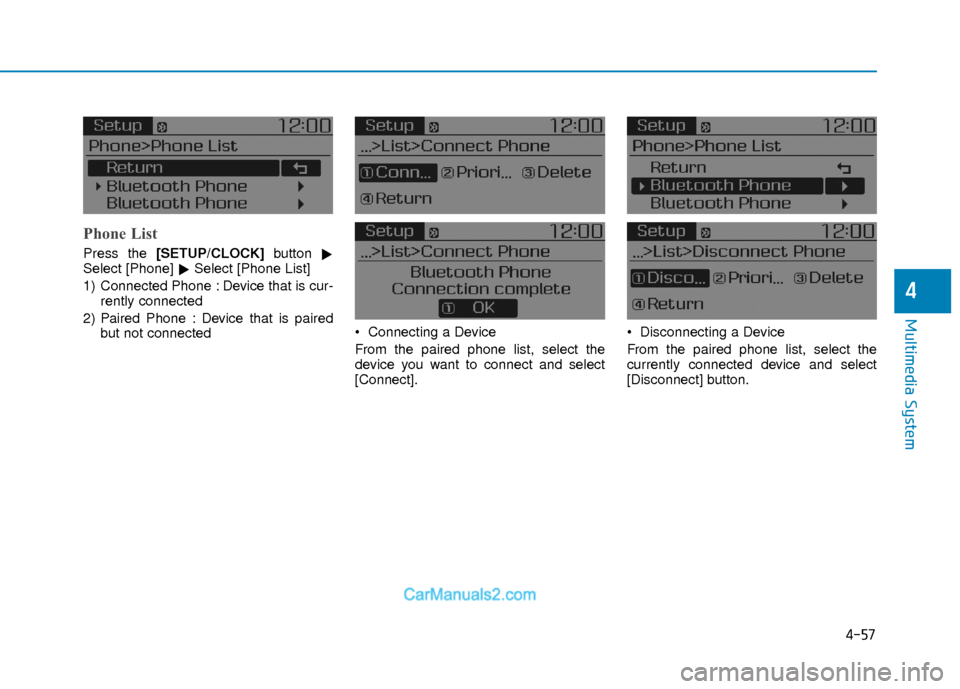
Phone List
Press the [SETUP/CLOCK] button
�
Select [Phone] �Select [Phone List]
1) Connected Phone : Device that is cur- rently connected
2) Paired Phone : Device that is paired but not connected Connecting a Device
From the paired phone list, select the
device you want to connect and select
[Connect]. Disconnecting a Device
From the paired phone list, select the
currently connected device and select
[Disconnect] button.
Page 278 of 526
![Hyundai Elantra 2018 Owners Manual 4-59
Multimedia System
4
Pairing a New Device
Press the [SETUP/CLOCK] button
�
Select [Phone] �Select [Pair Phone]
Bluetooth®Wireless Technology devices
can be paired with the audio system.
For more](/manual-img/35/14540/w960_14540-277.png "Hyundai Elantra 2018 Owners Manual 4-59
Multimedia System
4
Pairing a New Device
Press the [SETUP/CLOCK] button
�
Select [Phone] �Select [Pair Phone]
Bluetooth®Wireless Technology devices
can be paired with the audio system.
For more")
4-59
Multimedia System
4
Pairing a New Device
Press the [SETUP/CLOCK] button
�
Select [Phone] �Select [Pair Phone]
Bluetooth®Wireless Technology devices
can be paired with the audio system.
For more information, refer to the “Pairing
through Phone Setup” section within
Bluetooth®Wireless Technology.Viewing Paired Phone List
Press the [SETUP/CLOCK] button
�
Select [Phone] �Select [Phone List]
This feature is used to view mobile
phones that have been paired with the
audio system. Upon selecting a paired
phone, the setup menu is displayed.
For more information, refer to the “Setting
Bluetooth®Wireless Technology
Connection” section within Bluetooth®
Wireless Technology. 1) Connect/Disconnect Phone :
Connect/Disconnects currently select-
ed phone
2) Change Priority : Sets currently selected phone to highest connection
priority
3) Delete : Deletes the currently selected phone
4) Return : Moves to the previous screen
To learn more about whether your mobile phone supports contact down-
loads, refer to your mobile phone
user’s manual.
The contacts for only the connected phone can be downloaded
Page 279 of 526
4-60
Multimedia System
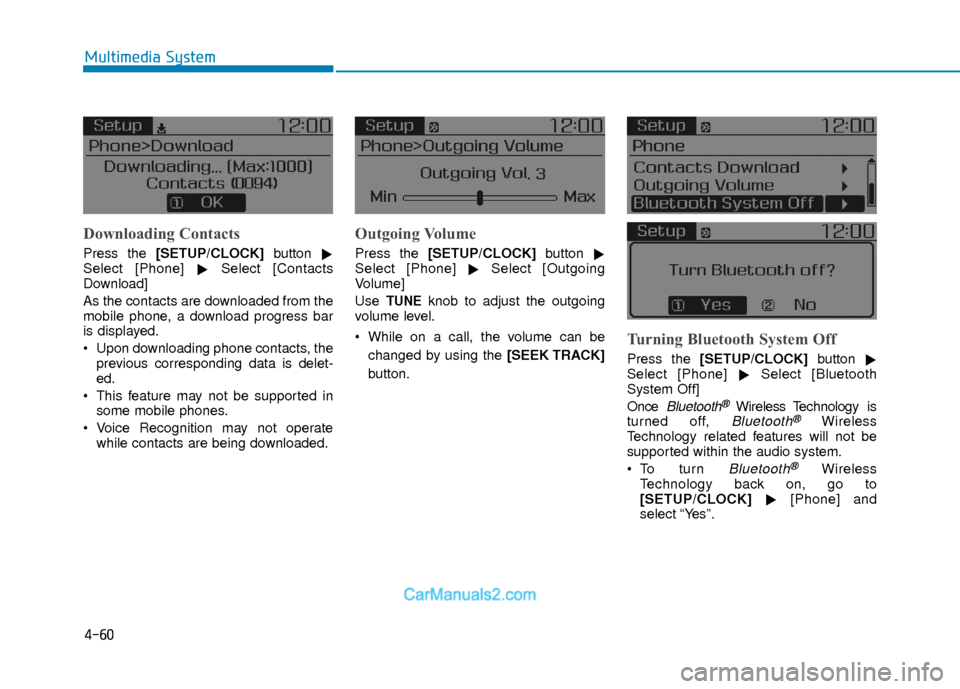
Downloading Contacts
Press the [SETUP/CLOCK] button
�
Select [Phone] �Select [Contacts
Download]
As the contacts are downloaded from the
mobile phone, a download progress bar
is displayed.
Upon downloading phone contacts, the previous corresponding data is delet-
ed.
This feature may not be supported in some mobile phones.
Voice Recognition may not operate while contacts are being downloaded.
Outgoing Volume
Press the [SETUP/CLOCK] button
�
Select [Phone] �Select [Outgoing
Volume]
Use
TUNEknob to adjust the outgoing
volume level.
While on a call, the volume can be
changed by using the [SEEK TRACK]
button.
Turning Bluetooth System Off
Press the [SETUP/CLOCK] button
�
Select [Phone] �Select [Bluetooth
System Off]
Once
Bluetooth®Wireless Technology is
turned off, Bluetooth®Wireless
Technology related features will not be
supported within the audio system.
Bluetooth®Wireless
Technology back on, go to
[SETUP/CLOCK] �[Phone] and
select “Yes”.
Page 280 of 526
4-61
Multimedia System
4
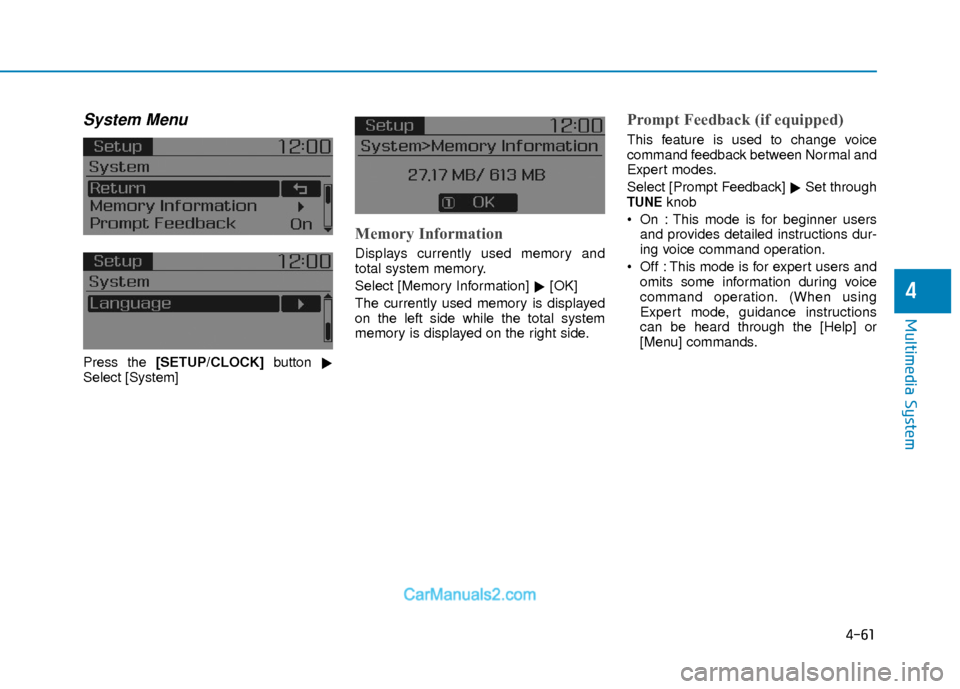
System Menu
Press the [SETUP/CLOCK] button
�
Select [System]
Memory Information
Displays currently used memory and
total system memory.
Select [Memory Information] �[OK]
The currently used memory is displayed
on the left side while the total system
memory is displayed on the right side.
Prompt Feedback (if equipped)
This feature is used to change voice
command feedback between Normal and
Expert modes.
Select [Prompt Feedback] �Set through
TUNEknob
On : This mode is for beginner users and provides detailed instructions dur-
ing voice command operation.
Off : This mode is for expert users and omits some information during voice
command operation. (When using
Expert mode, guidance instructions
can be heard through the [Help] or
[Menu] commands.
Page 387 of 526

6-6
What to do in an emergency
If your temperature gauge indicates over-
heating, you experience a loss of power,
or hear loud pinging or knocking, the
engine may be overheating. If this hap-
pens, you should:
1. Pull off the road and stop as soon asit is safe to do so.
2. Place the shift lever in P (Park) and set the parking brake. If the air condi-
tioning is ON, turn it OFF.
3. If engine coolant is running out under the vehicle or steam is coming out
from the hood, stop the engine. Do not
open the hood until the coolant has
stopped running or the steaming has
stopped. If there is no visible loss of
engine coolant and no steam, leave
the engine running and check to be
sure the engine cooling fan is operat-
ing. If the fan is not running, turn the
engine off. 4. Check for coolant leaking from the
radiator, hoses or under the vehicle. (If
the air conditioning had been in use, it
is normal for cold water to be draining
from it when you stop.)
5. If engine coolant is leaking out, stop the engine immediately and call the
nearest authorized HYUNDAI dealer
for assistance. 6. If you cannot find the cause of the
overheating, wait until the engine tem-
perature has returned to normal.
Then, if coolant has been lost, careful-
ly add coolant to the reservoir to bring
the fluid level in the reservoir up to the
halfway mark.
7. Proceed with caution, keeping alert for further signs of overheating. If over-
heating happens again, call an author-
ized HYUNDAI dealer for assistance.
I IF
F
T
T H
H E
E
E
E N
N G
GI
IN
N E
E
O
O V
VE
ER
R H
H E
EA
A T
TS
S
While the engine is run-
ning, keep hands, cloth-
ing and tools away from
the moving parts such
as the cooling fan and
drive belt to prevent
serious injury.
WARNING
Your vehicle is
equipped with a pres-
surized coolant reserve
tank. NEVER remove
the coolant reserve tank
cap or the radiator drain plug while
the engine and radiator are HOT.
Hot coolant and steam may blow
out under pressure, causing seri-
ous injury.
Turn the engine off and wait until
the engine cools down. Use
extreme care when removing the
coolant reserve tank cap. Wrap a
towel or thick rag around it, and
turn it counterclockwise slowly to
release some of the pressure from
the system. Step back while the
pressure is released.
(Continued)
(Continued)
When you are sure all the pressure
has been released, continue turn-
ing the cap counterclockwise to
remove it.
WARNING
Serious loss of coolant indicates a
leak in the cooling system and
should be checked as soon as pos-
sible by an authorized HYUNDAI
dealer.
CAUTION
Page 450 of 526
7-32
Maintenance
By jump starting
After a jump start from a good battery,
drive the vehicle for 20-30 minutes before
it is shutoff. The vehicle may not restart if
you shut it off before the battery had a
chance to adequately recharge. See
"Jump Starting" in chapter 6 for more
information on jump starting procedures.
Information
An inappropriately disposedbattery can be harmful to the
environment and human
health.
Dispose the battery according to your local
law(s) or regulation.
Reset Features
The following items may need to be reset
after the battery has been discharged or
the battery has been disconnected.
Power Windows
Trip Computer
Climate Control System
Clock
Audio System
Sunroof
i
(Continued)
The negative battery cable must
be removed first and installed
last when the battery is discon-
nected. Disconnect the battery
charger in the following order:
(1) Turn off the battery charger main switch.
(2) Unhook the negative clamp
from the negative battery ter-
minal.
(3) Unhook the positive clamp
from the positive battery ter-
minal.
Always use a genuine HYUNDAI
approved battery when you
replace the battery.
Page 468 of 526
7-50
Maintenance
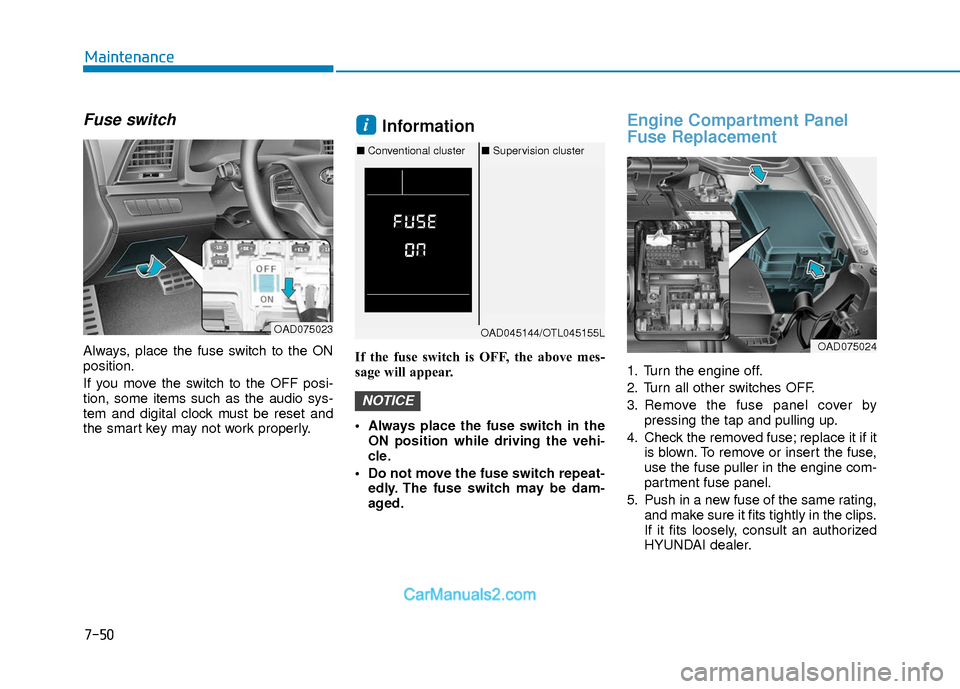
Fuse switch
Always, place the fuse switch to the ON
position.
If you move the switch to the OFF posi-
tion, some items such as the audio sys-
tem and digital clock must be reset and
the smart key may not work properly.
Information
If the fuse switch is OFF, the above mes-
sage will appear.
Always place the fuse switch in theON position while driving the vehi-
cle.
Do not move the fuse switch repeat- edly. The fuse switch may be dam-
aged.
Engine Compartment Panel
Fuse Replacement
1. Turn the engine off.
2. Turn all other switches OFF.
3. Remove the fuse panel cover by pressing the tap and pulling up.
4. Check the removed fuse; replace it if it is blown. To remove or insert the fuse,
use the fuse puller in the engine com-
partment fuse panel.
5. Push in a new fuse of the same rating, and make sure it fits tightly in the clips.
If it fits loosely, consult an authorized
HYUNDAI dealer.
NOTICE
i
OAD075023OAD045144/OTL045155L
■Conventional cluster ■Supervision cluster
OAD075024