Page 145 of 472

3-60
Convenient features of your vehicle
Overspeed Warning
Light (if equipped)
This warning light blinks:
When you drive the vehicle more
than 120 km/h.
- This is to prevent you from driving
your vehicle with overspeed.
- The overspeed warning chime also
sound for approximately 5 seconds.
Master Warning Light
(if equipped)
This indicator light illuminates :
When the remaining mileage or time
is 0 on the “Service Interval” in the
cluster.
If the service interval setting is reset,
the master warning light turns off.
Glow Indicator Light
(Diesel Engine)
This indicator light illuminates:
When the engine is being preheated
with the ignition switch or Engine
Start/Stop button in the ON position.
- The engine can be started after the
glow indicator light goes off.
- The illumination time varies with
the engine coolant temperature, air
temperature, and battery condition.
If the indicator light remains on or
blinks after the engine has warmed
up or while driving, there may a mal-
function with the engine preheating
system.
In this case, we recommend that you
have the vehicle inspected by an
authorized HYUNDAI dealer.
Information - Engine
Preheating
If the engine does not start within 10
seconds after the preheating is com-
pleted, set the ignition switch or
Engine Start/Stop button to the
LOCK or OFF position for 10 seconds
and then to the ON position in order
to preheat the engine again.i120km/h
Page 146 of 472

3-61
Convenient features of your vehicle
3
KEY OUT Indicator
Light (if equipped)
When the Engine Start/Stop button
is in the ACC or ON position, if any
door is open, the system checks for
the smart key.
This indicator light blinks:
When the smart key is not in the
vehicle and any door is open with the
ignition switch or Engine Start/Stop
button in the ACC or ON position.
- At this time, if you close all doors,
the chime will also sound for
approximately 5 seconds.
- The indicator will go off while the
vehicle is moving.
Warning Messages
(for Type B, if equipped)
Shift to "P" position
(for smart key system and auto-
matic transaxle)
This warning message is displayed if
you try to turn off the engine without
the shift lever in P (Park) position.
At this time, the Engine Start/Stop
button turns to the ACC position (If
you press the Engine Start/Stop but-
ton once more, it will turn to the ON
position).
Low Key Battery
(for smart key system)
This warning message is displayed if
the battery of the smart key is dis-
charged when the Engine Start/Stop
button is in the OFF position.
OGS045108
OLF044126L
KEY
OUT
Page 154 of 472
3-69
Convenient features of your vehicle
3
Trip computer mode
The trip computer mode displays
information related to vehicle driving
parameters including distance to
empty, fuel economy, trip meter infor-
mation and vehicle speed.
For more details, refer to “Trip
Computer” in this chapter.
Information mode
Service Interval
Service in
It calculates and displays when you
need a scheduled maintenance
service (mileage or days).
If the remaining mileage or time
reaches 1,500 km (900 miles) or 30
days, "Service in" message is dis-
played for several seconds each time
you set the ignition switch to the ON
position.
For the setting of the service inter-
val, refer to "User Settings Mode"
of the LCD display.Service required
If you exceed the specified service
interval, a message indicating,
"Service required" will be displayed
each time you turn ON the vehicle.
To reset the service interval, press
the OK button for more than 1 sec-
ond.
OGS048168LOGS048105L
OGS045106
Page 156 of 472
3-71
Convenient features of your vehicle
3
ItemsExplanation
Auto Lock
Disable : The auto door lock operation will be deactivated.
Enable on Speed : All doors will be automatically locked when the vehicle speed exceeds
15 km/h.
Enable on Shift : All doors will be automatically locked if the automatic transaxle shift lever is
shifted from the P (Park) position to the R (Reverse), N (Neutral), or D (Drive)
position.
Auto Unlock
Disable : The auto door unlock operation will be canceled.
Vehicle Off : All doors will be automatically unlocked when the ignition key is removed from the
ignition switch or the Engine Star/Stop button is set to the OFF position.
On Shift to P : All doors will be automatically unlocked if the automatic transaxle shift lever is
shifted to the P (Park) position.
Door
User settings mode
In this mode, you can change setting of the instrument cluster, doors, lamps, and so on.
Page 158 of 472
3-73
Convenient features of your vehicle
3
ItemsExplanation
Enable Service IntervalYou can activate or deactivate the service interval function.
Adjust IntervalIf the service interval menu is activated, you may adjust the time and distance.
Service Interval
ItemsExplanation
Fuel Economy Auto Reset
Off : The average fuel economy will not reset automatically whenever refueling.
After Ignition : The average fuel economy will reset automatically.
After Refueling : The average fuel economy will reset automatically when refueling.
For more details, refer to "Trip computer" in this chapter.
Fuel Economy UnitYou can select the fuel economy unit.(km/L, L/100, MPG)
Temperature UnitYou can select the temperature unit.(°C,°F)
Other
Page 162 of 472
3-77
Convenient features of your vehicle
3
The accumulated driving information
will continue to be counted while the
engine is still running (for example,
when the vehicle is in traffic or
stopped at a stop light).
Information
The vehicle must be driven for a min-
imum of 300 meters (0.19 miles) since
the last ignition key cycle before the
average fuel economy will be recalcu-
lated.
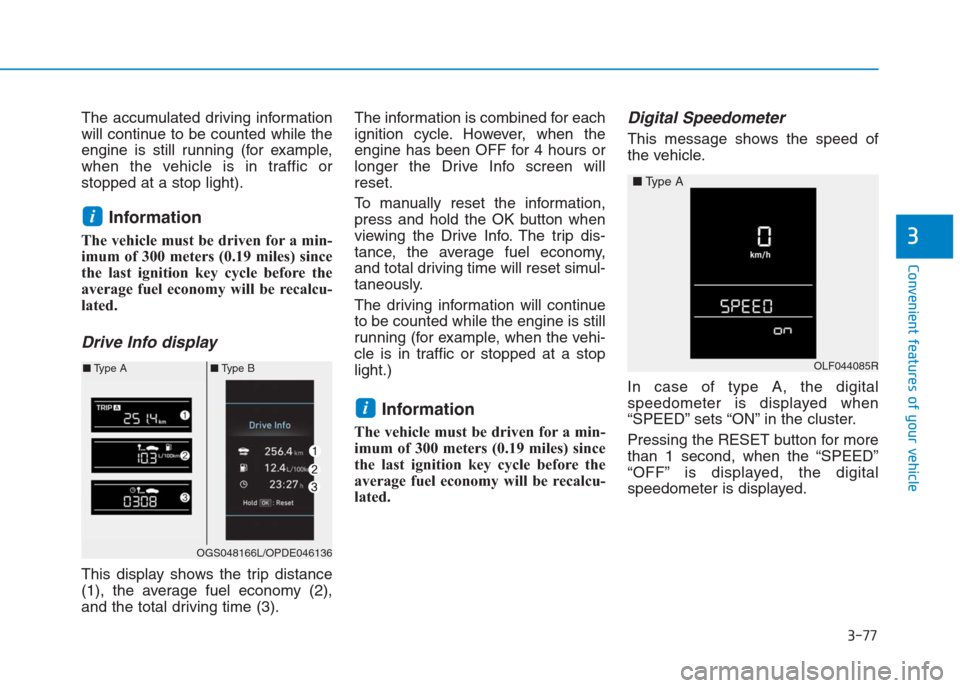
Drive Info display
This display shows the trip distance
(1), the average fuel economy (2),
and the total driving time (3).The information is combined for each
ignition cycle. However, when the
engine has been OFF for 4 hours or
longer the Drive Info screen will
reset.
To manually reset the information,
press and hold the OK button when
viewing the Drive Info. The trip dis-
tance, the average fuel economy,
and total driving time will reset simul-
taneously.
The driving information will continue
to be counted while the engine is still
running (for example, when the vehi-
cle is in traffic or stopped at a stop
light.)
Information
The vehicle must be driven for a min-
imum of 300 meters (0.19 miles) since
the last ignition key cycle before the
average fuel economy will be recalcu-
lated.
Digital Speedometer
This message shows the speed of
the vehicle.
In case of type A, the digital
speedometer is displayed when
“SPEED” sets “ON” in the cluster.
Pressing the RESET button for more
than 1 second, when the “SPEED”
“OFF” is displayed, the digital
speedometer is displayed.
i
i
OGS048166L/OPDE046136
■Type A■Type BOLF044085R
■Type A
Page 164 of 472
3-79
Convenient features of your vehicle
3
Information
The ignition switch must be in the ON
position to turn on the headlights.
Parking light position ( )
When the light switch is in the park-
ing light position, the parking (posi-
tion) light, license plate light and
instrument panel lights are turned
ON.
AUTO light position (if equipped)
When the light switch is in the AUTO
position, the parking (position) light
and headlights will be turned ON or
OFF automatically depending on the
amount of light outside the vehicle.
i
OLF044086R
OLF044086L
■Right Hand Drive
■Left Hand DriveOLF044085R
OLF044085L
■Right Hand Drive
■Left Hand Drive
Page 168 of 472

3-83
Convenient features of your vehicle
3
Front fog light (if equipped)
Fog lights are used to provide
improved visibility when visibility is
poor due to fog, rain or snow, etc.
1. Turn on the park light.
2. Move the light switch (1) to the
front fog light position.3. To turn off the front fog light, turn
the light switch to the front fog light
position again or turn off the park-
ing light.
When in operation, the fog lights
consume large amounts of vehicle
electrical power. Only use the fog
lights when visibility is poor.
Battery saver function
The purpose of this feature is to pre-
vent the battery from being dis-
charged. The system automatically
turns off the parking lights when the
driver removes the ignition key or
turns the engine off (for smart key)
and opens the driver-side door.
With this feature, the parking lights
will turn off automatically if the driver
parks on the side of road at night.
If necessary, to keep the lights on
when the ignition key is removed or
the engine is turned off (for smart
key), perform the following:
1) Open the driver-side door.
2) Turn the parking lights OFF and
ON again using the light switch on
the steering column.
NOTICE
OIB047008R
OIB047008L
■Right Hand Drive
■Left Hand Drive


