2018 Hyundai Accent power window
[x] Cancel search: power windowPage 15 of 442

1-4
Your vehicle at a glance
I
IN
N T
TE
ER
R I
IO
O R
R
O
O V
VE
ER
R V
V I
IE
E W
W
1. Door lock/unlock button ....................3-12
2. Side view mirror control switch ..........3-30
3. Central door lock switch ....................3-14
4 Power window lock switch* ................3-34
5. Power window switches* ..................3-31
6. Light control/Turn signals ..................3-84
7. Wiper/Washer ....................................3-91
8. Instrument panel illumination
control switch ....................................3-51
9. ESC OFF button ................................5-28
10. Hood release lever ..........................3-40
11. Fuel filler door opener ....................3-47
12. Trunk release lever ..........................3-41
13. Fuse box ..........................................7-47
14. Steering wheel ................................3-17
15. Steering wheel tilt/telescope lever ..3-18
16. Seat ..................................................2-3
OHCA017003
The actual shape may differ from the illustration.
Page 79 of 442

Convenient features of your vehicle
Accessing Your Vehicle .........................................3-3
Remote Key........................................................................\
.3-3
Smart Key ........................................................................\
....3-6
Immobilizer System .........................................................3-11
Door Locks ............................................................3-12
Operating Door Locks from Outside the Vehicle ....3-12
Operating door locks from inside the vehicle .........3-13
Auto Door Lock/Unlock Features ...............................3-16
Child-Protector Rear Door Locks ...............................3-16
Theft-Alarm System ............................................3-17
Steering Wheel .....................................................3-17
Electric Power Steering (EPS) .....................................3-17
Tilt Steering / Telescope Steering ..............................3-18
Heated steering wheel ...................................................3-19
Horn ........................................................................\
............3-19
Mirrors ...................................................................3-20
Inside Rearview Mirror ..................................................3-20
Side View Mirrors ...........................................................3-28
Windows ................................................................3-32
Power Windows ...............................................................3-32
Manual windows ..............................................................3-35
Sunroof..................................................................3-36
Sunroof opening and closing .......................................3-37
Sliding the sunroof .........................................................3-37
Tilting the sunroof ..........................................................3-37
Sunshade ........................................................................\
...3-38
Resetting the sunroof ....................................................3-38
Exterior Features .................................................3-41
Hood ........................................................................\
...........3-41
Trunk ........................................................................\
..........3-42
Smart Trunk ......................................................................3-\
44
Fuel Filler Door ................................................................3-48
Instrument Cluster ...............................................3-51
Instrument Cluster Control............................................3-52
Gauges and Meters ........................................................3-53
Transmission shift indicator .........................................3-56
Warning and Indicator Lights .......................................3-58
LCD Display Messages ...................................................3-68
LCD Display ...........................................................3-72
LCD Display Control ........................................................3-72
LCD Display Modes .........................................................3-72
Trip Computer .......................................................3-77
Type A ........................................................................\
........3-77
Type B ........................................................................\
........3-81
3
Page 80 of 442

Lighting..................................................................3-85
Exterior Lights .................................................................3-85
Interior Lights...................................................................3-90
Welcome System .............................................................3-91
Wipers and Washers ............................................3-92
Windshield Wipers...........................................................3-92
Windshield Washers .......................................................3-93
Driver Assist System ...........................................3-94
Rear View Monitor..........................................................3-94
Manual Climate Control System.........................3-95
Heating and Air Conditioning .......................................3-96
System Operation .........................................................3-100
System Maintenance....................................................3-102
Automatic Climate Control System ..................3-104
Automatic Heating and Air Conditioning.................3-105
Manual Heating and Air Conditioning......................3-106
System Operation .........................................................3-111
System Maintenance....................................................3-113
Windshield Defrosting and Defogging ............3-115
Auto Defogging System
(Only for Automatic Climate Control System) .......3-118
Rear Window Defroster ..............................................3-119
Storage Compartment .......................................3-120
Center Console Storage ..............................................3-120
Sliding Armrest ..............................................................3-120
Glove Box ........................................................................\
3-121
Sunglass Holder.............................................................3-121
Multi Box ........................................................................\
.3-122
Interior Features ................................................3-123
Cup Holder ......................................................................3-\
123
Sunvisor ........................................................................\
...3-124
Power Outlet ..................................................................3-125
Clock ........................................................................\
.........3-127
Clothes Hanger ..............................................................3-127
Floor Mat Anchor(s).....................................................3-128
Luggage Net Holder .....................................................3-1283
Page 81 of 442

3-3
Convenient features of your vehicle
Remote Key (if equipped)
Your HYUNDAI uses a remote key,
which you can use to lock or unlock
a door (and trunk) and even start the
engine.
1. Door Lock
2. Door Unlock
3. Trunk Unlock
4. Panic
Locking
To lock :
1. Close all doors, engine hood andtrunk.
2. Press the Door Lock button (1) on the remote key.
3. The hazard warning lights will blink and the chime will sound
once if the lock button is pressed
again within four seconds.
4. Make sure the doors are locked by checking the position of the door
lock button inside the vehicle.
Information
After locking the doors, if you press
the Door Lock button again within
four seconds, the hazard warning
lights will blink and the horn will
sound one time to confirm that the
doors are locked.
i
A AC
CC
CE
E S
SS
SI
IN
N G
G
Y
Y O
O U
UR
R
V
V E
EH
H I
IC
C L
LE
E
3
OHCA047001
Do not leave the keys in your
vehicle with unsupervised chil-
dren. Unattended children
could place the key in the igni-
tion switch and may operate
power windows or other con-
trols, or even make the vehicle
move, which could result in
serious injury or death.
WARNING
Page 85 of 442

3-7
Convenient features of your vehicle
Locking
To lock :
1. Close all doors, hood and trunk.
2. Either press the door handle but-ton or press the Door Lock button
(1) on the smart key.
3. The hazard warning lights will blink and the chime will sound
once.
4. When the doors are locked, the indicator light on the central door
lock/unlock switch will be illuminat-
ed.
Information
The door handle button will only
operate when the smart key is within
28~40 inches (0.7~1 m) from the out-
side door handle.
Even though you press the outside
door handle button, the doors will not
lock and the chime will sound for
three seconds if any of the following
occur:
The Smart Key is in the vehicle.
The Engine Start/Stop button is inACC or ON position.
Any door except the trunk is open.
Unlocking
To unlock:
1. Carry the Smart Key.
2. Either press the driver's outside door handle button or press the
Door Unlock button (2) on the
smart key.
i
3
OHCR046002OHCR046002
Do not leave the Smart Key in
your vehicle with unsupervised
children. Unattended children
could press the Engine Start/
Stop button and may operate
power windows or other con-
trols, or even make the vehicle
move, which could result in
serious injury or death.
WARNING
Page 92 of 442

3-14
Convenient features of your vehicle
If the inner door handle of the dri- ver's (or front passenger's) door is
pulled when the door lock button is
in the lock position, the button is
unlocked and door opens.
Front doors cannot be locked if the key is in the ignition switch and any
front door is open.
Doors cannot be locked if the smart key is in the vehicle and any
door is open.
When push the driver's door lock button (1) to the "Lock" position, all
vehicle doors will lock. (if
equipped)
When push the driver’s door lock button (1) to the "Unlock" position,
all vehicle doors will unlock. (if
equipped)
Information
If a power door lock ever fails to func-
tion while you are in the vehicle try
one or more of the following tech-
niques to exit:
• Operate the door unlock featurerepeatedly (both electronic and
manual) while simultaneously
pulling on the door handle.
• Operate the other door handles, front and rear.
• Lower a front window and use the mechanical key to unlock the door
from outside.
With the central door lock/unlock switch (if equipped)
When pressing the ( ) switch (1), all
vehicle doors will lock.
When pressing the ( ) switch (2), all
vehicle doors will unlock.
i
■ Driver’s side
OHCR046004■Passenger’s side
OHCA047699
Page 110 of 442
3-32
Convenient features of your vehicle
Power Windows (if equipped)
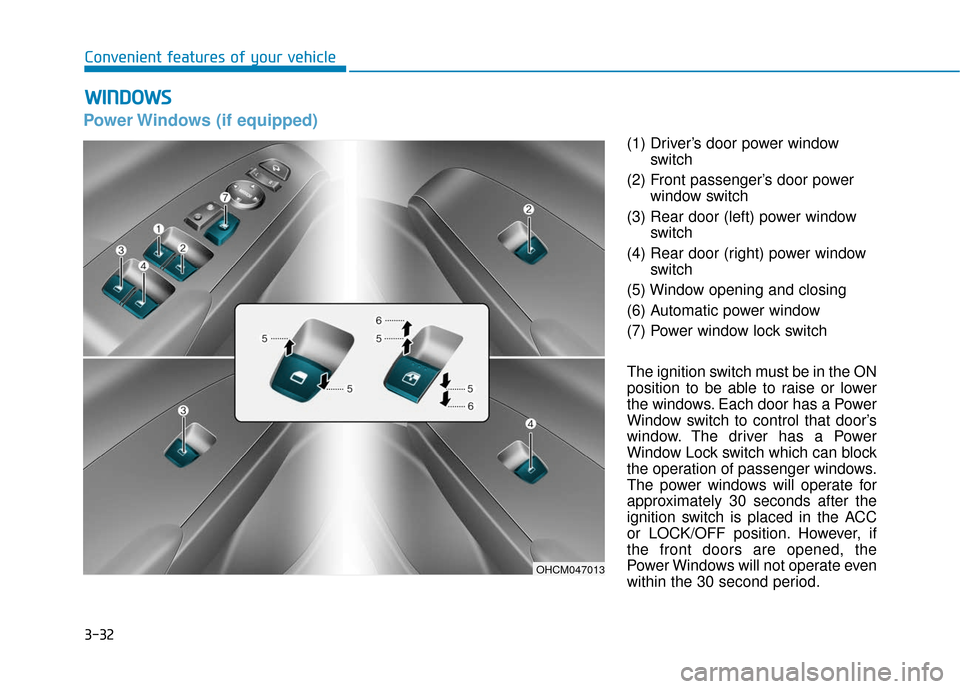
(1) Driver’s door power windowswitch
(2) Front passenger’s door power window switch
(3) Rear door (left) power window switch
(4) Rear door (right) power window switch
(5) Window opening and closing
(6) Automatic power window
(7) Power window lock switch
The ignition switch must be in the ON
position to be able to raise or lower
the windows. Each door has a Power
Window switch to control that door’s
window. The driver has a Power
Window Lock switch which can block
the operation of passenger windows.
The power windows will operate for
approximately 30 seconds after the
ignition switch is placed in the ACC
or LOCK/OFF position. However, if
the front doors are opened, the
Power Windows will not operate even
within the 30 second period.
W W I
IN
N D
DO
O W
W S
S
OHCM047013
Page 111 of 442
3-33
Convenient features of your vehicle
3
Information
• In cold and wet climates, power win-dows may not work properly due to
freezing conditions.
• While driving with the rear win- dows down or with the sunroof (if
equipped) opened (or partially
opened), your vehicle may demon-
strate a wind buffeting or pulsation
noise. This noise is normal and can
be reduced or eliminated by taking
the following actions. If the noise
occurs with one or both of the rear
windows down, partially lower both
front windows approximately one
inch. If you experience the noise
with the sunroof open, slightly close
the sunroof.
Window opening and closing
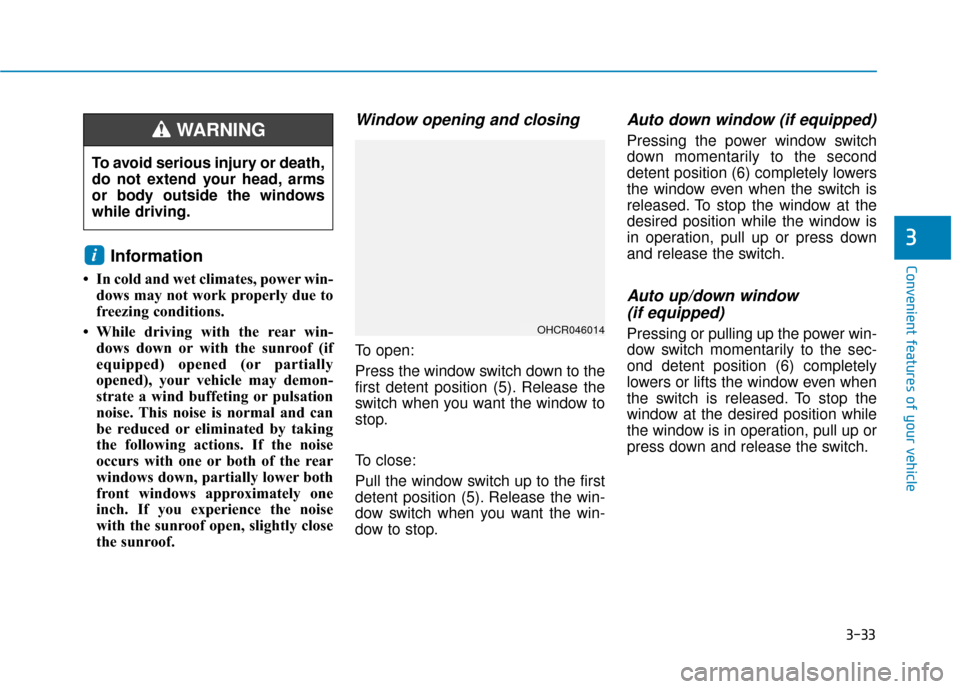
To open:
Press the window switch down to the
first detent position (5). Release the
switch when you want the window to
stop.
To close:
Pull the window switch up to the first
detent position (5). Release the win-
dow switch when you want the win-
dow to stop.
Auto down window (if equipped)
Pressing the power window switch
down momentarily to the second
detent position (6) completely lowers
the window even when the switch is
released. To stop the window at the
desired position while the window is
in operation, pull up or press down
and release the switch.
Auto up/down window (if equipped)
Pressing or pulling up the power win-
dow switch momentarily to the sec-
ond detent position (6) completely
lowers or lifts the window even when
the switch is released. To stop the
window at the desired position while
the window is in operation, pull up or
press down and release the switch.
i
To avoid serious injury or death,
do not extend your head, arms
or body outside the windows
while driving.
WARNING
OHCR046014