2018 HONDA RIDGELINE Traction mode
[x] Cancel search: Traction modePage 13 of 623

11
Quick Reference Guide
Instrument Panel (P73)
System Indicators
Malfunction Indicator
Lamp
Low Oil Pressure
Indicator
Charging System
IndicatorAnti-lock Brake System
(
ABS ) Indicator
Vehicle Stability Assist
(VSA®
) System Indicator
VSA ® OFF Indicator
Electric Power Steering
(EPS) System Indicator
Lights Indicators
Lights On Indicator
High Beam Indicator
Immobilizer System
Indicator
Seat Belt Reminder
Indicator
System Indicators
System Message
IndicatorParking Brake and
Brake System
Indicator (Red)Supplemental
Restraint System
Indicator
Low Fuel Indicator
Gauges (P103)/Multi-Information Display (P104)/System Indicators (P74)
Low Tire Pressure/
TPMS Indicator Turn Signal and
Hazard Warning
Indicators
Smart Entry System
Indicator Ambient Meter Shift Lever
Position Indicator
Fuel Gauge
Tachometer
Temperature
Gauge
Speedometer
Multi-Information Display
Brake System
Indicator (Amber)
All-wheel drive system
(AWD ) Indicator*
Blind spot information
(BSI) Indicator*
System Indicators
Collision Mitigation Braking
SystemTM (CMBSTM) Indicator*
Road Departure Mitigation
(RDM) Indicator*
Security System Alarm
Indicator
U.S.
Canada U.S.
Canada
Fog Light Indicator*
ECON Mode Indicator
Auto high-beam
Indicator
*
Lane Keeping Assist
System ( LKAS) Indicator*
CRUISE MAIN
Indicator*
CRUISE CONTROL
Indicator*
Adaptive Cruise
Control (ACC )
Indicator
*
Intelligent Traction
Management Indicator
Bed Lights On Indicator
* Not available on all models
Page 23 of 623

21
Quick Reference Guide
VSA® OFF Button (P477)
● The vehicle stability assist (VSA® ) system
helps stabilize the vehicle during
cornering, and helps maintain traction
while accelerating on loose or slippery
road surfaces.
● VSA ® comes on automatically every time
you start the engine.
● To partially disable or fully restore VSA ®
function, press and ho ld the button until
you hear a beep.
Cruise Control* (P445)
● Cruise control allows you to maintain a
set speed without keeping your foot on
the accelerator pedal.
● To use cruise control, press the CRUISE
button, then press the – /SET button once
you have achieved the desired speed
(above 25 mph or 40 km/h).
Collision Mitigation
Braking System
TM
(CMBS
TM) OFF Button*
(P495)
● When a possible collision is likely
unavoidable, the CMBS
TM can help you to
reduce the vehicle speed and the severity
of the collision.
● To turn the CMBS
TM on or off, press and
hold the button until you hear a beep.
Tire Pressure Monitoring System (TPMS) (P480, 588)
● TPMS monitors tire pressure.
● TPMS is turned on automatically every time you start the engine.
● TPMS fill assist provides audible and visual guidance during tire pressure adjustment.
Refueling (P512)
aPress the fuel fill
door release button.
bAfter refueling,
wait for about five
seconds before
removing the filler
nozzle.
Fuel recommendation: Unleaded gasoline with a pump octane number
87 or higher recommended
Fuel tank capacity: 19.5 US gal (73.8 ℓ)
* Not available on all models
Page 81 of 623

79
uuIndicators u
Continued
Instrument Panel
IndicatorNameOn/BlinkingExplanationMessage
Vehicle Stability
Assist (VSA ®) OFF
Indicator
●Comes on for a few seconds
when you set the power mode to
ON, then goes off.
——
●Comes on when VSA ® OFF switch
is pressed.●Appears when Normal or Snow Mode is
selected.
2 VSA ® On and Off P. 477
●Comes on when Mud/Sand mode
is selected by pressing Intelligent
Traction Management System
switch.
●Appears when Mud Mode is selected.
2Intelligent Traction Management P. 443
●Appears when Sand Mode is selected.
2Intelligent Traction Management P. 443
●Appears when Mud or Sand Mode is
selected. To turn VSA® on, select Normal or
Snow.
2Intelligent Traction Management P. 443
AWD models
Page 98 of 623

96
uuIndicators uMulti-Information Display Warn ing and Information Messages
Instrument Panel
MessageConditionExplanation
●Appears when pressing the Intelligent Traction
Management button.
2Intelligent Traction Management P. 443
MessageConditionExplanation
●Appears if there is a problem with the headlights.●Appears while driving - The low beam headlights
may not be on. When conditions allow you to drive
safety, have your vehicle chec ked by a dealer as soon as
possible.
AWD models
2WD models
Models with LED low beam headlights
Page 228 of 623

uuAudio System Basic Operation uAudio/Information Screen
226
Features
■Using the audio/information screen
Select to go to the home screen.
Select Phone , Info , Audio , Settings , Navigation
*, HondaLink , Smartphone
Connection , or Truck Bed Audio*.
■Phone
Displays the HFL information.
2 Bluetooth® HandsFreeLink ® P. 376
1 Using the audio/in formation screen
Touchscreen Operation
•Use simple gestures - in cluding touching, swiping,
and scrolling - to operate certain audio functions.
•Some items may be grayed out during driving to
reduce the potential for distraction.
•You can select them when the vehicle is stopped or
use voice commands.
•Wearing gloves may limit or prevent touchscreen
response.
•You can use the microfiber cleaning cloth included
in your owner’s kit to remo ve dust or fingerprints
from the touchscreen.
You can change the touchs creen sensitivity setting.
2 Customized Features P. 317
Home Screen
Models without
navigation system
Models with
navigation system
(Home) Icon
* Not available on all models
Page 316 of 623
314
uuGeneral Information on the Audio System uLegal Information on Apple CarPlay/Android Auto
Features
Models with Display Audio
Legal Information on Ap ple CarPlay/Android Auto
USE OF APPLE CARPLAY IS SUBJECT TO YOUR AGREEMENT TO THE CARPLAY TERMS OF USE, WHICH ARE INCLUDED AS PART OF THE
APPLE iOS TERMS OF USE. IN SUMMARY, THE CARPLAY TERMS OF USE DISCLAIM APPLE AND I TS SERVICE PROVIDERS’ LIABILITY IF THE
SERVICES FAIL TO PERFORM CORRECTLY OR ARE DISCONTINUED, STRICTLY LIMIT APPLE AND ITS SERVICE PROVIDERS’ OTHER
LIABILITIES, DESCRIBE THE KINDS OF USER INFORMATION (INCLUDING, FOR EXAMPLE, VE HICLE LOCATION, VEHICLE SPEED, AND
VEHICLE STATUS) BEING GATHERED AND STORED BY APPLE AND I TS SERVICE PROVIDERS, AND DISCLOSE CERTAIN POSSIBLE RISKS
ASSOCIATED WITH THE USE OF CARPLAY, INCLUDING THE POTENTI AL FOR DRIVER DISTRACTION. SEE APPLE’S PRIVACY POLICY FOR
DETAILS REGARDING APPLE'S USE AND HANDLING OF DATA UPLOADED BY CARPLAY.
USE OF ANDROID AUTO IS SUBJECT TO YOUR AGREEMENT TO THE ANDROID AUTO TERMS OF USE WHICH MUST BE AGREED TO WHEN
THE ANDROID AUTO APPLICATION IS DOWNLOADED TO YOUR ANDROI D PHONE. IN SUMMARY, THE ANDROID AUTO TERMS OF USE
DISCLAIM GOOGLE AND ITS SERVICE PROVIDERS’ LIABILITY IF THE SERVICES FAIL TO PERFORM CORRECTLY OR ARE DISCONTINUED,
STRICTLY LIMIT GOOGLE AND ITS SERVICE PROVIDERS’ OTHER LIABILIT IES, DESCRIBE THE KINDS OF USER INFORMATION (INCLUDING,
FOR EXAMPLE, VEHICLE LOCATION, VEHICLE SPEED, AND VEHI CLE STATUS) BEING GATHERED AND STORED BY GOOGLE AND ITS
SERVICE PROVIDERS, AND DISCLOSE CERT AIN POSSIBLE RISKS ASSOCIATED WITH TH E USE OF ANDROID AUTO, INCLUDING THE
POTENTIAL FOR DRIVER DISTRACTION. SEE GOOGLE’S PRIVACY POLICY FOR DETAIL S REGARDING GOOGLE’S USE AND HANDLING OF
DATA UPLOADED BY ANDROID AUTO.
■OWNER’S MANUAL LICENSE/LIABILITY STATEMENTS
Page 411 of 623

409
Driving
This chapter discusses driving and refueling.
Before Driving................................... 410
Towing a Trailer ................................ 418
Off-Highway Driving Guidelines ..... 430
When Driving Starting the Engine .......................... 432
Precautions While Driving................. 438
Automatic Transmission ................... 439
Shifting ............................................ 440
ECON Button ................................... 442
Intelligent Traction Management...... 443
Cruise Control
*................................ 445
Front Sensor Camera*...................... 448Road Departure Mi tigation (RDM)
System*...................................... 450
Adaptive Cruise Control (ACC)*....... 455
Lane Keeping Assist System (LKAS)*.... 468Vehicle Stability Assist (VSA ®), aka Electronic
Stability Control (ESC), System ............. 476
Agile Handling Assist ....................... 478
i-VTM4 (Intelligent Variable Torque
Management)-4 ® System
*.............. 479
TPMS with Tire Fill Assist .................. 480
Tire Pressure Monitoring System (TPMS) -
Required Federal Explanation ......... 482
Blind spot inform ation (BSI) System
*.... 484
LaneWatchTM*.................................. 486 Braking
Brake System ................................... 488
Anti-lock Brake System (ABS) ........... 490
Brake Assist System ......................... 491
Collision Mitigation Braking System
TM
(CMBSTM)*..................................... 492
Parking Your Vehicle When Stopped ................................ 501
Parking Sensor System
*................... 502
Cross Traffic Monitor*..................... 506
Multi-View Rear Camera .................. 510
Refueling Fuel Information .............................. 512
How to Refuel ................................. 513
Fuel Economy and CO
2 Emissions .... 515
* Not available on all models
Page 422 of 623
420
uuTowing a Trailer uTowing Preparation
Driving
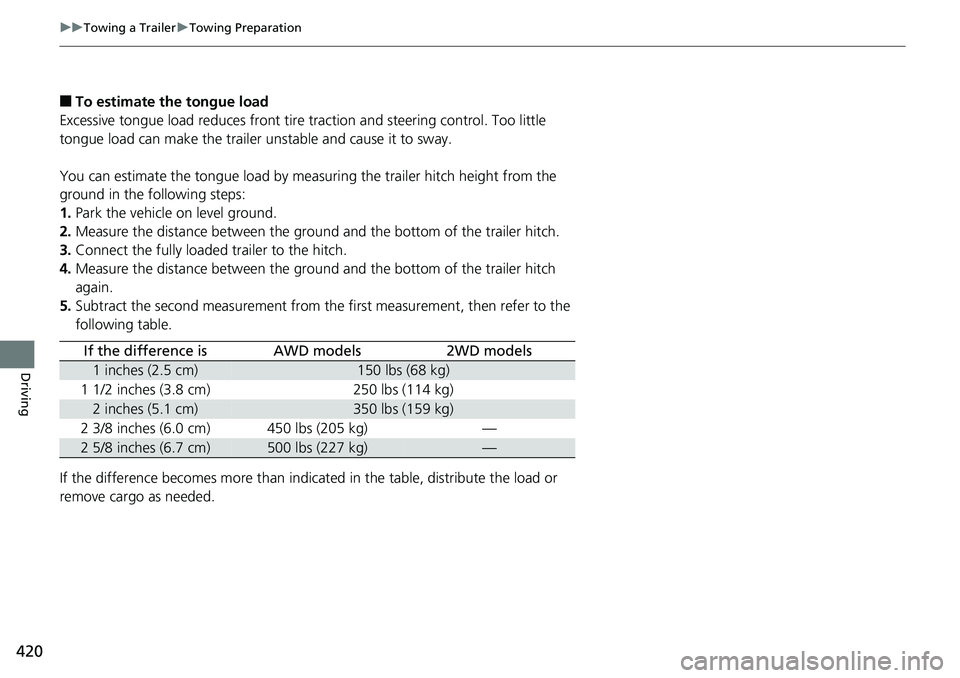
■To estimate the tongue load
Excessive tongue load reduces front tire traction and steering control. Too little
tongue load can make the trailer unstable and cause it to sway.
You can estimate the tongue load by meas uring the trailer hitch height from the
ground in the following steps:
1. Park the vehicle on level ground.
2. Measure the distance between the ground and the bottom of the trailer hitch.
3. Connect the fully loaded trailer to the hitch.
4. Measure the distance between the ground and the bottom of the trailer hitch
again.
5. Subtract the second measurement from th e first measurement, then refer to the
following table.
If the difference becomes more than indicated in the table, distribute the load or
remove cargo as needed.
If the difference isAWD models2WD models
1 inches (2.5 cm)150 lbs (68 kg)
1 1/2 inches (3.8 cm)250 lbs (114 kg)
2 inches (5.1 cm)350 lbs (159 kg)
2 3/8 inches (6.0 cm)450 lbs (205 kg)—
2 5/8 inches (6.7 cm)500 lbs (227 kg)—