Page 341 of 695
339
uuBlu-ray/DVD Rear Entertainment System*uAuxiliary Console Panel
Features
Auxiliary Console Panel
Auxiliary input jacks and headphone connectors for the Blu-ray/DVD rear
entertainment system are on the back of the center console compartment.
V = Video jack
L = Left audio jack
R = Right audio jack
■Auxiliary Input Jacks
The system will accept auxiliary inputs from standard video games and video
equipment. Some video game power s upplies may cause poor picture quality.
■Headphone Connector
The headphones can also be used by connecting to the auxiliary console panel.
There are two headphone connectors for th e rear passengers. Each connector has
its own volume control.
Auxiliary Input Jacks
18 PILOT-31TG76200.book 339 ページ 2018年3月30日 金曜日 午前11時51分
Page 348 of 695
346
uuBlu-ray/DVD Rear Entertainment System*uPlaying a DVD/Blu-rayTM*
Features
1. Press the SETUP button on the remote to
display the SETUP screen.
2. Select an item and then press the ENTER
button on the remote.
The following items are available:
• Display Adjust : Adjusts the screen's preferences.
2Adjusting the Screen P. 347
•Aspect Ratio : Selects an aspect ratio of the image.
2Setting the Aspect Ratio P. 348
•PERSONAL SURROUND : Sets the surround of the wireless headphones.
2Setting the Personal Surround P. 348
•Language : Sets the system language used on all screens.
2Setting the Language P. 349
After you make all the adjustments, the sc reen goes back to the top SETUP screen,
or press the CANCEL button to return.
■Screen and Surround Settings
18 PILOT-31TG76200.book 346 ページ 2018年3月30日 金曜日 午前11時51分
Page 369 of 695
367Continued
Features
Customized Features
Use the audio/information screen to customize certain features.
■How to customize
While the vehicle is at a complete stop with the power ON, press the MENU/CLOCK
button, then select Settings. To customize the phone se ttings, press the button,
then select Phone Setup .
1Customized Features
When you customize settings, make sure that the
vehicle is at a complete stop and shift to
(P.Models with color audio system
1 How to customize
These indications are used to show how to operate
the selector knob.
Rotate to select.
Press to enter.
To customize other features, select Settings, rotate
, then press .
2 List of customizable options P. 371
Audio/Information Screen
MENU/CLOCK Button
Selector Knob
(Phone) Button
18 PILOT-31TG76200.book 367 ページ 2018年3月30日 金曜日 午前11時51分
Page 372 of 695
370
uuCustomized Features u
Features
Press the button and rotate to select Phone Setup, then press .
RingtoneFixed
Mobile Phone
Bluetooth SetupAdd New Device
Connect a Phone
Connect an Audio Device
Disconnect All Devices
Delete Device
Pass-Key
Speed Dial
Caller ID InfoName Priority
Number Priority
System Clear
18 PILOT-31TG76200.book 370 ページ 2018年3月30日 金曜日 午前11時51分
Page 375 of 695
373
uuCustomized Features u
Continued
Features
*1:Default Setting
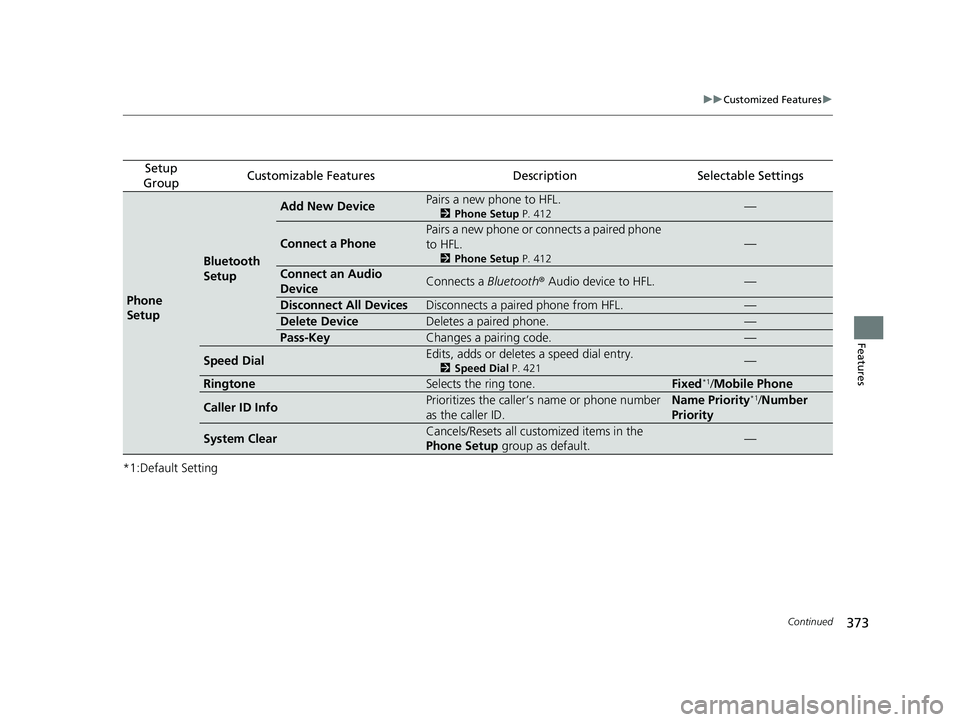
Setup
GroupCustomizable FeaturesDescriptionSelectable Settings
Phone
Setup
Bluetooth
Setup
Add New DevicePairs a new phone to HFL.
2 Phone Setup P. 412—
Connect a Phone
Pairs a new phone or connects a paired phone
to HFL.
2Phone Setup P. 412
—
Connect an Audio
DeviceConnects a Bluetooth® Audio device to HFL.—
Disconnect All DevicesDisconnects a paired phone from HFL.—
Delete DeviceDeletes a paired phone.—
Pass-KeyChanges a pairing code.—
Speed DialEdits, adds or deletes a speed dial entry.
2Speed Dial P. 421—
RingtoneSelects the ring tone.Fixed*1/Mobile Phone
Caller ID InfoPrioritizes the caller’s name or phone number
as the caller ID.Name Priority*1/Number
Priority
System ClearCancels/Resets all customized items in the
Phone Setup group as default.—
18 PILOT-31TG76200.book 373 ページ 2018年3月30日 金曜日 午前11時51分
Page 377 of 695
375
uuCustomized Features u
Continued
Features
■Customization flow
Select Settings .
Brightness
Contrast
Black Level
Sound/Beep
System
DisplayDisplay Settings
Background Color
Guidance Volume
Text Message Volume
Select .
Voice RecogVoice Prompt
Blue
Amber
Red
Violet
Voice Recog. Volume
Beep Volume
Voice Recog. Volume
Song by Voice*
Song by Voice Phonetic Modification*
Phonebook Phonetic Modification
Automatic Phone Sync
One Press Voice Operation
* Not available on all models
18 PILOT-31TG76200.book 375 ページ 2018年3月30日 金曜日 午前11時51分
Page 384 of 695
382
uuCustomized Features u
Features
Bluetooth Device List
Default
PhonePhone
Edit Speed Dial
Ring Tone
Auto Transfer
HondaLink Assist
Text/EmailEnable Text/Email
Select Account
New Message Notification
Cross Traffic Monitor*
Camera
Show with Turn SignalLaneWatch*
Display Time after Turn Signal Off
Reference Line
Default
Rear CameraFixed Guideline
Dynamic Guideline
Default
Automatic Phone Sync
* Not available on all models
18 PILOT-31TG76200.book 382 ページ 2018年3月30日 金曜日 午前11時51分
Page 385 of 695
383
uuCustomized Features u
Continued
Features
Bluetooth On/Off Status
Default
Bluetooth/Wi-FiBluetooth
Bluetooth Device List
Edit Pairing Code
Wi-FiWi-Fi On/Off Status
Wi-Fi Network List
Wi-Fi Information
Default
Rear Audio*
Rear Control
Auto Speaker
Apple CarPlaySmartphone
Android Auto
* Not available on all models
18 PILOT-31TG76200.book 383 ページ 2018年3月30日 金曜日 午前11時51分