2018 HONDA ODYSSEY stop start
[x] Cancel search: stop startPage 239 of 763
Continued237
uuInterior Lights/Interior Convenience Items uInterior Convenience Items
Controls
■When charging does not start
Perform one of the solutions in the following table.
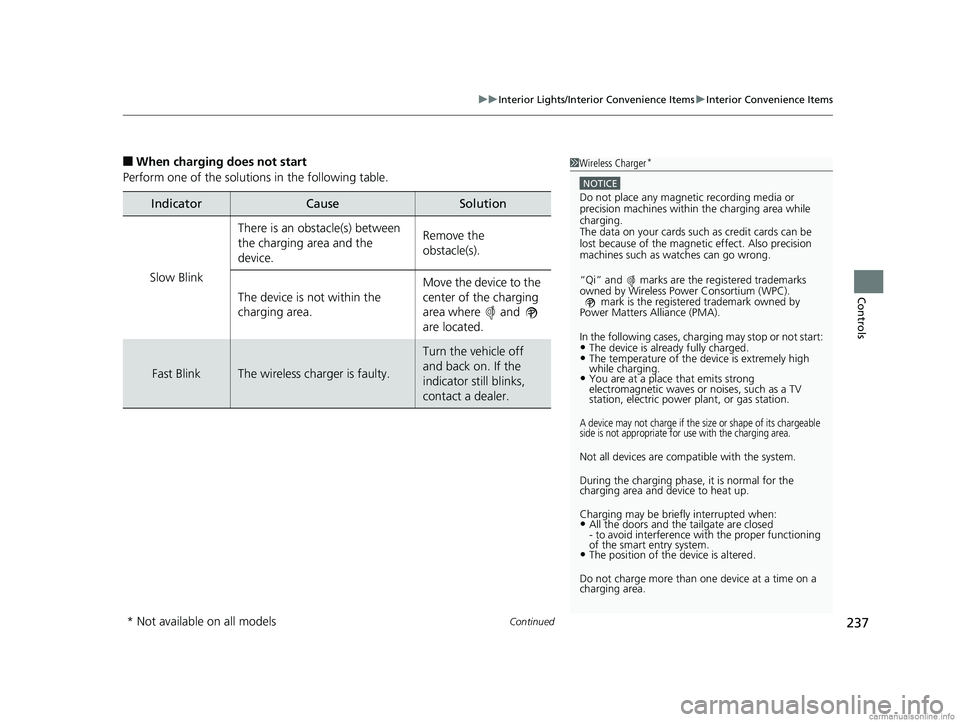
IndicatorCauseSolution
Slow Blink
There is an obstacle(s) between
the charging area and the
device.Remove the
obstacle(s).
The device is not within the
charging area. Move the device to the
center of the charging
area where and
are located.
Fast BlinkThe wireless charger is faulty.
Turn the vehicle off
and back on. If the
indicator still blinks,
contact a dealer.
1
Wireless Charger*
NOTICE
Do not place any magneti c recording media or
precision machines within the charging area while
charging.
The data on your cards such as credit cards can be
lost because of the magneti c effect. Also precision
machines such as watches can go wrong.
“Qi” and marks are the registered trademarks
owned by Wire less Power Consortium (WPC).
mark is the registered trademark owned by
Power Matters Alliance (PMA).
In the following cases, ch arging may stop or not start:
•The device is already fully charged.•The temperature of the device is extremely high
while charging.
•You are at a place that emits strong
electromagnetic waves or noises, such as a TV
station, electric power plant, or gas station.
A device may not charge if the si ze or shape of its chargeable
side is not appropriate for use with the charging area.
Not all devices are compatible with the system.
During the charging phase, it is normal for the
charging area and de vice to heat up.
Charging may be briefl y interrupted when:
•All the doors and the tailgate are closed
- to avoid interference with the proper functioning
of the smart entry system.
•The position of the device is altered.
Do not charge more than one device at a time on a
charging area.
* Not available on all models
18 US ODYSSEY-31THR6010.book 237 ページ 2018年12月6日 木曜日 午後4時18分
Page 254 of 763

252
Controls
Climate Control System
Using Automatic Climate Control
The automatic climate control system maintains the interior temperature you select.
The system also selects the proper mix of heated or cooled air that raises or lowers
the interior temperature to your pr eference as quickly as possible.
Use the system when the engine is running.
1. Press the AUTO button.
2. Adjust the interior temperature using the dr iver’s side or passenger’s side control
switch.
3. Press the butto n to cancel.
Tri-zone climate control system
1Using Automatic Climate Control
Press the FRONT CLIMATE button to display A/C,
MODE, fan control information on the audio/
information screen for several seconds. Select icon to
turn on or off A/C, change the vent mode, or change
the fan speed.
During idle-stops, air-conditioning is suspended, and
only the blower remains ac tive. If you do not want
air-conditioning suspended, press to cancel idle-
stop.
If any buttons are presse d while using the climate
control system in auto, the function of the button
that was pressed will take priority.
The AUTO indicator will go off, but functions
unrelated to the button that were pressed will be
controlled automatically.
To prevent cold air from bl owing in from outside, the
fan may not start i mmediately when the AUTO
button is pressed.
If the interior is very warm, you can cool it down
more rapidly by partial ly opening the windows,
turning the system on AUTO, and setting the
temperature to low. Change the fresh mode to
recirculation mode until the temperature cools down.
When you set the temperat ure to the lower or upper
limit, Lo or Hi is displayed.
Models with Auto Idle StopMode Control Icon
(Air flows from
dashboard vents) Mode Control Icon
(Air flows from
floor vents)
Mode Control Icon
(Air flows from
floor and
windshield
defroster vents)
Fan Control Icon
Mode Control Icon (Air flows from
floor and dashboard vents)
A/C
(Air Conditioning)
Icon
(On/Off) Button
(Recirculation) Button
SYNC (Synchronized) Button
FRONT
CLIMATE
Button
Driver’s Side
Temperature
Control switch Fan Control Button
Passenger’s
Side
Temperature
Control switchAUTO Button
18 US ODYSSEY-31THR6010.book 252 ページ 2018年12月6日 木曜日 午後4時18分
Page 255 of 763
Continued253
uuClimate Control System uUsing Automatic Climate Control
Controls
■Switching between the recirc ulation and fresh air modes
Press the button and switch the mode depending on environmental
conditions.
Recirculation Mode (indicator on): Recirculates air from the vehicle’s interior through
the system.
Fresh Air Mode (indicator off): Maintains outside ventilation. Keep the system in
fresh air mode in normal situations.
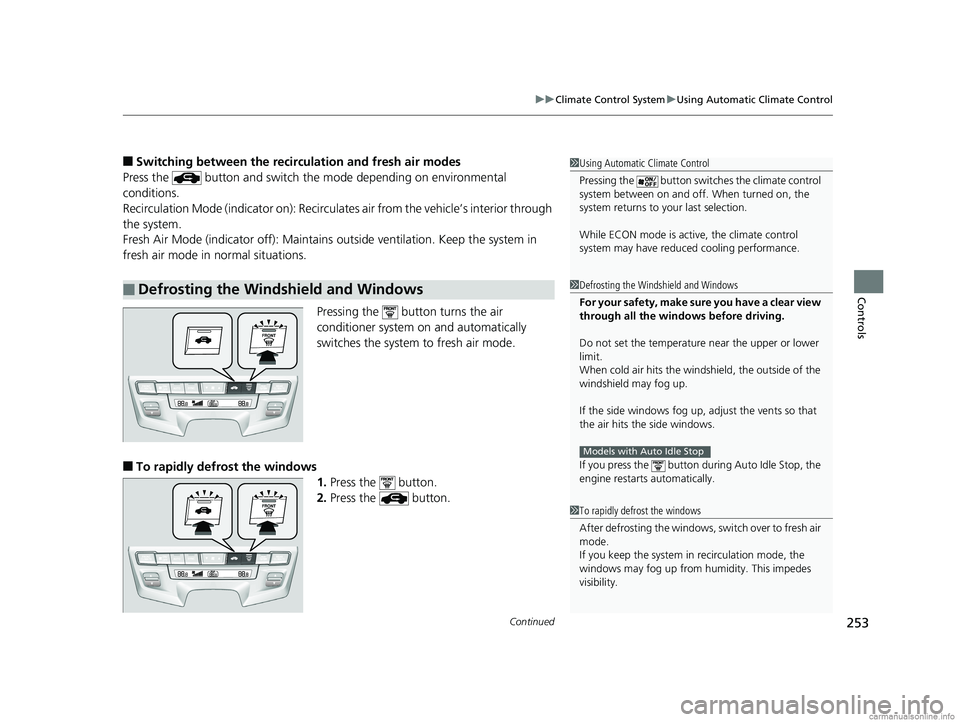
Pressing the button turns the air
conditioner system on and automatically
switches the system to fresh air mode.
■To rapidly defrost the windows1.Press the button.
2. Press the button.
■Defrosting the Windshield and Windows
1Using Automatic Climate Control
Pressing the butt on switches the climate control
system between on and off. When turned on, the
system returns to your last selection.
While ECON mode is active, the climate control
system may have reduced cooling performance.
1Defrosting the Windshield and Windows
For your safety, make sure you have a clear view
through all the windows before driving.
Do not set the temperatur e near the upper or lower
limit.
When cold air hits the windshield, the outside of the
windshield may fog up.
If the side windows fog up, adjust the vents so that
the air hits th e side windows.
If you press the button dur ing Auto Idle Stop, the
engine restarts automatically.
Models with Auto Idle Stop
1 To rapidly defrost the windows
After defrosting the windows, switch over to fresh air
mode.
If you keep the system in recirculation mode, the
windows may fog up from humidity. This impedes
visibility.
18 US ODYSSEY-31THR6010.book 253 ページ 2018年12月6日 木曜日 午後4時18分
Page 373 of 763
371
uuAudio Error Messages uAndroid/Apps
Features
Android/Apps
If an error occurs while using the audio system or apps, you may see the following
error messages. If you cannot clear the error message, contact a dealer.
*1:****part is variable characters, and will change depending upon where an error
occurs.
Error MessageSolution
Unfortunately, **** has
stopped.*1Error has occurred within app, select OK on the screen to close the app.
**** is not responding.
Would you like to close
it?
*1
App is not responding.
Select Wait if you can wait for a response from app a little longer. If it does not respond even if you keep
waiting, select OK to close the app and start it up. If the error message continues, perform Factory Data
Reset .
2Defaulting All the Settings P. 466
Models with Display Audio
18 US ODYSSEY-31THR6010.book 371 ページ 2018年12月6日 木曜日 午後4時18分
Page 454 of 763
452
uuCustomized Features u
Features
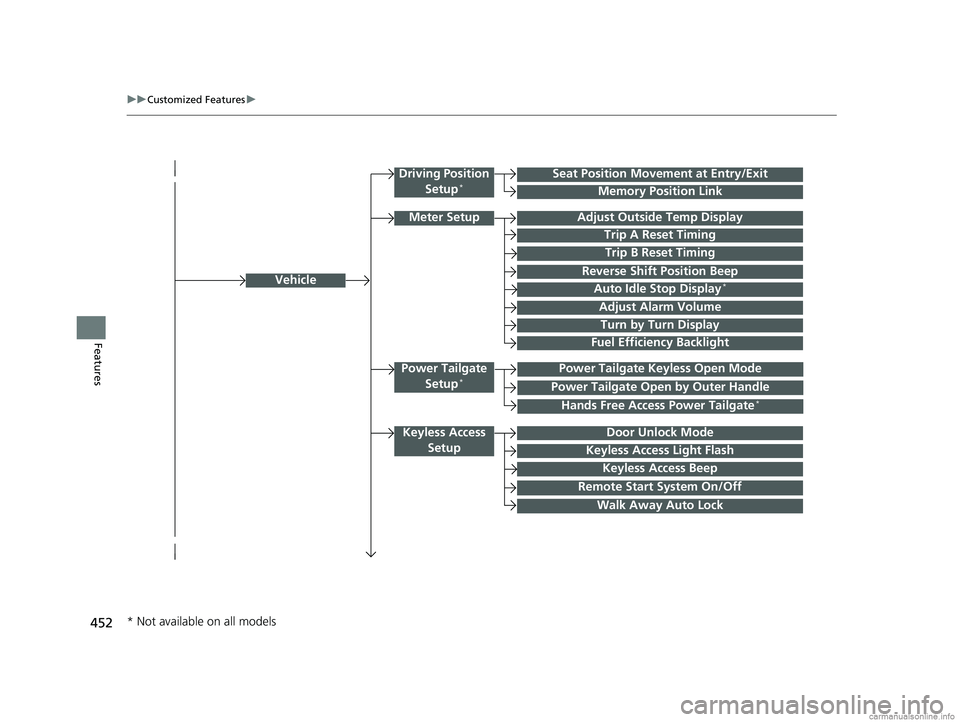
Vehicle
Driving Position
Setup*Seat Position Movement at Entry/Exit
Memory Position Link
Meter SetupAdjust Outside Temp Display
Trip A Reset Timing
Trip B Reset Timing
Reverse Shift Position Beep
Auto Idle Stop Display*
Adjust Alarm Volume
Turn by Turn Display
Power Tailgate
Setup*Power Tailgate Keyless Open Mode
Power Tailgate Open by Outer Handle
Keyless Access SetupDoor Unlock Mode
Keyless Access Light Flash
Keyless Access Beep
Remote Start System On/Off
Walk Away Auto Lock
Fuel Efficiency Backlight
Hands Free Access Power Tailgate*
* Not available on all models
18 US ODYSSEY-31THR6010.book 452 ページ 2018年12月6日 木曜日 午後4時18分
Page 517 of 763
Continued515
uuBluetooth ® HandsFreeLink ®u HFL Menus
Features
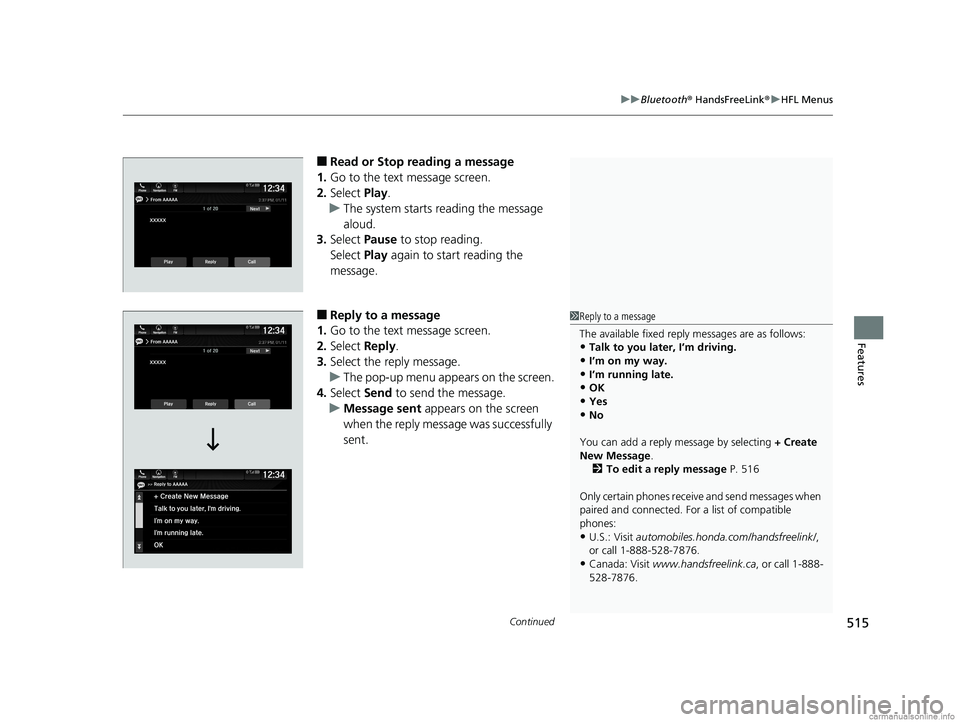
■Read or Stop reading a message
1. Go to the text message screen.
2. Select Play.
u The system starts reading the message
aloud.
3. Select Pause to stop reading.
Select Play again to start reading the
message.
■Reply to a message
1. Go to the text message screen.
2. Select Reply.
3. Select the reply message.
u The pop-up menu appears on the screen.
4. Select Send to send the message.
u Message sent appears on the screen
when the reply message was successfully
sent.1 Reply to a message
The available fixed reply messages are as follows:
•Talk to you later, I’m driving.
•I’m on my way.
•I’m running late.•OK
•Yes
•No
You can add a reply message by selecting + Create
New Message .
2 To edit a reply message P. 516
Only certain phones receiv e and send messages when
paired and connected. For a list of compatible
phones:
•U.S.: Visit automobiles.honda.com /handsfreelink/,
or call 1-888-528-7876.
•Canada: Visit www.handsfreelink.ca , or call 1-888-
528-7876.
18 US ODYSSEY-31THR6010.book 515 ページ 2018年12月6日 木曜日 午後4時18分
Page 525 of 763

523
Driving
This chapter discusses driving, refueling, and information on items such as accessories.
Before Driving
Driving Preparation .......................... 524
Maximum Load Limit........................ 527
Towing a Trailer Towing Preparation .......................... 530
Driving Safely with a Trailer .............. 534
Towing Your Vehicle ........................ 535
When Driving Starting the Engine .......................... 536
Precautions While Driving................. 542
Automatic Transmission ................... 543
Shifting ............................................ 544
Auto Idle Stop
*................................ 552
ECON Button ................................... 557 Intelligent Traction Management ..... 558
Cruise Control
*............................... 559
Front Sensor Camera*..................... 562
Adaptive Cruise Control (ACC)*....... 564Road Departure Mitigation (RDM) System*... 576Lane Keeping Assist System (LKAS)*.... 581
Vehicle Stabilit y Assist (VSA®), aka Electronic
Stability Control (ESC), System........... 589
Agile Handling Assist ....................... 591
Tire Pressure Monitoring System (TPMS) with Tire Fill Assist .......................... 592
Tire Pressure Monitoring System (TPMS) -
Required Federal Explanation ......... 594
Blind spot information (BSI) System*... 596LaneWatchTM*.................................. 598 Braking
Brake System ................................... 600
Anti-lock Brake System (ABS) ........... 606
Brake Assist System ......................... 607
Collision Mitigation Braking System
TM
(CMBSTM)*..................................... 608
Parking Your Vehicle When Stopped ................................ 617
Parking Sensor System
*................... 619
Cross Traffic Monitor*..................... 624
Multi-View Rear Camera .................. 628
Refueling
Fuel Information .............................. 630
How to Refuel ................................. 631
Fuel Economy and CO
2 Emissions .... 633
* Not available on all models
18 US ODYSSEY-31THR6010.book 523 ページ 2018年12月6日 木曜日 午後4時18分
Page 538 of 763

536
Driving
When Driving
Starting the Engine
1.Make sure the parking brake is applied.
u The parking brake and brake system
indicator comes on for 15 seconds when
you press the electric parking brake
switch.
2. Depress the brake pedal.
3. Press the ENGINE START/STOP button
without depressing the accelerator pedal.
The engine will crank until it starts.1 Starting the Engine
Keep your foot firmly on the brake pedal when
starting the engine.
The engine is harder to st art in cold weather and in
thinner air found at altitudes above 8,000 feet (2,400
meters).
When starting the engine in cold weather, turn off all
electrical accessories such as the lights, climate
control system, and rear de fogger in order to reduce
battery drain.
If you live in a region where winter is extremely cold,
an engine block heater will improve starting and
warming of the engine. Cons ult a dealer for details.
If the exhaust system sounds abnormal or you can
smell exhaust gas inside the vehicle, have your vehicle
checked by a dealer. There may be a problem with
the engine or exhaust system.
Bring the remote close to the ENGINE START/STOP
button if the battery in the remote is weak. 2 If the Remote Battery is Weak P. 709
The engine may not start if the remote is subjected to
strong radio waves.
Do not hold the ENGINE START/STOP button to
start the engine.
If the engine does not start, wait at least 30 seconds
before trying again.
Brake Pedal
18 US ODYSSEY-31THR6010.book 536 ページ 2018年12月6日 木曜日 午後4時18分