Page 468 of 679

uuWhen Driving uStarting the Engine
466
Driving
1. Depress the brake pedal and press the ENGINE START/STOP button
simultaneously.
2. Put the shift lever in
(D. Select (R when reversing.
3. With the parking brake is applied, releas e the brake pedal and gently depress the
accelerator pedal.
u Make sure the parking brake indicator goes off.
4. Gradually release the brake pedal and gently depress the accelerator pedal to pull
away.
■Hill start assist system
Hill start assist keeps the brake engaged br iefly to help prevent the vehicle from
rolling on inclines as you move your fo ot from the brake pedal to the accelerator.
Move the shift lever to
(D, (S, or (L when facing uphill, or (R when facing
downhill, then release the brake pedal.
■Starting to Drive1 Starting to Drive
The engine stops when the sh ift lever is moved out of
(P before the ENGINE START/STOP button is
pressed. Follow step 1 when starting to drive.
You can also release the parking brake by pressing
the electric parking brake sw itch while depressing the
brake pedal. When facing downhill, you can start
your vehicle more smoothly by manually releasing it
with the electric parki ng brake switch than by
releasing it with th e accelerator pedal.
When the engine was started using the button*
on the smart entry remoteWhen the engine was started using the button* on the smart entry remote
When the engine was started in any case
1 Hill start assist system
Hill start assist may not prevent the vehicle from
rolling downhill on a very steep or slippe ry slope, and
does not operate on small inclines.
Hill start assist is not a replacement for the parking
brake.
Hill start assist will operate even when VSA ® is
switched off.
* Not available on all models
18 CR-V-31TLA6100.book 466 ページ 2017年9月7日 木曜日 午後3時56分
Page 469 of 679

467
uuWhen Driving uPrecautions While Driving
Driving
Precautions While Driving
Utility vehicles have a significantly higher rollover rate than other types of vehicles.
To prevent rollovers or loss of control:
• Take corners at slower speeds than yo u would with a passenger vehicle.
• Avoid sharp turns and abrupt maneuvers whenever possible.
• Do not modify your vehicle in any way th at you would raise the center of gravity.
• Roof load capacity is 165 lbs (75 kg), av ailable roof racks/carriers may have lower
capacities. Please check accessory' s information (Honda accessory).
Avoid driving in deep water and on flooded roads. This can damage the engine or
driveline, or cause electrical component failure.
If there is a strong impact with something under the vehicle, stop in a safe location.
Check the underside of the vehicle for damage or any fluid leaks.
■Driving Guidelines for Your Utility Vehicle
■In Rain
■Other Precautions
1 Precautions While Driving
NOTICE
Do not operate the shift lever while pressing the
accelerator pedal. You could damage the
transmission.
NOTICE
If you repeatedly turn the steering wheel at an
extremely low speed, or hold the steering wheel in
the full left or right position for a while, the electric
power steering (EPS) system heats up. The system
goes into a protective mode, and limits its
performance. The steering wheel becomes harder
and harder to operate. Once the system cools down,
the EPS system is restored.
Repeated operation under these conditions can
eventually damage the system.
18 CR-V-31TLA6100.book 467 ページ 2017年9月7日 木曜日 午後3時56分
Page 475 of 679
473
uuWhen Driving uCruise Control*
Continued
DrivingTake your foot off the pedal and press the −/SET button when you reach the desired
speed.
The moment you release the −/SET button, the set speed is fixed, and cruise control
begins. The CRUISE CONTROL indicator comes on.
When you use cruise control, Straight Drivin g Assist (a feature of the Electric Power
Steering system) is activated.
By enabling the steering system to automa tically compensate for natural steering
pull, Straight Driv ing Assist makes it easier for you to keep your vehicle in a straight
line.
■To Set the Vehicle Speed
−/SET Button
On when cruise control begins
Press and release
18 CR-V-31TLA6100.book 473 ページ 2017年9月7日 木曜日 午後3時56分
Page 478 of 679
476
uuWhen Driving uCruise Control*
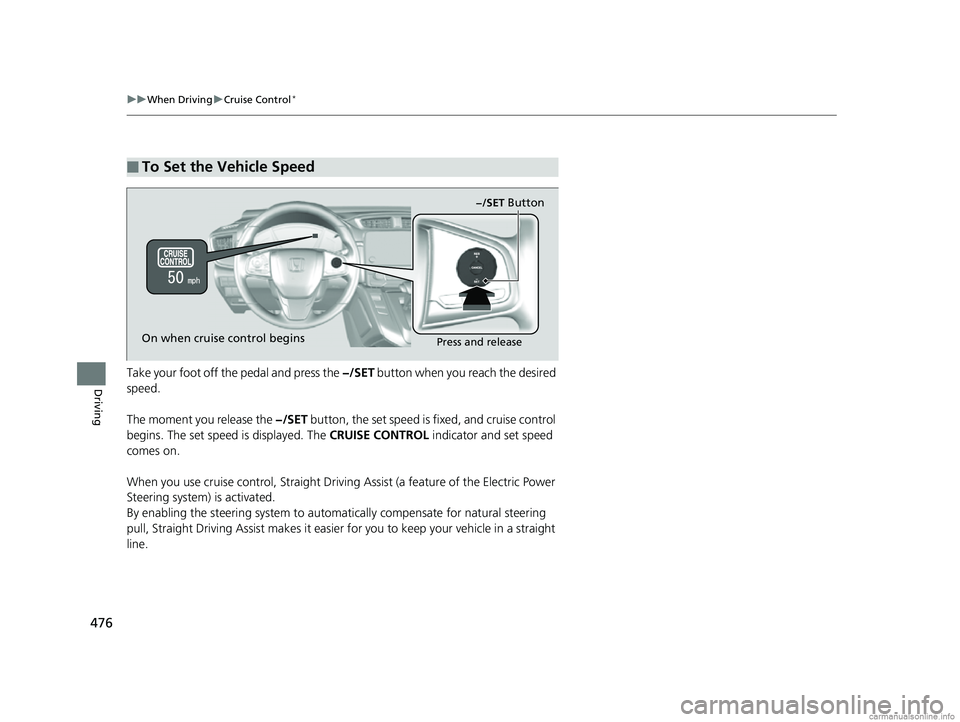
DrivingTake your foot off the pedal and press the −/SET button when you reach the desired
speed.
The moment you release the −/SET button, the set speed is fixed, and cruise control
begins. The set speed is displayed. The CRUISE CONTROL indicator and set speed
comes on.
When you use cruise control, Straight Driv ing Assist (a feature of the Electric Power
Steering system) is activated.
By enabling the steering system to automatically compensate for natural steering
pull, Straight Driving Assist makes it easier for you to keep your vehicle in a straight
line.
■To Set the Vehicle Speed
−/SET Button
On when cruise control begins
Press and release
18 CR-V-31TLA6100.book 476 ページ 2017年9月7日 木曜日 午後3時56分
Page 486 of 679
484
uuWhen Driving uAdaptive Cruise Control (ACC) with Low Speed Follow (LSF)*
Driving
When ACC with LSF st arts operating, the
vehicle icon, distance bars and set speed
appear on the driver information interface.
When you use ACC with LSF, Straight Driving
Assist (a feature of the Electric Power Steering
system) is activated.
By enabling the steering system to
automatically compensate for natural steering
pull, Straight Driving Assist makes it easier for
you to keep your vehicle in a straight line.
Set Vehicle Speed
Set Vehicle Distance
18 CR-V-31TLA6100.book 484 ページ 2017年9月7日 木曜日 午後3時56分
Page 497 of 679

Continued495
uuWhen Driving uAdaptive Cruise Control (ACC) with Low Speed Follow (LSF)*
Driving
Press and hold the (interval) button for one
second. Cruise Mode Selected appears on
the driver informatio n interface for two
seconds, and then the mode switches to
Cruise.
To switch back to ACC with LSF, press and
hold the button again for one second.
■When to use
Desired speed in a range above roughly 25 mph (40 km/h) ~.
Take your foot off the pedal and press the –/SET button when you reach the desired
speed.
The moment you release the –/SET button, the set speed is fixed, and cruise control
begins. The CRUISE CONTROL indicator comes on.
When you use cruise control, Straight Drivin g Assist (a feature of the Electric Power
Steering system) is activated.
By enabling the steering system to automa tically compensate for natural steering
pull, Straight Driv ing Assist makes it easier for you to keep your vehicle in a straight
line.
■To Switch ACC with LSF to Cruise Control1 To Switch ACC with LSF to Cruise Control
Always be aware which mode you are in. When you
are driving in Cruise mode, the system will not assist
you to maintain a following-interval from a vehicle
ahead of you.
You can switch the displayed set speed
measurements on the audio/information screen
*
between mph and km/h.
2 Customized Features P. 351
ACC with
LSF ON Cruise
Control ON
■To Set the Vehicle Speed
* Not available on all models
18 CR-V-31TLA6100.book 495 ページ 2017年9月7日 木曜日 午後3時56分
Page 504 of 679
uuWhen Driving uLane Keeping Assist System (LKAS)*
502
Driving
Provides assistance to keep the vehicle in the center of the lane, when the vehicle
nears a white or yellow line, steering force of the electric power steering will become
stronger.
When the vehicle enters the warning area, the LKAS alerts you with slight steering
wheel vibration as well as a warning display.
■Lane Keep Support Function1 Lane Keeping Assist System (LKAS)*
The LKAS may not function as designed while driving
in frequent stop and go traf fic, or on roads with
sharp curves.
When it fails to detect lanes, the system will
temporarily be canceled. When lane is detected,
system will recover automatically.
■Lane Departure Warning Function
Warning Area
Warning Area
* Not available on all models
18 CR-V-31TLA6100.book 502 ページ 2017年9月7日 木曜日 午後3時56分
Page 515 of 679

Continued513
uuWhen Driving uBlind spot information (BSI) System*
Driving
■When the system detects a vehicle1Blind spot inform ation (BSI) System*
You can change the setting for BSI.
2 Customized Features P. 351
Turn the system off when towing a trailer.
The system may not work properly for the following
reasons:
•The added mass tilts the vehicle and changes the
radar coverage.
•The trailer itself can be detected by the radar
sensors, causing the BSI al ert indicators to come on.
BSI may be adversel y affected when:
•Objects (guard rails, poles, trees, etc,.) are
detected.
•An object that does not re flect radio waves well,
such as a motorcycle, is in the alert zone.
•Driving on a curved road.
•A vehicle is moving from a far lane to the adjacent
lane.
•The system picks up external electrical interference.•The rear bumper or the sens ors have been improperly
repaired or the rear bu mper has been deformed.
•The orientation of the sensors has been changed.•In bad weather (Heavy rain, snow, and fog).
•Making a turn at an intersection.
•Driving on a bumpy road.•Making a short turn that slightly tilts the vehicle.
■Comes on when●A vehicle enters the ale rt zone from behind
to overtake you with a speed difference of
no more than 31 mph (50 km/h) from your
vehicle.
●You pass a vehicle with a speed difference
of no more than 12 mph (20 km/h).
BSI Alert Indicator: Located on the outside
rearview mirror on both sides.
■Blinks and the beeper sounds when
You move the turn signal lever in the direction
of the detected vehicle. The beeper sounds
three times. Comes On
Blinks
* Not available on all models
18 CR-V-31TLA6100.book 513 ページ 2017年9月7日 木曜日 午後3時56分