2018 HONDA CLARITY PLUG-IN camera
[x] Cancel search: cameraPage 446 of 591

444
uuBraking uCollision Mitigation Braking SystemTM (CMBSTM)
Driving
■Vehicle conditions
• Headlight lenses are dirty or the headlights are not properly adjusted.
• The outside of the windshie ld is blocked by dirt, mud, leaves, wet snow, etc.
• The inside of the windshield is fogged.
• An abnormal tire or wheel condition (wrong sized, varied size or construction,
improperly inflated tire, etc.).
• When tire chains are installed.
• The vehicle is tilted due to a heav y load or suspension modifications.
• The camera temperature gets too high.
• Driving with the parking brake applied.
• When the radar sensor in the front grille gets dirty.
■Detection limitations
• A vehicle or pedestrian suddenly crosses in front of you.
• The distance between your vehicle and the vehicle or pedestrian ahead of you is
too short.
• A vehicle cuts in front of you at a slow speed, and it brakes suddenly.
• When you accelerate rapidly and approach the vehicle or pedestrian ahead of you
at high speed.
• The vehicle ahead of you is a motorcycle, bicycle, mobility scooter or other small
vehicle.
• When there are animals in front of your vehicle.
• When you drive on a curved, wi nding or undulating road that makes it difficult for
the sensor to properly detect a vehicle in front of you.
• The speed difference between your vehicle an d a vehicle or pedestrian in front of
you is significantly large.
• An oncoming vehicle suddenly comes in front of you.
• Another vehicle suddenly comes in front of you at an intersection, etc.
• Your vehicle abruptly crosses over in front of an oncoming vehicle.
• When driving through a narrow iron bridge.
• When the lead vehicle suddenly slows down.
18 CLARITY PHEV CSS-31TRW6000.book 444 ページ 2017年12月25日 月曜日 午後2時22分
Page 447 of 591
445
uuBraking uCollision Mitigation Braking SystemTM (CMBSTM)
Continued
Driving
• When there is a group of people in front of your vehicle walking together side by
side.
• Surrounding conditions or belongings of the pedestrian alter the pedestrian’s
shape, preventing the system from recogn izing that the person is a pedestrian.
• When the pedestrian is shorte r than about 3.3 feet (1 meter) or taller than about
6.6 feet (2 meters) in height.
• When a pedestrian blends in with the background.
• When a pedestrian is bent over or squatting, or when their hands are raised or
they are running.
• When several pedestrians are walking ahead in a group.
• When the camera cannot correctly identify that a pedestrian is present due to an
unusual shape (holding luggage, body position, size).
■Automatic shutoff
The CMBSTM may automatically shut itself off and the CMBSTM indicator comes and
stays on when:
• The temperature inside the system is high.
• You drive off-road or on a mountain road, or curved and winding road for an
extended period.
• An abnormal tire condition is detected (wrong tire size, flat tire, etc.).
• The camera behind the rearview mirror, or the area around the camera, including
the windshield, gets dirty.
Once the conditions that caused the CMBS
TM to shut off improve or are addressed
(e.g., cleaning), the system comes back on.
Limitations applicable to pedestrian detection only
18 CLARITY PHEV CSS-31TRW6000.book 445 ページ 2017年12月25日 月曜日 午後2時22分
Page 451 of 591
449Continued
Driving
Multi-View Rear Camera
About Your Multi-View Rear Camera
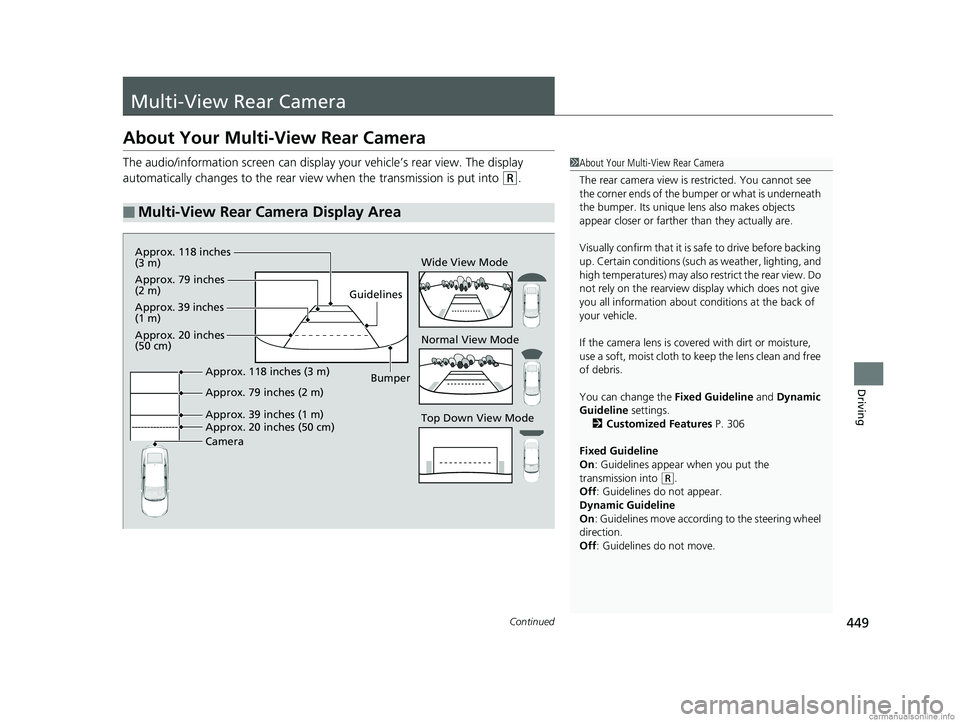
The audio/information screen can display your vehicle’s rear view. The display
automatically changes to the rear view when the transmission is put into
(R.
■Multi-View Rear Camera Display Area
1About Your Multi-View Rear Camera
The rear camera view is restricted. You cannot see
the corner ends of the bum per or what is underneath
the bumper. Its unique le ns also makes objects
appear closer or farther than they actually are.
Visually confirm that it is safe to drive before backing
up. Certain conditions (such as weather, lighting, and
high temperatures) may also restrict the rear view. Do
not rely on the rearview display which does not give
you all information about conditions at the back of
your vehicle.
If the camera lens is cove red with dirt or moisture,
use a soft, moist cloth to keep the lens clean and free
of debris.
You can change the Fixed Guideline and Dynamic
Guideline settings.
2 Customized Features P. 306
Fixed Guideline
On : Guidelines appear when you put the
transmission into
( R.
Off : Guidelines do not appear.
Dynamic Guideline
On : Guidelines move according to the steering wheel
direction.
Off : Guidelines do not move.
Top Down View Mode Normal View Mode Wide View Mode
Guidelines
Bumper
Camera Approx. 20 inches (50 cm) Approx. 39 inches (1 m) Approx. 79 inches (2 m) Approx. 118 inches (3 m)
Approx. 118 inches
(3 m)
Approx. 79 inches
(2 m)
Approx. 39 inches
(1 m)
Approx. 20 inches
(50 cm)
18 CLARITY PHEV CSS-31TRW6000.book 449 ページ 2017年12月25日 月曜日 午後2時22分
Page 452 of 591
450
uuMulti-View Rear Camera uAbout Your Multi-View Rear Camera
Driving
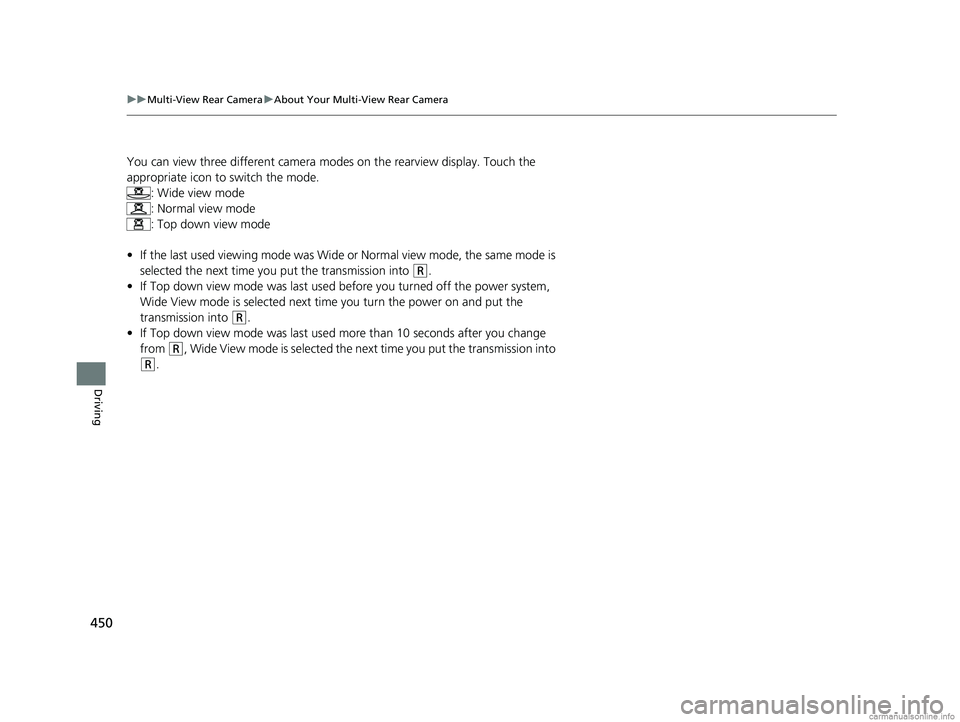
You can view three different camera mo des on the rearview display. Touch the
appropriate icon to switch the mode. : Wide view mode
: Normal view mode
: Top down view mode
• If the last used viewing mode was Wide or Normal view mode, the same mode is
selected the next time you put the transmission into
(R.
• If Top down view mode was last used before you turned off the power system,
Wide View mode is selected next ti me you turn the power on and put the
transmission into
(R.
• If Top down view mode was last used more than 10 seconds after you change
from
(R, Wide View mode is selected the next time you put the transmission into
(R.
18 CLARITY PHEV CSS-31TRW6000.book 450 ページ 2017年12月25日 月曜日 午後2時22分
Page 516 of 591
uuCleaning uInterior Care
514
Maintenance
Wipe using a glass cleaner.
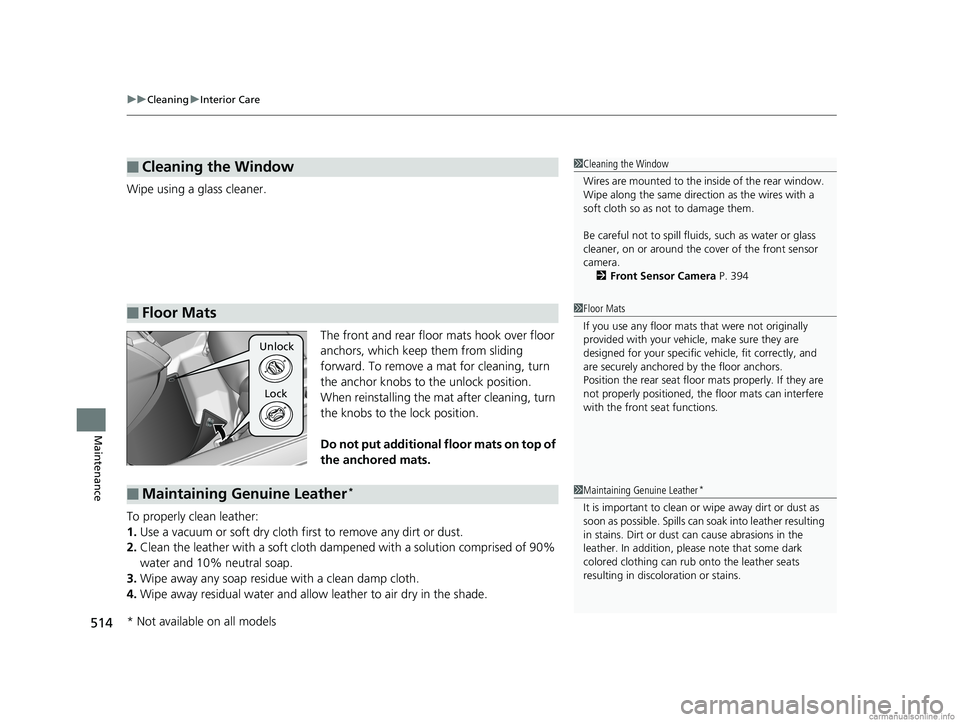
The front and rear floor mats hook over floor
anchors, which keep them from sliding
forward. To remove a mat for cleaning, turn
the anchor knobs to the unlock position.
When reinstalling the mat after cleaning, turn
the knobs to the lock position.
Do not put additional floor mats on top of
the anchored mats.
To properly clean leather:
1. Use a vacuum or soft dry cloth first to remove any dirt or dust.
2. Clean the leather with a soft cloth dampen ed with a solution comprised of 90%
water and 10% neutral soap.
3. Wipe away any soap residu e with a clean damp cloth.
4. Wipe away residual water and allow leather to air dry in the shade.
■Cleaning the Window
■Floor Mats
1Cleaning the Window
Wires are mounted to the in side of the rear window.
Wipe along the same direct ion as the wires with a
soft cloth so as not to damage them.
Be careful not to spill fluids, such as water or glass
cleaner, on or around the cover of the front sensor
camera. 2 Front Sensor Camera P. 394
1Floor Mats
If you use any floor mats that were not originally
provided with your vehicle, make sure they are
designed for your specific ve hicle, fit correctly, and
are securely anchored by the floor anchors.
Position the rear seat floor mats properly. If they are
not properly positioned, the floor mats can interfere
with the front seat functions.
Unlock
Lock
■Maintaining Genuine Leather*1 Maintaining Genuine Leather*
It is important to clean or wipe away dirt or dust as
soon as possible. Spills can soak into leather resulting
in stains. Dirt or dust ca n cause abrasions in the
leather. In addition, pl ease note that some dark
colored clothing can rub onto the leather seats
resulting in discol oration or stains.
* Not available on all models
18 CLARITY PHEV CSS-31TRW6000.book 514 ページ 2017年12月25日 月曜日 午後2時22分
Page 558 of 591

556
uuFuses uFuse Locations
Handling the Unexpected
There are four fuse boxes on the driver’s
side.
■Fuse Box A
Located under the dashboard.
Fuse locations are shown on the label on
the under panel.
Locate the fuse in question by the fuse
number and label number.
■Driver’s Side Interior Fuse Box
Fuse Label
Fuse Box A
■Circuit protected and fuse rating
Circuit ProtectedAmps
1ACC7.5 A
2−−
3VB SOL10 A
4SHIFTER7.5 A
5OPTION MAIN15 A
6SRS OPTION7.5 A
7METER10 A
8FUEL PUMP15 A
9OPTION7.5 A
10CTR ACC SOCKET20 A
11−−
12R SIDE DOOR LOCK10 A
13L SIDE DOOR UNLOCK10 A
14RR L P/W20 A
15AS P/W20 A
16DOOR LOCK20 A
17P-DRV7.5 A
18−−
19WASHER15 A
20−−
21ACG7.5 A
22DRL7.5 A
23−10 A
24FR SENSOR CAMERA5A
25DR DOOR LOCK10 A
26R SIDE DOOR UNLOCK10 A
27RR R P/W20 A
28DR P/W20 A
29FR ACC SOCKET20 A
30INTERIOR LIGHT7.5 A
31DR P/SEAT REC20 A
32FR SEAT HEATER20 A
33DR P/SEAT SLI20 A
34ABS/VSA7.5 A
35SRS10 A
36−−
37LID ACT10 A
38L SIDE DOOR LOCK10 A
39DR DOOR UNLOCK10 A
Circuit ProtectedAmps
18 CLARITY PHEV CSS-31TRW6000.book 556 ページ 2017年12月25日 月曜日 午後2時22分
Page 584 of 591
582
Index
FM/AM Radio............................................ 243
Foot Brake ................................................. 433
Front Airbags (SRS) ..................................... 57
Front Seat Heaters .................................... 191
Front Seats ................................................ 175
Adjusting ................................................. 175
Front Sensor Camera ................................ 394
Fuel ...................................................... 33, 451
Fuel Economy and CO
2 Emissions............. 469
Gauge ..................................................... 121
Instant Fuel Economy ............................... 127
Range ...................................................... 121
Recommendation .................................... 451
Refueling ................................................. 451
Requirement ............................................ 566
Fuel Economy and CO
2 Emissions ............ 469
Fuel Fill Cap ......................................... 33, 452
Fuel Fill Door ....................................... 33, 452
Fuses .......................................................... 553
Inspecting and Changing ......................... 560
Locations ......................................... 553, 556
G
Gasoline (Fuel) Economy ................................................. 469
Information ............................................. 451
Refueling ................................................. 451
Gauges ....................................................... 121
Gear Position Indicator ....................... 91, 384 Gear Shift Positions
Transmission ........................................... 382
Glass (care) ........................................ 514, 516
Glove Box .................................................. 185
H
Handling the Unexpected ........................ 521
HandsFreeLink ® (HFL) ............................... 335
Automatic Import of Cellular Phonebook
and Call History ..................................... 348
Displaying Messages................................ 362
HFL Buttons............................................. 335
HFL Menus .............................................. 338
HFL Status Display ................................... 337
In Case of Emergency .............................. 366
Limitations for Manual Operation ............ 337
Making a Call .......................................... 356
Options During a Call .............................. 359
Phone Setup............................................ 343
Phonebook Phonetic Modification ........... 352
Receiving a Call ....................................... 359
Receiving a Text Message/E-mail.............. 360
Ring Tone................................................ 347
Selecting a Mail Account ......................... 361
Speed Dial ............................................... 349
To Set Up Text Message/E-mail Options ... 346
Hazard Warning Button .............................. 6
HD Radio
TM................................................ 243
Head Restraints ........................................ 178 Headlights
................................................ 162
Aiming.................................................... 494
Automatic Operation .............................. 163
Dimming......................................... 162, 165
Operating ............................................... 162
Heated Door Mirror Button .................... 169
Heaters (Seat) ........................................... 191
HFL (HandsFreeLink ®) .............................. 335
High Beam Indicator .................................. 97
High Voltage Battery ............................... 466
Charging ................................................ 454
High Voltage Battery Charge Level Gauge ..................................................... 123
Hill Start Assist System ............................. 379
Home Screen ............................................ 225
HomeLink ® Universal Transceiver ........... 332
Honda App License Agreement .............. 291
Honda Sensing
TM........................................ 34
HondaLink ®.............................................. 269
HV Button ................................................... 16
HV Charge .................................................. 17
HV Charge Indicator .................................. 89
HV Indicator ............................................... 89
I
Identification Numbers
Motor, and Transmission......................... 568
Vehicle Identification............................... 568
Immobilizer System .................................. 153
Indicator ................................................... 97
18 CLARITY PHEV CSS-31TRW6000.book 582 ページ 2017年12月25日 月曜日 午後2時22分
Page 586 of 591

584
Index
Lower Anchors............................................ 74
Luggage (Maximum Load Limit) .............. 373
M
Maintenance............................................. 471
12-Volt Battery ........................................ 508
Brake Fluid............................................... 492
Cleaning .................................................. 513
Climate Control System ........................... 511
Coolant ................................................... 488
Maintenance Minder
TM............................ 475
Oil ........................................................... 483
Precautions .............................................. 472
Radiator................................................... 489
Remote Transmitter ................................. 510
Replacing Light Bulbs ............................... 494
Safety ...................................................... 473
Service Items............................................ 477
Tires ........................................................ 499
Transmission Fluid.................................... 492
Under the Hood....................................... 480
Malfunction Indicator Lamp ...................... 90
Map Lights ................................................ 184
Maximum Load Limit ................................ 373
Meters, Gauges ......................................... 121
Mirrors ....................................................... 173
Adjusting ................................................. 173
Door ........................................................ 174
Exterior .................................................... 174
Interior Rearview...................................... 173 Modifications (and Accessories)
.............. 519
Motor ........................................................ 568
Jump Starting .......................................... 539
MP3 ........................................................... 264
Multi-View Rear Camera .......................... 449
N
Numbers (Identification).......................... 568
O
Odometer................................................. 126
Oil (Engine) ............................................... 482
Adding .................................................... 484
Checking................................................. 483
Displaying Oil Life .................................... 475
Recommended Engine Oil ....................... 482
Viscosity .................................................. 482
Warning .................................................. 545
Open Source Licences ............................... 305
Opening Trunk ...................................................... 564
Opening/Closing Hood....................................................... 481
Power Windows ...................................... 156
Trunk ...................................................... 150
Operating the Switches Around the Steering Wheel ....................................... 158
Outside Temperature Display .................. 126
Overheating .............................................. 542
P
Pandora®.................................................. 262
Panic Mode ............................................... 155
Parking ..................................................... 447
Parking Brake ........................................... 431
Parking Brake and Brake System Indicator (Red) ........................................ 550
Passenger Front Airbag Off Indicator ....... 67
Passing Indicators ..................................... 162
Playing Bluetooth ® Audio ....................... 267
POWER Button ......................................... 158
Power Flow Monitor ................................ 132
Power System Turning on .............................................. 376
POWER SYSTEM Indicator ......................... 88
Power Windows ....................................... 156
POWER/CHARGE Gauge .......................... 122
Precautions While Driving Rain ........................................................ 380
Pregnant Women ....................................... 52
Puncture (Tire) ......................................... 522
R
Radiator.................................................... 489
Radio (FM/AM) ......................................... 243
Radio (SiriusXM ®)..................................... 247
Radio Data System (RDS) ......................... 245
Range ................................................ 121, 129
RDS (Radio Data System) ......................... 245
Readiness Codes (Emissions Testing) ...... 572
18 CLARITY PHEV CSS-31TRW6000.book 584 ページ 2017年12月25日 月曜日 午後2時22分