2018 HONDA CLARITY PLUG IN HYBRID TPMS
[x] Cancel search: TPMSPage 25 of 591
23
Quick Reference Guide
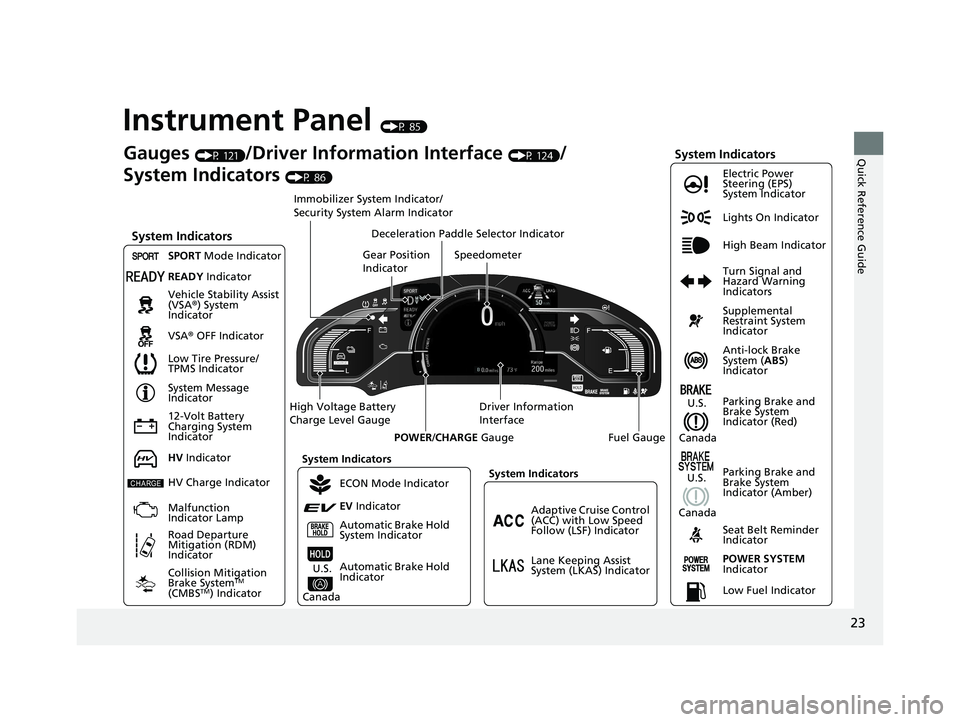
Instrument Panel (P 85)
Lights On Indicator
System Indicators
12-Volt Battery
Charging System
Indicator Anti-lock Brake
System ( ABS )
IndicatorVehicle Stability Assist
(VSA ® ) System
Indicator
VSA ® OFF Indicator Electric Power
Steering (EPS)
System Indicator
System Indicators High Beam Indicator
Seat Belt Reminder
IndicatorSystem Indicators
System Message
Indicator
Parking Brake and
Brake System
Indicator (Red)Supplemental
Restraint System
Indicator
Gauges (P 121)
/Driver Information Interface (P 124)
/
System Indicators (P 86)
Low Tire Pressure/
TPMS Indicator Turn Signal and
Hazard Warning
IndicatorsSpeedometer
Automatic Brake Hold
System Indicator Parking Brake and
Brake System
Indicator (Amber)SPORT Mode Indicator
Collision Mitigation
Brake System TM
(CMBS TM
) IndicatorRoad Departure
Mitigation (RDM)
Indicator Immobilizer System Indicator/
Security System Alarm Indicator
Automatic Brake Hold
IndicatorREADY Indicator
POWER SYSTEM
IndicatorGear Position
Indicator
Fuel GaugeDriver Information
InterfaceHigh Voltage Battery
Charge Level Gauge
POWER / CHARGE Gauge
Low Fuel IndicatorAdaptive Cruise Control
(ACC) with Low Speed
Follow (LSF) Indicator
Lane Keeping Assist
System (LKAS) IndicatorDeceleration Paddle Selector Indicator
System Indicators
ECON Mode Indicator
EV Indicator
U.S.
CanadaHV Indicator
HV Charge Indicator
Malfunction
Indicator Lamp U.S.
Canada U.S.
Canada18 CLARITY PHEV CSS-31TRW6000.book 23 ページ 2017年8月31日 木曜日 午後2時 49分
Page 34 of 591
32
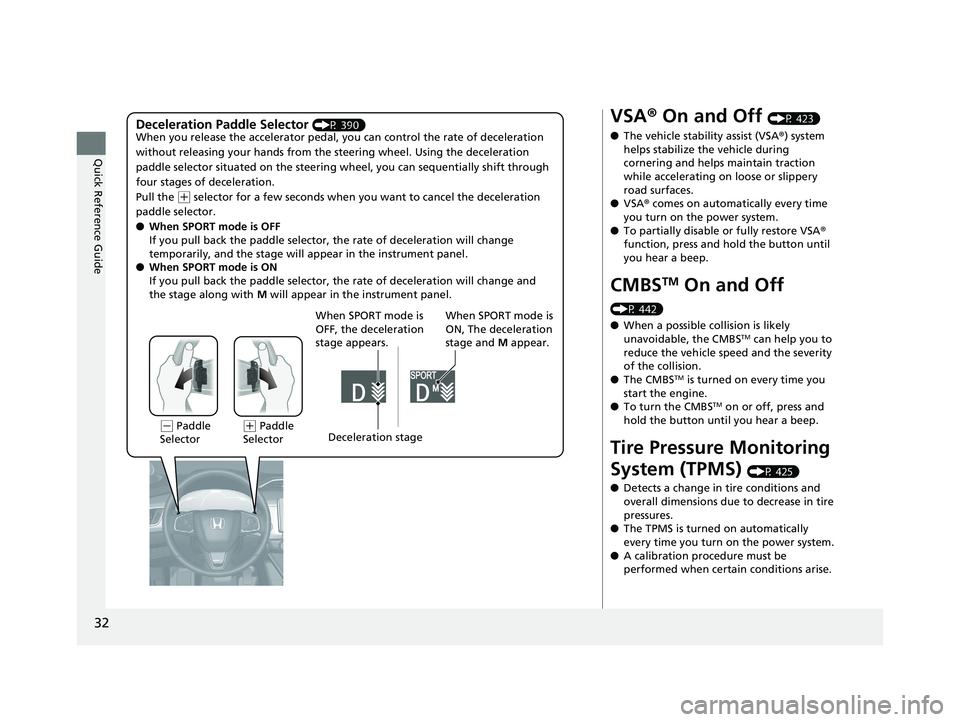
Quick Reference Guide Deceleration Paddle Selector (P 390)
When you release the accelerator pedal, yo u can control the rate of deceleration
without releasing your hands from the steering wheel. Using the deceleration
paddle selector situated on the steering wheel, you can sequenti ally shift through
four stages of deceleration.
Pull the ( +
selector for a few seconds when yo u want to cancel the deceleration
paddle selector.
● When SPORT mode is OFF
If you pull back the paddle selector, the rate of deceleration will change
temporarily, and the stage will appear in the instrument panel.
● When SPORT mode is ON
If you pull back the paddle selector, the rate of deceleration will change and
the stage along with M will appear in the instrument panel.
When SPORT mode is
OFF, the deceleration
stage appears. When SPORT mode is
ON, The deceleration
stage and M appear.
( -
Paddle
Selector ( +
Paddle
Selector Deceleration stage VSA ® On and Off (P 423)
● The vehicle stability assist (VSA ® ) system
helps stabilize the vehicle during
cornering and helps maintain traction
while accelerating on loose or slippery
road surfaces.
● VSA ® comes on automatically every time
you turn on the power system.
● To partially disable or fully restore VSA ®
function, press and hold the button until
you hear a beep.
CMBS TM
On and Off (P 442)
● When a possible collision is likely
unavoidable, the CMBS TM
can help you to
reduce the vehicle sp eed and the severity
of the collision.
● The CMBS TM
is turned on every time you
start the engine.
● To turn the CMBS TM
on or off, press and
hold the button until you hear a beep.
Tire Pressure Monitoring
System (TPMS) (P 425)
● Detects a change in tire conditions and
overall dimensions due to decrease in tire
pressures.
● The TPMS is turned on automatically
every time you turn on the power system.
● A calibration procedure must be
performed when certain conditions arise.18 CLARITY PHEV CSS-31TRW6000.book 32 ページ 2017年8月31日 木曜日 午後2時 49分
Page 41 of 591
39
Quick Reference Guide
Why does the gear position
automatically change to ( P
when I open the driver's
door to check for parking
space lines when
reversing? ●
Fasten the driver’s seat belt. ●
Close the driver's door and manually change the gear
position.
u When opening the driver’s door
(P 385)
Why do I hear a screeching
sound when I apply the
brake pedal? The brake pads may need to be replaced. Have your vehicle
inspected by an authorized Honda Clarity Plug-In Hybrid dealer.
I’m seeing an amber
indicator of a tire with an
exclamation point. What is
that? The Tire Pressure Monitoring Syst em (TPMS) needs attention. If
you recently inflated or changed a tire, you have to recalibrate
the system.
u TPMS Calibration
(P 425)18 CLARITY PHEV CSS-31TRW6000.book 39 ページ 2017年8月31日 木曜日 午後2時 49分
Page 98 of 591
96 uu Indicators u
Instrument Panel Indicator Name On/Blinking Explanation Message
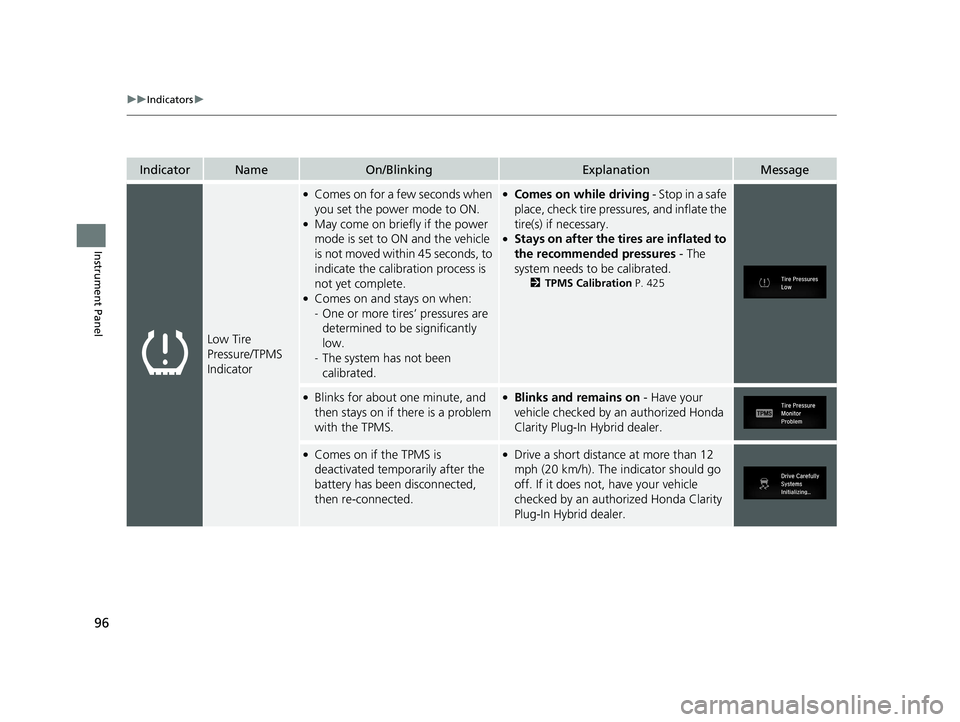
Low Tire
Pressure/TPMS
Indicator ●
Comes on for a few seconds when
you set the power mode to ON. ●
May come on briefly if the power
mode is set to ON and the vehicle
is not moved within 45 seconds, to
indicate the calibration process is
not yet complete. ●
Comes on and stays on when:
- One or more tires’ pressures are
determined to be significantly
low.
- The system has not been
calibrated. ●
Comes on while driving - Stop in a safe
place, check tire pressures, and inflate the
tire(s) if necessary. ●
Stays on after the tires are inflated to
the recommended pressures - The
system needs to be calibrated. 2 TPMS Calibration P. 425●
Blinks for about one minute, and
then stays on if th ere is a problem
with the TPMS. ●
Blinks and remains on - Have your
vehicle checked by an authorized Honda
Clarity Plug-In Hybrid dealer. ●
Comes on if the TPMS is
deactivated temporarily after the
battery has been disconnected,
then re-connected. ●
Drive a short distance at more than 12
mph (20 km/h). The indicator should go
off. If it does not, have your vehicle
checked by an author ized Honda Clarity
Plug-In Hybrid dealer.18 CLARITY PHEV CSS-31TRW6000.book 96 ページ 2017年8月31日 木曜日 午後2時 49分
Page 314 of 591

312 uu Customized Features u
Features Driver Assist System Setup Forward Collision Warning Distance
ACC Forward Vehicle Detect Beep
Lane Keeping Assist Suspend Beep
Road Departure Mi tigation Setting
Adjust Outside Temp. Display
“Trip A” Reset Timing
“Trip B” Reset TimingVehicle
Meter Setup
Adjust Alarm Volume
New Message Notifications Turn By Turn Auto Display
Reverse Alert Tone CancelTPMS Calibration
Calibrate
Fuel Efficiency Backlight
Memory Position LinkDriving Position Setup *
Speed/Distance Units
* Not available on all models 18 CLARITY PHEV CSS-31TRW6000.book 312 ページ 2017年8月31日 木曜日 午後2時49分
Page 328 of 591

326 uu Customized Features u
Features *1:Default Setting Setup
Group Customizable Features Description Selectable Settings
System Others Climate Screen Timeout Changes the length of time the climate control
display stays on when you press the CLIMATE
button. Never / 5 Seconds / 10
Seconds *1
/ 20
Seconds
Detail Information Displays the details of the head unit and
operating system information.
Default Cancels /Resets all cust omized items in the
System group as default. Yes / No
Vehicle TPMS Calibration Cancels/Calibrates the TPMS. Cancel / Calibrate
Driver
Assist
System
Setup Forward Collision Warning
Distance Changes the distance at which CMBS TM
alerts. Long / Normal *1
/ Short
ACC Forward Vehicle
Detect Beep Causes the system to beep when the system
detects a vehicle, or when the vehicle goes out of
the ACC with LSF range. On / Off *1
Lane Keeping Assist
Suspend Beep Causes the system to beep when LKAS is
suspended. On / Off *1
Road Departure Mitigation
Setting Changes the setting for the road departure
mitigation system. Normal *1
/ Wide /
Warning Only /
Narrow18 CLARITY PHEV CSS-31TRW6000.book 326 ページ 2017年8月31日 木曜日 午後2時49分
Page 371 of 591
369Driving This chapter discusses driving and refueling.
Before Driving ................................... 370
Towing a Trailer ................................ 375
When Driving
Turning on the Power ...................... 376
Precautions While Driving................. 380
Transmission .................................... 381
Shifting ............................................ 382
ECON Mode .................................... 388
SPORT Mode.................................... 389
Deceleration Paddle Selector ............ 390
Acoustic Vehicle Al erting System ...... 393
Front Sensor Camera ....................... 394
Road Departure Mi tigation (RDM)
System ........................................ 396 Adaptive Cruise Control (ACC) with Low
Speed Follow (LSF) ......................... 400
Lane Keeping Assist System (LKAS) .. 415
Vehicle Stability Assist (VSA ® ), aka
Electronic Stability Control (ESC),
System ....................................... 422 Agile Handling Assist ....................... 424
Tire Pressure Monitoring System (TPMS) .. 425
Tire Pressure Monitoring System (TPMS) -
Required Federal Explanation ......... 427
LaneWatch TM
................................... 429
Braking .............................................. 431
Parking Your Vehicle
When Stopped................................. 447 Multi-View Rear Camera .................. 449
Refueling
Fuel Information .............................. 451
How to Refuel ................................. 452
Charging
Before Charging .............................. 454
Charge the High Voltage battery using a
Level 1 or 2 charger ....................... 455
Control Box ..................................... 461
High Voltage Battery........................ 466
Using a Timer .................................. 467
Fuel Economy and CO 2
Emissions
Improving Fuel Economy and Reducing
CO 2
Emissions ................................ 46918 CLARITY PHEV CSS-31TRW6000.book 369 ページ 2017年8月31日 木曜日 午後2時49分
Page 424 of 591
422 uu When Driving u Vehicle Stability Assist (VSA ® ), aka Electronic Stability Control (ESC), System
Driving Vehicle Stability Assist (VSA ® ), aka Electronic
Stability Control (ESC), System VSA ® helps to stabilize the vehicle during cornering if the vehicle turns more or less
than what was intended. It also assists in maintaining traction on slippery surfaces.
It does so by regulating engine and motor output and selectively applying the
brakes.
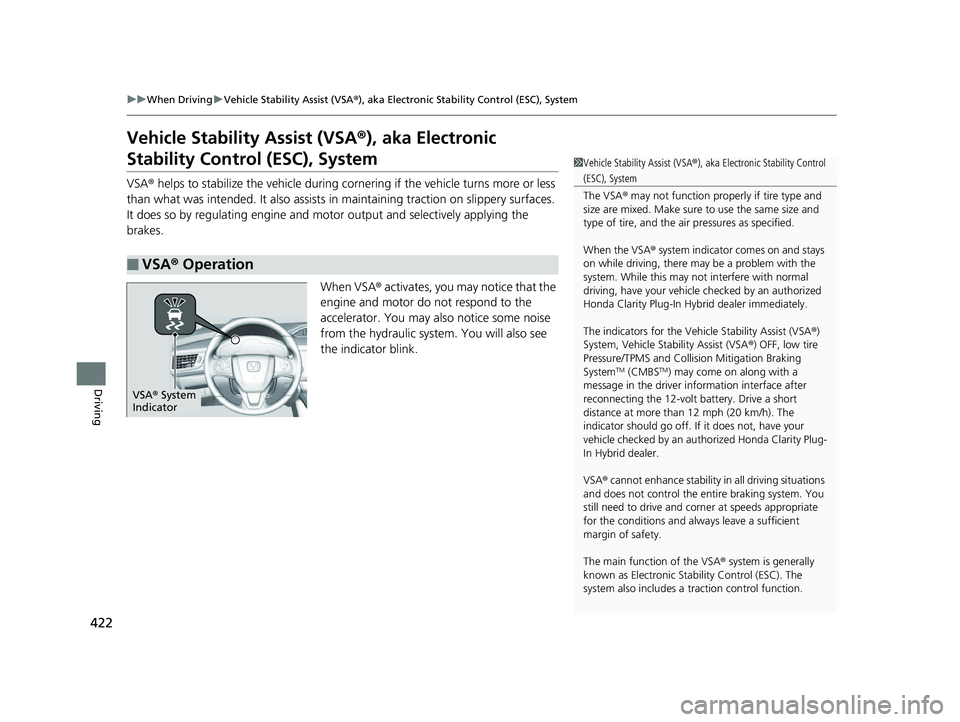
When VSA ® activates, you may notice that the
engine and motor do not respond to the
accelerator. You may also notice some noise
from the hydraulic system . You will also see
the indicator blink.
■ VSA ® Operation 1 Vehicle Stability Assist (VSA ® ), aka Electronic Stability Control
(ESC), System
The VSA ® may not function properl y if tire type and
size are mixed. Make sure to use the same size and
type of tire, and the air pressures as specified.
When the VSA ® system indicator comes on and stays
on while driving, there ma y be a problem with the
system. While this may not interfere with normal
driving, have your vehicle checked by an authorized
Honda Clarity Plug-In Hybr id dealer immediately.
The indicators for the Vehicle Stability Assist (VSA ® )
System, Vehicle Stability Assist (VSA ® ) OFF, low tire
Pressure/TPMS and Collision Mitigation Braking
System TM
(CMBS TM
) may come on along with a
message in the driver information interface after
reconnecting the 12-volt battery. Drive a short
distance at more than 12 mph (20 km/h). The
indicator should go off. If it does not, have your
vehicle checked by an aut horized Honda Clarity Plug-
In Hybrid dealer.
VSA ® cannot enhance stability in all driving situations
and does not control the entire braking system. You
still need to drive and corner at speeds appropriate
for the conditions and always leave a sufficient
margin of safety.
The main function of the VSA ® system is generally
known as Electronic Stab ility Control (ESC). The
system also includes a traction control function.VSA ® System
Indicator18 CLARITY PHEV CSS-31TRW6000.book 422 ページ 2017年8月31日 木曜日 午後2時49分