Page 23 of 591
21
Quick Reference Guide
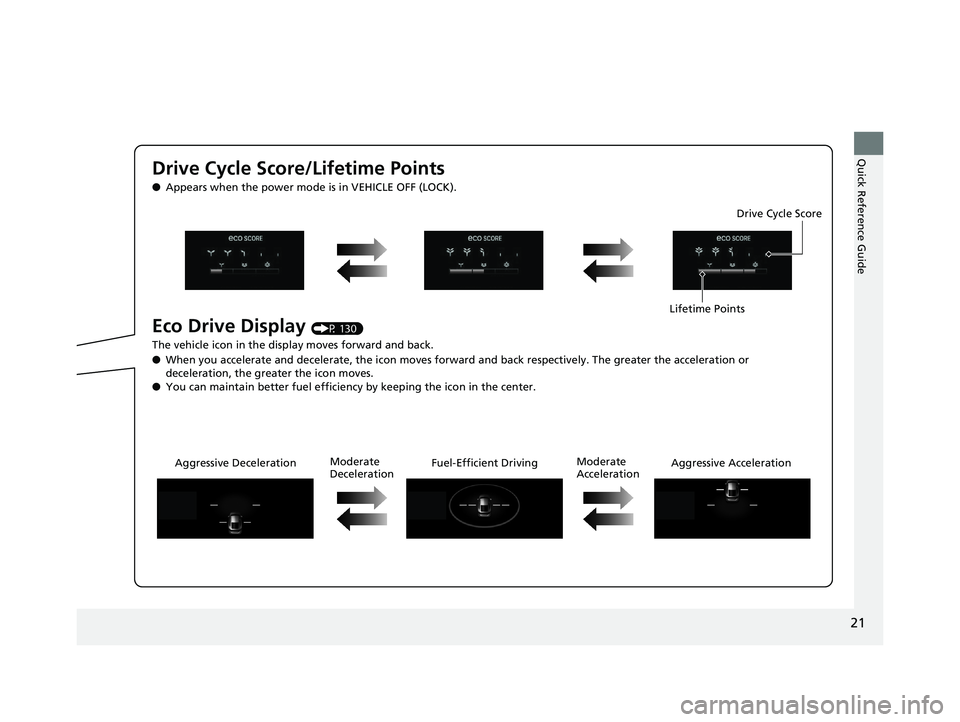
Drive Cycle Score/Lifetime Points ● Appears when the power mode is in VEHICLE OFF (LOCK).
Eco Drive Display (P 130)
The vehicle icon in the disp lay moves forward and back.
● When you accelerate and decelerate, the icon moves forward and back respectively. The greater the acceleration or
deceleration, the greater the icon moves.
● You can maintain better fuel efficiency by keeping the icon in the center. Drive Cycle Score
Lifetime Points
Aggressive Deceleration Fuel-Effici ent Driving Aggressive AccelerationModerate
Deceleration Moderate
Acceleration18 CLARITY PHEV CSS-31TRW6000.book 21 ページ 2017年8月31日 木曜日 午後2時 49分
Page 30 of 591
28
Quick Reference Guide Features (P 203)
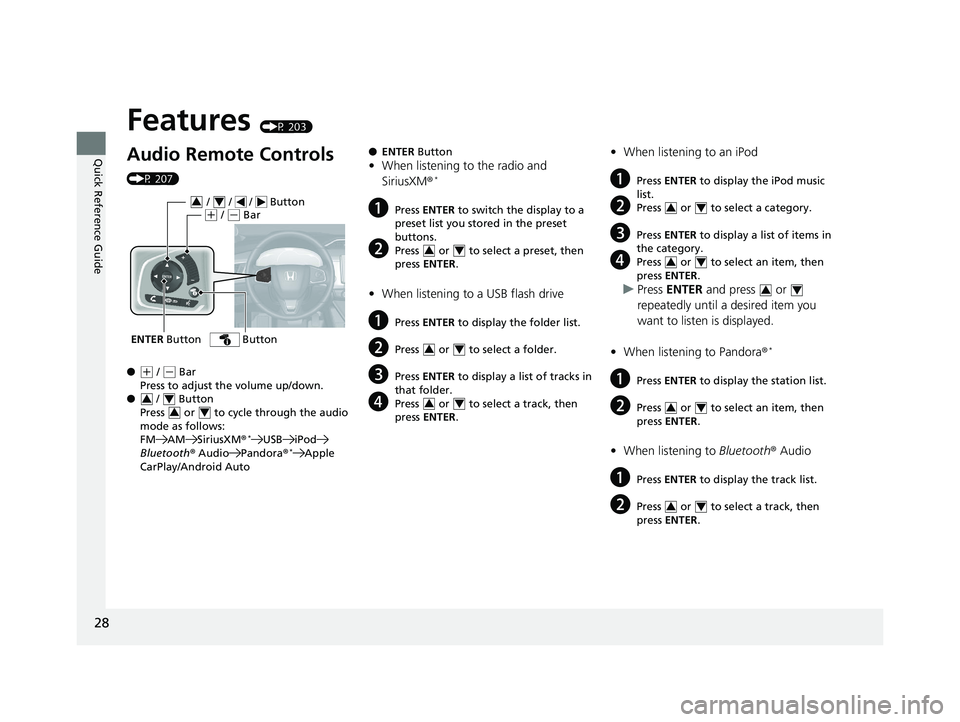
Audio Remote Controls (P 207)
● ( +
/ ( -
Bar
Press to adjust the volume up/down.
● / Button
Press or to cycle through the audio
mode as follows:
FM AM SiriusXM ® *
USB iPod
Bluetooth ® Audio Pandora ® *
Apple
CarPlay/Android AutoENTER Button / / / Button 3 4
( +
/ ( -
Bar
Button
3 4
3 4 ● ENTER Button
• When listening to the radio and
SiriusXM ® *
a Press ENTER to switch the display to a
preset list you stored in the preset
buttons.
b Press or to select a preset, then
press ENTER .
• When listening to a USB flash drive
a Press ENTER to display the folder list.
b Press or to select a folder.
c Press ENTER to display a list of tracks in
that folder.
d Press or to select a track, then
press ENTER .3 4
3 4
3 4 • When listening to an iPod
a Press ENTER to display the iPod music
list.
b Press or to select a category.
c Press ENTER to display a list of items in
the category.
d Press or to select an item, then
press ENTER .
u Press ENTER and press or
repeatedly until a desired item you
want to listen is displayed.
• When listening to Pandora ® *
a Press ENTER to display the station list.
b Press or to select an item, then
press ENTER .
• When listening to Bluetooth ® Audio
a Press ENTER to display the track list.
b Press or to select a track, then
press ENTER . 3 4
3 4
3 4
3 4
3 418 CLARITY PHEV CSS-31TRW6000.book 28 ページ 2017年8月31日 木曜日 午後2時 49分
Page 131 of 591
Continued
129uu Gauges and Driver Information Interface u Driver Information Interface
Instrument Panel
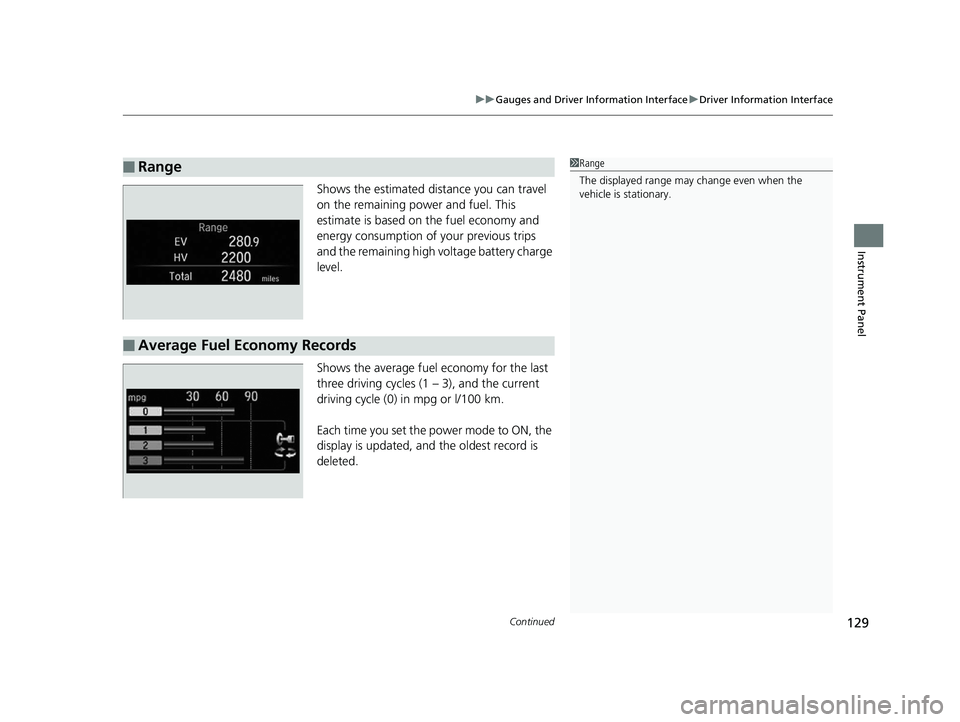
Shows the estimated distance you can travel
on the remaining power and fuel. This
estimate is based on the fuel economy and
energy consumption of your previous trips
and the remaining high voltage battery charge
level.
Shows the average fuel economy for the last
three driving cycles (1 – 3), and the current
driving cycle (0) in mpg or l/100 km.
Each time you set the power mode to ON, the
display is updated, and the oldest record is
deleted.■ Range 1 Range
The displayed ra nge may change even when the
vehicle is stationary.
■ Average Fuel Economy Records 18 CLARITY PHEV CSS-31TRW6000.book 129 ページ 2017年8月31日 木曜日 午後2時49分
Page 132 of 591
130 uu Gauges and Driver Information Interface u Driver Information Interface
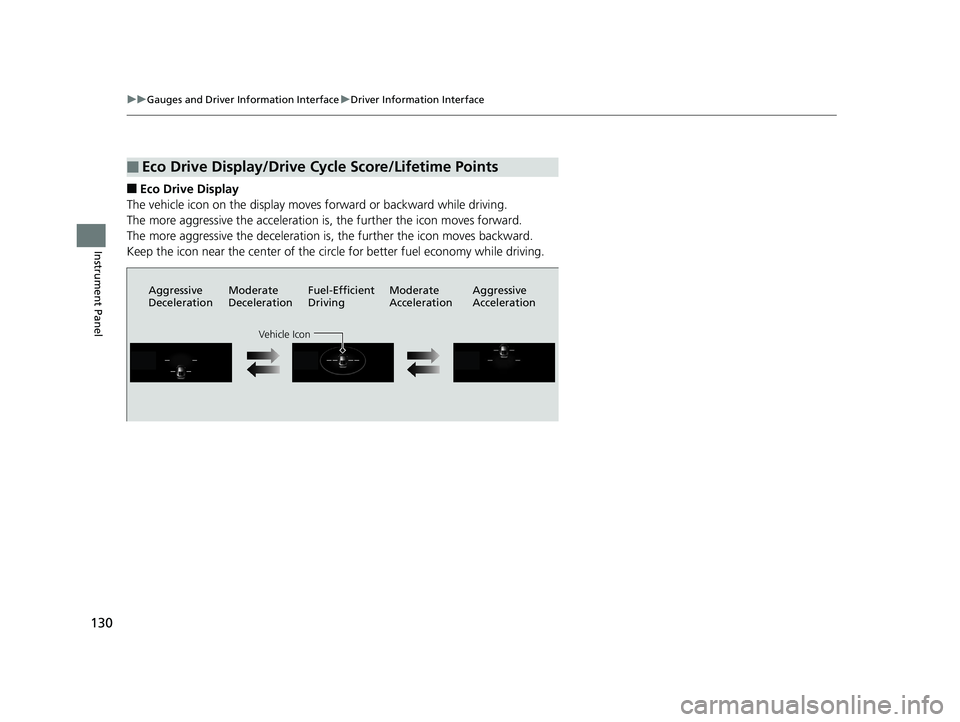
Instrument Panel ■ Eco Drive Display
The vehicle icon on the display moves forward or backward while driving.
The more aggressive the acceleration is, the further the icon moves forward.
The more aggressive the deceleration is, the further the icon moves backward.
Keep the icon near the center of the circ le for better fuel economy while driving.
■ Eco Drive Display/Drive Cycle Score/Lifetime Points Aggressive
Deceleration Moderate
Deceleration Fuel-Efficient
Driving Moderate
Acceleration Aggressive
Acceleration
Vehicle Icon18 CLARITY PHEV CSS-31TRW6000.book 130 ページ 2017年8月31日 木曜日 午後2時49分
Page 133 of 591
131uu Gauges and Driver Information Interface u Driver Information Interface
Continued
Instrument Panel
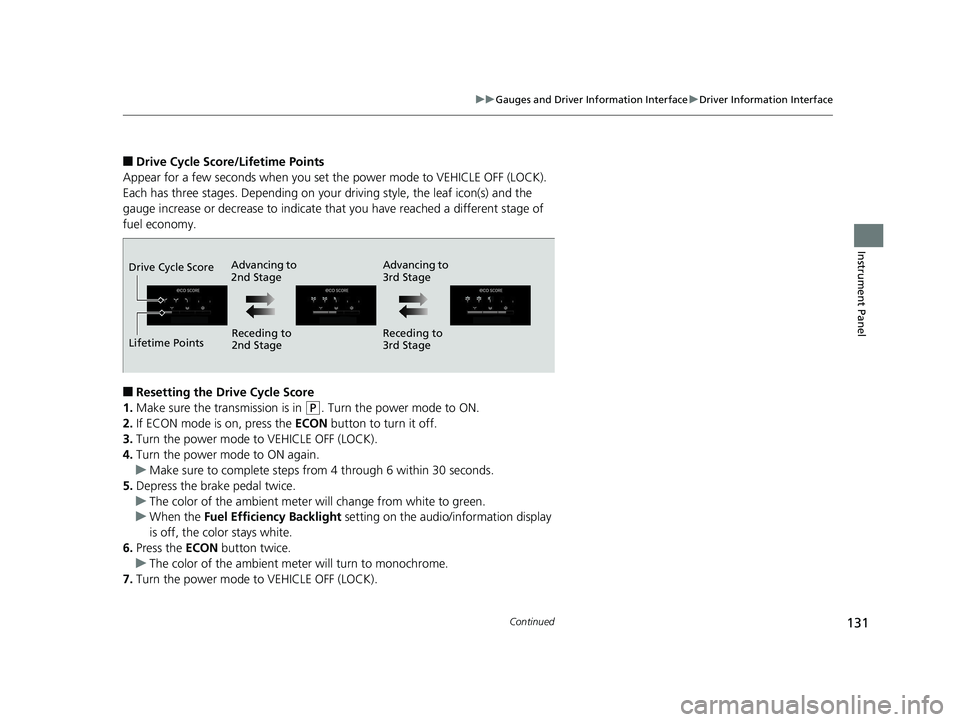
■ Drive Cycle Score/Lifetime Points
Appear for a few seconds when you set the power mode to VEHICLE OFF (LOCK).
Each has three stages. Depending on your driving style, the leaf icon(s) and the
gauge increase or decrease to indicate that you have reached a different stage of
fuel economy.
■ Resetting the Drive Cycle Score
1. Make sure the transmission is in ( P
. Turn the power mode to ON.
2. If ECON mode is on, press the ECON button to turn it off.
3. Turn the power mode to VEHICLE OFF (LOCK).
4. Turn the power mode to ON again.
u Make sure to complete steps fro m 4 through 6 within 30 seconds.
5. Depress the brake pedal twice.
u The color of the ambient meter wi ll change from white to green.
u When the Fuel Efficiency Backlight setting on the audi o/information display
is off, the color stays white.
6. Press the ECON button twice.
u The color of the ambient mete r will turn to monochrome.
7. Turn the power mode to VEHICLE OFF (LOCK). Advancing to
2nd Stage Advancing to
3rd Stage
Receding to
2nd Stage Receding to
3rd StageLifetime PointsDrive Cycle Score18 CLARITY PHEV CSS-31TRW6000.book 131 ページ 2017年8月31日 木曜日 午後2時49分
Page 209 of 591
207uu Audio System u Audio Remote Controls
Continued
Features
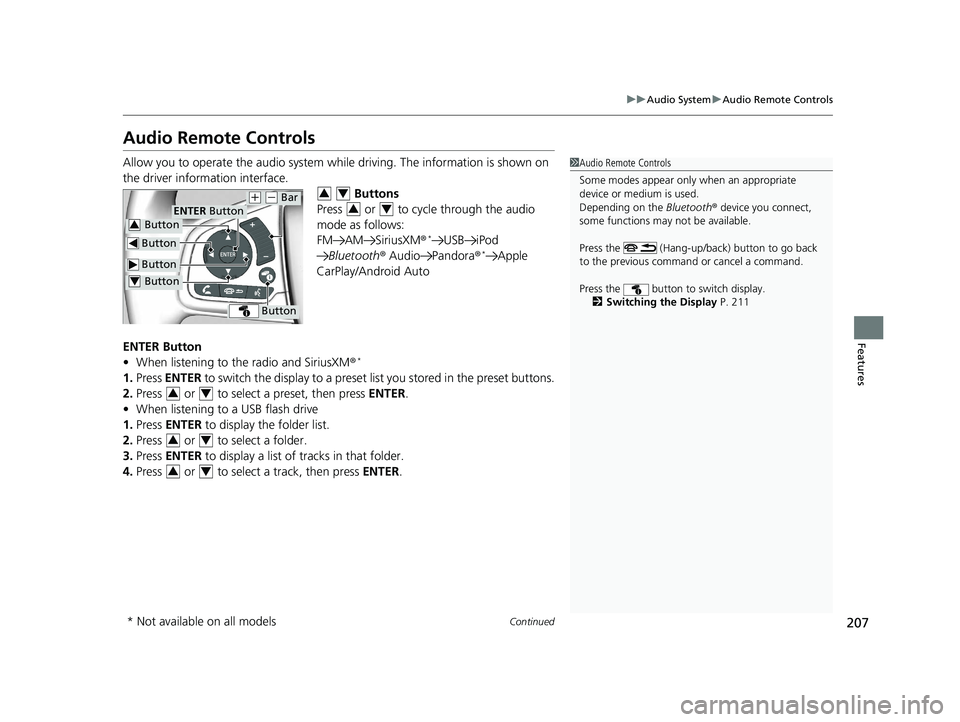
Audio Remote Controls Allow you to operate the audio system whil e driving. The information is shown on
the driver information interface.
Buttons
Press or to cycle through the audio
mode as follows:
FM AM SiriusXM ® *
USB iPod
Bluetooth ® Audio Pandora ® *
Apple
CarPlay/Android Auto
ENTER Button
• When listening to the radio and SiriusXM ® *
1. Press ENTER to switch the disp lay to a preset list you stored in the preset buttons.
2. Press or to select a preset, then press ENTER .
• When listening to a USB flash drive
1. Press ENTER to display the folder list.
2. Press or to select a folder.
3. Press ENTER to display a list of tracks in that folder.
4. Press or to select a track, then press ENTER . 1 Audio Remote Controls
Some modes appear only when an appropriate
device or medium is used.
Depending on the Bluetooth ® device you connect,
some functions may not be available.
Press the (Hang-up/back) button to go back
to the previous command or cancel a command.
Press the button to switch display.
2 Switching the Display P. 211 Button ENTER Button
Button ( +
( -
Bar
Button Button3
Button4 3 4
3 4
3 4
3 4
3 4
* Not available on all models 18 CLARITY PHEV CSS-31TRW6000.book 207 ページ 2017年8月31日 木曜日 午後2時49分
Page 409 of 591
407uu When Driving u Adaptive Cruise Control (ACC) with Low Speed Follow (LSF)
Continued
Driving
■ Detection limitations
• A vehicle or pedestrian suddenly crosses in front of you.
• The interval between your vehicle and the vehicle or pedestrian ahead of you is
too short.
• A vehicle cuts in front of you at a slow speed, and it brakes suddenly.
• When you accelerate rapidly and approach the vehicle or pedestrian ahead of you
at high speed.
• The vehicle ahead of you is a motorcycle, bicycle, mobility scooter, or other small
vehicle.
• When there are animals in front of your vehicle.
• When you drive on a curved or winding or undulating road that makes it difficult
for the sensor to properly detect a vehicle or a pedestrian in front of you.
• The speed difference between your vehicle an d a vehicle or pedestrian in front of
you is significantly large.
• An oncoming vehicle suddenly comes in front of you.
• Your vehicle abruptly crosses over in front of an oncoming vehicle.
• When driving through a narrow iron bridge.
• When the vehicle ahead of you brakes suddenly.
• When the vehicle ahead of you has a unique shape.
• When your vehicle or the vehicle ahead of you is driving on one edge of the lane. 18 CLARITY PHEV CSS-31TRW6000.book 407 ページ 2017年8月31日 木曜日 午後2時49分
Page 446 of 591
444 uu Braking u Collision Mitigation Braking System TM
(CMBS TM
)
Driving ■ Vehicle conditions
• Headlight lenses are dirty or the headlights are not properly adjusted.
• The outside of the windshie ld is blocked by dirt, m ud, leaves, wet snow, etc.
• The inside of the windshield is fogged.
• An abnormal tire or wheel condition (wrong sized, varied size or construction,
improperly inflated tire, etc.).
• When tire chains are installed.
• The vehicle is tilted due to a heav y load or suspension modifications.
• The camera temperature gets too high.
• Driving with the parking brake applied.
• When the radar sensor in the front grille gets dirty.
■ Detection limitations
• A vehicle or pedestrian suddenly crosses in front of you.
• The distance between your vehicle and the vehicle or pedestrian ahead of you is
too short.
• A vehicle cuts in front of you at a slow speed, and it brakes suddenly.
• When you accelerate rapidly and approach the vehicle or pedestrian ahead of you
at high speed.
• The vehicle ahead of you is a motorcycle, bicycle, mobility scooter or other small
vehicle.
• When there are animals in front of your vehicle.
• When you drive on a cu rved, winding or undu lating road that makes it difficult for
the sensor to properly detect a vehicle in front of you.
• The speed difference between your vehicle an d a vehicle or pedestrian in front of
you is significantly large.
• An oncoming vehicle suddenly comes in front of you.
• Another vehicle suddenly comes in front of you at an intersection, etc.
• Your vehicle abruptly crosses over in front of an oncoming vehicle.
• When driving through a narrow iron bridge.
• When the lead vehicle suddenly slows down. 18 CLARITY PHEV CSS-31TRW6000.book 444 ページ 2017年8月31日 木曜日 午後2時49分