2018 HONDA CLARITY ELECTRIC steering
[x] Cancel search: steeringPage 6 of 559
Contents
This owner’s manual should be considered a permanent part of the
vehicle and should remain with the vehicle when it is sold.
This owner’s manual covers all models of your vehicle. You may find
descriptions of equipment and features that are not on your
particular model.
Images throughout this owner’s manual (including the front cover)
represent features and equipment that are available on some, but
not all, models. Your particular mo del may not have some of these
features.
The information and specifications in cluded in this publication were
in effect at the time of approval for printing. Honda Motor Co., Ltd.
reserves the right, however, to discontinue or change specifications
or design at any time without notice and without incurring any
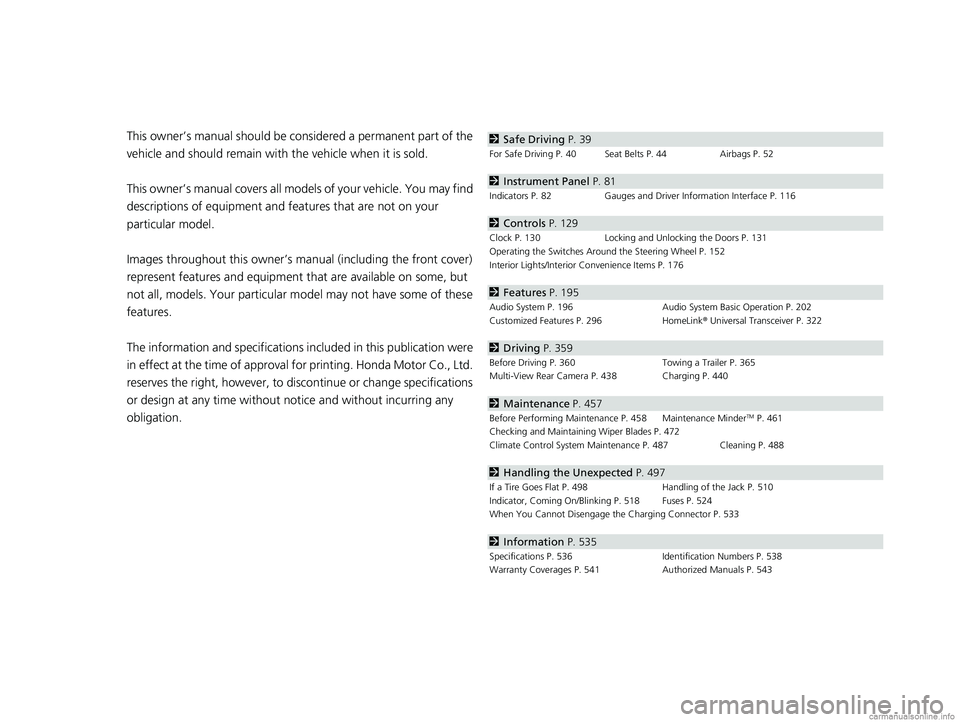
obligation.2 Safe Driving P. 39
For Safe Driving P. 40 Seat Belts P. 44 Airbags P. 52
2Instrument Panel P. 81
Indicators P. 82 Gauges and Driver Information Interface P. 116
2Controls P. 129
Clock P. 130 Locking and Unlocking the Doors P. 131
Operating the Switches Around the Steering Wheel P. 152
Interior Lights/Interior Convenience Items P. 176
2 Features P. 195
Audio System P. 196 Audio System Basic Operation P. 202
Customized Features P. 296 HomeLink® Universal Transceiver P. 322
2 Driving P. 359
Before Driving P. 360 Towing a Trailer P. 365
Multi-View Rear Camera P. 438 Charging P. 440
2 Maintenance P. 457
Before Performing Maintenance P. 458 Maintenance MinderTM P. 461
Checking and Maintaining Wiper Blades P. 472
Climate Control System Main tenance P. 487 Cleaning P. 488
2Handling the Unexpected P. 497
If a Tire Goes Flat P. 498 Handling of the Jack P. 510
Indicator, Coming On/Blinking P. 518 Fuses P. 524
When You Cannot Disengage the Charging Connector P. 533
2Information P. 535
Specifications P. 536 Identification Numbers P. 538
Warranty Coverages P. 541 Authorized Manuals P. 543
18 CLARITY ELECTRIC CSS-31TRV6100.book 4 ページ 2018年2月5日 月曜日 午後12時0分
Page 8 of 559
6
Quick Reference Guide
Quick Reference Guide
Visual Index
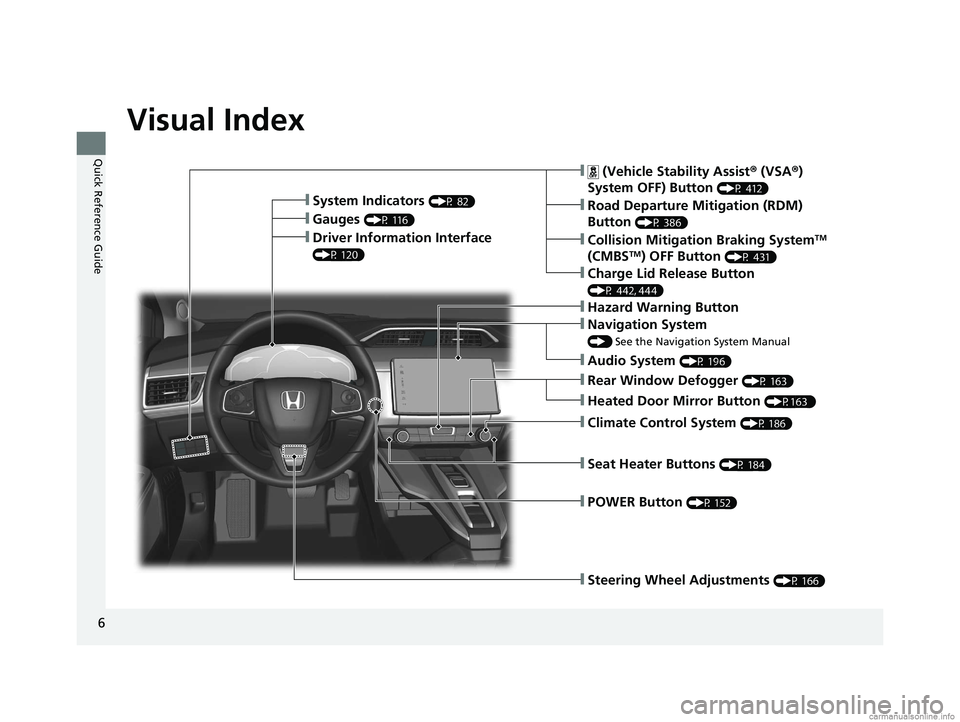
❙Steering Wheel Adjustments (P 166)
❙ (Vehicle Stability Assist® (VSA ®)
System OFF) Button
(P 412)
❙Road Departure Mitigation (RDM)
Button
(P 386)
❙System Indicators (P 82)
❙Gauges (P 116)
❙Collision Mitigation Braking SystemTM
(CMBSTM) OFF Button (P 431)
❙Charge Lid Release Button
(P 442, 444)
❙Driver Information Interface
(P 120)
❙Navigation System
() See the Navigation System Manual
❙Climate Control System (P 186)
❙Rear Window Defogger (P 163)
❙POWER Button (P 152)
❙Seat Heater Buttons (P 184)
❙Audio System (P 196)
❙Hazard Warning Button
❙Heated Door Mirror Button (P163 )
18 CLARITY ELECTRIC CSS-31TRV6100.book 6 ページ 2018年2月5日 月曜日 午後12時0分
Page 24 of 559
22
Quick Reference Guide
Safe Driving (P 39)
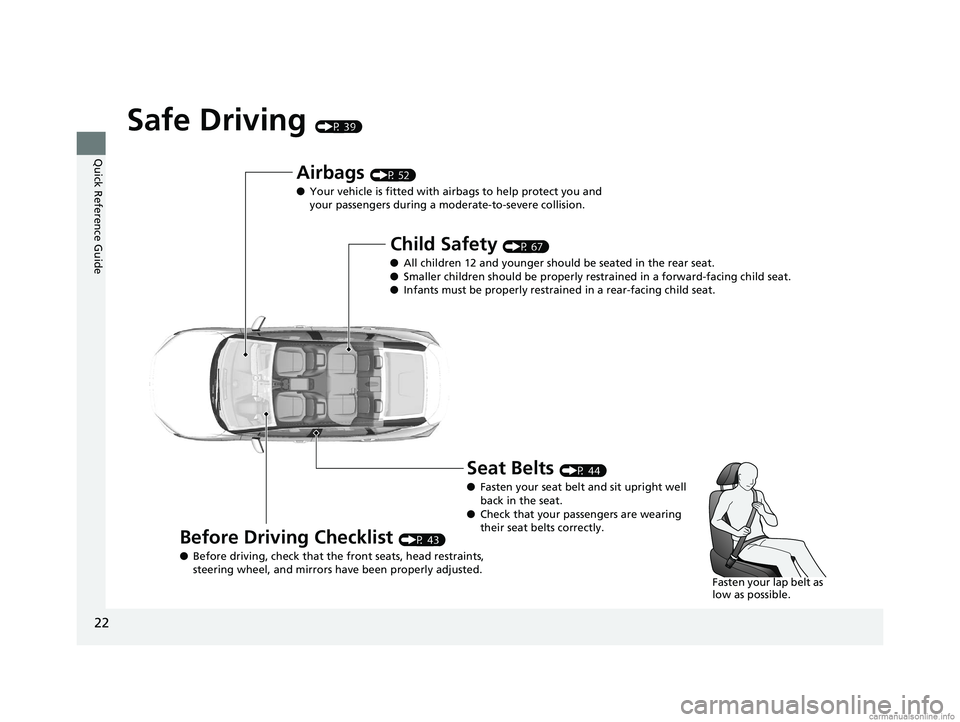
Airbags (P 52)
● Your vehicle is fitted with ai rbags to help protect you and
your passengers during a moderate-to-severe collision.
Child Safety (P 67)
● All children 12 and younger should be seated in the rear seat.
● Smaller children should be properly restra ined in a forward-facing child seat.
● Infants must be properly restraine d in a rear-facing child seat.
Before Driving Checklist (P 43)
● Before driving, check that the front seats, head restraints,
steering wheel, and mirrors have been properly adjusted.
Seat Belts (P 44)
● Fasten your seat belt and sit upright well
back in the seat.
● Check that your passengers are wearing
their seat belts correctly.
Fasten your lap belt as
low as possible.
18 CLARITY ELECTRIC CSS-31TRV6100.book 22 ページ 2018年2月5日 月曜日 午後12時0分
Page 25 of 559
23
Quick Reference Guide
Instrument Panel (P 81)
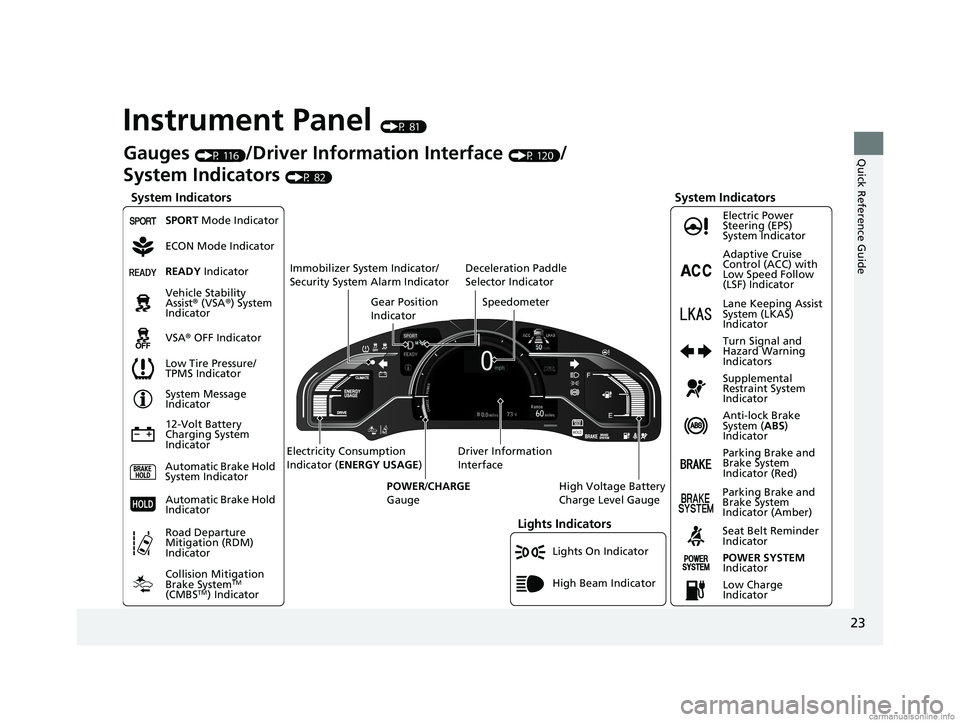
Lights On Indicator
System Indicators
12-Volt Battery
Charging System
IndicatorAnti-lock Brake
System (
ABS)
Indicator
Vehicle Stability
Assist
® (VSA ®) System
Indicator
VSA ® OFF Indicator Electric Power
Steering (EPS)
System Indicator
Lights Indicators
High Beam Indicator
Seat Belt Reminder
Indicator
System Indicators
System Message
Indicator
Parking Brake and
Brake System
Indicator (Red) Supplemental
Restraint System
Indicator
Gauges (P 116)/Driver Information Interface (P 120)/
System Indicators
(P 82)
Low Tire Pressure/
TPMS Indicator Turn Signal and
Hazard Warning
Indicators
Speedometer
Automatic Brake Hold
System Indicator Parking Brake and
Brake System
Indicator (Amber)
SPORT Mode Indicator
Collision Mitigation
Brake System
TM
(CMBSTM) Indicator
Road Departure
Mitigation (RDM)
Indicator
Immobilizer System Indicator/
Security System Alarm Indicator
Automatic Brake Hold
IndicatorREADY Indicator
POWER SYSTEM
Indicator
Gear Position
Indicator
High Voltage Battery
Charge Level Gauge
Driver Information
Interface
Electricity Consumption
Indicator (
ENERGY USAGE )
POWER /CHARGE
Gauge
Low Charge
Indicator Adaptive Cruise
Control (ACC) with
Low Speed Follow
(LSF) Indicator
Lane Keeping Assist
System (LKAS)
Indicator
Deceleration Paddle
Selector Indicator
ECON Mode Indicator
18 CLARITY ELECTRIC CSS-31TRV6100.book 23 ページ 2018年2月5日 月曜日 午後12時0分
Page 27 of 559
25
Quick Reference Guide
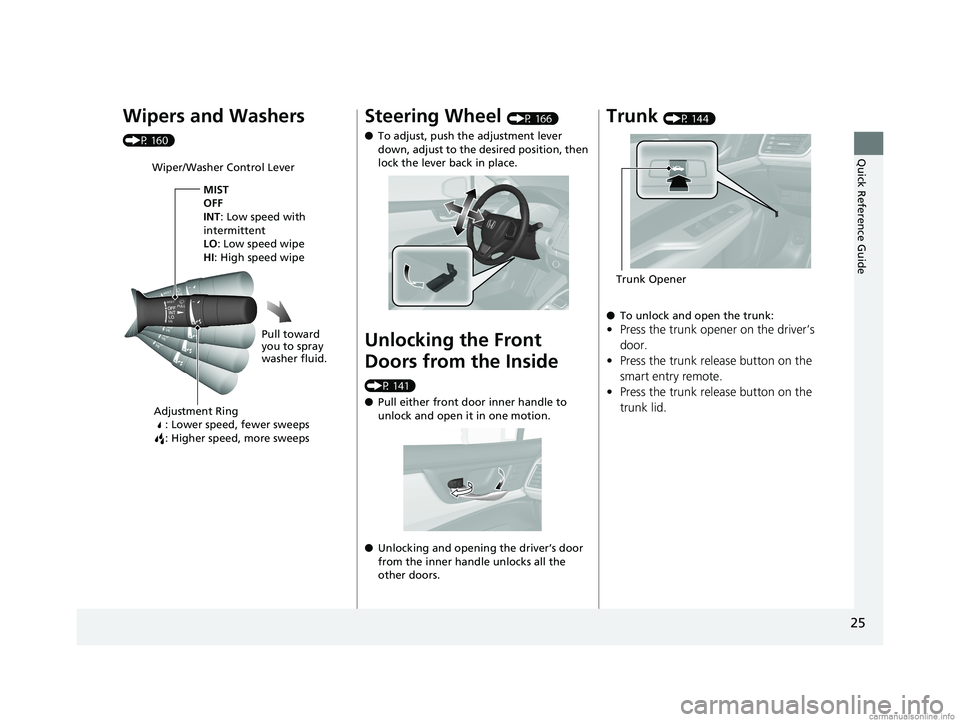
Wipers and Washers
(P 160)
Wiper/Washer Control LeverAdjustment Ring : Lower speed, fewer sweeps
: Higher speed, more sweeps
MIST
OFF
INT: Low speed with
intermittent
LO : Low speed wipe
HI: High speed wipe
Pull toward
you to spray
washer fluid.
Steering Wheel (P 166)
● To adjust, push the adjustment lever
down, adjust to the desired position, then
lock the lever back in place.
Unlocking the Front
Doors from the Inside
(P 141)
●Pull either front door inner handle to
unlock and open it in one motion.
● Unlocking and opening the driver’s door
from the inner handle unlocks all the
other doors.
Trunk (P 144)
● To unlock and open the trunk:
•Press the trunk opener on the driver’s
door.
• Press the trunk release button on the
smart entry remote.
• Press the trunk release button on the
trunk lid.
Trunk Opener
18 CLARITY ELECTRIC CSS-31TRV6100.book 25 ページ 2018年2月5日 月曜日 午後12時0分
Page 34 of 559
32
Quick Reference Guide
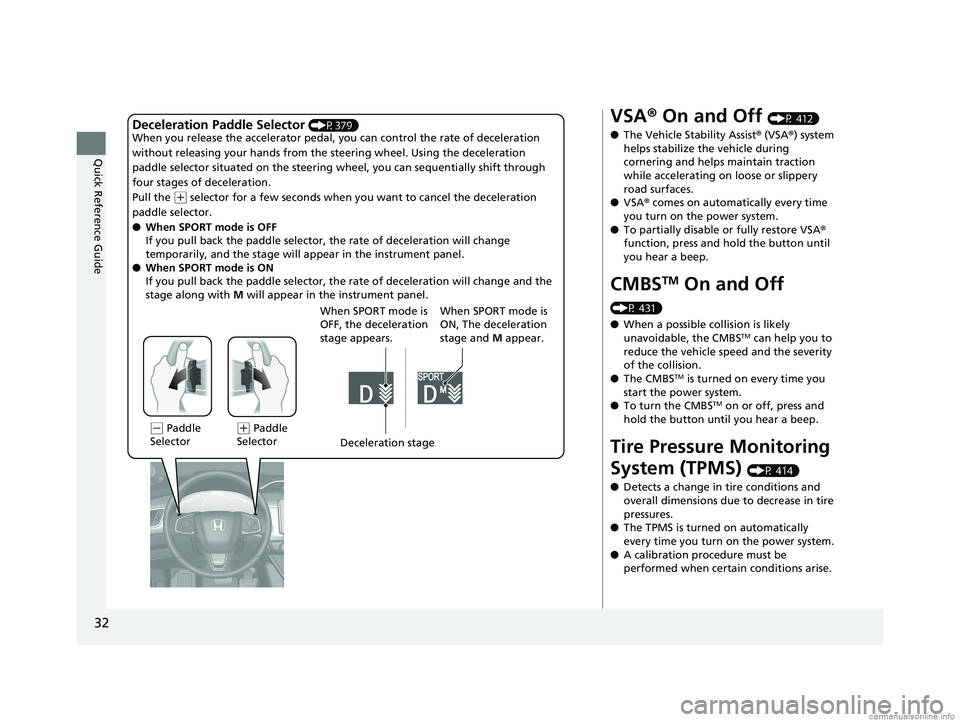
Deceleration Paddle Selector (P379)
When you release the accelerator pedal, yo u can control the rate of deceleration
without releasing your hands from the steering wheel. Using the deceleration
paddle selector situated on the steering wheel, you can sequentially shift through
four stages of deceleration.
Pull the
( + selector for a few seconds when yo u want to cancel the deceleration
paddle selector.
● When SPORT mode is OFF
If you pull back the paddle selector, the rate of deceleration will change
temporarily, and the stage will ap pear in the instrument panel.
● When SPORT mode is ON
If you pull back the paddle selector, the rate of deceleration will change and the
stage along with M will appear in the instrument panel.
(- Paddle
Selector Deceleration stage
When SPORT mode is
OFF, the deceleration
stage appears.(
+ Paddle
Selector When SPORT mode is
ON, The deceleration
stage and
M appear.
VSA ® On and Off (P 412)
● The Vehicle Stability Assist ® (VSA ®) system
helps stabilize the vehicle during
cornering and helps maintain traction
while accelerating on loose or slippery
road surfaces.
● VSA ® comes on automatically every time
you turn on the power system.
● To partially disable or fully restore VSA ®
function, press and hold the button until
you hear a beep.
CMBSTM On and Off
(P 431)
● When a possible collision is likely
unavoidable, the CMBS
TM can help you to
reduce the vehicle sp eed and the severity
of the collision.
● The CMBS
TM is turned on every time you
start the power system.
● To turn the CMBS
TM on or off, press and
hold the button until you hear a beep.
Tire Pressure Monitoring
System (TPMS)
(P 414)
● Detects a change in tire conditions and
overall dimensions due to decrease in tire
pressures.
● The TPMS is turned on automatically
every time you turn on the power system.
● A calibration procedure must be
performed when certain conditions arise.
18 CLARITY ELECTRIC CSS-31TRV6100.book 32 ページ 2018年2月5日 月曜日 午後12時0分
Page 35 of 559
33
Quick Reference Guide
Honda Sensing®
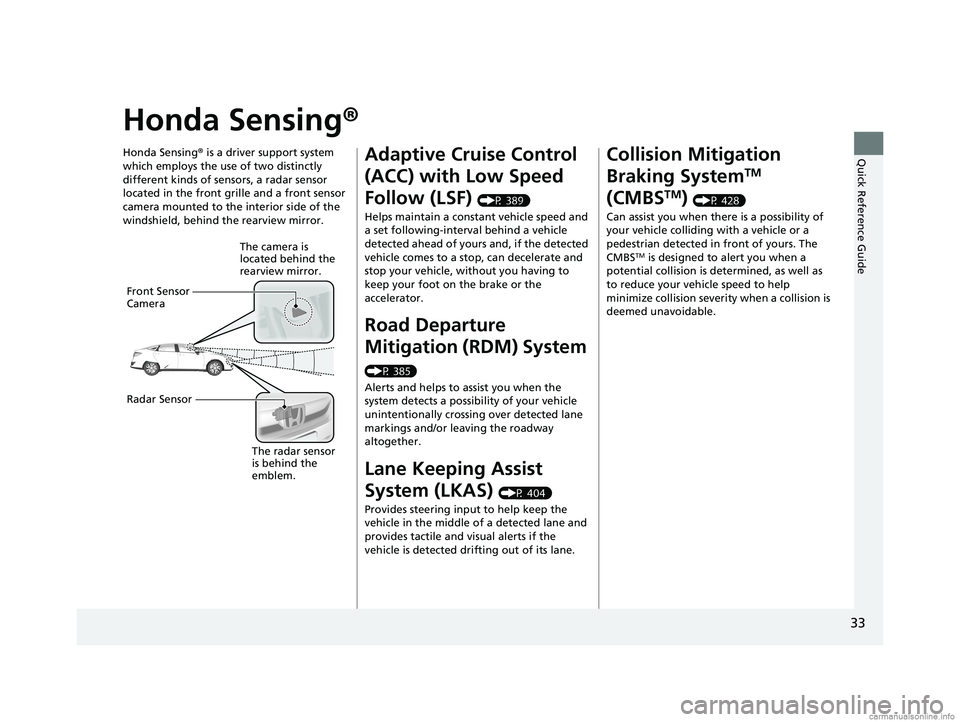
Honda Sensing® is a driver support system
which employs the use of two distinctly
different kinds of sensors, a radar sensor
located in the front grille and a front sensor
camera mounted to the interior side of the
windshield, behind the rearview mirror.
The camera is
located behind the
rearview mirror.
Front Sensor
Camera
Radar Sensor
The radar sensor
is behind the
emblem.
Adaptive Cruise Control
(ACC) with Low Speed
Follow (LSF)
(P 389)
Helps maintain a constant vehicle speed and
a set following-interval behind a vehicle
detected ahead of yours and, if the detected
vehicle comes to a stop, can decelerate and
stop your vehicle, without you having to
keep your foot on the brake or the
accelerator.
Road Departure
Mitigation (RDM) System
(P 385)
Alerts and helps to assist you when the
system detects a possibility of your vehicle
unintentionally crossing over detected lane
markings and/or leaving the roadway
altogether.
Lane Keeping Assist
System (LKAS)
(P 404)
Provides steering input to help keep the
vehicle in the middle of a detected lane and
provides tactile and visual alerts if the
vehicle is detected drifting out of its lane.
Collision Mitigation
Braking System
TM
(CMBS
TM) (P 428)
Can assist you when there is a possibility of
your vehicle colliding with a vehicle or a
pedestrian detected in front of yours. The
CMBS
TM is designed to alert you when a
potential collision is determined, as well as
to reduce your vehi cle speed to help
minimize collision severity when a collision is
deemed unavoidable.
18 CLARITY ELECTRIC CSS-31TRV6100.book 33 ページ 2018年2月5日 月曜日 午後12時0分
Page 44 of 559
42
uuFor Safe Driving uYour Vehicle’s Safety Features
Safe Driving
Your Vehicle’s Safety Features
The following checklist will help you take an active role in protecting yourself and
your passengers.
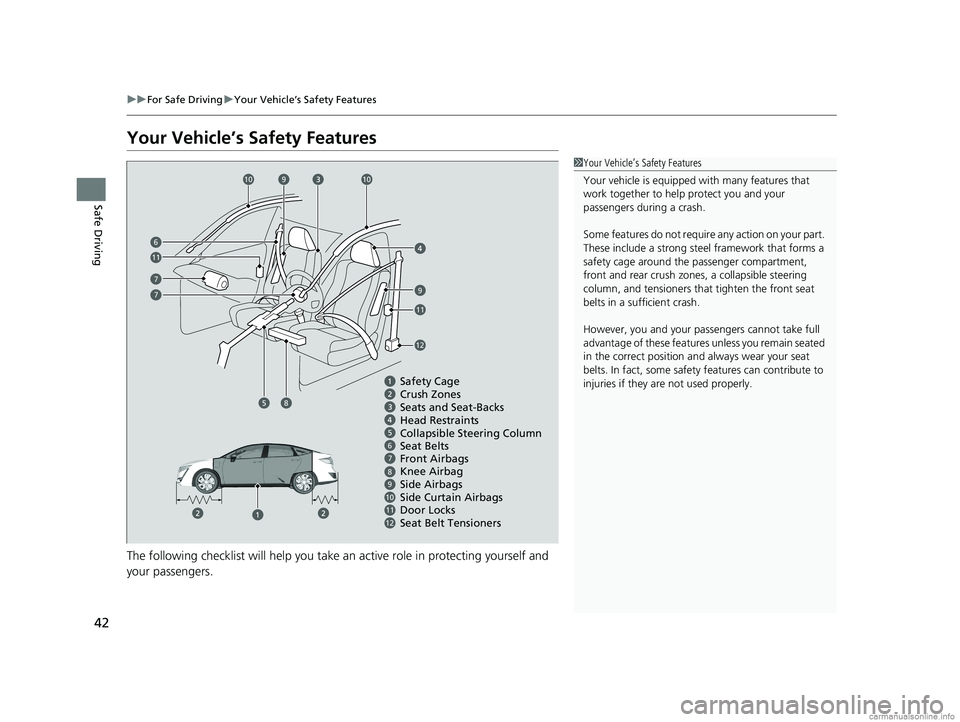
1 Your Vehicle’s Safety Features
Your vehicle is equipped wi th many features that
work together to help protect you and your
passengers during a crash.
Some features do not require any action on your part.
These include a strong steel framework that forms a
safety cage around the passenger compartment,
front and rear crush zone s, a collapsible steering
column, and tensioners that tighten the front seat
belts in a sufficient crash.
However, you and your passe ngers cannot take full
advantage of these features unless you remain seated
in the correct position and always wear your seat
belts. In fact, some safety features can contribute to
injuries if they are not used properly.
67
9101112
Safety Cage
Crush Zones
Seats and Seat-Backs
Head Restraints
Collapsible Steering Column
Seat Belts
Front Airbags
Side Curtain Airbags
Door Locks Side Airbags
Seat Belt Tensioners
7
7
1010
9
9
11
11
6
12
8Knee Airbag
8
18 CLARITY ELECTRIC CSS-31TRV6100.book 42 ページ 2018年2月5日 月曜日 午後12時0分