2018 HONDA CIVIC SEDAN ignition
[x] Cancel search: ignitionPage 436 of 643

434
uuWhen Driving uPrecautions While Driving
Driving
Precautions While Driving
Avoid driving in deep water and on flooded roads. This can damage the engine or
driveline, or cause elec trical component failure.
If there is a strong impact with something under the vehicle, stop in a safe location.
Check the underside of the vehicle for damage or any fluid leaks.
*1: Models with the smart entry system have an ENGINE START/STOP button instead of an
ignition switch.
■In Rain
■Other Precautions
1 Precautions While Driving
NOTICE
Do not operate the shift lever while pressing the
accelerator pedal. You could damage the
transmission.
NOTICE
If you repeatedly turn the steering wheel at an
extremely low speed, or hold the steering wheel in
the full left or right position for a while, the electric
power steering (EPS) system heats up. The system
goes into a protective mode, and limits its
performance. The steering wheel becomes harder
and harder to operate. Once the system cools down,
the EPS system is restored.
Repeated operation under these conditions can
eventually damage the system.
If the ignition switch is turned to ACCESSORY
( q*1
while driving, the engine will shut down and all
steering and brake power a ssist functions will stop,
making it difficult to control the vehicle.
Do not put the shift lever in
( N, as you will lose
engine braking (and acce leration) performance.
During the first 600 miles (1,000 km) of operation,
avoid sudden acceleration or full throttle operation so
as not to damage the engine or powertrain.
Avoid hard braking for the first 200 miles (300 km).
You should also follow this when the brake pads are
replaced.
18 CIVIC 4D HCM (KA KC KL)-31TBA6201.book 434 ページ 2018年10月30日 火曜日 午前7時28分
Page 438 of 643
436
uuWhen Driving uShifting
Driving
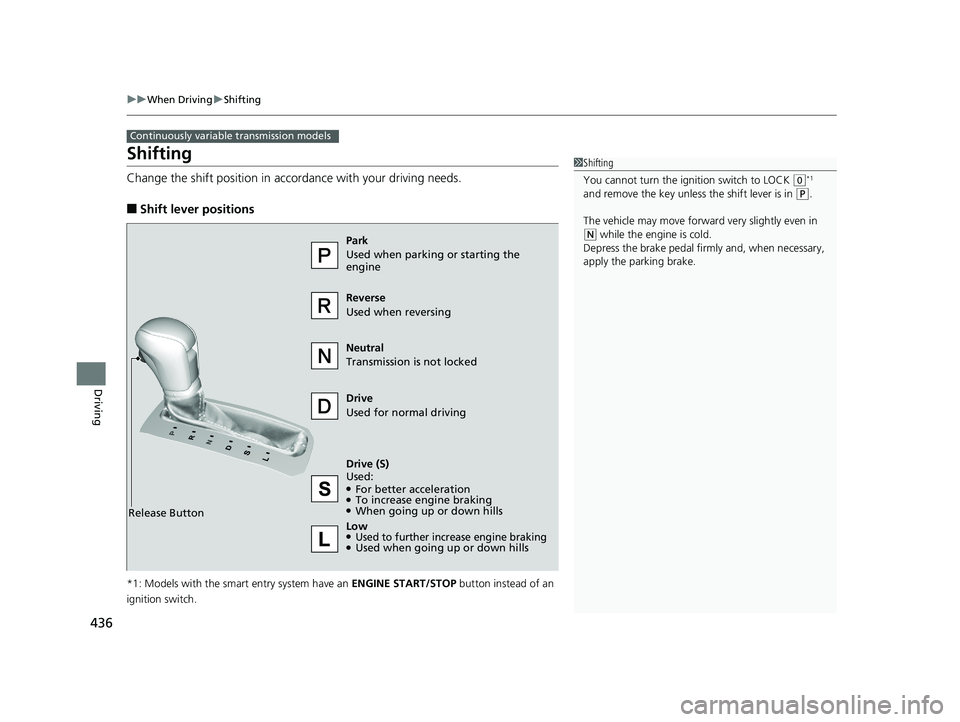
Shifting
Change the shift position in accordance with your driving needs.
■Shift lever positions
*1: Models with the smart entry system have an ENGINE START/STOP button instead of an
ignition switch.
Continuously variable transmission models
1 Shifting
You cannot turn the ignition switch to LOCK
(0*1
and remove the key unless the shift lever is in
( P.
The vehicle may move forward very slightly even in
(N while the engine is cold.
Depress the brake pe dal firmly and, when necessary,
apply the parking brake.
Reverse
Used when reversing
Drive
Used for normal driving
Park
Used when parking or starting the
engine
Neutral
Transmission is not locked
Release Button
Drive (S)
Used:
●For better acceleration●To increase engine braking●When going up or down hills
Low
●Used to further increase engine braking●Used when going up or down hills
18 CIVIC 4D HCM (KA KC KL)-31TBA6201.book 436 ページ 2018年10月30日 火曜日 午前7時28分
Page 442 of 643
440
uuWhen Driving uShifting
Driving
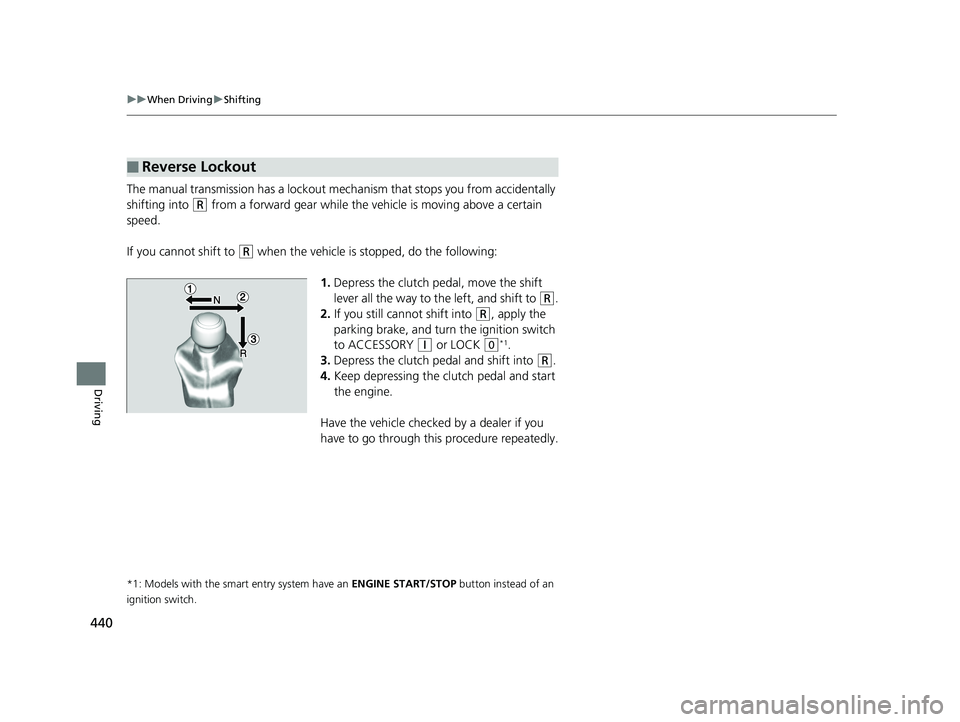
The manual transmission has a lockout mech anism that stops you from accidentally
shifting into
(R from a forward gear while the ve hicle is moving above a certain
speed.
If you cannot shift to
(R when the vehicle is stopped, do the following:
1.Depress the clutch pedal, move the shift
lever all the way to the left, and shift to
(R.
2. If you still cannot shift into
(R, apply the
parking brake, and turn the ignition switch
to ACCESSORY
(q or LOCK (0*1.
3. Depress the clutch pedal and shift into
(R.
4. Keep depressing the clutch pedal and start
the engine.
Have the vehicle checked by a dealer if you
have to go through this procedure repeatedly.
*1: Models with the smart entry system have an ENGINE START/STOP button instead of an
ignition switch.
■Reverse Lockout
18 CIVIC 4D HCM (KA KC KL)-31TBA6201.book 440 ページ 2018年10月30日 火曜日 午前7時28分
Page 481 of 643

479
uuWhen Driving uTire Pressure Monitoring System (TPMS)
Continued
Driving
Tire Pressure Monitoring System (TPMS)
Instead of directly measuring the pressure in each tire, the TPMS on this vehicle
monitors and compares the rolling radius and rotational characteristics of each
wheel and tire while you are driving to determine if one or more tires are
significantly under-inflated. This will caus e the low tire pressure/TPMS indicator to
come on and a message to appear on the driver information interface
*.
You must start TPMS calibration every time you:
• Adjust the pressure in one or more tires.
• Rotate the tires.
• Replace one or more tires.
Before calibrating the TPMS:
• Set the cold tire pressure in all four tires.
2 Checking Tires P. 550
Make sure:
•The vehicle is at a complete stop.
• The shift lever is in
(N.
• The shift lever is in
(P.
• The ignition switch is in ON
(w*1.
*1: Models with the smart entry system have an ENGINE START/STOP button instead of an
ignition switch.
■TPMS Calibration
U.S. models
1 Tire Pressure Monitoring System (TPMS)
The system does not monitor the tires when driving
at low speed.
Conditions such as low ambient temperature and
altitude change directly a ffect tire pressure and can
trigger the low tire pressure/TPMS indicator to come on.
Tire pressure checked and inflated in:
•Warm weather can beco me under-inflated in
colder weather.
•Cold weather can become over-inflated in warmer
weather.
The low tire pressure indica tor will not come on as a
result of over inflation.
The TPMS may not function pr operly if tire type and
size are mixed. Make sure to use the same size and
type of tire. 2 Checking and Maintaining Tires P. 550
The low tire pressure/TPMS indicator may come on
with a delay or may not come on at all when:
•You rapidly accelerate, decelerate, or turn the
steering wheel.
•You drive on snowy or slippery roads.•Snow chains are used.
The low tire pressure/TPMS indicator may come on
under the following conditions:
•A compact spare tire* is used.•There is a heavier and une ven load on the tires,
such as when towing a trailer, than the condition at
calibration.
•Snow chains are used.
Manual transmission models
Continuously variable transmission models
All models
* Not available on all models
18 CIVIC 4D HCM (KA KC KL)-31TBA6201.book 479 ページ 2018年10月30日 火曜日 午前7時28分
Page 482 of 643

uuWhen Driving uTire Pressure Monitoring System (TPMS)
480
Driving
Press and hold the TPMS button until the low
tire pressure/TPMS indi cator blinks twice,
indicating the calibration process has begun.
• If the low tire pressure/TPMS indicator does
not blink, confirm the above conditions
then press and hold the TPMS button again.
• The calibration pr ocess finishes
automatically.
You can calibrate the system from the customized
features on the driver information interface.
1. Press the then / button to select
(Vehicle Settings ), then press the
ENTER button.
u TPMS Calibration appears on the display.
2. Press the ENTER button.
u The display switches to the
customization setup screen, where you
can select Cancel or Calibrate .
3. Press the / button and select
Calibrate , then press the ENTER button.
u Calibration Started screen appears,
then the display returns to the
customization menu screen.
• If the Calibration Failed to Start message
appears, repeat steps 2-3.
• The calibration process finishes automatically.
1TPMS Calibration
•TPMS cannot be calibrated if a compact spare tire*
is installed.
•The calibration process requires approximately 30
minutes of cumulative dr iving at speeds between
30-65 mph (48-105 km/h).
•During this period, if the igni tion switch is turned to
ON
( w*1 and the vehicle is not moved within 45
seconds, you may notice th e low tire pressure
indicator comes on briefl y. This is normal and
indicates that the calibr ation process is not yet
complete.
If the snow chains are installed, remove them before
calibrating the TPMS.
If the low tire pressure/TPMS indicator comes on even
when the properly inflated specified regular tires are
installed, have your vehicle checked by a dealer.
We recommend that the tires be replaced with the
same brand, model, and size as the originals. Ask a
dealer for details.
*1: Models with the smart entry system have an ENGINE
START/STOP button instead of an ignition switch.
TPMS
Button
Low Tire Pressure/
TPMS IndicatorModels with info rmation display
Models with color audio system
Models with driver information interface
34
34
* Not available on all models
18 CIVIC 4D HCM (KA KC KL)-31TBA6201.book 480 ページ 2018年10月30日 火曜日 午前7時28分
Page 486 of 643

484
Driving
Braking
Brake System
Use the parking brake to keep the vehicle stationary when parked. When the
parking brake is applied, you can manually or automatically release it.
■To apply
The electric parking brake can be applied any
time the vehicle has battery, no matter which
position the ignition switch
*1 is in.
Pull the electric parkin g brake switch up gently
and securely. u The parking brake and brake system
indicator comes on.
■To release
The ignition switch must be ON
(w*1 in order
to release the electric parking brake.
1. Depress the brake pedal.
2. Press the electric parking brake switch.
u The parking brake and brake system
indicator goes off.
Manually releasing the parking brake using
the switch helps your ve hicle start slowly and
smoothly when facing down hill on steep hills.
*1: Models with the smart entry system have an ENGINE START/STOP button instead of an
ignition switch.
■Parking Brake1 Parking Brake
You may hear the electric parking brake system
motor operating from the re ar wheel area when you
apply or release the park ing brake, or turn the
ignition switch to LOCK
( 0*1. This is normal.
The brake pedal may slightly move due to the electric
parking brake system opera tion when you apply or
release the parking brake. This is normal.
You cannot apply or release the parking brake if the
battery goes dead. 2 Jump Starting P. 597
If you pull up and hold the electric parking brake
switch while driving, the brakes on all four wheels
are applied by the VSA
® system until the vehicle
comes to a stop. The electric parking brake then
applies, and the switch should be released.
In the following situations, the parking brake
automatically operates.
•When your vehicle is stopped with the automatic
brake hold system activated for more than 10
minutes.
•When the driver’s seat belt is unfastened while
your vehicle is stopped and the brake hold system
is applied.
•When the engine is turned off while the brake hold
system is applied.
•When there is a problem with the brake hold
system while brake hold is applied.
•When your vehicle is stopped for more than 10
minutes while ACC with LSF is activated.Models with ACC with LSF
Electric Parking
Brake Switch
Electric Parking
Brake Switch
18 CIVIC 4D HCM (KA KC KL)-31TBA6201.book 484 ページ 2018年10月30日 火曜日 午前7時28分
Page 487 of 643
Continued485
uuBraking uBrake System
Driving
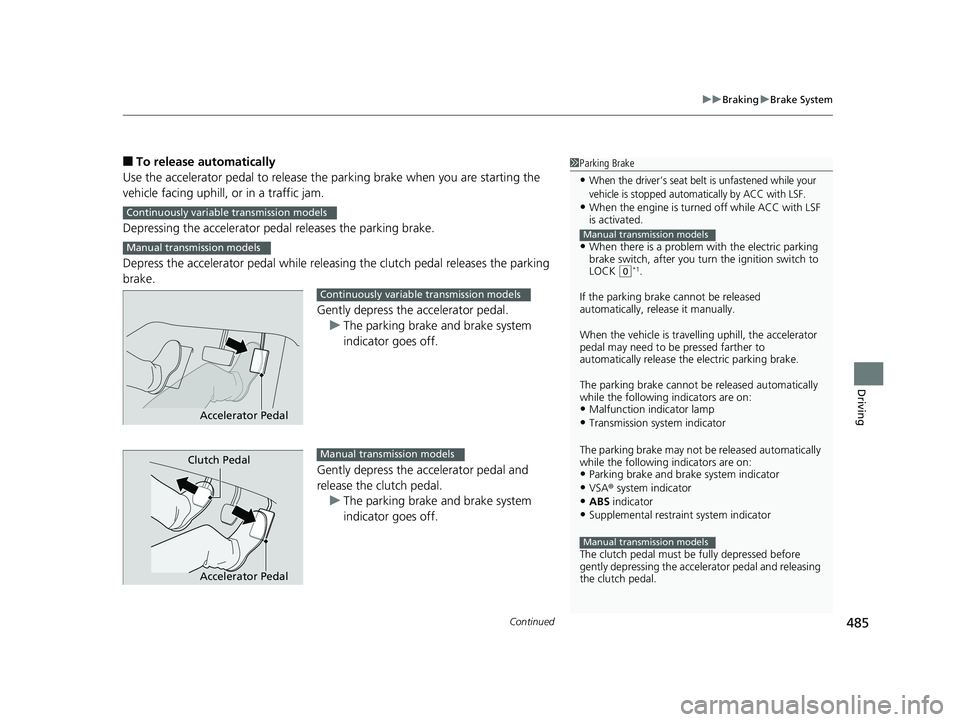
■To release automatically
Use the accelerator pedal to release the parking brake when you are starting the
vehicle facing uphill, or in a traffic jam.
Depressing the accelerator pedal releases the parking brake.
Depress the accelerator pedal while releasin g the clutch pedal releases the parking
brake.
Gently depress the accelerator pedal.u The parking brake and brake system
indicator goes off.
Gently depress the accelerator pedal and
release the clutch pedal. u The parking brake and brake system
indicator goes off.1Parking Brake
•When the driver’s seat belt is unfastened while your
vehicle is stopped automatically by ACC with LSF.
•When the engine is turned off while ACC with LSF
is activated.
•When there is a problem with the electric parking
brake switch, after you turn the ignition switch to
LOCK
( 0*1.
If the parking brake cannot be released
automatically, release it manually.
When the vehicle is travelling uphill, the accelerator
pedal may need to be pressed farther to
automatically release the electric parking brake.
The parking brake cannot be released automatically
while the following indicators are on:
•Malfunction indicator lamp
•Transmission system indicator
The parking brake may not be released automatically
while the following indicators are on:
•Parking brake and bra ke system indicator•VSA® system indicator
•ABS indicator
•Supplemental restraint system indicator
The clutch pedal must be fully depressed before
gently depressing the accelerator pedal and releasing
the clutch pedal.
Manual transmission models
Manual transmission models
Continuously variable transmission models
Manual transmission models
Accelerator Pedal
Continuously variable transmission models
Accelerator Pedal
Clutch PedalManual transmission models
18 CIVIC 4D HCM (KA KC KL)-31TBA6201.book 485 ページ 2018年10月30日 火曜日 午前7時28分
Page 504 of 643
uuMulti-View Rear Camera uAbout Your Multi-View Rear Camera
502
Driving
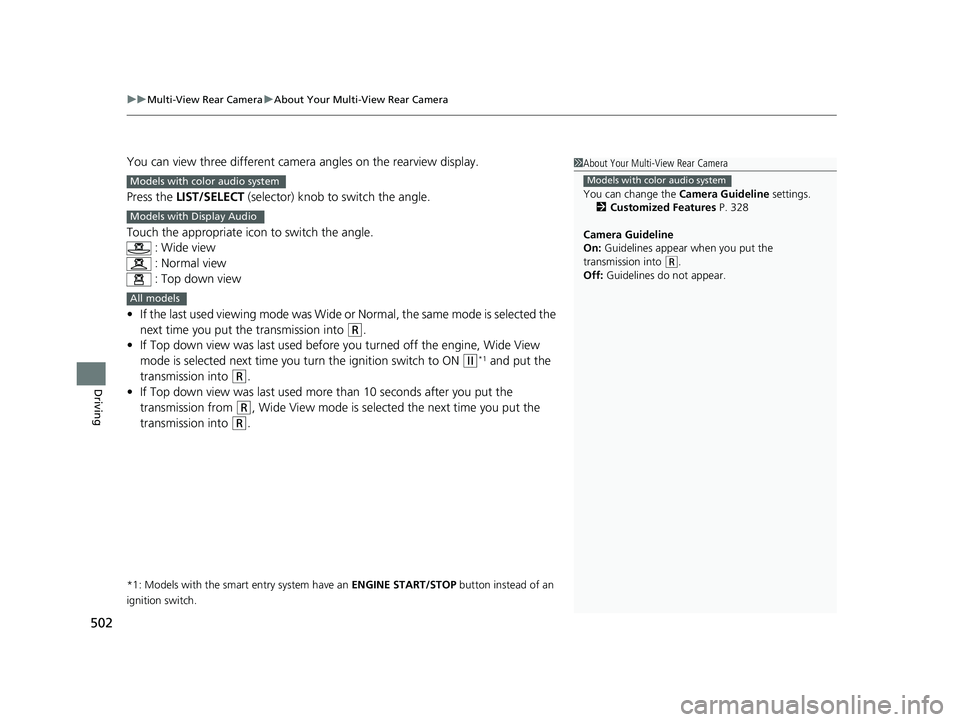
You can view three different camera angles on the rearview display.
Press the LIST/SELECT (selector) knob to switch the angle.
Touch the appropriate icon to switch the angle. : Wide view
: Normal view
: Top down view
• If the last used viewing mode was Wide or Normal, the same mode is selected the
next time you put the transmission into
(R.
• If Top down view was last used before you turned off the engine, Wide View
mode is selected next time you turn the ignition switch to ON
(w*1 and put the
transmission into
(R.
• If Top down view was last used more than 10 seconds after you put the
transmission from
(R, Wide View mode is selected the next time you put the
transmission into
(R.
*1: Models with the smart entry system have an ENGINE START/STOP button instead of an
ignition switch.
1 About Your Multi-View Rear Camera
You can change the Camera Guideline settings.
2 Customized Features P. 328
Camera Guideline
On: Guidelines appear when you put the
transmission into
( R.
Off: Guidelines do not appear.
Models with color audio systemModels with color audio system
Models with Display Audio
All models
18 CIVIC 4D HCM (KA KC KL)-31TBA6201.book 502 ページ 2018年10月30日 火曜日 午前7時28分