2018 HONDA CIVIC HATCHBACK door lock
[x] Cancel search: door lockPage 172 of 703

uuSecurity System uSecurity System Alarm
170
Controls
■Setting the security system alarm
The security system alarm automatically sets when the following conditions have
been met:
• The ignition switch is in LOCK
(0*1, and the key has been removed from the
ignition switch.
• The hood is closed.
• All doors and the hatch are locked from outside with the key, remote transmitter,
or smart entry system
*.
■When the security system alarm sets
The security system alarm indicator in the instrument panel blinks. When the
blinking interval changes after about 15 seconds, the security system alarm is set.
■To cancel the security system alarm
The security system alarm is canceled when the vehicle is unlocked using the remote
transmitter, smart entry system
*, or the ignition swit ch is turned to ON (w*1. The
security system alarm indicator goes off at the same time.
*1: Models with the smart entry system have an ENGINE START/STOP button instead of an
ignition switch.
1 Security System Alarm
Do not set the security system alarm when someone
is in the vehicle or a window is open. The system can
accidentally activate when:
•Unlocking the door with the lock tab.•Opening the hood with the hood release.
•Taking the transmission out of ( P.
If the battery goes dead after you have set the
security system alarm, the security alarm may go off
once the battery is re charged or replaced.
If this occurs, deactivate the security system alarm by
unlocking a door using the key, remote transmitter or
smart entry system
*.
Continuously variable transmission models
* Not available on all models
18 CIVIC 5D (KA KC KL)-31TGG6100.book 170 ページ 2017年12月27日 水曜日 午前11時2分
Page 174 of 703

172
Controls
Opening and Closing the Windows
Opening/Closing the Power Windows
The power windows can be opened and closed when the ignition switch is in ON
(w*1, using the switches on the doors.
The driver’s side switches can be used to open and close all the windows. The power
window lock button on the driver’s side must be switched off (indicator off) to open
and close the windows from anywhere other than the driver’s seat.
When the power window lock button is pressed, the indicator comes on and you
can only operate the driver’s window. Turn the power window lock button on if a
child is in the vehicle.
■Manual operation
To open: Push the switch down lightly, and
hold it until the desired position is reached.
To close: Pull the switch up lightly, and hold it
until the desired position is reached.
■Automatic operation
To open: Push the switch down firmly.
To close: Pull the switch up firmly.
The window opens or cl oses completely. To
stop the window at any time, push or pull the
switch briefly.
*1: Models with the smart entry system have an ENGINE START/STOP button instead of an
ignition switch.
■Opening/Closing Windows with Auto-Open/Close Function
1 Opening/Closing the Power Windows
The power windows can be operated for up to 10
minutes after you turn the ignition switch to LOCK
( 0*1.
Opening either front door cancels this function.
Auto Reverse
If a power window senses resistance when closing
automatically, it will stop closing and reverse
direction.
The driver’s window auto re verse function is disabled
when you continuously pull up the switch.
The auto reverse function stops sensing when the
window is almost closed to en sure that it fully closes.
3WARNING
Closing a power window on someone's
hands or fingers can cause serious injury.
Make sure your passengers are away from
the windows before closing them.
Power Window
Lock Button
Indicator
Driver’s
Window
SwitchFront Passenger’s
Window Switch
18 CIVIC 5D (KA KC KL)-31TGG6100.book 172 ページ 2017年12月27日 水曜日 午前11時2分
Page 176 of 703

174
uuOpening and Closing the Windows uOpening/Closing th e Power Windows
Controls
To open: Unlock the driver’s door with the
key. Within 10 seconds of returning the key to
the central position, turn the key in the unlock
direction and hold it there.
To close: Lock the driver’s door with the key.
Within 10 seconds of re turning the key to the
central position, turn the key in the lock
direction and hold it there.
Release the key to stop the windows and
moonroof at the desired position. If you want
further adjustment, repeat the same
operation.
■Opening/Closing the Windows and Moonroof* with the Key
Close
Open
* Not available on all models
18 CIVIC 5D (KA KC KL)-31TGG6100.book 174 ページ 2017年12月27日 水曜日 午前11時2分
Page 177 of 703

175
Controls
Opening and Closing the Moonroof*
You can only operate the moonroof when the power mode is in ON. Use the switch
in the front of the ceiling to open and close the moonroof.
■Automatic operation
To open: Pull the switch back firmly.
To close: Push the switch forward firmly.
The moonroof will automatically open or close
all the way. To stop the moonroof midway,
push the switch briefly.
■Manual operation
To open: Pull the switch back lightly, and
hold it until the desired position is reached.
To close: Push the switch fo rward lightly, and
hold it until the desired position is reached.
■Tilting the moonroof up
To tilt: Push on the center of the moonroof
switch.
To close: Push the switch forward firmly,
then release.
■Opening/Closing the Moonroof1 Opening/Closing the Moonroof
NOTICE
Opening the moonroof in below freezing
temperature or when it is covered with snow or ice
can damage the moonr oof panel or motor.
The power moonroof can be operated for up to 10
minutes after you set the power mode to VEHICLE
OFF (LOCK).
Opening either front door cancels this function.
When resistance is detected, the auto reverse
function causes the moonroof to change directions,
then stop. Auto reverse stops sensing when the
moonroof is almost closed to ensure that it fully
closes. Make sure that al l objects, including fingers,
are clear of the moonroof.
You can use the remote transmitter or the key to
operate the moonroof. 2 Opening the Windows and Moonroof
*
with the Remote P. 173
2 Opening/Closing the Windows and
Moonroof
* with the Key P. 174
3WARNING
Opening or closing the moonroof on
someone’s hands or fingers can cause
serious injury.
Make sure all hands and fingers are clear of
the moonroof before opening or closing it.
Open
CloseTilt
* Not available on all models
18 CIVIC 5D (KA KC KL)-31TGG6100.book 175 ページ 2017年12月27日 水曜日 午前11時2分
Page 178 of 703
176
Controls
Operating the Switches Around the Steering Wheel
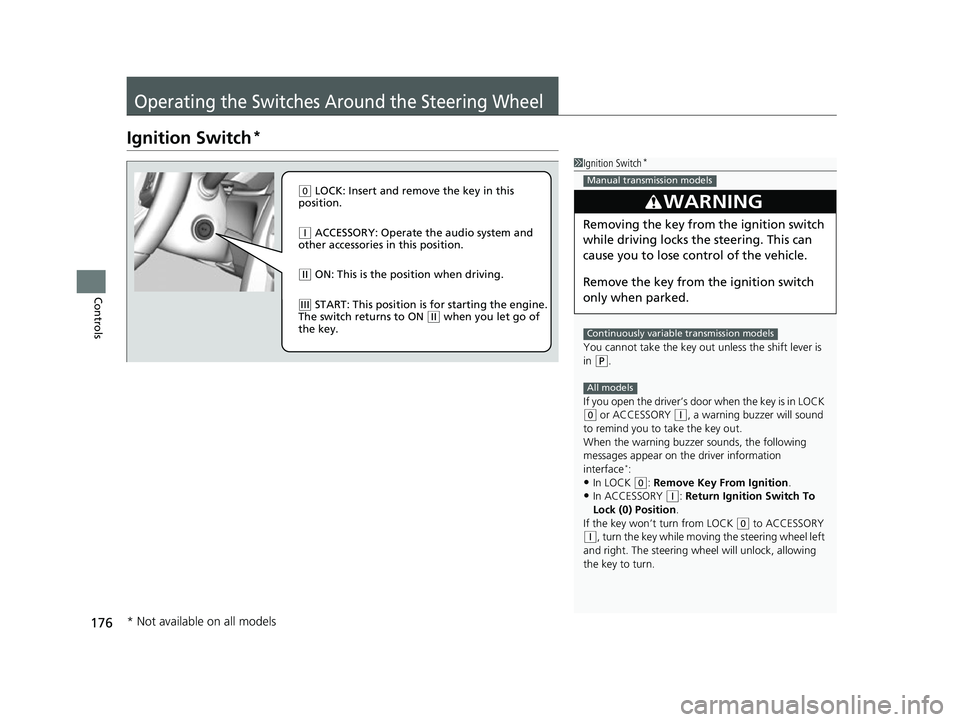
Ignition Switch*
1Ignition Switch*
You cannot take the key out unless the shift lever is
in
( P.
If you open the driver’s door when the key is in LOCK
(0 or ACCESSORY ( q, a warning buzzer will sound
to remind you to take the key out.
When the warning buzzer sounds, the following
messages appear on the driver information
interface
*:
•In LOCK ( 0: Remove Key From Ignition .
•In ACCESSORY (q: Return Ignition Switch To
Lock (0) Position .
If the key won’t turn from LOCK
( 0 to ACCESSORY
(q, turn the key while moving the steering wheel left
and right. The steering wh eel will unlock, allowing
the key to turn.
3WARNING
Removing the key from the ignition switch
while driving locks the steering. This can
cause you to lose control of the vehicle.
Remove the key from the ignition switch
only when parked.
Manual transmission models
Continuously variable transmission models
All models
( 0 LOCK: Insert and remove the key in this
position.
( q ACCESSORY: Operate the audio system and
other accessories in this position.
( w ON: This is the position when driving.
(e START: This position is for starting the engine.
The switch returns to ON ( w when you let go of
the key.
* Not available on all models
18 CIVIC 5D (KA KC KL)-31TGG6100.book 176 ページ 2017年12月27日 水曜日 午前11時2分
Page 179 of 703

177
uuOperating the Switches Around the Steering Wheel uENGINE START/STOP Button*
Continued
Controls
ENGINE START/STOP Button*
*1:Canadian models and 2.0 L engine models
*2:Except Canadian models
■Changing the Power Mode1ENGINE START/STOP Button*
ENGINE START/STOP Button Operating Range
You can start the engine when the smart entry
remote is inside the vehicle.
The engine may also run if the smart entry remote is
close to the door or window, ev en if it is outside the
vehicle.
ON mode:
The button is on (in red), if the engine is running.
If the battery of the smar t entry remote is getting
low, the engine may not start when you press the
ENGINE START/STOP button. If the engine does not
start, refer to the following link. 2 If the Smart Entry Remote Battery is Weak
P. 653
Do not leave the power mode in ACCESSORY or ON
when you get out.
Operating RangeContinuously Variable Transmission Manual Transmission
VEHICLE OFF (LOCK)
The button is off.
The steering wheel is locked
*1.
The power to all electrical
components is turned off.
Press the button without the
shift lever in
( P.
Press the button with the
shift lever in
( P. Press the button.
Without pressing
the clutch pedal
Without pressing
the brake pedal ACCESSORY
The button blinks (in red).
Operate the audio system and
other accessories in this position.
ON
The button blinks (in red).
All electrical components can be
used.
Shift to (P*2.
*2
* Not available on all models
18 CIVIC 5D (KA KC KL)-31TGG6100.book 177 ページ 2017年12月27日 水曜日 午前11時2分
Page 180 of 703

178
uuOperating the Switches Around the Steering Wheel uENGINE START/STOP Button*
Controls
If you leave the vehicle for 30 to 60 minutes with the transmission in (P*1 and the
power mode in ACCESSORY, the vehicle automa tically goes into the mode similar to
VEHICLE OFF (LOCK) to avoid draining the battery.
When in this mode:
The steering wheel does not lock.
You cannot lock or unlock doors with th e remote transmitter or the smart entry
system.
Press the ENGINE START/STOP button twice to switch the mode to VEHICLE OFF
(LOCK).
*1: Continuously variab le transmission models
■Automatic Power Off
Canadian models and 2.0 L engine models
18 CIVIC 5D (KA KC KL)-31TGG6100.book 178 ページ 2017年12月27日 水曜日 午前11時2分
Page 183 of 703

181
uuOperating the Switches Around the Steering Wheel uTurn Signals
Continued
Controls
Turn Signals
The turn signals can be used when the ignition
switch is in ON
(w*1.
■One-touch turn signal
When you lightly push up or down and release
the turn signal lever, th e exterior turn signals
and turn signal indicator blink three times.
This feature can be used when signaling for a
lane change.
Light Switches
Rotating the light switch turns the lights on
and off, regardless of the power mode setting
or position of the ignition switch.
■High beams
Push the lever forward until you hear a click.
■Low beams
When in high beams, pull the lever back to
return to low beams.
■Flashing the high beams
Pull the lever back, and release it.
*1: Models with the smart entry system have an ENGINE START/STOP button instead of an
ignition switch.
Right Turn
Left Turn
■Manual Operation
1 Light Switches
If you leave the power mode in VEHICLE OFF (LOCK)
while the lights are on, a chime sounds when the
driver’s door is opened.
If you remove the key from the ignition switch while
the lights are on, a chime sounds when the driver’s
door is opened.
When the lights are on, the lights on indicator in the
instrument pane l will be on.
2 Lights On Indicator P. 90
Do not leave the lights on when the engine is off
because it will cause the battery to discharge.
If you sense that the le vel of the headlights is
abnormal, have the vehicl e inspected by a dealer.
Models with smart entry system
Models without smart entry system
All models
High Beams
Flashing the high beams
Low Beams
Turns on parking, side marker,
tail, and rear license plate lights
Turns on headlights, parking,
side marker, tail, and rear license
plate lights
18 CIVIC 5D (KA KC KL)-31TGG6100.book 181 ページ 2017年12月27日 水曜日 午前11時2分