Page 102 of 703

100
uuIndicators u
Instrument Panel
*1:Models with the smart entry system have an ENGINE START/STOP button instead of an ignition switch.
IndicatorNameOn/BlinkingExplanationMessage*
Collision
Mitigation
Braking
System
TM
(CMBSTM)
Indicator*
●Comes on for a few seconds when
you turn the ignition switch to ON
(w*1, then goes off.●Comes on when you deactivate
the CMBSTM. A driver information
interface message appears for five
seconds.
●Comes on if there is a problem
with the CMBSTM.
●Stays on constantly without the
CMBSTM off - Have your vehicle checked
by a dealer.
2 Collision Mitigation Braking
SystemTM (CMBSTM)* P. 541
●Comes on if the CMBSTM is
deactivated temporarily after the
battery has been disconnected,
then re-connected.●Drive a short distance at more than 12
mph (20 km/h). The indicator should go
off. If it does not, have your vehicle
checked by a dealer.
●Comes on when the CMBSTM
system shuts itself off.●Stays on - The area around the camera is
blocked by dirt, mud, etc. Stop your
vehicle in a safe place, and wipe it off with
a soft cloth.
2 Front Sensor Camera* P. 477●Have your vehicle checked by a dealer if
the indicator does not go off even after
you cleaned the camera.
2Collision Mitigation Braking
SystemTM (CMBSTM)* P. 541
* Not available on all models
18 CIVIC 5D (KA KC KL)-31TGG6100.book 100 ページ 2017年12月27日 水曜日 午前11時2分
Page 104 of 703
102
uuIndicators uInformation Display Warning and Information Messages*
Instrument Panel
Information Display Warning and Information Messages*
The following messages appear only on the information display.
MessageConditionExplanation
●Appears when there is a problem with the sensor on
the battery.●Have your vehicle checked by a dealer.
2Checking the Battery P. 613
●Appears along with the battery charging system
indicator when the batte ry is not charging.●Turn off the climate control system and rear defogger to
reduce electricity consumption.
2If the Charging System Indicator Comes On P. 661
* Not available on all models
18 CIVIC 5D (KA KC KL)-31TGG6100.book 102 ページ 2017年12月27日 水曜日 午前11時2分
Page 105 of 703
103
uuIndicators uDriver Information Interface Wa rning and Information Messages*
Continued
Instrument Panel
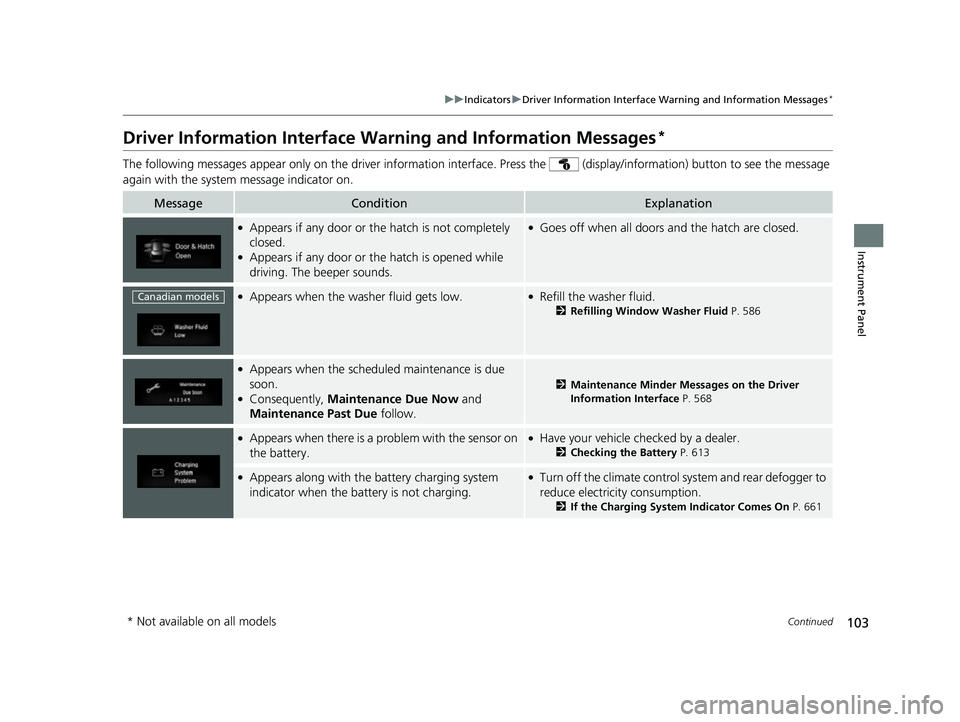
Driver Information Interface Warning and Information Messages*
The following messages appear only on the driver information interface. Press the (d isplay/information) button to see the message
again with the system message indicator on.
MessageConditionExplanation
●Appears if any door or the hatch is not completely
closed.
●Appears if any door or the hatch is opened while
driving. The beeper sounds.
●Goes off when all doors and the hatch are closed.
●Appears when the washer fluid gets low.●Refill the washer fluid.
2 Refilling Window Washer Fluid P. 586
●Appears when the scheduled maintenance is due
soon.
●Consequently, Maintenance Due Now and
Maintenance Past Due follow.
2Maintenance Minder Messages on the Driver
Information Interface P. 568
●Appears when there is a pr oblem with the sensor on
the battery.●Have your vehicle checked by a dealer.
2 Checking the Battery P. 613
●Appears along with the ba ttery charging system
indicator when the battery is not charging.●Turn off the climate control system and rear defogger to
reduce electricity consumption.
2 If the Charging System Indicator Comes On P. 661
Canadian models
* Not available on all models
18 CIVIC 5D (KA KC KL)-31TGG6100.book 103 ページ 2017年12月27日 水曜日 午前11時2分
Page 110 of 703

108
uuIndicators uDriver Information Interface Wa rning and Information Messages*
Instrument Panel
MessageConditionExplanation
●Appears if you push the ENGINE START/STOP
button to turn the engine off without the shift lever
in
(P.
●Move the shift lever to (P. The power mode changes to
VEHICLE OFF.
●Move the shift lever to (P, then press the ENGINE
START/STOP button twice.
●Appears when the power mode is in ACCESSORY.
—
●Appears after the driver’s door is opened when the
power mode is in ACCESSORY.●Press the ENGINE START/STOP button twice with your
foot off the brake pedal (automatic transmission) or the
clutch pedal (manual transmission) to change the power
mode to VEHICLE OFF (LOCK).
●Appears when you close the door with the power
mode in ON without the smart entry remote inside
the vehicle.●Disappears when you bring the smart entry remote back
inside the vehicle and close the door.
2 Smart Entry Remote Reminder P. 179
●Appears when the smart entry remote battery
becomes weak.●Replace the battery as soon as possible.
2Replacing the Button Battery P. 615
Continuously
variable transmission
modelsU.S. models
Canadian models
18 CIVIC 5D (KA KC KL)-31TGG6100.book 108 ページ 2017年12月27日 水曜日 午前11時2分
Page 111 of 703

109
uuIndicators uDriver Information Interface Wa rning and Information Messages*
Continued
Instrument Panel
MessageConditionExplanation
●Appears if the smart entry remote battery is too
weak to start the engine or the key is not within
operating range to start the engine.
A beeper sounds six times.●Bring the smart entry remote in front of the ENGINE
START/STOP button to be touched with.
2 If the Smart Entry Remote Battery is Weak P. 653
●Appears when the starter system has a problem.●As a temporary measure, press and hold the ENGINE
START/STOP button for up to 15 seconds while pressing
the brake pedal and clutch pedal (manual transmission
only), manually start the engine.
Have your vehicle checked by a dealer.
●Appears as soon as a problem is detected in the
smart entry system or push button starting system.●Appears constantly - Have your vehicle checked by a
dealer.
U.S.
*
Canada
* Not available on all models
18 CIVIC 5D (KA KC KL)-31TGG6100.book 109 ページ 2017年12月27日 水曜日 午前11時2分
Page 149 of 703

147Continued
Controls
Locking and Unlocking the Doors
Key Types and Functions
This vehicle comes with the following keys:
Use the keys to start and stop the engine, and to lock and unlock the doors and
hatch. You can also use the remote transmitter to lock and unlock the doors and
hatch.
The built-in key can be used to lock/unlock the
doors when the smart entry remote battery
becomes weak and the power door lock/
unlock operation is disabled.
To remove the built-in key, slide the release
knob and then pull out the key. To reinstall
the built-in key, push the built-in key into the
smart entry remote until it clicks.1 Key Types and Functions
All the keys have an immobilizer system. The
immobilizer system helps to protect against vehicle
theft. 2 Immobilizer System P. 168
Follow the advice below to prevent damage to the
keys:
•Do not leave the keys in direct sunlight, or in
locations with high temperature or high humidity.
•Do not drop the keys or set heavy objects on them.•Keep the keys away from liquids, dust and sand.
•Do not take the keys apart except for replacing the
battery.
If the circuits in the keys are damaged, the engine
may not start, and the remote transmitter may not
work.
If the keys do not work properly, have them
inspected by a dealer.
You can remotely start th e engine using the smart
entry remote with remote engine starter. 2 Remote Engine Start with Vehicle
Feedback
* P. 454
Models with remote engine starter
■Built-in Key*
Ignition key with
remote transmitterSmart entry remoteSmart entry remote with
remote engine starter
Built-in Key
Release Knob
* Not available on all models
18 CIVIC 5D (KA KC KL)-31TGG6100.book 147 ページ 2017年12月27日 水曜日 午前11時2分
Page 150 of 703

uuLocking and Unlocking the Doors uLow Smart Entry Remote Signal Strength*
148
Controls
Contains a number that you will need if you
purchase a replacement key.
Low Smart Entry Remo te Signal Strength*
The vehicle transmits radio waves to loca te the smart entry remote when locking/
unlocking the doors and hatch, or to start the engine.
In the following cases, locking/unlocking the doors and hatch, or starting the engine
may be inhibited or operation may be unstable:
• Strong radio waves are being tra nsmitted by nearby equipment.
• You are carrying the smart entry remote together with telecommunications
equipment, laptop computers, ce ll phones, or wireless devices.
• A metallic object is touching or covering the smart entry remote.
■Key Number Tag1Key Number Tag
Keep the key number tag separate from the key in a
safe place outside of your vehicle.
If you wish to purchase an additional key, contact a
dealer.
If you lose your key and you cannot start the engine,
contact a dealer.
1 Low Smart Entry Remote Signal Strength*
Communication between the smart entry remote and
the vehicle consumes the smart entry remote’s
battery.
Battery life is about two years, but this varies
depending on re gularity of use.
The battery is consumed whenever the smart entry
remote is receivi ng strong radio wave s. Avoid placing
it near electrical appliances such as televisions and
personal computers.
* Not available on all models
18 CIVIC 5D (KA KC KL)-31TGG6100.book 148 ページ 2017年12月27日 水曜日 午前11時2分
Page 156 of 703

uuLocking and Unlocking the Doors uLocking/Unlocking the Doors from the Outside
154
Controls
■Locking the doors and hatch
Press the lock button.
Once: u Some exterior lights flash, all the doors
and hatch lock, and the security system
sets.
Twice (within five seco nds after the first
push):
u The beeper sounds and verifies the
security system is set.
■Using the Remote Transmitter1Using the Remote Transmitter
If you do not open a door or the hatch within 30
seconds of unlocking the vehicle with the remote
transmitter, the doors and hatch will automatically
relock.
You can change the relock timer setting. 2 Customized Features P. 133, 348
The remote transmitter will not work when the key is
in the ignition switch.
You can lock or unlock doors using the remote
transmitter only when the power mode is in VEHICLE
OFF.
The remote transmitter us es low-power signals, so
the operating range may vary depending on the
surroundings.
The remote will not lock th e vehicle when a door is
open.
If the distance at which the remote transmitter works
varies, the batter y is probably low.
If the LED does not come on when you press a
button, the battery is dead. 2 Replacing the Button Battery P. 615
Models with driver information interface
Models without smart entry system
Models with smart entry system
All models
LED
Unlock Button
Lock Button
18 CIVIC 5D (KA KC KL)-31TGG6100.book 154 ページ 2017年12月27日 水曜日 午前11時2分
