2018 GMC YUKON XL key
[x] Cancel search: keyPage 163 of 425

GMC Yukon/Yukon XL/Denali Owner Manual (GMNA-Localizing-U.S./
Canada/Mexico-11349262) - 2018 - crc - 6/20/17
162 Instruments and Controls Auto Memory Recall
This feature automatically recalls
the current driver ’ s previously stored
1 or 2 button positions when the
ignition is changed from off to on or
ACC/ACCESSORY. See Memory
Seats 0 64 .
Select On or Off.
Easy Exit Options
This feature automatically recalls
the previously stored Exit button
position when exiting the vehicle.
See Memory Seats 0 64 .
Select On or Off.
Chime Volume
This allows the selection of the
chime volume level.
Touch + or − to adjust the volume.
Hands Free Liftgate Control
The liftgate may be operated with a
kicking motion under the rear
bumper. See Liftgate 0 43 .
Select Off, On-Open and Close,
or On-Open Only. Reverse Tilt Mirror
When on, the driver and/or
passenger mirrors will tilt downward
when the vehicle is shifted to
R (Reverse) to improve visibility of
the ground near the rear wheels.
See Reverse Tilt Mirrors 0 55 .
Select Off, On - Driver and
Passenger, On - Driver, or On -
Passenger.
Auto Mirror Folding
When on, the outside mirrors will
automatically fold or unfold when
the Remote Keyless Entry (RKE)
transmitter
Q or
K button is
pressed and held. See Folding
Mirrors 0 53 .
Select Off or On.
Auto Wipe in Reverse Gear
When on and the front wiper is on
and wiping, the rear wiper will
automatically activate when the
vehicle is shifted to R (Reverse).
Select Off or On. Lighting Select the Lighting menu and the
following may display:
.
Vehicle Locator Lights
.
Exit Lighting
Vehicle Locator Lights
This feature will flash the exterior
lamps and allows some of the
exterior lamps and most of the
interior lamps to turn on briefly when
K on the Remote Keyless Entry
(RKE) transmitter is pressed to
locate the vehicle.
Select On or Off.
Exit Lighting
This allows the selection of how
long the exterior lamps stay on
when leaving the vehicle when it is
dark outside.
Select Off, 30 Seconds, 60 Seconds,
or 120 Seconds.
Power Door Locks
Select Power Door Locks and the
following may display:
.
Unlocked Door Anti-Lockout
Page 164 of 425

GMC Yukon/Yukon XL/Denali Owner Manual (GMNA-Localizing-U.S./
Canada/Mexico-11349262) - 2018 - crc - 6/20/17
Instruments and Controls 163.
Auto Door Unlock
.
Delayed Door Lock
Unlocked Door Anti-Lockout
When on, this feature will keep the
driver door from locking when the
door is open and the key is in the
ignition. If Off is selected, the
Delayed Door Lock menu will be
available.
Select On or Off.
Auto Door Unlock
This allows selection of which of the
doors will automatically unlock when
the vehicle is shifted into P (Park).
Select Off, All Doors, or Driver Door.
Delayed Door Lock
When on, this feature will delay the
locking of the doors. To override the
delay, press the power door lock
switch on the door.
Select On or Off.
Remote Lock, Unlock, Start
Select and the following may
display: .
Remote Unlock Light Feedback
.
Remote Lock Feedback
.
Remote Door Unlock
.
Remote Start Auto Cool Seats
.
Remote Start Auto Heat Seats
.
Passive Door Unlock
.
Passive Door Lock
.
Remote Left in Vehicle Alert
Remote Unlock Light Feedback
When on, the exterior lamps will
flash when unlocking the vehicle
with the RKE transmitter.
Select Off or Flash Lights.
Remote Lock Feedback
This allows selection of what type of
feedback is given when locking the
vehicle with the RKE transmitter.
Select Off, Lights and Horn, Lights
Only, or Horn Only.
Remote Door Unlock
This allows selection of which doors
will unlock when pressing
K on the
RKE transmitter. Select All Doors or Driver Door.
Remote Start Auto Cool Seats
If turned on, this feature will turn the
ventilated seats on when using
remote start on warm days.
Select Off or On.
Remote Start Auto Heat Seats
If turned on, this feature will turn the
heated seats on when using remote
start on cold days.
Select Off or On.
Passive Door Unlock
This allows the selection of what
doors will unlock when using the
button on the driver door to unlock
the vehicle.
Select All Doors or Driver Door.
Passive Door Lock
This allows passive locking to be
turned on or off and selects
feedback.
Page 165 of 425
GMC Yukon/Yukon XL/Denali Owner Manual (GMNA-Localizing-U.S./
Canada/Mexico-11349262) - 2018 - crc - 6/20/17
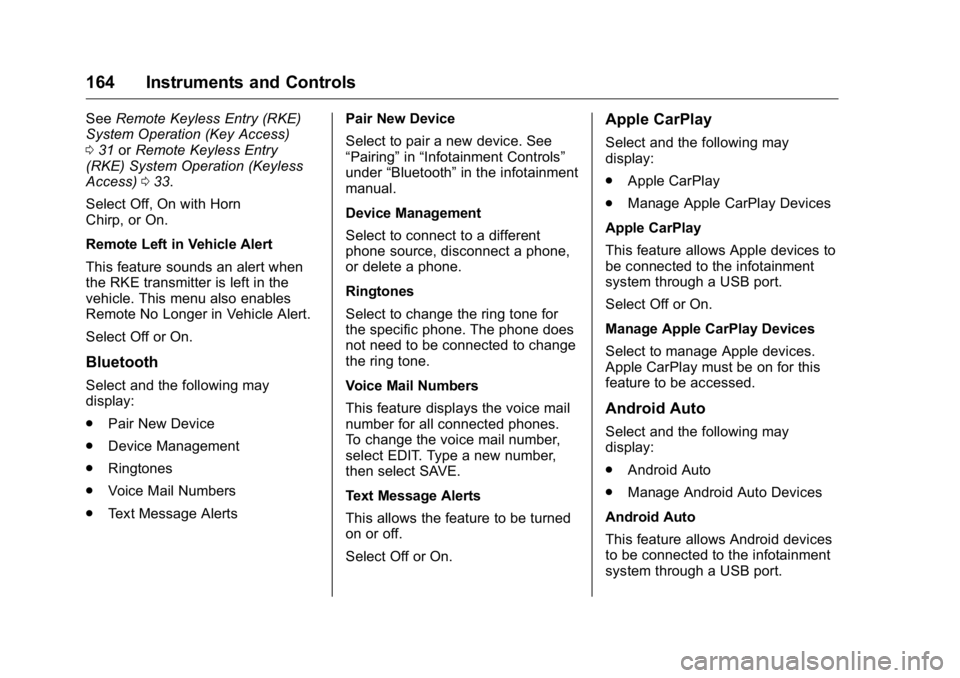
164 Instruments and Controls See Remote Keyless Entry (RKE)
System Operation (Key Access)
0 31 or Remote Keyless Entry
(RKE) System Operation (Keyless
Access) 0 33 .
Select Off, On with Horn
Chirp, or On.
Remote Left in Vehicle Alert
This feature sounds an alert when
the RKE transmitter is left in the
vehicle. This menu also enables
Remote No Longer in Vehicle Alert.
Select Off or On.
Bluetooth Select and the following may
display:
.
Pair New Device
.
Device Management
.
Ringtones
.
Voice Mail Numbers
.
Text Message Alerts Pair New Device
Select to pair a new device. See
“ Pairing ” in “ Infotainment Controls ”
under “ Bluetooth ” in the infotainment
manual.
Device Management
Select to connect to a different
phone source, disconnect a phone,
or delete a phone.
Ringtones
Select to change the ring tone for
the specific phone. The phone does
not need to be connected to change
the ring tone.
Voice Mail Numbers
This feature displays the voice mail
number for all connected phones.
To change the voice mail number,
select EDIT. Type a new number,
then select SAVE.
Text Message Alerts
This allows the feature to be turned
on or off.
Select Off or On. Apple CarPlay Select and the following may
display:
.
Apple CarPlay
.
Manage Apple CarPlay Devices
Apple CarPlay
This feature allows Apple devices to
be connected to the infotainment
system through a USB port.
Select Off or On.
Manage Apple CarPlay Devices
Select to manage Apple devices.
Apple CarPlay must be on for this
feature to be accessed.
Android Auto Select and the following may
display:
.
Android Auto
.
Manage Android Auto Devices
Android Auto
This feature allows Android devices
to be connected to the infotainment
system through a USB port.
Page 178 of 425

GMC Yukon/Yukon XL/Denali Owner Manual (GMNA-Localizing-U.S./
Canada/Mexico-11349262) - 2018 - crc - 6/20/17
Lighting 177
Press
m or
n next to each reading
lamp to turn it on or off.
Lighting Features Entry Lighting Some exterior lamps and the interior
lamps turn on briefly at night, or in
areas with limited lighting, when
Kis pressed on the Remote Keyless
Entry (RKE) transmitter. When a
door is opened, the interior lamps
come on if the dome lamp control is
in the DOOR position. After about
30 seconds the exterior lamps turn
off. Entry lighting can be disabled
manually by changing the ignition
out of the OFF position, or by
pressing the RKE transmitter
Qbutton.
This feature can be changed. See
“ Vehicle Locator Lights ” under
Vehicle Personalization 0 158 .
Exit Lighting Some exterior lamps and interior
lamps come on at night, or in areas
with limited lighting, when the driver
door is opened after the ignition is
turned off. The exterior lamps and interior lamps remain on for a set
amount of time, then automatically
turn off.
The exterior lamps turn off
immediately by turning the exterior
lamp control off.
This feature can be changed. See
Vehicle Personalization 0 158 .
Battery Load
Management The vehicle has Electric Power
Management (EPM), which
estimates the battery's temperature
and state of charge. It then adjusts
the voltage for best performance
and extended life of the battery.
When the battery's state of charge
is low, the voltage is raised slightly
to quickly bring the charge back up.
When the state of charge is high,
the voltage is lowered slightly to
prevent overcharging. The voltmeter
gauge or the voltage display on the
Driver Information Center (DIC),
if equipped, may show the voltage
Page 189 of 425

GMC Yukon/Yukon XL/Denali Owner Manual (GMNA-Localizing-U.S./
Canada/Mexico-11349262) - 2018 - crc - 6/21/17
188 Driving and Operating
Driving and
Operating Driving Information Distracted Driving . . . . . . . . . . . . 189
Defensive Driving . . . . . . . . . . . . . 190
Drunk Driving . . . . . . . . . . . . . . . . . 190
Control of a Vehicle . . . . . . . . . . . 190
Braking . . . . . . . . . . . . . . . . . . . . . . . 190
Steering . . . . . . . . . . . . . . . . . . . . . . 191
Off-Road Recovery . . . . . . . . . . . 191
Loss of Control . . . . . . . . . . . . . . . 192
Off-Road Driving . . . . . . . . . . . . . 192
Driving on Wet Roads . . . . . . . . 197
Hill and Mountain Roads . . . . . 198
Winter Driving . . . . . . . . . . . . . . . . 198
If the Vehicle Is Stuck . . . . . . . . 200
Vehicle Load Limits . . . . . . . . . . . 200
Starting and Operating New Vehicle Break-In . . . . . . . . . 204
Adjustable Throttle and Brake
Pedal . . . . . . . . . . . . . . . . . . . . . . . 205
Ignition Positions (Keyless
Access) . . . . . . . . . . . . . . . . . . . . . 205
Ignition Positions (Key
Access) . . . . . . . . . . . . . . . . . . . . . 207
Starting the Engine . . . . . . . . . . . 209
Engine Heater . . . . . . . . . . . . . . . . 210 Retained Accessory
Power (RAP) . . . . . . . . . . . . . . . . 212
Shifting Into Park . . . . . . . . . . . . . 212
Shifting out of Park . . . . . . . . . . . 213
Parking over Things
That Burn . . . . . . . . . . . . . . . . . . . 214
Active Fuel Management . . . . . 214
Extended Parking . . . . . . . . . . . . 214
Engine Exhaust Engine Exhaust . . . . . . . . . . . . . . 215
Running the Vehicle While
Parked . . . . . . . . . . . . . . . . . . . . . . 215
Automatic Transmission Automatic Transmission . . . . . . 216
Manual Mode . . . . . . . . . . . . . . . . . 218
Tow/Haul Mode . . . . . . . . . . . . . . . 222
Drive Systems Four-Wheel Drive . . . . . . . . . . . . . 222
Brakes Antilock Brake
System (ABS) . . . . . . . . . . . . . . . 227
Parking Brake . . . . . . . . . . . . . . . . 228
Brake Assist . . . . . . . . . . . . . . . . . . 228
Hill Start Assist (HSA) . . . . . . . . 229
Ride Control Systems
Traction Control/Electronic
Stability Control . . . . . . . . . . . . . 229 Hill Descent Control (HDC) . . . 231
Magnetic Ride Control . . . . . . . . 232
Locking Rear Axle . . . . . . . . . . . . 232
Automatic Level Control . . . . . . 232
Cruise Control Cruise Control . . . . . . . . . . . . . . . . 233
Adaptive Cruise Control . . . . . . 235
Driver Assistance Systems Driver Assistance Systems . . . 242
Assistance Systems for
Parking or Backing . . . . . . . . . . 243
Assistance Systems for
Driving . . . . . . . . . . . . . . . . . . . . . . 246
Forward Collision Alert (FCA)
System . . . . . . . . . . . . . . . . . . . . . . 246
Forward Automatic
Braking (FAB) . . . . . . . . . . . . . . . 248
Side Blind Zone
Alert (SBZA) . . . . . . . . . . . . . . . . 250
Lane Change Alert (LCA) . . . . . 250
Lane Departure
Warning (LDW) . . . . . . . . . . . . . 252
Lane Keep Assist (LKA) . . . . . . 252
Fuel Fuel . . . . . . . . . . . . . . . . . . . . . . . . . . 254
California Fuel
Requirements . . . . . . . . . . . . . . . 255
Fuels in Foreign Countries . . . 255
Fuel Additives . . . . . . . . . . . . . . . . 255
Page 206 of 425

GMC Yukon/Yukon XL/Denali Owner Manual (GMNA-Localizing-U.S./
Canada/Mexico-11349262) - 2018 - crc - 6/21/17
Driving and Operating 205Caution (Continued) premature wear and earlier
replacement. Follow this
breaking-in guideline every
time you get new brake
linings.
.
Do not tow a trailer during
break-in. See Trailer Towing
0 262 for the trailer towing
capabilities of the vehicle
and more information.
Following break-in, engine speed
and load can be gradually
increased.
Adjustable Throttle and
Brake Pedal If equipped, the position of the
throttle and brake pedals can be
changed.
The pedals can only be adjusted
when the vehicle is in P (Park). The switch used to adjust the
pedals is to the left of the steering
wheel.
Press the switch to the left to move
the pedals closer to your body.
Press the switch to the right to move
the pedals away.
Before you start driving, fully press
the brake pedal to confirm the
adjustment is right for you.
The vehicle may have a memory
function, which lets pedal settings
be saved and recalled. See Memory
Seats 0 64 . Ignition Positions
(Keyless Access)
Vehicles equipped with Keyless
Access have pushbutton starting.
The Remote Keyless Entry (RKE)
transmitter must be in the vehicle for
the system to operate. If the
pushbutton start is not working, the
vehicle may be near a strong radio
antenna signal causing interference
to the Keyless Access system.
See Remote Keyless Entry (RKE)
System Operation (Key Access)
0 31 or Remote Keyless Entry
(RKE) System Operation (Keyless
Access) 0 33 .
Page 208 of 425

GMC Yukon/Yukon XL/Denali Owner Manual (GMNA-Localizing-U.S./
Canada/Mexico-11349262) - 2018 - crc - 6/21/17
Driving and Operating 207The ignition will switch from ACC/
ACCESSORY to off after
five minutes to prevent battery
rundown.
ON/RUN/START (Green Indicator
Light) : This mode is for driving and
starting. With the ignition off, and
the brake pedal applied, pressing
the button once will turn the ignition
on. Once engine cranking begins,
release the button. Engine cranking
will continue until the engine starts.
See Starting the Engine 0 209 .
Service Mode
This power mode is available for
service and diagnostics, and to
verify the proper operation of the
malfunction indicator lamp as may
be required for emission inspection
purposes. With the vehicle off, and
the brake pedal not applied,
pressing and holding the button for
more than five seconds will place
the vehicle in Service Mode. The
instruments and audio systems will
operate as they do when the ignition
is on, but the vehicle will not be able to be driven. The engine will not
start in Service Mode. Press the
button again to turn the ignition off.
Ignition Positions (Key
Access)
Vehicles with Key Access have an
ignition switch with four different
positions.
To shift out of P (Park), the ignition
must be on or in ACC/ACCESSORY
and the regular brake pedal must be
applied.
0 (STOPPING THE ENGINE/LOCK/
OFF) : When the vehicle is stopped,
turn the ignition switch to LOCK/ OFF to turn the engine off. Retained
Accessory Power (RAP) will remain
active. See Retained Accessory
Power (RAP) 0 212 .
This position locks the ignition and
steering wheel. It also locks the
transmission on automatic
transmission vehicles. The key can
be removed in LOCK/OFF.
The steering can bind with the
wheels turned off center. If this
happens, move the steering wheel
from right to left while turning the
key to ACC/ACCESSORY. If this
does not work, then the vehicle
needs service.
Do not turn the engine off when the
vehicle is moving. This will cause a
loss of power assist in the brake
and steering systems and disable
the airbags.
If the vehicle must be shut off in an
emergency:
1. Brake using a firm and steady
pressure. Do not pump the
brakes repeatedly. This may
deplete power assist, requiring
increased brake pedal force.
Page 209 of 425

GMC Yukon/Yukon XL/Denali Owner Manual (GMNA-Localizing-U.S./
Canada/Mexico-11349262) - 2018 - crc - 6/21/17
208 Driving and Operating 2. Shift the vehicle to N (Neutral).
This can be done while the
vehicle is moving. After shifting
to N (Neutral), firmly apply the
brakes and steer the vehicle to
a safe location.
3. Come to a complete stop, shift
to P (Park), and turn the
ignition to LOCK/OFF. On
vehicles with an automatic
transmission, the shift lever
must be in P (Park) to turn the
ignition switch to the LOCK/
OFF position.
4. Set the parking brake. See
Parking Brake 0 228 .
{ Warning
Turning off the vehicle while
moving may cause loss of power
assist in the brake and steering
systems and disable the airbags.
While driving, only shut the
vehicle off in an emergency. If the vehicle cannot be pulled over,
and must be shut off while driving,
turn the ignition to ACC/
ACCESSORY.
CautionUsing a tool to force the key to
turn in the ignition could cause
damage to the switch or break the
key. Use the correct key, make
sure it is all the way in, and turn it
only with your hand. If the key
cannot be turned by hand, see
your dealer.
1 (ACC/ACCESSORY) : This
position lets things like the radio
and the windshield wipers operate
while the engine is off. It also
unlocks the steering wheel. Use this
position if the vehicle must be
pushed or towed.
2 (ON/RUN) : This position can be
used to operate the electrical
accessories and to display some
instrument cluster warning and
indicator lights. This position can
also be used for service and diagnostics, and to verify the proper
operation of the malfunction
indicator lamp as may be required
for emission inspection purposes.
The switch stays in this position
when the engine is running. The
transmission is also unlocked in this
position on automatic transmission
vehicles.
If the key is left in the ACC/
ACCESSORY or ON/RUN position
with the engine off, the battery could
be drained. The vehicle may not
start if the battery is allowed to drain
for an extended period of time.
3 (START) : This is the position that
starts the engine. When the engine
starts, release the key. The ignition
switch returns to ON/RUN for
driving.
A warning tone will sound when the
driver door is opened and the
ignition is in ACC/ACCESSORY or
LOCK/OFF, and the key is in the
ignition.