2018 GMC YUKON XL door lock
[x] Cancel search: door lockPage 344 of 425

GMC Yukon/Yukon XL/Denali Owner Manual (GMNA-Localizing-U.S./
Canada/Mexico-11349262) - 2018 - crc - 6/20/17
Vehicle Care 343
1. Pull to open the trim
panel door.
The third row driver side seat
may need to be folded to
access the trim panel door.
2. Lift the acoustic pad to access
the jack and tools.
3. Turn the wing nut retaining the
tool bag (3) counterclockwise to
remove it.
Pull the tool bag toward the
front of the vehicle and lift the
rear portion of the bag upward
to remove it. 4. Turn the jack knob (1)
counterclockwise to release the
jack and wheel blocks from the
bracket.
5. Turn the wing nut retaining the
wheel blocks (2)
counterclockwise to remove the
wheel blocks and the wheel
block retainer.
Use the following tools:
1. Jack
2. Wheel Blocks
3. Jack Handle
4. Jack Handle Extensions
5. Wheel Wrench To access the spare tire, refer to the
following graphics and instructions:
1. Hoist Assembly
2. Hoist Shaft
3. Hoist Shaft Access
Cover/Hole
4. Jack Handle Extensions
5. Wheel Wrench
6. Spare Tire Lock
7. Hoist End of Extension Tool
8. Hoist Shaft Access Hole
9. Spare Tire (Valve Stem
Pointed Down)
10. Tire/Wheel Retainer
11. Hoist Cable
Page 345 of 425
GMC Yukon/Yukon XL/Denali Owner Manual (GMNA-Localizing-U.S./
Canada/Mexico-11349262) - 2018 - crc - 6/20/17
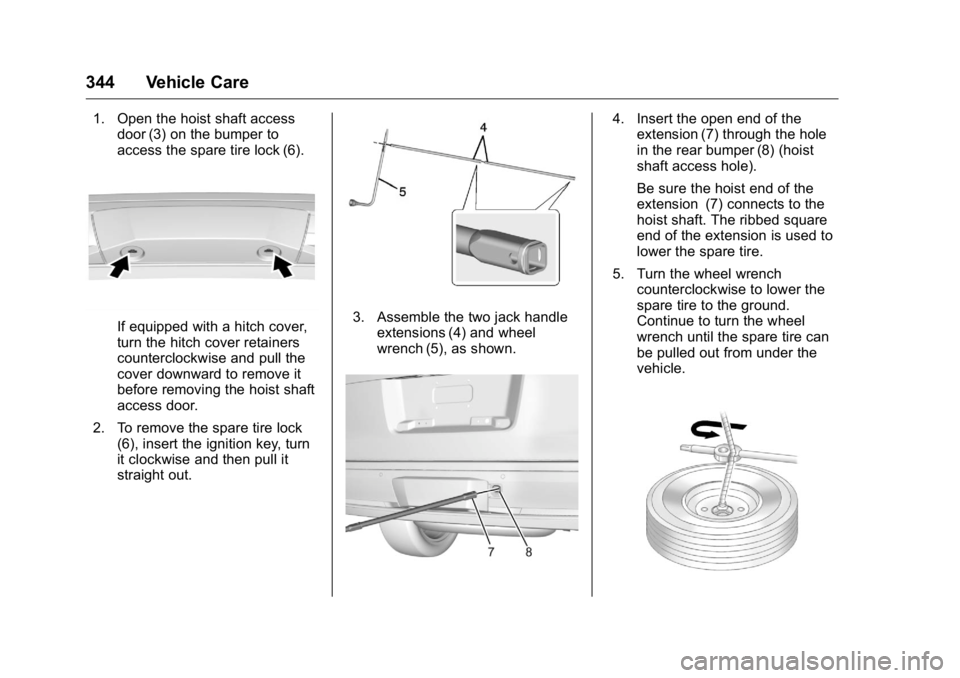
344 Vehicle Care 1. Open the hoist shaft access
door (3) on the bumper to
access the spare tire lock (6).
If equipped with a hitch cover,
turn the hitch cover retainers
counterclockwise and pull the
cover downward to remove it
before removing the hoist shaft
access door.
2. To remove the spare tire lock
(6), insert the ignition key, turn
it clockwise and then pull it
straight out. 3. Assemble the two jack handle
extensions (4) and wheel
wrench (5), as shown. 4. Insert the open end of the
extension (7) through the hole
in the rear bumper (8) (hoist
shaft access hole).
Be sure the hoist end of the
extension (7) connects to the
hoist shaft. The ribbed square
end of the extension is used to
lower the spare tire.
5. Turn the wheel wrench
counterclockwise to lower the
spare tire to the ground.
Continue to turn the wheel
wrench until the spare tire can
be pulled out from under the
vehicle.
Page 351 of 425

GMC Yukon/Yukon XL/Denali Owner Manual (GMNA-Localizing-U.S./
Canada/Mexico-11349262) - 2018 - crc - 6/20/17
350 Vehicle Care 3. Assemble the two jack handle
extensions (4) and wheel
wrench (5).
4. Insert the open end of the
extension (7) through the hole
in the rear bumper (8) (hoist
shaft access hole).
5. Raise the tire part way upward.
Make sure the retainer is
seated in the wheel opening.
6. Raise the tire fully against the
underside of the vehicle by
turning the wheel wrench
clockwise until you hear two
clicks or feel it skip twice. The
cable cannot be overtightened. 7. Make sure the tire is stored
securely. Push, pull, and then
try to turn the tire. If the tire
moves, use the wheel wrench
to tighten the cable.
8. Reinstall the spare tire lock.
9. Reinstall the hoist shaft access
cover.
If equipped, reinstall the hitch
cover and turn the retainers
clockwise.
To store the tools:
1. Return the tools (wheel
wrench, jack handle, and jack
handle extensions) to the
tool bag. 2. Assemble the wheel blocks
and jack together with the
wing nut.
3. Position the jack and wheel
blocks in the driver side trim
panel over the wheelhouse.
4. Turn the jack knob clockwise
until the jack is secured tight in
the mounting bracket. Be sure
to position the holes in the
base of the jack onto the pin in
the mounting bracket.
5. Use the retaining bracket to
fasten the tool bag on the stud
and turn the wing nut clockwise
to secure.
6. Close the trim panel door.
Full-Size Spare Tire If this vehicle came with a full-size
spare tire, it was fully inflated when
new, however, it can lose air over
time. Check the inflation pressure
regularly.
See Tire Pressure 0 327 and
Vehicle Load Limits 0 200 . For
Page 358 of 425

GMC Yukon/Yukon XL/Denali Owner Manual (GMNA-Localizing-U.S./
Canada/Mexico-11349262) - 2018 - crc - 6/20/17
Vehicle Care 357To dinghy tow:
1. Position the vehicle being
towed behind the tow vehicle,
facing forward and on a level
surface.
2. Securely attach the vehicle
being towed to the tow vehicle.
3. Apply the parking brake and
start the engine.
4. Shift the transfer case to
N (Neutral). See “ Shifting into
N (Neutral) ” under Four-Wheel
Drive 0 222 . Check that the
vehicle is in N (Neutral) by
starting the engine and shifting
the transmission to
R (Reverse) and then to D
(Drive). There should be no
movement of the vehicle while
shifting.
5. Shift the transmission into
D (Drive). Turn the engine off. CautionFailure to disconnect the negative
battery cable or to have it contact
the terminals can cause damage
to the vehicle.
6. Disconnect the negative
battery cable at the battery and
secure the nut and bolt. Cover
the negative battery post with a
non-conductive material to
prevent any contact with the
negative battery terminal.
7. Shift the transmission to
P (Park).
Caution
If the steering column is locked,
vehicle damage may occur.
8. Move the steering wheel to
make sure the steering column
is unlocked.
9. With a foot on the brake pedal,
release the parking brake. 10. Keep the ignition key in the
towed vehicle in ACC/
ACCESSORY to prevent the
steering column from locking.
If equipped with Keyless
Access, keep the RKE
transmitter outside of the
vehicle, and manually lock the
doors. Access the vehicle as if
it has a dead RKE transmitter
battery, by using the key in the
door lock.
Disconnecting the Towed Vehicle
Before disconnecting the towed
vehicle:
1. Park on a level surface.
2. Set the parking brake, then
shift the transmission to
P (Park).
3. Connect the battery.
4. Apply the brake pedal.
Page 365 of 425

GMC Yukon/Yukon XL/Denali Owner Manual (GMNA-Localizing-U.S./
Canada/Mexico-11349262) - 2018 - crc - 6/20/17
364 Vehicle Care For 1500 Series vehicles, at least
every other oil change lubricate the
outer tie rod ends.
Control arm ball joints on 1500
Series vehicles are
maintenance-free.
CautionLubrication of applicable steering/
suspension points should not be
done unless the temperature is
− 12 °C (10 °F) or higher,
or damage could result.
Body Component Lubrication Lubricate all key lock cylinders,
hood hinges, liftgate hinges, steel
fuel door hinge and power assist
step hinges, unless the components
are plastic. Applying silicone grease
on weatherstrips with a clean cloth
will make them last longer, seal
better, and not stick or squeak.
Underbody Maintenance
At least twice a year, spring and fall,
use plain water to flush any
corrosive materials from the underbody. Take care to thoroughly
clean any areas where mud and
other debris can collect. If equipped
with power assist steps, extend
them and then use a high pressure
wash to clean all joints and gaps.
Do not directly power wash the
transfer case and/or front/rear axle
output seals. High pressure water
can overcome the seals and
contaminate the fluid. Contaminated
fluid will decrease the life of the
transfer case and/or axles and
should be replaced.
Sheet Metal Damage If the vehicle is damaged and
requires sheet metal repair or
replacement, make sure the body
repair shop applies anti-corrosion
material to parts repaired or
replaced to restore corrosion
protection.
Original manufacturer replacement
parts will provide the corrosion
protection while maintaining the
vehicle warranty. Finish Damage Quickly repair minor chips and
scratches with touch-up materials
available from your dealer to avoid
corrosion. Larger areas of finish
damage can be corrected in your
dealer's body and paint shop.
Chemical Paint Spotting Airborne pollutants can fall upon
and attack painted vehicle surfaces
causing blotchy, ring-shaped
discolorations, and small, irregular
dark spots etched into the paint
surface. See “ Finish Care ”
previously in this section.
Interior Care To prevent dirt particle abrasions,
regularly clean the vehicle's interior.
Immediately remove any soils.
Newspapers or dark garments can
transfer color to the vehicle ’ s
interior.
Use a soft bristle brush to remove
dust from knobs and crevices on the
instrument cluster. Using a mild
soap solution, immediately remove
Page 403 of 425
GMC Yukon/Yukon XL/Denali Owner Manual (GMNA-Localizing-U.S./
Canada/Mexico-11349262) - 2018 - crc - 6/21/17
402 OnStar
Security If equipped, OnStar provides these
services:
.
With Stolen Vehicle Assistance,
OnStar Advisors can use GPS to
pinpoint the vehicle and help
authorities quickly recover it.
.
With Remote Ignition Block,
if equipped, OnStar can block
the engine from being restarted.
.
With Stolen Vehicle Slowdown,
if equipped, OnStar can work
with law enforcement to
gradually slow the vehicle down.
Theft Alarm Notification If equipped, if the doors are locked
and the vehicle alarm sounds, a
notification by text, e-mail, or phone
call will be sent. If the vehicle is
stolen, an OnStar Advisor can work
with authorities to recover the
vehicle. Navigation OnStar navigation requires a
specific OnStar service plan.
Press
Q to receive Turn-by-Turn
directions or have them sent to the
vehicle ’ s navigation screen,
if equipped.
Turn-by-Turn Navigation 1. Press
Q to connect to an
Advisor.
2. Request directions to be
downloaded to the vehicle.
3. Follow the voice-guided
commands.
Using Voice Commands
During a Planned Route Functionality of the Voice Command
button may vary by vehicle and
region. For some vehicles, press
=to open the OnStar app on the
infotainment display. For other
vehicles press
= as follows. Cancel Route
1. Press
= . System responds:
“ OnStar ready, ” then a tone.
2. Say “ Cancel route. ” System
responds: “ Do you want to
cancel directions? ”
3. Say “ Yes. ” System responds:
“ OK, request completed, thank
you, goodbye. ”
Route Preview
1. Press
= . System responds:
“ OnStar ready, ” then a tone.
2. Say “ Route preview. ” System
responds with the next three
maneuvers.
Repeat
1. Press
= . System responds:
“ OnStar ready, ” then a tone.
2. Say “ Repeat. ” System
responds with the last direction
given, then responds with
“ OnStar ready, ” then a tone.
Page 405 of 425

GMC Yukon/Yukon XL/Denali Owner Manual (GMNA-Localizing-U.S./
Canada/Mexico-11349262) - 2018 - crc - 6/21/17
404 OnStar devices. Manage data usage by
turning Wi-Fi on or off on your
mobile device, using the myGMC
mobile app, or by contacting an
OnStar Advisor. On some vehicles,
Wi-Fi can also be managed from the
Wi-Fi Hotspot menu.
MyGMC Mobile App (If Available)
Download the myGMC mobile app
to compatible Apple and Android
smartphones. GMC users can
access the following services from a
smartphone:
.
Remotely start/stop the vehicle,
if factory-equipped.
.
Lock/unlock doors, if equipped
with automatic locks.
.
Activate the horn and lamps.
.
Check the vehicle ’ s fuel level, oil
life, or tire pressure,
if factory-equipped with the Tire
Pressure Monitor System.
.
Send destinations to the vehicle.
.
Locate the vehicle on a map
(U.S. market only). .
Turn the vehicle's Wi-Fi hotspot
on/off, manage settings, and
monitor data consumption,
if equipped.
.
Locate a dealer and schedule
service.
.
Request roadside assistance.
.
Set a parking reminder with pin
drop, take a photo, make a note,
and set a timer.
.
Connect with GMC on social
media.
For myGMC mobile app information
and compatibility, see my.gmc.com.
An active OnStar service,
compatible device, factory-installed
remote start, and power locks are
required. Data rates apply. See
onstar.com for details and system
limitations.
Remote Services
Contact an OnStar Advisor to
unlock the doors or sound the horn
and flash the lamps. OnStar AtYourService OnStar Advisors can provide offers
from restaurants and retailers on
your route, help locate hotels,
or book a room. These services
vary by market.
OnStar Hands-Free Calling Make and receive calls with the
built-in wireless calling service,
which requires available minutes.
Functionality of the Voice Command
button may vary by vehicle and
region. For some vehicles, press
=to open the OnStar app on the
infotainment display, then select
Hands-Free calling. For other
vehicles press
= as follows.
Make a Call
1. Press
= . System responds:
“ OnStar ready. ”
2. Say “ Call. ” System responds:
“ Call. Please say the name or
number to call. ”
Page 408 of 425

GMC Yukon/Yukon XL/Denali Owner Manual (GMNA-Localizing-U.S./
Canada/Mexico-11349262) - 2018 - crc - 6/21/17
OnStar 407information about the vehicle cannot
work unless GPS signals are
available, unobstructed, and
compatible with the OnStar
hardware. OnStar services may not
work if the OnStar equipment is not
properly installed or it has not been
properly maintained. If equipment or
software is added, connected,
or modified, OnStar services may
not work. Other problems beyond
the control of OnStar — such as
hills, tall buildings, tunnels, weather,
electrical system design and
architecture of the vehicle, damage
to the vehicle in a crash, or wireless
phone network congestion or
jamming — may prevent service.
See Radio Frequency Statement
0 396 .
Services for People with
Disabilities
Advisors provide services to help
with physical disabilities and
medical conditions.
Press
Q to help:
.
Locate a gas station with an
attendant to pump gas. .
Find a hotel, restaurant, etc.,
that meets accessibility needs.
.
Provide directions to the closest
hospital or pharmacy in urgent
situations.
TTY Users OnStar has the ability to
communicate to deaf,
hard-of-hearing, or speech-impaired
customers while in the vehicle. The
available dealer-installed TTY
system can provide in-vehicle
access to all OnStar services,
except Virtual Advisor and OnStar
Turn-by-Turn Navigation.
OnStar Personal Identification
Number (PIN) A PIN is needed to access some
OnStar services. The PIN will need
to be changed the first time when
speaking with an Advisor. To
change the OnStar PIN, contact an
OnStar Advisor by pressing
Q or
calling 1-888-4ONSTAR. Warranty OnStar equipment may be
warranted as part of the vehicle
warranty.
Languages The vehicle can be programmed to
respond in multiple languages.
Press
Q and ask for an Advisor.
Advisors are available in English,
Spanish, and French. Available
languages may vary by country.
Potential Issues OnStar cannot perform Remote
Door Unlock or Stolen Vehicle
Assistance after the vehicle has
been off continuously for 10 days
without an ignition cycle. If the
vehicle has not been started for
10 days, OnStar can contact
Roadside Assistance or a locksmith
to help gain access to the vehicle.
Global Positioning
System (GPS)
.
Obstruction of the GPS can
occur in a large city with tall
buildings; in parking garages;