2018 GMC YUKON XL power steering
[x] Cancel search: power steeringPage 208 of 425

GMC Yukon/Yukon XL/Denali Owner Manual (GMNA-Localizing-U.S./
Canada/Mexico-11349262) - 2018 - crc - 6/21/17
Driving and Operating 207The ignition will switch from ACC/
ACCESSORY to off after
five minutes to prevent battery
rundown.
ON/RUN/START (Green Indicator
Light) : This mode is for driving and
starting. With the ignition off, and
the brake pedal applied, pressing
the button once will turn the ignition
on. Once engine cranking begins,
release the button. Engine cranking
will continue until the engine starts.
See Starting the Engine 0 209 .
Service Mode
This power mode is available for
service and diagnostics, and to
verify the proper operation of the
malfunction indicator lamp as may
be required for emission inspection
purposes. With the vehicle off, and
the brake pedal not applied,
pressing and holding the button for
more than five seconds will place
the vehicle in Service Mode. The
instruments and audio systems will
operate as they do when the ignition
is on, but the vehicle will not be able to be driven. The engine will not
start in Service Mode. Press the
button again to turn the ignition off.
Ignition Positions (Key
Access)
Vehicles with Key Access have an
ignition switch with four different
positions.
To shift out of P (Park), the ignition
must be on or in ACC/ACCESSORY
and the regular brake pedal must be
applied.
0 (STOPPING THE ENGINE/LOCK/
OFF) : When the vehicle is stopped,
turn the ignition switch to LOCK/ OFF to turn the engine off. Retained
Accessory Power (RAP) will remain
active. See Retained Accessory
Power (RAP) 0 212 .
This position locks the ignition and
steering wheel. It also locks the
transmission on automatic
transmission vehicles. The key can
be removed in LOCK/OFF.
The steering can bind with the
wheels turned off center. If this
happens, move the steering wheel
from right to left while turning the
key to ACC/ACCESSORY. If this
does not work, then the vehicle
needs service.
Do not turn the engine off when the
vehicle is moving. This will cause a
loss of power assist in the brake
and steering systems and disable
the airbags.
If the vehicle must be shut off in an
emergency:
1. Brake using a firm and steady
pressure. Do not pump the
brakes repeatedly. This may
deplete power assist, requiring
increased brake pedal force.
Page 209 of 425

GMC Yukon/Yukon XL/Denali Owner Manual (GMNA-Localizing-U.S./
Canada/Mexico-11349262) - 2018 - crc - 6/21/17
208 Driving and Operating 2. Shift the vehicle to N (Neutral).
This can be done while the
vehicle is moving. After shifting
to N (Neutral), firmly apply the
brakes and steer the vehicle to
a safe location.
3. Come to a complete stop, shift
to P (Park), and turn the
ignition to LOCK/OFF. On
vehicles with an automatic
transmission, the shift lever
must be in P (Park) to turn the
ignition switch to the LOCK/
OFF position.
4. Set the parking brake. See
Parking Brake 0 228 .
{ Warning
Turning off the vehicle while
moving may cause loss of power
assist in the brake and steering
systems and disable the airbags.
While driving, only shut the
vehicle off in an emergency. If the vehicle cannot be pulled over,
and must be shut off while driving,
turn the ignition to ACC/
ACCESSORY.
CautionUsing a tool to force the key to
turn in the ignition could cause
damage to the switch or break the
key. Use the correct key, make
sure it is all the way in, and turn it
only with your hand. If the key
cannot be turned by hand, see
your dealer.
1 (ACC/ACCESSORY) : This
position lets things like the radio
and the windshield wipers operate
while the engine is off. It also
unlocks the steering wheel. Use this
position if the vehicle must be
pushed or towed.
2 (ON/RUN) : This position can be
used to operate the electrical
accessories and to display some
instrument cluster warning and
indicator lights. This position can
also be used for service and diagnostics, and to verify the proper
operation of the malfunction
indicator lamp as may be required
for emission inspection purposes.
The switch stays in this position
when the engine is running. The
transmission is also unlocked in this
position on automatic transmission
vehicles.
If the key is left in the ACC/
ACCESSORY or ON/RUN position
with the engine off, the battery could
be drained. The vehicle may not
start if the battery is allowed to drain
for an extended period of time.
3 (START) : This is the position that
starts the engine. When the engine
starts, release the key. The ignition
switch returns to ON/RUN for
driving.
A warning tone will sound when the
driver door is opened and the
ignition is in ACC/ACCESSORY or
LOCK/OFF, and the key is in the
ignition.
Page 223 of 425

GMC Yukon/Yukon XL/Denali Owner Manual (GMNA-Localizing-U.S./
Canada/Mexico-11349262) - 2018 - crc - 6/21/17
222 Driving and Operating
Tow/Haul Mode
The Tow/Haul Mode adjusts the
transmission shift pattern to reduce
shift cycling. This provides
increased performance, vehicle
control, and enhanced transmission
and engine cooling when driving
down steep hills or mountain
grades, towing, or hauling heavy
loads.
The selector button is on the end of
the shift lever. Turn the Tow/Haul
Mode on and off by pressing the
button. When the Tow/Haul Mode is
enabled, a light on the instrument
cluster will come on. See Tow/Haul Mode Light 0 146 and
Hill and Mountain Roads 0 198 .
Also see “ Tow/Haul Mode ” under
Towing Equipment 0 267 .
Tow/Haul Mode Grade Braking Tow/Haul Mode Grade Braking is
only enabled while the Tow/Haul
Mode is selected and the vehicle is
not in the Range Selection Mode.
See “ Tow/Haul Mode ” listed
previously and Manual Mode 0 218 .
Tow/Haul Mode Grade Braking
assists in maintaining desired
vehicle speeds when driving on
downhill grades by using the engine
and transmission to slow the
vehicle.
To disable or enable Tow/Haul
Grade Braking within the current
ignition cycle, press and hold the
Tow/Haul button for five seconds.
When the button is released, the
requested mode change is made.
A DIC message is displayed.
See Towing Equipment 0 267 .
For other forms of grade braking,
see Automatic Transmission 0 216
and Cruise Control 0 233 .Drive Systems Four-Wheel Drive If equipped, four-wheel drive
engages the front axle for extra
traction.
CautionDo not drive on clean, dry
pavement in 4
m and 4
n (if
equipped) for an extended period
of time. These conditions may
cause premature wear on the
vehicle ’ s powertrain.
Driving on clean, dry pavement in 4
m or 4
n may:
.
Cause a vibration to be felt in
the steering system.
.
Cause tires to wear faster.
.
Make the transfer case harder to
shift, and cause it to run noisier.
Page 224 of 425
GMC Yukon/Yukon XL/Denali Owner Manual (GMNA-Localizing-U.S./
Canada/Mexico-11349262) - 2018 - crc - 6/21/17
Driving and Operating 223
{ WarningShifting the transfer case to
N (Neutral) can cause the vehicle
to roll even if the transmission is
in P (Park). You or someone else
could be seriously injured. Be
sure to set the parking brake
before placing the transfer case in
N (Neutral). See Parking Brake
0 228 .
CautionExtended high-speed operation in
4
n may damage or shorten the
life of the drivetrain.
Engagement noise and bump when
shifting between 4
n and 4
m or from
N (Neutral), with the engine running,
is normal.
Shifting into 4
n will turn Traction
Control and StabiliTrak off. See
Traction Control/Electronic Stability
Control 0 229 . Two Speed Automatic
Transfer Case
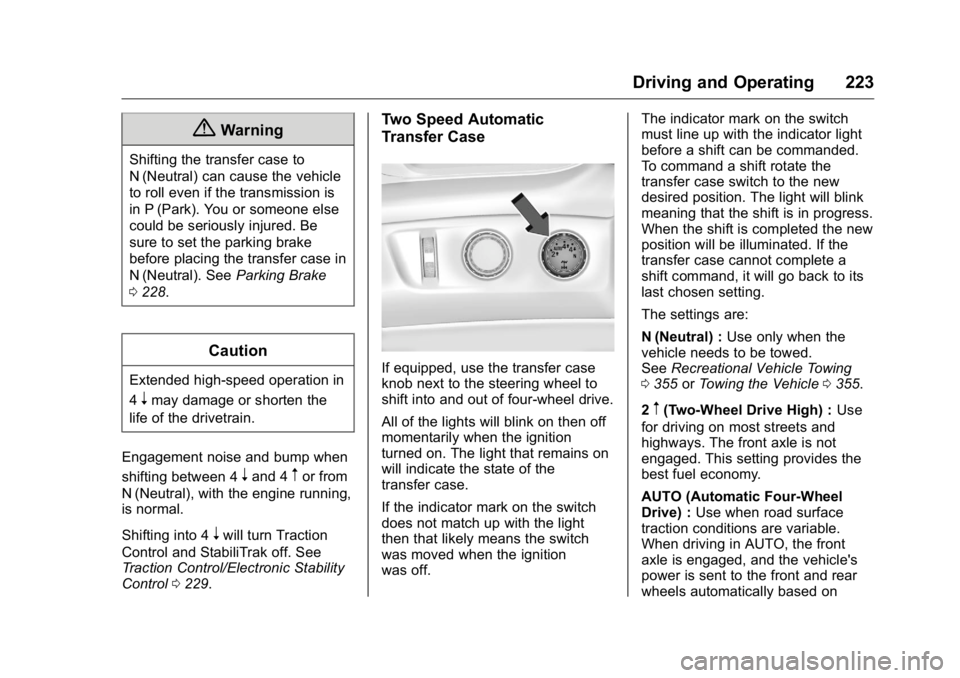
If equipped, use the transfer case
knob next to the steering wheel to
shift into and out of four-wheel drive.
All of the lights will blink on then off
momentarily when the ignition
turned on. The light that remains on
will indicate the state of the
transfer case.
If the indicator mark on the switch
does not match up with the light
then that likely means the switch
was moved when the ignition
was off. The indicator mark on the switch
must line up with the indicator light
before a shift can be commanded.
To command a shift rotate the
transfer case switch to the new
desired position. The light will blink
meaning that the shift is in progress.
When the shift is completed the new
position will be illuminated. If the
transfer case cannot complete a
shift command, it will go back to its
last chosen setting.
The settings are:
N (Neutral) : Use only when the
vehicle needs to be towed.
See Recreational Vehicle Towing
0 355 or Towing the Vehicle 0 355 .
2
m (Two-Wheel Drive High) : Use
for driving on most streets and
highways. The front axle is not
engaged. This setting provides the
best fuel economy.
AUTO (Automatic Four-Wheel
Drive) : Use when road surface
traction conditions are variable.
When driving in AUTO, the front
axle is engaged, and the vehicle's
power is sent to the front and rear
wheels automatically based on
Page 227 of 425

GMC Yukon/Yukon XL/Denali Owner Manual (GMNA-Localizing-U.S./
Canada/Mexico-11349262) - 2018 - crc - 6/21/17
226 Driving and Operating 4. Turn the transfer case knob to
the desired setting.
After the transfer case has
shifted out of N (Neutral), the
N (Neutral) light will go out.
5. Release the parking brake.
6. Start the engine and shift the
transmission to the
desired gear.
Single Speed Automatic
Transfer Case
Use the transfer case knob, next to
the steering wheel, to shift into and
out of four-wheel drive for extra
traction. All of the lights will blink on then off
momentarily when the ignition is
turned on. The light that remains on
will indicate the state of the
transfer case.
If the indicator mark on the switch
does not match up with the light
then that likely means the switch
was moved when the ignition
was off.
The indicator mark on the switch
must line up with the indicator light
before a shift can be commanded.
To command a shift rotate the
transfer case switch to the new
desired position. The light will blink
meaning that the shift is in progress.
When the shift is completed the new
position will be illuminated. If the
transfer case can not complete a
shift command, it will go back to its
last chosen setting.
The settings are:
2
m (Two-Wheel Drive High) : Use
for driving on most streets and
highways. The front axle is not
engaged. This setting provides the
best fuel economy. AUTO (Automatic Four-Wheel
Drive) : Use when road surface
traction conditions are variable.
When driving in AUTO, the front
axle is engaged, and the vehicle's
power is sent to the front and rear
wheels automatically based on
driving conditions. This setting
provides slightly lower fuel economy
than 2
m .
Do not use AUTO mode to park on
a steep grade with poor traction
such as ice, snow, mud, or gravel.
In AUTO mode only rear wheels will
hold the vehicle from sliding when
parked. If parking on a steep grade,
use 4
m to keep all four wheels
engaged.
4
m (Four-Wheel Drive High) : Use
this position when extra traction is
needed, such as when driving on
snowy or icy roads, when
off-roading, or when plowing snow.
Page 271 of 425

GMC Yukon/Yukon XL/Denali Owner Manual (GMNA-Localizing-U.S./
Canada/Mexico-11349262) - 2018 - crc - 6/21/17
270 Driving and Operating antilock brake or StabiliTrak
systems to activate, power sent to
the trailer's brakes will be
automatically adjusted to minimize
trailer wheel lock-up. This does not
imply that the trailer has StabiliTrak.
If the vehicle ’ s brake, antilock brake,
or StabiliTrak systems are not
functioning properly, the ITBC
system may not be fully functional
or may not function at all. Make sure
all of these systems are fully
operational to ensure full
functionality of the ITBC system.
The ITBC system is powered
through the vehicle's electrical
system. Turning the ignition off will
also turn off the ITBC system. The
ITBC system is fully functional only
when the ignition is in on.
{ Warning
Connecting a trailer that has an
air brake system may result in
reduced or complete loss of trailer
braking. There may be an
increase in stopping distance or
(Continued) Warning (Continued) trailer instability which could
result in personal injury or
damage to the vehicle, trailer,
or other property. Use the ITBC
system only with electric or
electric over hydraulic trailer
brakes.
Trailer Brake Control Panel
1. Manual Trailer Brake Apply
Lever
2. Trailer Gain Adjustment
Buttons The ITBC system has a control
panel on the instrument panel to the
left of the steering column. The
control panel allows adjustment to
the amount of output, referred to as
Trailer Gain, available to the trailer
brakes and allows manual
application of the trailer brakes. The
Trailer Brake Control Panel is used
along with the Trailer Brake Display
Page on the DIC to adjust and
display power output to the trailer
brakes.
Trailer Brake DIC Display Page
The ITBC system displays
messages in the Driver Information
Center (DIC).
The display page indicates Trailer
Gain setting, power output to the
trailer brakes, trailer connection, and
system operational status.
To display the Trailer Brake Display
Page do any of the following:
.
Scroll through the DIC menu
pages.
.
Press a Trailer Gain button.
If the Trailer Brake Display Page
is not currently displayed, press
Page 316 of 425

GMC Yukon/Yukon XL/Denali Owner Manual (GMNA-Localizing-U.S./
Canada/Mexico-11349262) - 2018 - crc - 6/20/17
Vehicle Care 315
The vehicle may not be equipped
with all of the fuses, relays, and
features shown. Fuses Usage
1 –
2 – Fuses Usage
3 –
4 Accessory power
outlet 1
5 Retained accessory
power
6 APO/BATT
7 Universal garage door
opener/Interior
rearview mirror
8 SEO/Retained
accessory power
9 –
10 Body control module 3
11 Body control module 5
12 Steering wheel control
backlighting
13 –
14 –
15 –
16 Discrete logic ignition
sensor
17 Video processing
module
Page 317 of 425

GMC Yukon/Yukon XL/Denali Owner Manual (GMNA-Localizing-U.S./
Canada/Mexico-11349262) - 2018 - crc - 6/20/17
316 Vehicle Care Fuses Usage
18 Mirror window module
19 Body control module 1
20 Front bolster (if
equipped)
21 –
22 –
23 –
24 HVAC/Ignition
25 Instrument cluster/
Ignition sensing
diagnostic module/
Ignition
26 Tilt column/SEO/Tilt
column lock 1/SEO
27 Data link connector/
Driver seat module
28 Passive entry/Passive
start/HVAC battery
29 Content theft
deterrent
30 –
31 –
32 – Fuses Usage
33 SEO/Automatic level
control/Left
heated seat
34 Park enable/Electric
adjustable pedal (if
equipped)
35 –
36 Miscellaneous/Run
crank
37 Heated steering wheel
38 Steering column
lock 2 (if equipped)
39 Instrument cluster
battery
40 –
41 –
42 Euro trailer (if
equipped)
43 Left doors
44 Driver power seat
45 – Fuses Usage
46 Right heated, cooled,
or ventilated seat (if
equipped)
47 Left heated, cooled,
or ventilated seat (if
equipped)
48 –
49 –
50 Accessory power
outlet 2
51 –
52 Retained accessory
power relay
54 –
55 –
56 –
Relays Usage
52 Retained accessory
power
53 Run/Crank relay