2018 GMC SIERRA DENALI USB
[x] Cancel search: USBPage 8 of 505

GMC Sierra/Sierra Denali Owner Manual (GMNA-Localizing-U.S./Canada/
Mexico-11349177) - 2018 - CRC - 10/17/17
In Brief 71. Instrument Panel Illumination
Control 0 182 .
2. Integrated Trailer Brake Control
(ITBC) System (If Equipped).
See Towing Equipment 0 325 .
3. Exterior Lamp Controls 0 176 .
Fog Lamps 0 181 (If
Equipped).
4. Air Vents 0 231 .
5. Turn Signal Lever. See Turn
and Lane-Change Signals
0 181 .
Windshield Wiper/Washer
0 130 .
6. Favorite Switches (Out of
View). See Steering Wheel
Controls 0 129 .
Volume Switches (Out of View).
See Steering Wheel Controls
0 129 .
7. Instrument Cluster 0 138 .
8. Hazard Warning Flashers
0 180 .
9. Shift Lever. See Automatic
Transmission 0 265 . Tow/Haul Selector Button (If
Equipped). See Tow/Haul
Mode 0 271 .
Range Selection Mode (If
Equipped). See Manual Mode
0 268 .
10. Light Sensor. See Automatic
Headlamp System 0 179 .
11. Infotainment 0 186 .
12. Passenger Airbag On-Off
Switch (If Equipped) (Out of
View). See Airbag On-Off
Switch 0 84 .
13. Heated and Ventilated Front
Seats 0 65 (If Equipped).
14. Power Outlet 110/120V
Alternating Current (If
Equipped). See Power Outlets
0 133 .
15. Power Outlets 0 133 (If
Equipped).
16. USB Port 0 197 (If Equipped).
17.
g Traction Control/Electronic
Stability Control 0 282 .0 Pedal Adjust Switch (If
Equipped). See Adjustable
Throttle and Brake Pedal
0 256 .
{ Cargo Lamp 0 183 .
X Parking Assist Button (If
Equipped). See Assistance
Systems for Parking or Backing
0 289 .
A Lane Keep Assist (LKA)
(1500 Series) 0 297 (If
Equipped).
5 Hill Descent Control Switch
(If Equipped). See Hill Descent
Control (HDC) 0 284 .
q Exhaust Brake Switch (If
Equipped). See “ Exhaust
Brake ” in the Duramax diesel
supplement.
g Power Take Off (PTO)
Switch (If Equipped). See the
Duramax diesel supplement.
Page 25 of 505

GMC Sierra/Sierra Denali Owner Manual (GMNA-Localizing-U.S./Canada/
Mexico-11349177) - 2018 - CRC - 10/17/17
24 In Brief Automatic Transfer Case
This transfer case knob is to the left
of the steering column.
The different drive options that may
be available are described following.
2
m (Two-Wheel Drive High) : This
setting is used for driving in most
street and highway situations.
AUTO (Automatic Four-Wheel
Drive) : This setting is ideal for use
when road surface traction
conditions are variable. Do not use AUTO mode to park on
a steep grade with poor traction
such as ice, snow, mud or gravel. In
AUTO mode only the rear wheels
will hold the vehicle from sliding
when parked. If parking on a steep
grade, use 4
m to keep all four
wheels engaged.
4
m (Four-Wheel Drive High) : Use
this setting when extra traction is
needed, such as on snowy or icy
roads or in most off-road situations.
N (Neutral) : Shift to this setting
only when towing the vehicle.
See Recreational Vehicle Towing
0 430 or Trailer Towing 0 307 .
4
n (Four-Wheel Drive Low) : This
setting sends maximum power to all
four wheels. Choose 4
n when
driving in deep sand, mud, or snow,
and while climbing or descending
steep hills.
See Four-Wheel Drive 0 272 .Vehicle Features Infotainment System The base radio and base radio with
touchscreen information is included
in this manual. See the infotainment
manual for information on the
uplevel radios, audio players,
phone, navigation system, Rear
Seat Entertainment (RSE), and
voice or speech recognition,
if equipped.
Radio(s) Base Radio
O : Press to turn the system on.
Press and hold to turn it off. When
on, press to mute; press again to
unmute. Turn to increase or
decrease the volume.
RADIO : Press to choose between
FM, AM, and SiriusXM, if equipped.
MEDIA : Press to change the audio
source between CD, USB, AUX,
and Bluetooth Audio, if equipped.
{ : Press to go to the Home Page.
Page 26 of 505

GMC Sierra/Sierra Denali Owner Manual (GMNA-Localizing-U.S./Canada/
Mexico-11349177) - 2018 - CRC - 10/17/17
In Brief 25MENU : Press to select a menu.
g : Press to seek the previous
station or track.
l : Press to seek the next station
or track.
See “ Base Radio ” in Overview
0 188 .
Base Radio with Touchscreen
O : Press to turn the system on.
Press and hold to turn it off. When
on, press to mute; press again to
unmute. Turn to increase or
decrease the volume.
{ : Press to go to the Home Page.
7 : Press to seek the previous
station or track.
6 : Press to seek the next station
or track.
See “ Base Radio with Touchscreen ”
in Overview 0 188 .
Setting the Clock
See Clock 0 132 . Satellite Radio Vehicles with a SiriusXM satellite
radio tuner and a valid SiriusXM
satellite radio subscription can
receive SiriusXM programming.
SiriusXM Satellite Radio
Service SiriusXM is a satellite radio service
based in the 48 contiguous United
States and 10 Canadian provinces.
SiriusXM satellite radio has a wide
variety of programming and
commercial-free music, coast to
coast, and in digital-quality sound.
A fee is required to receive the
SiriusXM service.
For more information refer to:
.
www.siriusxm.com or call
1-888-601-6296 (U.S.).
.
www.siriusxm.ca or call
1-877-438-9677 (Canada).
See Satellite Radio 0 192 .Portable Audio Devices This vehicle may have a 3.5 mm
(1/8 in) auxiliary input jack and USB
ports in the center stack, center
console, or under armrest. There
may be a USB port in the upper
glove box. External devices such as
iPods, laptop computers, MP3
players, and USB storage devices
may be connected, depending on
the audio system.
See USB Port 0 197 and Auxiliary
Jack 0 203 .
Bluetooth The Bluetooth system allows users
with a Bluetooth-enabled cell phone
to make and receive hands-free
calls using the vehicle audio system
and controls.
The Bluetooth-enabled cell phone
must be paired with the in-vehicle
Bluetooth system before it can be
used in the vehicle. Not all phones
will support all functions.
Page 126 of 505
GMC Sierra/Sierra Denali Owner Manual (GMNA-Localizing-U.S./Canada/
Mexico-11349177) - 2018 - CRC - 10/17/17
Storage 125Rear
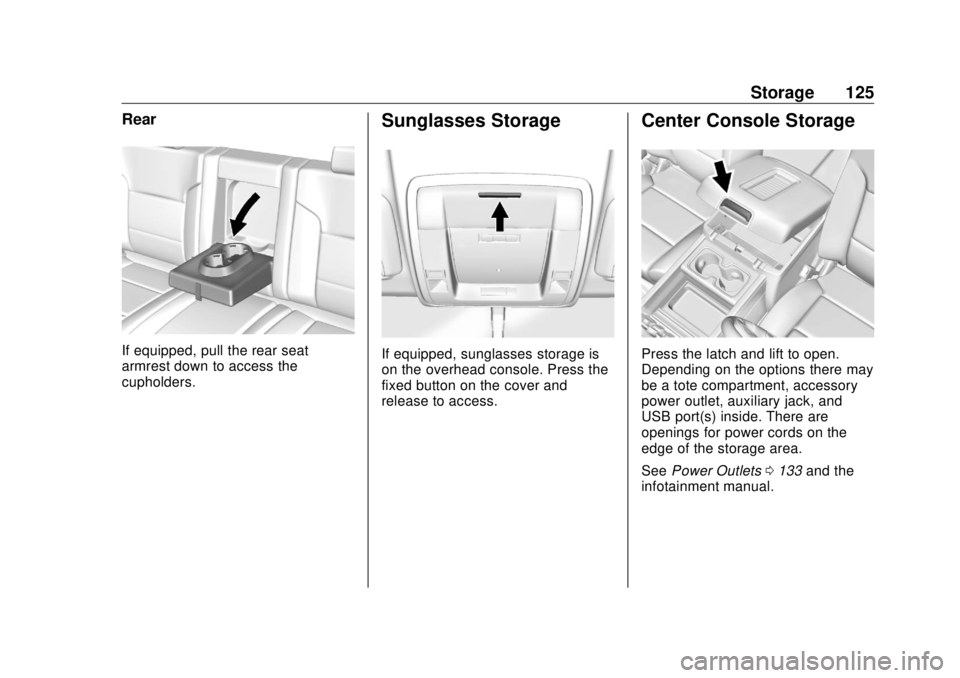
If equipped, pull the rear seat
armrest down to access the
cupholders. Sunglasses Storage
If equipped, sunglasses storage is
on the overhead console. Press the
fixed button on the cover and
release to access. Center Console Storage
Press the latch and lift to open.
Depending on the options there may
be a tote compartment, accessory
power outlet, auxiliary jack, and
USB port(s) inside. There are
openings for power cords on the
edge of the storage area.
See Power Outlets 0 133 and the
infotainment manual.
Page 166 of 505
GMC Sierra/Sierra Denali Owner Manual (GMNA-Localizing-U.S./Canada/
Mexico-11349177) - 2018 - CRC - 10/17/17
Instruments and Controls 165
Vehicle
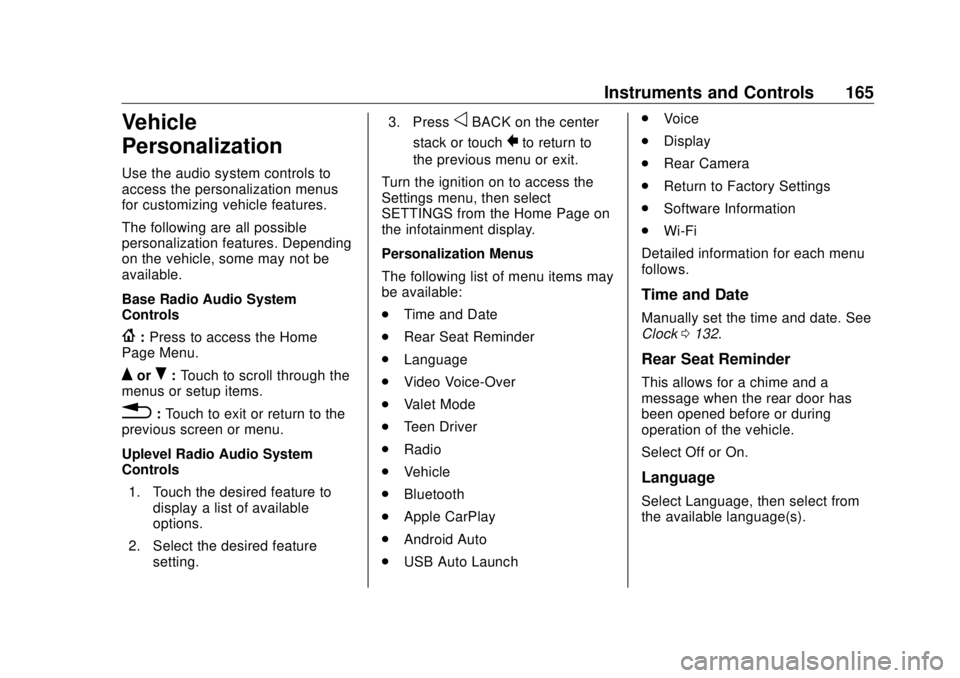
Personalization Use the audio system controls to
access the personalization menus
for customizing vehicle features.
The following are all possible
personalization features. Depending
on the vehicle, some may not be
available.
Base Radio Audio System
Controls
{ : Press to access the Home
Page Menu.
Q or
R : Touch to scroll through the
menus or setup items.
0 : Touch to exit or return to the
previous screen or menu.
Uplevel Radio Audio System
Controls
1. Touch the desired feature to
display a list of available
options.
2. Select the desired feature
setting. 3. Press
o BACK on the center
stack or touch
0 to return to
the previous menu or exit.
Turn the ignition on to access the
Settings menu, then select
SETTINGS from the Home Page on
the infotainment display.
Personalization Menus
The following list of menu items may
be available:
.
Time and Date
.
Rear Seat Reminder
.
Language
.
Video Voice-Over
.
Valet Mode
.
Teen Driver
.
Radio
.
Vehicle
.
Bluetooth
.
Apple CarPlay
.
Android Auto
.
USB Auto Launch .
Voice
.
Display
.
Rear Camera
.
Return to Factory Settings
.
Software Information
.
Wi-Fi
Detailed information for each menu
follows.
Time and Date Manually set the time and date. See
Clock 0 132 .
Rear Seat Reminder This allows for a chime and a
message when the rear door has
been opened before or during
operation of the vehicle.
Select Off or On.
Language
Select Language, then select from
the available language(s).
Page 171 of 505
GMC Sierra/Sierra Denali Owner Manual (GMNA-Localizing-U.S./Canada/
Mexico-11349177) - 2018 - CRC - 10/17/17
170 Instruments and Controls Pair New Device
Select to pair a new device. See
“ Pairing ” under Bluetooth
(Overview) 0 211 or Bluetooth
(Infotainment Controls) 0 213 or
“ Pairing ” in “ Infotainment Controls ”
under Bluetooth in the infotainment
manual.
Discoverable
This allows the system to find a
device.
Select Off or On.
Device Management
Select to connect to a different
phone source, disconnect a phone,
or delete a phone.
Ringtones
Select to change the ring tone for
the specific phone. The phone does
not need to be connected to change
the ring tones. Voice Mail Numbers
This feature displays the voice mail
number for all connected phones.
To change the voice mail number,
select EDIT. Type a new number,
then select Save.
Text Message Alerts
This allows the feature to be turned
on or off.
Select Off or On.
Apple CarPlay Select and the following may
display:
.
Apple CarPlay
.
Manage Apple CarPlay Devices
Apple CarPlay
This feature allows Apple devices to
be connected to the infotainment
system through a USB port.
Select Off or On.
Manage Apple CarPlay Devices
Select to manage Apple devices.
Apple CarPlay must be on for this
feature to be accessed. Android Auto Select and the following may
display:
.
Android Auto
.
Manage Android Auto Devices
Android Auto
This feature allows Android devices
to be connected to the infotainment
system through a USB port.
Select Off or On.
Manage Android Auto Devices
Select to manage Android devices.
Android Auto must be on for this
feature to be accessed.
USB Auto Launch This allows Android and Apple
CarPlay devices to automatically
connect when plugged into the
USB port.
Select Off or On.
Page 187 of 505

GMC Sierra/Sierra Denali Owner Manual (GMNA-Localizing-U.S./Canada/
Mexico-11349177) - 2018 - CRC - 10/17/17
186 Infotainment System
Infotainment
System Introduction Infotainment . . . . . . . . . . . . . . . . . . 186
Theft-Deterrent Feature . . . . . . 187
Overview . . . . . . . . . . . . . . . . . . . . . 188
Home Page . . . . . . . . . . . . . . . . . . 189
Software Updates . . . . . . . . . . . . 189
Radio AM-FM Radio . . . . . . . . . . . . . . . . 190
Satellite Radio . . . . . . . . . . . . . . . . 192
Radio Reception . . . . . . . . . . . . . . 193
Fixed Mast Antenna . . . . . . . . . . 194
Multi-Band Antenna . . . . . . . . . . 194
Audio Players Avoiding Untrusted Media
Devices . . . . . . . . . . . . . . . . . . . . . 195
CD Player . . . . . . . . . . . . . . . . . . . . 195
USB Port . . . . . . . . . . . . . . . . . . . . . 197
Auxiliary Jack . . . . . . . . . . . . . . . . 203
Bluetooth Audio . . . . . . . . . . . . . . 204
Voice Recognition
Voice Recognition . . . . . . . . . . . . 205 Phone Bluetooth (Overview) . . . . . . . . . 211
Bluetooth (Infotainment
Controls) . . . . . . . . . . . . . . . . . . . . 213
Apple CarPlay and
Android Auto . . . . . . . . . . . . . . . . 217
Trademarks and License
Agreements Trademarks and License
Agreements . . . . . . . . . . . . . . . . . 218
Introduction Infotainment Base radio information is included in
this manual. See the infotainment
manual for information on other
available infotainment systems.
Read the following pages to
become familiar with the features.
{ WarningTaking your eyes off the road for
too long or too often while using
any infotainment feature can
cause a crash. You or others
could be injured or killed. Do not
give extended attention to
infotainment tasks while driving.
Limit your glances at the vehicle
displays and focus your attention
on driving. Use voice commands
whenever possible.
Page 189 of 505
GMC Sierra/Sierra Denali Owner Manual (GMNA-Localizing-U.S./Canada/
Mexico-11349177) - 2018 - CRC - 10/17/17
188 Infotainment System
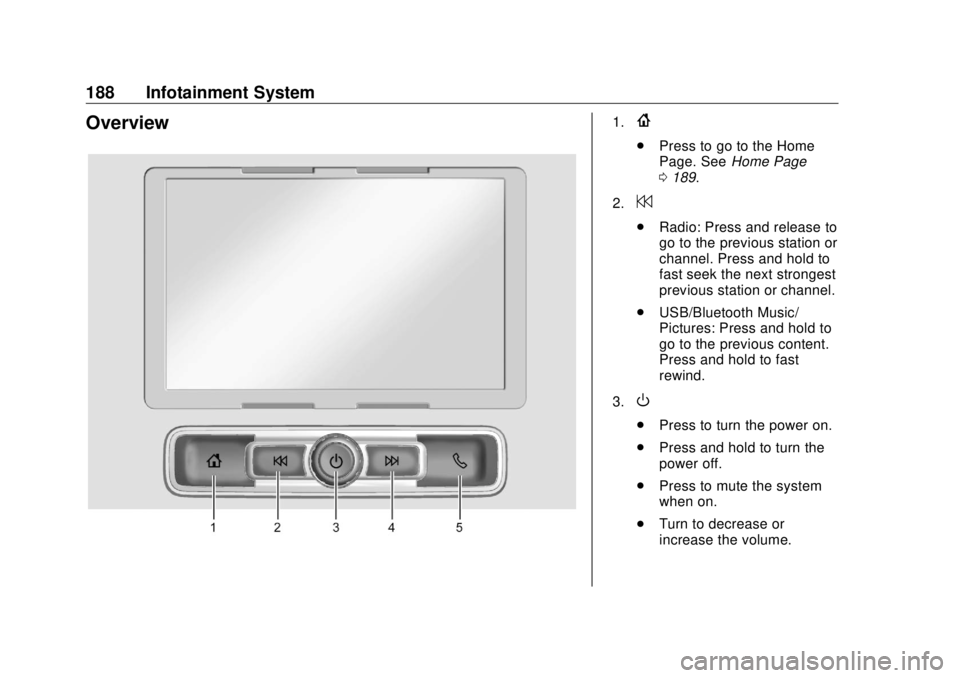
Overview 1.
{ .
Press to go to the Home
Page. See Home Page
0 189 .
2.
7 .
Radio: Press and release to
go to the previous station or
channel. Press and hold to
fast seek the next strongest
previous station or channel.
.
USB/Bluetooth Music/
Pictures: Press and hold to
go to the previous content.
Press and hold to fast
rewind.
3.
O .
Press to turn the power on.
.
Press and hold to turn the
power off.
.
Press to mute the system
when on.
.
Turn to decrease or
increase the volume.