2018 GMC SIERRA DENALI mirror
[x] Cancel search: mirrorPage 295 of 505

GMC Sierra/Sierra Denali Owner Manual (GMNA-Localizing-U.S./Canada/
Mexico-11349177) - 2018 - CRC - 10/17/17
294 Driving and Operating conditions when selecting the alert
timing. The range of selectable alert
timing may not be appropriate for all
drivers and driving conditions.
Unnecessary Alerts FCA may provide unnecessary
alerts for turning vehicles, vehicles
in other lanes, objects that are not
vehicles, or shadows. These alerts
are normal operation and the
vehicle does not need service.
Cleaning the System If the FCA system does not seem to
operate properly, this may correct
the issue:
.
Clean the outside of the
windshield in front of the
rearview mirror.
.
Clean the entire front of the
vehicle.
.
Clean the headlamps. Forward Automatic
Braking (FAB) If the vehicle has Forward Collision
Alert (FCA), it also has FAB, which
includes Intelligent Brake
Assist (IBA). When the system
detects a vehicle ahead in your path
that is traveling in the same
direction that you may be about to
crash into, it can provide a boost to
braking or automatically brake the
vehicle. This can help avoid or
lessen the severity of crashes when
driving in a forward gear. Depending
on the situation, the vehicle may
automatically brake moderately or
hard. This forward automatic
braking can only occur if a vehicle is
detected. This is shown by the FCA
vehicle ahead indicator being lit.
See Forward Collision Alert (FCA)
System 0 292 .
The system works when driving in a
forward gear between 8 km/h
(5 mph) and 80 km/h (50 mph).
It can detect vehicles up to
approximately 60 m (197 ft). { WarningFAB is an emergency crash
preparation feature and is not
designed to avoid crashes. Do
not rely on FAB to brake the
vehicle. FAB will not brake
outside of its operating speed
range and only responds to
detected vehicles.
FAB may not:
.
Detect a vehicle ahead on
winding or hilly roads.
.
Detect all vehicles,
especially vehicles with a
trailer, tractors, muddy
vehicles, etc.
.
Detect a vehicle when
weather limits visibility, such
as in fog, rain, or snow.
.
Detect a vehicle ahead if it
is partially blocked by
pedestrians or other objects.
(Continued)
Page 297 of 505

GMC Sierra/Sierra Denali Owner Manual (GMNA-Localizing-U.S./Canada/
Mexico-11349177) - 2018 - CRC - 10/17/17
296 Driving and Operating
{ WarningThe LDW system does not steer
the vehicle. The LDW system
may not:
.
Provide enough time to
avoid a crash.
.
Detect lane markings under
poor weather or visibility
conditions. This can occur if
the windshield or
headlamps are blocked by
dirt, snow, or ice; if they are
not in proper condition; or if
the sun shines directly into
the camera.
.
Detect road edges.
.
Detect lanes on winding or
hilly roads.
If LDW only detects lane
markings on one side of the road,
it will only warn you when
departing the lane on the side
where it has detected a lane
marking. Always keep your
(Continued) Warning (Continued) attention on the road and
maintain proper vehicle position
within the lane, or vehicle
damage, injury, or death could
occur. Always keep the
windshield, headlamps, and
camera sensors clean and in
good repair. Do not use LDW in
bad weather conditions.
How the System Works The LDW camera sensor is on the
windshield ahead of the rearview
mirror.
To turn LDW on and off, press
@ on
the center stack. The control
indicator will light when LDW is on. When LDW is on,
@ is green if
LDW is available to warn of a lane
departure. If the vehicle crosses a
detected lane marking without using
the turn signal in that direction,
@ changes to amber and flashes.
Additionally, there may be three
beeps, or the driver seat may pulse
three times on the right or left,
depending on the lane departure
direction.
When the System Does Not
Seem to Work Properly The system may not detect lanes as
well when there are:
.
Close vehicles ahead.
.
Sudden lighting changes, such
as when driving through tunnels.
.
Banked roads.
If the LDW system is not functioning
properly when lane markings are
clearly visible, cleaning the
windshield may help.
LDW alerts may occur due to tar
marks, shadows, cracks in the road,
temporary or construction lane
Page 299 of 505

GMC Sierra/Sierra Denali Owner Manual (GMNA-Localizing-U.S./Canada/
Mexico-11349177) - 2018 - CRC - 10/17/17
298 Driving and Operating How the System Works The LKA camera sensor is on the
windshield ahead of the rearview
mirror.
To turn LKA on and off, press
Aon the center stack.
When on,
A is green if LKA is
available to assist and provide LDW
alerts. It may assist by gently
turning the steering wheel and
display
A as amber if the vehicle
approaches a detected lane marking
without using a turn signal in that
direction. It may also provide an
LDW alert by flashing
A amber
as the lane marking is crossed.
Additionally, there may be three
beeps, or the driver seat may pulse
three times, on the right or left,
depending on the lane departure
direction. Take Steering
The LKA system does not
continuously steer the vehicle.
If LKA does not detect active driver
steering, an alert, chime, or DIC
message may be provided. Move
the steering wheel to dismiss.
When the System Does Not
Seem to Work Properly The system performance may be
affected by:
.
Close vehicles ahead.
.
Sudden lighting changes, such
as when driving through tunnels.
.
Banked roads.
.
Roads with poor lane markings,
such as two-lane roads.
If the LKA system is not functioning
properly when lane markings are
clearly visible, cleaning the
windshield may help. A camera blocked message may
display if the camera is blocked.
Cleaning the outside of the
windshield behind the rearview
mirror may correct the issue. Some
driver assistance systems may have
reduced performance or not work at
all. An LKA or LDW unavailable
message may display if the systems
are temporarily unavailable. This
message could be due to a blocked
camera. The LKA system does not
need service. Clean the outside of
the windshield behind the rearview
mirror.
LKA assistance and/or LDW alerts
may occur due to tar marks,
shadows, cracks in the road,
temporary or construction lane
markings, or other road
imperfections. This is normal system
operation; the vehicle does not need
service. Turn LKA off if these
conditions continue.
Page 306 of 505

GMC Sierra/Sierra Denali Owner Manual (GMNA-Localizing-U.S./Canada/
Mexico-11349177) - 2018 - CRC - 10/17/17
Driving and Operating 305tires, and mirrors. Get familiar with
the handling and braking of the rig.
If the trailer has electric brakes, start
the combination moving and then
apply the trailer brake controller by
hand to be sure the brakes work.
During the trip, check occasionally
to be sure that the load is secure
and the lamps and any trailer
brakes still work.
Following Distance Stay at least twice as far behind the
vehicle ahead as you would when
driving the vehicle without a trailer.
This can help to avoid heavy
braking and sudden turns.
Passing More passing distance is needed
when towing a trailer. The
combination will not accelerate as
quickly and is longer so it is
necessary to go much farther
beyond the passed vehicle before
returning to the lane. Backing Up Hold the bottom of the steering
wheel with one hand. To move the
trailer to the left, move that hand to
the left. To move the trailer to the
right, move your hand to the right.
Always back up slowly and,
if possible, have someone
guide you.
Making Turns
CautionMaking very sharp turns while
trailering could cause the trailer to
come in contact with the vehicle.
The vehicle could be damaged.
Avoid making very sharp turns
while trailering.
When turning with a trailer, make
wider turns than normal. Do this so
the trailer will not strike soft
shoulders, curbs, road signs, trees,
or other objects. Avoid jerky or
sudden maneuvers. Signal well in
advance. If the trailer turn signal bulbs burn
out, the arrows on the instrument
cluster will still flash for turns. It is
important to check occasionally to
be sure the trailer bulbs are still
working.
Turn Signals When Towing a
Trailer The turn signal indicators on the
instrument cluster flash whenever
signaling a turn or lane change.
Properly hooked up, the trailer
lamps also flash, telling other
drivers the vehicle is turning,
changing lanes, or stopping.
When towing a trailer, the arrows on
the instrument cluster flash for turns
even if the bulbs on the trailer are
burned out.
Check occasionally to be sure the
trailer bulbs are still working.
Page 384 of 505
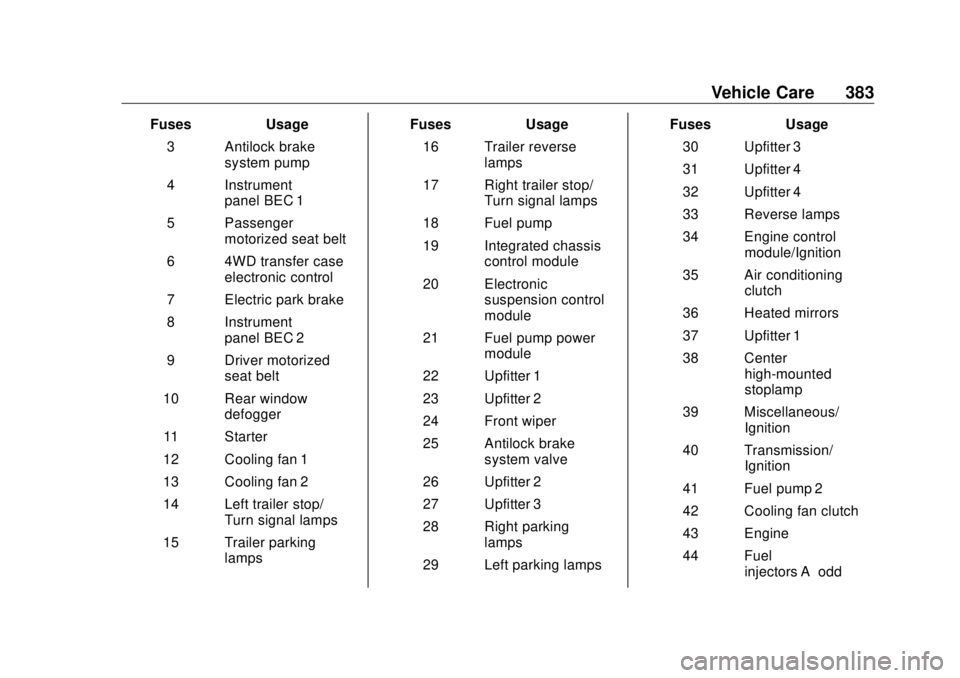
GMC Sierra/Sierra Denali Owner Manual (GMNA-Localizing-U.S./Canada/
Mexico-11349177) - 2018 - CRC - 10/17/17
Vehicle Care 383Fuses Usage
3 Antilock brake
system pump
4 Instrument
panel BEC 1
5 Passenger
motorized seat belt
6 4WD transfer case
electronic control
7 Electric park brake
8 Instrument
panel BEC 2
9 Driver motorized
seat belt
10 Rear window
defogger
11 Starter
12 Cooling fan 1
13 Cooling fan 2
14 Left trailer stop/
Turn signal lamps
15 Trailer parking
lamps Fuses Usage
16 Trailer reverse
lamps
17 Right trailer stop/
Turn signal lamps
18 Fuel pump
19 Integrated chassis
control module
20 Electronic
suspension control
module
21 Fuel pump power
module
22 Upfitter 1
23 Upfitter 2
24 Front wiper
25 Antilock brake
system valve
26 Upfitter 2
27 Upfitter 3
28 Right parking
lamps
29 Left parking lamps Fuses Usage
30 Upfitter 3
31 Upfitter 4
32 Upfitter 4
33 Reverse lamps
34 Engine control
module/Ignition
35 Air conditioning
clutch
36 Heated mirrors
37 Upfitter 1
38 Center
high-mounted
stoplamp
39 Miscellaneous/
Ignition
40 Transmission/
Ignition
41 Fuel pump 2
42 Cooling fan clutch
43 Engine
44 Fuel
injectors A – odd
Page 388 of 505

GMC Sierra/Sierra Denali Owner Manual (GMNA-Localizing-U.S./Canada/
Mexico-11349177) - 2018 - CRC - 10/17/17
Vehicle Care 387
The vehicle may not be equipped
with all of the fuses, relays, and
features shown. Fuses Usage
1 Accessory power
outlet 2 Fuses Usage
2 Special equipment
option/Retained
accessory power
3 Universal remote
system/Interior
rearview mirror
6 Body control module 3
7 Body control module 5
8 Driver window switch/
Mirror switch
9 –
10 Accessory power
outlet/Retained
accessory power
11 Accessory power
outlet battery
12 Accessory power
outlet 1/Cigarette
lighter
13 Discrete logic ignition
switch
14 Switch backlighting
17 Body control module 1
Page 493 of 505

GMC Sierra/Sierra Denali Owner Manual (GMNA-Localizing-U.S./Canada/
Mexico-11349177) - 2018 - CRC - 10/17/17
492 Index Antilock Brake System
(ABS) (cont'd)
Warning Light . . . . . . . . . . . . . . . . . 152
Appearance Care
Exterior . . . . . . . . . . . . . . . . . . . . . . . 435
Interior . . . . . . . . . . . . . . . . . . . . . . . . 441
Apple CarPlay and
Android Auto . . . . . . . . . . . . . . . . . . 217
Assistance Program,
Roadside . . . . . . . . . . . . . . . . . . . . . . 469
Assistance Systems for
Driving . . . . . . . . . . . . . . . . . . . . . . . . 292
Assistance Systems for
Parking and Backing . . . . . . . . . . 289
Audio
Bluetooth . . . . . . . . . . . . . . . . . . . . . 204
Theft-Deterrent Feature . . . . . . . 187
Audio Players
CD . . . . . . . . . . . . . . . . . . . . . . . . . . . 195
Automatic
Dimming Mirrors . . . . . . . . . . . . . . . . 50
Door Locks . . . . . . . . . . . . . . . . . . . . . 41
Forward Braking . . . . . . . . . . . . . . 294
Headlamp System . . . . . . . . . . . . 179
Transmission . . . . . . . . . . . . . . . . . 265
Transmission Fluid . . . . . . 354, 357
Automatic Transmission
Manual Mode . . . . . . . . . . . . . . . . . 268 Automatic Transmission (cont'd)
Shift Lock Control Function
Check . . . . . . . . . . . . . . . . . . . . . . . 374
Auxiliary
Roof Mounted Lamp . . . . . . . . . . 182
Auxiliary Jack . . . . . . . . . . . . . . . . . . . 203
Avoiding Untrusted Media
Devices . . . . . . . . . . . . . . . . . . . . . . . 195
Axle, Front . . . . . . . . . . . . . . . . . . . . . . 370
Axle, Rear . . . . . . . . . . . . . . . . . . . . . . 371
B Battery
Exterior Lighting Battery
Saver . . . . . . . . . . . . . . . . . . . . . . . 185
Load Management . . . . . . . . . . . . 184
Power Protection . . . . . . . . . . . . . 185
Battery - North America . . . . 369, 426
Blade Replacement, Wiper . . . . . 375
Blind Spot Mirrors . . . . . . . . . . . . . . . 50
Bluetooth
Overview . . . . . . . . . . . . . . . . 211, 213
Bluetooth Audio . . . . . . . . . . . . . . . . 204
Brake
Pedal and Adjustable
Throttle . . . . . . . . . . . . . . . . . . . . . . 256
System Warning Light . . . . . . . . 152
Brakes . . . . . . . . . . . . . . . . . . . . . . . . . . 367 Brakes (cont'd)
Antilock . . . . . . . . . . . . . . . . . . . . . . . 280
Assist . . . . . . . . . . . . . . . . . . . . . . . . . 281
Fluid . . . . . . . . . . . . . . . . . . . . . . . . . . 368
Parking . . . . . . . . . . . . . . . . . . . . . . . 281
Braking . . . . . . . . . . . . . . . . . . . . . . . . . 236
Automatic Forward . . . . . . . . . . . 294
Break-In, New Vehicle . . . . . . . . . . 255
Bulb Replacement
Center High-Mounted
Stoplamp (CHMSL) and
Cargo Lamp . . . . . . . . . . . . . . . . . 380
Halogen Bulbs . . . . . . . . . . . . . . . . 378
Headlamp Aiming . . . . . . . . . . . . . 377
Headlamps . . . . . . . . . . . . . . . . . . . 378
High Intensity Discharge
(HID) Lighting . . . . . . . . . . . . . . . 378
Taillamps, Turn Signal,
Stoplamps, and Back-up
Lamps . . . . . . . . . . . . . . . . . . . . . . 378
Buying New Tires . . . . . . . . . . . . . . . 408
C Calibration . . . . . . . . . . . . . . . . . . . . . . 131
California
Fuel Requirements . . . . . . . . . . . 300
Page 494 of 505

GMC Sierra/Sierra Denali Owner Manual (GMNA-Localizing-U.S./Canada/
Mexico-11349177) - 2018 - CRC - 10/17/17
Index 493California (cont'd)
Perchlorate Materials
Requirements . . . . . . . . . . . . . . . 343
California
Proposition
65 Warning . . . . . . . . . .343, 369, 426,
Back Cover
Canadian Vehicle Owners . . . . . . . . 2
Capacities and
Specifications . . . . . . . . . . . . . . . . . 461
Carbon Monoxide
Engine Exhaust . . . . . . . . . . . . . . . 264
Tailgate . . . . . . . . . . . . . . . . . . . . . . . . . 43
Winter Driving . . . . . . . . . . . . . . . . 245
Cargo
Tie-Downs . . . . . . . . . . . . . . . . . . . . 126
Cargo Lamp . . . . . . . . . . . . . . . . . . . . 183
Caution, Danger, and Warning . . . . 3
CD Player . . . . . . . . . . . . . . . . . . . . . . 195
Center Console Storage . . . . . . . . 125
Center High-Mounted
Stoplamp (CHMSL) and
Cargo Lamp . . . . . . . . . . . . . . . . . . . 380
Center Seat . . . . . . . . . . . . . . . . . . . . . 59
Chains, Tire . . . . . . . . . . . . . . . . . . . . 413
Charging
Wireless . . . . . . . . . . . . . . . . . . . . . . 134
Charging System Light . . . . . . . . . 149 Check
Engine Light (Malfunction
Indicator) . . . . . . . . . . . . . . . . . . . . 150
Ignition Transmission Lock . . . 374
Child Restraints
Infants and Young Children . . . . . 94
Lower Anchors and Tethers
for Children . . . . . . . . . . . . . . . . . . . 99
Older Children . . . . . . . . . . . . . . . . . . 92
Securing . . . . . . . . . . . . . 111, 114, 115
Systems . . . . . . . . . . . . . . . . . . . . . . . . 96
Circuit Breakers . . . . . . . . . . . . . . . . 381
Cleaning
Exterior Care . . . . . . . . . . . . . . . . . 435
Interior Care . . . . . . . . . . . . . . . . . . 441
Climate Control
Systems . . . . . . . . . . . . . . . . . 224, 226
Air Conditioning . . . . . . . . . 224, 226
Dual Automatic . . . . . . . . . . . . . . . 228
Heating . . . . . . . . . . . . . . . . . . 224, 226
Clock . . . . . . . . . . . . . . . . . . . . . . . . . . . 132
Cluster, Instrument . . . . . . . . . . . . . 138
Collision Damage Repair . . . . . . . 472
Compartments
Storage . . . . . . . . . . . . . . . . . . . . . . . 124
Compass . . . . . . . . . . . . . . . . . . . . . . . 131
Connections
OnStar . . . . . . . . . . . . . . . . . . . . . . . 482 Control
Hill Descent . . . . . . . . . . . . . . . . . . 284
Traction and Electronic
Stability . . . . . . . . . . . . . . . . . . . . . 282
Control Light
Hill Descent . . . . . . . . . . . . . . . . . . 153
Control of a Vehicle . . . . . . . . . . . . . 236
Convex Mirrors . . . . . . . . . . . . . . . . . . 47
Coolant
Engine Temperature Gauge . . 144
Engine Temperature
Warning Light . . . . . . . . . . . . . . . 155
Cooling . . . . . . . . . . . . . . .224, 226, 228
Cooling System . . . . . . . . . . . . . . . . . 359
Courtesy Transportation
Program . . . . . . . . . . . . . . . . . . . . . . . 471
Cruise Control . . . . . . . . . . . . . . . . . . 285
Light . . . . . . . . . . . . . . . . . . . . . . . . . . 158
Cupholders . . . . . . . . . . . . . . . . . . . . . 124
Customer Assistance . . . . . . . . . . . 468
Offices . . . . . . . . . . . . . . . . . . . . . . . . 467
Text Telephone (TTY)
Users . . . . . . . . . . . . . . . . . . . . . . . 468
Customer Information
Service Publications
Ordering Information . . . . . . . . 474
Customer Satisfaction
Procedure . . . . . . . . . . . . . . . . . . . . . 465