2018 GMC SIERRA DENALI towing
[x] Cancel search: towingPage 273 of 505
GMC Sierra/Sierra Denali Owner Manual (GMNA-Localizing-U.S./Canada/
Mexico-11349177) - 2018 - CRC - 10/17/17
272 Driving and Operating On vehicles with a diesel engine,
Tow/Haul Mode Grade Braking can
be enabled or disabled by pressing
the Tow/Haul Mode button. Use the
exhaust brake and Tow/Haul Mode
for maximum grade braking.
See Towing Equipment 0 325 .
For other forms of grade braking,
see Automatic Transmission 0 265
and Cruise Control 0 285 .
Drive Systems Four-Wheel Drive If equipped, four-wheel drive
engages the front axle for extra
traction.
Read the appropriate section for
transfer case operation before
using.
CautionDo not drive on clean, dry
pavement in 4
m and 4
n (if
equipped) for an extended period
of time. These conditions may
cause premature wear on the
vehicle ’ s powertrain.
Driving on clean, dry pavement in
4
m or 4
n may:
.
Cause a vibration to be felt in
the steering system.
.
Cause tires to wear faster.
.
Make the transfer case harder to
shift, and cause it to run noisier. { WarningIf equipped with four-wheel drive,
the vehicle will be free to roll if the
transfer case is in N (Neutral),
even when the shift lever is in
P (Park). You or someone else
could be seriously injured. Be
sure the transfer case is in a drive
gear — 2
m , 4
m , or 4
n or set the
parking brake before placing the
transfer case in N (Neutral). See
Shifting Into Park 0 262 .
Caution
Extended high-speed operation in
4
n may damage or shorten the
life of the drivetrain.
Engagement noise and bump when
shifting between 4
n and 4
m or from
N (Neutral), with the engine running,
is normal.
Page 274 of 505

GMC Sierra/Sierra Denali Owner Manual (GMNA-Localizing-U.S./Canada/
Mexico-11349177) - 2018 - CRC - 10/17/17
Driving and Operating 273Shifting into 4
n will turn Traction
Control and StabiliTrak off. See
Traction Control/Electronic Stability
Control 0 282 .
Manual Transfer Case
Move the lever to shift into and out
of four-wheel drive. An indicator light comes on when
four-wheel drive is engaged. See
Four-Wheel-Drive Light 0 153 .
N (Neutral) : Use only when the
vehicle needs to be towed.
See Recreational Vehicle Towing
0 430 or Towing the Vehicle 0 430 .
2
m (Two-Wheel Drive High) : Use
this setting for driving on most
streets and highways. The front axle
is not engaged. This setting
provides the best fuel economy.
4
n (Four-Wheel Drive Low) : This
setting also engages the front axle
and delivers extra torque. Choose
4
n if driving off-road in deep sand,
deep mud, or deep snow, and while
climbing or descending steep hills.
When engaged, keep vehicle speed
below 72 km/h (45 mph).
4
m (Four-Wheel Drive High) : Use
this setting when extra traction is
needed. The front axle engages and
helps when driving on snowy or icy
roads, when off-roading, or when
plowing snow. The vehicle can be shifted between
2
m and 4
m while the vehicle is
moving. In extremely cold weather,
it may be necessary to stop or slow
the vehicle to shift into 4
m .
Using the Manual Transfer Case
.
Use quick motions to shift into or
out of 4
n or N (Neutral).
.
Shifting may be harder when the
vehicle is cold, but will return to
normal once warmed up.
.
Four-wheel drive reduces fuel
economy.
.
Delayed shifts from 4
m to 2
m may
be experienced due to uneven
tire wear, low tire pressure, high
vehicle loading, or cold
temperatures.
Shifting from 2
m to 4
m .
Shifts can be made at any
vehicle speed.
.
Shift in one continuous motion.
Page 276 of 505

GMC Sierra/Sierra Denali Owner Manual (GMNA-Localizing-U.S./Canada/
Mexico-11349177) - 2018 - CRC - 10/17/17
Driving and Operating 275The indicator mark on the switch
must line up with the indicator light
before a shift can be commanded.
To command a shift rotate the
transfer case switch to the new
desired position. The light will blink
meaning that the shift is in progress.
When the shift is completed the new
position will be illuminated. If the
transfer case can not complete a
shift command, it will go back to its
last chosen setting.
In extreme cold weather it may be
necessary to slow or stop the
vehicle to shift from 2
m to 4
m .
Delayed shifts from 4
m to 2
m may be
experienced due to uneven tire
wear, low tire pressure, high vehicle
loading, or cold temperatures.
Caution
Shifting the transmission into gear
before the requested mode
indicator light has stopped
flashing could damage the
transfer case. The settings are:
N (Neutral) : Use only when the
vehicle needs to be towed. See
Recreational Vehicle Towing 0 430
or Towing the Vehicle 0 430 .
2
m (Two-Wheel Drive High) : Use
for driving on most streets and
highways. The front axle is not
engaged. This setting provides the
best fuel economy.
4
n (Four-Wheel Drive Low) : This
setting engages the front axle and
delivers extra torque. Choose 4
n if
driving off-road in deep sand, deep
mud, or deep snow, and while
climbing or descending steep hills.
When engaged, keep vehicle speed
below 72 km/h (45 mph).
Shifting into 4
n will turn Traction
Control and StabiliTrak off. See
Traction Control/Electronic Stability
Control 0 282 .
4
m (Four-Wheel Drive High) : Use
when extra traction is needed. The
front axle engages and helps when
driving on snowy or icy roads, when off-roading, or when plowing snow.
The vehicle can be shifted from 2
mto 4
m while the vehicle is moving.
Shifting Into 4
m Turn the knob to 4
m at any speed
up to 121 km/h (75 mph), except
from 4
n . The indicator light will flash
while shifting and will remain on the
selected setting.
Shifting Into 2
m Turn the knob to 2
m at any speed,
except when shifting from 4
n .
Shifting Into 4
n When 4
n is engaged, vehicle speed
should be kept below 72 km/h
(45 mph).
1. The ignition must be on and
the vehicle must be stopped or
moving less than 5 km/h
(3 mph) with the transmission
in N (Neutral). It is best for the
vehicle to be moving
1.6 to 3.2 km/h (1 to 2 mph).
Page 277 of 505
GMC Sierra/Sierra Denali Owner Manual (GMNA-Localizing-U.S./Canada/
Mexico-11349177) - 2018 - CRC - 10/17/17
276 Driving and Operating 2. Turn the knob to 4
n . Wait for
the 4
n indicator light to stop
flashing before shifting the
transmission into gear.
If the transmission is in gear and/or
moving more than 5 km/h (3 mph),
the 4
n indicator light will flash for
30 seconds and not complete the
shift. After 30 seconds the transfer
case will shift to 4
m . Turn the knob
to 4
m to see the indicator. With the
vehicle moving less than 5 km/h
(3 mph), and the transmission in
N (Neutral), attempt the shift again.
Shifting Out of 4
n1. To shift out of 4
n the vehicle
must be stopped or moving
less than 5 km/h (3 mph) with
the transmission in N (Neutral)
and the ignition in on. It is best
for the vehicle to be moving
1.6 to 3.2 km/h (1 to 2 mph). 2. Turn the knob to 4
m or 2
m .
Wait for the 4
m or 2
m indicator
light to stop flashing before
shifting the transmission
into gear.
If the transmission is in gear and/or
moving more than 5 km/h (3 mph),
the 4
m or 2
m indicator light will flash
for 30 seconds, but will not complete
the shift. With the vehicle moving
less than 5 km/h (3 mph), and the
transmission in N (Neutral), attempt
the shift again.
Shifting Into N (Neutral)
To shift:
1. Park the vehicle on a level
surface.
2. Set the parking brake and
press and hold the brake
pedal. See Parking Brake
0 281 .
3. Start the vehicle or turn the
ignition on.
4. Shift the transmission to
N (Neutral). 5. Shift the transfer case to 2
m .
6. Turn the transfer case knob
clockwise to N (Neutral) until it
stops and hold it there until the
N (Neutral) light starts blinking.
This will take at least
10 seconds. Then slowly
release the knob to the 4
n position. The N (Neutral) light
will come on when the transfer
case shift to N (Neutral) is
complete.
7. With the engine running, verify
that the transfer case is in
N (Neutral) by shifting the
transmission to R (Reverse),
then to D (Drive). There should
be no movement of the vehicle
while shifting the transmission.
8. Turn the engine off, and the
ignition to ACC/ACCESSORY.
9. Place the transmission shift
lever in P (Park). See
Recreational Vehicle Towing
0 430 .
10. Turn the ignition off.
Page 278 of 505
GMC Sierra/Sierra Denali Owner Manual (GMNA-Localizing-U.S./Canada/
Mexico-11349177) - 2018 - CRC - 10/17/17
Driving and Operating 277Shifting Out of N (Neutral)
To shift:
1. Set the parking brake and
apply the brake pedal.
2. Turn the ignition on with the
engine off.
3. Shift the transmission to
N (Neutral).
4. Turn the transfer case knob to
2
m .
After the transfer case has
shifted out of N (Neutral), the
N (Neutral) light will go out.
5. Release the parking brake.
Caution
Shifting the transmission into gear
before the requested mode
indicator light has stopped
flashing could damage the
transfer case.
6. Start the engine and shift the
transmission to the
desired gear. Automatic Transfer Case
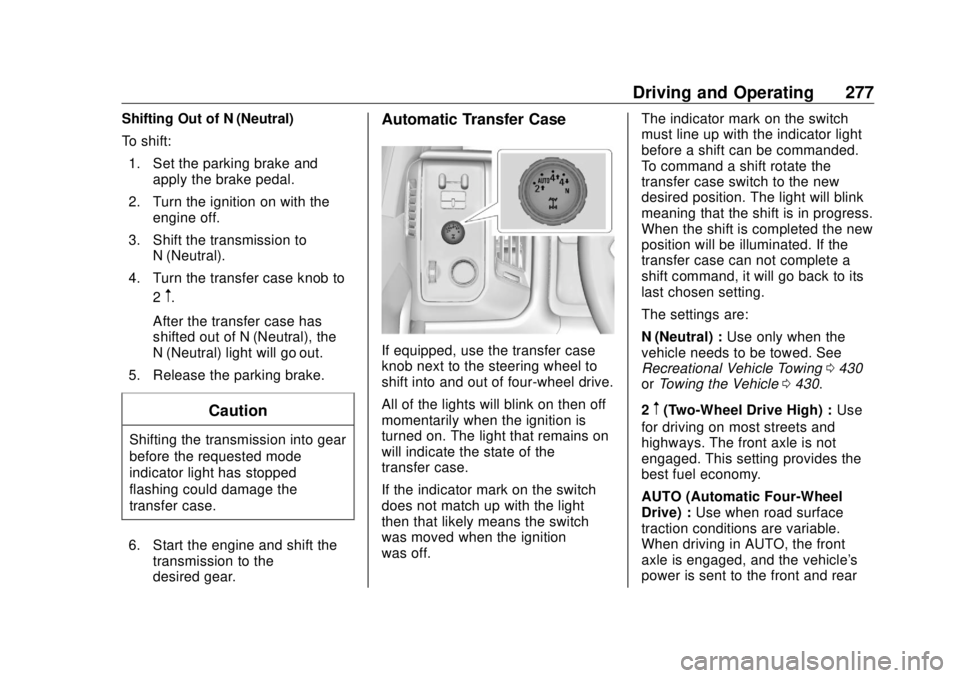
If equipped, use the transfer case
knob next to the steering wheel to
shift into and out of four-wheel drive.
All of the lights will blink on then off
momentarily when the ignition is
turned on. The light that remains on
will indicate the state of the
transfer case.
If the indicator mark on the switch
does not match up with the light
then that likely means the switch
was moved when the ignition
was off. The indicator mark on the switch
must line up with the indicator light
before a shift can be commanded.
To command a shift rotate the
transfer case switch to the new
desired position. The light will blink
meaning that the shift is in progress.
When the shift is completed the new
position will be illuminated. If the
transfer case can not complete a
shift command, it will go back to its
last chosen setting.
The settings are:
N (Neutral) : Use only when the
vehicle needs to be towed. See
Recreational Vehicle Towing 0 430
or Towing the Vehicle 0 430 .
2
m (Two-Wheel Drive High) : Use
for driving on most streets and
highways. The front axle is not
engaged. This setting provides the
best fuel economy.
AUTO (Automatic Four-Wheel
Drive) : Use when road surface
traction conditions are variable.
When driving in AUTO, the front
axle is engaged, and the vehicle's
power is sent to the front and rear
Page 280 of 505
GMC Sierra/Sierra Denali Owner Manual (GMNA-Localizing-U.S./Canada/
Mexico-11349177) - 2018 - CRC - 10/17/17
Driving and Operating 279Shifting Out of 4
nTo shift:
1. The vehicle must be stopped or
moving less than 5 km/h
(3 mph) with the transmission
in N (Neutral) and the ignition
on. It is best for the vehicle to
be moving 1.6 to 3.2 km/h
(1 to 2 mph).
2. Turn the knob to 4
m , AUTO,
or 2
m . Wait for the 4
m , AUTO,
or 2
m indicator light to stop
flashing before shifting the
transmission into gear.
Caution
Shifting the transmission into gear
before the requested mode
indicator light has stopped
flashing could damage the
transfer case. If the transmission is in gear and/or
moving more than 5 km/h (3 mph),
the 4
m , AUTO, or 2
m indicator light
will flash for 30 seconds but will not
complete the shift. With the vehicle
moving less than 5 km/h (3 mph),
and the transmission in N (Neutral),
attempt the shift again.
Shifting Into N (Neutral)
To shift into N (Neutral):
1. Park the vehicle on a level
surface.
2. Set the parking brake and
press and hold the brake
pedal. See Parking Brake
0 281 .
3. Start the vehicle or turn the
ignition on.
4. Shift the transmission to
N (Neutral).
5. Shift the transfer case to 2
m . 6. Turn the transfer case knob
clockwise to N (Neutral) until it
stops and hold it there until the
N (Neutral) light starts blinking.
This will take at least
10 seconds. Then slowly
release the knob to the 4
n position. The N (Neutral) light
will come on when the transfer
case shift to N (Neutral) is
complete.
7. With the engine running, verify
that the transfer case is in
N (Neutral) by shifting the
transmission to R (Reverse),
then shift the transmission to
D (Drive). There should be no
movement of the vehicle while
shifting the transmission.
8. Turn the engine off, and the
ignition to ACC/ACCESSORY.
9. Place the transmission shift
lever in P (Park). See
Recreational Vehicle Towing
0 430 .
10. Turn the ignition to off.
Page 292 of 505

GMC Sierra/Sierra Denali Owner Manual (GMNA-Localizing-U.S./Canada/
Mexico-11349177) - 2018 - CRC - 10/17/17
Driving and Operating 291
{ WarningThe Parking Assist system does
not detect children, pedestrians,
bicyclists, animals, or objects
located below the bumper or that
are too close or too far from the
vehicle. It is not available at
speeds greater than 8 km/h
(5 mph). To prevent injury, death,
or vehicle damage, even with
Parking Assist, always check the
area around the vehicle and
check all mirrors before moving
forward or backing. The instrument cluster may have a
parking assist display with bars that
show “ distance to object ” and object
location information for the Parking
Assist system. As the object gets
closer, more bars light up and the
bars change color from yellow to
amber to red.
When an object is first detected in
the rear, one beep will be heard
from the rear, or both sides of the
Safety Alert Seat will pulse two
times. When an object is very close
(<0.6 m (2 ft) in the vehicle rear,
or <0.3 m (1 ft) in the vehicle front),
a continuous beep will sound from
the front or rear, or both sides of the Safety Alert Seat will pulse five
times. Beeps for FPA are higher
pitched than for RPA.
Turning the Features On or Off Press
X on the center stack to
turn the Front and Rear Parking
Assist on or off. The indicator light in
the button comes on when the
features are on and turns off when
the features have been disabled.
Front and Rear Parking Assist can
be turned off, on, or on with towbar
through vehicle personalization. See
“ Park Assist ” under Vehicle
Personalization 0 165 . If the parking
assist is turned off through vehicle
personalization, the parking assist
button on the center stack will be
disabled. To turn the parking assist
on again, select On in vehicle
personalization. The On with Towbar
setting allows for the parking assist
to work properly with an attached
trailer hitch. Turn off parking assist
when towing a trailer.
Page 296 of 505
GMC Sierra/Sierra Denali Owner Manual (GMNA-Localizing-U.S./Canada/
Mexico-11349177) - 2018 - CRC - 10/17/17
Driving and Operating 295Warning (Continued)Complete attention is always
required while driving, and you
should be ready to take action
and apply the brakes and/or steer
the vehicle to avoid crashes.
FAB may slow the vehicle to a
complete stop to try to avoid a
potential crash. The vehicle will only
hold at a stop briefly. A firm press of
the accelerator pedal will
release FAB.
{ WarningFAB may automatically brake the
vehicle suddenly in situations
where it is unexpected and
undesired. It could respond to a
turning vehicle ahead, guardrails,
signs, and other non-moving
objects. To override FAB, firmly
press the accelerator pedal, if it is
safe to do so. Intelligent Brake Assist (IBA) IBA may activate when the brake
pedal is applied quickly by providing
a boost to braking based on the
speed of approach and distance to
a vehicle ahead.
Minor brake pedal pulsations or
pedal movement during this time is
normal and the brake pedal should
continue to be applied as needed.
IBA will automatically disengage
only when the brake pedal is
released.
{ WarningIBA may increase vehicle braking
in situations when it may not be
necessary. You could block the
flow of traffic. If this occurs, take
your foot off the brake pedal and
then apply the brakes as needed.
FAB and IBA can be disabled
through vehicle personalization. See
“ Collision/Detection Systems ” under
Vehicle Personalization 0 165 .{ WarningUsing FAB or IBA while towing a
trailer could cause you to lose
control of the vehicle and crash.
Turn the system to Alert or Off
when towing a trailer.
Lane Departure Warning
(LDW) (2500/3500 Series) If equipped, LDW may help avoid
crashes due to unintentional lane
departures. It may provide an alert if
the vehicle is crossing a lane
marking without using a turn signal
in that direction. LDW uses a
camera sensor to detect the lane
markings at speeds of 56 km/h
(35 mph) or greater.