2018 GMC SIERRA DENALI park assist
[x] Cancel search: park assistPage 291 of 505

GMC Sierra/Sierra Denali Owner Manual (GMNA-Localizing-U.S./Canada/
Mexico-11349177) - 2018 - CRC - 10/17/17
290 Driving and Operating
1. View Displayed by the
Camera
1. View Displayed by the
Camera
2. Corners of the Rear Bumper Displayed images may be farther or
closer than they appear. The area
displayed is limited and objects that
are close to either corner of the
bumper or under the bumper do not
display.
A warning triangle may display on
the infotainment display to show
that RPA has detected an object.
This triangle changes from amber to
red and increases in size the closer
the object.
{ WarningThe camera(s) do not display
children, pedestrians, bicyclists,
crossing traffic, animals, or any
other object outside of the
cameras ’ field of view, below the
bumper, or under the vehicle.
Shown distances may be different
from actual distances. Do not
drive or park the vehicle using
only these camera(s). Always
check behind and around the
(Continued) Warning (Continued) vehicle before driving. Failure to
use proper care may result in
injury, death, or vehicle damage.
Parking Assist
With RPA, and if equipped with FPA,
as the vehicle moves at speeds of
less than 8 km/h (5 mph) the
sensors on the bumpers may detect
objects up to 2.5 m (8 ft) behind and
1.2 m (4 ft) in front of the vehicle
within a zone 25 cm (10 in) high off
the ground and below bumper level.
These detection distances may be
shorter during warmer or humid
weather. Blocked sensors will not
detect objects and can also cause
false detections. Keep the sensors
clean of mud, dirt, snow, ice, and
slush; and clean sensors after a car
wash in freezing temperatures.
Page 292 of 505

GMC Sierra/Sierra Denali Owner Manual (GMNA-Localizing-U.S./Canada/
Mexico-11349177) - 2018 - CRC - 10/17/17
Driving and Operating 291
{ WarningThe Parking Assist system does
not detect children, pedestrians,
bicyclists, animals, or objects
located below the bumper or that
are too close or too far from the
vehicle. It is not available at
speeds greater than 8 km/h
(5 mph). To prevent injury, death,
or vehicle damage, even with
Parking Assist, always check the
area around the vehicle and
check all mirrors before moving
forward or backing. The instrument cluster may have a
parking assist display with bars that
show “ distance to object ” and object
location information for the Parking
Assist system. As the object gets
closer, more bars light up and the
bars change color from yellow to
amber to red.
When an object is first detected in
the rear, one beep will be heard
from the rear, or both sides of the
Safety Alert Seat will pulse two
times. When an object is very close
(<0.6 m (2 ft) in the vehicle rear,
or <0.3 m (1 ft) in the vehicle front),
a continuous beep will sound from
the front or rear, or both sides of the Safety Alert Seat will pulse five
times. Beeps for FPA are higher
pitched than for RPA.
Turning the Features On or Off Press
X on the center stack to
turn the Front and Rear Parking
Assist on or off. The indicator light in
the button comes on when the
features are on and turns off when
the features have been disabled.
Front and Rear Parking Assist can
be turned off, on, or on with towbar
through vehicle personalization. See
“ Park Assist ” under Vehicle
Personalization 0 165 . If the parking
assist is turned off through vehicle
personalization, the parking assist
button on the center stack will be
disabled. To turn the parking assist
on again, select On in vehicle
personalization. The On with Towbar
setting allows for the parking assist
to work properly with an attached
trailer hitch. Turn off parking assist
when towing a trailer.
Page 293 of 505

GMC Sierra/Sierra Denali Owner Manual (GMNA-Localizing-U.S./Canada/
Mexico-11349177) - 2018 - CRC - 10/17/17
292 Driving and Operating To turn the rear parking assist
symbols or guidance lines on or off,
see “ Rear Camera ” under Vehicle
Personalization 0 165 .
Assistance Systems for
Driving If equipped, when driving the
vehicle in a forward gear, Forward
Collision Alert (FCA), Lane
Departure Warning (LDW), and/or
Lane Keep Assist (LKA) can help to
avoid a crash or reduce crash
damage.
Forward Collision Alert
(FCA) System If equipped, the FCA system may
help to avoid or reduce the harm
caused by front-end crashes. When
approaching a vehicle ahead too
quickly, FCA provides a red flashing
alert on the windshield and rapidly
beeps or pulses the driver seat.
FCA also lights an amber visual
alert if following another vehicle
much too closely. FCA detects vehicles within a
distance of approximately 60 m
(197 ft) and operates at speeds
above 8 km/h (5 mph).
{ WarningFCA is a warning system and
does not apply the brakes. When
approaching a slower-moving or
stopped vehicle ahead too rapidly,
or when following a vehicle too
closely, FCA may not provide a
warning with enough time to help
avoid a crash. It also may not
provide any warning at all. FCA
does not warn of pedestrians,
animals, signs, guardrails,
bridges, construction barrels,
or other objects. Be ready to take
action and apply the brakes. See
Defensive Driving 0 236 .
FCA can be disabled with either the
FCA steering wheel control or,
if equipped, through vehicle
personalization. See “ Collision/
Detection Systems ” under Vehicle
Personalization 0 165 . Detecting the Vehicle Ahead
FCA warnings will not occur unless
the FCA system detects a vehicle
ahead. When a vehicle is detected,
the vehicle ahead indicator will
display green. Vehicles may not be
detected on curves, highway exit
ramps, or hills, due to poor visibility;
or if a vehicle ahead is partially
blocked by pedestrians or other
objects. FCA will not detect another
vehicle ahead until it is completely
in the driving lane.
{ Warning
FCA does not provide a warning
to help avoid a crash, unless it
detects a vehicle. FCA may not
detect a vehicle ahead if the FCA
sensor is blocked by dirt, snow,
(Continued)
Page 331 of 505
GMC Sierra/Sierra Denali Owner Manual (GMNA-Localizing-U.S./Canada/
Mexico-11349177) - 2018 - CRC - 10/17/17
330 Driving and Operating .
Black: Ground
Be sure to consult the aftermarket
electric brake controller owner ’ s
manual to determine wire color
coding of the electric trailer brake
controller. The wire colors on the
brake controller may be different
from the vehicle.
The electric trailer brake controller
should be installed by your dealer or
a qualified service center.
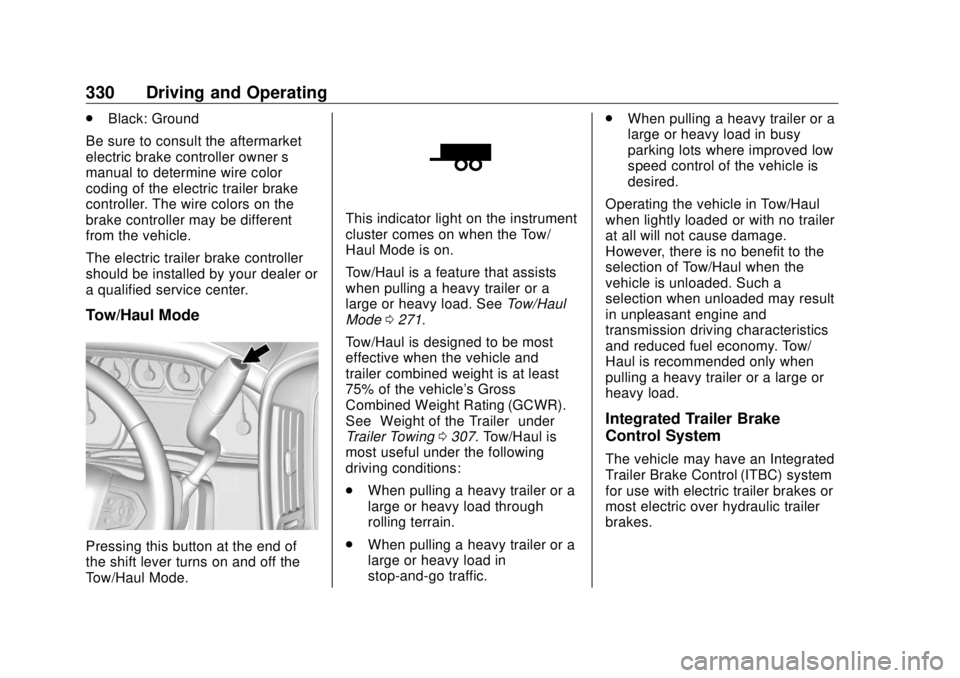
Tow/Haul Mode
Pressing this button at the end of
the shift lever turns on and off the
Tow/Haul Mode. This indicator light on the instrument
cluster comes on when the Tow/
Haul Mode is on.
Tow/Haul is a feature that assists
when pulling a heavy trailer or a
large or heavy load. See Tow/Haul
Mode 0 271 .
Tow/Haul is designed to be most
effective when the vehicle and
trailer combined weight is at least
75% of the vehicle's Gross
Combined Weight Rating (GCWR).
See “ Weight of the Trailer ” under
Trailer Towing 0 307 . Tow/Haul is
most useful under the following
driving conditions:
.
When pulling a heavy trailer or a
large or heavy load through
rolling terrain.
.
When pulling a heavy trailer or a
large or heavy load in
stop-and-go traffic. .
When pulling a heavy trailer or a
large or heavy load in busy
parking lots where improved low
speed control of the vehicle is
desired.
Operating the vehicle in Tow/Haul
when lightly loaded or with no trailer
at all will not cause damage.
However, there is no benefit to the
selection of Tow/Haul when the
vehicle is unloaded. Such a
selection when unloaded may result
in unpleasant engine and
transmission driving characteristics
and reduced fuel economy. Tow/
Haul is recommended only when
pulling a heavy trailer or a large or
heavy load.
Integrated Trailer Brake
Control System The vehicle may have an Integrated
Trailer Brake Control (ITBC) system
for use with electric trailer brakes or
most electric over hydraulic trailer
brakes.
Page 364 of 505
GMC Sierra/Sierra Denali Owner Manual (GMNA-Localizing-U.S./Canada/
Mexico-11349177) - 2018 - CRC - 10/17/17
Vehicle Care 3636. Verify coolant level after the
engine is shut off and the
coolant is cold. If necessary,
repeat coolant fill procedure
Steps 1 – 6.
CautionIf the pressure cap is not tightly
installed, coolant loss and engine
damage may occur. Be sure the
cap is properly and tightly
secured.
Engine Overheating If the vehicle has the Duramax
diesel engine, see the Duramax
diesel supplement.
Caution
Do not run the engine if there is a
leak in the engine cooling system.
This can cause a loss of all
coolant and can damage the
system and vehicle. Have any
leaks fixed right away. The vehicle has several indicators
to warn of engine overheating.
There is a coolant temperature
gauge in the vehicle's instrument
cluster. See Engine Coolant
Temperature Gauge 0 144 .
In addition, there are ENGINE
OVERHEATED STOP ENGINE,
ENGINE OVERHEATED IDLE
ENGINE, and ENGINE POWER IS
REDUCED messages in the Driver
Information Center (DIC).
If the decision is made not to lift the
hood when this warning appears,
get service help right away. See
Roadside Assistance Program
0 469 .
If the decision is made to lift the
hood, make sure the vehicle is
parked on a level surface.
4.3L V6, 5.3L V8, and 6.2L
V8 Engines
Check to see if the engine cooling
fans are running. If the engine is
overheating, the fans should be running. If they are not, do not
continue to run the engine and have
the vehicle serviced.
If Steam is Coming from the
Engine Compartment
{ WarningSteam and scalding liquids from a
hot cooling system are under
pressure. Turning the pressure
cap, even a little, can cause them
to come out at high speed and
you could be burned. Never turn
the cap when the cooling system,
including the pressure cap, is hot.
Wait for the cooling system and
pressure cap to cool.
If No Steam is Coming from
the Engine Compartment
The ENGINE OVERHEATED STOP
ENGINE or the ENGINE
OVERHEATED IDLE ENGINE
message, along with a low coolant
condition, can indicate a serious
problem.
Page 484 of 505
GMC Sierra/Sierra Denali Owner Manual (GMNA-Localizing-U.S./Canada/
Mexico-11349177) - 2018 - CRC - 10/17/17
OnStar 483OnStar Advisor. On some vehicles,
Wi-Fi can also be managed from the
Wi-Fi Hotspot menu.
MyGMC Mobile App (If Available)
Download the myGMC mobile app
to compatible Apple and Android
smartphones. GMC users can
access the following services from a
smartphone:
.
Remotely start/stop the vehicle,
if factory-equipped.
.
Lock/unlock doors, if equipped
with automatic locks.
.
Activate the horn and lamps.
.
Check the vehicle ’ s fuel level, oil
life, or tire pressure,
if factory-equipped with the Tire
Pressure Monitor System.
.
Send destinations to the vehicle.
.
Locate the vehicle on a map
(U.S. market only).
.
Turn the vehicle's Wi-Fi hotspot
on/off, manage settings, and
monitor data consumption,
if equipped. .
Locate a dealer and schedule
service.
.
Request roadside assistance.
.
Set a parking reminder with pin
drop, take a photo, make a note,
and set a timer.
.
Connect with GMC on social
media.
For myGMC mobile app information
and compatibility, see
www.my.gmc.com.
An active OnStar service,
compatible device, factory-installed
remote start, and power locks are
required. Data rates apply. See
onstar.com for details and system
limitations.
Remote Services Contact an OnStar Advisor to
unlock the doors or sound the horn
and flash the lamps. OnStar AtYourService OnStar Advisors can provide offers
from restaurants and retailers on
your route, help locate hotels,
or book a room. These services
vary by market.
OnStar Hands-Free Calling Make and receive calls with the
built-in wireless calling service,
which requires available minutes.
Functionality of the Voice Command
button may vary by vehicle and
region. For some vehicles, press
= to open the OnStar app on the
infotainment display, then select
Hands-Free calling. For other
vehicles press
= as follows.
Make a Call
1. Press
= . System responds:
“ OnStar ready. ”
2. Say “ Call. ” System responds:
“ Call. Please say the name or
number to call. ”
Page 493 of 505

GMC Sierra/Sierra Denali Owner Manual (GMNA-Localizing-U.S./Canada/
Mexico-11349177) - 2018 - CRC - 10/17/17
492 Index Antilock Brake System
(ABS) (cont'd)
Warning Light . . . . . . . . . . . . . . . . . 152
Appearance Care
Exterior . . . . . . . . . . . . . . . . . . . . . . . 435
Interior . . . . . . . . . . . . . . . . . . . . . . . . 441
Apple CarPlay and
Android Auto . . . . . . . . . . . . . . . . . . 217
Assistance Program,
Roadside . . . . . . . . . . . . . . . . . . . . . . 469
Assistance Systems for
Driving . . . . . . . . . . . . . . . . . . . . . . . . 292
Assistance Systems for
Parking and Backing . . . . . . . . . . 289
Audio
Bluetooth . . . . . . . . . . . . . . . . . . . . . 204
Theft-Deterrent Feature . . . . . . . 187
Audio Players
CD . . . . . . . . . . . . . . . . . . . . . . . . . . . 195
Automatic
Dimming Mirrors . . . . . . . . . . . . . . . . 50
Door Locks . . . . . . . . . . . . . . . . . . . . . 41
Forward Braking . . . . . . . . . . . . . . 294
Headlamp System . . . . . . . . . . . . 179
Transmission . . . . . . . . . . . . . . . . . 265
Transmission Fluid . . . . . . 354, 357
Automatic Transmission
Manual Mode . . . . . . . . . . . . . . . . . 268 Automatic Transmission (cont'd)
Shift Lock Control Function
Check . . . . . . . . . . . . . . . . . . . . . . . 374
Auxiliary
Roof Mounted Lamp . . . . . . . . . . 182
Auxiliary Jack . . . . . . . . . . . . . . . . . . . 203
Avoiding Untrusted Media
Devices . . . . . . . . . . . . . . . . . . . . . . . 195
Axle, Front . . . . . . . . . . . . . . . . . . . . . . 370
Axle, Rear . . . . . . . . . . . . . . . . . . . . . . 371
B Battery
Exterior Lighting Battery
Saver . . . . . . . . . . . . . . . . . . . . . . . 185
Load Management . . . . . . . . . . . . 184
Power Protection . . . . . . . . . . . . . 185
Battery - North America . . . . 369, 426
Blade Replacement, Wiper . . . . . 375
Blind Spot Mirrors . . . . . . . . . . . . . . . 50
Bluetooth
Overview . . . . . . . . . . . . . . . . 211, 213
Bluetooth Audio . . . . . . . . . . . . . . . . 204
Brake
Pedal and Adjustable
Throttle . . . . . . . . . . . . . . . . . . . . . . 256
System Warning Light . . . . . . . . 152
Brakes . . . . . . . . . . . . . . . . . . . . . . . . . . 367 Brakes (cont'd)
Antilock . . . . . . . . . . . . . . . . . . . . . . . 280
Assist . . . . . . . . . . . . . . . . . . . . . . . . . 281
Fluid . . . . . . . . . . . . . . . . . . . . . . . . . . 368
Parking . . . . . . . . . . . . . . . . . . . . . . . 281
Braking . . . . . . . . . . . . . . . . . . . . . . . . . 236
Automatic Forward . . . . . . . . . . . 294
Break-In, New Vehicle . . . . . . . . . . 255
Bulb Replacement
Center High-Mounted
Stoplamp (CHMSL) and
Cargo Lamp . . . . . . . . . . . . . . . . . 380
Halogen Bulbs . . . . . . . . . . . . . . . . 378
Headlamp Aiming . . . . . . . . . . . . . 377
Headlamps . . . . . . . . . . . . . . . . . . . 378
High Intensity Discharge
(HID) Lighting . . . . . . . . . . . . . . . 378
Taillamps, Turn Signal,
Stoplamps, and Back-up
Lamps . . . . . . . . . . . . . . . . . . . . . . 378
Buying New Tires . . . . . . . . . . . . . . . 408
C Calibration . . . . . . . . . . . . . . . . . . . . . . 131
California
Fuel Requirements . . . . . . . . . . . 300
Page 495 of 505

GMC Sierra/Sierra Denali Owner Manual (GMNA-Localizing-U.S./Canada/
Mexico-11349177) - 2018 - CRC - 10/17/17
494 Index D Damage Repair, Collision . . . . . . . 472
Danger, Warning, and Caution . . . . 3
Data Collection
Infotainment System . . . . . . . . . . 478
OnStar . . . . . . . . . . . . . . . . . . . . . . . 478
Data Recorders, Event . . . . . . . . . 477
Daytime Running
Lamps (DRL) . . . . . . . . . . . . . . . . . . 179
Defensive Driving . . . . . . . . . . . . . . . 236
Diagnostics
OnStar . . . . . . . . . . . . . . . . . . . . . . . 484
Distracted Driving . . . . . . . . . . . . . . . 235
Dome Lamps . . . . . . . . . . . . . . . . . . . 183
Door
Ajar Light . . . . . . . . . . . . . . . . . . . . . 158
Locks . . . . . . . . . . . . . . . . . . . . . . . . . . . 40
Power Locks . . . . . . . . . . . . . . . . . . . . 41
Drive Belt Routing, Engine . . . . . . 464
Driver Assistance Systems . . . . . 288
Driver Information
Center (DIC) . . . . . . . . . . . . . 158, 160
Driving
Assistance Systems . . . . . . . . . . 292
Characteristics and
Towing Tips . . . . . . . . . . . . . . . . . 303
Defensive . . . . . . . . . . . . . . . . . . . . . 236
Drunk . . . . . . . . . . . . . . . . . . . . . . . . . 236 Driving (cont'd)
For Better Fuel Economy . . . . . . . 33
Hill and Mountain Roads . . . . . . 245
If the Vehicle is Stuck . . . . . . . . . 247
Loss of Control . . . . . . . . . . . . . . . 238
Off-Road . . . . . . . . . . . . . . . . . . . . . 239
Off-Road Recovery . . . . . . . . . . . 238
Vehicle Load Limits . . . . . . . . . . . 248
Wet Roads . . . . . . . . . . . . . . . . . . . 244
Winter . . . . . . . . . . . . . . . . . . . . . . . . 245
Dual Automatic Climate
Control System . . . . . . . . . . . . . . . . 228
E E85 or FlexFuel . . . . . . . . . . . . . . . . 300
Electrical Equipment,
Add-On . . . . . . . . . . . . . . . . . . . . . . . 336
Electrical System
Engine Compartment Fuse
Block . . . . . . . . . . . . . . . . . . . . . . . . 381
Fuses and Circuit Breakers . . . 381
Instrument Panel Fuse
Block . . . . . . . . . . . . . . . . . . . 385, 386
Overload . . . . . . . . . . . . . . . . . . . . . 380
Emergency
OnStar . . . . . . . . . . . . . . . . . . . . . . . 480
Engine
Air Cleaner/Filter . . . . . . . . . . . . . 358 Engine (cont'd)
Check Light (Malfunction
Indicator) . . . . . . . . . . . . . . . . . . . . 150
Compartment Overview . . . . . . . 345
Coolant Heater . . . . . . . . . . . . . . . 260
Coolant Temperature
Gauge . . . . . . . . . . . . . . . . . . . . . . 144
Coolant Temperature
Warning Light . . . . . . . . . . . . . . . 155
Cooling System . . . . . . . . . . . . . . . 359
Drive Belt Routing . . . . . . . . . . . . 464
Exhaust . . . . . . . . . . . . . . . . . . . . . . 264
Fan . . . . . . . . . . . . . . . . . . . . . . . . . . . 365
Oil Life System . . . . . . . . . . . . . . . 353
Oil Pressure Gauge . . . . . . . . . . 143
Oil Pressure Light . . . . . . . . . . . . 156
Overheated Protection
Operating Mode . . . . . . . . . . . . . 364
Overheating . . . . . . . . . . . . . . . . . . 363
Power Messages . . . . . . . . . . . . . 164
Running While Parked . . . . . . . . 265
Starting . . . . . . . . . . . . . . . . . . . . . . . 258
Entry Lighting . . . . . . . . . . . . . . . . . . . 184
Equipment, Towing . . . . . . . . . . . . . 325
Event Data Recorders . . . . . . . . . . 477
Exit Lighting . . . . . . . . . . . . . . . . . . . . 184
Extender, Seat Belt . . . . . . . . . . . . . . 75
Exterior Lamp Controls . . . . . . . . . 176