2018 GENESIS G80 control arm
[x] Cancel search: control armPage 89 of 516
Convenient features of your vehicle
Accessing your vehicle .........................................3-4
Smart key ............................................................................3-4
Immobilizer System ...........................................................3-9
Door locks .............................................................3-11
Operating door locks from outside the vehicle ......3-11
Power Door Latch ...........................................................3-12
Operating door locks from inside the vehicle .........3-12
Auto door lock/unlock features..................................3-14
Child-protector rear door locks ..................................3-14
Theft-alarm system.............................................3-15
Driver position memory system .........................3-16
Storing positions into memory ...................................3-16
Resetting the driver's seat memory system ............3-17
Easy access function .....................................................3-18
Steering wheel......................................................3-19
Electric power steering (EPS) ......................................3-19
Tilt steering / Telescope steering...............................3-19
Heated steering wheel ...................................................3-20
Horn ....................................................................................3-21
Mirrors ...................................................................3-22
Inside rearview mirror....................................................3-22
Side view mirrors.............................................................3-32
Reverse parking aid function.......................................3-34
Windows ................................................................3-35
Power windows ................................................................3-36
Panorama sunroof ...............................................3-39
Sunshade ...........................................................................3-39
Sliding the sunroof .........................................................3-40
Tilting the sunroof ..........................................................3-40
Closing the sunroof ........................................................3-41
Resetting the sunroof ....................................................3-42
Exterior features .................................................3-43
Hood ...................................................................................3-43
Trunk ..................................................................................3-44
Smart trunk.......................................................................3-51
Fuel filler door .................................................................3-54
Instrument cluster................................................3-58
Instrument Cluster Control............................................3-59
LCD Display Control ........................................................3-59
Gauges ...............................................................................3-60
3
Page 96 of 516

3-8
This device complies with Part 15
of the FCC rules.
Operation is subject to the following
two conditions:
1. This device may not cause harm-
ful interference, and
2. This device must accept any inter-
ference received, including inter-
ference that may cause undesired
operation.
✽ ✽
NOTICE
Changes or modifications not
expressly approved by the party
responsible for compliance could
void the user's authority to operate
the device.
Restrictions in Handling Keys
When leaving keys with parking lot
and valet attendants, the following
procedures will ensure your vehicle’s
trunk and glove box compartment
can only be opened with the
mechanical key.To lock:
1. Remove the mechanical key from
the Smart Key.
2. Unlock the glove box by using the
mechanical key, then open it.
3. Set the Trunk Lid Control button to
the LOCK position (button pressed).
4. Close and lock the glove box using
the mechanical key.
5. Leave the Smart Key with the
attendant and keep the mechani-
cal key with you.
The Smart Key can only be used to
start the engine and operate door
locks.
To unlock:
1. Open the glove box with the
mechanical key.
2. Set the Trunk Lid Control button to
the UNLOCK position (button not
pressed).
In this position the trunk lid will open
with the Trunk Lid button or the
Smart Key.
Convenient features of your vehicle
ODH043007
Page 114 of 516

3-26
Convenient features of your vehicle
There are some conditions that can
cause changes to the vehicle mag-
nets, such as installing a ski rack or
a CB antenna. Body repair work on
the vehicle can also cause changes
to the vehicle's magnetic field. In
these situations, the compass will
need to be re-calibrated to quickly
correct these changes.
If you need to recalibrate the com-
pass:
1. Press and hold the Control Button
for more than 6 seconds. When
the compass memory is cleared, a
"C" will appear in the display.
2. Drive the vehicle in 2 complete cir-
cles at less than 5 mph (8 km/h).
Integrated HomeLink®Wireless
Control System
The HomeLink®Wireless Control
System can replace up to three
hand-held radio-frequency (RF)
transmitters with a single built-in
device. This innovative feature will
learn the radio frequency codes of
most current transmitters to operate
devices such as gate operators,
garage door openers, entry door
locks, security systems, even home
lighting. Both standard and rolling
code-equipped transmitters can be
programmed by following the out-
lined procedures.
Additional HomeLink
®information
can be found at: www.homelink.com,
www.youtube.com/HomeLinkGentex
or by calling 1-800-355-3515.
Retain the original transmitter of the
RF device you are programming for
use in other vehicles as well as for
future HomeLink
®programming. It is
also suggested that upon the sale of
the vehicle, the programmed
HomeLink
®buttons be erased for
security purposes.Before programming HomeLink
®
to a garage door opener or gate
operator, make sure people and
objects are out of the way of the
device to prevent potential harm
or damage. Do not use the
HomeLink
®with any garage
door opener that lacks the safe-
ty stop and reverse features
required by U.S. federal safety
standards (this includes any
garage door opener model man-
ufactured before April 1, 1982). A
garage door that cannot detect
an object - signaling the door to
stop and reverse - does not meet
current U.S. federal safety stan-
dards. Using a garage door
opener without these features
increases the risk of serious
injury or death.
WARNING
Page 117 of 516

3-29
Convenient features of your vehicle
3
Operating HomeLink®
1. Press and release one of the
HomeLink buttons (1, 2 or 3) that
programed.
2. The HomeLink indicator (4) will
operate as below:
- Indicates Green and is continu-
ously ON (Fixed Code Garage
Door Opener)
- Flashes in Green rapidly (Rolling
Code Garage Door Opener)
Erasing HomeLink®buttons
1. Press and hold the button (1) and
(3) simultaneously.
2. The indicator (4) is turned contin-
uously ON in orange for about 10
seconds.
3. Then the indicator (4) color
changes to Green and flashes
rapidly.
Release the buttons once the
green indicator flashes.
4. Now HomeLink button (1), (2) and
(4) memories are all cleared.NVS
®is a registered trademark and
Z-Nav™ is a trademark of the
Gentex Corporation, Zeeland,
Michigan. HomeLink
®is a registered
trademark owned by Johnson
Controls, Incorporated, Milwaukee,
Wisconsin.
FCC ID: NZLUAHL5A
IC: 4112A-UAHL5A
✽ ✽
NOTICE
This device complies with Part 15 of
the FCC Rules.
Operation is subject to the following
three conditions:
1. This device may not cause harm-
ful interference, and
2. This device must accept any inter-
ference received, including inter-
ference that may cause undesired
operation.
3. The transceiver has been tested
and complies with FCC and
Industry Canada rules. Changes
or modifications not expressly
approved by the party responsi-
ble for compliance could void the
user's authority to operate the
device.ODH047611NODH047613N
Page 124 of 516

3-36
Convenient features of your vehicle
Power windows
The Engine Start/Stop button must
be in the ON position to be able to
raise or lower the windows. Each
door has a Power Window switch to
control that door's window. The driv-
er has a Power Window Lock switch
which can block the operation of pas-
senger windows. The power windows
will operate for approximately 30
seconds after the Engine Start/Stop
button is placed in the ACC or OFF
position. However, if the front doors
are opened, the Power Windows
cannot be operated even within the
30 second period.
✽ ✽
NOTICE
• In cold and wet climates, power
windows may not work properly
due to freezing conditions.
• While driving with the rear win-
dows down or with the sunroof (if
equipped) opened (or partially
opened), your vehicle may demon-
strate a wind buffeting or pulsation
noise. This noise is normal and can
be reduced or eliminated by taking
the following actions. If the noise
occurs with one or both of the rear
windows down, partially lower
both front windows approximately
one inch. If you experience the
noise with the sunroof open, slight-
ly close the sunroof.
Window opening and closing
To open:
Press the window switch down to the
first detent position (5). Release the
switch when you want the window to
stop.
To close:
Pull the window switch up to the first
detent position (5). Release the win-
dow switch when you want the win-
dow to stop. To avoid serious injury or death,
do not extend your head, arms
or body outside the windows
while driving.
WARNING
ODH043027
Page 129 of 516

3-41
Convenient features of your vehicle
3
Closing the sunroof
Press the sunshade CLOSE button.
The sunroof glass will close then the
sunshade will close. To stop the sun-
roof movement at any point, press
the sunshade control switch momen-
tarily.
Automatic reverse
If the sunroof senses any obstacle
while it is closing automatically, it will
reverse direction then stop to allow
the object to be cleared.
ODH043038ODH043039
Make sure heads, other body
parts or other objects are
safely out of the way before
closing the sunroof to avoid
injuries or vehicle damage.
Objects less than 0.16 inch (4
mm) in diameter caught
between the sunroof glass
and the front glass channel
may not be detected by the
automatic reverse glass and
the glass will not stop and
reverse direction.
To avoid serious injury or
death, do not extend your
head, arms or body outside
the sunroof while driving.
A panorama sunroof is made
of glass, therefore it may break
in an accident. If you do not
have your seat belt on, you
may go through the broken
glass and get injured or killed.
For all passengers safety, have
an appropriate protection on
(ex. seat belt, CRS, etc.).
WARNING
Page 134 of 516

3-46
Convenient features of your vehicle
(3) Power Trunk Close button (4) Power Trunk Lock button
To open:
1. Make sure the shift lever is in P
(Park).
2. Then do one of the following:
- Press the Smart Key Trunk
Unlock button for more than one
second.
- Press the Open button (2) on the
trunk. You need the Smart Key in
your possession, when all doors
are locked.
- Press the Power Trunk Main
Control button (1).To close:
Do one of the following:
- Press the Power Trunk Main
Control button (1) until the Power
Trunk is closed securely.
- Press the Close button (3) on the
trunk.
- Press the Lock button (4) on the
trunk while carrying the Smart Key
with all the vehicle’s doors closed.
All doors will lock and arm the theft
alarm system.
If you push a button or switch while
the trunk is opening or closing, it
could stop moving. Press any button
to operate the Power Trunk again.
✽ ✽
NOTICE
The Power Trunk Lock button will
not work if you press the button
when:
- Any door is open.
- The Engine Start/Stop button is
not in the OFF position.
- The Smart Key is in the vehicle.
ODH047017ODH047018
Page 147 of 516
3-59
Convenient features of your vehicle
3
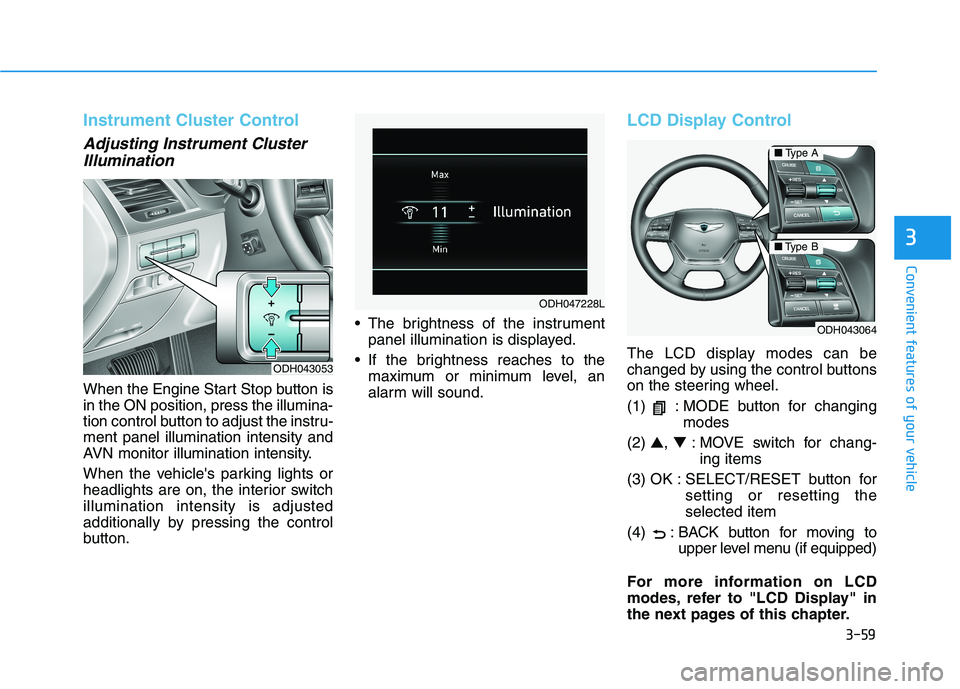
Instrument Cluster Control
Adjusting Instrument Cluster
Illumination
When the Engine Start Stop button is
in the ON position, press the illumina-
tion control button to adjust the instru-
ment panel illumination intensity and
AVN monitor illumination intensity.
When the vehicle's parking lights or
headlights are on, the interior switch
illumination intensity is adjusted
additionally by pressing the control
button. The brightness of the instrument
panel illumination is displayed.
If the brightness reaches to the
maximum or minimum level, an
alarm will sound.
LCD Display Control
The LCD display modes can be
changed by using the control buttons
on the steering wheel.
(1) : MODE button for changing
modes
(2) ▲, ▼: MOVE switch for chang-
ing items
(3) OK : SELECT/RESET button for
setting or resetting the
selected item
(4) : BACK button for moving to
upper level menu (if equipped)
For more information on LCD
modes, refer to "LCD Display" in
the next pages of this chapter.ODH043053
ODH047228L
ODH043064
■Type A
■Type B