2018 FORD TRANSIT center console
[x] Cancel search: center consolePage 164 of 521

PRINCIPLE OF OPERATION
WARNING: Vehicle modifications
involving braking system, aftermarket roof
racks, suspension, steering system, tire
construction and wheel and tire size may
change the handling characteristics of your
vehicle and may adversely affect the
performance of the electronic stability
control system. In addition, installing any
stereo loudspeakers may interfere with
and adversely affect the electronic stability
control system. Install any aftermarket
stereo loudspeaker as far as possible from
the front center console, the tunnel, and
the front seats in order to minimize the risk
of interfering with the electronic stability
control sensors. Reducing the
effectiveness of the electronic stability
control system could lead to an increased
risk of loss of vehicle control, vehicle
rollover, personal injury and death. WARNING:
Remember that even
advanced technology cannot defy the laws
of physics. It's always possible to lose
control of a vehicle due to inappropriate
driver input for the conditions. Aggressive
driving on any road condition can cause
you to lose control of your vehicle
increasing the risk of personal injury or
property damage. Activation of the
electronic stability control system is an
indication that at least some of the tires
have exceeded their ability to grip the road;
this could reduce the operator's ability to
control the vehicle potentially resulting in
a loss of vehicle control, vehicle rollover,
personal injury and death. If your electronic
stability control system activates, SLOW
DOWN.
The system automatically turns on each
time you switch the ignition on. If the stability control or traction control
system detects a fault, the following may
occur:
•
The stability and traction control light
illuminates steadily.
• The stability control and traction
control systems do not enhance your
vehicle's ability to maintain traction of
the wheels.
If the stability control or traction control
system activates, the following may occur:
• The stability and traction control light
flashes.
• Your vehicle slows down.
• Reduced engine power.
• A vibration in the brake pedal.
• The brake pedal is stiffer than usual.
• If the driving condition is severe and
your foot is not on the brake pedal, the
pedal may move as the system applies
higher brake force.
The stability control system has several
features built into it to help you maintain
control of your vehicle.
Electronic Stability Control
The system helps to prevent your vehicle
skidding or laterally sliding by individually
applying the brakes to one or more wheels
and, if necessary, reducing engine power.
Roll Stability Control
The system helps to prevent rollovers by
detecting your vehicle's roll motion, and
individually applying the brakes to one or
more wheels.
161
2018 Transit (TTH) Canada/United States of America, JK3J 19A321 AA enUSA, Edition date: 201705, Third-Printing- Stability Control
Page 351 of 521
against the use of any hand-held device
while driving and encourage the use of
voice-operated systems when possible.
Make sure you are aware of all applicable
local laws that may affect the use of
electronic devices while driving.
WARNING: For safety reasons, do
not connect or adjust the settings on your
device while your vehicle is moving. WARNING:
Store all devices in a
secure location when your vehicle is
moving, for example the glove
compartment. Hard objects may become
projectiles in a crash or sudden stop, which
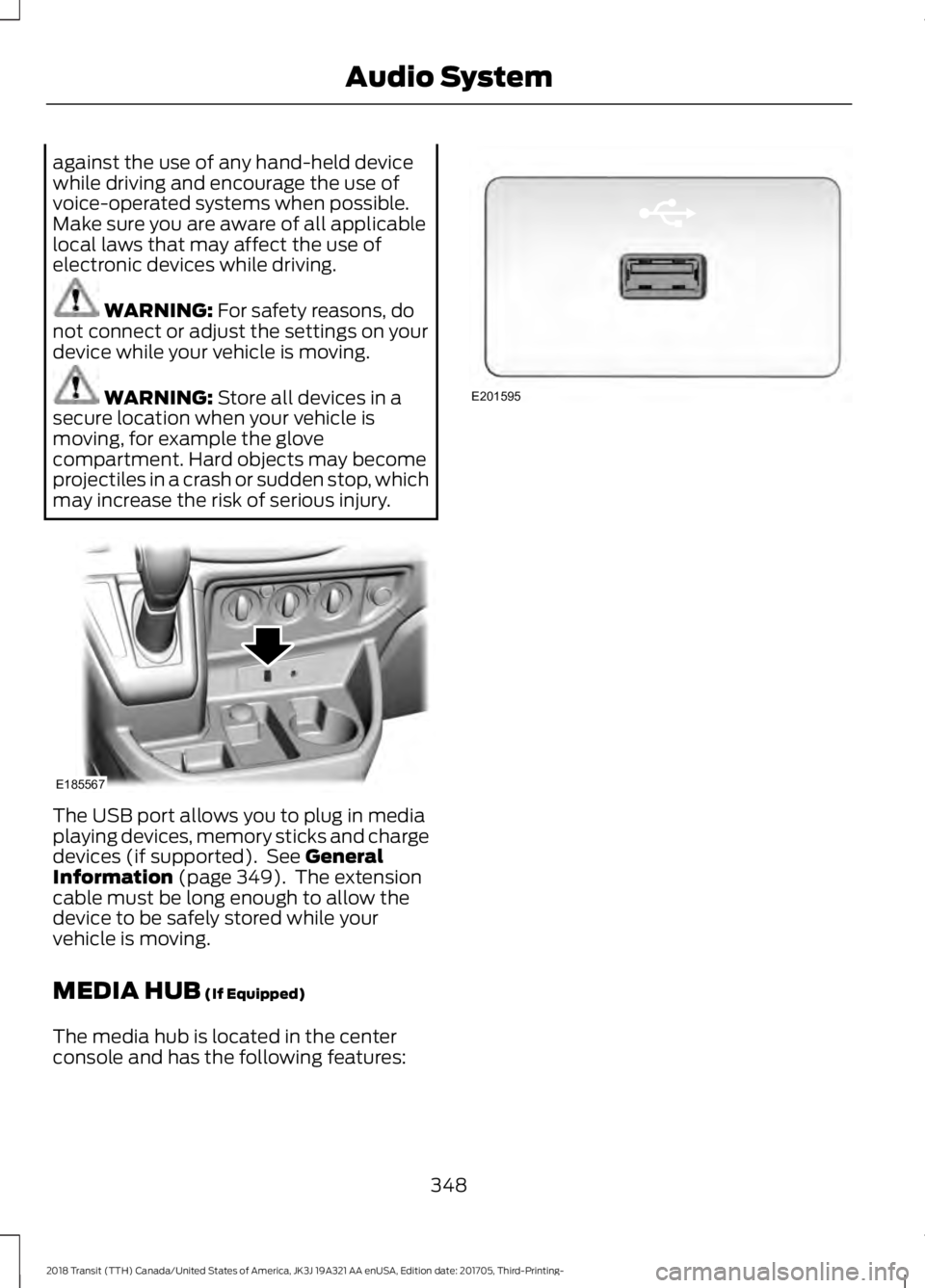
may increase the risk of serious injury. The USB port allows you to plug in media
playing devices, memory sticks and charge
devices (if supported). See
General
Information (page 349). The extension
cable must be long enough to allow the
device to be safely stored while your
vehicle is moving.
MEDIA HUB
(If Equipped)
The media hub is located in the center
console and has the following features: 348
2018 Transit (TTH) Canada/United States of America, JK3J 19A321 AA enUSA, Edition date: 201705, Third-Printing- Audio SystemE185567 E201595
Page 379 of 521

Description and Action
Display
2. Scroll to browse indexed media files on the device, and
then press the OK button.
Resets the USB index. After the new indexing is complete,
you can choose what to play from the USB song library.
Reset USB
* You can use the buttons at the bottom of the audio display to jump to a certain
alphabetical category quickly. You can also use the letters on the audio system's numeric
keypad to jump in the list.
Using Voice Commands
You can access and view your USB songs
using voice commands.
Plug the device into your vehicle's USB
port.
Press the voice button and when
prompted, say any of the following
commands: Accessing and Viewing USB Media
(browse | search | show) all (album |
albums)
(browse | search | show) all (artist |
artists)
(browse | search | show) all (genre |
genres)
(browse | search | show) all (playlist |
playlists)
(browse | search | show) all (song | songs
| title | titles | file | files | track | tracks)
(browse | search | show) album ___
(browse | search | show) artist ___
(browse | search | show) genre ___
(browse | search | show) playlist ___ USB 2
(If Equipped)
Your vehicle may come equipped with an
additional USB port. If so, USB 1 is located
at the front of the vehicle at the bottom of
the instrument panel. USB 2 is located
inside the storage compartment of the
vehicle's center console.
You can plug in an additional USB device
into the second USB port.
You can access both USB devices by using
voice commands.
To access a USB device press the voice
button and when prompted say: Voice command
USB 1
USB 2
Note: SYNC only supports one connected
iOS (Apple) devices at a time (whichever
one you plug in first). When you connect a
second iOS device, the systems charges it,
but does not support playback from it.
Bluetooth Devices and System
Settings
You can access these menus using the
audio display. See
Using SYNC™ With
Your Phone (page 353).
376
2018 Transit (TTH) Canada/United States of America, JK3J 19A321 AA enUSA, Edition date: 201705, Third-Printing- SYNC™
Page 414 of 521

Function
Button
Composers
This button allows you to choose a specific
letter to view within the category you are
browsing.
A-Z Jump
If available, this allows you to browse the
folders and files on your USB device.
Explore Device
USB Ports The USB ports are in the center console or
behind a small access door in the
instrument panel.
This feature allows you to plug in USB
media devices, memory sticks, flash drives
or thumb drives, and charge devices if they
support this feature.
Select this option to play audio from your
USB device.
Apps
The system supports the use of certain
audio apps such as Pandora or iHeartRadio
through a USB or Bluetooth enabled
device.
Each app gives you different on-screen
options depending on the app's content.
See Apps (page 425). Supported Media Players, Formats
and Metadata Information
The system is capable of hosting nearly
any digital media player, including iPod,
iPhone, and most USB drives.
Supported audio formats include MP3,
WMA, WAV, AAC, and FLAC.
Supported audio file extensions include
MP3, WMA, WAV, M4A, M4B, AAC, and
FLAC.
Supported USB file systems include: FAT,
exFAT, and NTFS.
SYNC 3 is also able to organize the media
from your USB device by metadata tags.
Metadata tags, which are descriptive
software identifiers embedded in the
media files, provide information about the
file.
If your indexed media files contain no
information embedded in these metadata
tags, SYNC 3 may classify the empty
metadata tags as unknown.
SYNC 3 is capable of indexing up to
50,000 songs per USB device, for up to 10
devices.
411
2018 Transit (TTH) Canada/United States of America, JK3J 19A321 AA enUSA, Edition date: 201705, Third-Printing- SYNC™ 3E211463
Page 458 of 521

For maximum vehicle performance, keep
the following information in mind when
adding accessories or equipment to your
vehicle:
•
When adding accessories, equipment,
passengers and luggage to your
vehicle, do not exceed the total weight
capacity of the vehicle or of the front
or rear axle (GVWR or GAWR as
indicated on the Safety Compliance
Certification label). Ask an authorized
dealer for specific weight information.
• The Federal Communications
Commission (FCC) and Canadian
Radio Telecommunications
Commission (CRTC) regulate the use
of mobile communications systems
that are equipped with radio
transmitters, for example two-way
radios, telephones and anti-theft
alarms. Any such equipment installed
in your vehicle should comply with
Federal Communications Commission
(FCC) and Canadian Radio
Telecommunications Commission
(CRTC) regulations and should be
installed only by an authorized dealer.
• Mobile communications systems may
harm the operation of your vehicle,
particularly if they are not properly
designed for automotive use.
• If you or an authorized Ford dealer add
any non-Ford electrical or electronic
accessories or components to your
vehicle, you may adversely affect
battery performance and durability,
and may adversely affect the
performance of other electrical
systems in the vehicle. AUXILIARY SWITCHES
The auxiliary switchboard on the center
console makes aftermarket customization
easier, with four prewired switches
attached to the power distribution box for
electrical accessories.
When using the auxiliary switches for an
extended period of time, we recommend
that the engine is running to prevent the
battery from running out of charge.
A fuse and relay kit is included with this
option. The kit contains the required fuses
and relays that are included under the
driver seat in the pre-fusebox. Refer to the
instructions included with the kit. See an
authorized dealer for service.
There is one power lead connector for each
switch. These can be found at either the
43-way connector for the AUX 1 and AUX
2 switches or the 6-way connector for the
AUX 3 and AUX 4 switches. Both
connectors are behind the passenger side
cup holder.
455
2018 Transit (TTH) Canada/United States of America, JK3J 19A321 AA enUSA, Edition date: 201705, Third-Printing- AccessoriesE163431
Page 514 of 521

Lug Nuts
See: Changing a Road Wheel........................ 292
M
Maintenance ..................................................229
General Information......................................... 229
Manual Climate Control............................109
Manual Seats
..................................................114
Adjusting the Armrest........................................ 116
Adjusting the Lumbar Support....................... 115
Moving the Seat Backward or Forward.............................................................. 114
Recline Adjustment............................................ 115
Media Hub......................................................348
Message Center See: Information Displays................................. 99
Mirrors See: Heated Windows and Mirrors.................111
See: Windows and Mirrors............................... 90
Mobile Communications Equipment......14
Motorcraft Parts - 3.2L Power Stroke Diesel............................................................308
Motorcraft Parts - 3.5L Ecoboost™.................................................308
Motorcraft Parts - 3.7L...............................310
MyKey Troubleshooting...............................68
MyKey ™.............................................................64
Principle of Operation........................................ 64
N
Navigation........................................................417 cityseeker.............................................................. 424
Destination Mode............................................... 419
Map Mode............................................................. 418
Navigation Map Updates................................ 425
Navigation Menu................................................ 422
SiriusXM Traffic and Travel Link................... 425
SYNC AppLink.................................................... 424
Waypoints............................................................. 423
Normal Scheduled Maintenance..........462 Intelligent Oil-Life Monitor™........................ 462
Normal Maintenance Intervals..................... 462O
Oil Change Indicator Reset......................235
Resetting the Oil Life Monitoring
System.............................................................. 235
Oil Check See: Engine Oil Check...................................... 234
Opening and Closing the Hood..............229 Closing the Hood............................................... 230
Opening the Hood............................................. 229
Ordering Additional Owner's Literature.....................................................206
Obtaining a French Owner ’s Manual.........206
Overhead Console
........................................125
Overhead Storage Compartments..............125
P
Parking Aid
......................................................163
Switching the Parking Aid System
Off....................................................................... 164
Parking Aids
....................................................163
Principle of Operation....................................... 163
Parking Brake - Vehicles With: Mechanical Parking Brake
......................157
Center Parking Brake......................................... 157
Parking Brake - Vehicles With: Push Down Parking Brake..................................157
Passive Anti-Theft System.........................75 SecuriLock®........................................................... 75
PATS See: Passive Anti-Theft System..................... 75
Perchlorate.........................................................12
Personalized Settings
.................................102
Measure Units...................................................... 102
Phone................................................................412 During a Phone Call........................................... 415
Making Calls......................................................... 414
Pairing Your Cell Phone for the First Time.................................................................... 412
Phone Menu......................................................... 413
Receiving Calls..................................................... 415
Smartphone Connectivity............................... 416
Text Messaging................................................... 416
Post-Crash Alert System
...........................198
Power Door Locks See: Locking and Unlocking............................. 70
Power Running Boards
.................................77
511
2018 Transit (TTH) Canada/United States of America, JK3J 19A321 AA enUSA, Edition date: 201705, Third-Printing- Index