Page 55 of 325
ADJUSTING THE STEERING
WHEEL
WARNING
Do not adjust the steering wheel
when your vehicle is moving.
Note:
Make sure that you are sitting in the
correct position. See Sitting in the Correct
Position (page 86).
Note: There are two steering column
adjustment levers on the steering column.
The left lever is for the telescope
adjustment. The right lever is for the tilt and
small telescope adjustments. 1.
Use the left lever to unlock the steering
column.
Note: You have to hold the lever down to
make adjustments.
2. Adjust the steering wheel to the desired
telescope position. 3. Lock the steering column.
1. Use the right lever to unlock the
steering column.
2. Adjust the steering wheel to the desired
tilt and telescope position. 3. Lock the steering column.
52
Ford GT (CGX), enUSA, Edition date: 201711, First Printing Steering WheelE232042 E232043 E227122 E227240
Page 59 of 325
ADJUSTING THE PEDALS
WARNING
Never use the pedal adjustment
controls when your feet are on the
accelerator or brake pedal when the
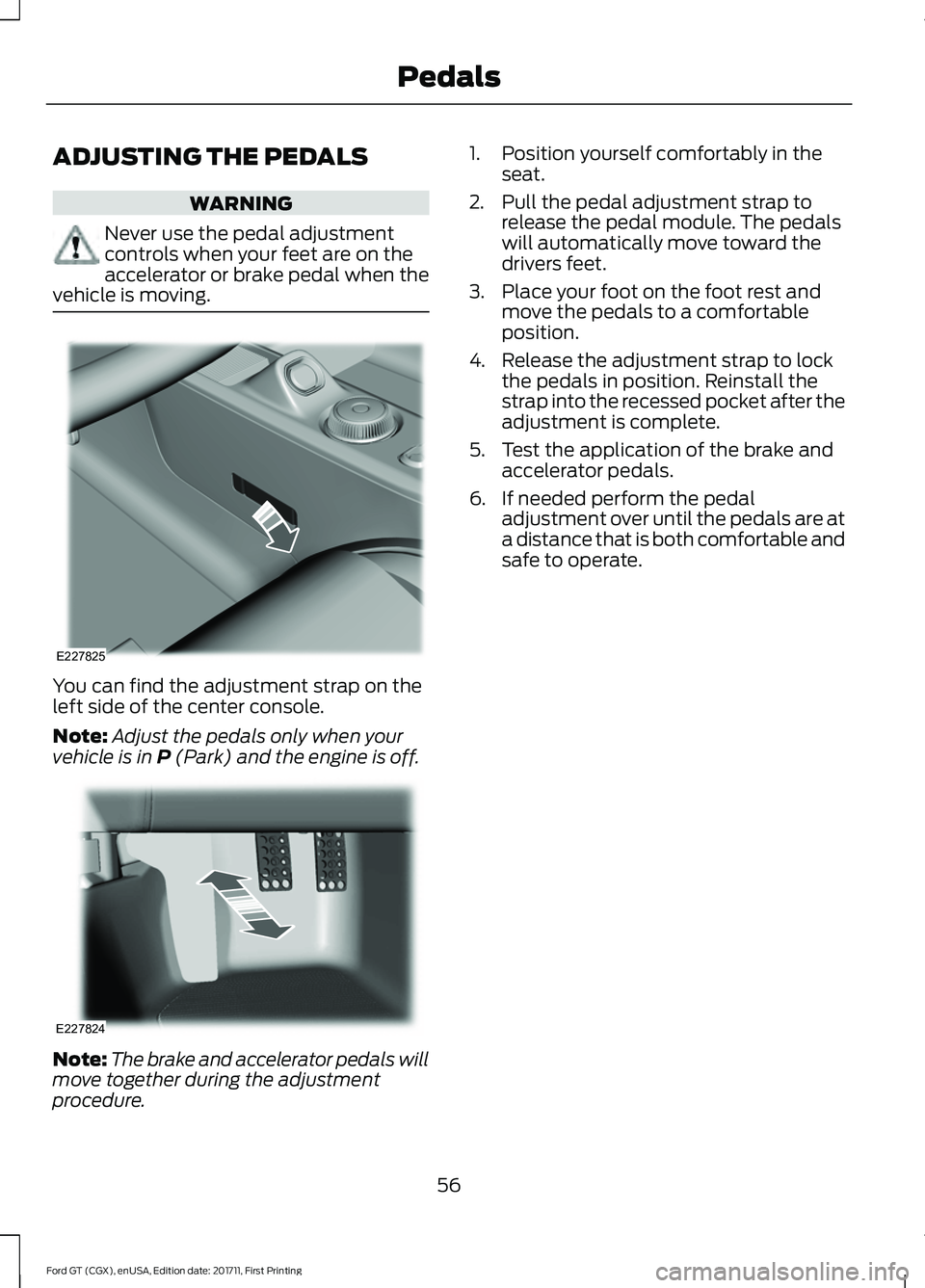
vehicle is moving. You can find the adjustment strap on the
left side of the center console.
Note:
Adjust the pedals only when your
vehicle is in P (Park) and the engine is off. Note:
The brake and accelerator pedals will
move together during the adjustment
procedure. 1. Position yourself comfortably in the
seat.
2. Pull the pedal adjustment strap to release the pedal module. The pedals
will automatically move toward the
drivers feet.
3. Place your foot on the foot rest and move the pedals to a comfortable
position.
4. Release the adjustment strap to lock the pedals in position. Reinstall the
strap into the recessed pocket after the
adjustment is complete.
5. Test the application of the brake and accelerator pedals.
6. If needed perform the pedal adjustment over until the pedals are at
a distance that is both comfortable and
safe to operate.
56
Ford GT (CGX), enUSA, Edition date: 201711, First Printing PedalsE227825 E227824
Page 65 of 325

Remote Control Front Windows
You can open the windows for a short time
after you unlock your vehicle with the
remote control. After you unlock your
vehicle, press and hold the remote control
unlock button to open the windows.
Release the button once movement starts.
Press the lock or unlock button to stop
movement.
EXTERIOR MIRRORS
Power Exterior Mirrors
WARNING
Do not adjust the mirrors when your
vehicle is moving. This could result
in the loss of control of your vehicle,
serious personal injury or death. Left-hand mirror
A
Adjustment control
B
Right-hand mirror
C
To adjust a mirror:
1. Select the mirror you want to adjust. The control will illuminate.
2. Adjust the position of the mirror.
3. Press the mirror switch again. Fold-Away Exterior Mirrors
Push the mirror toward the door window
glass. Make sure that you fully engage the
mirror in its support when returning it to its
original position.
INTERIOR MIRROR
WARNING
Do not adjust the mirrors when your
vehicle is moving. This could result
in the loss of control of your vehicle,
serious personal injury or death. Note:
Do not clean the housing or glass of
any mirror with harsh abrasives, fuel or other
petroleum or ammonia-based cleaning
products.
You can adjust the interior mirror to your
preference. This mirror has a second pivot
point, which lets you move the mirror head
up or down and from side to side.
Pull the tab below the mirror toward you
to reduce glare at night.
62
Ford GT (CGX), enUSA, Edition date: 201711, First Printing Windows and MirrorsE176804
Page 68 of 325

Fuel Gauge Position
Distance to Empty
Driving Type (Fuel Economy
Conditions)
1/8 tank.
50 mi (80 km)
Highway driving.
1/4 tank.
50 mi (80 km)
Performance driving or
extended idle.
Engine Coolant Temperature
Gauge WARNING
Do not remove the coolant reservoir
cap when the cooling system is hot.
Wait 10 minutes for the cooling
system to cool down. Cover the coolant
reservoir cap with a thick cloth to prevent
the possibility of scalding and slowly
remove the cap. Failure to follow this
instruction could result in personal injury. At normal operating temperature, the
engine coolant temperature will be in the
middle range of the gauge. If the engine
coolant temperature exceeds the normal
range, the gauge will be highlighted. Stop
your vehicle as soon as safely possible,
switch off the engine and let it cool.
Engine Oil Temperature Gauge
If the engine oil temperature exceeds the
normal range, the engine is overheating.
Reduce engine speed as soon as safely
possible to allow the engine to cool. If you
continue to operate the engine at high
engine speeds, the engine speed reduces
automatically to prevent engine damage.
Engine Oil Pressure Gauge
Oil pressure varies with engine speed. The
pressure rises as engine speed rises and
drops as engine speed drops. If the pressure drops below the normal
range of the gauge, a warning lamp
illuminates and a message appears in the
information display. Stop your vehicle as
soon as it is safe to do so and switch the
engine off. Check the engine oil level.
Gauge Mode
On the right side of the instrument cluster,
you can configure which gauges are
displayed.
WARNING LAMPS AND
INDICATORS
The following warning lamps and
indicators alert you to a vehicle condition
that may become serious. Some lamps
illuminate when you start your vehicle to
make sure they work. If any lamps remain
on after starting your vehicle, refer to the
respective system warning lamp for further
information.
Note:
Some warning indicators appear in
the information display and operate the
same as a warning lamp but do not
illuminate when you start your vehicle.
Anti-Lock Braking System If it illuminates when you are
driving, this indicates a
malfunction. You will continue
to have the normal braking system
(without ABS) unless the brake system
warning lamp is also illuminated. Have the
system checked by your authorized dealer.
65
Ford GT (CGX), enUSA, Edition date: 201711, First Printing Instrument Cluster
Page 72 of 325
AUDIBLE WARNINGS AND
INDICATORS
Keyless Warning Alert
The horn will sound twice when you exit
your vehicle with the intelligent access key
and your vehicle is in ON, indicating your
vehicle is still on. The horn will also sound
twice when you exit your vehicle and
attempt to lock the doors manually while
the intelligent access key is still in the
vehicle. The doors will not lock if the
intelligent access key remains in the
vehicle.
Headlamps On Warning Chime
Sounds when you remove the key from the
vehicle and you have left the headlamps
or parking lamps on.
69
Ford GT (CGX), enUSA, Edition date: 201711, First Printing Instrument Cluster
Page 75 of 325
Display Settings
Choose your applicable setting.
Distance
Choose your applicable setting.
Temperature
Choose your applicable setting.
Tire Pressure
Choose your applicable setting.
Language
Note: Changing the Distance setting also
affects other gauge values. Vehicle Settings
Choose your applicable setting.
Performance Shift Indic-
ator
Autolamp Delay
Lighting
Daytime Lights
Autolock
Locks
Autounlock
MislockChoose your applicable setting.
Remote
Unlock
Choose your applicable setting.
Duration
Remote Start
System
Hold OK to Reset
Tire Monitor
Remote Open
Windows
Courtesy Wipe
Wipers
72
Ford GT (CGX), enUSA, Edition date: 201711, First Printing Information Displays
Page 77 of 325

Battery and Charging System
Action
Message
The charging system needs servicing. If the warning stays on
or continues to come on, contact an authorized dealer as soon as possible.
Charging System Service
Soon
The charging system needs servicing. Contact an authorized dealer as soon as possible.
Charging System Service
Now
The battery management system determines that the batteryis at a low state of charge. Turn your ignition off as soon as
possible to protect the battery. This message clears once you restart your vehicle and the battery state of charge has recovered.
Battery State of Charge
Low
Doors and Locks Action
Message
The door(s) listed is not completely closed.
X Door Ajar
The hood is not completely closed.
Hood Ajar
The hatch is not completely closed.
Hatch Ajar
Displays when the door lock turns off.
Door Unlocked
Indicates a door fault that requires manually opening the door
by the pull strap on the B-pillar. Contact an authorized dealer.
Door Fault Pull Release
Strap Over Shoulder
Indicates a fault with the electronic door system. Contact anauthorized dealer.
Door Fault Service
Required
Engine Action
Message
The engine coolant temperature is excessively high.
Engine Coolant Over
Temperature
The engine is overheating and the power has been reduced
to assist in lowering the temperature. Stop in a safe place as soon as it is possible.
Power Reduced to
Lower Engine Temp
The engine is on and a door is open.
Vehicle is On
74
Ford GT (CGX), enUSA, Edition date: 201711, First Printing Information Displays
Page 80 of 325

Action
Message
Displays if the electric park brake system detects a condition
that requires service. Some functionality may still be available. See an authorized dealer.
Park Brake Limited
Function Service Required
Displays if the electric parking brake system detects a condi-tion that requires service. See an authorized dealer.
Park Brake Malfunction
Service Now
Displays if the parking brake is set, the engine is running and
you drive the vehicle more than 3 mph (5 km/h). If the warning stays on after you release the parking brake, contact an authorized dealer.
Park Brake On
Remote Start Action
Message
A reminder to apply the brake and push the start button todrive your vehicle after a remote start.
To Drive: Press Brake
and Start Button
Starting System Action
Message
There is a problem with your vehicle ’s starting system. See
an authorized dealer for service.
Starting System Fault
Steering System Action
Message
The steering lock system has detected a condition thatrequires service. See an authorized dealer.
Steering Lock Malfunc-
tion Service Now
You need to turn your steering wheel when starting yourvehicle to unlock your steering column.
Steering Col. Lock Turn
Wheel while Starting vehicle
77
Ford GT (CGX), enUSA, Edition date: 201711, First Printing Information Displays


