2018 FORD GT ECO mode
[x] Cancel search: ECO modePage 71 of 325

It will also illuminate momentarily when
you switch the ignition on to confirm the
lamp is functional. If it does not illuminate
when you switch the ignition on, or begins
to flash at any time, have the system
checked by your authorized dealer.
Parking Lamps
It will illuminate when you switch
the parking lamps on.
Powertrain Fault Illuminates when a powertrain
fault has been detected. Have
the system checked as soon as
possible.
Rear Fog Lamp (If Equipped) It illuminates when you switch
the rear fog lamps on.
Ride Height System Fault Illuminates when there is an
issue with the ride height system.
Service Engine Soon If it illuminates when the engine
is running this indicates a
malfunction. The On Board
Diagnostics system has detected a
malfunction of the vehicle emission control
system.
If it flashes, engine misfire may be
occurring. Increased exhaust gas
temperatures could damage the catalytic
converter or other vehicle components.
Drive in a moderate fashion (avoid heavy
acceleration and deceleration) and have
your vehicle immediately serviced. It also illuminates momentarily when you
switch the ignition on prior to engine start
to confirm the lamp is functional and to
indicate whether your vehicle is ready for
Inspection and Maintenance (I/M) testing.
Normally, it illuminates until the engine is
cranked and automatically turns off if no
malfunctions are present. However, if after
15 seconds it flashes eight times, this
indicates that your vehicle is not ready for
Inspection and Maintenance (I/M) testing.
See Emission Control System (page 99).
Stability Control
Flashes during operation.
If it does not illuminate when you
switch the ignition on, or remains
on when the engine is running, this
indicates a malfunction. Have your vehicle
checked as soon as possible.
Note: The system automatically turns off
if there is a malfunction.
See
Using Stability Control (page 116).
Stability Control Off It illuminates when you switch
the system off.
Transmission Fault Illuminates when there is a
malfunction with your
transmission. Have the system
checked by your authorized dealer
immediately.
68
Ford GT (CGX), enUSA, Edition date: 201711, First Printing Instrument Cluster E67040 E234585 E236447 E236448
Page 73 of 325

GENERAL INFORMATION
WARNING
Driving while distracted can result in
loss of vehicle control, crash and
injury. We strongly recommend that
you use extreme caution when using any
device that may take your focus off the
road. Your primary responsibility is the safe
operation of your vehicle. We recommend
against the use of any hand-held device
while driving and encourage the use of
voice-operated systems when possible.
Make sure you are aware of all applicable
local laws that may affect the use of
electronic devices while driving. Various systems on your vehicle can be
controlled using the information display
controls on the steering wheel.
Corresponding information is displayed in
the information display.
Note:
Some options may appear slightly
different or not at all if the items are
optional.
Information Display Controls •
Press the return arrow button to enter
the menu.
• Use the center toggle control to scroll
through and highlight the options
within a menu.
• Press the OK button to enter a
sub-menu.
• Press the
OK button to choose and
confirm settings or messages.
• Press the return arrow button to exit a
menu.
You can switch some features on or off by
pressing the
OK button.
Main Menu Menu
Launch Control
Information
Navigation - Cancel Route
Rear Wing Deployment
Display Settings
Vehicle Settings
Note: You cannot switch on Launch Control
in Wet Mode.
70
Ford GT (CGX), enUSA, Edition date: 201711, First Printing Information DisplaysE227121
Page 74 of 325
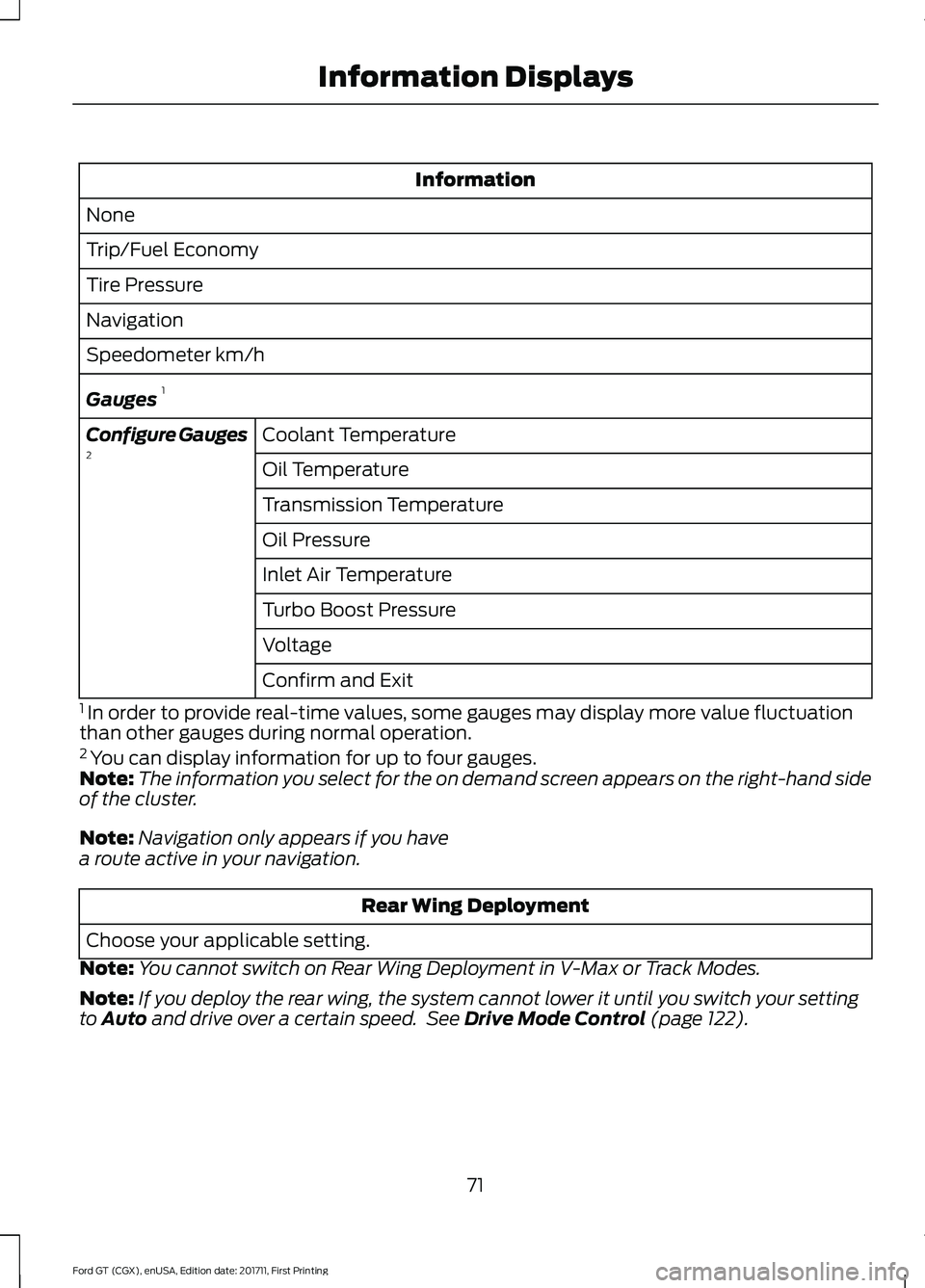
Information
None
Trip/Fuel Economy
Tire Pressure
Navigation
Speedometer km/h
Gauges 1
Coolant Temperature
Configure Gauges
2
Oil Temperature
Transmission Temperature
Oil Pressure
Inlet Air Temperature
Turbo Boost Pressure
Voltage
Confirm and Exit
1 In order to provide real-time values, some gauges may display more value fluctuation
than other gauges during normal operation.
2 You can display information for up to four gauges.
Note: The information you select for the on demand screen appears on the right-hand side
of the cluster.
Note: Navigation only appears if you have
a route active in your navigation. Rear Wing Deployment
Choose your applicable setting.
Note: You cannot switch on Rear Wing Deployment in V-Max or Track Modes.
Note: If you deploy the rear wing, the system cannot lower it until you switch your setting
to Auto and drive over a certain speed. See Drive Mode Control (page 122).
71
Ford GT (CGX), enUSA, Edition date: 201711, First Printing Information Displays
Page 81 of 325

Tire Pressure Monitoring System
Action
Message
One or more tires on your vehicle has low tire pressure. SeeTire Pressure Monitoring System (page 198).
Tire Pressure Low
The tire pressure monitoring system is malfunctioning. If thewarning stays on or continues to come on, contact an
authorized dealer.
See Tire Pressure Monitoring System (page 198).
Tire Pressure Monitor
Fault
A tire pressure sensor is malfunctioning or your spare tire is inuse. See
Tire Pressure Monitoring System (page 198). If
the warning stays on or continues to come on, contact an authorized dealer as soon as possible.
Tire Pressure Sensor
Fault
Transmission Action
Message
The transmission has limited functionality. See an authorized dealer.
Transmission Limited
Function See Manual
Displays as a reminder to shift into park. This message may
also display after reconnecting or recharging the battery until you cycle the ignition on. See
Changing the 12V Battery
(page 168).
Transmission Not in Park
Stay in neutral mode is engaged. Transmission automaticallyshifts into park when timer reaches zero.
Transmission Not in
Park. Park Engages in xx:xx
Displays when the transmission has adjusted the shift strategy.
Transmission Adjusted
Displays when the transmission is adjusting the shift strategy.
Transmission Adapt-
Mode
Displays when the transmission shift selector is locked and unable to select gears.
Transmission Indicat-
Mode Lockup On
Displays when the transmission shift selector is unlocked andfree to select gears.
Transmission Indicat-
Mode Lockup Off
Displays if you cannot shift to the selected gear because ofcurrent vehicle conditions.
Invalid Gear Selection
78
Ford GT (CGX), enUSA, Edition date: 201711, First Printing Information Displays
Page 93 of 325

GENERAL INFORMATION
WARNINGS
Extended idling at high engine
speeds can produce very high
temperatures in the engine and
exhaust system, creating the risk of fire or
other damage. Do not park, idle or drive your vehicle
on dry grass or other dry ground
cover. The emission system heats up
the engine compartment and exhaust
system, creating the risk of fire. Do not start the engine in a closed
garage or in other enclosed areas.
Exhaust fumes can be toxic. Always
open the garage door before you start the
engine. Exhaust leaks may result in entry of
harmful and potentially lethal fumes
into the passenger compartment. If
you smell exhaust fumes inside your
vehicle, have your vehicle inspected
immediately. Do not drive if you smell
exhaust fumes. If you disconnect the battery, your vehicle
may exhibit some unusual driving
characteristics for approximately 5 mi
(8 km) after you reconnect it. This is
because the engine management system
must realign itself with the engine. You
can disregard any unusual driving
characteristics during this period.
The powertrain control system meets all
Canadian interference-causing equipment
standard requirements regulating the
impulse electrical field or radio noise.
When you start the engine, avoid pressing
the accelerator pedal before and during
operation. Only use the accelerator pedal
when you have difficulty starting the
engine. KEYLESS STARTING
Note:
The keyless starting system may not
function if the key is close to metal objects
or electronic devices such as cellular
phones.
Note: A valid key must be located inside
your vehicle to switch the ignition on and
start the engine.
Ignition Modes The keyless starting system has three
modes:
Off:
Turns the ignition off.
• Without applying the brake pedal,
press and release the button once
when the ignition is in the on mode, or
when the engine is running but the
vehicle is not moving.
On:
All electrical circuits are operational
and the warning lamps and indicators
illuminate.
• Without applying the brake pedal,
press and release the button once.
Start:
Starts the engine.
• Press the brake pedal and then press
the button for any length of time.
90
Ford GT (CGX), enUSA, Edition date: 201711, First Printing Starting and Stopping the EngineE243665
Page 109 of 325

AUTOMATIC TRANSMISSION
WARNINGS
Always fully apply the parking brake.
Make sure you shift into park (P) for
vehicles with an automatic
transmission. Switch the ignition off and
remove the key whenever you leave your
vehicle. Do not apply the brake pedal and
accelerator pedal simultaneously.
Applying both pedals simultaneously
for more than a few seconds will limit
engine performance, which may result in
difficulty maintaining speed in traffic and
could lead to serious injury. Your Ford GT vehicle is equipped with a
7-speed, dual clutch automatic
transmission. In drive (D), the transmission
shifts automatically, or you can shift with
the paddle shifters. In manual mode, you
must shift the transmission with the
paddle shifters.
Understanding the Positions of
Your Automatic Transmission
1. Fully press down the brake pedal.
2. Move the selector to the desired gear. Park (P)
With the transmission in park (P), your
vehicle locks the transmission and
prevents the wheels from turning. Always
come to a complete stop before putting
your vehicle into park (P).
Automatic Return to Park
Note:
This feature does not operate when
your vehicle is in Stay in Neutral mode.
Your vehicle has a feature that
automatically shifts your vehicle into park
(P) when any of the following conditions
occur:
• You turn the vehicle off.
• You open the driver's door with your
seatbelt unlatched.
• Your seatbelt is unlatched when the
driver's door is open.
If you turn your vehicle off when moving,
your vehicle first shifts into neutral (N) until
it slows down enough to shift into park (P)
automatically.
Note: If you have waited an extended
period of time (2-15 minutes) before starting
your vehicle, unlatching your seatbelt causes
this feature to activate, even with the
driver's door closed.
Note: This feature may not work properly
if the door ajar switch is malfunctioning. If
your door ajar indicator does not illuminate
when you open the driver ’s door or the
indicator illuminates with the driver ’s door
closed, see your authorized dealer.
Reverse (R)
With the selector in reverse (R), your
vehicle moves backward. Always come to
a complete stop before shifting into and
out of reverse (R).
106
Ford GT (CGX), enUSA, Edition date: 201711, First Printing TransmissionE227917
Page 110 of 325

Neutral (N)
With the selector in neutral (N), your
vehicle can be started and is free to roll.
Hold the brake pedal down when in this
position.
Stay in Neutral Mode
Stay in Neutral mode allows your vehicle
to stay in neutral when you exit your
vehicle. Your vehicle must be stationary to
enter this mode.
To enter Stay in Neutral mode:
•
With the engine running.
• Release the parking brake if applied,
press down the brake pedal and press
the parking brake release switch on the
center console.
• Press down the brake pedal and move
the transmission selector to neutral
(N).
• A message appears in your display
screen.
• Press the manual (M) button to enter
Stay in Neutral mode.
• Another message appears in your
display screen confirming Neutral
mode is engaged.
• Stay in Neutral mode remains engaged
as long as the engine is running. If the
engine is turned off, a 30 minute timer
starts and appears in your display
screen.
To exit Stay in Neutral mode, press down
the brake pedal and select a different gear.
Drive (D)
Drive (D) is the normal driving position for
the best fuel economy. In the drive (D)
position, the transmission automatically
shifts through gears one through seven. Manual (M)
To select manual (M), place the
transmission selector in drive (D) and press
"M" button in the middle of the selector.
Once you select manual (M), you must use
the paddle shifters to upshift or downshift
the transmission.
To exit manual (M) and return to drive (D),
press the "M" button again.
SelectShift™ Automatic
Transmission
Your vehicle is equipped with a SelectShift
Automatic transmission, which gives you
the ability to change gears up or down as
desired.
In order to prevent the engine from running
at too low an RPM, which may cause it to
stall, SelectShift still automatically makes
some downshifts if it has determined that
you have not downshifted in time.
Although SelectShift makes some
downshifts for you, it still allows you to
downshift at any time as long as
SelectShift determines that no damage
occurs to the engine from over-revving.
Note:
Engine damage may occur if you
maintain excessive engine revving without
shifting.
SelectShift does not automatically upshift,
even if the engine is approaching the RPM
limit. It must be shifted manually by use of
the upshift (+) paddle. When using Manual
(M) shift mode, pay attention to the shift
indicator on the top rim of the steering
wheel and the RPM indicator in the
instrument cluster.
Use the paddles on the steering wheel
to shift.
• Pull the right paddle (+) to upshift.
• Pull the left paddle (–) to downshift.
107
Ford GT (CGX), enUSA, Edition date: 201711, First Printing Transmission
Page 111 of 325

SelectShift in drive (D):
•
Provides a temporary manual mode
for performing more demanding
maneuvers where extra control of gear
selection is required (for example,
when overtaking). This mode holds a
selected gear for a temporary period
of time dependent on driver inputs (for
example, steering or accelerator pedal
input).
SelectShift in manual (M):
• Provides a permanent manual gear
selection where full control of gear
selection is required.
The instrument cluster displays your
currently selected gear. If a gear is
requested but not available due to vehicle
conditions (low speed, too high engine
speed for requested gear selection), the
current gear flashes two times.
Upshift to the recommended shift speeds
according to this following chart: Upshifts When Accelerating (Recom-
mended for Best Fuel Economy)
Shift from:15 mph (24 km/h)
1 - 2
25 mph (40 km/h)
2 - 3
40 mph (64 km/h)
3 - 4 Upshifts When Accelerating (Recom-
mended for Best Fuel Economy)
45 mph (72 km/h)
4 - 5
50 mph (80 km/h)
5 - 6
55 mph (88 km/h)
6 - 7
Brake-Shift Interlock WARNINGS
When doing this procedure, you need
to take the transmission out of park
(P) which means your vehicle can
roll freely. To avoid unwanted vehicle
movement, always fully apply the parking
brake prior to doing this procedure. Use
wheels chocks if appropriate. If the parking brake is fully released,
but the brake warning lamp remains
illuminated, the brakes may not be
working properly. Have your vehicle
checked as soon as possible. Note:
You should only use this procedure
in the event that your vehicle is disabled and
you cannot start the engine in order to shift
into Neutral (N) to move it. Use the provided
Transmission Park Override tool to release
the transmission park mechanism and allow
the rear tires to roll freely.
Note: See your authorized dealer as soon
as this procedure is used.
Note: Do not drive your vehicle until you
verify that the brake lamps are working.
Your vehicle is equipped with a brake-shift
interlock feature that prevents moving the
selector from park (P) when the ignition is
in the on position and the brake pedal is
not pressed.
108
Ford GT (CGX), enUSA, Edition date: 201711, First Printing TransmissionE243776