2018 FORD FUSION ENERGI buttons
[x] Cancel search: buttonsPage 418 of 538

Action and DescriptionMenu Item
Uses the most fuel-efficient route.Economical Route
The time and distance for each route also displays.
On the route screen, you can choose to cancel the current navigation.The system asks for confirmation then returns you to the map modescreen.
Cancel
Once you have chosen you destination, press:
Action and DescriptionMenu Item
The system uses a variety of screens and prompts to guide you to yourdestination.Start
During Route guidance, you can press the maneuver arrow icon on themap if you want the system to repeat route guidance instructions.When the system repeats the last guidance instruction, it updates thedistance to the next guidance instruction, since it detects that thevehicle is moving.The navigation map shows your estimated time of arrival, remainingtravel time and the distance to your destination.SYNC 3 may not always announce vehicle arrival at the exact pointof your destination and you may have to cancel a route manually.
Navigation Menu
In map mode and during active navigationyou can access the navigation menu.
During active navigation, touch the bottomof the screen to view the menu and otherbuttons.
To access the Navigation menu, press:
Button
Menu
You can then select:
A full screen map displays during navigation.Full MapScreen View
Highway exit information displays on the right hand sideof the screen during navigation.HighwayExit InfoPoints of interest icons display for restaurants, hotels,fuel stations and ATMs when they are present at theexit. You can select the POI icons to receive a listing ofspecific locations. You can select the POI location as awaypoint or destination if desired.
415
Fusion Energi / Fusion Hybrid (CC7) Hybrid Electric Vehicle (HEV)/Plug-In Hybrid Electric Vehicle (PHEV), Canada/United States of America, enUSA, Edition date: 201705, Second Printing
SYNC™ 3
Page 436 of 538

Action and DescriptionMenu Item
Allows you to edit the GO Time andcabin conditioning temperature.My GO Times
Indicates that you can add a GOTime to this slot.--:--GO Time 2
Note: If you set GO Time 2 to occur before GO Time 1, or if youset GO Time 1 to occur after an existing GO Time 2, the GO Timeswill automatically sort themselves and be displayed in the correctorder.
GO Time and Cabin Conditioning
This screen allows you to enter or changethe GO Time and cabin conditioningtemperature.
Press any GO Time on the Schedule screento enter the editing screen for that GOTime.
Action and DescriptionMenu Item
These change the hours and minutes of your GO Time. Theminutes change in increments of five. You can also switch thesettings for AM and PM by touching those buttons.
Time (+ and -)
These switch the setting for your selected cabin conditioningtemperature for this GO Time event. You can select from foursettings:
Cabin Conditioning(+ and -)
Off85°F (29.5°C)72°F (22°C)65°F (18.5°C)
Note: Cabin conditioning can perform differently depending onif you plug into a 120V convenience cord or 240V charging station.The power available for conditioning is limited to the chargingstation power available.Note: Your vehicle may not always reach the set cabin temper-ature due to charging and ambient temperature conditions. Thisis normal operation.
Touching this button erases the GO Time and cabin conditioningtemperature.Clear
Touching this button stores the GO Time and temperaturesettings.Save
Note:If you select a GO Time, but choose Off for the temperature setting, the vehicleschedules charging to be complete by your GO Time and does not condition the cabin.
Note:Make sure you save your settings before returning to the previous screen. If you donot touch Save, the system will not automatically store the settings.
433
Fusion Energi / Fusion Hybrid (CC7) Hybrid Electric Vehicle (HEV)/Plug-In Hybrid Electric Vehicle (PHEV), Canada/United States of America, enUSA, Edition date: 201705, Second Printing
SYNC™ 3
Page 437 of 538

Value Charge Profiles
You can access the Value Charge Profile
screen by selecting the edit option in thebottom right hand corner of the ChargeSettings screen.
Action and DescriptionMenu Item
This displays the charging mode and off-peak times for yourDefault Value Charge profile. The system displays off-peak timesfor weekdays; the remaining hours of the day are considered peaktime. The system displays similar off-peak times for weekenddays.
Default
If you want your vehicle to immediatelycharge when you plug it in at this profilelocation.
Charge Now
If you want to take advantage of off-peakelectricity rates. The vehicle optimizes thecharge schedule to be complete by the nextGO Time.
Value Charge
To access your Default Value Charge Profilesettings screen (see Default Value ChargeProfile later in this section).
Edit
Once you create profile names, this section displays the ValueCharge Profile names and current Charge Mode for specific loca-tions. You can set up and edit these profiles using the MyFordMobile internet application. You can program up to nine uniquecharge profiles.
Customer DefinedValue ChargeProfiles
Default Value Charge Profile
You can access your Default Value ChargeProfile by selecting the edit option on theValue Charge Profiles screen.
Action and DescriptionMenu Item
Set the Weekday times and Weekend times by pressing theWeekday and Weekend buttons.Weekday
Weekend
This displays the start and finish of off-peak charge times, whichyou can modify, using the following:Weekday Start
Allows you to switch the hours of your startand finish times.+ and -Weekend Start
434
Fusion Energi / Fusion Hybrid (CC7) Hybrid Electric Vehicle (HEV)/Plug-In Hybrid Electric Vehicle (PHEV), Canada/United States of America, enUSA, Edition date: 201705, Second Printing
SYNC™ 3
Page 438 of 538
Action and DescriptionMenu Item
Allows you to switch the time of your startand finish time. This setting is viewable in12-hour mode.
AMWeekday Finish
PMWeekend Finish
These buttons represent the voltage service that the default profileis using. The system uses this selection to calculate estimatedcharge times.
240V and 120V
Touching this button erases the Default Value Charge preferences.Clear
Touching this button stores your Default Value Charge preferences.If you touch the back arrow button to return to the previous screenwithout saving your settings, the system does not store them andyou need to enter them again.
Save
Note:Make sure you save your settings before returning to the previous screen. If you donot touch Save the system does not store your settings.
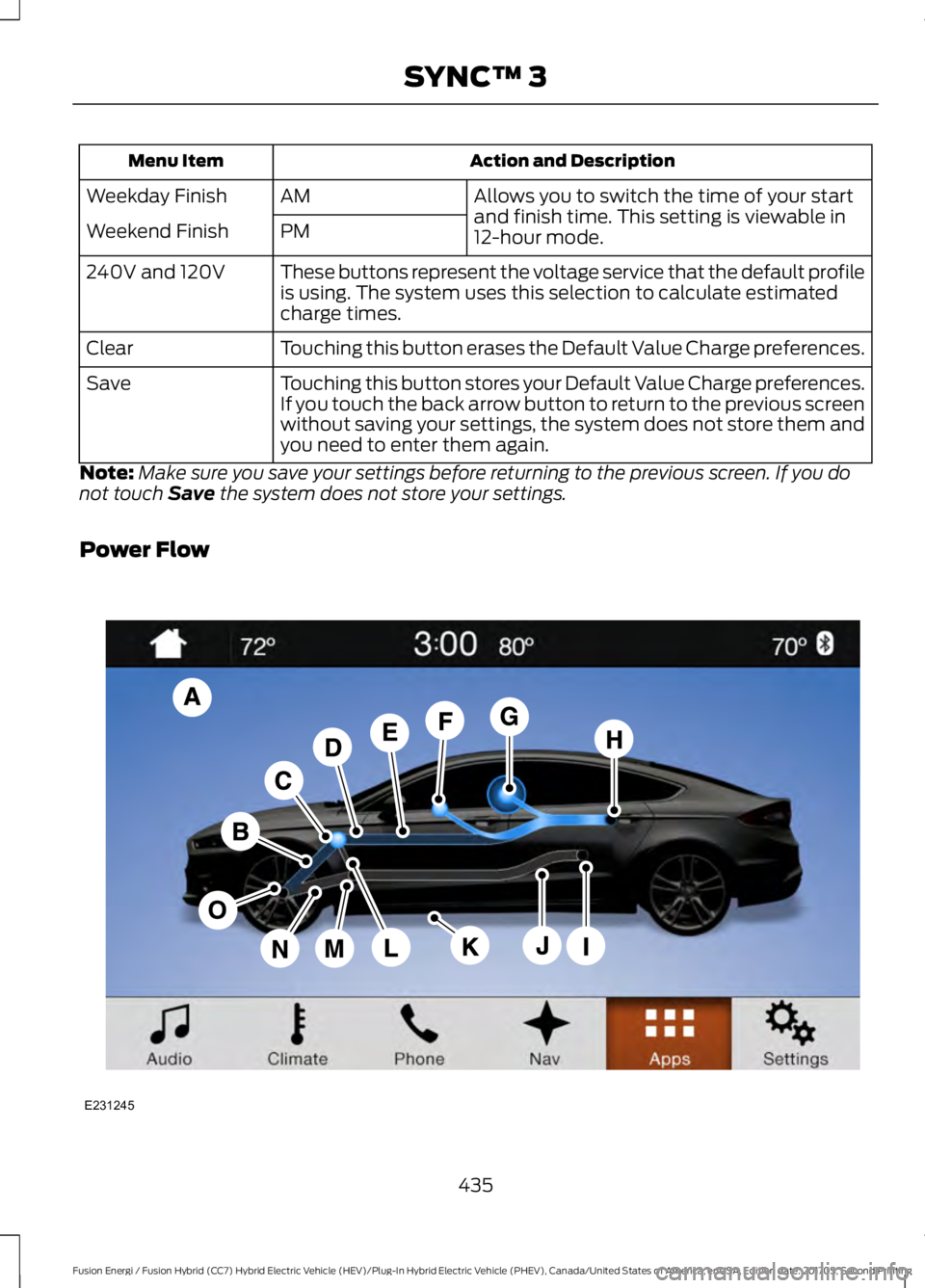
Power Flow
435
Fusion Energi / Fusion Hybrid (CC7) Hybrid Electric Vehicle (HEV)/Plug-In Hybrid Electric Vehicle (PHEV), Canada/United States of America, enUSA, Edition date: 201705, Second Printing
SYNC™ 3E231245
Page 445 of 538

Action and DescriptionMenu Item
Touch these buttons to identify traffic incidents on your route,near your vehicle’s current location or near any of your favoriteplaces, if programmed.
Traffic on Route
Traffic Nearby
Touch this button to view fuel prices at stations close to yourvehicle’s location or on an active navigation route.Fuel Prices
Touch this button to view nearby movie theaters and theirshow times, if available.Movie Listings
Touch this button to view the nearby weather, current weather,or the five-day forecast for the chosen area.Weather
Select to see the weather map,which can show storms, radarinformation, charts and winds.
Map
Select to choose from a listing ofweather locations.Area
Touch this button to view scores and schedules from a varietyof sports. You can also save up to 10 favorite teams for easieraccess. The score automatically refreshes when a game is inprogress.
Sports Info
Touch this button to view ski conditions for a specific area.Ski Conditions
SETTINGS
Under this menu, you can access andadjust the settings for many of the systemfeatures. To access additional settings,swipe the screen left or right.
Sound
Pressing this button allows you to adjustthe following:
Sound Settings
Returns Treble, Midrange, and Bass sound settings to factory levels.Reset All
Adjusts the high frequency level.Treble
Adjusts the middle frequency level.Midrange
Adjusts the low frequency level.Bass
Adjusts the sound ratio from side to side or front to back.Balance / Fade
442
Fusion Energi / Fusion Hybrid (CC7) Hybrid Electric Vehicle (HEV)/Plug-In Hybrid Electric Vehicle (PHEV), Canada/United States of America, enUSA, Edition date: 201705, Second Printing
SYNC™ 3
Page 463 of 538

USB and Bluetooth Stereo issues
Possible solutionPossible causeIssue
Disconnect the device from SYNC 3. Tryswitching your device off, resetting it orremoving the battery, then connect it backto SYNC 3.
This is a device limitation.
When I connectmy device, Isometimes donot hear anysound.
To listen to Apple devices through USB,select AirPlay from the devices ControlCenter, then select Dock Connector.
To listen to Apple devices throughBluetooth Stereo, select AirPlay from thedevices Control Center, then select SYNC.
Connect a compatible device or mediaplayer.The device or mediaplayer is incompatible.
SYNC 3 doesnot display thesong informa-tion, repeat, orshuffle buttons.
Wi-Fi Issues
Possible solutionPossible causeIssue
Verify password.Password error.Failed connec-tion.Check for a poor Wi-Fi signal.Weak signal.
Use a unique name for your SSID, don’t usethe default name unless it contains aunique identifier, such as part of the MACaddress.
Multiple Access pointswithin range with thesame SSID.
Position the vehicle close to the hotspotwith the front of the vehicle facing thehotspot direction and remove obstacles ifpossible. Other Wi-Fi, Bluetooth, microwaveand cordless phones may cause interfer-ence.
Weak signal probablydue to distance from thehotspot, obstruction orhigh interference.
Disconnectingafter successfulconnection.
460
Fusion Energi / Fusion Hybrid (CC7) Hybrid Electric Vehicle (HEV)/Plug-In Hybrid Electric Vehicle (PHEV), Canada/United States of America, enUSA, Edition date: 201705, Second Printing
SYNC™ 3
Page 466 of 538

AppLink issues
Possible solution(s)Possible cause(s)Issue
Switch Bluetooth off and then on to resetit on your phone. If you are in your vehicle,SYNC 3 should be able to automatically re-connect to your phone if you press the"Phone" button.
There is a Bluetooth issueon some older versionsof the Android operatingsystem that may causeapps that were found onyour previous vehicledrive to not be foundagain if you did notswitch Bluetooth off.
My Androidphone isconnected, myapp(s) arerunning, Irestarted them,but I still cannotfind any apps.
Unplug the USB cable from the phone, waita moment, and plug the USB cable back into the phone. After a few seconds, the appshould appear in SYNC 3's Mobile AppsMenu. If not, "Force Close" the applicationand restart it.
You may need to resetthe USB connection toSYNC 3.
My iPhone isconnected, myapp is running, Irestarted theapp but I stillcannot find it onSYNC 3.
Increase the Bluetooth volume of thedevice by using the device's volume controlbuttons which are most often found on theside of the device.The Bluetooth volume onthe phone may be low.
I have anAndroid phone.I found andstarted mymedia app onSYNC 3, butthere is nosound or thesound is verylow.
Force close or uninstall the apps you do notwant SYNC 3 to find. If the app has a "FordSYNC" setting, disable that setting in theapp's settings menu on the phone.
Some Android deviceshave a limited number ofBluetooth ports thatapps can use to connect.If you have more AppLinkapps on your phone thanthe number of availableBluetooth ports, you willnot see all of your appslisted in the SYNC 3mobile apps menu.
I can only seesome of theAppLink appsrunning on myphone listed inthe SYNC 3Mobile AppsMenu.
463
Fusion Energi / Fusion Hybrid (CC7) Hybrid Electric Vehicle (HEV)/Plug-In Hybrid Electric Vehicle (PHEV), Canada/United States of America, enUSA, Edition date: 201705, Second Printing
SYNC™ 3