2018 FORD FUSION ENERGI sensor
[x] Cancel search: sensorPage 82 of 538

The other lighting control switch positionsdo not turn on the daytime running lamps.
If the daytime running lamps are off in theinformation display, the lamps stay off inall switch positions.
AUTOMATIC HIGH BEAM
CONTROL (If Equipped)
WARNING
The system does not relieve you ofyour responsibility to drive with duecare and attention. You may need tooverride the system if it does not turn thehigh beams on or off.
The system turns on high beams if it is darkenough and no other traffic is present. If itdetects an approaching vehicle’sheadlamps or tail lamps, or street lightingahead, the system turns off high beamsbefore they can distract other road users.Low beams remain on.
Note:The system may not operate properlyif the sensor is blocked. Keep the windshieldfree from obstruction or damage.
Note:The system may not operate properlyin cold or inclement conditions. You canswitch on the high beams by overriding thesystem.
Note:If the system detects a blockage, forexample bird droppings, bug splatter, snowor ice, the system goes into low beam modeuntil you clear the blockage. A message mayappear in the information display if thecamera is blocked.
Note:Using much larger tires or equippingvehicle accessories such as snowplows canmodify your vehicle's ride height anddegrade automatic high beam controlperformance.
A camera sensor, centrally mountedbehind the windshield of your vehicle,continuously monitors conditions to turnthe high beams on and off.
Once the system is active, the high beamsturn on if:
•The ambient light level is low enough.
•There is no traffic in front of yourvehicle.
•The vehicle speed is greater thanapproximately 32 mph (51 km/h).
The high beams turn off if:
•The ambient light level is high enoughthat high beams are not required.
•The system detects an approachingvehicle's headlamps or tail lamps.
•The vehicle speed falls belowapproximately 27 mph (44 km/h).
•The system detects severe rain, snowor fog.
•The camera is blocked.
Switching the System On and Off
Switch the system on using the informationdisplay. See Information Displays (page97).
Switch the lighting control to theautolamps position. See Autolamps(page 77).
79
Fusion Energi / Fusion Hybrid (CC7) Hybrid Electric Vehicle (HEV)/Plug-In Hybrid Electric Vehicle (PHEV), Canada/United States of America, enUSA, Edition date: 201705, Second Printing
LightingE142451
Page 89 of 538
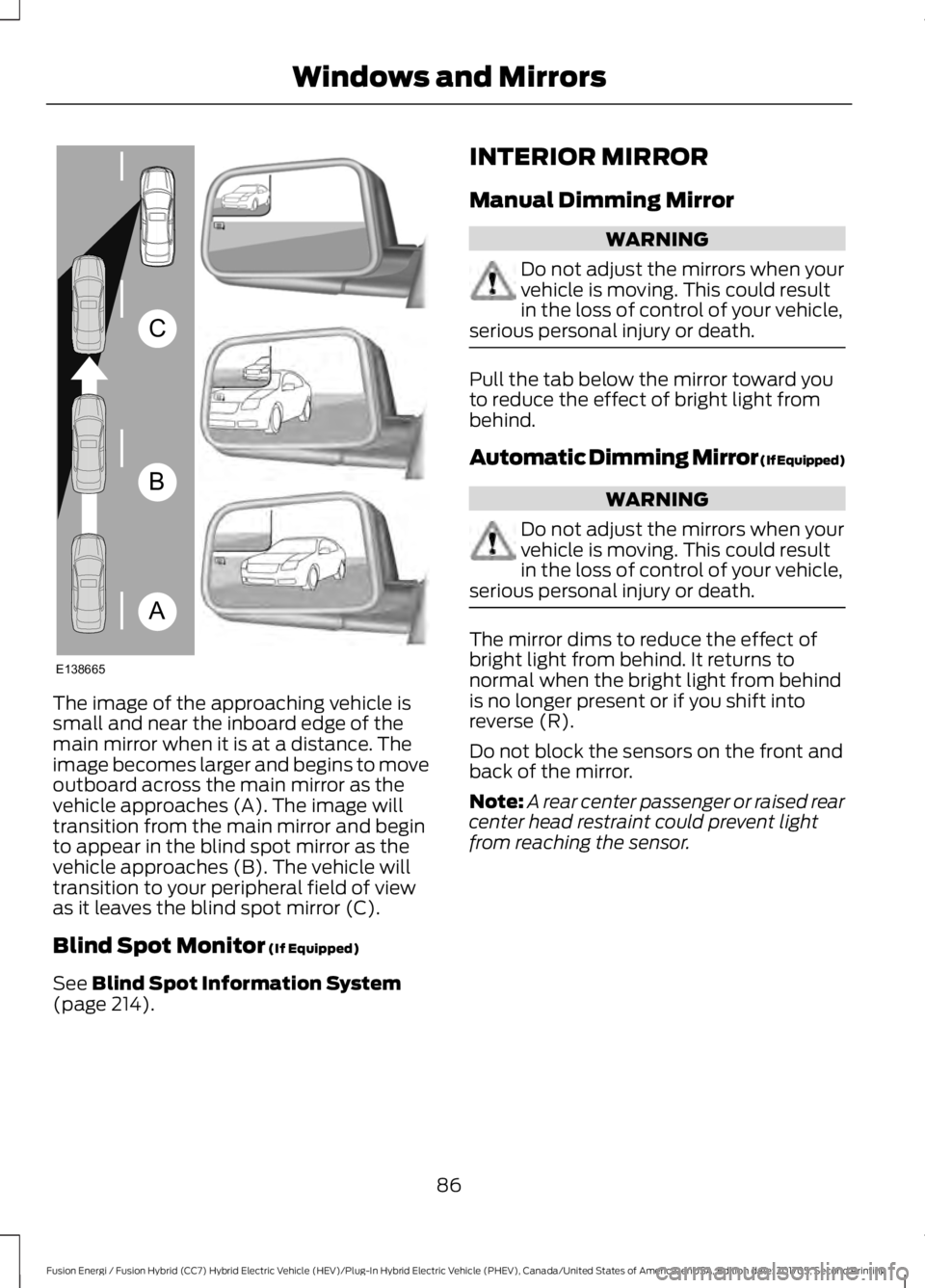
The image of the approaching vehicle issmall and near the inboard edge of themain mirror when it is at a distance. Theimage becomes larger and begins to moveoutboard across the main mirror as thevehicle approaches (A). The image willtransition from the main mirror and beginto appear in the blind spot mirror as thevehicle approaches (B). The vehicle willtransition to your peripheral field of viewas it leaves the blind spot mirror (C).
Blind Spot Monitor (If Equipped)
See Blind Spot Information System(page 214).
INTERIOR MIRROR
Manual Dimming Mirror
WARNING
Do not adjust the mirrors when yourvehicle is moving. This could resultin the loss of control of your vehicle,serious personal injury or death.
Pull the tab below the mirror toward youto reduce the effect of bright light frombehind.
Automatic Dimming Mirror (If Equipped)
WARNING
Do not adjust the mirrors when yourvehicle is moving. This could resultin the loss of control of your vehicle,serious personal injury or death.
The mirror dims to reduce the effect ofbright light from behind. It returns tonormal when the bright light from behindis no longer present or if you shift intoreverse (R).
Do not block the sensors on the front andback of the mirror.
Note:A rear center passenger or raised rearcenter head restraint could prevent lightfrom reaching the sensor.
86
Fusion Energi / Fusion Hybrid (CC7) Hybrid Electric Vehicle (HEV)/Plug-In Hybrid Electric Vehicle (PHEV), Canada/United States of America, enUSA, Edition date: 201705, Second Printing
Windows and MirrorsA
B
C
E138665
Page 110 of 538

Adaptive Cruise Control
ActionMessage
A radar malfunction is preventing the adaptive cruise controlfrom engaging. See Using Adaptive Cruise Control (page201).
Adaptive CruiseMalfunction
A condition exists such that the adaptive cruise cannot func-tion properly. See Using Adaptive Cruise Control (page201).
Adaptive Cruise NotAvailable
You have a blocked sensor due to bad weather, ice, mud orwater in front of the radar sensor. You can typically clean thesensor to resolve. See Using Adaptive Cruise Control (page201).
Adaptive Cruise NotAvailable SensorBlocked See Manual
The system has disabled the automatic braking.Normal Cruise ActiveAutomatic BrakingTurned Off
A radar malfunction is preventing the adaptive cruise controlfrom engaging.Front Sensor Not Aligned
The adaptive cruise has reinstated controls to the driver.Adaptive Cruise - DriverResume Control
The vehicle speed is too slow to activate the adaptive cruise.Adaptive Cruise SpeedToo Low to Activate
The adaptive cruise is automatically adjusting the gapdistance and the driver needs to shift the transmission into alower gear.
Adaptive Cruise ShiftDown
AdvanceTrac™
ActionMessage
Displayed when the system has detected a condition thatrequires service. Contact your authorized dealer as soon aspossible.
Service AdvanceTrac
The driver has disabled or enabled the traction control.AdvanceTrac Off On
107
Fusion Energi / Fusion Hybrid (CC7) Hybrid Electric Vehicle (HEV)/Plug-In Hybrid Electric Vehicle (PHEV), Canada/United States of America, enUSA, Edition date: 201705, Second Printing
Information Displays
Page 111 of 538

Airbag
ActionMessage
The system detects a malfunction due to a blocked sensor.Remove blockage.Occupant SensorBLOCKED RemoveObjects Near PassengerSeat
Alarm
ActionMessage
Alarm triggered due to unauthorized entry. See Anti-TheftAlarm (page 69).Vehicle Alarm To StopAlarm, Start Vehicle.
Automatic Engine Shutdown
ActionMessage
The engine is getting ready to shut off.Engine Shuts Off In{seconds to shut off:#0}Seconds
The engine has shut off to help increase fuel economy.Engine Shut Off For FuelEconomy
The engine is getting ready to shut off. You can press OK onthe left steering wheel button to override the shut down.Engine Shuts Off in{seconds to shut off:#0}Seconds Press Ok toOverride
108
Fusion Energi / Fusion Hybrid (CC7) Hybrid Electric Vehicle (HEV)/Plug-In Hybrid Electric Vehicle (PHEV), Canada/United States of America, enUSA, Edition date: 201705, Second Printing
Information Displays
Page 113 of 538

ActionMessage
Your vehicle enables the engine due to the climate controldefrost setting. This is normal operation.Engine Enabled Due toDefrost Setting
For full defrost heat press the EV button to select either EVLater or EV Auto. The engine may run to provide more cabinheat.
Press EV Button for FullDefrost
Your vehicle enables the engine for system performance. Thisis normal operation.Engine Enabled forSystem Performance
You can press OK to enable the engine temporarily forincreased performance when in EV Now mode.Press OK to EnableEngine
Blind Spot Information and Cross Traffic Alert System
ActionMessage
A fault with the system has occurred. Contact an authorizeddealer as soon as possible.Blindspot System Fault
The system sensors are blocked. See Blind Spot Informa-tion System (page 214).Blindspot Not AvailableSensor Blocked SeeManual
The system detects a vehicle. See Blind Spot InformationSystem (page 214).Cross Traffic VehicleComing From X
The blind spot information system and cross traffic alertsystem sensors are blocked. See Blind Spot InformationSystem (page 214).
Cross Traffic Not Avail-able Sensor Blocked SeeManual
A fault with the system has occurred. Contact an authorizeddealer as soon as possible.Cross Traffic SystemFault
Doors and Locks
ActionMessage
The door(s) listed is not completely closed.X Door Ajar
The luggage compartment is not completely closed.Trunk Ajar
The hood is not completely closed.Hood Ajar
110
Fusion Energi / Fusion Hybrid (CC7) Hybrid Electric Vehicle (HEV)/Plug-In Hybrid Electric Vehicle (PHEV), Canada/United States of America, enUSA, Edition date: 201705, Second Printing
Information Displays
Page 119 of 538

Power Steering
ActionMessage
The power steering system has detected a condition thatrequires service. See an authorized dealer.Steering Fault ServiceNow
The power steering system is not working. Stop your vehiclein a safe place. Contact an authorized dealer.Steering Loss StopSafely
The power steering system has detected a condition withinthe power steering system or passive entry or passive startsystem requires service. Contact an authorized dealer.
Steering Assist FaultService Required
Pre-Collision Assist
ActionMessage
A fault with the system has occurred. Contact an authorizeddealer as soon as possible.Pre-Collision AssistMalfunction
You have a blocked sensor due to bad weather, ice, mud orwater in front of the radar sensor. You can typically clean thesensor to resolve.
Pre-Collision Assist NotAvailable SensorBlocked
A fault with the system has occurred. Contact an authorizeddealer as soon as possible.Pre-Collision Assist NotAvailable
Remote Start
ActionMessage
A reminder to turn the key on to drive your vehicle after aremote start.To Drive: Turn Key to On
A reminder to apply the brake and push the gearshift buttonto drive your vehicle after a remote start.To Drive: Press Brakeand Start Button
Seats
ActionMessage
A reminder that memory seats are not available while driving.Memory Recall NotPermitted While Driving
Shows where you have saved your memory setting.Memory {0} Saved
116
Fusion Energi / Fusion Hybrid (CC7) Hybrid Electric Vehicle (HEV)/Plug-In Hybrid Electric Vehicle (PHEV), Canada/United States of America, enUSA, Edition date: 201705, Second Printing
Information Displays
Page 120 of 538

Starting System
ActionMessage
A reminder to apply the brake when starting your vehicle.To START Press Brake
The starter has exceeded its cranking time in attempting tostart your vehicle.Cranking Time Exceeded
The starter is attempting to start your vehicle.Engine Start PendingPlease Wait
The system has cancelled the pending start.Pending Start Cancelled
Tire Pressure Monitoring System
ActionMessage
One or more tires on your vehicle has low tire pressure. SeeTire Pressure Monitoring System (page 303).Tire Pressure Low
The tire pressure monitoring system is malfunctioning. If thewarning stays on or continues to come on, contact anauthorized dealer. See Tire Pressure Monitoring System(page 303).
Tire Pressure MonitorFault
A tire pressure sensor is malfunctioning or your spare tire is inuse. For more information on how the system operates underthese conditions, See Tire Pressure Monitoring System(page 303). If the warning stays on or continues to come on,contact an authorized dealer as soon as possible.
Tire Pressure SensorFault
Traction Control
ActionMessage
The status of the traction control system after you switchedit off or on. See Using Traction Control (page 184).Traction Control Off/On
117
Fusion Energi / Fusion Hybrid (CC7) Hybrid Electric Vehicle (HEV)/Plug-In Hybrid Electric Vehicle (PHEV), Canada/United States of America, enUSA, Edition date: 201705, Second Printing
Information Displays
Page 146 of 538
When the indicator light on the power pointis:
•On: The power point is working, theignition is on and a device is pluggedin.
•Off: The power point is off, the ignitionis off or no device is plugged in.
•Flashing: The power point is in faultmode.
The power outlet temporarily turns offpower when in fault mode if the deviceexceeds the 150 watt limit. Unplug yourdevice and switch the ignition off. Switchthe ignition back on, but do not plug yourdevice back in. Let the system cool off andswitch the ignition off to reset the faultmode. Switch the ignition back on andmake sure the indicator light remains on.
Do not use the power point for certainelectric devices, including:
•Cathode-ray, tube-type televisions.
•Motor loads, such as vacuum cleaners,electric saws and other electric powertools or compressor-drivenrefrigerators.
•Measuring devices, which processprecise data, such as medicalequipment or measuring equipment.
•Other appliances requiring anextremely stable power supply such asmicrocomputer-controlled electricblankets or touch-sensor lamps.
143
Fusion Energi / Fusion Hybrid (CC7) Hybrid Electric Vehicle (HEV)/Plug-In Hybrid Electric Vehicle (PHEV), Canada/United States of America, enUSA, Edition date: 201705, Second Printing
Auxiliary Power Points