2018 FORD FOCUS audio
[x] Cancel search: audioPage 387 of 473
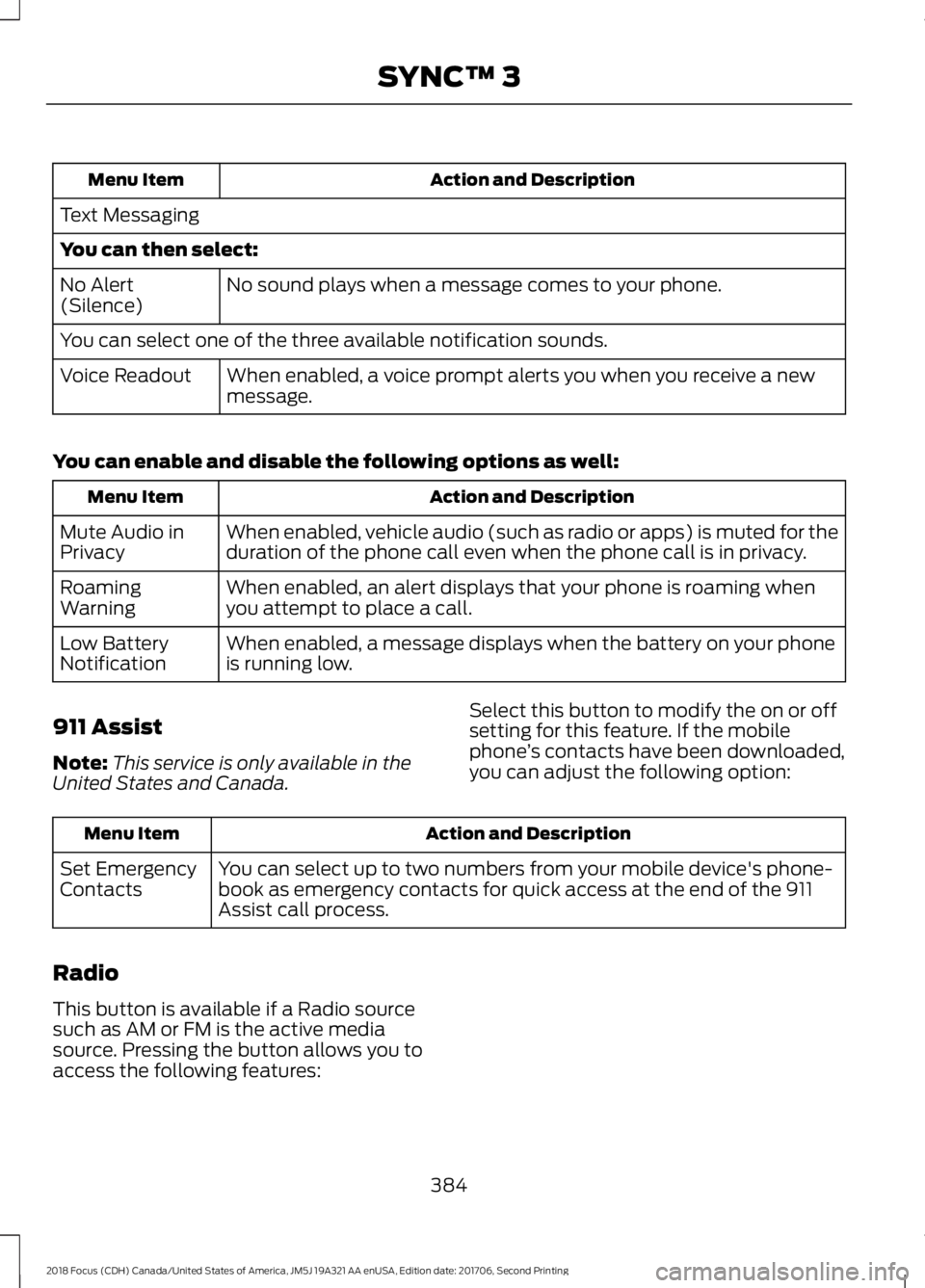
Action and DescriptionMenu Item
Text Messaging
You can then select:
No sound plays when a message comes to your phone.No Alert(Silence)
You can select one of the three available notification sounds.
When enabled, a voice prompt alerts you when you receive a newmessage.Voice Readout
You can enable and disable the following options as well:
Action and DescriptionMenu Item
When enabled, vehicle audio (such as radio or apps) is muted for theduration of the phone call even when the phone call is in privacy.Mute Audio inPrivacy
When enabled, an alert displays that your phone is roaming whenyou attempt to place a call.RoamingWarning
When enabled, a message displays when the battery on your phoneis running low.Low BatteryNotification
911 Assist
Note:This service is only available in theUnited States and Canada.
Select this button to modify the on or offsetting for this feature. If the mobilephone’s contacts have been downloaded,you can adjust the following option:
Action and DescriptionMenu Item
You can select up to two numbers from your mobile device's phone-book as emergency contacts for quick access at the end of the 911Assist call process.
Set EmergencyContacts
Radio
This button is available if a Radio sourcesuch as AM or FM is the active mediasource. Pressing the button allows you toaccess the following features:
3842018 Focus (CDH) Canada/United States of America, JM5J 19A321 AA enUSA, Edition date: 201706, Second PrintingSYNC™ 3
Page 396 of 473
Valet Mode
Valet mode allows you to lock the system.No information is accessible until thesystem is unlocked with the correct PIN.
When you select valet mode a pop upappears informing you that a four digitcode must be entered to enable anddisable valet mode. You can use any PINyou chose but you must use the same PINto disable valet mode. The system asksyou to input the code.
Note:If the system is locked and youcannot remember the PIN, please contactthe Customer Relationship Center.
United States: 1-800-392-3673Canada: 1-800-565-3673
To enable valet mode, enter your chosenPIN. The system then asks to confirm yourPIN by reentering it. The system then locks.
To unlock the system, enter the same pinnumber. The system reconnects to yourphone and all of your options are availableagain.
SYNC™ 3 TROUBLESHOOTING
Your SYNC 3 system is easy to use.However, should questions arise, pleaserefer to the tables below.
To check your cell phone's compatibility,visit the Ford website.
Website
owner.ford.comwww.syncmyride.cawww.syncmaroute.ca
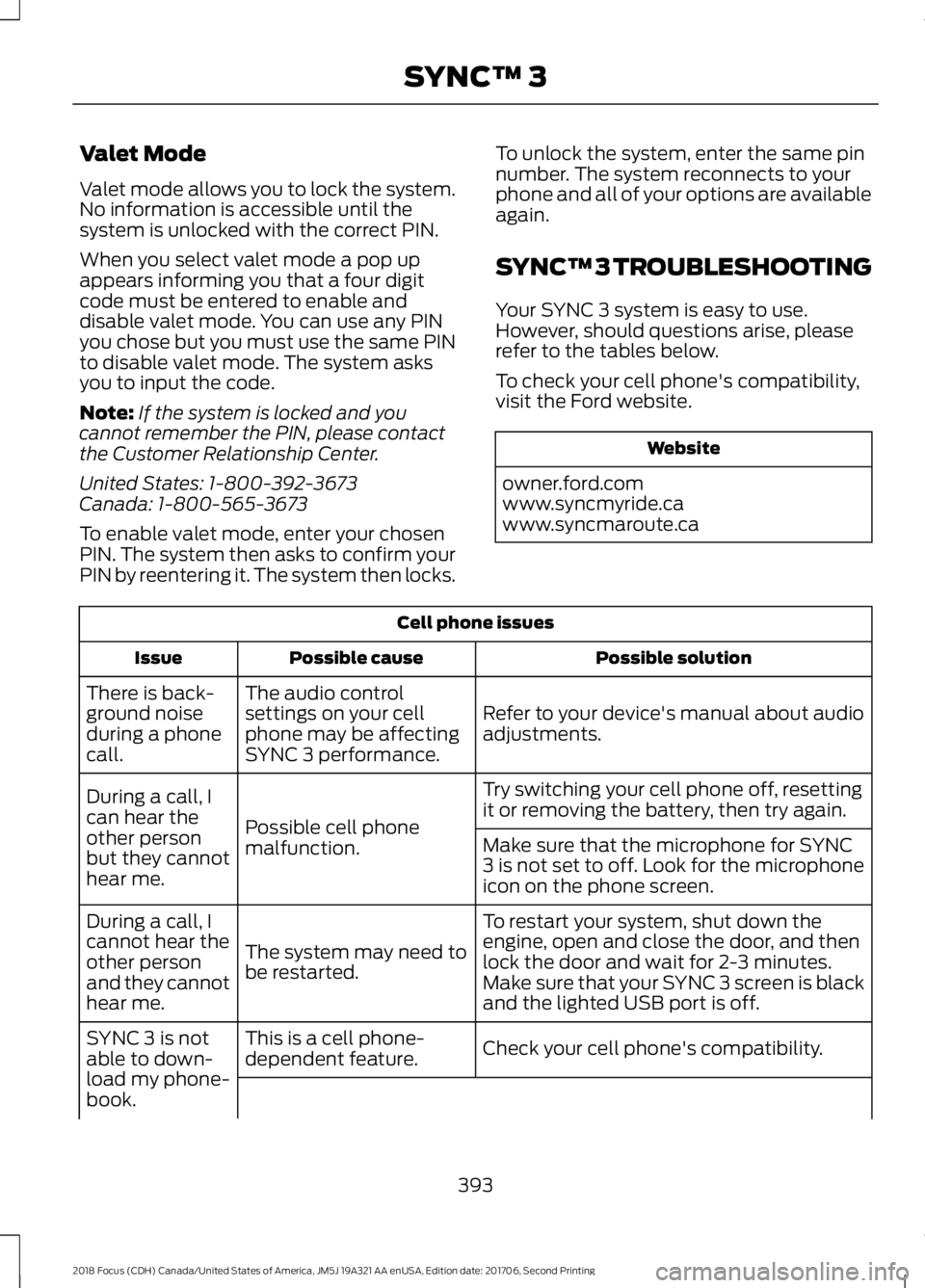
Cell phone issues
Possible solutionPossible causeIssue
Refer to your device's manual about audioadjustments.
The audio controlsettings on your cellphone may be affectingSYNC 3 performance.
There is back-ground noiseduring a phonecall.
Try switching your cell phone off, resettingit or removing the battery, then try again.Possible cell phonemalfunction.
During a call, Ican hear theother personbut they cannothear me.
Make sure that the microphone for SYNC3 is not set to off. Look for the microphoneicon on the phone screen.
To restart your system, shut down theengine, open and close the door, and thenlock the door and wait for 2-3 minutes.Make sure that your SYNC 3 screen is blackand the lighted USB port is off.
The system may need tobe restarted.
During a call, Icannot hear theother personand they cannothear me.
Check your cell phone's compatibility.This is a cell phone-dependent feature.SYNC 3 is notable to down-load my phone-book.
3932018 Focus (CDH) Canada/United States of America, JM5J 19A321 AA enUSA, Edition date: 201706, Second PrintingSYNC™ 3
Page 399 of 473
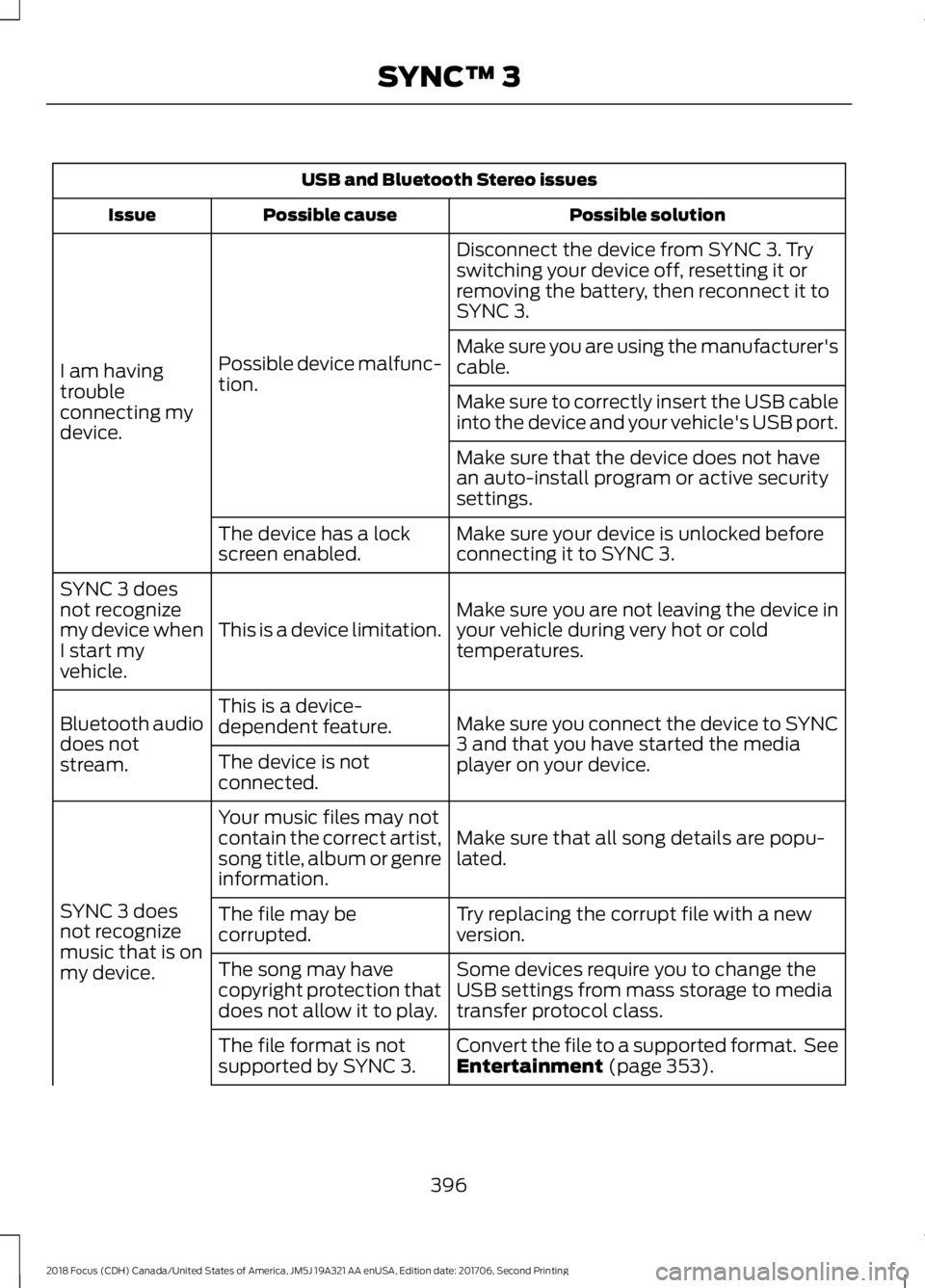
USB and Bluetooth Stereo issues
Possible solutionPossible causeIssue
Disconnect the device from SYNC 3. Tryswitching your device off, resetting it orremoving the battery, then reconnect it toSYNC 3.
Possible device malfunc-tion.I am havingtroubleconnecting mydevice.
Make sure you are using the manufacturer'scable.
Make sure to correctly insert the USB cableinto the device and your vehicle's USB port.
Make sure that the device does not havean auto-install program or active securitysettings.
Make sure your device is unlocked beforeconnecting it to SYNC 3.The device has a lockscreen enabled.
Make sure you are not leaving the device inyour vehicle during very hot or coldtemperatures.This is a device limitation.
SYNC 3 doesnot recognizemy device whenI start myvehicle.
Make sure you connect the device to SYNC3 and that you have started the mediaplayer on your device.
This is a device-dependent feature.Bluetooth audiodoes notstream.The device is notconnected.
Make sure that all song details are popu-lated.
Your music files may notcontain the correct artist,song title, album or genreinformation.
SYNC 3 doesnot recognizemusic that is onmy device.
Try replacing the corrupt file with a newversion.The file may becorrupted.
Some devices require you to change theUSB settings from mass storage to mediatransfer protocol class.
The song may havecopyright protection thatdoes not allow it to play.
Convert the file to a supported format. SeeEntertainment (page 353).The file format is notsupported by SYNC 3.
3962018 Focus (CDH) Canada/United States of America, JM5J 19A321 AA enUSA, Edition date: 201706, Second PrintingSYNC™ 3
Page 404 of 473
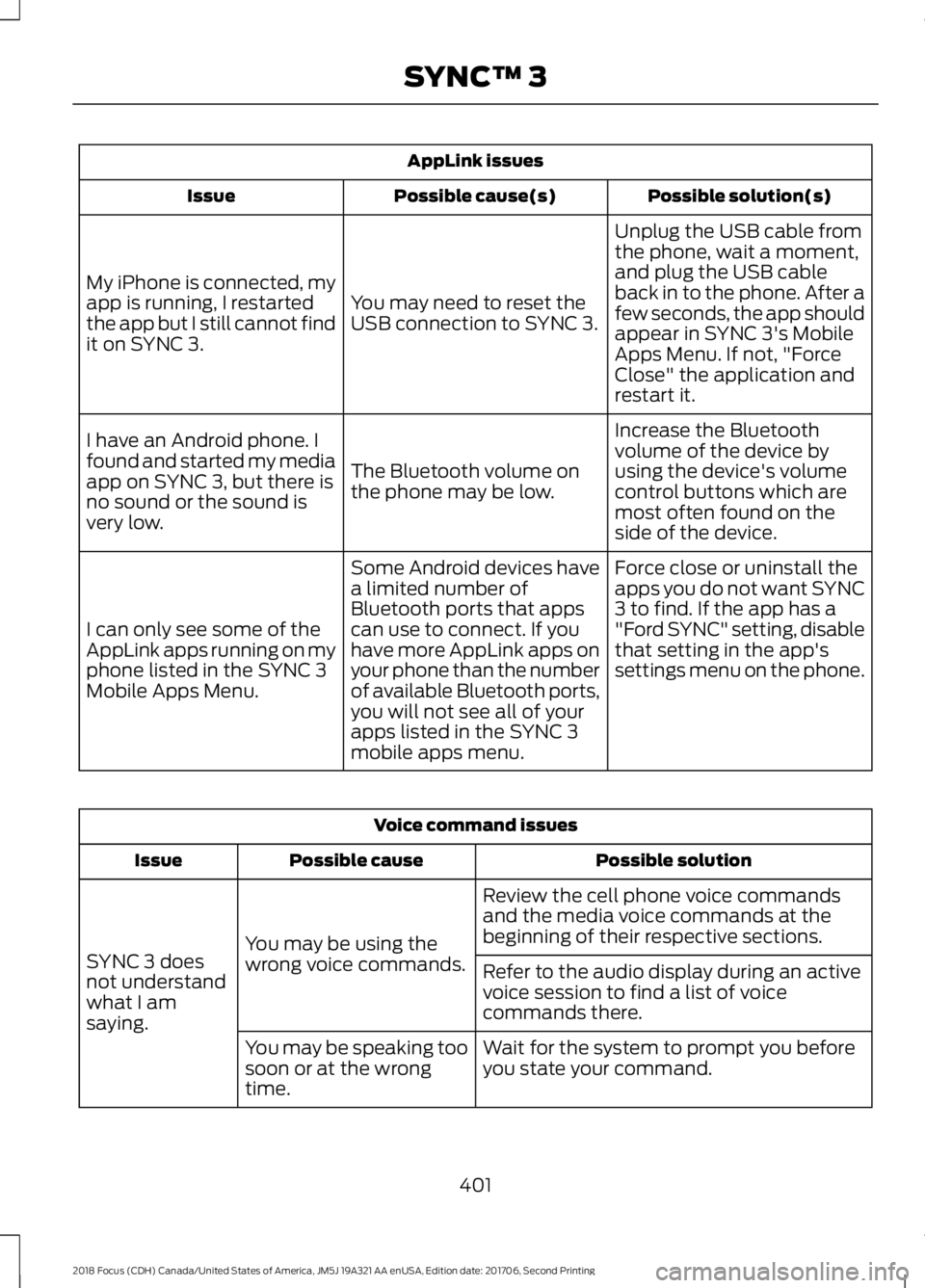
AppLink issues
Possible solution(s)Possible cause(s)Issue
Unplug the USB cable fromthe phone, wait a moment,and plug the USB cableback in to the phone. After afew seconds, the app shouldappear in SYNC 3's MobileApps Menu. If not, "ForceClose" the application andrestart it.
You may need to reset theUSB connection to SYNC 3.
My iPhone is connected, myapp is running, I restartedthe app but I still cannot findit on SYNC 3.
Increase the Bluetoothvolume of the device byusing the device's volumecontrol buttons which aremost often found on theside of the device.
The Bluetooth volume onthe phone may be low.
I have an Android phone. Ifound and started my mediaapp on SYNC 3, but there isno sound or the sound isvery low.
Force close or uninstall theapps you do not want SYNC3 to find. If the app has a"Ford SYNC" setting, disablethat setting in the app'ssettings menu on the phone.
Some Android devices havea limited number ofBluetooth ports that appscan use to connect. If youhave more AppLink apps onyour phone than the numberof available Bluetooth ports,you will not see all of yourapps listed in the SYNC 3mobile apps menu.
I can only see some of theAppLink apps running on myphone listed in the SYNC 3Mobile Apps Menu.
Voice command issues
Possible solutionPossible causeIssue
Review the cell phone voice commandsand the media voice commands at thebeginning of their respective sections.You may be using thewrong voice commands.SYNC 3 doesnot understandwhat I amsaying.
Refer to the audio display during an activevoice session to find a list of voicecommands there.
Wait for the system to prompt you beforeyou state your command.You may be speaking toosoon or at the wrongtime.
4012018 Focus (CDH) Canada/United States of America, JM5J 19A321 AA enUSA, Edition date: 201706, Second PrintingSYNC™ 3
Page 407 of 473

General
Possible solutionPossible causeIssue
SYNC 3 only supports four languages in asingle module for text display, voice controland voice prompts. The country where youbought your vehicle dictates the fourlanguages based on the most popularlanguages spoken. If the selected languageis not available, SYNC 3 remains in thecurrent active language.
SYNC 3 does not supportthe currently selectedlanguage for the instru-ment cluster and inform-ation and entertainmentdisplay.
The languageselected for theinstrumentcluster andinformation andentertainmentdisplay does notmatch theSYNC 3SYNC 3 offers several new voice controlfeatures for a wide range of languages.Dialing a contact name directly from thephonebook without pre-recording (forexample,“call John Smith”) or selecting atrack, artist, album, genre or playlist directlyfrom your media player (for example, "playartist Madonna").
language(phone, USB,Bluetoothaudio, voicecontrol andvoice prompts).
SYNC 3 System Reset
The system has a System Reset feature that can be performed if the function of a SYNC3 feature is lost. This reset is intended to restore functionality and will not erase anyinformation previously stored in the system (such as paired devices, phonebook, callhistory, text messages, or user settings). To perform a System Reset, press and holdthe Seek Up (>>|) button while pressing and holding the Radio Power button. Afterapproximately 5 seconds the screen will go black. Allow 1-2 minutes for the systemreset to complete. You may then resume using the SYNC 3 system.
For additional assistance with SYNC 3troubleshooting please call or visit the FordWebsite.
Ford Support
United States: 1-800-392-3673Customer Relation-ship CenterCanada: 1-800-565-3673
owner.ford.comWebsitewww.syncmyride.cawww.syncmaroute.ca
4042018 Focus (CDH) Canada/United States of America, JM5J 19A321 AA enUSA, Edition date: 201706, Second PrintingSYNC™ 3
Page 435 of 473
UPGRADES AND RECOVERY MEDIA:If the SOFTWARE is provided by FORDMOTOR COMPANY separate from theDEVICES on media such as a ROM chip,CD ROM disk(s) or via web download orother means, and is labeled "For UpgradePurposes Only" or "For Recovery PurposesOnly" you may install one (1) copy of suchSOFTWARE onto the DEVICES as areplacement copy for the existingSOFTWARE, and use it in accordance withthis EULA, including any additional EULAterms accompanying the upgradeSOFTWARE.
INTELLECTUAL PROPERTY RIGHTS:All title and intellectual property rights inand to the SOFTWARE (including but notlimited to any images, photographs,animations, video, audio, music, text and"applets" incorporated into theSOFTWARE), the accompanying printedmaterials, and any copies of theSOFTWARE, are owned by FORD MOTORCOMPANY, or its affiliates or suppliers. TheSOFTWARE is licensed, not sold. You maynot copy the printed materialsaccompanying the SOFTWARE. All titleand intellectual property rights in and tothe content which may be accessedthrough use of the SOFTWARE is theproperty of the respective content ownerand may be protected by applicablecopyright or other intellectual propertylaws and treaties. This EULA grants you norights to use such content outside itsintended use. All rights not specificallygranted under this EULA are reserved byFORD MOTOR COMPANY, its affiliates,and third party software and serviceproviders and suppliers. Use of any on-lineservices which may be accessed throughthe SOFTWARE may be governed by therespective terms of use relating to suchservices. If this SOFTWARE containsdocumentation that is provided only inelectronic form, you may print one copy ofsuch electronic documentation.
EXPORT RESTRICTIONS: Youacknowledge that the SOFTWARE issubject to U.S. and European Union exportjurisdiction. You agree to comply with allapplicable international and national lawsthat apply to the SOFTWARE, includingthe U.S. Export Administration Regulations,as well as end-user, end-use anddestination restrictions issued by U.S. andother governments.
TRADEMARKS: This EULA does not grantyou any rights in connection with anytrademarks or service marks of FORDMOTOR COMPANY, its affiliates, and thirdparty software and service providers.
PRODUCT SUPPORT: Please refer toFORD MOTOR COMPANY instructionsprovided in the documentation for theDEVICES product support, such as thevehicle owner guide.
Should you have any questions concerningthis EULA, or if you desire to contact FORDMOTOR COMPANY for any other reason,please refer to the address provided in thedocumentation for the DEVICES.
No Liability for Certain Damages:EXCEPT AS PROHIBITED BY LAW, FORDMOTOR COMPANY, ANY THIRD PARTYSOFTWARE OR SERVICES SUPPLIERS,AND THEIR AFFILIATES SHALL HAVE NOLIABILITY FOR ANY INDIRECT, SPECIAL,CONSEQUENTIAL OR INCIDENTALDAMAGES ARISING FROM OR INCONNECTION WITH THE USE ORPERFORMANCE OF THE SOFTWARE. THISLIMITATION SHALL APPLY EVEN IF ANYREMEDY FAILS OF ITS ESSENTIALPURPOSE. THERE ARE NO WARRANTIESOTHER THAN THOSE THAT MAY BEEXPRESSLY PROVIDED FOR YOUR NEWVEHICLE.
4322018 Focus (CDH) Canada/United States of America, JM5J 19A321 AA enUSA, Edition date: 201706, Second PrintingAppendices
Page 441 of 473
2. Account Information
You agree: (a) when registering theTeleNav Software, to provide TeleNav withtrue, accurate, current, and completeinformation about yourself, and (b) toinform TeleNav promptly of any changesto such information, and to keep it true,accurate, current and complete.
3. Software License
•Subject to your compliance with theterms of this Agreement, TeleNavhereby grants to you a personal,non-exclusive, non-transferable license(except as expressly permitted belowin connection with your permanenttransfer of the TeleNav Softwarelicense), without the right tosublicense, to use the TeleNavSoftware (in object code form only) inorder to access and use the TeleNavSoftware. This license shall terminateupon any termination or expiration ofthis Agreement. You agree that you willuse the TeleNav Software only for yourpersonal business or leisure purposes,and not to provide commercialnavigation services to other parties.
3.1 License Limitations
•(a) reverse engineer, decompile,disassemble, translate, modify, alteror otherwise change the TeleNavSoftware or any part thereof; (b)attempt to derive the source code,audio library or structure of theTeleNav Software without the priorexpress written consent of TeleNav;(c) remove from the TeleNavSoftware, or alter, any of TeleNav's orits suppliers' trademarks, trade names,logos, patent or copyright notices, orother notices or markings; (d)
distribute, sublicense or otherwisetransfer the TeleNav Software toothers, except as part of yourpermanent transfer of the TeleNavSoftware; or (e) use the TeleNavSoftware in any manner that
I. infringes the intellectual property orproprietary rights, rights of publicity orprivacy or other rights of any party,
ii. violates any law, statute, ordinance orregulation, including but not limited to lawsand regulations related to spamming,privacy, consumer and child protection,obscenity or defamation, or
iii. is harmful, threatening, abusive,harassing, tortuous, defamatory, vulgar,obscene, libelous, or otherwiseobjectionable; and (f) lease, rent out, orotherwise permit unauthorized access bythird parties to the TeleNav Softwarewithout advanced written permission ofTeleNav.
4. Disclaimers
•To the fullest extent permissiblepursuant to applicable law, in no eventwill TeleNav, its licensors and suppliers,or agents or employees of any of theforegoing, be liable for any decisionmade or action taken by you or anyoneelse in reliance on the informationprovided by the TeleNav Software.TeleNav also does not warrant theaccuracy of the map or other data usedfor the TeleNav Software. Such datamay not always reflect reality due to,among other things, road closures,construction, weather, new roads andother changing conditions. You areresponsible for the entire risk arisingout of your use of the TeleNavSoftware. For example but withoutlimitation, you agree not to rely on theTeleNav Software for criticalnavigation in areas where thewell-being or survival of you or others
4382018 Focus (CDH) Canada/United States of America, JM5J 19A321 AA enUSA, Edition date: 201706, Second PrintingAppendices
Page 462 of 473

A
A/CSee: Climate Control.........................................104About This Manual...........................................7ABSSee: Brakes............................................................147ABS driving hintsSee: Hints on Driving With Anti-LockBrakes................................................................148Accessories...................................................405Exterior style.......................................................405Interior style.........................................................405Lifestyle.................................................................405Peace of mind....................................................405AccessoriesSee: Replacement PartsRecommendation............................................12Active Park Assist.........................................155Deactivating the Active Park AssistFeature...............................................................157Parallel Parking Assist......................................155Troubleshooting the System..........................158Adjusting the Headlamps.........................225Horizontal Aim Adjustment...........................226Vertical Aim Adjustment.................................225Adjusting the Steering Wheel.....................71Airbag Disposal..............................................46Air ConditioningSee: Climate Control.........................................104Air FilterSee: Changing the Engine Air Filter.............234AlarmSee: Anti-Theft Alarm........................................70Ambient Lighting.............................................81Anti-Theft Alarm............................................70Arming the Alarm.................................................70Disarming the Alarm...........................................70Appendices....................................................427Apps..................................................................376...................................................................................376SiriusXM Traffic and Travel Link...................378Audible Warnings and Indicators............90Fasten Safety Belt................................................91Headlamps On Warning Chime.....................90Key in Ignition Warning Chime........................90Keyless Warning Alert........................................90Low Fuel Minder....................................................91
Parking Brake On Warning Chime...................91Audio Control....................................................71Seek, Next or Previous........................................72Audio System.................................................281General Information..........................................281Audio Unit - Vehicles With: SatelliteRadio.............................................................289Audio Unit - Vehicles With: Sony AudioSystem..........................................................285Menu Structure..................................................286Audio Unit - Vehicles With: SYNC.........282Autolamps.........................................................77Windshield Wiper ActivatedHeadlamps.........................................................77Automatic Climate Control......................105Dual Zone Temperature Control...................107Single Zone Temperature Control...............106Temperature Control........................................106Automatic High Beam Control..................79Automatic High Beam Indicator....................80Overriding the System.......................................80Switching the System On and Off.................79Automatic Transmission............................142Automatic Transmission AdaptiveLearning............................................................146Brake-Shift Interlock.........................................145If Your Vehicle Gets Stuck In Mud orSnow..................................................................146SelectShift Automatic™Transmission...................................................143Understanding the Positions of YourAutomatic Transmission.............................143Automatic Transmission FluidCheck..............................................................221Auto-Start-Stop............................................127Limitations of Use..............................................128Switching the System On and Off...............128Using Auto-Start-Stop with a ManualTransmission....................................................127Using Auto-Start-Stop with an AutomaticTransmission....................................................127Auxiliary Power Points..................................11712 Volt DC Power Point.......................................117Location...................................................................117
4592018 Focus (CDH) Canada/United States of America, JM5J 19A321 AA enUSA, Edition date: 201706, Second PrintingIndex