2018 FORD FOCUS battery
[x] Cancel search: batteryPage 399 of 473
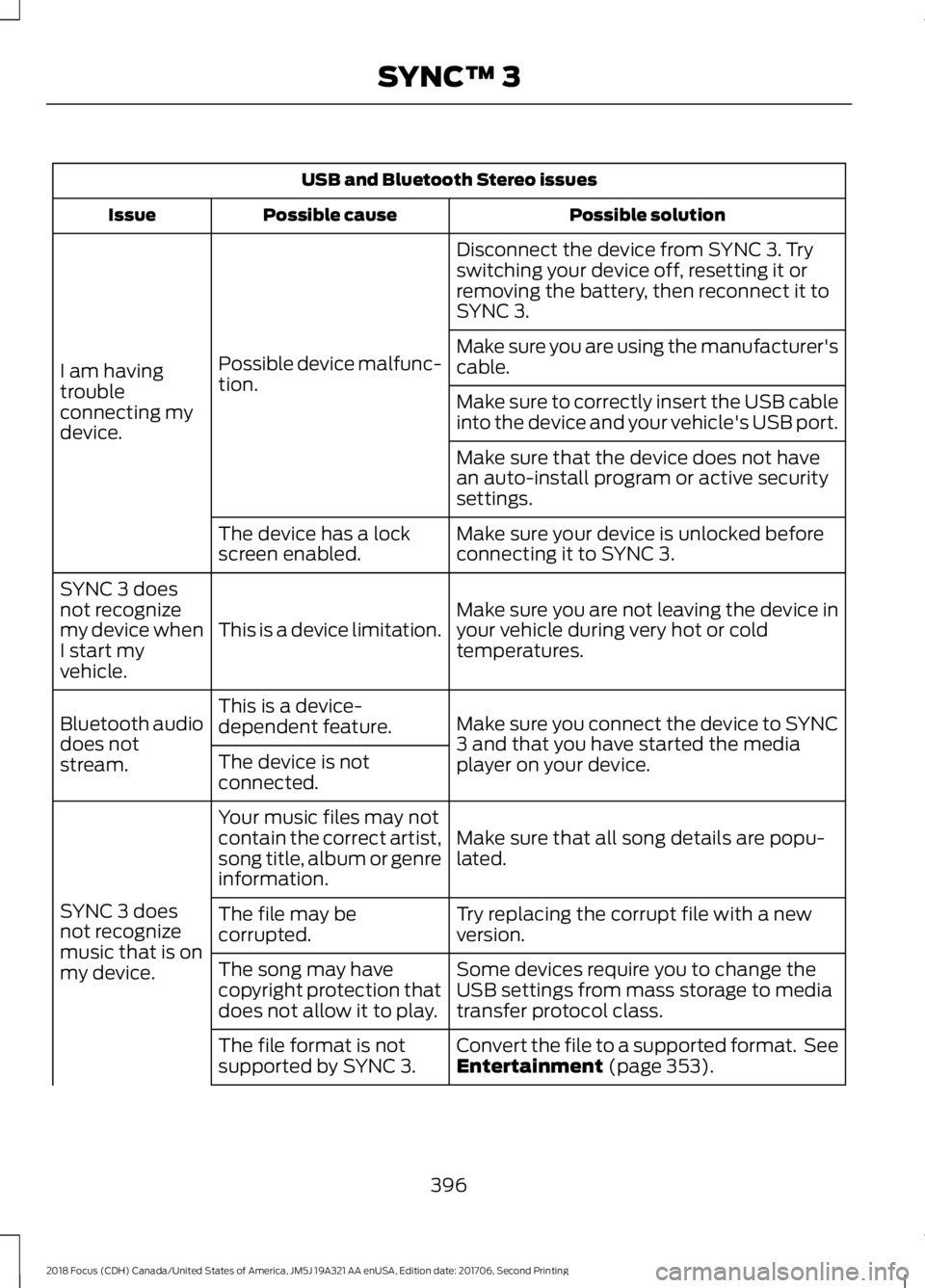
USB and Bluetooth Stereo issues
Possible solutionPossible causeIssue
Disconnect the device from SYNC 3. Tryswitching your device off, resetting it orremoving the battery, then reconnect it toSYNC 3.
Possible device malfunc-tion.I am havingtroubleconnecting mydevice.
Make sure you are using the manufacturer'scable.
Make sure to correctly insert the USB cableinto the device and your vehicle's USB port.
Make sure that the device does not havean auto-install program or active securitysettings.
Make sure your device is unlocked beforeconnecting it to SYNC 3.The device has a lockscreen enabled.
Make sure you are not leaving the device inyour vehicle during very hot or coldtemperatures.This is a device limitation.
SYNC 3 doesnot recognizemy device whenI start myvehicle.
Make sure you connect the device to SYNC3 and that you have started the mediaplayer on your device.
This is a device-dependent feature.Bluetooth audiodoes notstream.The device is notconnected.
Make sure that all song details are popu-lated.
Your music files may notcontain the correct artist,song title, album or genreinformation.
SYNC 3 doesnot recognizemusic that is onmy device.
Try replacing the corrupt file with a newversion.The file may becorrupted.
Some devices require you to change theUSB settings from mass storage to mediatransfer protocol class.
The song may havecopyright protection thatdoes not allow it to play.
Convert the file to a supported format. SeeEntertainment (page 353).The file format is notsupported by SYNC 3.
3962018 Focus (CDH) Canada/United States of America, JM5J 19A321 AA enUSA, Edition date: 201706, Second PrintingSYNC™ 3
Page 400 of 473
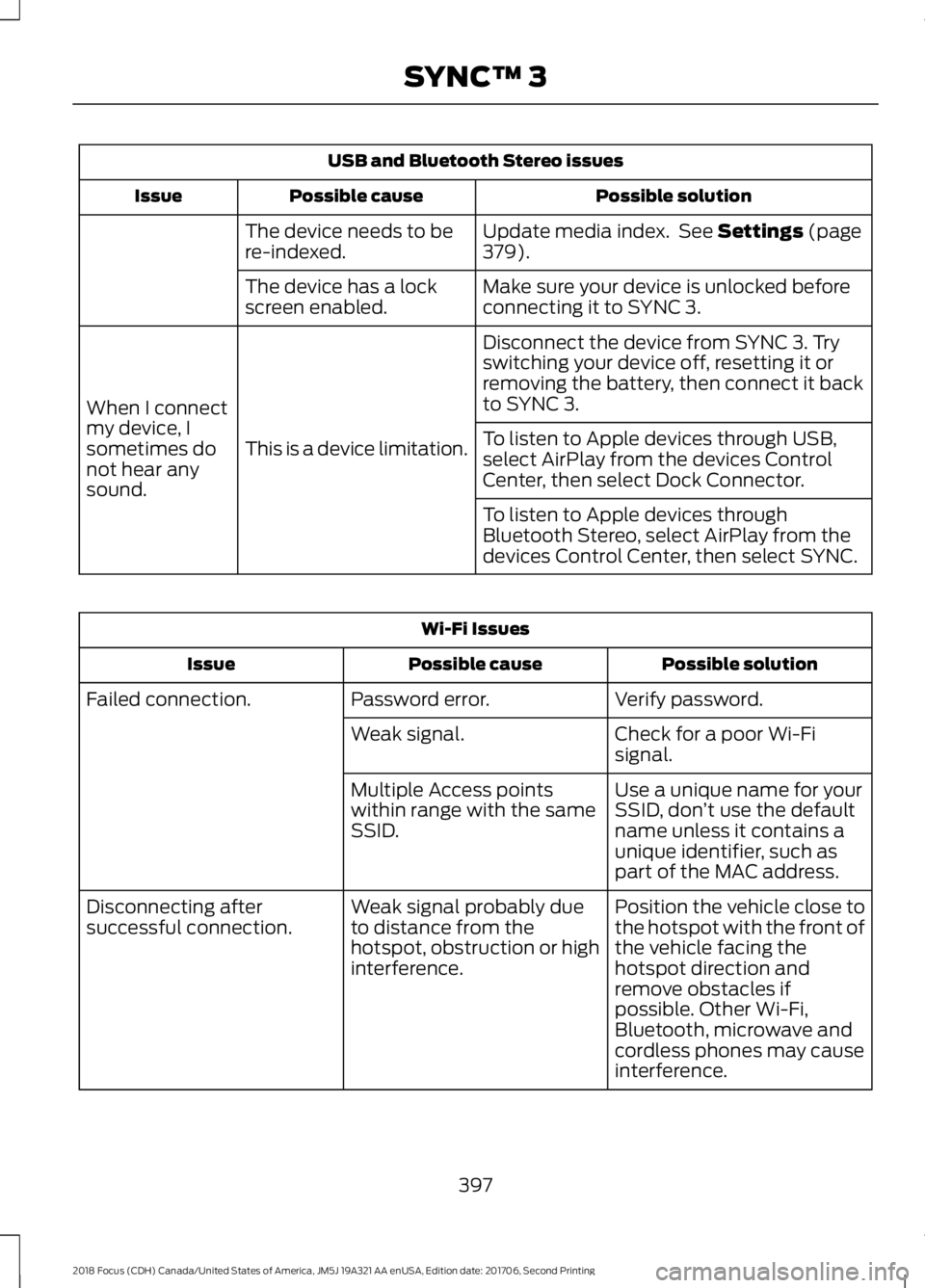
USB and Bluetooth Stereo issues
Possible solutionPossible causeIssue
Update media index. See Settings (page379).The device needs to bere-indexed.
Make sure your device is unlocked beforeconnecting it to SYNC 3.The device has a lockscreen enabled.
Disconnect the device from SYNC 3. Tryswitching your device off, resetting it orremoving the battery, then connect it backto SYNC 3.
This is a device limitation.
When I connectmy device, Isometimes donot hear anysound.
To listen to Apple devices through USB,select AirPlay from the devices ControlCenter, then select Dock Connector.
To listen to Apple devices throughBluetooth Stereo, select AirPlay from thedevices Control Center, then select SYNC.
Wi-Fi Issues
Possible solutionPossible causeIssue
Verify password.Password error.Failed connection.
Check for a poor Wi-Fisignal.Weak signal.
Use a unique name for yourSSID, don’t use the defaultname unless it contains aunique identifier, such aspart of the MAC address.
Multiple Access pointswithin range with the sameSSID.
Position the vehicle close tothe hotspot with the front ofthe vehicle facing thehotspot direction andremove obstacles ifpossible. Other Wi-Fi,Bluetooth, microwave andcordless phones may causeinterference.
Weak signal probably dueto distance from thehotspot, obstruction or highinterference.
Disconnecting aftersuccessful connection.
3972018 Focus (CDH) Canada/United States of America, JM5J 19A321 AA enUSA, Edition date: 201706, Second PrintingSYNC™ 3
Page 409 of 473
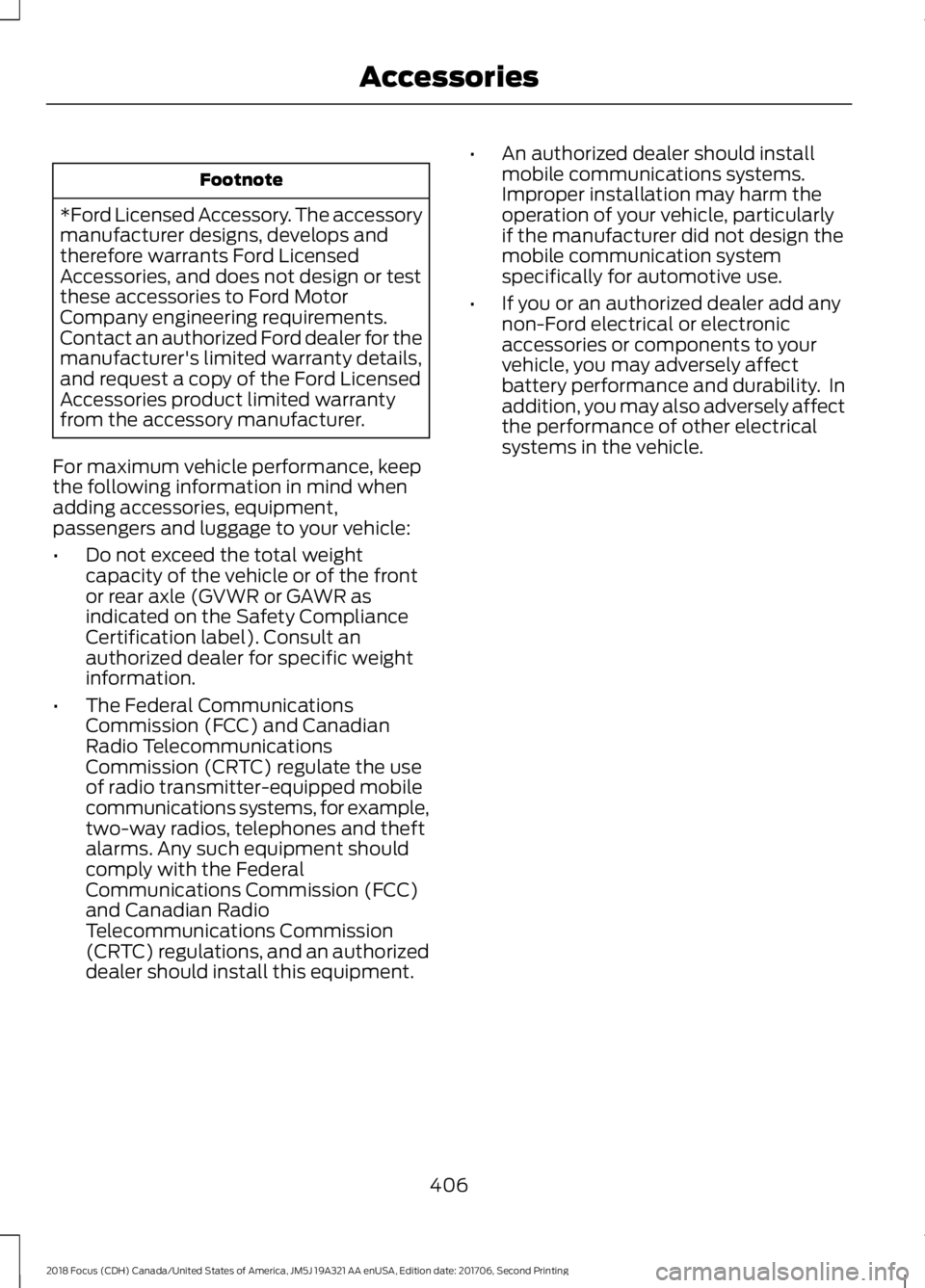
Footnote
*Ford Licensed Accessory. The accessorymanufacturer designs, develops andtherefore warrants Ford LicensedAccessories, and does not design or testthese accessories to Ford MotorCompany engineering requirements.Contact an authorized Ford dealer for themanufacturer's limited warranty details,and request a copy of the Ford LicensedAccessories product limited warrantyfrom the accessory manufacturer.
For maximum vehicle performance, keepthe following information in mind whenadding accessories, equipment,passengers and luggage to your vehicle:
•Do not exceed the total weightcapacity of the vehicle or of the frontor rear axle (GVWR or GAWR asindicated on the Safety ComplianceCertification label). Consult anauthorized dealer for specific weightinformation.
•The Federal CommunicationsCommission (FCC) and CanadianRadio TelecommunicationsCommission (CRTC) regulate the useof radio transmitter-equipped mobilecommunications systems, for example,two-way radios, telephones and theftalarms. Any such equipment shouldcomply with the FederalCommunications Commission (FCC)and Canadian RadioTelecommunications Commission(CRTC) regulations, and an authorizeddealer should install this equipment.
•An authorized dealer should installmobile communications systems.Improper installation may harm theoperation of your vehicle, particularlyif the manufacturer did not design themobile communication systemspecifically for automotive use.
•If you or an authorized dealer add anynon-Ford electrical or electronicaccessories or components to yourvehicle, you may adversely affectbattery performance and durability. Inaddition, you may also adversely affectthe performance of other electricalsystems in the vehicle.
4062018 Focus (CDH) Canada/United States of America, JM5J 19A321 AA enUSA, Edition date: 201706, Second PrintingAccessories
Page 410 of 473
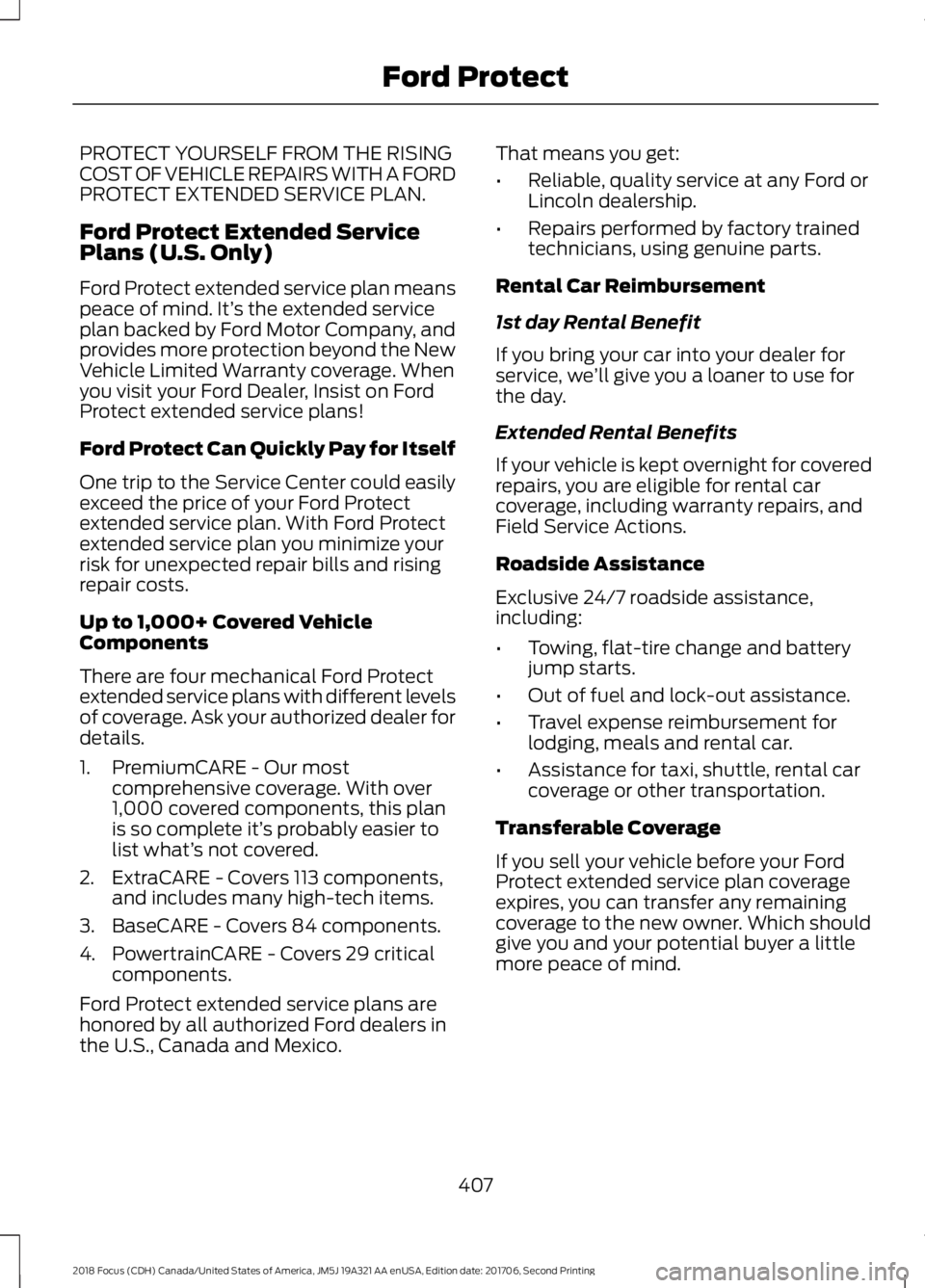
PROTECT YOURSELF FROM THE RISINGCOST OF VEHICLE REPAIRS WITH A FORDPROTECT EXTENDED SERVICE PLAN.
Ford Protect Extended ServicePlans (U.S. Only)
Ford Protect extended service plan meanspeace of mind. It’s the extended serviceplan backed by Ford Motor Company, andprovides more protection beyond the NewVehicle Limited Warranty coverage. Whenyou visit your Ford Dealer, Insist on FordProtect extended service plans!
Ford Protect Can Quickly Pay for Itself
One trip to the Service Center could easilyexceed the price of your Ford Protectextended service plan. With Ford Protectextended service plan you minimize yourrisk for unexpected repair bills and risingrepair costs.
Up to 1,000+ Covered VehicleComponents
There are four mechanical Ford Protectextended service plans with different levelsof coverage. Ask your authorized dealer fordetails.
1.PremiumCARE - Our mostcomprehensive coverage. With over1,000 covered components, this planis so complete it’s probably easier tolist what’s not covered.
2.ExtraCARE - Covers 113 components,and includes many high-tech items.
3.BaseCARE - Covers 84 components.
4.PowertrainCARE - Covers 29 criticalcomponents.
Ford Protect extended service plans arehonored by all authorized Ford dealers inthe U.S., Canada and Mexico.
That means you get:
•Reliable, quality service at any Ford orLincoln dealership.
•Repairs performed by factory trainedtechnicians, using genuine parts.
Rental Car Reimbursement
1st day Rental Benefit
If you bring your car into your dealer forservice, we’ll give you a loaner to use forthe day.
Extended Rental Benefits
If your vehicle is kept overnight for coveredrepairs, you are eligible for rental carcoverage, including warranty repairs, andField Service Actions.
Roadside Assistance
Exclusive 24/7 roadside assistance,including:
•Towing, flat-tire change and batteryjump starts.
•Out of fuel and lock-out assistance.
•Travel expense reimbursement forlodging, meals and rental car.
•Assistance for taxi, shuttle, rental carcoverage or other transportation.
Transferable Coverage
If you sell your vehicle before your FordProtect extended service plan coverageexpires, you can transfer any remainingcoverage to the new owner. Which shouldgive you and your potential buyer a littlemore peace of mind.
4072018 Focus (CDH) Canada/United States of America, JM5J 19A321 AA enUSA, Edition date: 201706, Second PrintingFord Protect
Page 414 of 473

Check Every Month
Windshield washer fluid level.
Fuel and water separator. Drain if necessary (or if indicated by the information display).
Holes and slots in the tail pipe to make sure they are functional and clear of debris.
Check Every Six Months
Battery connections. Clean if necessary.
Body and door drain holes for obstructions. Clean if necessary.
Cooling system fluid level and coolant strength.
Door weatherstrips for wear. Lubricate if necessary.
Hinges, latches and outside locks for proper operation. Lubricate if necessary.
Parking brake for proper operation.
Safety belts and seat latches for wear and function.
Safety warning lamps (brake, ABS, airbag and safety belt) for operation.
Washer spray and wiper operation. Clean or replace blades as necessary.
Multi-Point Inspection
In order to keep your vehicle running right,it is important to have the systems on yourvehicle checked regularly. This can helpidentify potential issues and prevent majorproblems. We recommend having thefollowing multi-point inspection performedat every scheduled maintenance intervalto help make sure your vehicle keepsrunning great.
Multi-Point Inspection
Hazard warning system operationAccessory drive belt(s)
Horn operationBattery performance
Radiator, cooler, heater and air conditioninghosesEngine air filter
4112018 Focus (CDH) Canada/United States of America, JM5J 19A321 AA enUSA, Edition date: 201706, Second PrintingScheduled Maintenance
Page 463 of 473

B
BatterySee: Changing the 12V Battery......................222Blind Spot Information System..............169Switching the System Off and On................170System Errors.......................................................170Using the Blind Spot InformationSystem...............................................................170BLISSee: Blind Spot Information System..........169Body Styling Kits..........................................243Bonnet LockSee: Opening and Closing the Hood............211Booster Seats..................................................24Types of Booster Seats......................................24Brake Fluid Check.........................................221Brakes................................................................147General Information...........................................147Breaking-In.....................................................186Bulb Specification Chart...........................232
C
Cabin Air Filter...............................................109California Proposition 65..............................11Capacities and Specifications - 1.0LEcoBoost™..................................................274Alternative Engine Oil for Extremely ColdClimates............................................................276Capacities.............................................................274Specifications......................................................274Capacities and Specifications -2.0L.................................................................277Alternative Engine Oil for Extremely ColdClimates...........................................................280Capacities..............................................................277Specifications......................................................278Capacities and Specifications...............268Car WashSee: Cleaning the Exterior...............................237Catalytic Converter.......................................137On-Board Diagnostics (OBD-II)...................138Readiness for Inspection and Maintenance(I/M) Testing...................................................138Center Console...............................................118Changing a Bulb...........................................227Front Fog Lamp..................................................229
Headlamp.............................................................227LED Rear Lamps.................................................232Rear Lamps - 4 Door........................................230Rear Lamps - 5 Door..........................................231Replacing Licence Plate and High MountedBrake Lamp Bulbs.........................................232Changing a Fuse..........................................209Fuses......................................................................209Changing a Road Wheel...........................263Dissimilar Spare Wheel and Tire AssemblyInformation.....................................................263Tire Change Procedure....................................264Changing the 12V Battery..........................222Changing the Engine Air Filter.................234Changing the Front Wiper Blades.........223Changing the Windshield WiperBlades................................................................224Service Position..................................................224Changing the Rear Wiper Blades...........224Checking MyKey System Status..............58MyKey Distance....................................................58Number of Admin Keys......................................58Number of MyKeys..............................................58Checking the Wiper Blades......................223Child Restraint and SeatbeltMaintenance.................................................35Child Restraint Positioning.........................26Child Safety.......................................................16General Information.............................................16Child Safety Locks..........................................27Left-Hand Side.....................................................28Right-Hand Side...................................................28Cleaning Leather Seats.............................240Cleaning Products.......................................236Cleaning the Engine....................................238Cleaning the Exterior...................................237Cleaning the Headlamps.................................237Exterior Chrome Parts......................................237Exterior Plastic Parts.........................................237Stripes or Graphics............................................238Underbody...........................................................238Under Hood.........................................................238Cleaning the Instrument Panel andInstrument Cluster Lens........................240Cleaning the Interior...................................239Cleaning the Wheels...................................241Cleaning the Windows and WiperBlades...........................................................239
4602018 Focus (CDH) Canada/United States of America, JM5J 19A321 AA enUSA, Edition date: 201706, Second PrintingIndex
Page 466 of 473
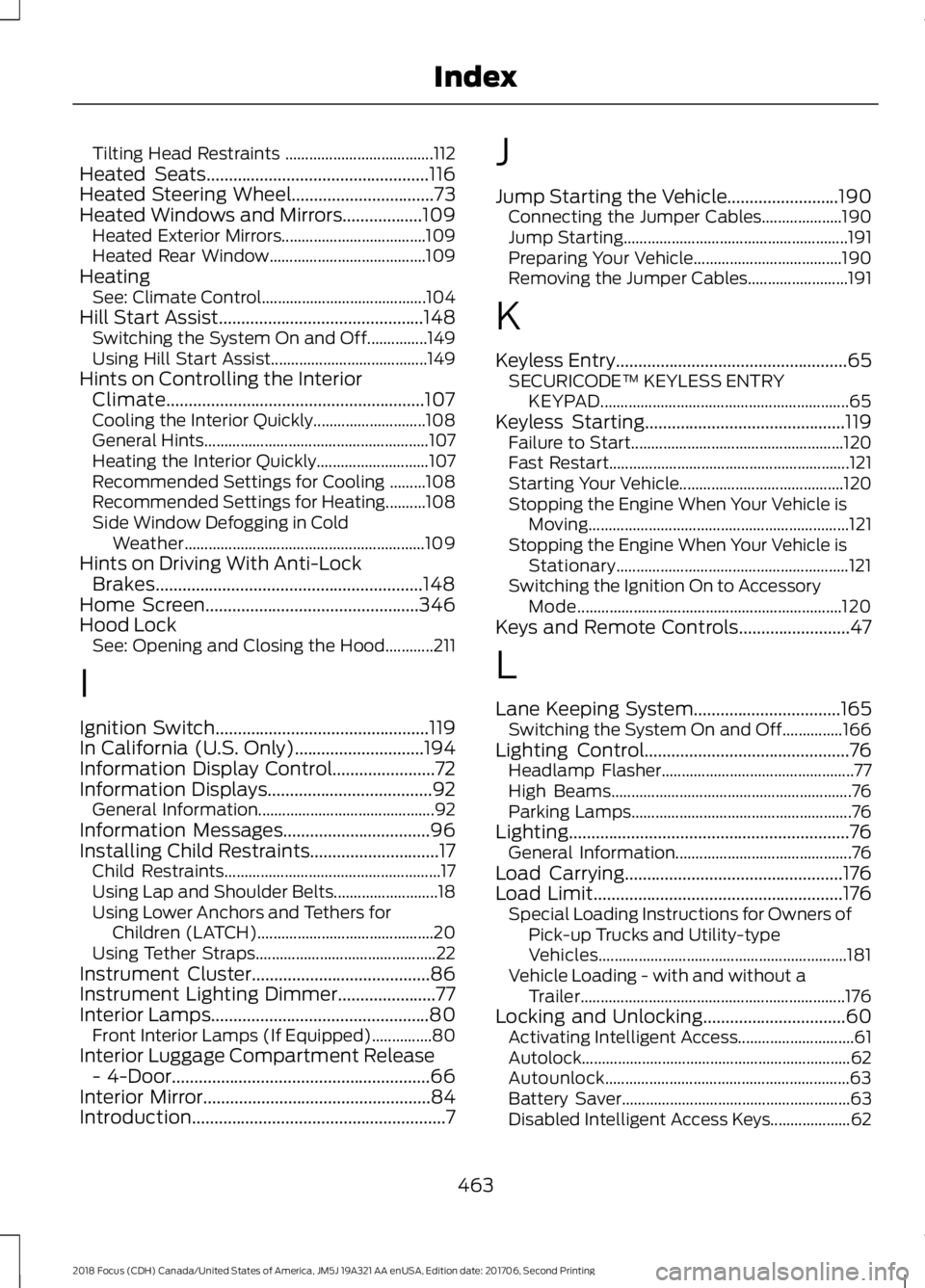
Tilting Head Restraints .....................................112Heated Seats..................................................116Heated Steering Wheel................................73Heated Windows and Mirrors..................109Heated Exterior Mirrors....................................109Heated Rear Window.......................................109HeatingSee: Climate Control.........................................104Hill Start Assist..............................................148Switching the System On and Off...............149Using Hill Start Assist.......................................149Hints on Controlling the InteriorClimate..........................................................107Cooling the Interior Quickly............................108General Hints........................................................107Heating the Interior Quickly............................107Recommended Settings for Cooling .........108Recommended Settings for Heating..........108Side Window Defogging in ColdWeather............................................................109Hints on Driving With Anti-LockBrakes............................................................148Home Screen................................................346Hood LockSee: Opening and Closing the Hood............211
I
Ignition Switch................................................119In California (U.S. Only).............................194Information Display Control.......................72Information Displays.....................................92General Information............................................92Information Messages.................................96Installing Child Restraints.............................17Child Restraints......................................................17Using Lap and Shoulder Belts..........................18Using Lower Anchors and Tethers forChildren (LATCH)............................................20Using Tether Straps.............................................22Instrument Cluster........................................86Instrument Lighting Dimmer......................77Interior Lamps.................................................80Front Interior Lamps (If Equipped)...............80Interior Luggage Compartment Release- 4-Door..........................................................66Interior Mirror...................................................84Introduction.........................................................7
J
Jump Starting the Vehicle.........................190Connecting the Jumper Cables....................190Jump Starting........................................................191Preparing Your Vehicle.....................................190Removing the Jumper Cables.........................191
K
Keyless Entry....................................................65SECURICODE™ KEYLESS ENTRYKEYPAD..............................................................65Keyless Starting.............................................119Failure to Start.....................................................120Fast Restart............................................................121Starting Your Vehicle.........................................120Stopping the Engine When Your Vehicle isMoving.................................................................121Stopping the Engine When Your Vehicle isStationary..........................................................121Switching the Ignition On to AccessoryMode..................................................................120Keys and Remote Controls.........................47
L
Lane Keeping System.................................165Switching the System On and Off...............166Lighting Control..............................................76Headlamp Flasher................................................77High Beams............................................................76Parking Lamps.......................................................76Lighting...............................................................76General Information............................................76Load Carrying.................................................176Load Limit........................................................176Special Loading Instructions for Owners ofPick-up Trucks and Utility-typeVehicles..............................................................181Vehicle Loading - with and without aTrailer..................................................................176Locking and Unlocking................................60Activating Intelligent Access.............................61Autolock...................................................................62Autounlock.............................................................63Battery Saver.........................................................63Disabled Intelligent Access Keys....................62
4632018 Focus (CDH) Canada/United States of America, JM5J 19A321 AA enUSA, Edition date: 201706, Second PrintingIndex
Page 468 of 473
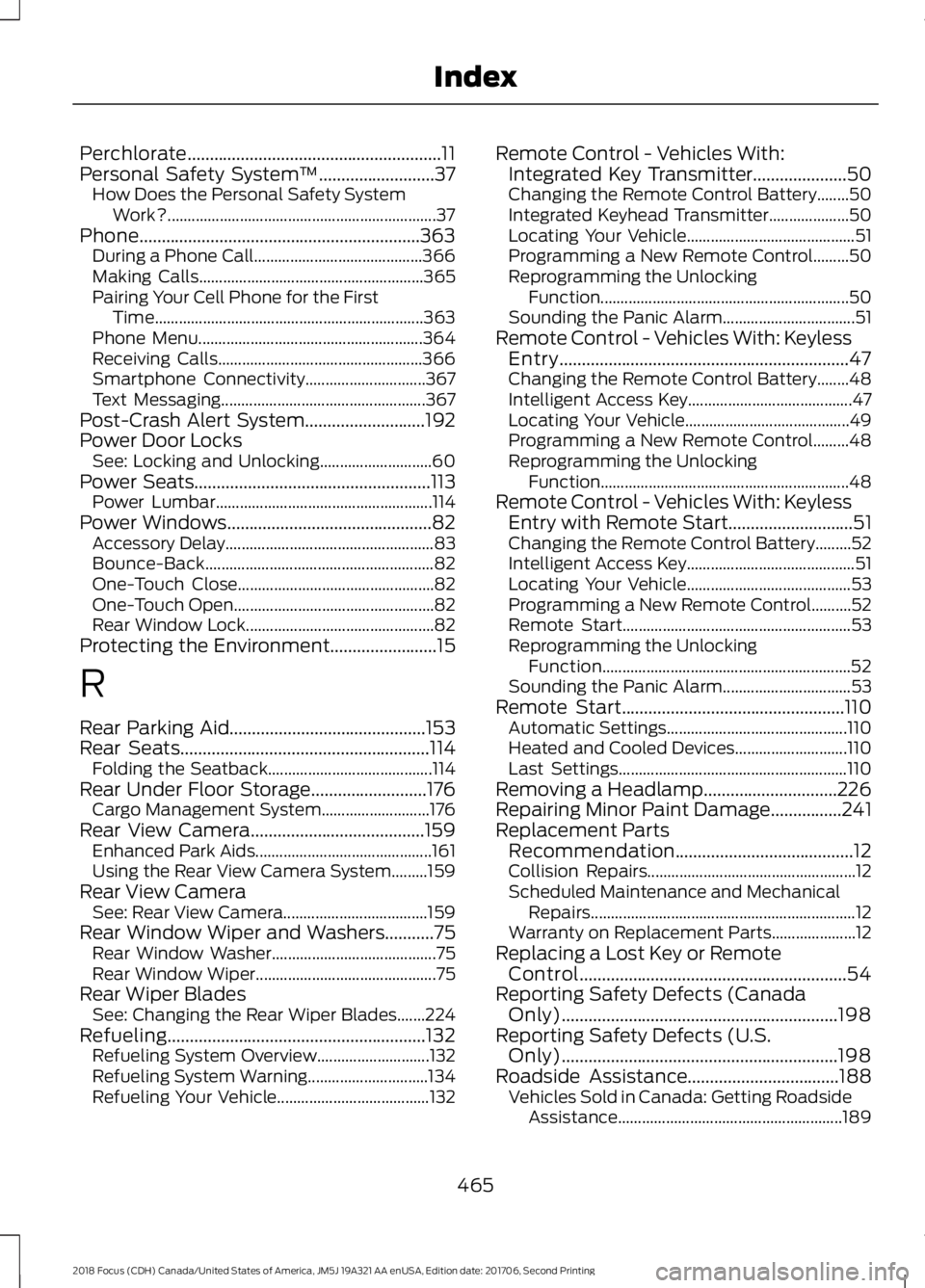
Perchlorate.........................................................11Personal Safety System™..........................37How Does the Personal Safety SystemWork?...................................................................37Phone...............................................................363During a Phone Call..........................................366Making Calls........................................................365Pairing Your Cell Phone for the FirstTime...................................................................363Phone Menu........................................................364Receiving Calls...................................................366Smartphone Connectivity..............................367Text Messaging...................................................367Post-Crash Alert System...........................192Power Door LocksSee: Locking and Unlocking............................60Power Seats.....................................................113Power Lumbar......................................................114Power Windows..............................................82Accessory Delay....................................................83Bounce-Back.........................................................82One-Touch Close.................................................82One-Touch Open..................................................82Rear Window Lock...............................................82Protecting the Environment........................15
R
Rear Parking Aid............................................153Rear Seats........................................................114Folding the Seatback.........................................114Rear Under Floor Storage..........................176Cargo Management System...........................176Rear View Camera.......................................159Enhanced Park Aids............................................161Using the Rear View Camera System.........159Rear View CameraSee: Rear View Camera....................................159Rear Window Wiper and Washers...........75Rear Window Washer.........................................75Rear Window Wiper.............................................75Rear Wiper BladesSee: Changing the Rear Wiper Blades.......224Refueling..........................................................132Refueling System Overview............................132Refueling System Warning..............................134Refueling Your Vehicle......................................132
Remote Control - Vehicles With:Integrated Key Transmitter.....................50Changing the Remote Control Battery........50Integrated Keyhead Transmitter....................50Locating Your Vehicle..........................................51Programming a New Remote Control.........50Reprogramming the UnlockingFunction..............................................................50Sounding the Panic Alarm.................................51Remote Control - Vehicles With: KeylessEntry.................................................................47Changing the Remote Control Battery........48Intelligent Access Key.........................................47Locating Your Vehicle.........................................49Programming a New Remote Control.........48Reprogramming the UnlockingFunction..............................................................48Remote Control - Vehicles With: KeylessEntry with Remote Start............................51Changing the Remote Control Battery.........52Intelligent Access Key..........................................51Locating Your Vehicle.........................................53Programming a New Remote Control..........52Remote Start.........................................................53Reprogramming the UnlockingFunction..............................................................52Sounding the Panic Alarm................................53Remote Start..................................................110Automatic Settings.............................................110Heated and Cooled Devices............................110Last Settings.........................................................110Removing a Headlamp..............................226Repairing Minor Paint Damage................241Replacement PartsRecommendation........................................12Collision Repairs....................................................12Scheduled Maintenance and MechanicalRepairs..................................................................12Warranty on Replacement Parts.....................12Replacing a Lost Key or RemoteControl............................................................54Reporting Safety Defects (CanadaOnly)..............................................................198Reporting Safety Defects (U.S.Only)..............................................................198Roadside Assistance..................................188Vehicles Sold in Canada: Getting RoadsideAssistance........................................................189
4652018 Focus (CDH) Canada/United States of America, JM5J 19A321 AA enUSA, Edition date: 201706, Second PrintingIndex