2018 FORD FOCUS park assist
[x] Cancel search: park assistPage 158 of 473

ACTIVE PARK ASSIST (If Equipped)
Parallel Parking Assist
WARNINGS
You must remain in your vehiclewhen the system turns on. At alltimes, you are responsible forcontrolling your vehicle, supervising thesystem and intervening, if required. Failureto take care may result in the loss ofcontrol of your vehicle, serious personalinjury or death.
The sensors may not detect objectsin heavy rain or other conditions thatcause interference.
Active park assist does not apply thebrakes under any circumstances.
The system is designed to aid thedriver. It is not intended to replaceyour attention and judgment. You arestill responsible to drive with due care andattention.
Note:The Blind Spot Information Systemdoes not detect traffic alongside or behindyour vehicle during an Active Park Assistmaneuver.
The system detects an available parallelparking space and automatically steersyour vehicle into the space (hands-free)while you control the accelerator, gearshiftand brakes. The system visually andaudibly guides you when parking yourvehicle.
If you are uncomfortable with the proximityto any vehicle or object, you may chooseto override the system by grabbing thesteering wheel or by pressing the activepark assist button.
The system may not correctly operate inany of the following conditions:
•You use a spare tire or a tiresignificantly worn more than the othertires.
•One or more tires are improperlyinflated.
•You try to park on a tight curve.
•Something passes between the frontbumper and the parking space. Forexample, a pedestrian or cyclist.
•The edge of the neighboring parkedvehicle is high off the ground. Forexample, a bus, tow truck or flatbedtruck.
•The weather conditions are poor. Forexample, during heavy rain, snow orfog.
Note: Keep the sensors on the bumper orfascia free from snow, ice and largeaccumulations of dirt. Covered sensors canaffect the system's accuracy. Do not cleanthe sensors with sharp objects.
Note:The sensors may not detect objectswith surfaces that absorb ultrasonic wavesor cause ultrasonic interference. Forexample, motorcycle exhaust, truck airbrakes or horns.
Note:Following a change in tire size, thesystem must recalibrate and operation maybe impaired for a short time.
Do not use the system if:
•You have attached a foreign objectclose to the sensors on the front or rearof your vehicle. For example, a bike rackor trailer.
•You attach an overhanging object tothe roof. For example, a surfboard.
•A foreign object damages or obstructsthe front or rear bumper or sidesensors.
•The correct tire size is not in use on yourvehicle. For example, a mini-spare tire.
1552018 Focus (CDH) Canada/United States of America, JM5J 19A321 AA enUSA, Edition date: 201706, Second PrintingParking Aids
Page 159 of 473
Using Active Park Assist - ParallelParking
Press the Active Park Assistbutton once to search for aparallel parking space.
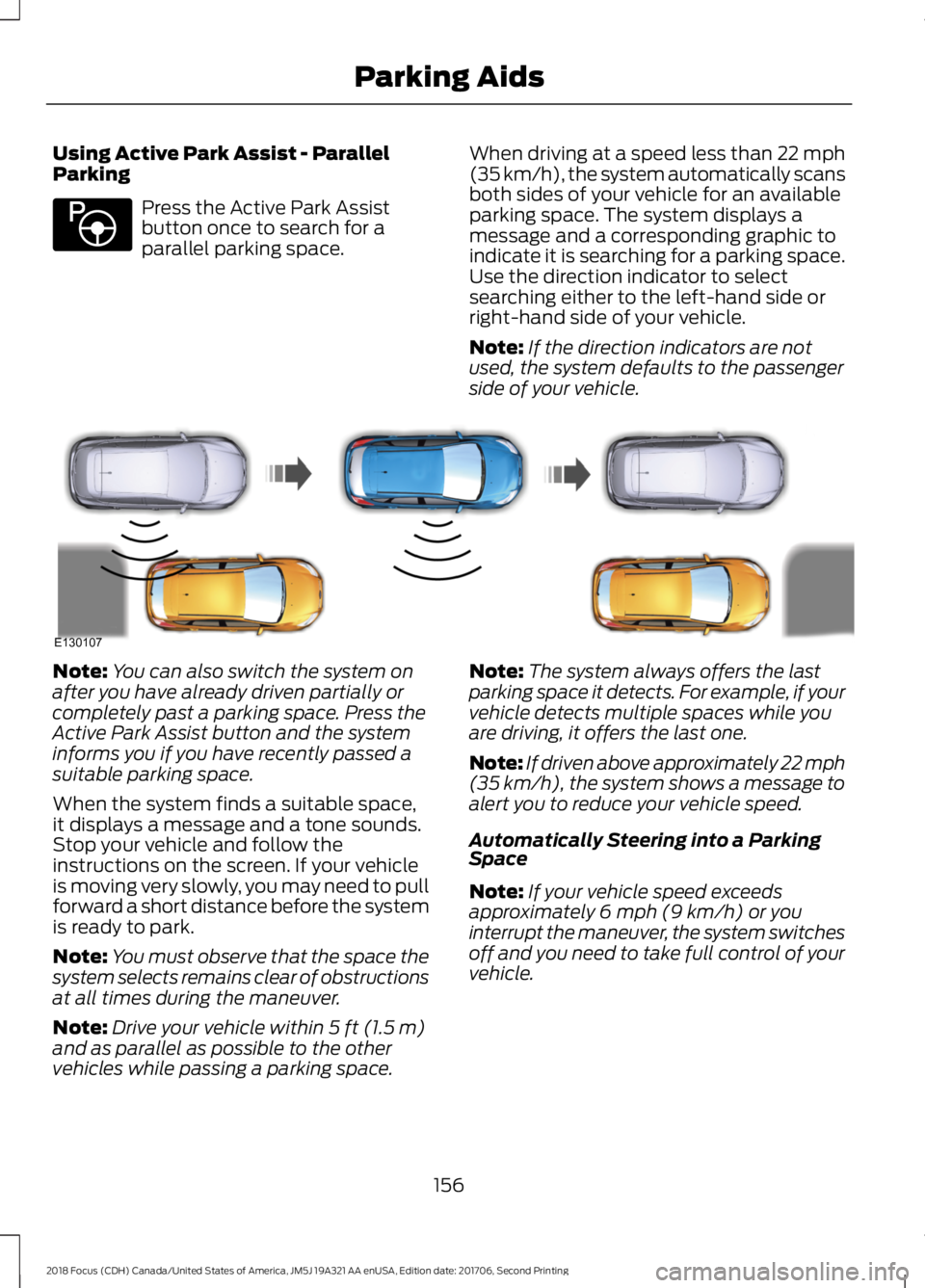
When driving at a speed less than 22 mph(35 km/h), the system automatically scansboth sides of your vehicle for an availableparking space. The system displays amessage and a corresponding graphic toindicate it is searching for a parking space.Use the direction indicator to selectsearching either to the left-hand side orright-hand side of your vehicle.
Note:If the direction indicators are notused, the system defaults to the passengerside of your vehicle.
Note:You can also switch the system onafter you have already driven partially orcompletely past a parking space. Press theActive Park Assist button and the systeminforms you if you have recently passed asuitable parking space.
When the system finds a suitable space,it displays a message and a tone sounds.Stop your vehicle and follow theinstructions on the screen. If your vehicleis moving very slowly, you may need to pullforward a short distance before the systemis ready to park.
Note:You must observe that the space thesystem selects remains clear of obstructionsat all times during the maneuver.
Note:Drive your vehicle within 5 ft (1.5 m)and as parallel as possible to the othervehicles while passing a parking space.
Note:The system always offers the lastparking space it detects. For example, if yourvehicle detects multiple spaces while youare driving, it offers the last one.
Note:If driven above approximately 22 mph(35 km/h), the system shows a message toalert you to reduce your vehicle speed.
Automatically Steering into a ParkingSpace
Note:If your vehicle speed exceedsapproximately 6 mph (9 km/h) or youinterrupt the maneuver, the system switchesoff and you need to take full control of yourvehicle.
1562018 Focus (CDH) Canada/United States of America, JM5J 19A321 AA enUSA, Edition date: 201706, Second PrintingParking AidsE146186 E130107
Page 160 of 473
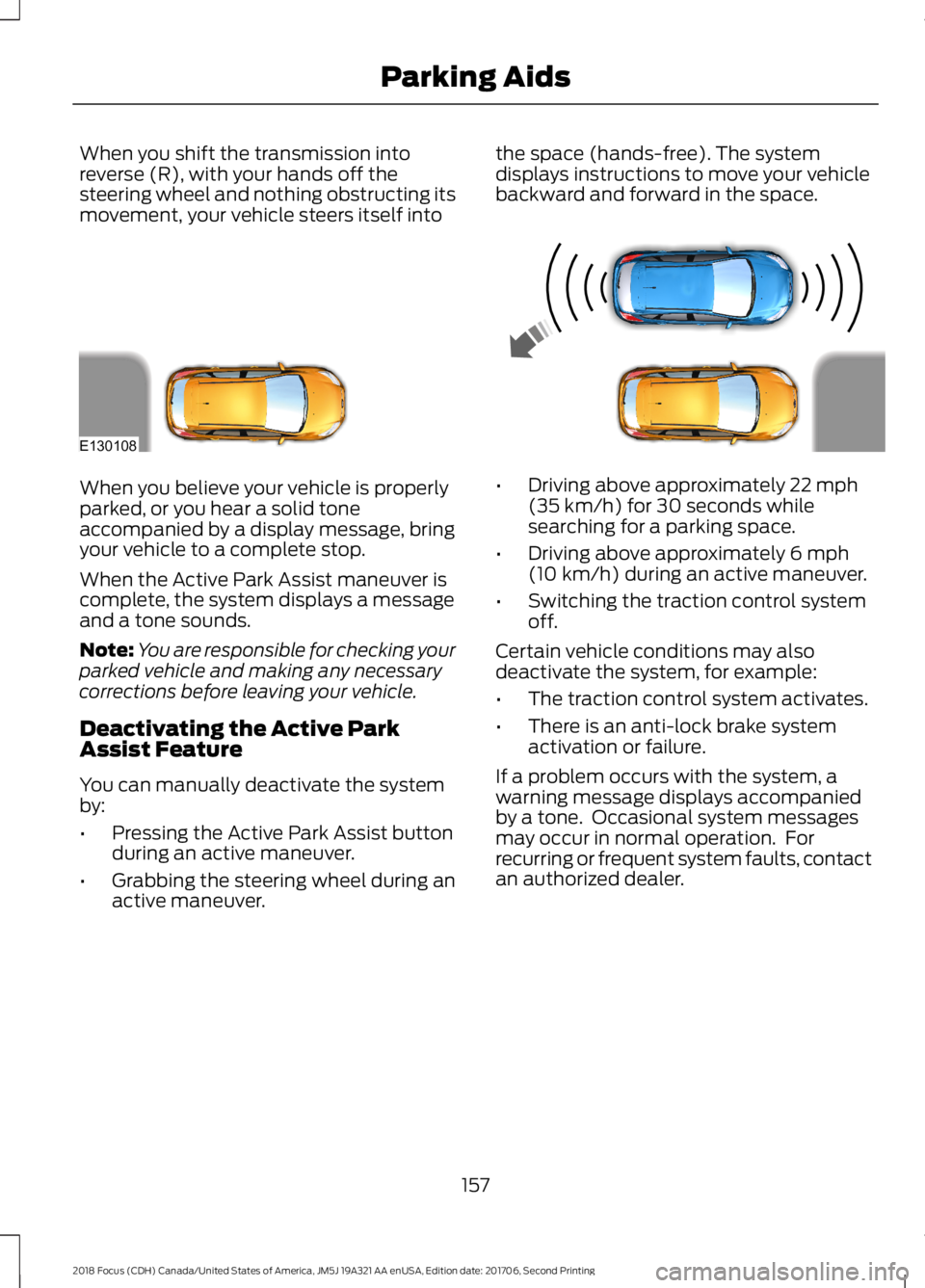
When you shift the transmission intoreverse (R), with your hands off thesteering wheel and nothing obstructing itsmovement, your vehicle steers itself into
the space (hands-free). The systemdisplays instructions to move your vehiclebackward and forward in the space.
When you believe your vehicle is properlyparked, or you hear a solid toneaccompanied by a display message, bringyour vehicle to a complete stop.
When the Active Park Assist maneuver iscomplete, the system displays a messageand a tone sounds.
Note:You are responsible for checking yourparked vehicle and making any necessarycorrections before leaving your vehicle.
Deactivating the Active ParkAssist Feature
You can manually deactivate the systemby:
•Pressing the Active Park Assist buttonduring an active maneuver.
•Grabbing the steering wheel during anactive maneuver.
•Driving above approximately 22 mph(35 km/h) for 30 seconds whilesearching for a parking space.
•Driving above approximately 6 mph(10 km/h) during an active maneuver.
•Switching the traction control systemoff.
Certain vehicle conditions may alsodeactivate the system, for example:
•The traction control system activates.
•There is an anti-lock brake systemactivation or failure.
If a problem occurs with the system, awarning message displays accompaniedby a tone. Occasional system messagesmay occur in normal operation. Forrecurring or frequent system faults, contactan authorized dealer.
1572018 Focus (CDH) Canada/United States of America, JM5J 19A321 AA enUSA, Edition date: 201706, Second PrintingParking AidsE130108
Page 176 of 473

Note:Keep the sensors free from snow, iceand large accumulations of dirt.
Note:Do not cover the sensors with bumperstickers, repair compound or other objects.
Note:Blocked sensors could affect systemperformance.
If the sensors are blocked, a message mayappear in the information display whenyou shift into reverse (R). SeeInformation Messages (page 96).
System Limitations
The system may not correctly operatewhen any of the following occur:
•The sensors are blocked.
•Adjacently parked vehicles or objectsare obstructing the sensors.
•Vehicles approach at speeds greaterthan 37 mph (60 km/h).
•The vehicle speed is greater than 7 mph(12 km/h).
•You reverse out of an angled parkingspace.
System Errors
If the system detects a fault a messagedisplays. See Information Messages(page 96).
Switching the System Off and On
You can temporarily switch the system offusing the information display. SeeInformation Messages (page 96). Whenyou switch system off, a message displays.See Information Messages (page 96).
Note:The system turns on each time youswitch the ignition on and you shift intoreverse (R). If you temporarily switch thesystem off, it turns on the next time youswitch the ignition on.
Note:The system may not correctly operatewhen towing a trailer. For vehicles with atrailer tow module and tow bar approvedby us, the system turns off when you attacha trailer. For vehicles with an aftermarkettrailer tow module or tow bar, werecommend that you switch the system offwhen you attach a trailer.
To permanently switch the system off,contact an authorized dealer.
ECO MODE
This system assists you in driving moreefficiently by constantly monitoringcharacteristics of gear changing,anticipation of traffic conditions andspeeds while driving.
The value of these characteristics isrepresented by petals shown in the display,with five petals being the most efficient.The more efficiently you drive, the betterthe rating, and the better your vehicle'soverall fuel economy.
Note:These efficiency values do not resultin a defined fuel consumption figure. It mightvary as it is not only related to these drivinghabits, but also influenced by many otherfactors such as short trips and cold starts.
Note:Frequent short trips, where the enginedoes not fully warm up, will also increasefuel consumption
The system is accessed using theinformation display control. See GeneralInformation (page 92).
1732018 Focus (CDH) Canada/United States of America, JM5J 19A321 AA enUSA, Edition date: 201706, Second PrintingDriving Aids
Page 194 of 473
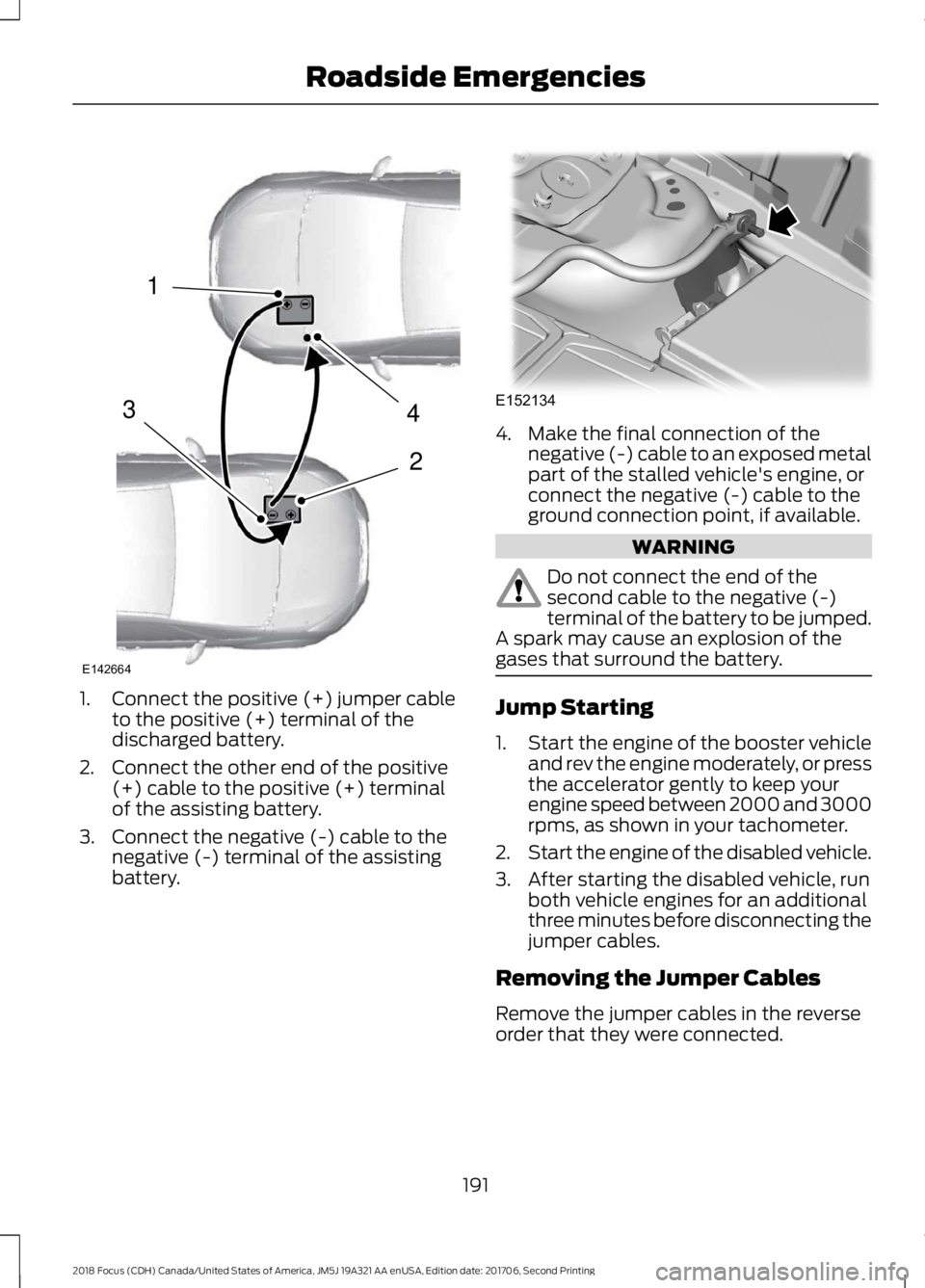
1.Connect the positive (+) jumper cableto the positive (+) terminal of thedischarged battery.
2.Connect the other end of the positive(+) cable to the positive (+) terminalof the assisting battery.
3.Connect the negative (-) cable to thenegative (-) terminal of the assistingbattery.
4.Make the final connection of thenegative (-) cable to an exposed metalpart of the stalled vehicle's engine, orconnect the negative (-) cable to theground connection point, if available.
WARNING
Do not connect the end of thesecond cable to the negative (-)terminal of the battery to be jumped.A spark may cause an explosion of thegases that surround the battery.
Jump Starting
1.Start the engine of the booster vehicleand rev the engine moderately, or pressthe accelerator gently to keep yourengine speed between 2000 and 3000rpms, as shown in your tachometer.
2.Start the engine of the disabled vehicle.
3.After starting the disabled vehicle, runboth vehicle engines for an additionalthree minutes before disconnecting thejumper cables.
Removing the Jumper Cables
Remove the jumper cables in the reverseorder that they were connected.
1912018 Focus (CDH) Canada/United States of America, JM5J 19A321 AA enUSA, Edition date: 201706, Second PrintingRoadside Emergencies4213E142664 E152134
Page 204 of 473

Protected ComponentFuse RatingFuse Location
Transmission control module.25 AF15Cooling fan (1.0L EcoBoost).
Battery monitoring sensor.20 AF16
Not used.-F17
Windshield wipers.20 AF18
Traction control module.5 AF19
Horn.15 AF20
Stoplamp switch.5 AF21
Parking assist control module.5 AF22
A/C compressor relay coils.5 AF23Lighting control.
Right-hand heated windshield element.5 AF24
Exterior mirrors.10 AF25
Transmission control module (2.0L GDI).15 AF26Transmission control module (1.0L Ecoboost).20 A
Air conditioning clutch.15 AF27
Rear view camera.5 AF28
Auto-stop-start.10 AF29
Not used.-F30
Accessory delay.5 AF31
Powertrain control module.10 AF32Crankshaft position sensor.Camshaft position sensor.
Mass air flow sensor (2.0 GDI).15 AF33Ignition coil (1.0L EcoBoost).
Coolant pump.
10 AF34
Evaporative emission canister purge valve.Sound symposer actuator valve.Turbocharger bypass valve.Wastegate control valve.Air conditioning compressor.
2012018 Focus (CDH) Canada/United States of America, JM5J 19A321 AA enUSA, Edition date: 201706, Second PrintingFuses
Page 223 of 473
Your vehicle has limited engine powerwhen in the fail-safe mode, drive yourvehicle with caution. Your vehicle does notmaintain high-speed operation and theengine may operate poorly.
Remember that the engine is capable ofautomatically shutting down to preventengine damage. In this situation:
1.Pull off the road as soon as safelypossible and switch the engine off.
2.If you are a member of a roadsideassistance program, we recommendthat you contact your roadsideassistance service provider.
3.If this is not possible, wait a shortperiod for the engine to cool.
4.Check the coolant level. If the coolantlevel is at or below the minimum mark,add prediluted coolant immediately.
5.When the engine temperature cools,you can re-start the engine. Have yourvehicle checked as soon as possible tominimize engine damage.
Note:Driving your vehicle without repairincreases the chance of engine damage.
Engine Coolant TemperatureManagement (If Equipped)
WARNING
To reduce the risk of crash and injury,be prepared that the vehicle speedmay reduce and the vehicle may notbe able to accelerate with full power untilthe coolant temperature reduces.
If you tow a trailer with your vehicle, theengine may temporarily reach a highertemperature during severe operatingconditions, for example ascending a longor steep grade in high ambienttemperatures.
At this time, you may notice the coolanttemperature gauge moves toward the redzone and a message may appear in theinformation display.
You may notice a reduction in vehiclespeed caused by reduced engine power inorder to manage the engine coolanttemperature. Your vehicle may enter thismode if certain high-temperature andhigh-load conditions take place. Theamount of speed reduction depends onvehicle loading, grade and ambienttemperature. If this occurs, there is noneed to stop your vehicle. You cancontinue to drive.
The air conditioning may automaticallyturn on and off during severe operatingconditions to protect the engine fromoverheating. When the coolanttemperature decreases to the normaloperating temperature, the air conditioningturns on.
If the coolant temperature gauge movesfully into the red zone, or if the coolanttemperature warning or service enginesoon messages appear in your informationdisplay, do the following:
1.Stop your vehicle as soon as it is safeto do so. Fully apply the parking brake,shift into park (P) or neutral (N).
2.Leave the engine running until thecoolant temperature gauge needlereturns to the normal position. Afterseveral minutes, if the temperaturedoes not drop, follow the remainingsteps.
3.Switch the engine off and wait for it tocool. Check the coolant level.
4.If the coolant level is at or below theminimum mark, add prediluted coolantimmediately.
5.If the coolant level is normal, restartthe engine and continue.
2202018 Focus (CDH) Canada/United States of America, JM5J 19A321 AA enUSA, Edition date: 201706, Second PrintingMaintenance
Page 345 of 473

•Do not attempt to service or repair thesystem. Have an authorized dealercheck your vehicle.
•Do not operate playing devices if thepower cords or cables are broken, splitor damaged. Place cords and cablesout of the way, so they do not interferewith the operation of pedals, seats,compartments or safe driving abilities.
•Do not leave playing devices in yourvehicle during extreme conditions as itcould cause them damage. See yourdevice's user guide for furtherinformation.
•For your safety, some SYNC 3 functionsare speed-dependent. Their use islimited to when your vehicle is travelingat speeds under 3 mph (5 km/h). Makesure that you review your device'smanual before using it with SYNC 3.
Speed-restricted Features
Some features of this system may be toodifficult to use while your vehicle is movingso they are restricted from use unless yourvehicle is stationary.
•Screens crowded with information,such as Point of Interest reviews andratings, SiriusXM Traffic and Travel Linksports scores, movie times or skiconditions.
•Any action that requires you to use akeyboard is restricted, such as enteringa navigation destination or editinginformation.
•All lists are limited so the user can viewfewer entries (such as phone contactsor recent phone call entries).
See the following chart for more specificexamples.
Restricted features
Pairing a Bluetooth phone.Cellular Phone
Browsing of list entries is limited for phone contacts andrecent phone calls.
Editing the keypad code.System Functionality
Enabling Valet Mode.
Editing settings while the rear view camera or active parkassist are active.
Editing Wi-Fi settings.Wi-Fi
Editing the list of wireless networks.
Connecting to a new Wi-Fi network.
Viewing received text messages.Text Messages
Using the keyboard to enter a destination.Navigation
Adding or editing Navigation Favorites entries or AvoidAreas.
3422018 Focus (CDH) Canada/United States of America, JM5J 19A321 AA enUSA, Edition date: 201706, Second PrintingSYNC™ 3