2018 FORD FOCUS ELECTRIC instrument panel
[x] Cancel search: instrument panelPage 190 of 375
CLEANING THE INSTRUMENT
PANEL AND INSTRUMENT
CLUSTER LENS
WARNING
Do not use chemical solvents or
strong detergents when cleaning the
steering wheel or instrument panel
to avoid contamination of the airbag
system. Note:
Follow the same procedure as
cleaning leather seats for cleaning leather
instrument panels and leather interior trim
surfaces. See Cleaning Leather Seats
(page 187).
Clean the instrument panel and cluster
lens with a clean, damp and soft cloth,
then use a clean, dry and soft cloth to dry
these areas.
• Avoid cleaners or polishes that increase
the gloss of the upper portion of the
instrument panel. The dull finish in this
area helps protect you from
undesirable windshield reflection.
• Do not use any household cleaning
products or glass cleaners as these
may damage the finish of the
instrument panel, interior trim and
cluster lens.
• Wash or wipe your hands clean if you
have been in contact with certain
products such as insect repellent and
suntan lotion to avoid possible damage
to the interior painted surfaces.
• Do not allow air fresheners and hand
sanitizers to spill onto interior surfaces.
If a spill occurs, wipe off immediately.
Your warranty may not cover these
damages.
If a staining liquid like coffee or juice has
been spilled on the instrument panel or on
interior trim surfaces: 1. Wipe up spilled liquid using a clean,
soft cloth as quickly as possible.
2. Use Motorcraft Premium Leather and Vinyl Cleaner or a commercially
available leather cleaning product for
automotive interiors. Test any cleaner
or stain remover on an inconspicuous
area.
3. Alternatively, wipe the surface with a clean, soft cloth and a mild soap and
water solution. Dry the area with a
clean, soft cloth.
4. If necessary, apply more soap and water solution or cleaning product to
a clean, soft cloth and press it onto the
soiled area. Allow this to set at room
temperature for 30 minutes.
5. Remove the soaked cloth, then with a clean, damp cloth, use a rubbing
motion for 60 seconds on the soiled
area.
6. Dry the area with a clean, soft cloth.
CLEANING LEATHER SEATS
(If
Equipped)
Note: Follow the same procedure as
cleaning leather seats for cleaning leather
instrument panels and leather interior trim
surfaces.
For routine cleaning, wipe the surface with
a soft, damp cloth and a mild soap and
water solution. Dry the area with a clean,
soft cloth.
For cleaning and removing stains such as
dye transfer, use Motorcraft Premium
Leather and Vinyl Cleaner or a
commercially available leather cleaning
product for automotive interiors.
Note: Test any cleaner or stain remover on
an inconspicuous area.
187
2018 Focus (CDH) Battery Electric Vehicle (BEV), Canada/United States of America, JM5J 19A321 RA enUSA, Edition date: 201706, First Printing Vehicle Care
Page 197 of 375
5. Remove the warning sticker found on
the canister and place it on the top of
the instrument panel or the center of
the dash.
6. Start the vehicle and leave the engine running so the compressor does not
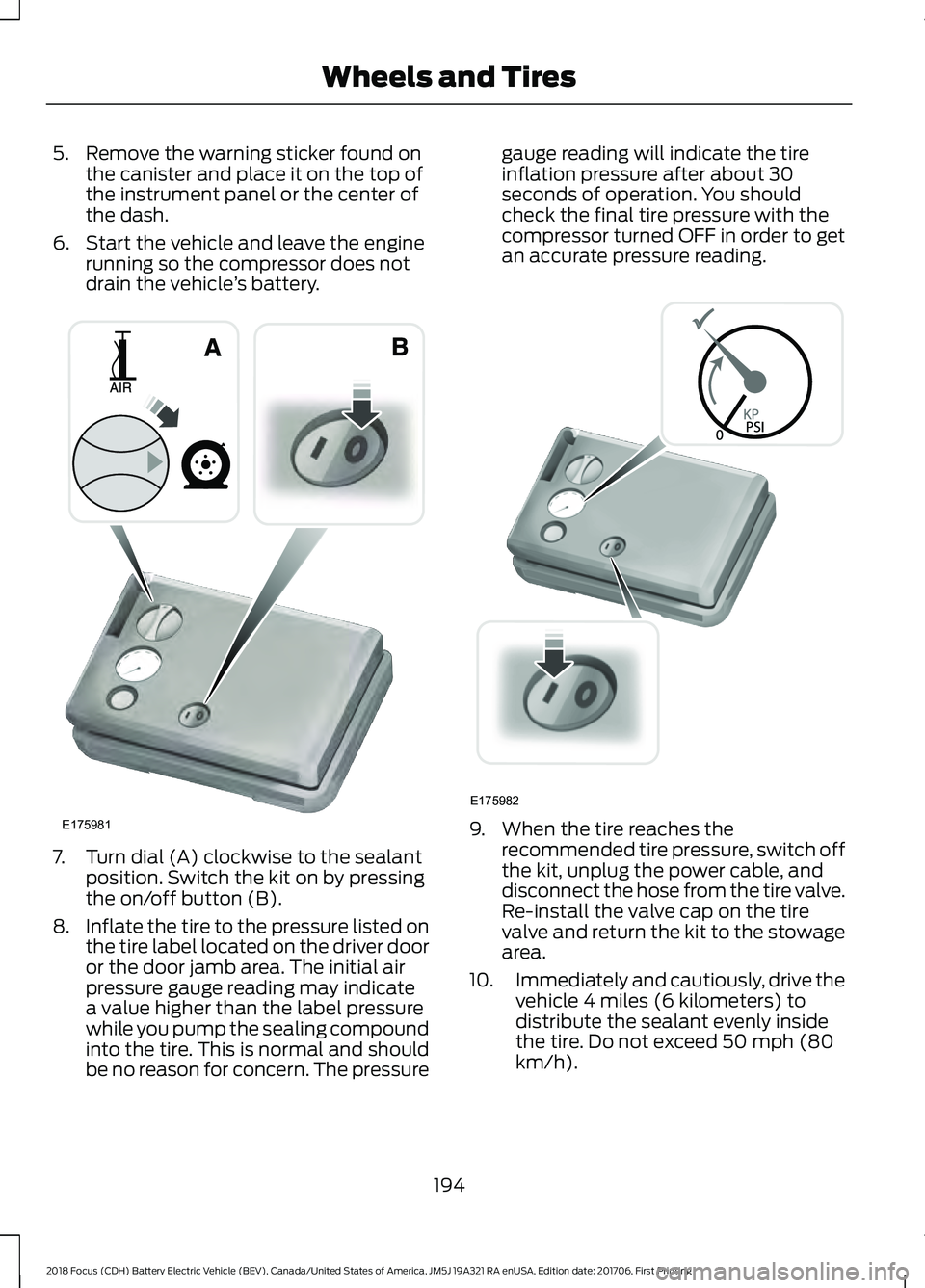
drain the vehicle ’s battery. 7. Turn dial (A) clockwise to the sealant
position. Switch the kit on by pressing
the on/off button (B).
8. Inflate the tire to the pressure listed on
the tire label located on the driver door
or the door jamb area. The initial air
pressure gauge reading may indicate
a value higher than the label pressure
while you pump the sealing compound
into the tire. This is normal and should
be no reason for concern. The pressure gauge reading will indicate the tire
inflation pressure after about 30
seconds of operation. You should
check the final tire pressure with the
compressor turned OFF in order to get
an accurate pressure reading.
9. When the tire reaches the
recommended tire pressure, switch off
the kit, unplug the power cable, and
disconnect the hose from the tire valve.
Re-install the valve cap on the tire
valve and return the kit to the stowage
area.
10. Immediately and cautiously, drive the
vehicle 4 miles (6 kilometers) to
distribute the sealant evenly inside
the tire. Do not exceed 50 mph (80
km/h).
194
2018 Focus (CDH) Battery Electric Vehicle (BEV), Canada/United States of America, JM5J 19A321 RA enUSA, Edition date: 201706, First Printing Wheels and TiresE175981 E175982
Page 222 of 375
VEHICLE IDENTIFICATION
NUMBER
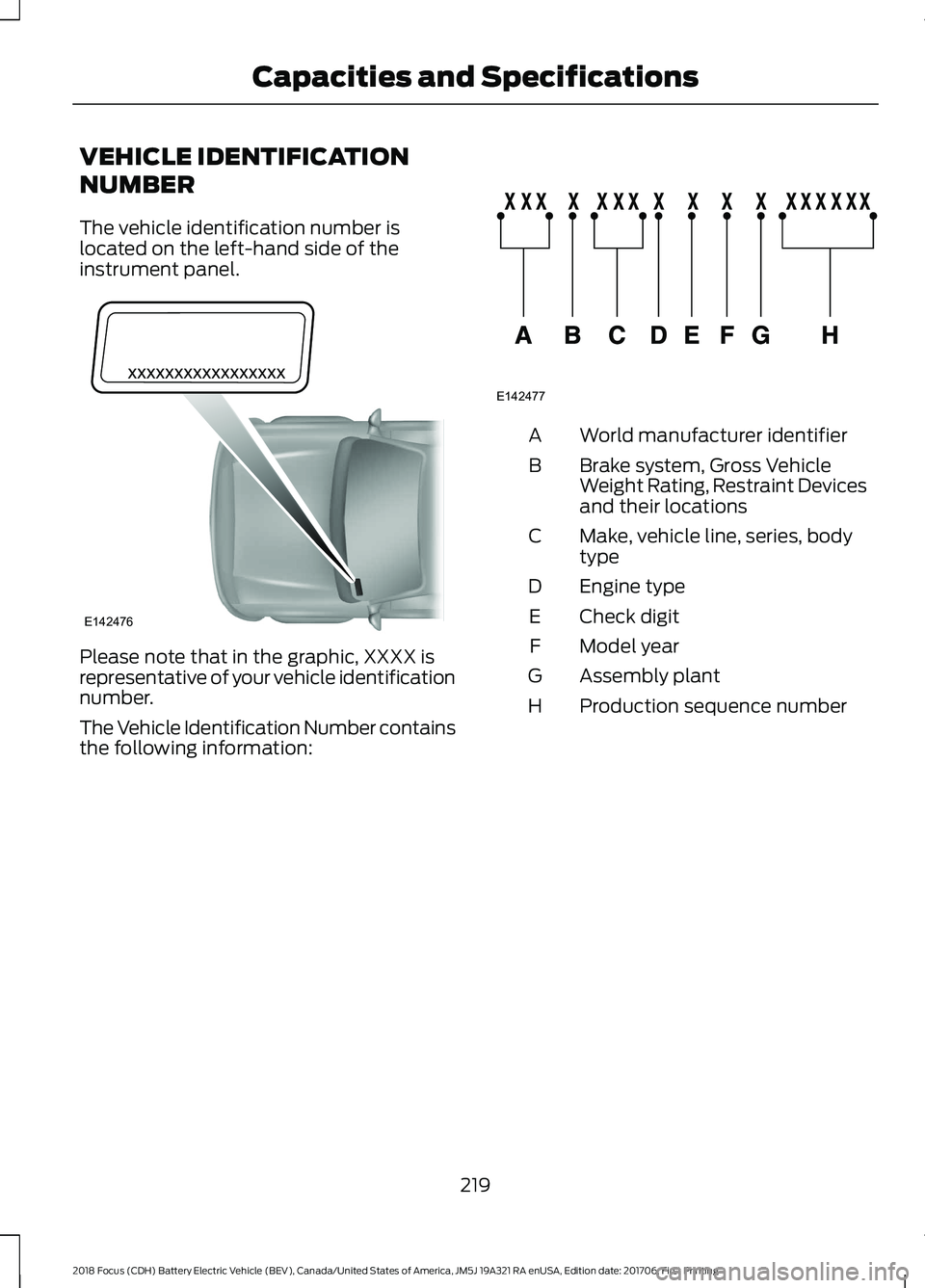
The vehicle identification number is
located on the left-hand side of the
instrument panel.
Please note that in the graphic, XXXX is
representative of your vehicle identification
number.
The Vehicle Identification Number contains
the following information: World manufacturer identifier
A
Brake system, Gross Vehicle
Weight Rating, Restraint Devices
and their locations
B
Make, vehicle line, series, body
type
C
Engine type
D
Check digit
E
Model year
F
Assembly plant
G
Production sequence number
H
219
2018 Focus (CDH) Battery Electric Vehicle (BEV), Canada/United States of America, JM5J 19A321 RA enUSA, Edition date: 201706, First Printing Capacities and SpecificationsE142476 E142477
Page 229 of 375
MEDIA HUB (If Equipped)
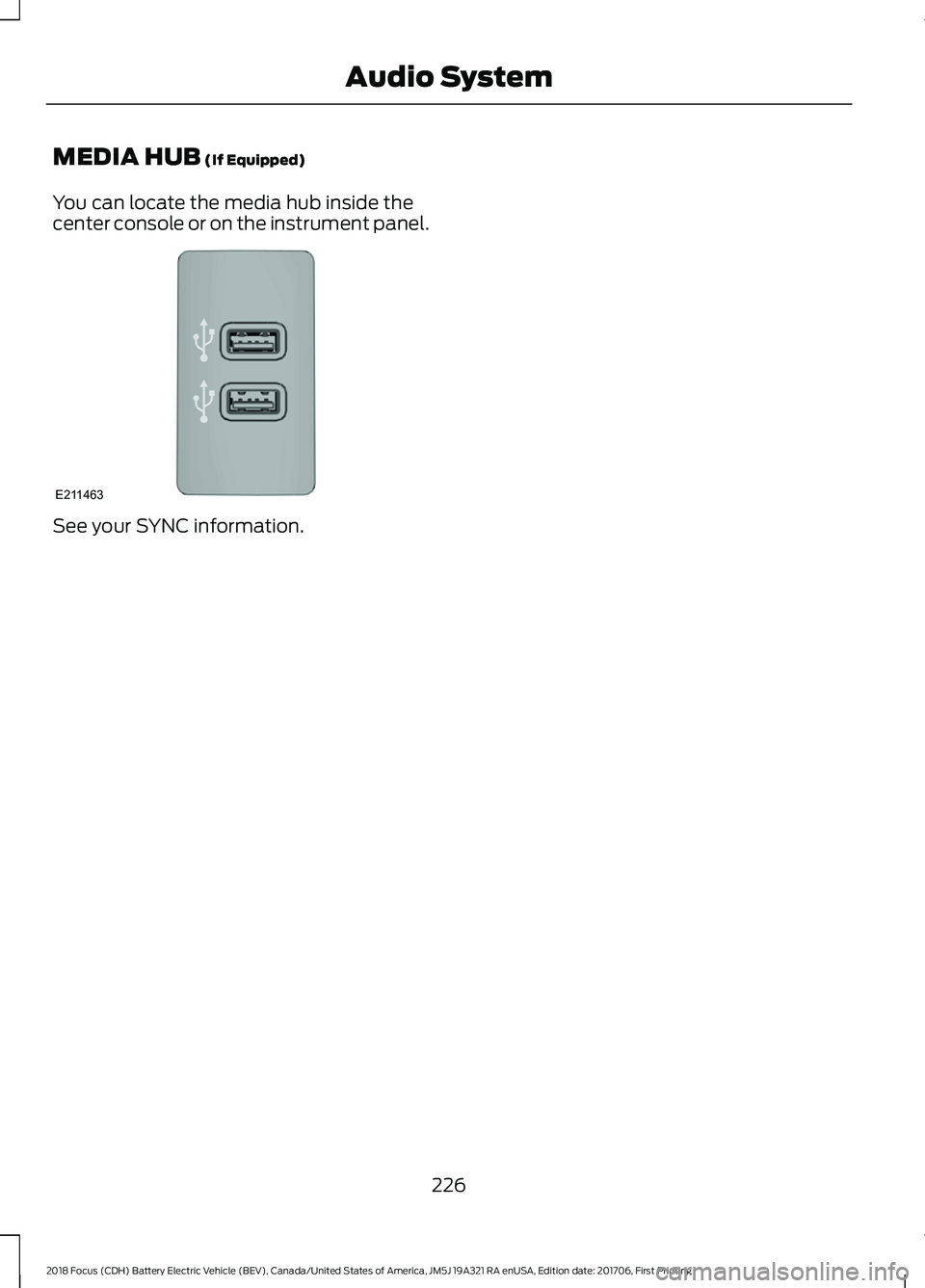
You can locate the media hub inside the
center console or on the instrument panel. See your SYNC information.
226
2018 Focus (CDH) Battery Electric Vehicle (BEV), Canada/United States of America, JM5J 19A321 RA enUSA, Edition date: 201706, First Printing Audio SystemE211463
Page 234 of 375
Cleaning the Touchscreen
You can remove fingerprints with a dry,
clean, soft cloth.
If dirt or fingerprints are still on the screen,
apply a small amount of alcohol to the
cloth and try to clean it again.
Note:
Do not use detergent or any type of
solvent to clean the touchscreen.
Note: Do not pour or spray alcohol onto the
touchscreen.
Using Voice Recognition
Using voice commands allows you to keep
your hands on the wheel and eyes on the
road. The system provides feedback
through audible tones, prompts, questions
and spoken confirmations depending on
the situation and the chosen level of
interaction (voice settings).
The system also asks short questions
(confirmation prompts) when it is not sure
of your request or when there are multiple
possible responses to your request.
When using voice commands, words and
icons may appear in the status bar
indicating the status of the voice command
session. See Using Voice Recognition
(page 239).
Using the Steering Wheel Controls
Depending on your vehicle and option
package, you can use different controls on
your steering wheel to interact with the
touchscreen system in different ways.
VOL:
Control the volume of audio output.
Mute:
Mute the audio output.
Voice:
Press to start a voice session. Press
again to stop the voice prompt and
immediately begin speaking. Press and
hold to end a voice session. SEEK NEXT:
•
While in radio mode, press to seek
between memory presets.
• While in USB, Bluetooth Audio or CD
mode, press to seek between songs or
press and hold to fast seek.
SEEK PREVIOUS:
• While in radio mode, press to seek
between memory presets.
• While in USB, Bluetooth Audio or CD
mode, press to seek between songs or
press and hold to fast seek.
PHONE ACCEPT:
Press to answer a call
or switch between calls.
PHONE REJECT:
Press to end a call or
reject an incoming call.
Note: On some models, SEEK NEXT
may
be combined with PHONE REJECT and
SEEK PREVIOUS may be combined with
PHONE ACCEPT.
M:
Touch the control repeatedly to switch
between media sources (modes).
See
Steering Wheel (page 61).
Using Your Bezel Controls
Depending on your vehicle and option
package, you may also have these controls
on your instrument panel:
• Power:
Switch the audio system on
and off.
• VOL:
Control the volume of playing
audio.
• Seek
and Tune: se as you normally
would in audio modes.
• Eject:
Eject a CD from the audio
system.
• SOURCE
or MEDIA: Press repeatedly
to advance through available media
modes.
231
2018 Focus (CDH) Battery Electric Vehicle (BEV), Canada/United States of America, JM5J 19A321 RA enUSA, Edition date: 201706, First Printing SYNC™ 3
Page 257 of 375
Function
Button
Composers
This button allows you to choose a specific
letter to view within the category you are
browsing.
A-Z Jump
If available, this allows you to browse the
folders and files on your USB device.
Explore Device
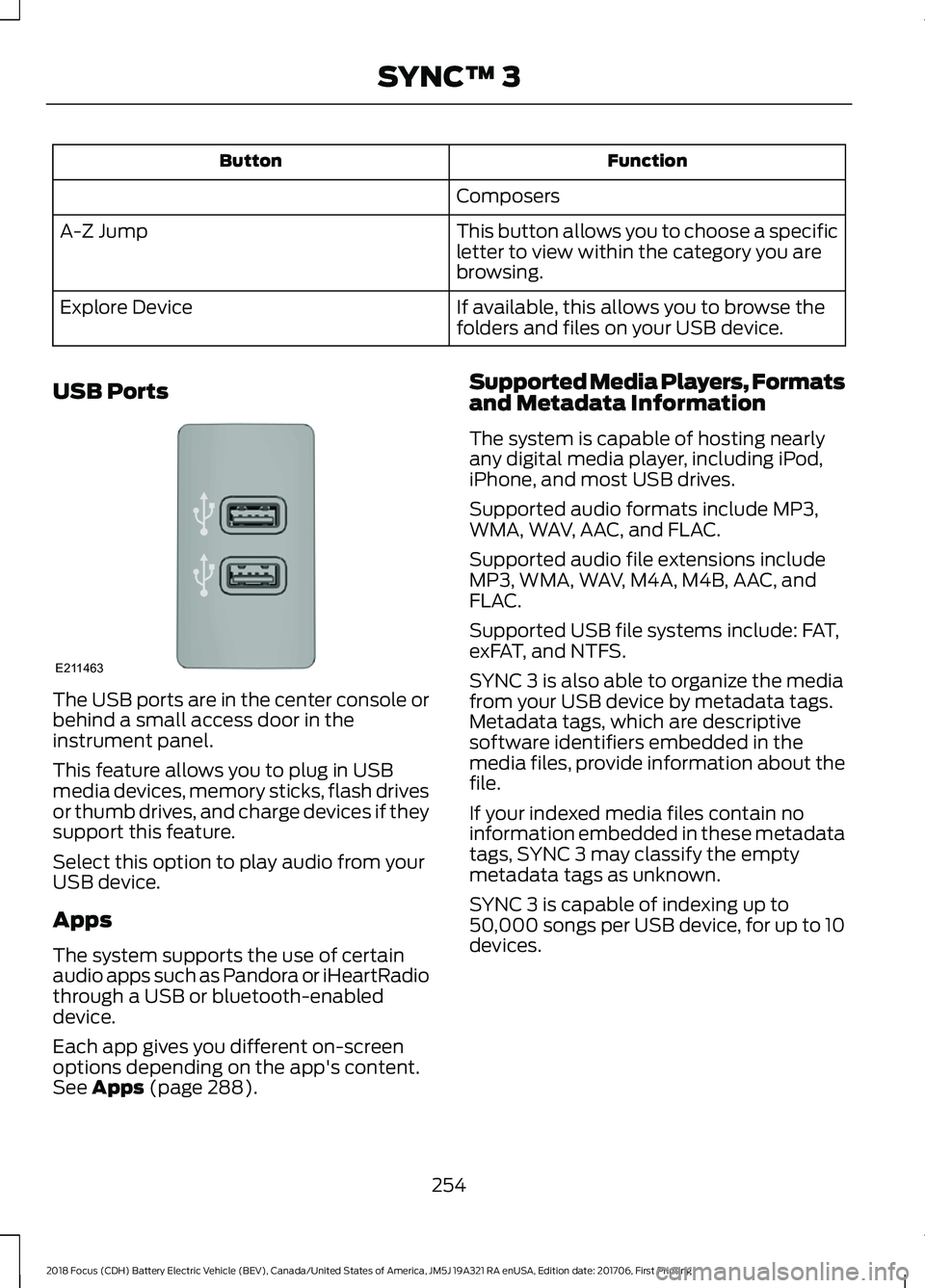
USB Ports The USB ports are in the center console or
behind a small access door in the
instrument panel.
This feature allows you to plug in USB
media devices, memory sticks, flash drives
or thumb drives, and charge devices if they
support this feature.
Select this option to play audio from your
USB device.
Apps
The system supports the use of certain
audio apps such as Pandora or iHeartRadio
through a USB or bluetooth-enabled
device.
Each app gives you different on-screen
options depending on the app's content.
See Apps (page 288). Supported Media Players, Formats
and Metadata Information
The system is capable of hosting nearly
any digital media player, including iPod,
iPhone, and most USB drives.
Supported audio formats include MP3,
WMA, WAV, AAC, and FLAC.
Supported audio file extensions include
MP3, WMA, WAV, M4A, M4B, AAC, and
FLAC.
Supported USB file systems include: FAT,
exFAT, and NTFS.
SYNC 3 is also able to organize the media
from your USB device by metadata tags.
Metadata tags, which are descriptive
software identifiers embedded in the
media files, provide information about the
file.
If your indexed media files contain no
information embedded in these metadata
tags, SYNC 3 may classify the empty
metadata tags as unknown.
SYNC 3 is capable of indexing up to
50,000 songs per USB device, for up to 10
devices.
254
2018 Focus (CDH) Battery Electric Vehicle (BEV), Canada/United States of America, JM5J 19A321 RA enUSA, Edition date: 201706, First Printing SYNC™ 3E211463
Page 369 of 375
Changing a Road Wheel............................216
Important Information for Lifting or
Jacking............................................................... 216
Changing the 12V Battery...........................174
Changing the Front Wiper Blades..........176 Changing the Windshield Wiper
Blades................................................................. 176
Service Position................................................... 176
Changing the Rear Wiper Blades............177
Charging the High Voltage Battery.........110 AC Charging........................................................... 110
DC Charging........................................................... 115
Checking MyKey System Status................51 MyKey Distance...................................................... 51
Number of Admin Keys....................................... 51
Number of MyKeys............................................... 51
Checking the Wiper Blades.......................175
Child Restraint and Seatbelt Maintenance.................................................33
Child Restraint Positioning.........................24
Child Safety
.......................................................15
General Information............................................. 15
Child Safety Locks
..........................................25
Left-Hand Side...................................................... 26
Right-Hand Side................................................... 26
Cleaning Leather Seats..............................187
Cleaning Products........................................183
Cleaning the Engine....................................185
Cleaning the Exterior...................................184 Cleaning the Headlamps................................. 184
Exterior Chrome Parts...................................... 184
Exterior Plastic Parts......................................... 184
Stripes or Graphics............................................ 184
Underbody............................................................ 185
Under Hood.......................................................... 185
Cleaning the Instrument Panel and Instrument Cluster Lens
..........................187
Cleaning the Interior....................................186
Cleaning the Wheels...................................188
Cleaning the Windows and Wiper Blades............................................................186
Clearing All MyKeys.......................................50
Climate Control
..............................................94
Cold Weather Precautions........................142
Collision, Damage or Fire Event...............147 Guidance for Ford Motor Company Electric
and Hybrid-Electric Vehicles Equipped
With High Voltage Batteries....................... 147Coolant Check.................................................171
Adding Coolant.................................................... 172
Recycled Coolant................................................ 173
Severe Climates................................................... 173
Crash Sensors and Airbag Indicator........42
Creating a MyKey
...........................................49
Programming/Changing Configurable
Settings............................................................... 49
Cruise Control
..................................................62
Principle of Operation........................................ 131
Cruise control See: Using Cruise Control................................. 131
Customer Assistance
..................................149
D
Data Recording
..................................................7
Event Data Recording........................................... 8
Service Data Recording......................................... 7
Daytime Running Lamps
............................68
Type 1 - Conventional
(Non-Configurable)....................................... 68
Type 2 - Configurable......................................... 68
Direction Indicators.......................................69
Doors and Locks.............................................53
Driver and Passenger Airbags...................36 Children and Airbags........................................... 37
Proper Driver and Front Passenger Seating Adjustment........................................................ 36
Driver Knee Airbag
..........................................41
Driving Aids.....................................................133
Driving Hints....................................................142
Driving Through Water
................................142
DRL See: Daytime Running Lamps........................ 68
E
Electric Vehicle Information....................269 Charge Settings................................................... 271
Power Flow.......................................................... 285
Vehicle..................................................................... 271
Electromagnetic Compatibility
..............334
End User License Agreement.................336 VEHICLE SOFTWARE END USER LICENSE
AGREEMENT (EULA) ................................. 336
Engine Immobilizer See: Passive Anti-Theft System..................... 58
366
2018 Focus (CDH) Battery Electric Vehicle (BEV), Canada/United States of America, JM5J 19A321 RA enUSA, Edition date: 201706, First Printing Index
Page 371 of 375
Hill Start Assist..............................................122
Switching the System On and Off................122
Using Hill Start Assist........................................ 122
Hints on Controlling the Interior Climate............................................................95
General Hints......................................................... 95
Improving Vehicle Drive Range....................... 96
Recommended Settings for Cooling............96
Side Window Defogging in Cold Weather.............................................................. 96
Hints on Driving With Anti-Lock Brakes..............................................................121
Home Screen................................................238
Hood Lock See: Opening and Closing the Hood...........170
I
In California (U.S. Only).............................150
Information Display Control.......................63 Multimedia Controls........................................... 63
Information Displays....................................80 General Information........................................... 80
Information Messages
..................................87
AdvanceTrac®....................................................... 87
Alarm System........................................................ 88
Battery and Charging System (High Voltage).............................................................. 88
Door Ajar................................................................. 89
Hill Start Assist..................................................... 90
Keys and Intelligent Access............................. 90
Lighting.................................................................... 90
Maintenance........................................................... 91
MyKey........................................................................\
91
Parking Aid.............................................................. 92
Parking Brake......................................................... 92
Power Steering...................................................... 92
Remote Start......................................................... 93
Tire Pressure Monitoring System................... 93
Traction Control.................................................... 93
Transmission.......................................................... 93
Installing Child Restraints
............................16
Child Restraints...................................................... 16
Using Lap and Shoulder Belts.......................... 17
Using Lower Anchors and Tethers for Children (LATCH)............................................. 19
Using Tether Straps.............................................. 21
Instrument Cluster.........................................75 Instrument Lighting Dimmer.....................68
Instrument Panel Overview.........................13
Interior Lamps
.................................................69
Front Interior Lamps (If Equipped)...............69
Interior Mirror
....................................................73
Introduction........................................................5
J
Jump Starting the Vehicle.........................145 To Connect the Booster Cables.................... 146
To Start Your Vehicle......................................... 146
K
Keys and Remote Controls.........................44
L
Lighting Control..............................................66 Headlamp Flasher................................................ 67
High Beams............................................................ 66
Parking Lamps...................................................... 66
Lighting..............................................................66 General Information........................................... 66
Load Carrying
.................................................134
Load Limit........................................................134
Special Loading Instructions for Owners of
Pick-up Trucks and Utility-type
Vehicles............................................................. 139
Vehicle Loading - with and without a Trailer.................................................................. 134
Locking and Unlocking
.................................53
Activating Intelligent Access............................ 54
Autolock................................................................... 55
Autounlock............................................................. 55
Battery Saver......................................................... 56
Disabled Intelligent Access Keys.................... 55
Illuminated Entry.................................................. 56
Illuminated Exit..................................................... 56
Opening the Liftgate........................................... 56
Power Door Locks................................................ 53
Remote Control..................................................... 53
Smart Unlocks for Intelligent Access Keys...................................................................... 55
Lug Nuts See: Changing a Road Wheel........................ 216
Lug Nuts
............................................................217
368
2018 Focus (CDH) Battery Electric Vehicle (BEV), Canada/United States of America, JM5J 19A321 RA enUSA, Edition date: 201706, First Printing Index