2018 FORD FOCUS ELECTRIC reset
[x] Cancel search: resetPage 92 of 375
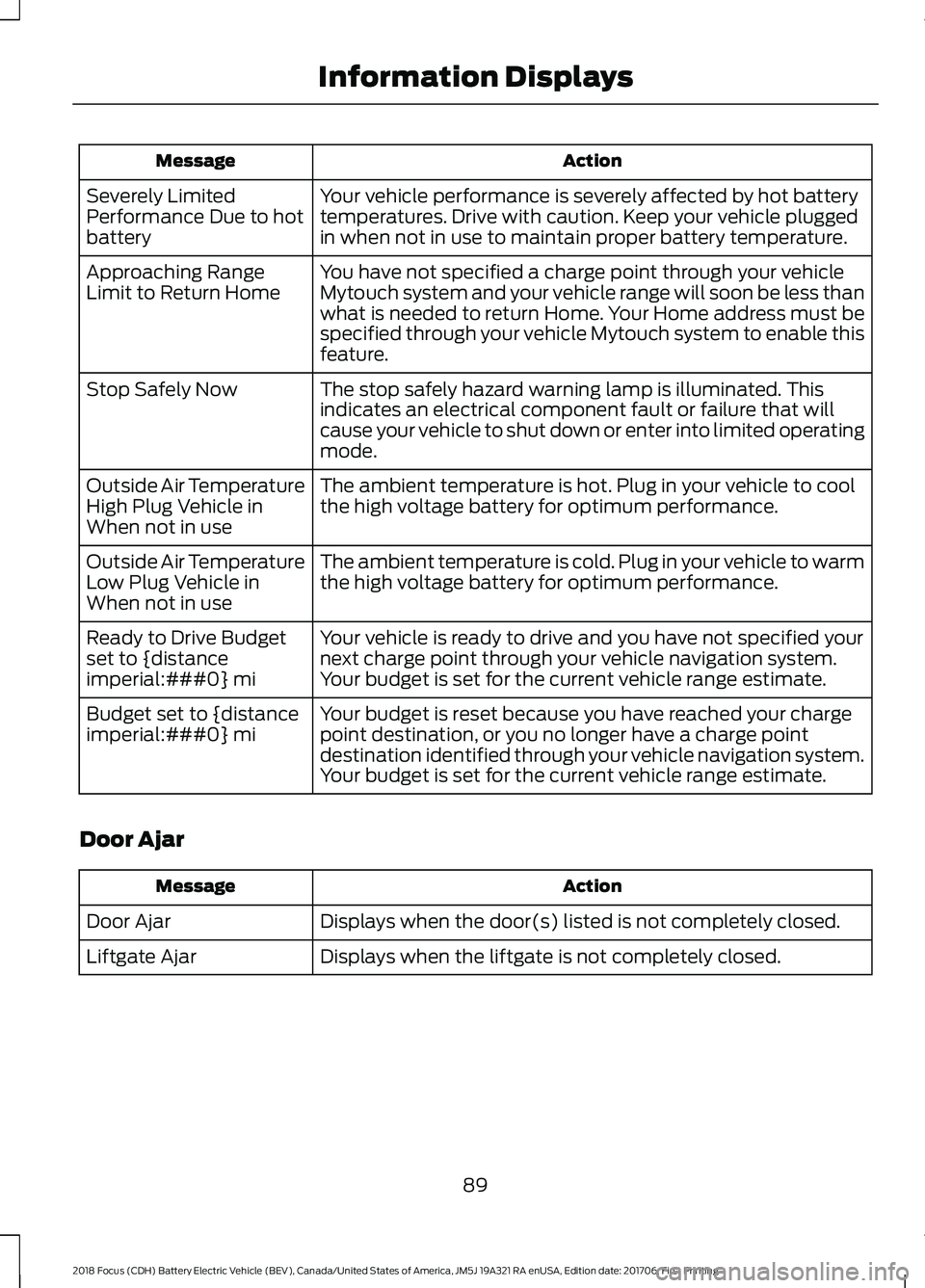
Action
Message
Your vehicle performance is severely affected by hot battery
temperatures. Drive with caution. Keep your vehicle plugged
in when not in use to maintain proper battery temperature.
Severely Limited
Performance Due to hot
battery
You have not specified a charge point through your vehicle
Mytouch system and your vehicle range will soon be less than
what is needed to return Home. Your Home address must be
specified through your vehicle Mytouch system to enable this
feature.
Approaching Range
Limit to Return Home
The stop safely hazard warning lamp is illuminated. This
indicates an electrical component fault or failure that will
cause your vehicle to shut down or enter into limited operating
mode.
Stop Safely Now
The ambient temperature is hot. Plug in your vehicle to cool
the high voltage battery for optimum performance.
Outside Air Temperature
High Plug Vehicle in
When not in use
The ambient temperature is cold. Plug in your vehicle to warm
the high voltage battery for optimum performance.
Outside Air Temperature
Low Plug Vehicle in
When not in use
Your vehicle is ready to drive and you have not specified your
next charge point through your vehicle navigation system.
Your budget is set for the current vehicle range estimate.
Ready to Drive Budget
set to {distance
imperial:###0} mi
Your budget is reset because you have reached your charge
point destination, or you no longer have a charge point
destination identified through your vehicle navigation system.
Your budget is set for the current vehicle range estimate.
Budget set to {distance
imperial:###0} mi
Door Ajar Action
Message
Displays when the door(s) listed is not completely closed.
Door Ajar
Displays when the liftgate is not completely closed.
Liftgate Ajar
89
2018 Focus (CDH) Battery Electric Vehicle (BEV), Canada/United States of America, JM5J 19A321 RA enUSA, Edition date: 201706, First Printing Information Displays
Page 119 of 375
Disconnecting the Charging Coupler
1. Press and hold the button on the
charging coupler and disconnect from
the charging port.
Note: Do not try to disconnect the charging
coupler with force. This could damage the
charging port and charging coupler.
Note: You cannot disconnect the charging
coupler until charging has been stopped or
completed.
2. Replace the charge port cover.
3. Close the charge port door.
Note: To close the charge port door, press
the center rear edge of the charge port door
and then release.
Overriding the Lock
If DC charging has stopped and you are still
unable to disconnect the charging coupler,
you must complete the following button
sequence within 10 seconds.
1. Press the charge unlock button on the center console.
2. Touch the charge unlock button in the touchscreen vehicle settings menu.
3. Press the charge unlock button on the center console.
Note: A message requesting confirmation
that your vehicle is unplugged appears on
the instrument cluster. See Information
Messages (page 87).
4. Switch the power off, leave your vehicle and close the door.
5. After one minute, press and hold the button on the charging coupler and
disconnect from the charging port.
If the previous steps fail to unlock the
charging coupler, you may need to switch
the power off, then on, and off again and
wait another minute to allow the system
to reset. If your first attempt was unsuccessful,
repeat steps 1 through 5.
If you are still unable to disconnect the
charging coupler, press the emergency
stop button on the charging system.
Note:
For additional instructions, please
refer to information available from the
charging networks or the charging system
site.
Call the Ford Roadside Assistance at
1-800-241-3673 for US sold vehicles
traveling within the US or Canada and
1-800-665-2006 for Canadian sold
vehicles traveling with the US or Canada
for additional information.
HIGH VOLTAGE BATTERY CUT-
OFF SWITCH
The high voltage shut off operation shuts
off power from the high-voltage battery
after a collision, or if your vehicle receives
a substantial physical jolt.
To reactivate your vehicle after either
event, perform the following steps:
1. Press the
START/STOP button to
power off your vehicle.
2. Wait for your vehicle to fully shut down
and the instrument cluster to turn off.
Note: Your vehicle may take between 30
to 90 seconds to shut down.
3. Press the brake pedal and press the START/STOP
button.
4. If your vehicle is not powered after this
sequence, repeat steps 1 through 3 up
to two more times.
Note: During this process, your vehicle
detects if the electrical system is safe and
reactivates. Once your vehicle determines
the electrical system safe, you can start your
vehicle as you would normally by pressing
the brake in combination with the
START/STOP
button.
116
2018 Focus (CDH) Battery Electric Vehicle (BEV), Canada/United States of America, JM5J 19A321 RA enUSA, Edition date: 201706, First Printing High Voltage Battery
Page 132 of 375
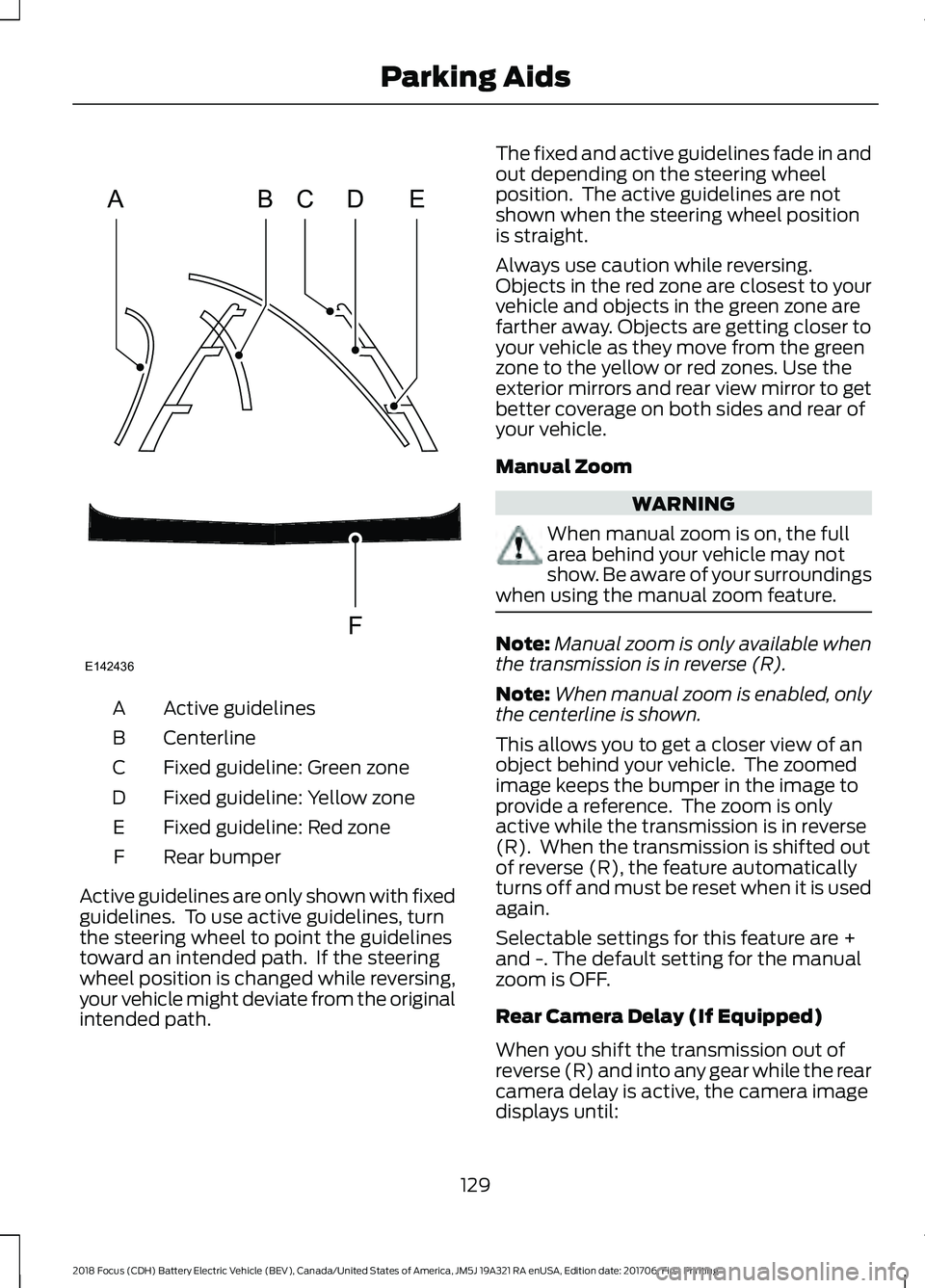
Active guidelines
A
Centerline
B
Fixed guideline: Green zone
C
Fixed guideline: Yellow zone
D
Fixed guideline: Red zone
E
Rear bumper
F
Active guidelines are only shown with fixed
guidelines. To use active guidelines, turn
the steering wheel to point the guidelines
toward an intended path. If the steering
wheel position is changed while reversing,
your vehicle might deviate from the original
intended path. The fixed and active guidelines fade in and
out depending on the steering wheel
position. The active guidelines are not
shown when the steering wheel position
is straight.
Always use caution while reversing.
Objects in the red zone are closest to your
vehicle and objects in the green zone are
farther away. Objects are getting closer to
your vehicle as they move from the green
zone to the yellow or red zones. Use the
exterior mirrors and rear view mirror to get
better coverage on both sides and rear of
your vehicle.
Manual Zoom
WARNING
When manual zoom is on, the full
area behind your vehicle may not
show. Be aware of your surroundings
when using the manual zoom feature. Note:
Manual zoom is only available when
the transmission is in reverse (R).
Note: When manual zoom is enabled, only
the centerline is shown.
This allows you to get a closer view of an
object behind your vehicle. The zoomed
image keeps the bumper in the image to
provide a reference. The zoom is only
active while the transmission is in reverse
(R). When the transmission is shifted out
of reverse (R), the feature automatically
turns off and must be reset when it is used
again.
Selectable settings for this feature are +
and -. The default setting for the manual
zoom is OFF.
Rear Camera Delay (If Equipped)
When you shift the transmission out of
reverse (R) and into any gear while the rear
camera delay is active, the camera image
displays until:
129
2018 Focus (CDH) Battery Electric Vehicle (BEV), Canada/United States of America, JM5J 19A321 RA enUSA, Edition date: 201706, First Printing Parking AidsABCD
F
E
E142436
Page 160 of 375
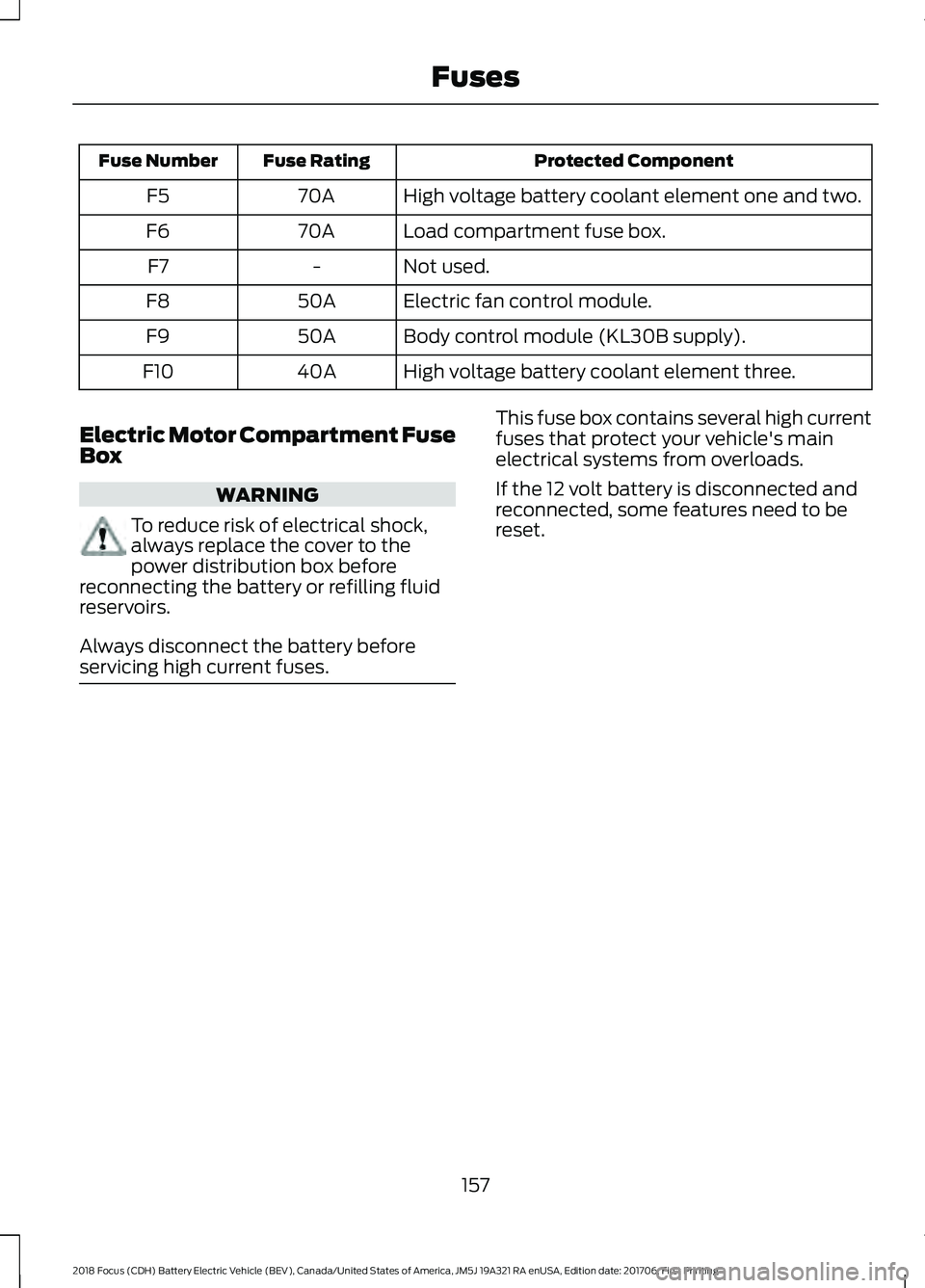
Protected Component
Fuse Rating
Fuse Number
High voltage battery coolant element one and two.
70A
F5
Load compartment fuse box.
70A
F6
Not used.
-
F7
Electric fan control module.
50A
F8
Body control module (KL30B supply).
50A
F9
High voltage battery coolant element three.
40A
F10
Electric Motor Compartment Fuse
Box WARNING
To reduce risk of electrical shock,
always replace the cover to the
power distribution box before
reconnecting the battery or refilling fluid
reservoirs.
Always disconnect the battery before
servicing high current fuses. This fuse box contains several high current
fuses that protect your vehicle's main
electrical systems from overloads.
If the 12 volt battery is disconnected and
reconnected, some features need to be
reset.
157
2018 Focus (CDH) Battery Electric Vehicle (BEV), Canada/United States of America, JM5J 19A321 RA enUSA, Edition date: 201706, First Printing Fuses
Page 178 of 375
Your vehicle is fitted with a Motorcraft
maintenance-free battery which normally
does not require additional water.
Note:
After cleaning or replacing the
battery, make sure you reinstall the battery
cover or shield.
When a battery replacement is required,
you must use a recommended
replacement battery that matches the
electrical requirements of the vehicle.
Note: Contact an authorized dealer for low
voltage battery access, testing or
replacement.
To make sure the battery management
system works correctly, do not connect an
electrical device ground connection
directly to the low voltage battery negative
post. This can cause inaccurate
measurements of the battery condition
and potential incorrect system operation.
Note: If you add electrical accessories or
components to the vehicle, it may adversely
affect the low voltage battery performance
and durability. This may also affect the
performance of other electrical systems in
the vehicle.
For longer, trouble-free operation, keep the
top of the battery clean and dry.
If you see any corrosion on the battery or
terminals, remove the cables from the
terminals and clean with a wire brush. You
can neutralize the acid with a solution of
baking soda and water.
A computer electronically controls your
vehicle. The power of the low voltage
battery maintains the memory of some
settings, for example, clock setting or radio
presets. When the low voltage battery is
disconnected and then connected, these
settings erase.
To restore the settings, do the following:
1. Apply the parking brake.
2. Shift into park (P) or neutral (N). 3. Switch off all accessories.
4. Press the brake pedal and start your
vehicle.
5. Reset the clock.
6. Reset the bounce-back feature. See Power Windows (page 71).
7. Reset the radio station presets. See Audio System
(page 223).
Make sure that you dispose of old batteries
in an environmentally friendly way. Seek
advice from your local authority about
recycling old batteries.
If storing your vehicle for more than 30
days without recharging the battery, we
recommend that you disconnect the
battery cables to maintain battery charge
for quick starting.
CHECKING THE WIPER
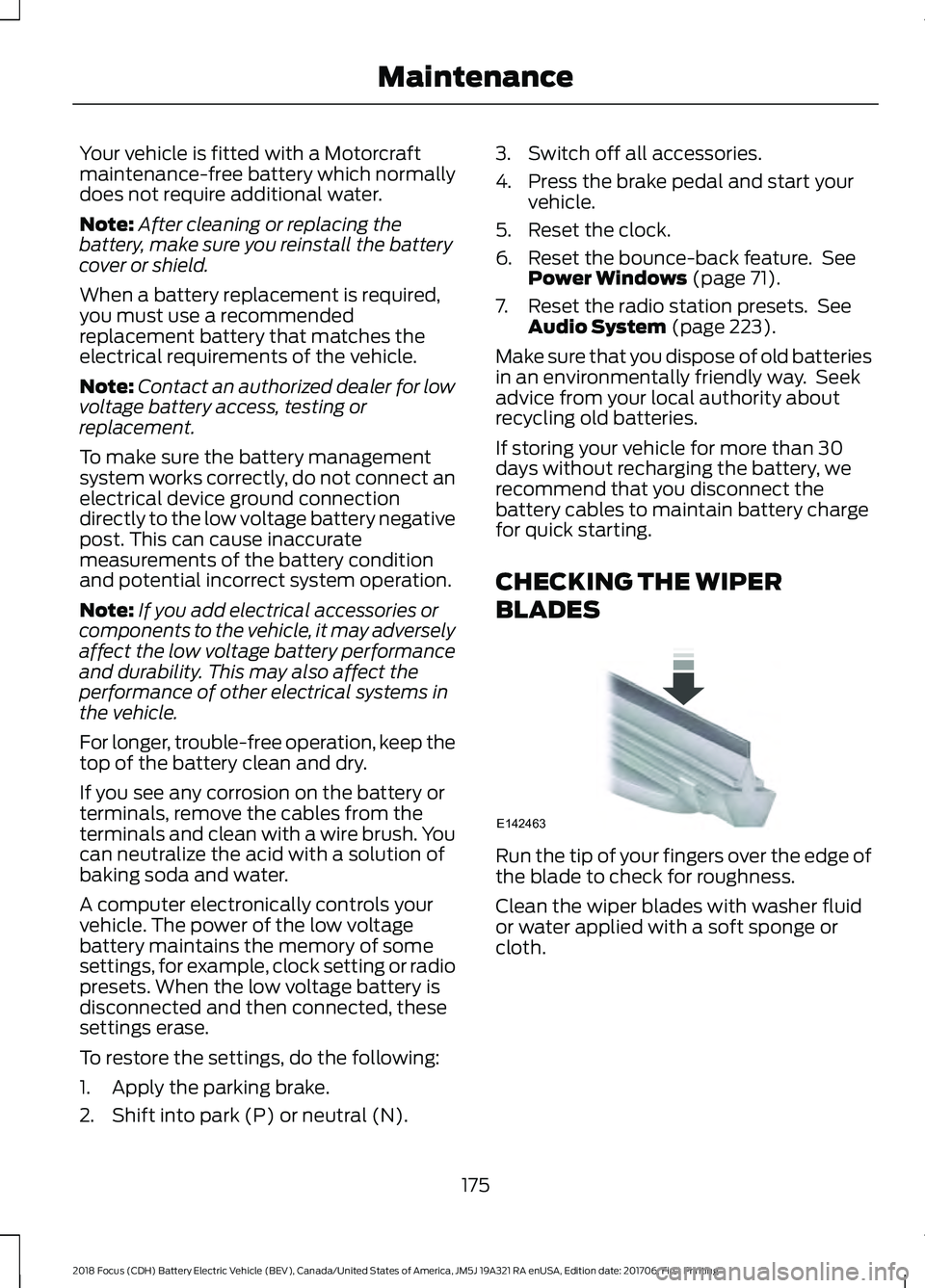
BLADES Run the tip of your fingers over the edge of
the blade to check for roughness.
Clean the wiper blades with washer fluid
or water applied with a soft sponge or
cloth.
175
2018 Focus (CDH) Battery Electric Vehicle (BEV), Canada/United States of America, JM5J 19A321 RA enUSA, Edition date: 201706, First Printing MaintenanceE142463
Page 192 of 375
General
•
Store all vehicles in a dry, ventilated
place.
• Protect from sunlight, if possible.
• If you store vehicles outside, they
require regular maintenance to protect
against rust and damage.
Body
• Wash your vehicle thoroughly to
remove dirt, grease, oil, tar or mud from
exterior surfaces, rear-wheel housing
and the underside of front fenders.
• Periodically wash your vehicle if you
store it in exposed locations.
• Touch-up exposed or primed metal to
prevent rust.
• Cover chrome and stainless steel parts
with a thick coat of auto wax to prevent
discoloration. Re-wax as necessary
when you wash your vehicle.
• Lubricate all hood, door and luggage
compartment hinges and latches with
a light grade oil.
• Cover interior trim to prevent fading.
• Keep all rubber parts free from oil and
solvents.
Electric Motor
• Start your vehicle every 15 days for a
minimum of 15 minutes with the
climate controls set to defrost.
High Voltage Battery
• Make sure the high voltage battery has
a minimum charge of 50%. Cooling System
•
Protect against freezing temperatures.
• When removing your vehicle from
storage, check coolant fluid level.
Confirm that there are no cooling
system leaks and that fluid is at the
recommended level.
12V Battery
• Check and recharge as necessary. Keep
connections clean.
• If storing your vehicle for more than 30
days without recharging the battery,
we recommend that you disconnect
the battery cables to maintain battery
charge for quick starting.
Note: It is necessary to reset memory
features if you disconnect the battery
cables.
We recommend the following options for
your plug-in vehicle:
• Leave your vehicle plugged in. The 12V
battery maintains power if left plugged
in. However, this periodically uses
electricity from the household outlet.
• Connect a battery charger to your 12V
battery and leave it on a continuous,
slow charge.
• Disconnect the 12V battery.
Brakes
• Make sure the brakes and parking brake
release fully.
Tires
• Maintain recommended air pressure.
189
2018 Focus (CDH) Battery Electric Vehicle (BEV), Canada/United States of America, JM5J 19A321 RA enUSA, Edition date: 201706, First Printing Vehicle Care
Page 214 of 375
Tire and Wheel Alignment
A bad jolt from hitting a curb or
pothole can cause the front end
of your vehicle to become
misaligned or cause damage to
your tires. If your vehicle seems to
pull to one side when you are
driving, the wheels may be out of
alignment. Have an authorized
dealer check the wheel alignment
periodically.
Wheel misalignment in the front
or the rear can cause uneven and
rapid treadwear of your tires and
should be corrected by an
authorized dealer. Front-wheel
drive vehicles and those with an
independent rear suspension (if
equipped) may require alignment
of all four wheels.
The tires should also be balanced
periodically. An unbalanced tire
and wheel assembly may result in
irregular tire wear.
Tire Rotation WARNING
If the tire label shows
different tire pressures for the
front and rear tires and the vehicle
is equipped with a tire pressure
monitoring system, then the
settings for the system sensors
need to be updated. Always
perform the system reset
procedure after tire rotation. If the
system is not reset, it may not
provide a low tire pressure
warning when necessary. See Tire
Pressure Monitoring System
(page 212). Note:
If your tires show uneven
wear ask an authorized dealer to
check for and correct any wheel
misalignment, tire imbalance or
mechanical problem involved
before tire rotation.
Note: Your vehicle may be
equipped with a dissimilar spare
wheel and tire assembly. A
dissimilar spare wheel and tire
assembly is defined as a spare
wheel and tire assembly that is
different in brand, size or
appearance from the road tires and
wheels. If you have a dissimilar
spare wheel and tire assembly it is
intended for temporary use only
and should not be used in a tire
rotation.
Note: After having your tires
rotated, inflation pressure must be
checked and adjusted to the
vehicle requirements.
211
2018 Focus (CDH) Battery Electric Vehicle (BEV), Canada/United States of America, JM5J 19A321 RA enUSA, Edition date: 201706, First Printing Wheels and Tires
Page 234 of 375
Cleaning the Touchscreen
You can remove fingerprints with a dry,
clean, soft cloth.
If dirt or fingerprints are still on the screen,
apply a small amount of alcohol to the
cloth and try to clean it again.
Note:
Do not use detergent or any type of
solvent to clean the touchscreen.
Note: Do not pour or spray alcohol onto the
touchscreen.
Using Voice Recognition
Using voice commands allows you to keep
your hands on the wheel and eyes on the
road. The system provides feedback
through audible tones, prompts, questions
and spoken confirmations depending on
the situation and the chosen level of
interaction (voice settings).
The system also asks short questions
(confirmation prompts) when it is not sure
of your request or when there are multiple
possible responses to your request.
When using voice commands, words and
icons may appear in the status bar
indicating the status of the voice command
session. See Using Voice Recognition
(page 239).
Using the Steering Wheel Controls
Depending on your vehicle and option
package, you can use different controls on
your steering wheel to interact with the
touchscreen system in different ways.
VOL:
Control the volume of audio output.
Mute:
Mute the audio output.
Voice:
Press to start a voice session. Press
again to stop the voice prompt and
immediately begin speaking. Press and
hold to end a voice session. SEEK NEXT:
•
While in radio mode, press to seek
between memory presets.
• While in USB, Bluetooth Audio or CD
mode, press to seek between songs or
press and hold to fast seek.
SEEK PREVIOUS:
• While in radio mode, press to seek
between memory presets.
• While in USB, Bluetooth Audio or CD
mode, press to seek between songs or
press and hold to fast seek.
PHONE ACCEPT:
Press to answer a call
or switch between calls.
PHONE REJECT:
Press to end a call or
reject an incoming call.
Note: On some models, SEEK NEXT
may
be combined with PHONE REJECT and
SEEK PREVIOUS may be combined with
PHONE ACCEPT.
M:
Touch the control repeatedly to switch
between media sources (modes).
See
Steering Wheel (page 61).
Using Your Bezel Controls
Depending on your vehicle and option
package, you may also have these controls
on your instrument panel:
• Power:
Switch the audio system on
and off.
• VOL:
Control the volume of playing
audio.
• Seek
and Tune: se as you normally
would in audio modes.
• Eject:
Eject a CD from the audio
system.
• SOURCE
or MEDIA: Press repeatedly
to advance through available media
modes.
231
2018 Focus (CDH) Battery Electric Vehicle (BEV), Canada/United States of America, JM5J 19A321 RA enUSA, Edition date: 201706, First Printing SYNC™ 3