2018 FORD FLEX remove seats
[x] Cancel search: remove seatsPage 125 of 508

Note:
Do not remove ice from the mirrors
with a scraper or adjust the mirror glass
when it is frozen in place.
Note: Do not clean the mirror housing or
glass with harsh abrasives, fuel or other
petroleum-based cleaning products.
CABIN AIR FILTER
Your vehicle is equipped with a cabin air
filter, which gives you and your passengers
the following benefits:
• It improves your driving comfort by
reducing particle concentration.
• It improves the interior compartment
cleanliness.
• It protects the climate control
components from particle deposits.
You can locate the cabin air filter behind
the glove box.
Note: Make sure you have a cabin air filter
installed at all times. This prevents foreign
objects from entering the system. Running
the system without a filter in place could
result in degradation or damage to the
system.
Replace the filter at regular intervals. See
Scheduled Maintenance (page 447).
For additional cabin air filter information,
or to replace the filter, see an authorized
dealer.
REMOTE START
(If Equipped)
The system adjusts the interior
temperature depending on your chosen
settings during remote start.
You cannot adjust the climate control
setting during remote start operation.
When you switch the ignition on, the
climate control system returns to the
previous settings. You can now make
adjustments. Some features may remain on if they turn
on during remote start:
•
Driver heated seat.
• Driver cooled seat.
• Heated steering wheel.
• Heated mirrors.
• Heated rear window.
Note: If the passenger heated or cooled
seats are on when you switch the vehicle
off, they default to the driver setting when
you switch the vehicle on.
You can adjust the default remote start
settings using the information display
controls. See
Information Displays
(page 97).
Automatic Settings
In hot weather, the system is set to
72°F
(22°C). The cooled seats are set to high
(if available, and you select AUTO in the
information display).
In moderate weather, the system either
heats or cools (based on pre-selected
settings). The rear defroster, heated
mirrors and heated or cooled seats do not
turn on.
In cold weather, the system is set to
72°F
(22°C). The heated seats and heated
steering wheel are set to high (if available,
and you select
AUTO in the information
display). The rear defroster and heated
mirrors turn on.
122
Flex (TP3) , enUSA, Edition date: 201801, Second Printing Climate Control
Page 127 of 508

Note:
Adjust the seat backrest to an upright
driving position before adjusting the head
restraint. Adjust the head restraint so that
the top of it is level with the top of your head
and as far forward as possible. Make sure
that you remain comfortable. If you are
extremely tall, adjust the head restraint to
its highest position.
Front Seat Head Restraints Second Row Center Seat Head
Restraint (If Equipped)
The head restraints consist of:
An energy absorbing head
restraint.
A
Two steel stems.
B Guide sleeve adjust and release
button.
C
Guide sleeve unlock and remove
button.
D
Adjusting the Head Restraint
Raising the Head Restraint
Pull the head restraint up.
Lowering the Head Restraint
1. Press and hold button C.
2. Push the head restraint down.
Removing the Head Restraint
1. Pull the head restraint up until it reaches its highest position.
2. Press and hold buttons C and D.
3. Pull the head restraint up.
Installing the Head Restraint
1. Align the steel stems into the guide sleeves.
2. Press and hold buttons C and D.
3. Push the head restraint down until it locks.
Second Row Outermost Seat Head
Restraints 124
Flex (TP3) , enUSA, Edition date: 201801, Second Printing SeatsE138642 E138645 E162872
A
C
B
Page 128 of 508

The head restraints consist of:
An energy absorbing head
restraint.
A
Two steel stems.
B
Guide sleeve unlock and remove
buttons.
C
The outermost head restraints are
non-adjustable, but they can be removed.
Removing the Head Restraint
1. Pull the head restraint up until it reaches its highest position.
2. Press and hold the C buttons.
3. Pull the head restraint up.
Installing the Head Restraint
1. Align the steel stems into the guide sleeves.
2. Press and hold the C buttons.
3. Push the head restraint down until it locks.
Third Row Head Restraints (If
Equipped) The head restraints consist of:
An energy absorbing head
restraint.
A
Two steel stems.
B
Fold strap.
C
Folding the Head Restraint
Pull the fold strap (C). Pull the head
restraint back up to reset.
Note: Press the stow or fold button on the
power folding seats to fold the head
restraint.
Tilting Head Restraints (If Equipped) The front head restraints tilt for extra
comfort.
1. Adjust the seat backrest to an upright
driving or riding position.
2. Pivot the head restraint forward toward
your head to the desired position.
After the head restraint reaches the
forward-most tilt position, pivot it forward
again to release it to the rearward, un-tilted
position.
125
Flex (TP3) , enUSA, Edition date: 201801, Second Printing SeatsE190836 E144727
Page 132 of 508
Note:
Adjusting any active memory feature
or pressing a memory switch during a
memory recall cancels the operation.
Linking a PreSet Position to your
Remote Control or Intelligent
Access Key Fob
Your vehicle can save the preset memory
positions for up to two remote controls.
1. With the ignition on, move the memory
features to the desired positions.
2. Press and hold the desired preset button for about five seconds. A tone
sounds after about two seconds.
Continue holding until you hear a
second tone.
3. Within three seconds, press the lock button on the remote control you are
linking.
To unlink a remote control, follow the
same procedure – except in step 3, press
the unlock button on the remote control.
Note: If more than one linked remote
control or intelligent access key is in range,
the memory function moves to the settings
of the first key to initiate a memory recall.
Easy Entry and Exit Feature
This feature adjusts the position of the seat
and steering column to allow easier exit
and entry to the vehicle.
The driver seat automatically moves 2 in
(5 cm) rearward when the transmission is
in park (P) and you remove the key from
the ignition or you switch the ignition off.
The driver seat and steering wheel return
to their previous positions when you put
the key in the ignition or switch the ignition
on.
You can enable or disable this feature
through the information display. See
Information Displays
(page 97). REAR SEATS
Adjusting the Rear Seats
Second Row Seats WARNINGS
Always drive and ride with your
seatback upright and the lap belt
snug and low across the hips.
Reclining the seatback can cause an
occupant to slide under the seat's
seatbelt, resulting in severe personal
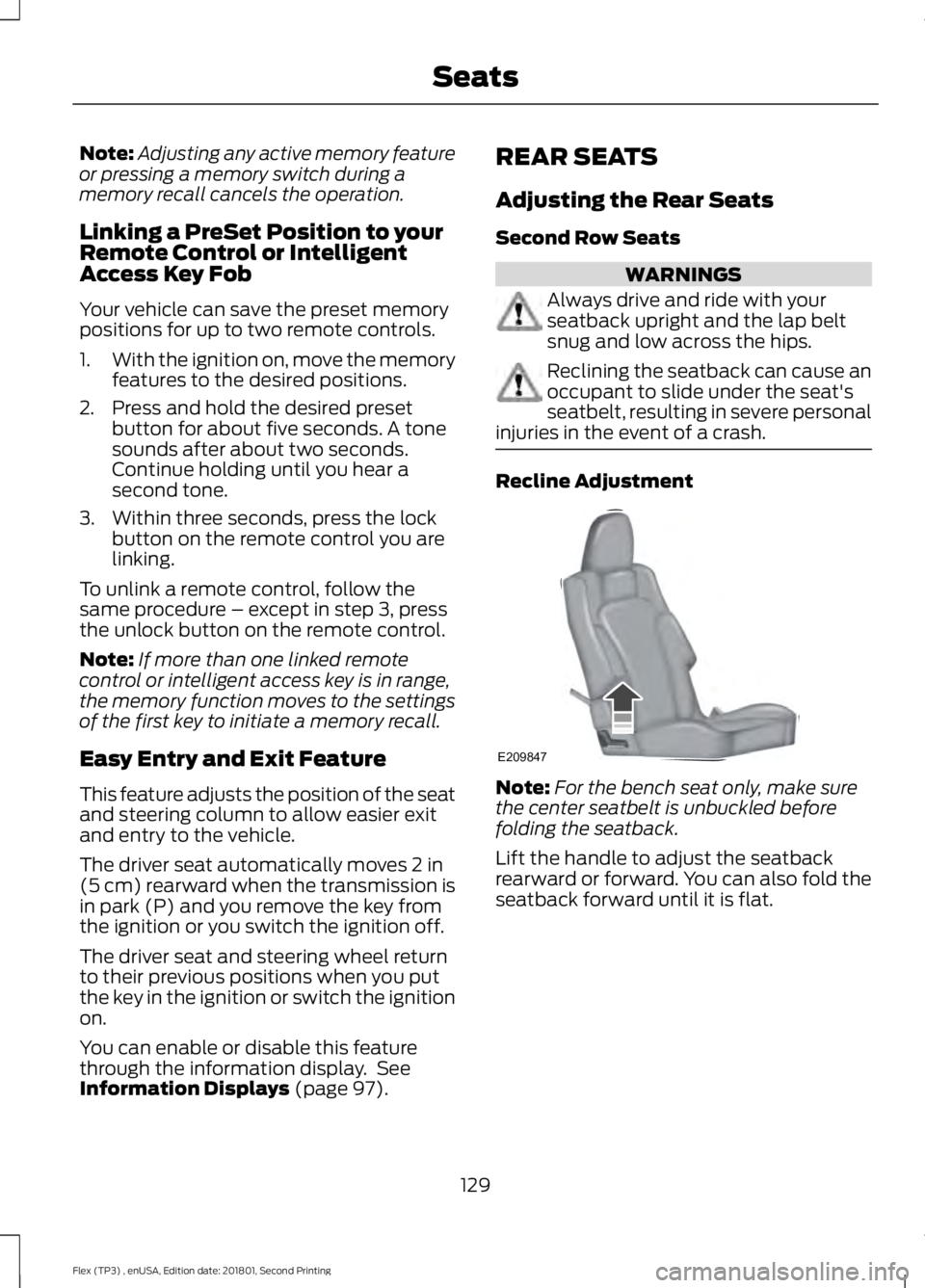
injuries in the event of a crash. Recline Adjustment
Note:
For the bench seat only, make sure
the center seatbelt is unbuckled before
folding the seatback.
Lift the handle to adjust the seatback
rearward or forward. You can also fold the
seatback forward until it is flat.
129
Flex (TP3) , enUSA, Edition date: 201801, Second Printing SeatsE209847
Page 133 of 508

Moving the Seats Backward and
Forward (If equipped)
Power Fold and Tumble Seat
WARNING
Do not fold a seat if it is occupied.
Failure to follow this instruction
could result in personal injury.
This feature is available for the right-hand
seat on seven-passenger vehicles and on
both sides for six-passenger vehicles.
The control is at the back of the rear door
opening. Press it to fold the seatback down
and tumble the seat forward for access to
the third row. Note:
When you switch the ignition off, the
power fold feature works until the battery
saver turns it off after 10 minutes. You can
reactivate the power seats by pressing the
unlock button on the remote entry key fob
or by using the unlock procedure on the
keyless entry keypad. See Doors and Locks
(page 63). Keep the key in the accessory or
run position to prevent the feature from
timing out.
Third Row Seats (Accessing the Seat) WARNINGS
Check under the seat cushion to
make sure no cargo or objects are
under the seat cushion before
returning the seat cushion to its original
position, and that the seat cushion locks
into place. Failure to do so may prevent
the seat from operating properly in the
event of a crash, which could increase the
risk of serious injury. Do not adjust a seat or release a seat
floor latch when the vehicle is
moving. Failure to follow this
instruction could result in personal injury
or death in a sudden stop or crash. Do not drive your vehicle with a seat
that is unlatched or in the folded
position. Failure to follow this
instruction could result in personal injury
or death in the event of a sudden stop or
crash. Note:
Remove items from the second-row
seat. Make sure that no bulky objects such
as purses or briefcases are on the floor in
front of the second-row seats before
tumbling them.
Note: For second-row bench seats, make
sure the center seatbelt is unbuckled before
folding the seatback.
Note: You may have to move the front-row
seat forward to allow the second-row seat
to be fully tumbled.
130
Flex (TP3) , enUSA, Edition date: 201801, Second Printing SeatsE190838 E190848
Page 136 of 508

Stowing the Third Row Seat
Note:
Remove all objects from the seat and
stowage tub. Objects in the seat or stowage
tub may cause serious damage to the seat
upholstery and cause improper seat
function. 1. From the rear of the vehicle, stow the
head restraints by pulling the strap on
the middle of the seatback just below
the head restraint. Then, fold the
seatback by pulling and holding the red
strap while pushing the seatback
forward. Release the strap once the
seatback starts rotating forward. 2. Release the cushion latches by pulling
the short black strap while pulling on
the strap at the top of the seatback.
This tumbles the seat all the way into
the floor tub. Note:
Do not use the seat anchors as cargo
tie downs. Note:
Do not use the third row seat back as
a load floor when the seatback is folded.
Sharp objects may result in damage to seat
upholstery.
Note: Make sure that the area under the
seat is free of objects before stowing it.
Unstowing the Third Row Seat WARNING
Make sure the seat fully locks into
place by rocking it backward and
forward. Not securing the seat into
the locked position can be dangerous in a
crash and could cause serious personal
injury or death. Note:
Make sure that there are no objects
such as books, purses or brief cases on the
load floor before unstowing the seat. Failure
to remove all objects from the top of the
load floor prior to unstowing it may cause
damage to the seat.
Note: Make sure the area under the forward
portion of the load floor is free of objects
before unstowing the third row seat.
133
Flex (TP3) , enUSA, Edition date: 201801, Second Printing SeatsE210069 E209852 E209853
Page 138 of 508

Press to return the seat to the
normal seating position.
A
Press to stow the seat into the
tub floor.
B
Press the top of the button to
fold down the seatback. Press
the bottom portion of the button
to put the seat into the tailgate
position.
C
Press to select either right-hand
seat, the left-hand seat or both.
D
Note: The third row seat includes obstacle
detection that allows the seat to stop and
reverse direction if it hits an obstacle so that
the obstacle can be removed.
Note: Pressing a different button while the
power seat feature is already being
performed may cause the first selected seat
movement to be cancelled. Allow the first
seat movement to be completed before
pressing a button for another function. Note:
Make sure that there are no objects
such as books, purses or briefcases on the
load floor before unstowing the seat. Failure
to remove all objects from the top of the
load floor prior to unstowing it may cause
damage to the seat.
Note: In order to allow the seat to complete
the stowed position, do not place objects
under the seat before stowing. Remove all
objects from the seat and stowage tub.
Note: In the unlikely event that the third
row power seat stops prematurely or travels
to an unexpected position, press the FOLD
button (C) to reset the seat and return it to
a normal position. WARNING
Do not sit in seats that are rearward
facing when your vehicle is moving.
This is not a correct seating position
and the seatbelts do not properly function
this way. Failure to follow this instruction
could result in personal injury or death in
a sudden stop or crash. 135
Flex (TP3) , enUSA, Edition date: 201801, Second Printing SeatsE209855
Page 274 of 508

To clean the windshield and wiper blades:
•
Clean the windshield with a
non-abrasive glass cleaner. When
cleaning the interior of the windshield,
avoid getting any glass cleaner on the
instrument panel or door panels. Wipe
any glass cleaner off these surfaces
immediately.
• For windshields contaminated with
tree sap, chemicals, wax or bugs, clean
the entire windshield using steel wool
(no greater than 0000 grade) in a
circular motion and rinse with water.
• Clean the wiper blades with isopropyl
rubbing alcohol or windshield washer
concentrate.
Note: Do not use razor blades or other
sharp objects to clean or remove decals
from the inside of the heated rear window.
The vehicle warranty does not cover
damage caused to the heated rear window
grid lines.
CLEANING THE INTERIOR WARNINGS
Do not use cleaning solvents, bleach
or dye on the vehicle's seatbelts, as
these actions may weaken the belt
webbing. On vehicles equipped with
seat-mounted airbags, do not use
chemical solvents or strong
detergents. Such products could
contaminate the side airbag system and
affect performance of the side airbag in a
crash. For fabric, carpets, cloth seats and seats
equipped with side airbags:
•
Remove dust and loose dirt with a
vacuum cleaner.
• Remove light stains and soil with
Motorcraft Professional Strength
Carpet & Upholstery Cleaner.
• If grease or tar is present on the
material, spot-clean the area first with
Motorcraft Spot and Stain Remover. In
Canada, use Motorcraft Multi-Purpose
Cleaner.
• If a ring forms on the fabric after spot
cleaning, clean the entire area
immediately (but do not oversaturate)
or the ring will set.
• Do not use household cleaning
products or glass cleaners, which can
stain and discolor the fabric and affect
the flame retardant abilities of the seat
materials.
CLEANING THE INSTRUMENT
PANEL AND INSTRUMENT
CLUSTER LENS WARNING
Do not use chemical solvents or
strong detergents when cleaning the
steering wheel or instrument panel
to avoid contamination of the airbag
system. Note:
Follow the same procedure as
cleaning leather seats for cleaning leather
instrument panels and leather interior trim
surfaces. See Cleaning Leather Seats
(page 272).
Clean the instrument panel and cluster
lens with a clean, damp and soft cloth,
then use a clean, dry and soft cloth to dry
these areas.
271
Flex (TP3) , enUSA, Edition date: 201801, Second Printing Vehicle Care