2018 FORD FIESTA ac system
[x] Cancel search: ac systemPage 49 of 449

Note:
Your vehicle ’s keys came with a
security label that provides important
vehicle key cut information. Keep the label
in a safe place for future reference.
Intelligent Access Transmitter (If
Equipped)
Your intelligent access keys operate the
power locks. The key must be in your
vehicle to activate the push button start
system.
The intelligent access key also contains a
removable mechanical key blade that you
can use to unlock the driver door. Note:
Your vehicle ’s back-up keys came
with a security tag that provides important
vehicle key cut information. Keep the tag in
a safe place for future reference.
Programming a New Integrated
Keyhead Transmitter
1. Turn the ignition key from position 0 to
position
II 8 times within 10 seconds.
2. Turn the ignition key to position
0. A
tone sounds to indicate that it is now
possible to program a remote control.
3. Press any button on a new remote control within 10 seconds. A tone
sounds as confirmation.
4. Repeat step 3 within 10 seconds for each new remote control. Do not
remove the key from the ignition when
pressing the button on the remote
control.
5. Turn the ignition key to position
II, or
wait for 10 seconds without
programming another remote control
to end the key programming. Only the
remote controls that you have just
programmed are now able to lock and
unlock your vehicle.
Reprogramming the Unlocking
Function
Note: When you press the unlock button
either all the doors are unlocked or only the
driver ’s door and the liftgate are unlocked.
Pressing the unlock button again unlocks
all the doors.
You can reprogram the unlocking function
using the remote control so that only the
driver's door is unlocked. This will enable
two-stage unlocking.
Press and hold the unlock and lock buttons
on the remote control simultaneously for
at least four seconds with the ignition off.
The direction indicators will flash twice to
confirm the change.
46
2018 Fiesta (CCT) Canada/United States of America, JE8J 19A321 AB enUSA, Edition date: 201706, First-Printing Keys and Remote ControlsE162601 E87964
2
1
1
Page 52 of 449

4. Twist the screwdriver in the position
shown to separate the two halves of
the remote control. Note:
Do not touch the battery contacts or
the printed circuit board with the
screwdriver.
5. Carefully remove the battery with the screwdriver.
6. Install a new battery (3V CR 2032) with
the + facing downward.
7. Assemble the two halves of the remote
control.
8. Install the key blade. Car Finder Press the button twice within
three seconds. The horn will
sound and the turn signals will
flash. We recommend you use this method
to locate your vehicle, rather than using
the panic alarm.
Note: If locking was not successful or if any
door or the liftgate is open, or if the hood is
open on vehicles with a perimeter alarm or
remote start, the horn will sound twice and
the lamps will not flash.
Sounding a Panic Alarm
(If Equipped)
Note: The panic alarm will only operate
when the ignition is off. Press the button to activate the
alarm. Press the button again or
turn the ignition on to deactivate.
REPLACING A LOST KEY OR
REMOTE CONTROL
Replacement or additional keys or remote
controls can be purchased from an
authorized dealer. Your dealer can program
the remote controls for your vehicle or you
may be able to program them yourself.
See
Remote Control (page 45).
To re-program the passive anti-theft
system see an authorized dealer.
49
2018 Fiesta (CCT) Canada/United States of America, JE8J 19A321 AB enUSA, Edition date: 201706, First-Printing Keys and Remote ControlsE119190
4 E125860
5 E138623 E138624
Page 53 of 449

PRINCIPLE OF OPERATION
MyKey allows you to program keys with
restricted driving modes to promote good
driving habits. All but one of the keys
programmed to the vehicle can be
activated with these restricted modes.
Any keys that have not been programmed
are referred to as administrator keys or
admin keys. These can be used to:
•
Create a MyKey.
• Program configurable MyKey settings.
• Clear all MyKey features.
When you have created a MyKey, you can
access the following information using the
information display:
• How many admin keys and MyKeys are
programmed to your vehicle.
• The total distance your vehicle has
traveled using any MyKey.
Note: You can only program all MyKeys to
the same settings.
Note: For vehicles with keyless start, when
both a MyKey transmitter and an admin
transmitter are present, the admin
transmitter will be recognized by the vehicle
to start the engine.
Non-configurable Settings
The following settings cannot be changed:
• Belt-Minder™. You cannot disable this
feature. The audio system will mute
when the driver and front seat
passengers’ safety belts are not
fastened.
• Early low-fuel warning. The low-fuel
warning activates earlier, giving the
MyKey user more time to refuel.
• Driver assist features, if equipped on
your vehicle, are forced on: parking aid.
• Satellite radio adult content
restrictions. Configurable Settings WARNING: Do not set MyKey
maximum speed limit to a limit that will
prevent the driver from maintaining a safe
speed considering posted speed limits and
prevailing road conditions. The driver is
always responsible to drive in accordance
with local laws and prevailing conditions.
Failure to do so could result in accident or
injury.
You can configure certain MyKey settings
when you first create a MyKey. You can
also change the settings afterward with
an admin key.
The following settings can be configured
using an admin key:
• A vehicle speed limit can be set.
Warnings will be shown in the display
followed by an audible tone when your
vehicle reaches the set speed. You
cannot override the set speed by fully
depressing the accelerator pedal or by
setting the cruise control.
• Vehicle speed minders can be set.
Once you select a speed, a visual
warning will be shown in the display
followed by an audible tone when the
set vehicle speed is exceeded.
• Audio system maximum volume of
45%. A message will be shown in the
display when you attempt to exceed
the limited volume. Also, the speed
sensitive compensated volume
(automatic volume control) feature
will be disabled.
• Always on setting. When this is
selected you will not be able to disable
AdvanceTrac, 911 Assist or the do not
disturb feature (if your vehicle is
equipped with these features).
50
2018 Fiesta (CCT) Canada/United States of America, JE8J 19A321 AB enUSA, Edition date: 201706, First-Printing MyKey
™
(If Equipped)
Page 54 of 449
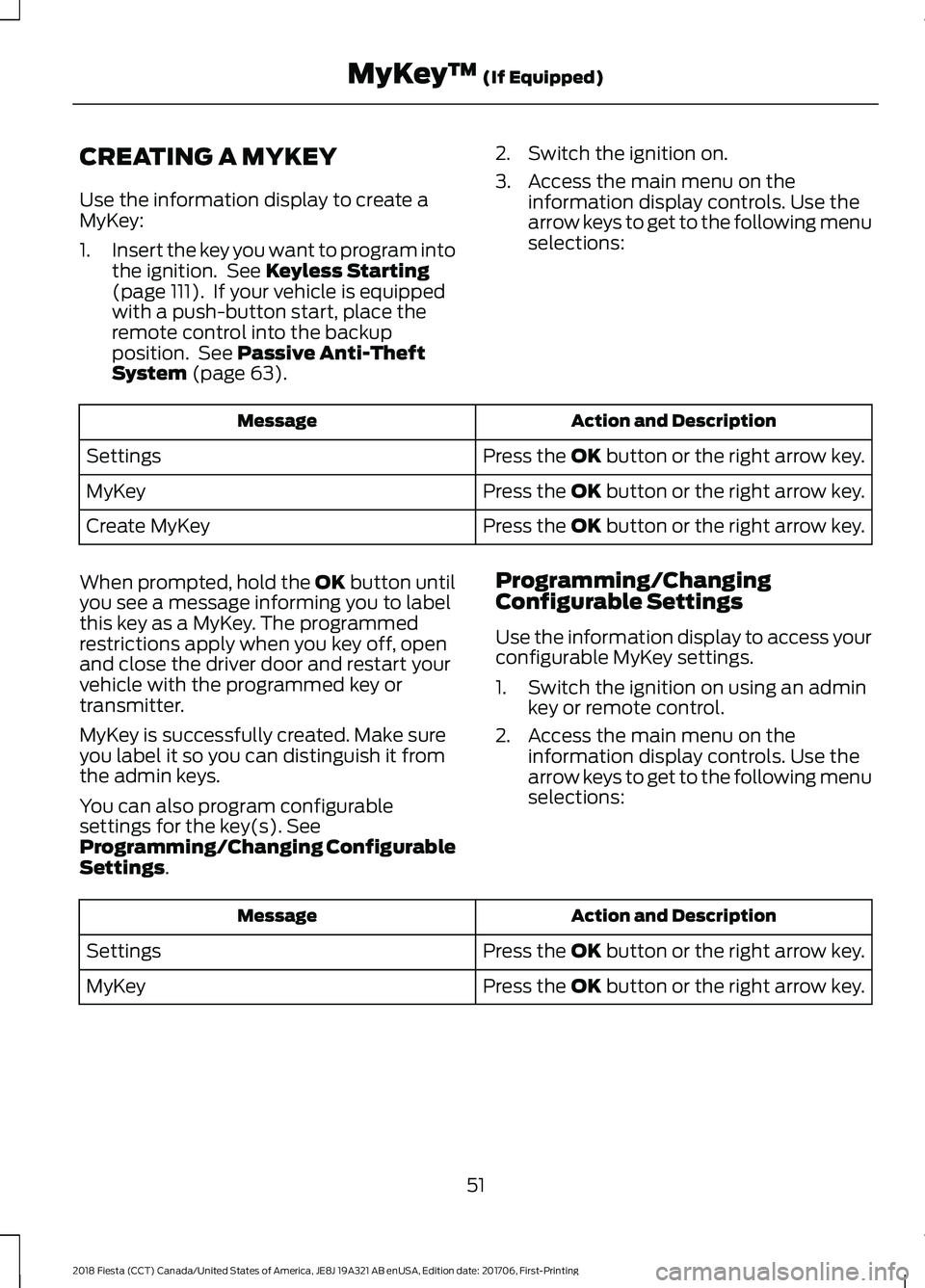
CREATING A MYKEY
Use the information display to create a
MyKey:
1.
Insert the key you want to program into
the ignition. See Keyless Starting
(page 111). If your vehicle is equipped
with a push-button start, place the
remote control into the backup
position. See
Passive Anti-Theft
System (page 63). 2. Switch the ignition on.
3. Access the main menu on the
information display controls. Use the
arrow keys to get to the following menu
selections: Action and Description
Message
Press the OK button or the right arrow key.
Settings
Press the OK button or the right arrow key.
MyKey
Press the OK button or the right arrow key.
Create MyKey
When prompted, hold the OK button until
you see a message informing you to label
this key as a MyKey. The programmed
restrictions apply when you key off, open
and close the driver door and restart your
vehicle with the programmed key or
transmitter.
MyKey is successfully created. Make sure
you label it so you can distinguish it from
the admin keys.
You can also program configurable
settings for the key(s). See
Programming/Changing Configurable
Settings
. Programming/Changing
Configurable Settings
Use the information display to access your
configurable MyKey settings.
1. Switch the ignition on using an admin
key or remote control.
2. Access the main menu on the information display controls. Use the
arrow keys to get to the following menu
selections: Action and Description
Message
Press the OK button or the right arrow key.
Settings
Press the OK button or the right arrow key.
MyKey
51
2018 Fiesta (CCT) Canada/United States of America, JE8J 19A321 AB enUSA, Edition date: 201706, First-Printing MyKey
™
(If Equipped)
Page 56 of 449
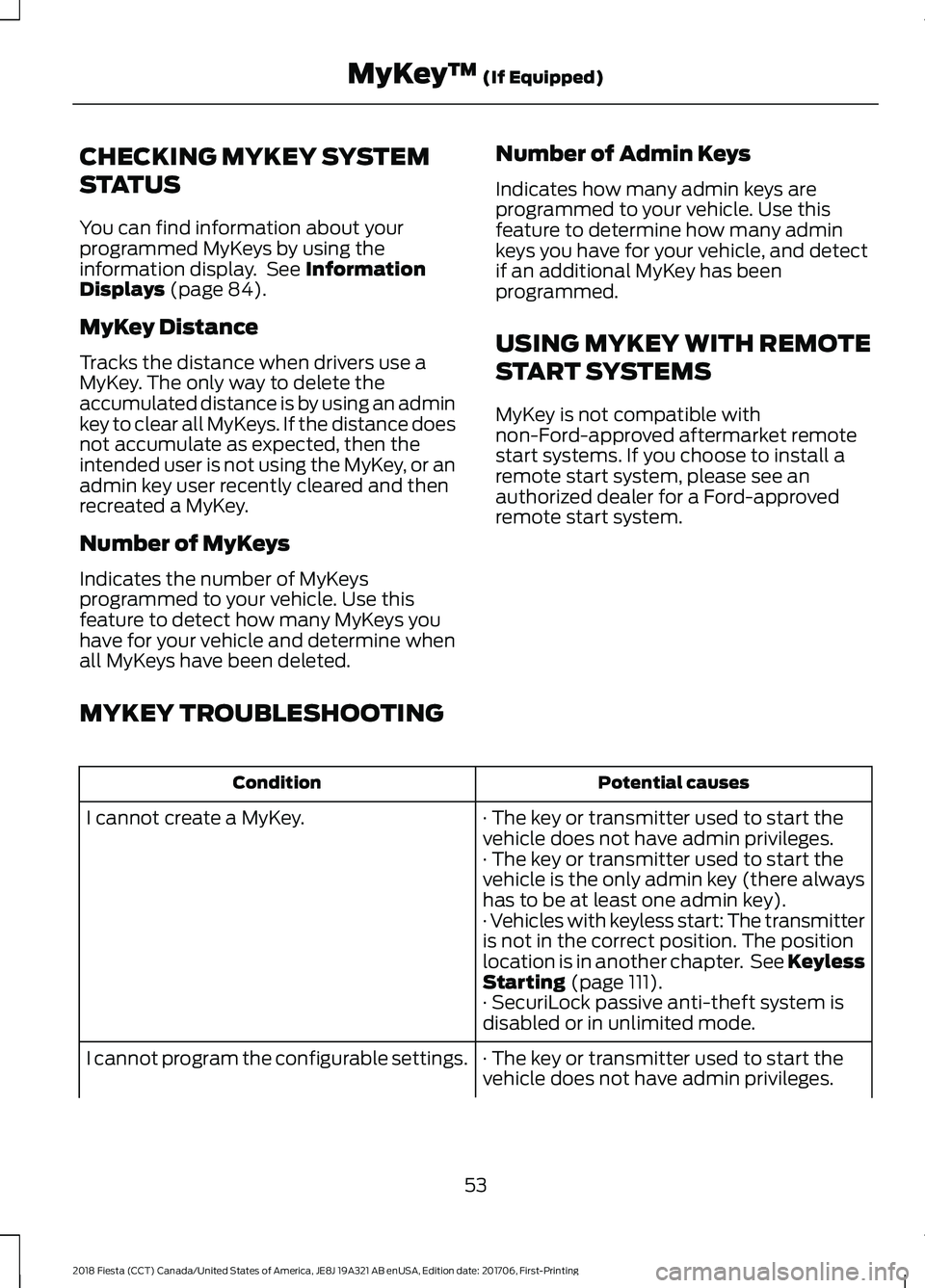
CHECKING MYKEY SYSTEM
STATUS
You can find information about your
programmed MyKeys by using the
information display. See Information
Displays (page 84).
MyKey Distance
Tracks the distance when drivers use a
MyKey. The only way to delete the
accumulated distance is by using an admin
key to clear all MyKeys. If the distance does
not accumulate as expected, then the
intended user is not using the MyKey, or an
admin key user recently cleared and then
recreated a MyKey.
Number of MyKeys
Indicates the number of MyKeys
programmed to your vehicle. Use this
feature to detect how many MyKeys you
have for your vehicle and determine when
all MyKeys have been deleted. Number of Admin Keys
Indicates how many admin keys are
programmed to your vehicle. Use this
feature to determine how many admin
keys you have for your vehicle, and detect
if an additional MyKey has been
programmed.
USING MYKEY WITH REMOTE
START SYSTEMS
MyKey is not compatible with
non-Ford-approved aftermarket remote
start systems. If you choose to install a
remote start system, please see an
authorized dealer for a Ford-approved
remote start system.
MYKEY TROUBLESHOOTING Potential causes
Condition
· The key or transmitter used to start the
vehicle does not have admin privileges.
I cannot create a MyKey.
· The key or transmitter used to start the
vehicle is the only admin key (there always
has to be at least one admin key).
· Vehicles with keyless start: The transmitter
is not in the correct position. The position
location is in another chapter. See Keyless
Starting
(page 111).
· SecuriLock passive anti-theft system is
disabled or in unlimited mode.
· The key or transmitter used to start the
vehicle does not have admin privileges.
I cannot program the configurable settings.
53
2018 Fiesta (CCT) Canada/United States of America, JE8J 19A321 AB enUSA, Edition date: 201706, First-Printing MyKey
™
(If Equipped)
Page 57 of 449
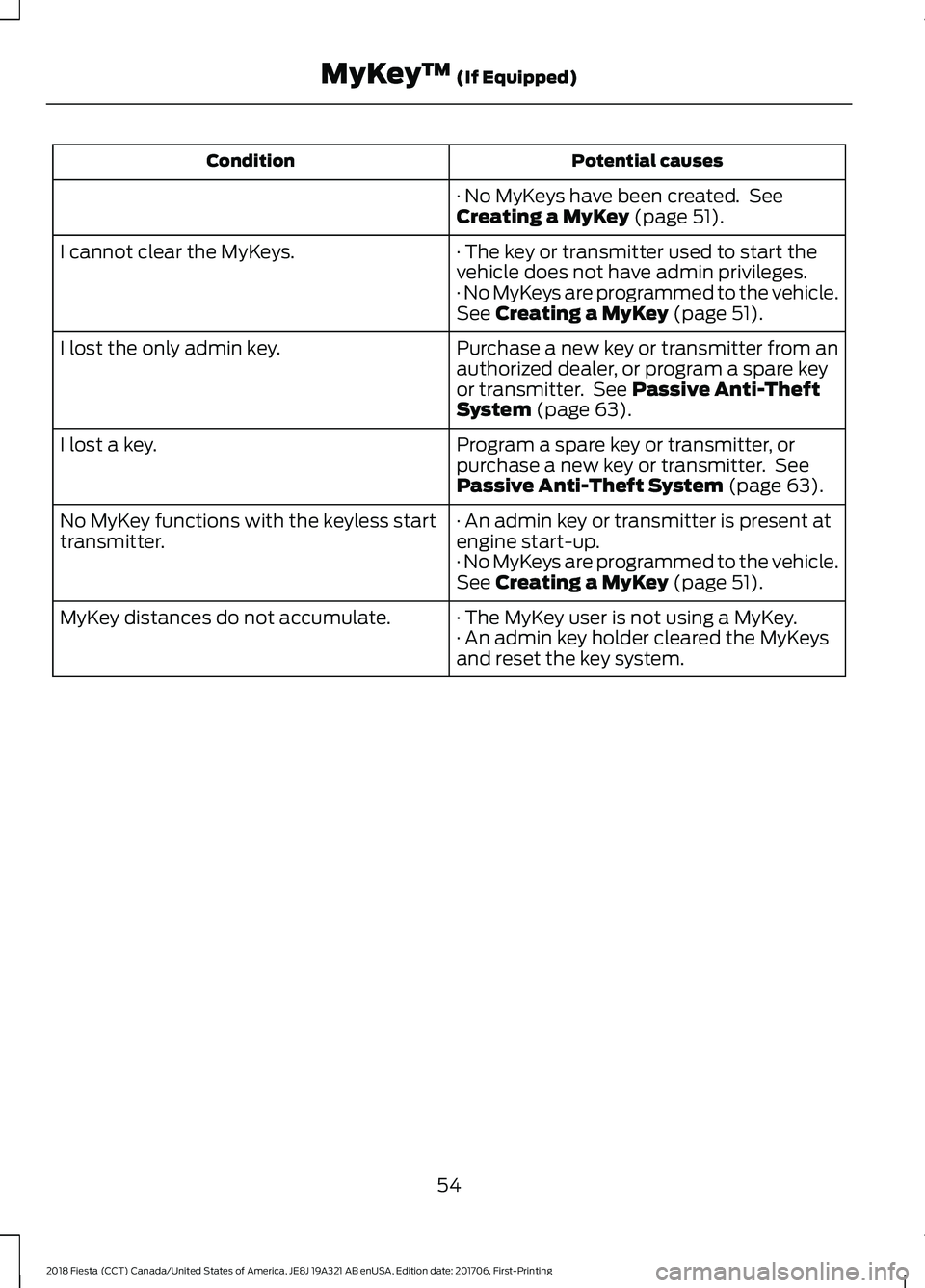
Potential causes
Condition
· No MyKeys have been created. See
Creating a MyKey (page 51).
· The key or transmitter used to start the
vehicle does not have admin privileges.
I cannot clear the MyKeys.
· No MyKeys are programmed to the vehicle.
See
Creating a MyKey (page 51).
Purchase a new key or transmitter from an
authorized dealer, or program a spare key
or transmitter. See
Passive Anti-Theft
System (page 63).
I lost the only admin key.
Program a spare key or transmitter, or
purchase a new key or transmitter. See
Passive Anti-Theft System
(page 63).
I lost a key.
· An admin key or transmitter is present at
engine start-up.
No MyKey functions with the keyless start
transmitter.
· No MyKeys are programmed to the vehicle.
See
Creating a MyKey (page 51).
· The MyKey user is not using a MyKey.
MyKey distances do not accumulate.
· An admin key holder cleared the MyKeys
and reset the key system.
54
2018 Fiesta (CCT) Canada/United States of America, JE8J 19A321 AB enUSA, Edition date: 201706, First-Printing MyKey
™
(If Equipped)
Page 60 of 449
Auto Unlock Feature
The auto unlock feature will unlock all the
doors when all of the following conditions
have been met:
•
The ignition is on, all doors are closed,
and your vehicle is moving at a speed
greater than 12 mph (20 km/h) for
more than two seconds.
• Your vehicle has come to a stop and
you switch the ignition off or to the
accessory position.
• The driver door is opened within 10
minutes of you switching the ignition
off or to the accessory position.
Note: The doors will not auto unlock if your
vehicle has been electronically locked after
the ignition is switched off and before the
driver door is opened.
Enabling or Disabling Auto Unlock
Note: See an authorized dealer to enable
or disable the auto unlock feature or carry
out the following procedure.
Note: You will have 30 seconds to
complete the procedure.
1. Switch the ignition on.
2. Press the power door lock button three
times.
3. Switch the ignition off.
4. Press the power door lock button three
times.
5. Switch the ignition on. The system alerts you with a tone to indicate your
vehicle is in programming mode.
6. Press the power door lock button for less than one second and release.
A tone sounds to confirm the change.
After programming the feature, switch the
ignition off to exit the programming mode. Emergency Locking With the Key
Note:
If the child safety locks are on and
you pull the interior handle, you will only
turn off the emergency locking, not the child
safety lock. You can only open the doors
using the external door handle.
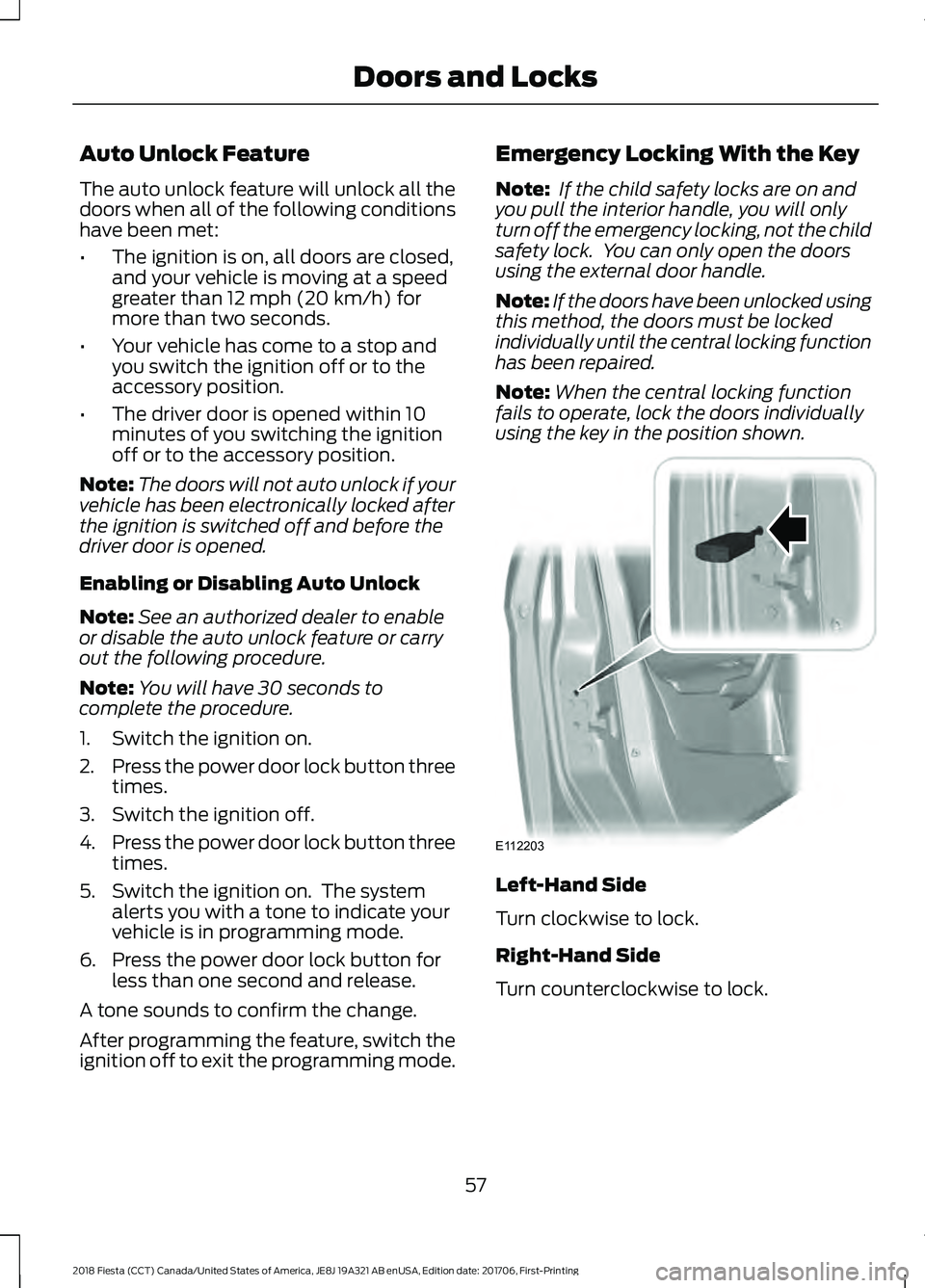
Note: If the doors have been unlocked using
this method, the doors must be locked
individually until the central locking function
has been repaired.
Note: When the central locking function
fails to operate, lock the doors individually
using the key in the position shown. Left-Hand Side
Turn clockwise to lock.
Right-Hand Side
Turn counterclockwise to lock.
57
2018 Fiesta (CCT) Canada/United States of America, JE8J 19A321 AB enUSA, Edition date: 201706, First-Printing Doors and LocksE112203
Page 62 of 449
KEYLESS ENTRY
General Information
WARNING: The system may not
function if the key is close to metal objects
or electronic devices such as cell phones.
The system will not function if:
• Your vehicle battery has no charge.
• The passive key frequencies are
jammed.
• The passive key battery has no charge.
Note: If the system does not function, you
will need to use the key blade to lock and
unlock your vehicle.
The system allows you to operate your
vehicle without the use of a key or remote
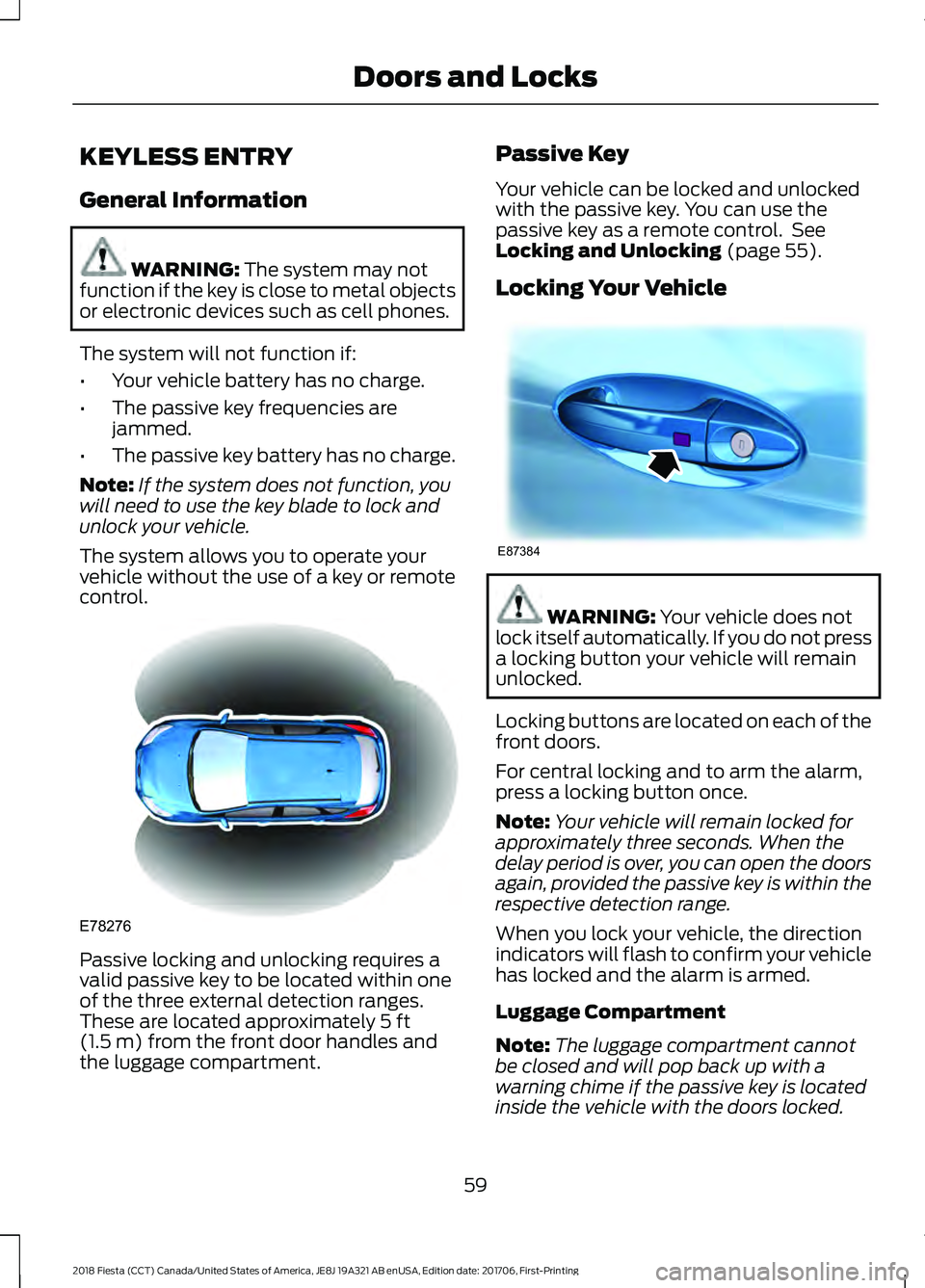
control. Passive locking and unlocking requires a
valid passive key to be located within one
of the three external detection ranges.
These are located approximately
5 ft
(1.5 m) from the front door handles and
the luggage compartment. Passive Key
Your vehicle can be locked and unlocked
with the passive key. You can use the
passive key as a remote control. See
Locking and Unlocking
(page 55).
Locking Your Vehicle WARNING:
Your vehicle does not
lock itself automatically. If you do not press
a locking button your vehicle will remain
unlocked.
Locking buttons are located on each of the
front doors.
For central locking and to arm the alarm,
press a locking button once.
Note: Your vehicle will remain locked for
approximately three seconds. When the
delay period is over, you can open the doors
again, provided the passive key is within the
respective detection range.
When you lock your vehicle, the direction
indicators will flash to confirm your vehicle
has locked and the alarm is armed.
Luggage Compartment
Note: The luggage compartment cannot
be closed and will pop back up with a
warning chime if the passive key is located
inside the vehicle with the doors locked.
59
2018 Fiesta (CCT) Canada/United States of America, JE8J 19A321 AB enUSA, Edition date: 201706, First-Printing Doors and LocksE78276 E87384