2018 FORD FIESTA CD player
[x] Cancel search: CD playerPage 338 of 449
There are two preset banks available for
AM and three banks for FM. To access
additional presets, tap the preset button.
The indicator on the preset button shows
which bank of presets you are currently
viewing.
SiriusXM® Satellite Radio (If
Activated)
Note:
This feature may not be available in
all markets and requires an active
subscription. SiriusXM satellite radio is a
subscription-based satellite radio service
that broadcasts a variety of music, sports,
news, weather, traffic and entertainment
programming. Your factory-installed
SiriusXM satellite radio system includes
hardware and a limited subscription term
that begins on the date of sale or lease of
your vehicle. See an authorized dealer for
availability.
For more information on extended
subscription terms (a service fee is
required), the online media player and a
list of SiriusXM satellite radio channels,
and other features, please visit
www.siriusxm.com in the United States,
www.siriusxm.ca in Canada, or call
SiriusXM at 1-888-539-7474.
Note:
SiriusXM reserves the unrestricted
right to change, rearrange, add or delete
programming. This includes canceling,
moving or adding particular channels, and
its prices, at any time, with or without notice
to you. Ford Motor Company shall not be
responsible for any such programming
changes.
Note: This receiver includes the eCos
real-time operating system. eCos is
published under the eCos License.
The following buttons are available for SiriusXM: Action and description
Menu item
Touch this button to see a list of available stations.
Browse
A pop-up appears, allowing you to type in the call numbers of
a station.
Direct Tune
Once you enter the stations call numbers, you can select:The system tunes to the station you select.
Enter
You exit the pop-up and the current station
continues to play.
Cancel
You can press the backspace button to delete the previous
number.
335
2018 Fiesta (CCT) Canada/United States of America, JE8J 19A321 AB enUSA, Edition date: 201706, First-Printing SYNC™ 3E234451
Page 345 of 449
Function
Button
Composers
This button allows you to choose a specific
letter to view within the category you are
browsing.
A-Z Jump
If available, this allows you to browse the
folders and files on your USB device.
Explore Device
USB Ports The USB ports are in the center console or
behind a small access door in the
instrument panel.
This feature allows you to plug in USB
media devices, memory sticks, flash drives
or thumb drives, and charge devices if they
support this feature.
Select this option to play audio from your
USB device.
Apps
The system supports the use of certain
audio apps such as Pandora or iHeartRadio
through a USB or Bluetooth enabled
device.
Each app gives you different on-screen
options depending on the app's content.
See Apps (page 356). Supported Media Players, Formats
and Metadata Information
The system is capable of hosting nearly
any digital media player, including iPod,
iPhone, and most USB drives.
Supported audio formats include MP3,
WMA, WAV, AAC, and FLAC.
Supported audio file extensions include
MP3, WMA, WAV, M4A, M4B, AAC, and
FLAC.
Supported USB file systems include: FAT,
exFAT, and NTFS.
SYNC 3 is also able to organize the media
from your USB device by metadata tags.
Metadata tags, which are descriptive
software identifiers embedded in the
media files, provide information about the
file.
If your indexed media files contain no
information embedded in these metadata
tags, SYNC 3 may classify the empty
metadata tags as unknown.
SYNC 3 is capable of indexing up to
50,000 songs per USB device, for up to 10
devices.
342
2018 Fiesta (CCT) Canada/United States of America, JE8J 19A321 AB enUSA, Edition date: 201706, First-Printing SYNC™ 3E211463
Page 363 of 449
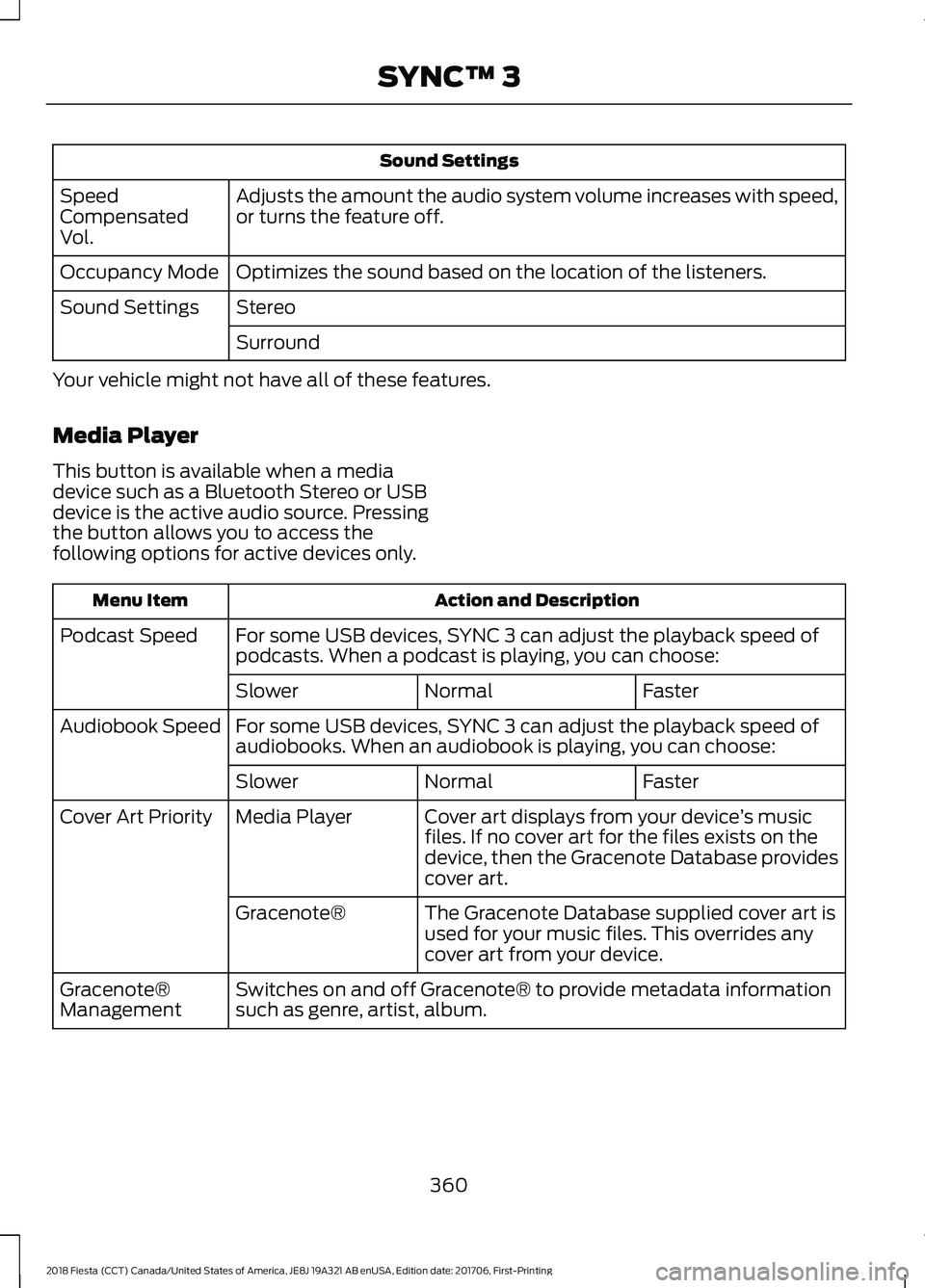
Sound Settings
Adjusts the amount the audio system volume increases with speed,
or turns the feature off.
Speed
Compensated
Vol.
Optimizes the sound based on the location of the listeners.
Occupancy Mode
Stereo
Sound Settings
Surround
Your vehicle might not have all of these features.
Media Player
This button is available when a media
device such as a Bluetooth Stereo or USB
device is the active audio source. Pressing
the button allows you to access the
following options for active devices only. Action and Description
Menu Item
For some USB devices, SYNC 3 can adjust the playback speed of
podcasts. When a podcast is playing, you can choose:
Podcast Speed
Faster
Normal
Slower
For some USB devices, SYNC 3 can adjust the playback speed of
audiobooks. When an audiobook is playing, you can choose:
Audiobook Speed
Faster
Normal
Slower
Cover art displays from your device ’s music
files. If no cover art for the files exists on the
device, then the Gracenote Database provides
cover art.
Media Player
Cover Art Priority
The Gracenote Database supplied cover art is
used for your music files. This overrides any
cover art from your device.
Gracenote®
Switches on and off Gracenote® to provide metadata information
such as genre, artist, album.
Gracenote®
Management
360
2018 Fiesta (CCT) Canada/United States of America, JE8J 19A321 AB enUSA, Edition date: 201706, First-Printing SYNC™ 3
Page 379 of 449
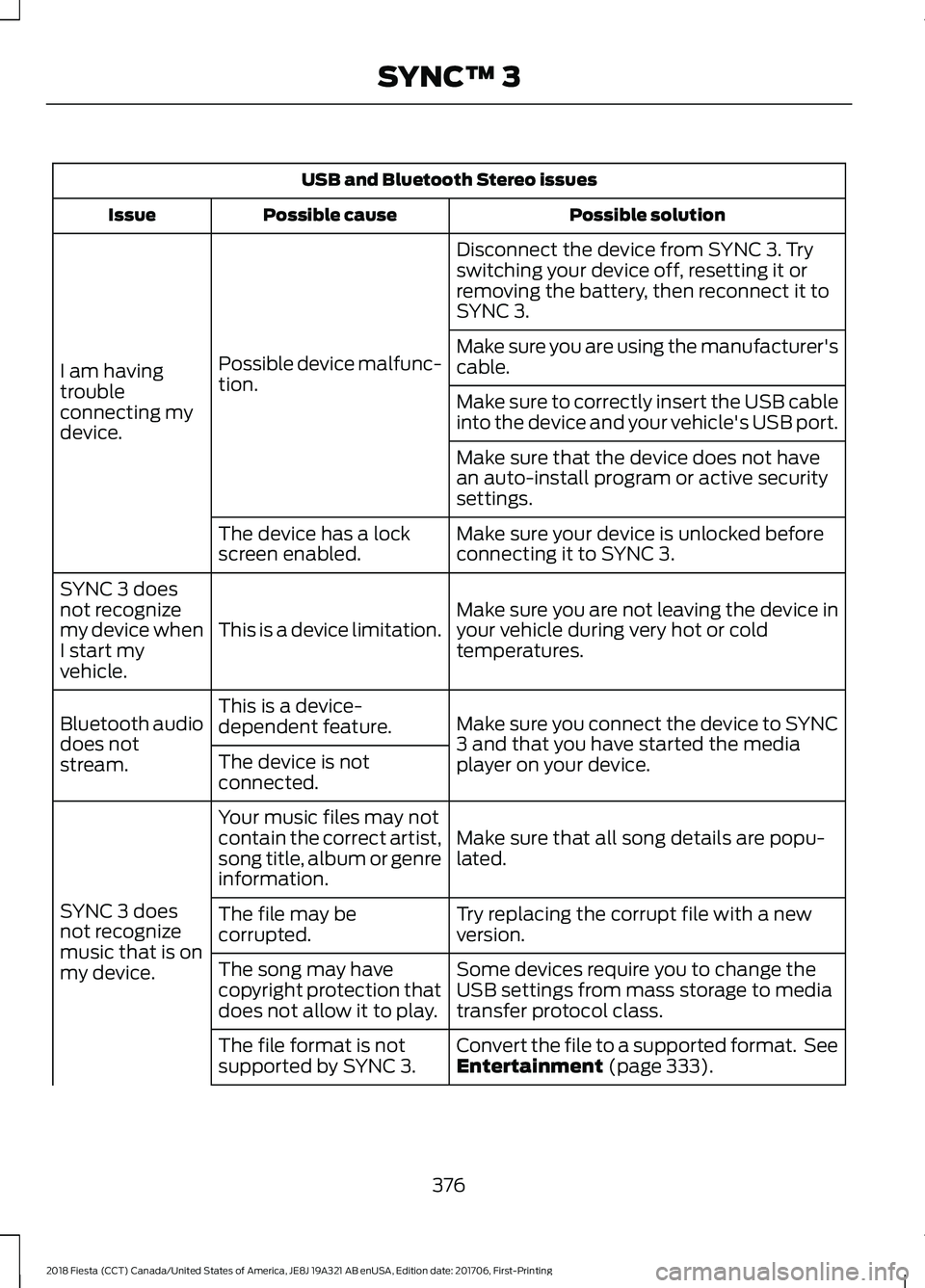
USB and Bluetooth Stereo issues
Possible solution
Possible cause
Issue
Disconnect the device from SYNC 3. Try
switching your device off, resetting it or
removing the battery, then reconnect it to
SYNC 3.
Possible device malfunc-
tion.
I am having
trouble
connecting my
device. Make sure you are using the manufacturer's
cable.
Make sure to correctly insert the USB cable
into the device and your vehicle's USB port.
Make sure that the device does not have
an auto-install program or active security
settings.
Make sure your device is unlocked before
connecting it to SYNC 3.
The device has a lock
screen enabled.
Make sure you are not leaving the device in
your vehicle during very hot or cold
temperatures.
This is a device limitation.
SYNC 3 does
not recognize
my device when
I start my
vehicle.
Make sure you connect the device to SYNC
3 and that you have started the media
player on your device.
This is a device-
dependent feature.
Bluetooth audio
does not
stream. The device is not
connected.
Make sure that all song details are popu-
lated.
Your music files may not
contain the correct artist,
song title, album or genre
information.
SYNC 3 does
not recognize
music that is on
my device. Try replacing the corrupt file with a new
version.
The file may be
corrupted.
Some devices require you to change the
USB settings from mass storage to media
transfer protocol class.
The song may have
copyright protection that
does not allow it to play.
Convert the file to a supported format. See
Entertainment (page 333).
The file format is not
supported by SYNC 3.
376
2018 Fiesta (CCT) Canada/United States of America, JE8J 19A321 AB enUSA, Edition date: 201706, First-Printing SYNC™ 3
Page 386 of 449
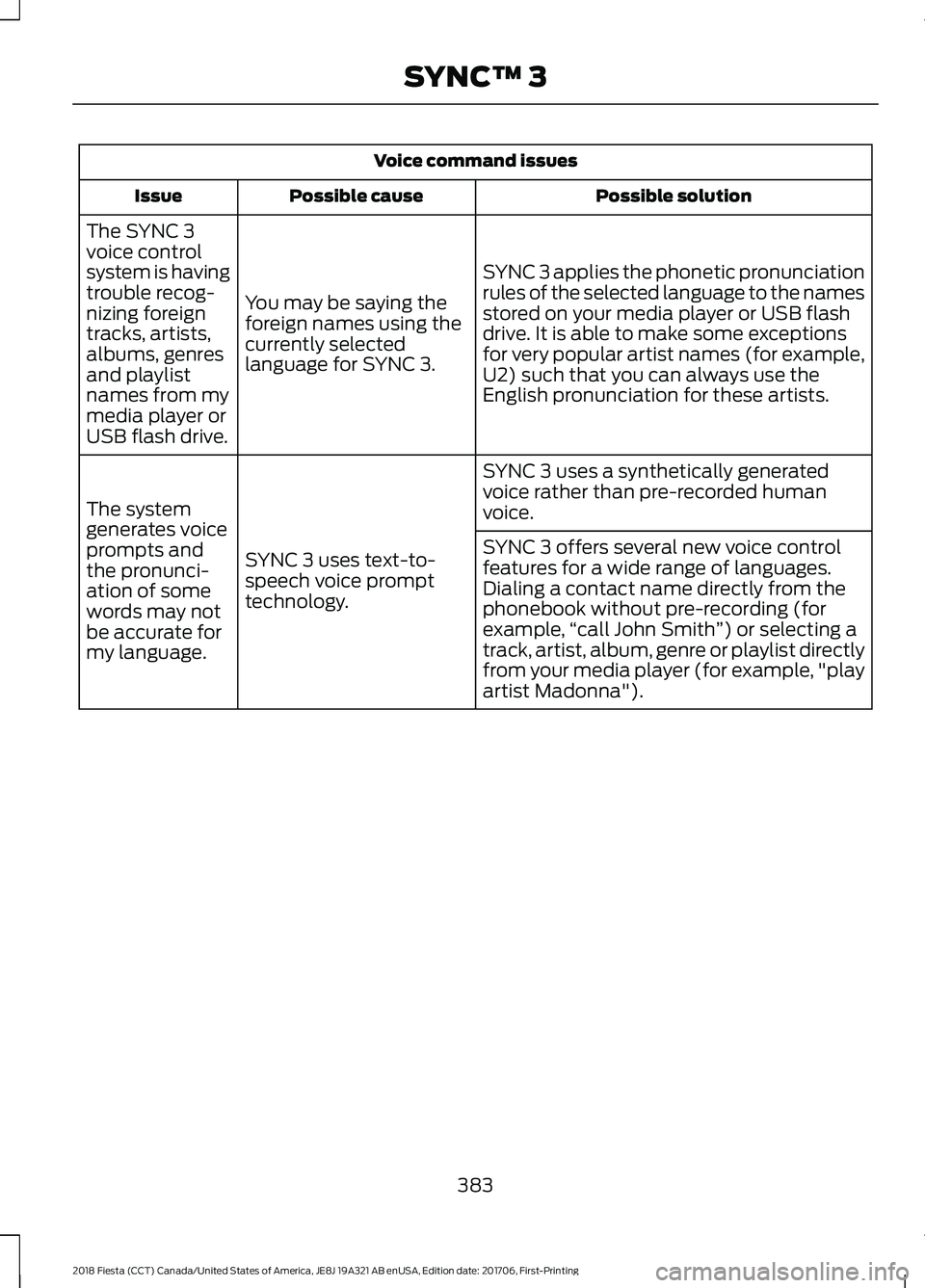
Voice command issues
Possible solution
Possible cause
Issue
SYNC 3 applies the phonetic pronunciation
rules of the selected language to the names
stored on your media player or USB flash
drive. It is able to make some exceptions
for very popular artist names (for example,
U2) such that you can always use the
English pronunciation for these artists.
You may be saying the
foreign names using the
currently selected
language for SYNC 3.
The SYNC 3
voice control
system is having
trouble recog-
nizing foreign
tracks, artists,
albums, genres
and playlist
names from my
media player or
USB flash drive.
SYNC 3 uses a synthetically generated
voice rather than pre-recorded human
voice.
SYNC 3 uses text-to-
speech voice prompt
technology.
The system
generates voice
prompts and
the pronunci-
ation of some
words may not
be accurate for
my language. SYNC 3 offers several new voice control
features for a wide range of languages.
Dialing a contact name directly from the
phonebook without pre-recording (for
example,
“call John Smith ”) or selecting a
track, artist, album, genre or playlist directly
from your media player (for example, "play
artist Madonna").
383
2018 Fiesta (CCT) Canada/United States of America, JE8J 19A321 AB enUSA, Edition date: 201706, First-Printing SYNC™ 3
Page 387 of 449
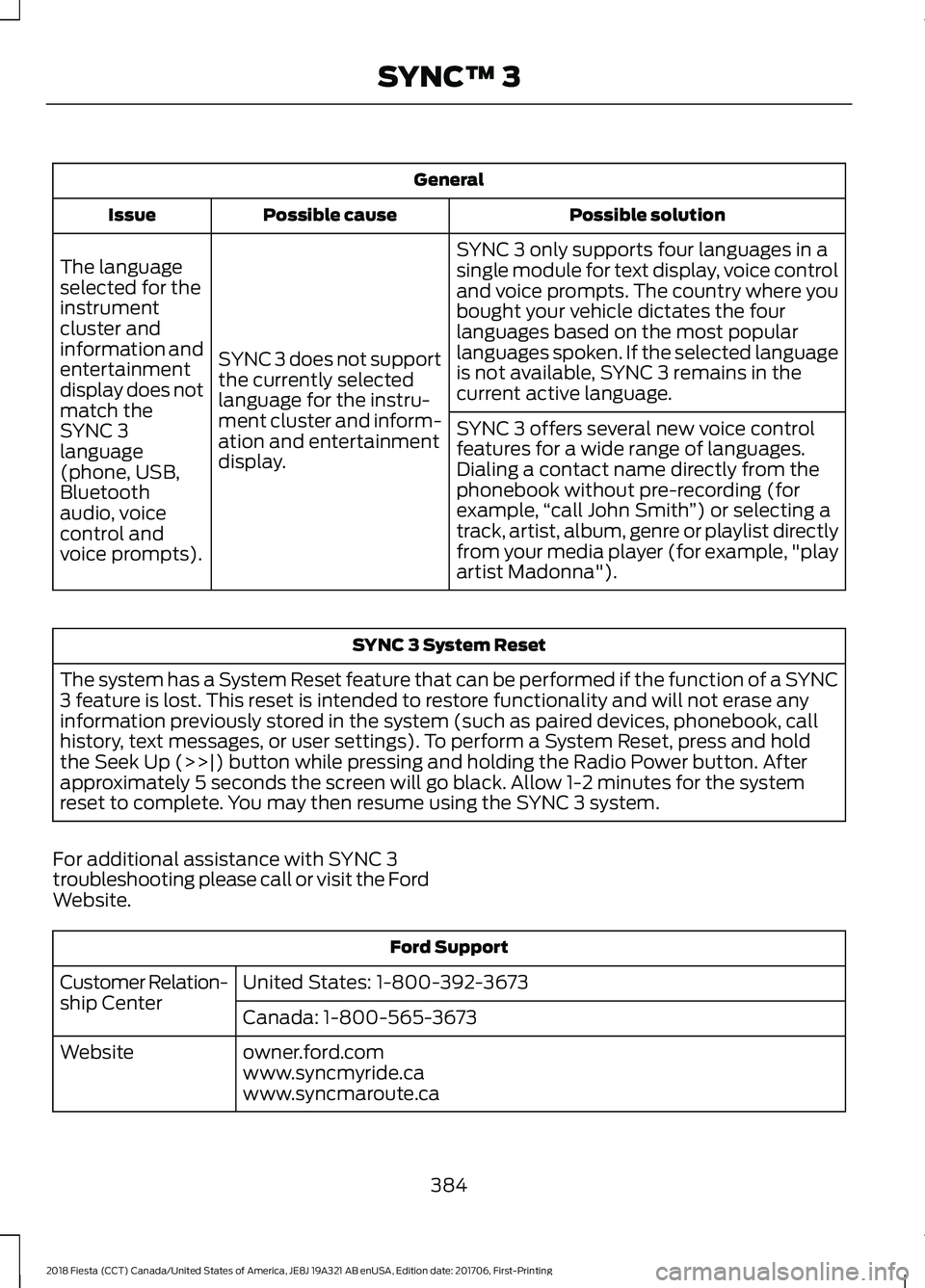
General
Possible solution
Possible cause
Issue
SYNC 3 only supports four languages in a
single module for text display, voice control
and voice prompts. The country where you
bought your vehicle dictates the four
languages based on the most popular
languages spoken. If the selected language
is not available, SYNC 3 remains in the
current active language.
SYNC 3 does not support
the currently selected
language for the instru-
ment cluster and inform-
ation and entertainment
display.
The language
selected for the
instrument
cluster and
information and
entertainment
display does not
match the
SYNC 3
SYNC 3 offers several new voice control
features for a wide range of languages.
Dialing a contact name directly from the
phonebook without pre-recording (for
example,
“call John Smith ”) or selecting a
track, artist, album, genre or playlist directly
from your media player (for example, "play
artist Madonna").
language
(phone, USB,
Bluetooth
audio, voice
control and
voice prompts). SYNC 3 System Reset
The system has a System Reset feature that can be performed if the function of a SYNC
3 feature is lost. This reset is intended to restore functionality and will not erase any
information previously stored in the system (such as paired devices, phonebook, call
history, text messages, or user settings). To perform a System Reset, press and hold
the Seek Up (>>|) button while pressing and holding the Radio Power button. After
approximately 5 seconds the screen will go black. Allow 1-2 minutes for the system
reset to complete. You may then resume using the SYNC 3 system.
For additional assistance with SYNC 3
troubleshooting please call or visit the Ford
Website. Ford Support
United States: 1-800-392-3673
Customer Relation-
ship Center
Canada: 1-800-565-3673
owner.ford.com
Website
www.syncmyride.ca
www.syncmaroute.ca
384
2018 Fiesta (CCT) Canada/United States of America, JE8J 19A321 AB enUSA, Edition date: 201706, First-Printing SYNC™ 3
Page 441 of 449

Sources..................................................................
334
Supported Media Players, Formats and Metadata Information................................. 342
USB Ports............................................................. 342
Environment......................................................14
Event Data Recording See: Data Recording.............................................. 9
Export Unique Options..................................13
Exterior Mirrors................................................76
Fold-Away Exterior Mirrors............................... 76
Integrated Blind Spot Mirrors........................... 76
Power Exterior Mirrors......................................... 76
F
Fan See: Engine Cooling Fan................................... 187
Fastening the Seatbelts
..............................29
Seatbelt Locking Modes.................................... 30
Using Seatbelts During Pregnancy................29
Flat Tire See: Changing a Road Wheel....................... 239
Floor Mats.......................................................159
Fog Lamps - Front See: Front Fog Lamps......................................... 72
Ford Credit
..........................................................11
US Only...................................................................... 11
Ford Protect
...................................................387
Ford Protect Extended Service Plan
(CANADA ONLY).......................................... 388
Ford Protect Extended Service Plans (U.S. Only).................................................................. 387
Front Fog Lamps.............................................72
Front Parking Aid..........................................140 Sensing System Audible Warnings...............141
Switching the Parking Aid System Off........141
Front Passenger Sensing System
............38
Front Wiper Blades See: Changing the Front Wiper Blades.......195
Fuel and Refueling........................................115
Fuel Consumption.......................................120 Calculating Fuel Economy................................ 121
Filling the Fuel Tank............................................ 121
Fuel Filler Funnel Location.........................116
Fuel Quality......................................................115 Choosing the Right Fuel.................................... 115
Fuel Shutoff.....................................................161
Fuses..................................................................172 Fuse Specification Chart............................172
Engine Compartment Fuse Box..................... 172
Passenger Compartment Fuse Box.............176
G
Gauges................................................................79 Compass (If Equipped)...................................... 79
Engine Coolant Temperature Gauge.............79
Fuel Gauge............................................................. 80
Low Fuel Reminder............................................. 80
Gearbox See: Transmission.............................................. 126
General Information on Radio Frequencies...................................................45
Intelligent Access................................................. 45
General Maintenance Information.......389 Multi-Point Inspection...................................... 391
Owner Checks and Services......................... 390
Protecting Your Investment.......................... 389
Why Maintain Your Vehicle?......................... 389
Why Maintain Your Vehicle at Your Dealership?..................................................... 389
Getting Assistance Outside the U.S. and Canada..........................................................168
Getting the Services You Need...............165 Away From Home............................................... 165
H
Handbrake See: Parking Brake.............................................. 133
Hazard Flashers.............................................161
Headlamp Adjusting See: Adjusting the Headlamps..................... 196
Headlamp Exit Delay.....................................72
Headlamp Removal See: Removing a Headlamp........................... 197
Headrest See: Head Restraints.......................................... 101
Head Restraints.............................................101 Adjusting the Head Restraint......................... 102
Heated Seats
.................................................105
Heated Windows and Mirrors...................99 Heated Exterior Mirrors.................................... 100
Heated Windows................................................. 99
Heating See: Climate Control.......................................... 94
438
2018 Fiesta (CCT) Canada/United States of America, JE8J 19A321 AB enUSA, Edition date: 201706, First-Printing Index
Page 445 of 449
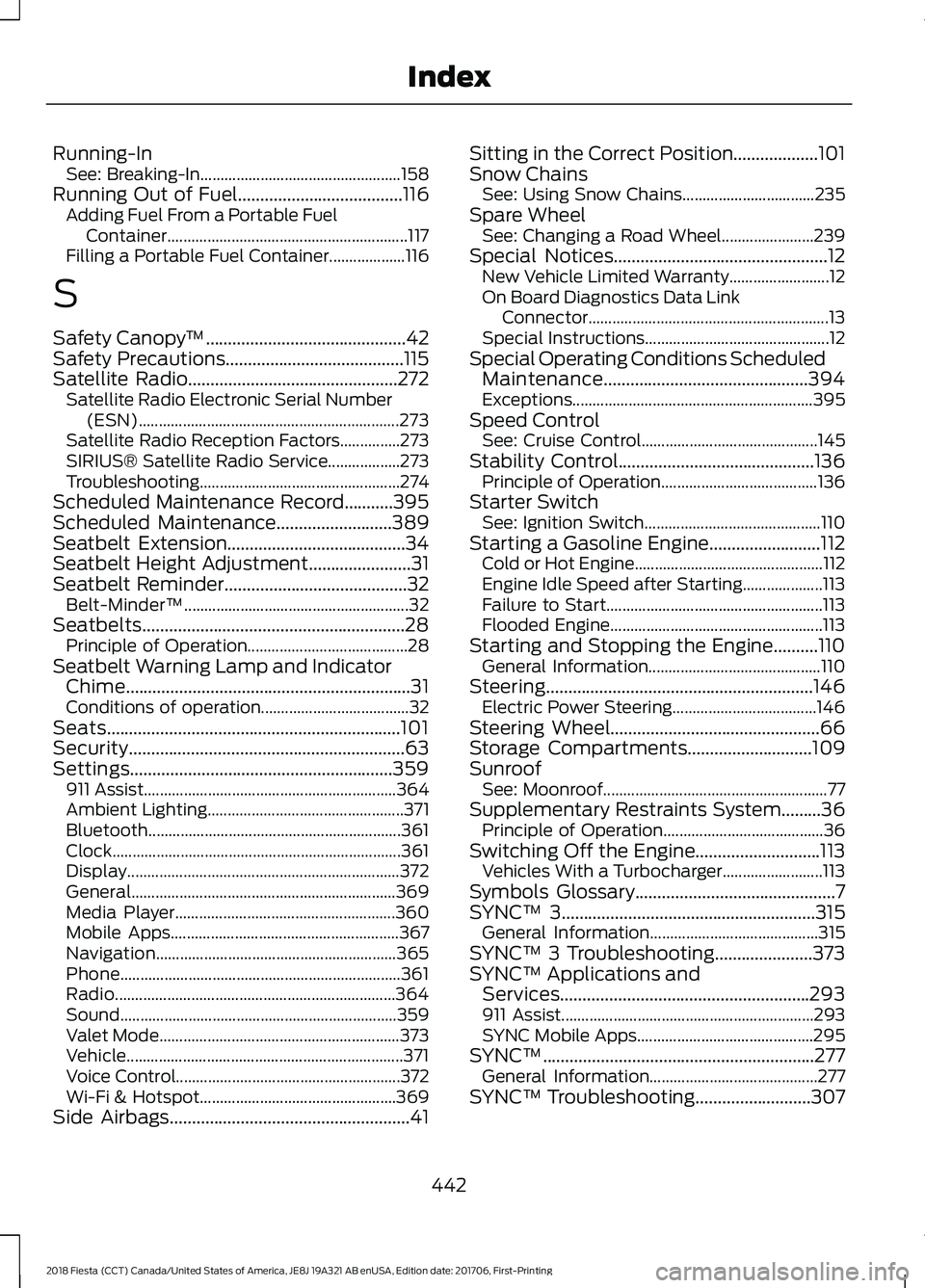
Running-In
See: Breaking-In.................................................. 158
Running Out of Fuel.....................................116
Adding Fuel From a Portable Fuel
Container............................................................ 117
Filling a Portable Fuel Container................... 116
S
Safety Canopy ™
.............................................42
Safety Precautions........................................115
Satellite Radio
...............................................272
Satellite Radio Electronic Serial Number
(ESN)................................................................. 273
Satellite Radio Reception Factors...............273
SIRIUS® Satellite Radio Service.................. 273
Troubleshooting.................................................. 274
Scheduled Maintenance Record...........395
Scheduled Maintenance..........................389
Seatbelt Extension
........................................34
Seatbelt Height Adjustment.......................31
Seatbelt Reminder.........................................32 Belt-Minder™........................................................ 32
Seatbelts...........................................................28 Principle of Operation........................................ 28
Seatbelt Warning Lamp and Indicator Chime................................................................31
Conditions of operation..................................... 32
Seats..................................................................101
Security..............................................................63
Settings...........................................................359 911 Assist............................................................... 364
Ambient Lighting................................................. 371
Bluetooth............................................................... 361
Clock........................................................................\
361
Display.................................................................... 372
General.................................................................. 369
Media Player....................................................... 360
Mobile Apps......................................................... 367
Navigation............................................................ 365
Phone...................................................................... 361
Radio...................................................................... 364
Sound..................................................................... 359
Valet Mode............................................................ 373
Vehicle..................................................................... 371
Voice Control........................................................ 372
Wi-Fi & Hotspot................................................. 369
Side Airbags
......................................................41 Sitting in the Correct Position...................101
Snow Chains
See: Using Snow Chains................................. 235
Spare Wheel See: Changing a Road Wheel....................... 239
Special Notices................................................12 New Vehicle Limited Warranty......................... 12
On Board Diagnostics Data Link Connector............................................................ 13
Special Instructions.............................................. 12
Special Operating Conditions Scheduled Maintenance..............................................394
Exceptions............................................................ 395
Speed Control See: Cruise Control............................................ 145
Stability Control
............................................136
Principle of Operation....................................... 136
Starter Switch See: Ignition Switch............................................ 110
Starting a Gasoline Engine.........................112 Cold or Hot Engine............................................... 112
Engine Idle Speed after Starting.................... 113
Failure to Start...................................................... 113
Flooded Engine..................................................... 113
Starting and Stopping the Engine..........110 General Information........................................... 110
Steering
............................................................146
Electric Power Steering.................................... 146
Steering Wheel...............................................66
Storage Compartments............................109
Sunroof See: Moonroof........................................................ 77
Supplementary Restraints System.........36 Principle of Operation........................................ 36
Switching Off the Engine............................113 Vehicles With a Turbocharger......................... 113
Symbols Glossary
.............................................7
SYNC™ 3.........................................................315
General Information.......................................... 315
SYNC™ 3 Troubleshooting
......................373
SYNC™ Applications and Services........................................................293
911 Assist............................................................... 293
SYNC Mobile Apps............................................ 295
SYNC™.............................................................277 General Information.......................................... 277
SYNC™ Troubleshooting..........................307
442
2018 Fiesta (CCT) Canada/United States of America, JE8J 19A321 AB enUSA, Edition date: 201706, First-Printing Index