2018 FORD F-650/750 audio
[x] Cancel search: audioPage 4 of 386
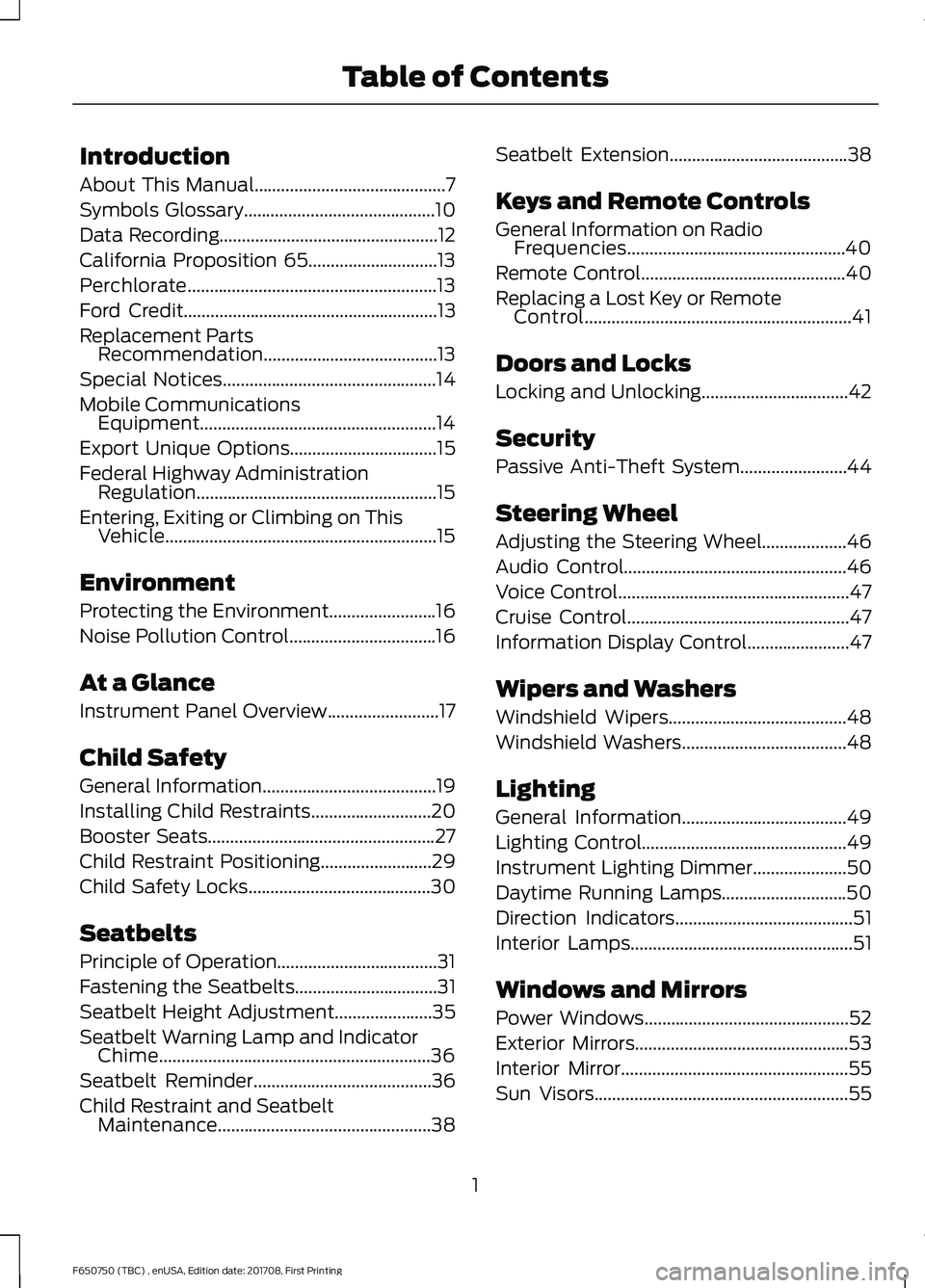
Introduction
About This Manual...........................................7
Symbols Glossary
...........................................10
Data Recording.................................................12
California Proposition 65.............................13
Perchlorate........................................................13
Ford Credit
.........................................................13
Replacement Parts Recommendation
.......................................13
Special Notices
................................................14
Mobile Communications Equipment.....................................................14
Export Unique Options.................................15
Federal Highway Administration Regulation......................................................15
Entering, Exiting or Climbing on This Vehicle.............................................................15
Environment
Protecting the Environment........................16
Noise Pollution Control.................................16
At a Glance
Instrument Panel Overview.........................17
Child Safety
General Information
.......................................19
Installing Child Restraints...........................20
Booster Seats
...................................................27
Child Restraint Positioning
.........................29
Child Safety Locks.........................................30
Seatbelts
Principle of Operation....................................31
Fastening the Seatbelts
................................31
Seatbelt Height Adjustment......................35
Seatbelt Warning Lamp and Indicator Chime.............................................................36
Seatbelt Reminder........................................36
Child Restraint and Seatbelt Maintenance................................................38 Seatbelt Extension
........................................38
Keys and Remote Controls
General Information on Radio Frequencies.................................................40
Remote Control..............................................40
Replacing a Lost Key or Remote Control............................................................41
Doors and Locks
Locking and Unlocking
.................................42
Security
Passive Anti-Theft System........................44
Steering Wheel
Adjusting the Steering Wheel...................46
Audio Control..................................................46
Voice Control
....................................................47
Cruise Control
..................................................47
Information Display Control
.......................47
Wipers and Washers
Windshield Wipers........................................48
Windshield Washers
.....................................48
Lighting
General Information
.....................................49
Lighting Control
..............................................49
Instrument Lighting Dimmer
.....................50
Daytime Running Lamps............................50
Direction Indicators
........................................51
Interior Lamps
..................................................51
Windows and Mirrors
Power Windows
..............................................52
Exterior Mirrors
................................................53
Interior Mirror...................................................55
Sun Visors.........................................................55
1
F650750 (TBC) , enUSA, Edition date: 201708, First Printing Table of Contents
Page 7 of 386

Brake Fluid Check........................................205
Power Steering Fluid Check....................205
Washer Fluid Check....................................206
Draining the Fuel Filter Water Trap - 6.7L Diesel...........................................................206
Fuel Filter - 6.8L...........................................207
Changing the 12V Battery.........................207
Checking the Wiper Blades.....................209
Changing the Wiper Blades....................209
Adjusting the Headlamps
.........................210
Removing a Headlamp................................211
Changing a Bulb
.............................................211
Bulb Specification Chart............................212
Changing the Engine Air Filter - 6.7L Diesel.............................................................213
Changing the Engine Air Filter - 6.8L......217
Changing the Engine-Mounted and Diesel Fuel Conditioner Module Fuel
Filters .............................................................
218
Electrical System Inspection....................221
Air Induction System Inspection.............221
Exhaust System Inspection.....................222
Brake System Inspection..........................223
Axle Inspection
.............................................226
Steering System Inspection.....................226
Suspension System Inspection
..............227
Frame and Tow Hook Inspection...........227
Rear Axle Fluid Check.................................227
Spring U-Bolt Check...................................228
Vehicle Care
General Information
...................................229
Cleaning Products
.......................................229
Cleaning the Exterior..................................229
Waxing.............................................................230
Cleaning the Engine.....................................231
Cleaning the Windows and Wiper Blades...........................................................231
Cleaning the Interior....................................232
Cleaning the Instrument Panel and Instrument Cluster Lens........................232 Repairing Minor Paint Damage
...............233
Cleaning the Wheels..................................233
Vehicle Storage
.............................................234
Wheels and Tires
Tire Care
..........................................................236
Using Snow Chains......................................251
Changing a Road Wheel............................251
Technical Specifications...........................253
Capacities and Specific- ations
Engine Specifications - 6.7L Diesel.......255
Engine Specifications - 6.8L
...................256
Motorcraft Parts - 6.7L Diesel..................257
Motorcraft Parts - 6.8L..............................258
Vehicle Identification Number
................259
Vehicle Certification Label.......................260
Transmission Code Designation............260
Capacities and Specifications - 6.7L Diesel............................................................261
Capacities and Specifications - 6.8L..............................................................269
Audio System
General Information
...................................276
Audio Unit - Vehicles With: AM/FM/CD/ SYNC.............................................................277
Audio Unit - Vehicles With: AM/FM
......279
Satellite Radio
...............................................281
Audio Input Jack...........................................283
USB Port
.........................................................284
SYNC™
General Information
...................................285
Using Voice Recognition............................287
Using SYNC™ With Your Phone............289
Using SYNC™ With Your Media Player............................................................301
SYNC™ Troubleshooting
..........................310
4
F650750 (TBC) , enUSA, Edition date: 201708, First Printing Table of Contents
Page 20 of 386

INSTRUMENT PANEL OVERVIEW
Wiper stalk. See Windshield Wipers (page 48).
A
Cruise control switches. See
Cruise Control (page 137).
B
Instrument cluster. See
Instrument Cluster (page 56).
C
SelectShift Automatic transmission gearshift lever. See
Transmission (page
114).
D
Audio unit. See
Audio System (page 276).
E
Climate controls. See
Climate Control (page 72).
F
Audio input jack. See Audio Input Jack (page 283). USB port. See USB Port
(page
284).
G
Auxiliary switches. See
Auxiliary Switches (page 316).
H
Fuel tank selector switch. See
Fuel Tank Selector Switch (page 101).
I
Ignition. See
Ignition Switch (page 86).
J
Audio control. See
Audio Control (page 46).
K
17
F650750 (TBC) , enUSA, Edition date: 201708, First Printing At a GlanceE251090
Page 49 of 386

ADJUSTING THE STEERING
WHEEL
WARNING
Do not adjust the steering wheel
when your vehicle is moving.
Note:
Make sure that you are sitting in the
correct position. See Sitting in the Correct
Position (page 75). 1. Unlock the steering column.
2.
Adjust the steering wheel to the desired
position. 3. Lock the steering column.
AUDIO CONTROL
(If Equipped)
You can operate the following functions
with the control: Seek up or next.
A
Media.
B
Volume up and down.
C
Seek down or previous.
D
46
F650750 (TBC) , enUSA, Edition date: 201708, First Printing Steering WheelE183047 E183049 E210085
Page 50 of 386

Media
Press repeatedly to scroll through available
audio modes.
Seek, Next or Previous
Press the seek button to:
•
Tune the radio to the next or previous
stored preset.
• Play the next or the previous track.
Press and hold the seek button to:
• Tune the radio to the next station up
or down the frequency band.
• Seek through a track.
VOICE CONTROL (If Equipped) Voice recognition.
A
Answer or end call.
B CRUISE CONTROL See
Cruise Control (page 137).
INFORMATION DISPLAY
CONTROL See
Information Displays (page 64).
47
F650750 (TBC) , enUSA, Edition date: 201708, First Printing Steering WheelE210086 E163053 E163054
Page 211 of 386

Note:
Electrical or electronic accessories
or components added to the vehicle by the
dealer or the owner may adversely affect
battery performance and durability.
Your vehicle is equipped with a Motorcraft
maintenance-free battery which normally
does not require additional water during
its life of service.
For longer, trouble-free operation, keep the
top of the battery clean and dry. Also,
make certain the battery cables are always
tightly fastened to the battery terminals.
If you see any corrosion on the battery or
terminals, remove the cables from the
terminals and clean with a wire brush. You
can neutralize the acid with a solution of
baking soda and water.
It is recommended that the negative
battery cable terminal be disconnected
from the battery if you plan to store your
vehicle for an extended period of time.
Because your vehicle ’s engine is
electronically controlled by a computer,
some control conditions are maintained
by power from the battery. When the
battery is disconnected or a new battery
is installed, the engine must relearn its idle
and fuel trim strategy for optimum
driveability and performance. To begin this
process
1. With the vehicle at a complete stop, set the parking brake.
2. Put the gearshift in park (P) or neutral (N) and turn off all accessories.
3. Start the engine. Run the engine until it reaches normal operating
temperature.
4. Allow the engine to idle for at least one
minute.
5. Turn the air conditioning (if equipped) on and allow the engine to idle for at
least one minute. 6. Release the parking brake. With your
foot on the brake pedal and with the
air conditioning on, put the vehicle in
drive (D) and allow the engine to idle
for at least one minute.
•If you do not allow the engine to
relearn its idle trim, the idle quality
of your vehicle may be adversely
affected until the idle trim is
eventually relearned.
7. Drive the vehicle to complete the relearning process
•The vehicle may need to be driven
10 mi (16 km) or more to relearn the
idle and fuel trim strategy along
with the ethanol content for flexible
fuel vehicles.
If the battery has been disconnected or a
new battery has been installed, the clock
and radio settings must be reset once the
battery is reconnected.
Always dispose of automotive
batteries in a responsible manner.
Follow your local authorized standards
for disposal. Call your local authorized
recycling center to find out more about
recycling automotive batteries.
Battery Management System (If
Equipped)
The battery management system (BMS)
monitors battery conditions and takes
actions to extend battery life. If excessive
battery drain is detected, the system may
temporarily disable certain electrical
features to protect the battery. Those
electrical accessories affected include the
rear defrost, heated/cooled seats, climate
control fan, heated steering wheel, audio
and navigation system. A message may be
shown in the information displays to alert
208
F650750 (TBC) , enUSA, Edition date: 201708, First Printing Maintenance
Page 279 of 386

GENERAL INFORMATION
Radio Frequencies and Reception
Factors
AM and FM frequencies are established by
the Federal Communications Commission
(FCC) and the Canadian Radio and
Telecommunications Commission (CRTC).
Those frequencies are:
•
AM: 530, 540-1700, 1710 kHz
• FM: 87.9-107.7, 107.9 MHz Radio Reception Factors
The further you travel from an AM or FM station, the
weaker the signal and the weaker the reception.
Distance and strength
Hills, mountains, tall buildings, bridges, tunnels, freeway
overpasses, parking garages, dense tree foliage and
thunderstorms can interfere with the reception.
Terrain
When you pass a ground-based broadcast repeating
tower, a stronger signal may overtake a weaker one and
result in the audio system muting.
Station overload
CD and CD Player Information
Note: CD units play commercially pressed
4.7 in (12 cm) audio compact discs only. Due
to technical incompatibility, certain
recordable and re-recordable compact discs
may not function correctly when used in
Ford CD players.
Note: Do not insert CDs with homemade
paper (adhesive) labels into the CD player
as the label may peel and cause the CD to
become jammed. You should use a
permanent felt tip marker rather than
adhesive labels on your homemade CDs.
Ballpoint pens may damage CDs. Please
contact an authorized dealer for further
information.
Note: Do not use any irregularly shaped
discs or discs with a scratch protection film
attached.
Always handle discs by their edges only.
Clean the disc with an approved CD
cleaner only. Wipe it from the center of the
disc toward the edge. Do not clean in a
circular motion. Do not expose discs to direct sunlight or
heat sources for extended periods.
MP3 and WMA Track and Folder
Structure
Audio systems capable of recognizing and
playing MP3 and WMA individual tracks
and folder structures work as follows:
•
There are two different modes for MP3
and WMA disc playback: MP3 and
WMA track mode (system default) and
MP3 and WMA folder mode.
• MP3 and WMA track mode ignores any
folder structure on the MP3 and WMA
disc. The player numbers each MP3
and WMA track on the disc (noted by
the MP3 or WMA file extension) from
T001 to a maximum of T255. The
maximum number of playable MP3 and
WMA files may be less depending on
the structure of the CD and exact
model of radio present.
276
F650750 (TBC) , enUSA, Edition date: 201708, First Printing Audio System
Page 280 of 386

•
MP3 and WMA folder mode represents
a folder structure consisting of one
level of folders. The CD player numbers
all MP3 and WMA tracks on the disc
(noted by the MP3 or WMA file
extension) and all folders containing
MP3 and WMA files, from F001 (folder)
T001 (track) to F253 T255.
• Creating discs with only one level of
folders helps with navigation through
the disc files.
If you are burning your own MP3 and WMA
discs, it is important to understand how
the system reads the structures you create.
While various files may be present (files
with extensions other than MP3 and
WMA), only files with the MP3 and WMA
extension are played; other files are
ignored by the system. This enables you to
use the same MP3 and WMA disc for a
variety of tasks on your work computer,
home computer and your in-vehicle
system. In track mode, the system displays and
plays the structure as if it were only one
level deep (all MP3 and WMA files play,
regardless of being in a specific folder). In
folder mode, the system only plays the
MP3 and WMA files in the current folder.
AUDIO UNIT - VEHICLES WITH:
AM/FM/CD/SYNC WARNING
Driving while distracted can result in
loss of vehicle control, crash and
injury. We strongly recommend that
you use extreme caution when using any
device that may take your focus off the
road. Your primary responsibility is the safe
operation of your vehicle. We recommend
against the use of any hand-held device
while driving and encourage the use of
voice-operated systems when possible.
Make sure you are aware of all applicable
local laws that may affect the use of
electronic devices while driving. 277
F650750 (TBC) , enUSA, Edition date: 201708, First Printing Audio SystemE169515
B
A
Q
R
P
C
E
D
F
O
MLKJIHN
G