2018 FORD F-150 lock
[x] Cancel search: lockPage 141 of 641

Pre-Collision Assist
Action
Message
You have a blocked sensor due to bad weather, ice, mud or
water in front of the radar sensor. You can typically clean the
sensor to resolve.
Pre-Collision Assist Not
Available Sensor Blocked
A fault with the system has occurred. Contact an authorized
dealer as soon as possible.
Pre-Collision Assist Not
Available
Pro Trailer Backup Assist Action
Message
Pro Trailer Backup Assist can only be activated whenthe vehicle is stopped.
Pro Trailer Backup Assist™ Not
Active Stop Vehicle to Activate
Camera System is locating the sticker. Wait until thesticker is found before attempting to use Pro Trailer Backup Assist.
Pro Trailer Backup Assist™
Locating Sticker Please wait... Press Knob to Exit
Stop Now. Pro Trailer Backup Assist has reached maxtrailer angle.
Pro Trailer Backup Assist™ Stop
now Maximum trailer angle Press Knob to Exit
Stop Now. Pro Trailer Backup Assist is no longercontrolling steering.
Pro Trailer Backup Assist™ Stop
Now Take Control of Steering Wheel
Slow vehicle speed. Vehicle is approaching the exitspeed for the Pro Trailer Backup Assist feature.
Pro Trailer Backup Assist™
Reduce Speed Turn Knob to Steer Press Knob to Exit
Conditions for Pro Trailer Backup Assist operation arenot met. See Trailer Reversing Aids (page 282).
Pro Trailer Backup Assist™
System is Not Available
Pro Trailer Backup Assist cannot operate with handson wheel. Remove hands to activate.
Pro Trailer Backup Assist™
Remove Hands from Steering
Wheel to Activate Press Knob to Exit
Pro Trailer Backup Assist knob has been pushed todeactivate the system.
Pro Trailer Backup Assist™
Cancelled by Driver Take
Control of Steering Wheel
Pro Trailer Backup Assist operation is only available in
reverse gear. Shift gear selector into reverse to activate.
Pro Trailer Backup Assist™ Shift
to Reverse to Activate. Press Knob to Exit
138
F-150 (TFC) Canada/United States of America, enUSA, Edition date: 201709, Fifth-Printing Information Displays
Page 144 of 641
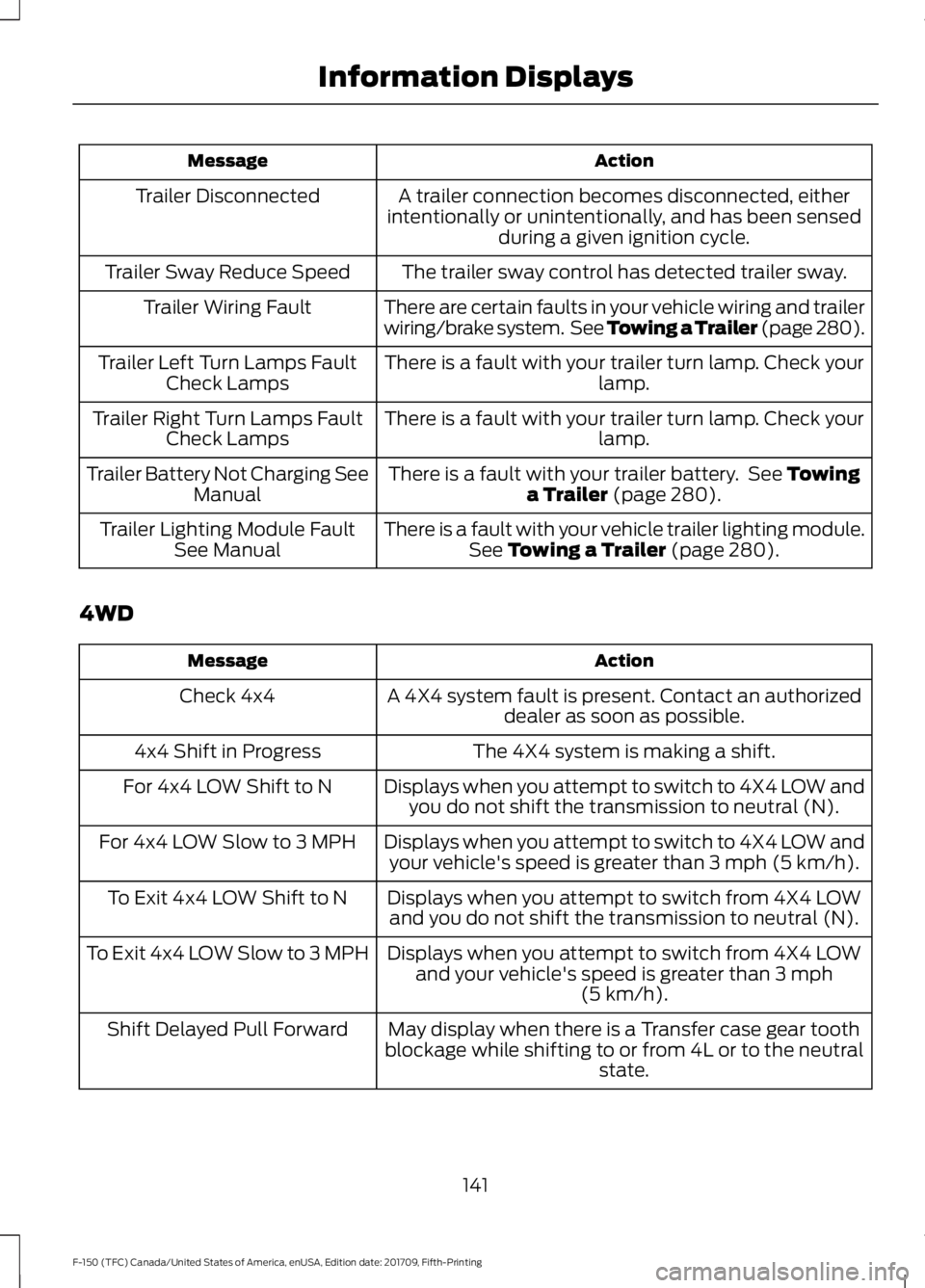
Action
Message
A trailer connection becomes disconnected, either
intentionally or unintentionally, and has been sensed during a given ignition cycle.
Trailer Disconnected
The trailer sway control has detected trailer sway.
Trailer Sway Reduce Speed
There are certain faults in your vehicle wiring and trailer
wiring/brake system. See Towing a Trailer (page 280).
Trailer Wiring Fault
There is a fault with your trailer turn lamp. Check yourlamp.
Trailer Left Turn Lamps Fault
Check Lamps
There is a fault with your trailer turn lamp. Check yourlamp.
Trailer Right Turn Lamps Fault
Check Lamps
There is a fault with your trailer battery. See
Towing
a Trailer (page 280).
Trailer Battery Not Charging See
Manual
There is a fault with your vehicle trailer lighting module.See
Towing a Trailer (page 280).
Trailer Lighting Module Fault
See Manual
4WD Action
Message
A 4X4 system fault is present. Contact an authorizeddealer as soon as possible.
Check 4x4
The 4X4 system is making a shift.
4x4 Shift in Progress
Displays when you attempt to switch to 4X4 LOW andyou do not shift the transmission to neutral (N).
For 4x4 LOW Shift to N
Displays when you attempt to switch to 4X4 LOW andyour vehicle's speed is greater than
3 mph (5 km/h).
For 4x4 LOW Slow to 3 MPH
Displays when you attempt to switch from 4X4 LOWand you do not shift the transmission to neutral (N).
To Exit 4x4 LOW Shift to N
Displays when you attempt to switch from 4X4 LOWand your vehicle's speed is greater than
3 mph
(5 km/h).
To Exit 4x4 LOW Slow to 3 MPH
May display when there is a Transfer case gear tooth
blockage while shifting to or from 4L or to the neutral state.
Shift Delayed Pull Forward
141
F-150 (TFC) Canada/United States of America, enUSA, Edition date: 201709, Fifth-Printing Information Displays
Page 145 of 641
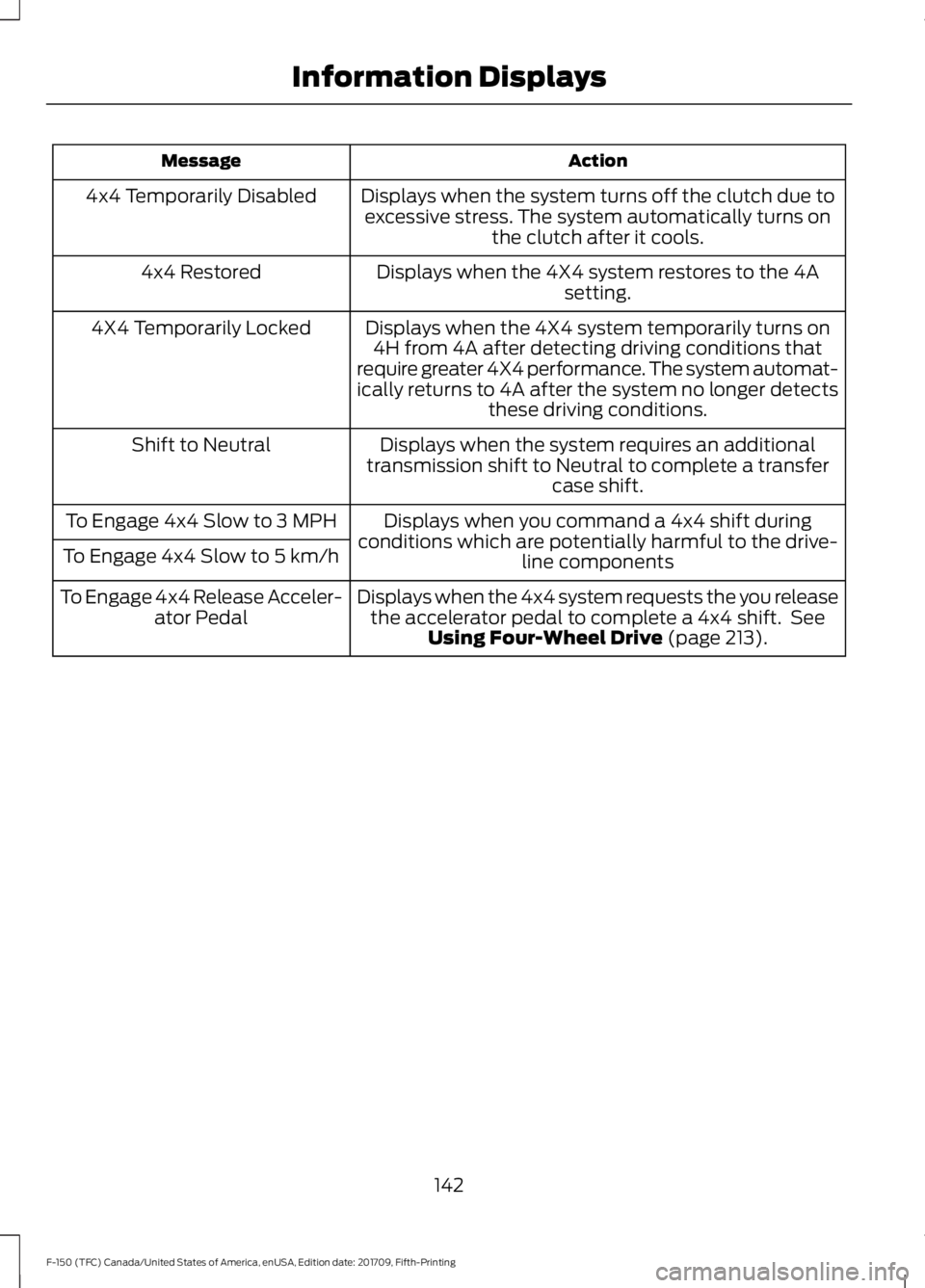
Action
Message
Displays when the system turns off the clutch due toexcessive stress. The system automatically turns on the clutch after it cools.
4x4 Temporarily Disabled
Displays when the 4X4 system restores to the 4Asetting.
4x4 Restored
Displays when the 4X4 system temporarily turns on4H from 4A after detecting driving conditions that
require greater 4X4 performance. The system automat-
ically returns to 4A after the system no longer detects these driving conditions.
4X4 Temporarily Locked
Displays when the system requires an additional
transmission shift to Neutral to complete a transfer case shift.
Shift to Neutral
Displays when you command a 4x4 shift during
conditions which are potentially harmful to the drive- line components
To Engage 4x4 Slow to 3 MPH
To Engage 4x4 Slow to 5 km/h
Displays when the 4x4 system requests the you releasethe accelerator pedal to complete a 4x4 shift. See Using Four-Wheel Drive (page 213).
To Engage 4x4 Release Acceler-
ator Pedal
142
F-150 (TFC) Canada/United States of America, enUSA, Edition date: 201709, Fifth-Printing Information Displays
Page 155 of 641
WARNING: The head restraint is
a safety device. Whenever possible it
should be installed and properly
adjusted when the seat is occupied.
Failure to adjust the head restraint
properly could reduce its effectiveness
during certain impacts.
Note: Adjust the seat backrest to an upright
driving position before adjusting the head
restraint. Adjust the head restraint so that
the top of it is level with the top of your head
and as far forward as possible. Make sure
that you remain comfortable. If you are
extremely tall, adjust the head restraint to
its highest position.
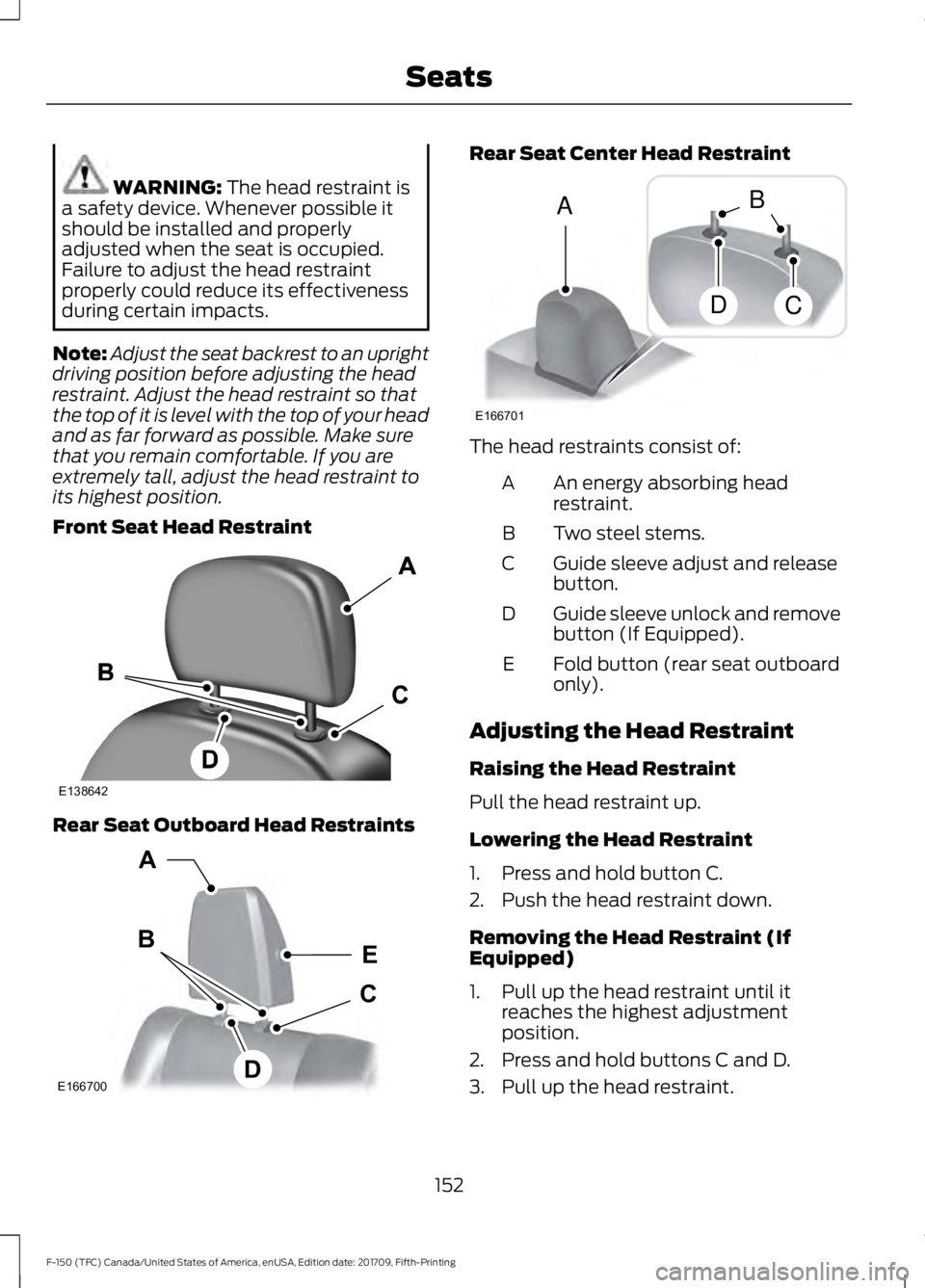
Front Seat Head Restraint Rear Seat Outboard Head Restraints Rear Seat Center Head Restraint
The head restraints consist of:
An energy absorbing head
restraint.
A
Two steel stems.
B
Guide sleeve adjust and release
button.
C
Guide sleeve unlock and remove
button (If Equipped).
D
Fold button (rear seat outboard
only).
E
Adjusting the Head Restraint
Raising the Head Restraint
Pull the head restraint up.
Lowering the Head Restraint
1. Press and hold button C.
2. Push the head restraint down.
Removing the Head Restraint (If
Equipped)
1. Pull up the head restraint until it reaches the highest adjustment
position.
2. Press and hold buttons C and D.
3. Pull up the head restraint.
152
F-150 (TFC) Canada/United States of America, enUSA, Edition date: 201709, Fifth-Printing SeatsE138642 E166700
E
D
C
B
A E166701
A
DC
B
Page 156 of 641
Note:
For rear outboard seats, you can fold
the head restraint forward for easier
removal.
Installing the Head Restraint
Align the steel stems into the guide sleeves
and push the head restraint down until it
locks.
Folding the Head Restraint
Note: The rear seat outboard head
restraints may fold forward for improved
visibility.
1. Press and hold button E.
2. Pull the head restraint back up to reset.
Front Seat Center Head Restraint
Your vehicle may have a front row center
head restraint that you cannot adjust or
remove.
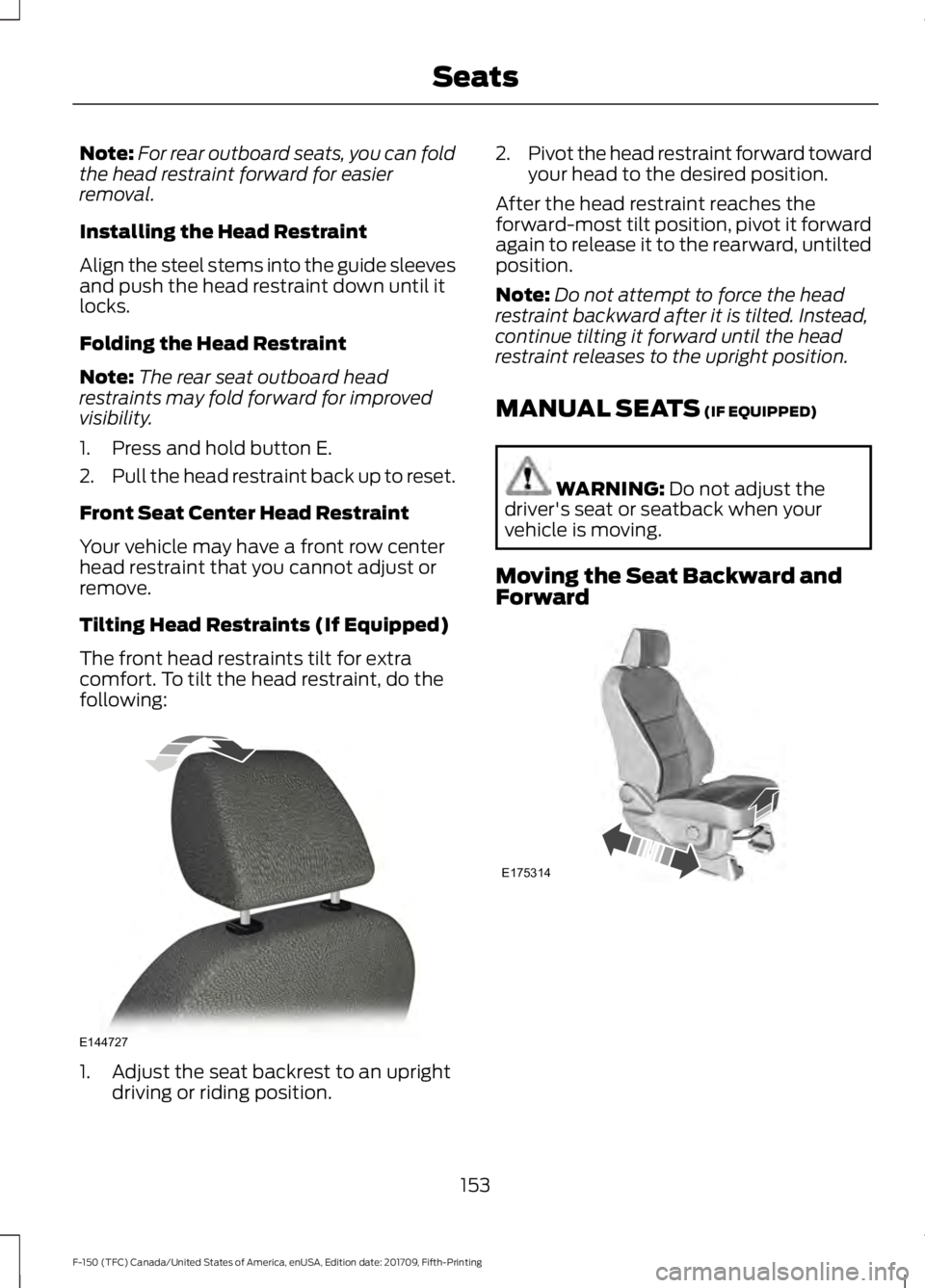
Tilting Head Restraints (If Equipped)
The front head restraints tilt for extra
comfort. To tilt the head restraint, do the
following: 1. Adjust the seat backrest to an upright
driving or riding position. 2.
Pivot the head restraint forward toward
your head to the desired position.
After the head restraint reaches the
forward-most tilt position, pivot it forward
again to release it to the rearward, untilted
position.
Note: Do not attempt to force the head
restraint backward after it is tilted. Instead,
continue tilting it forward until the head
restraint releases to the upright position.
MANUAL SEATS (IF EQUIPPED) WARNING:
Do not adjust the
driver's seat or seatback when your
vehicle is moving.
Moving the Seat Backward and
Forward 153
F-150 (TFC) Canada/United States of America, enUSA, Edition date: 201709, Fifth-Printing SeatsE144727 E175314
Page 160 of 641
MEMORY FUNCTION (IF EQUIPPED)
WARNING:
Before activating the
memory seat, make sure that the area
immediately surrounding the seat is clear
of obstructions and that all occupants
are clear of moving parts. WARNING:
Do not use the
memory function when your vehicle is
moving.
This function automatically recalls the
position of these features:
• Driver seat.
• Power mirrors.
• Optional power steering column.
• Optional power adjustable pedals.
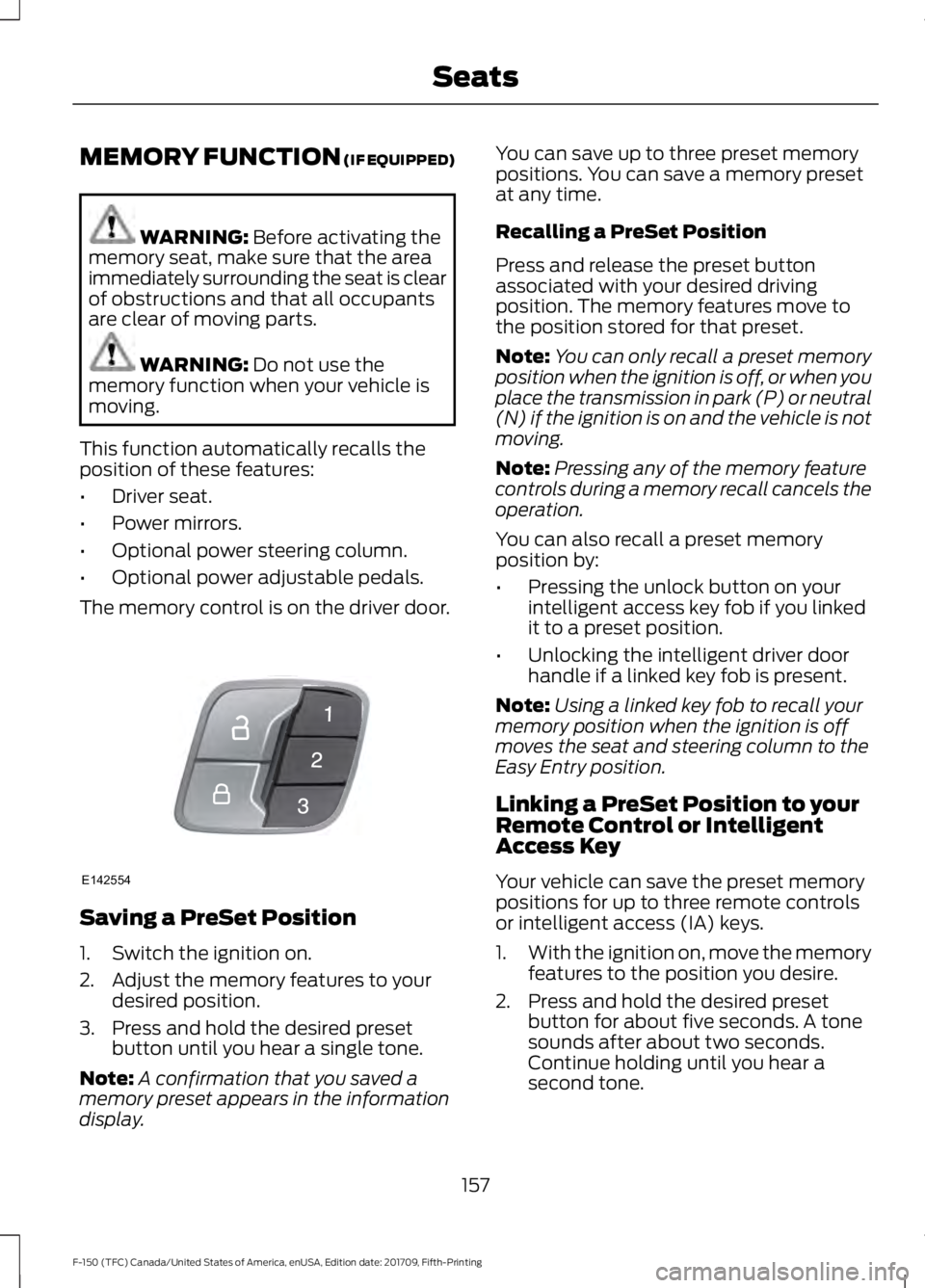
The memory control is on the driver door. Saving a PreSet Position
1. Switch the ignition on.
2. Adjust the memory features to your
desired position.
3. Press and hold the desired preset button until you hear a single tone.
Note: A confirmation that you saved a
memory preset appears in the information
display. You can save up to three preset memory
positions. You can save a memory preset
at any time.
Recalling a PreSet Position
Press and release the preset button
associated with your desired driving
position. The memory features move to
the position stored for that preset.
Note:
You can only recall a preset memory
position when the ignition is off, or when you
place the transmission in park (P) or neutral
(N) if the ignition is on and the vehicle is not
moving.
Note: Pressing any of the memory feature
controls during a memory recall cancels the
operation.
You can also recall a preset memory
position by:
• Pressing the unlock button on your
intelligent access key fob if you linked
it to a preset position.
• Unlocking the intelligent driver door
handle if a linked key fob is present.
Note: Using a linked key fob to recall your
memory position when the ignition is off
moves the seat and steering column to the
Easy Entry position.
Linking a PreSet Position to your
Remote Control or Intelligent
Access Key
Your vehicle can save the preset memory
positions for up to three remote controls
or intelligent access (IA) keys.
1. With the ignition on, move the memory
features to the position you desire.
2. Press and hold the desired preset button for about five seconds. A tone
sounds after about two seconds.
Continue holding until you hear a
second tone.
157
F-150 (TFC) Canada/United States of America, enUSA, Edition date: 201709, Fifth-Printing SeatsE142554
Page 161 of 641
3. Within three seconds, press the lock
button on the remote control you are
linking.
To unlink a remote control, follow the
same procedure – except in Step 3, press
the unlock button on the remote control.
Easy Entry and Exit Feature
If you enable this feature, it automatically
moves the driver seat position rearward up
to 2 in (5 cm) when you switch the ignition
off. The driver seat returns to the previous
position when you switch the ignition on.
Switch this feature on and off through the
Information displays settings menu. See
General Information (page 113).
Note: After moving the seat to the easy exit
position, pressing any of the memory feature
controls cancels the easy entry return
movement.
REAR SEATS
(IF EQUIPPED)
Folding Up the Rear Seat Cushion
The rear seat has a split 60/40 cushion.
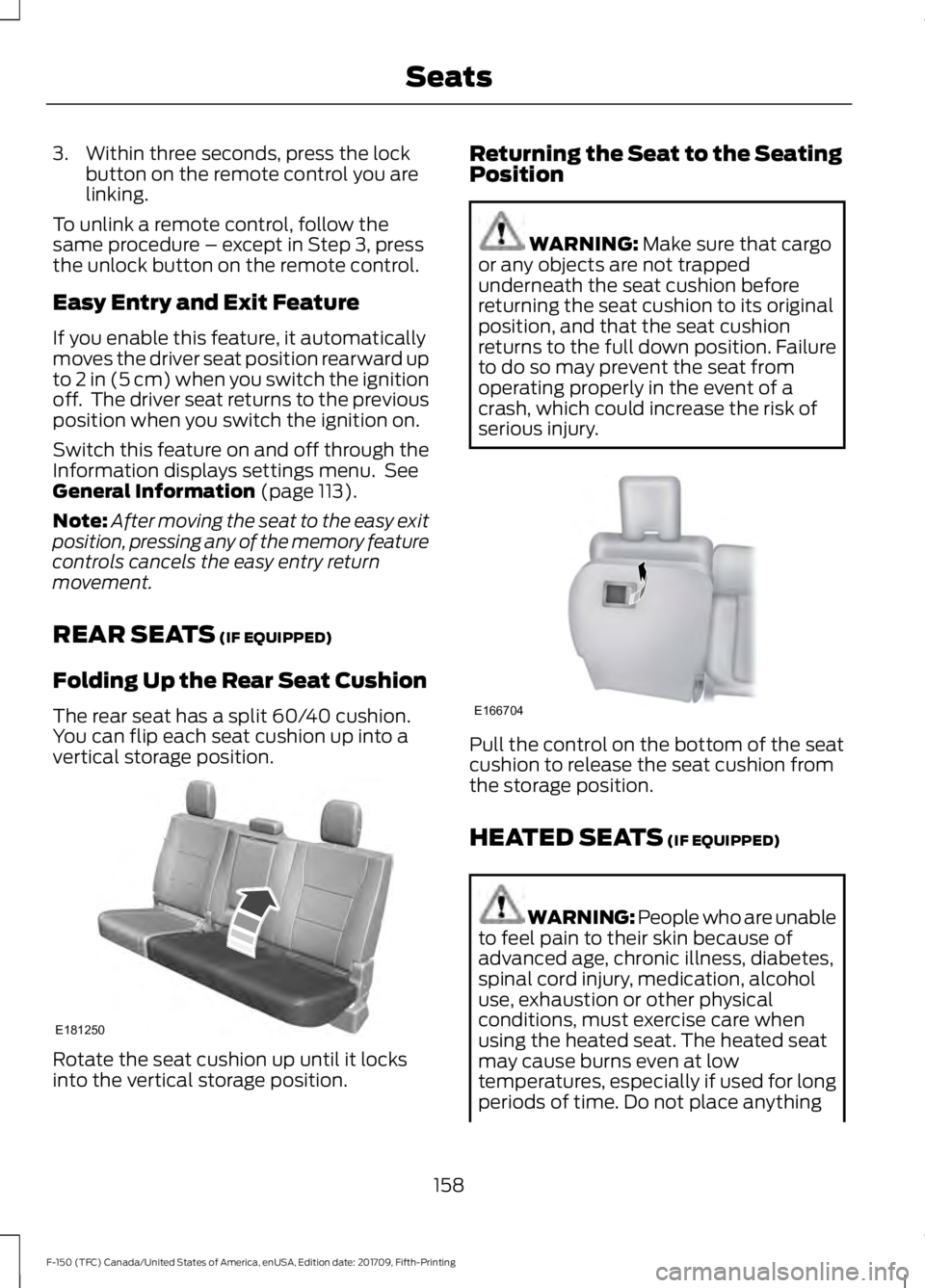
You can flip each seat cushion up into a
vertical storage position. Rotate the seat cushion up until it locks
into the vertical storage position. Returning the Seat to the Seating
Position WARNING:
Make sure that cargo
or any objects are not trapped
underneath the seat cushion before
returning the seat cushion to its original
position, and that the seat cushion
returns to the full down position. Failure
to do so may prevent the seat from
operating properly in the event of a
crash, which could increase the risk of
serious injury. Pull the control on the bottom of the seat
cushion to release the seat cushion from
the storage position.
HEATED SEATS
(IF EQUIPPED)
WARNING: People who are unable
to feel pain to their skin because of
advanced age, chronic illness, diabetes,
spinal cord injury, medication, alcohol
use, exhaustion or other physical
conditions, must exercise care when
using the heated seat. The heated seat
may cause burns even at low
temperatures, especially if used for long
periods of time. Do not place anything
158
F-150 (TFC) Canada/United States of America, enUSA, Edition date: 201709, Fifth-Printing SeatsE181250 E166704
Page 163 of 641

Press the heated seat symbol to cycle
through the various heat settings and off.
More indicator lights indicate warmer
settings.
The heated seat module resets at every
ignition run cycle. While the ignition is in
the on position, press the heated seat
switch to enable heating mode. When
activated, they turn off automatically when
you switch off the engine.
VENTILATED SEATS (IF EQUIPPED)
Note: The ventilated seats may remain on
after you remote start your vehicle, based
on your remote start settings. The ventilated
seats may also turn on when you start your
vehicle if they were on when you switched
your vehicle off.
Do not do the following:
• Spill liquid on the front seats. This may
cause the air vent holes to become
blocked and not work properly.
• Place cargo or objects under the seats.
They may block the air intake causing
the air vents to not work properly.
The engine must be running to use this
feature. Press this symbol to cycle through the
various ventilation settings and off. More
indicator lights indicate higher fan speeds.
If the engine falls below 350 RPM while
the ventilated seats are on, the feature
turns itself off. You need to reactivate it.
Note:
To improve comfort, use the
ventilated seats along with the vehicle ’s air
conditioning system. FRONT SEAT ARMREST
(IF
EQUIPPED) Press the release control to move the front
seat armrest up or down.
Lift the latch to open the lid and gain
access to the optional storage
compartment under the center seat
cushion.
The cupholder is located inside the front
seat armrest. You can also flip the
cupholder so that it faces forward. See
Center Console
(page 168).
160
F-150 (TFC) Canada/United States of America, enUSA, Edition date: 201709, Fifth-Printing SeatsE224689 E175382 E184821