2018 FORD F-150 trailer
[x] Cancel search: trailerPage 122 of 641
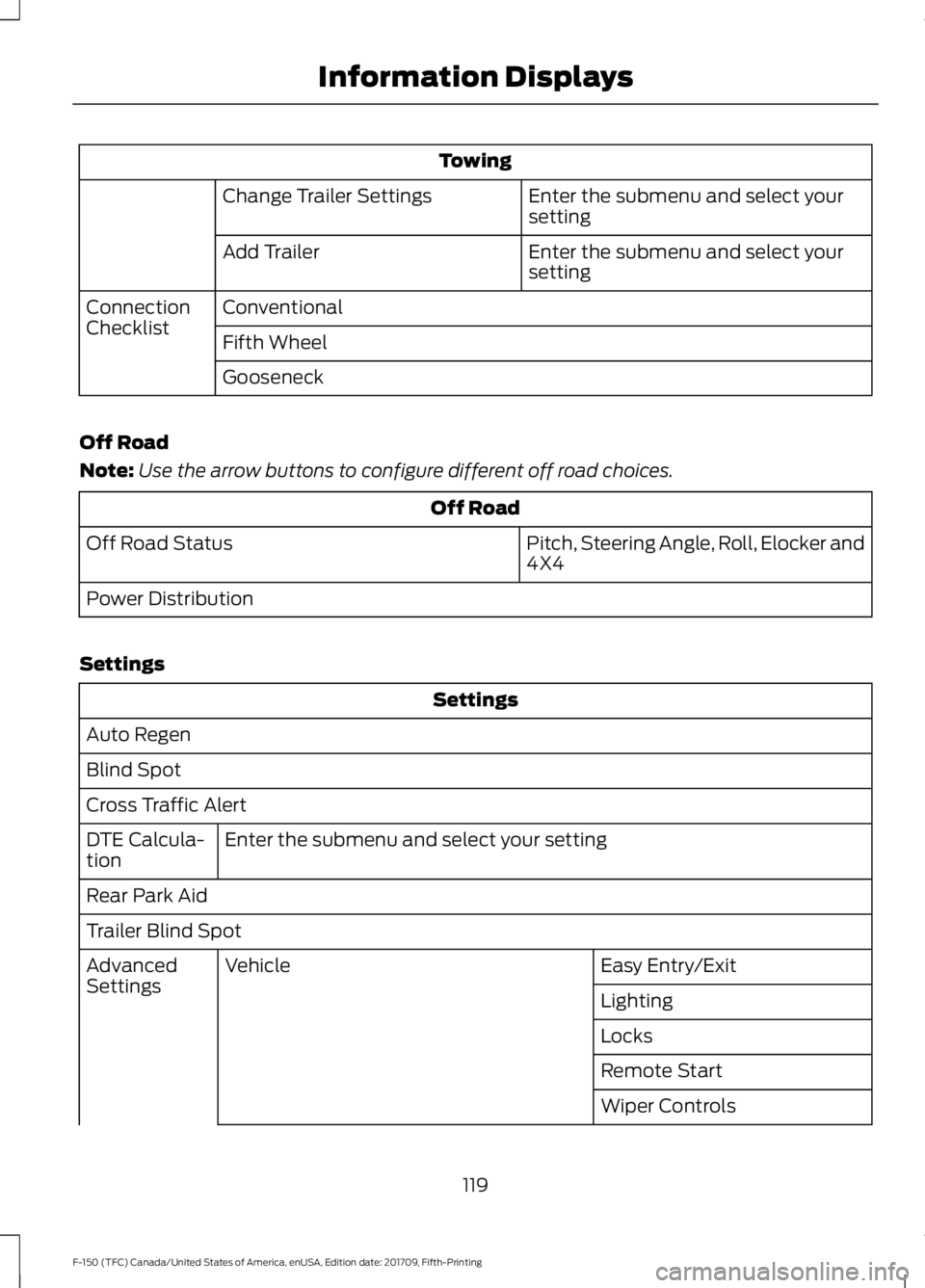
Towing
Enter the submenu and select your
setting
Change Trailer Settings
Enter the submenu and select your
setting
Add Trailer
Conventional
Connection
Checklist
Fifth Wheel
Gooseneck
Off Road
Note: Use the arrow buttons to configure different off road choices. Off Road
Pitch, Steering Angle, Roll, Elocker and
4X4
Off Road Status
Power Distribution
Settings Settings
Auto Regen
Blind Spot
Cross Traffic Alert Enter the submenu and select your setting
DTE Calcula-
tion
Rear Park Aid
Trailer Blind Spot
Easy Entry/Exit
Vehicle
Advanced
Settings
Lighting
Locks
Remote Start
Wiper Controls
119
F-150 (TFC) Canada/United States of America, enUSA, Edition date: 201709, Fifth-Printing Information Displays
Page 126 of 641
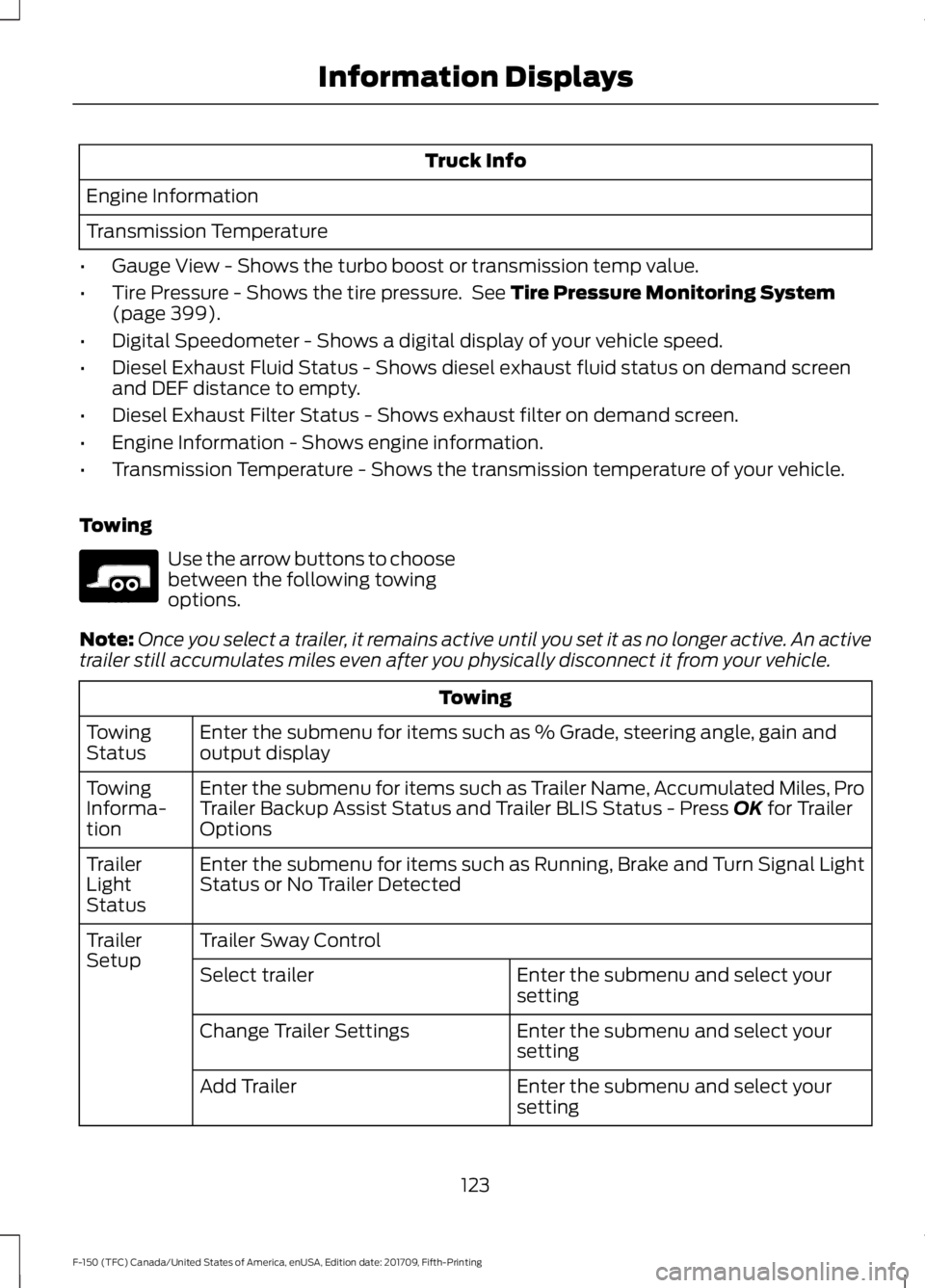
Truck Info
Engine Information
Transmission Temperature
• Gauge View - Shows the turbo boost or transmission temp value.
• Tire Pressure - Shows the tire pressure. See Tire Pressure Monitoring System
(page 399).
• Digital Speedometer - Shows a digital display of your vehicle speed.
• Diesel Exhaust Fluid Status - Shows diesel exhaust fluid status on demand screen
and DEF distance to empty.
• Diesel Exhaust Filter Status - Shows exhaust filter on demand screen.
• Engine Information - Shows engine information.
• Transmission Temperature - Shows the transmission temperature of your vehicle.
Towing Use the arrow buttons to choose
between the following towing
options.
Note: Once you select a trailer, it remains active until you set it as no longer active. An active
trailer still accumulates miles even after you physically disconnect it from your vehicle. Towing
Enter the submenu for items such as % Grade, steering angle, gain and
output display
Towing
Status
Enter the submenu for items such as Trailer Name, Accumulated Miles, Pro
Trailer Backup Assist Status and Trailer BLIS Status - Press
OK for Trailer
Options
Towing
Informa-
tion
Enter the submenu for items such as Running, Brake and Turn Signal Light
Status or No Trailer Detected
Trailer
Light
Status
Trailer Sway Control
Trailer
Setup
Enter the submenu and select your
setting
Select trailer
Enter the submenu and select your
setting
Change Trailer Settings
Enter the submenu and select your
setting
Add Trailer
123
F-150 (TFC) Canada/United States of America, enUSA, Edition date: 201709, Fifth-Printing Information DisplaysE176096
Page 127 of 641
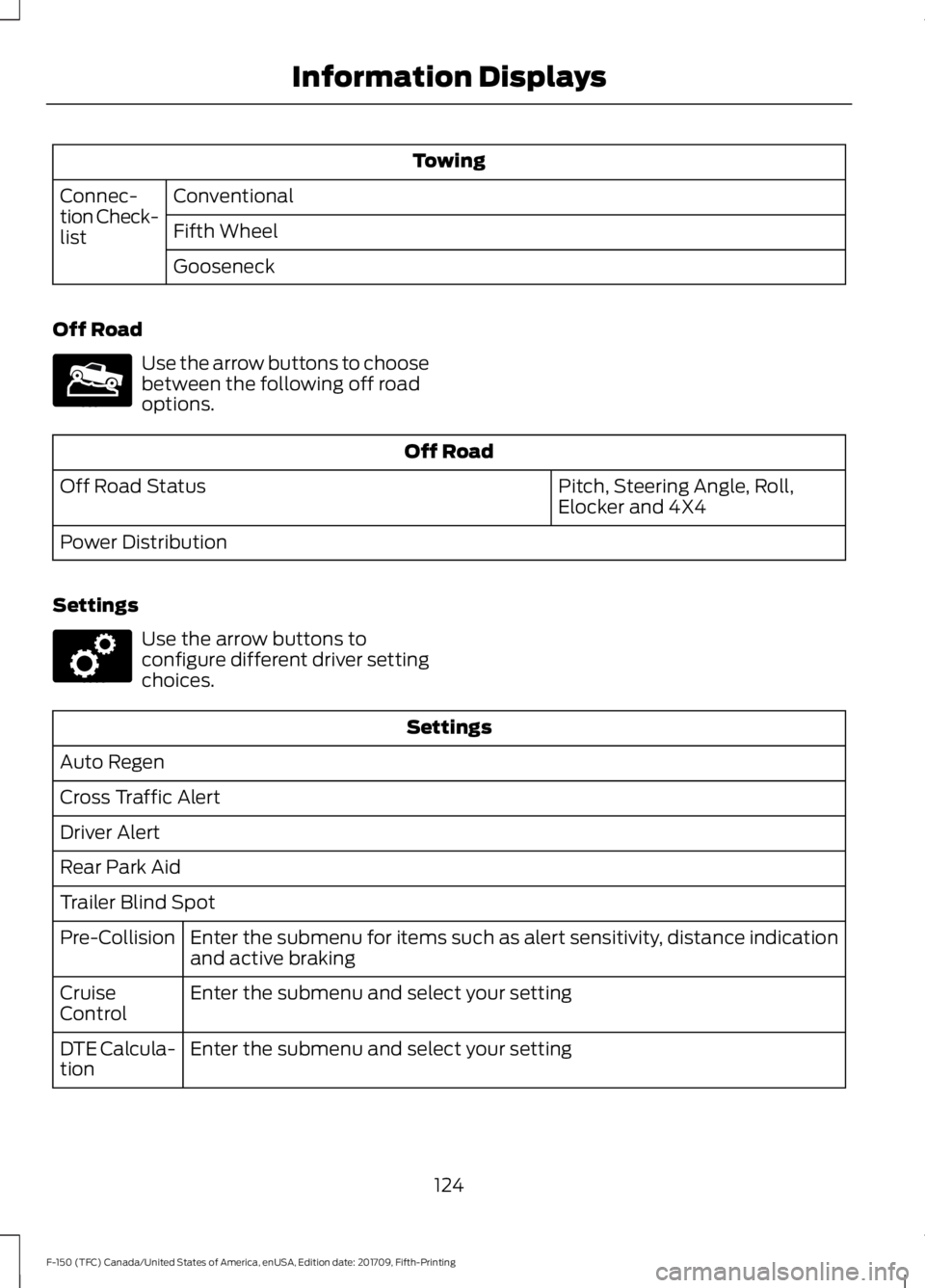
Towing
Conventional
Connec-
tion Check-
list Fifth Wheel
Gooseneck
Off Road Use the arrow buttons to choose
between the following off road
options.
Off Road
Pitch, Steering Angle, Roll,
Elocker and 4X4
Off Road Status
Power Distribution
Settings Use the arrow buttons to
configure different driver setting
choices.
Settings
Auto Regen
Cross Traffic Alert
Driver Alert
Rear Park Aid
Trailer Blind Spot Enter the submenu for items such as alert sensitivity, distance indication
and active braking
Pre-Collision
Enter the submenu and select your setting
Cruise
Control
Enter the submenu and select your setting
DTE Calcula-
tion
124
F-150 (TFC) Canada/United States of America, enUSA, Edition date: 201709, Fifth-Printing Information DisplaysE176097 E176098
Page 132 of 641

Action
Message
The blind spot information system and cross traffic alert
system sensors are blocked. See Blind Spot Information
System (page 257).
Cross Traffic Not Avail-
able Sensor Blocked See Manual
A fault with the system has occurred. Contact an authorizeddealer as soon as possible.
Cross Traffic System
Fault
The system automatically turns off and displays this messagewhen you connect a trailer to the vehicle that does not have
a trailer blind spot system or when you switch the trailer blind spot system off through the information display. See
Blind
Spot Information System (page 257).
Cross Traffic Alert Deac-
tivated Trailer Attached
The system automatically turns off and displays this messagewhen you connect a trailer to the vehicle that does not have
a trailer blind spot system or when you switch the trailer blind spot system off through the information display. See
Blind
Spot Information System (page 257).
Blind Spot Alert Deactiv-
ated Trailer Attached
Displays when the trailer connected is a fifth wheel or goose-neck, or when the trailer width is wider than
10 ft (2.7 m) or
longer than 33 ft (10 m).
Trailer Blind Spot Not
available Due to Invalid Trailer
Diesel Messages WARNING:
When the Exhaust
Filter Cleaning message appears in the
information display, do not park near
flammable materials, vapors or
structures until filter cleaning is
complete.
129
F-150 (TFC) Canada/United States of America, enUSA, Edition date: 201709, Fifth-Printing Information Displays
Page 141 of 641

Pre-Collision Assist
Action
Message
You have a blocked sensor due to bad weather, ice, mud or
water in front of the radar sensor. You can typically clean the
sensor to resolve.
Pre-Collision Assist Not
Available Sensor Blocked
A fault with the system has occurred. Contact an authorized
dealer as soon as possible.
Pre-Collision Assist Not
Available
Pro Trailer Backup Assist Action
Message
Pro Trailer Backup Assist can only be activated whenthe vehicle is stopped.
Pro Trailer Backup Assist™ Not
Active Stop Vehicle to Activate
Camera System is locating the sticker. Wait until thesticker is found before attempting to use Pro Trailer Backup Assist.
Pro Trailer Backup Assist™
Locating Sticker Please wait... Press Knob to Exit
Stop Now. Pro Trailer Backup Assist has reached maxtrailer angle.
Pro Trailer Backup Assist™ Stop
now Maximum trailer angle Press Knob to Exit
Stop Now. Pro Trailer Backup Assist is no longercontrolling steering.
Pro Trailer Backup Assist™ Stop
Now Take Control of Steering Wheel
Slow vehicle speed. Vehicle is approaching the exitspeed for the Pro Trailer Backup Assist feature.
Pro Trailer Backup Assist™
Reduce Speed Turn Knob to Steer Press Knob to Exit
Conditions for Pro Trailer Backup Assist operation arenot met. See Trailer Reversing Aids (page 282).
Pro Trailer Backup Assist™
System is Not Available
Pro Trailer Backup Assist cannot operate with handson wheel. Remove hands to activate.
Pro Trailer Backup Assist™
Remove Hands from Steering
Wheel to Activate Press Knob to Exit
Pro Trailer Backup Assist knob has been pushed todeactivate the system.
Pro Trailer Backup Assist™
Cancelled by Driver Take
Control of Steering Wheel
Pro Trailer Backup Assist operation is only available in
reverse gear. Shift gear selector into reverse to activate.
Pro Trailer Backup Assist™ Shift
to Reverse to Activate. Press Knob to Exit
138
F-150 (TFC) Canada/United States of America, enUSA, Edition date: 201709, Fifth-Printing Information Displays
Page 142 of 641
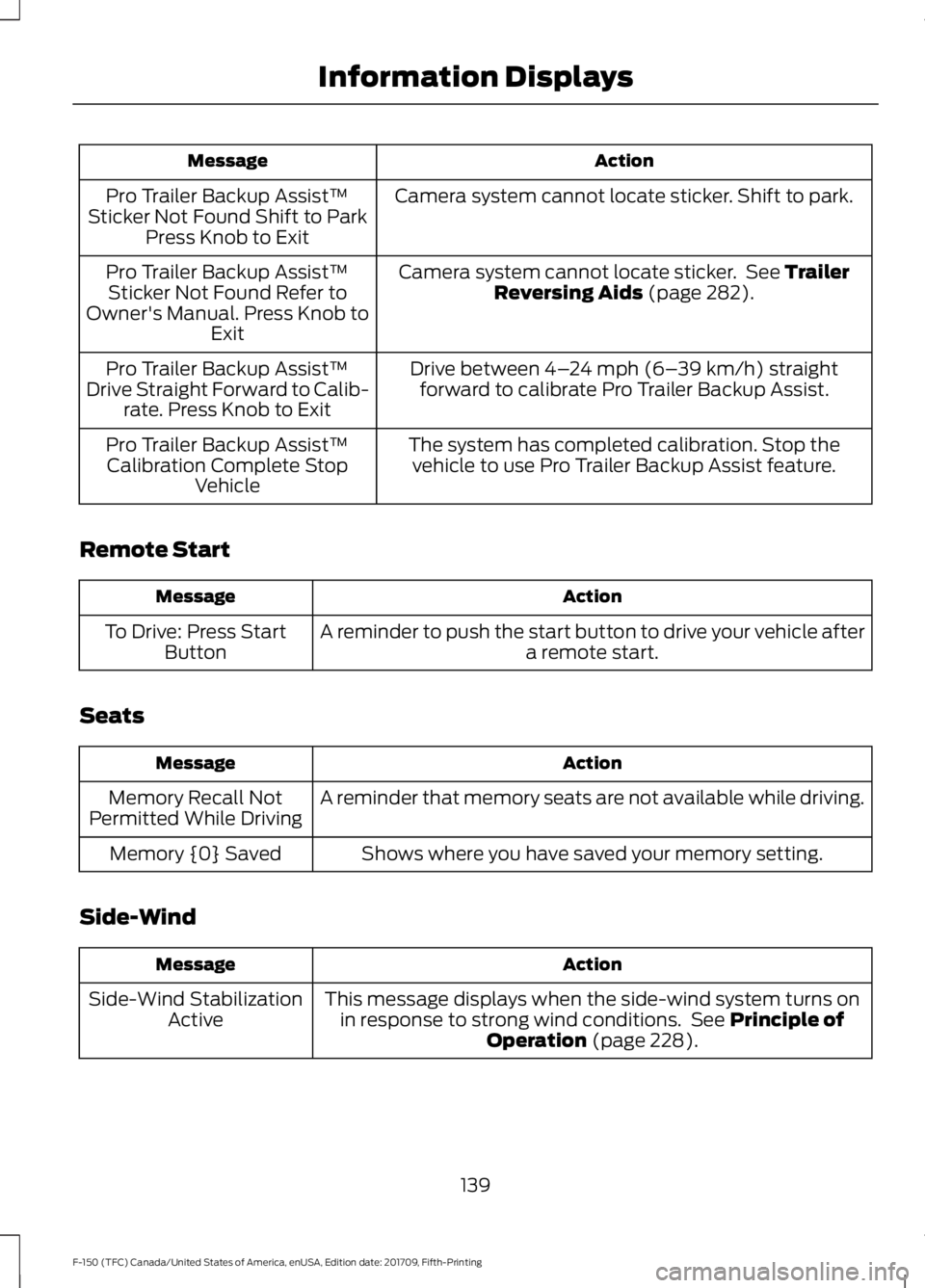
Action
Message
Camera system cannot locate sticker. Shift to park.
Pro Trailer Backup Assist™
Sticker Not Found Shift to Park Press Knob to Exit
Camera system cannot locate sticker. See Trailer
Reversing Aids (page 282).
Pro Trailer Backup Assist™
Sticker Not Found Refer to
Owner's Manual. Press Knob to Exit
Drive between
4–24 mph (6– 39 km/h) straight
forward to calibrate Pro Trailer Backup Assist.
Pro Trailer Backup Assist™
Drive Straight Forward to Calib- rate. Press Knob to Exit
The system has completed calibration. Stop thevehicle to use Pro Trailer Backup Assist feature.
Pro Trailer Backup Assist™
Calibration Complete Stop Vehicle
Remote Start Action
Message
A reminder to push the start button to drive your vehicle after a remote start.
To Drive: Press Start
Button
Seats Action
Message
A reminder that memory seats are not available while driving.
Memory Recall Not
Permitted While Driving
Shows where you have saved your memory setting.
Memory {0} Saved
Side-Wind Action
Message
This message displays when the side-wind system turns onin response to strong wind conditions. See
Principle of
Operation (page 228).
Side-Wind Stabilization
Active
139
F-150 (TFC) Canada/United States of America, enUSA, Edition date: 201709, Fifth-Printing Information Displays
Page 143 of 641
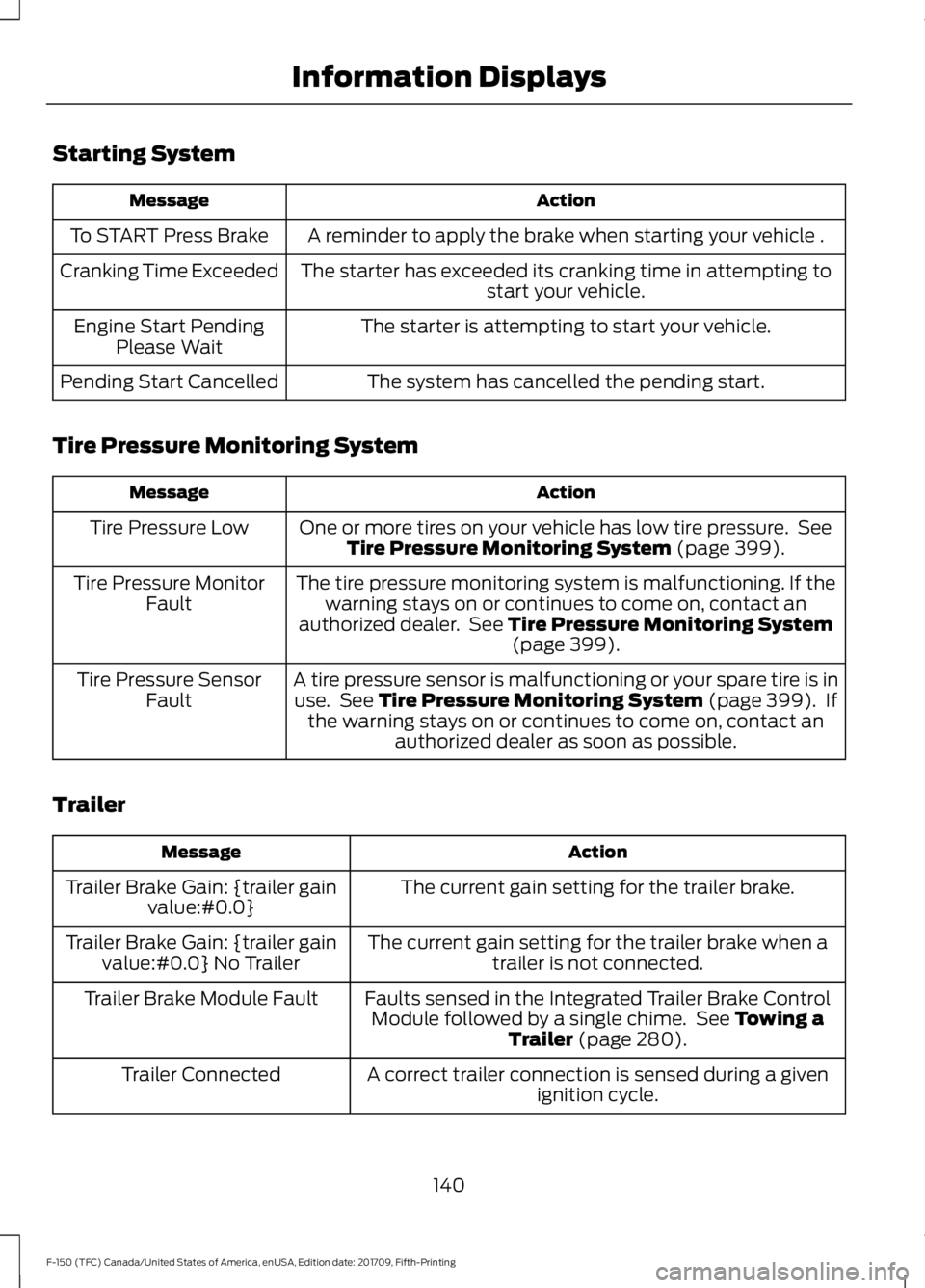
Starting System
Action
Message
A reminder to apply the brake when starting your vehicle .
To START Press Brake
The starter has exceeded its cranking time in attempting tostart your vehicle.
Cranking Time Exceeded
The starter is attempting to start your vehicle.
Engine Start Pending
Please Wait
The system has cancelled the pending start.
Pending Start Cancelled
Tire Pressure Monitoring System Action
Message
One or more tires on your vehicle has low tire pressure. SeeTire Pressure Monitoring System (page 399).
Tire Pressure Low
The tire pressure monitoring system is malfunctioning. If thewarning stays on or continues to come on, contact an
authorized dealer. See
Tire Pressure Monitoring System (page 399).
Tire Pressure Monitor
Fault
A tire pressure sensor is malfunctioning or your spare tire is inuse. See
Tire Pressure Monitoring System (page 399). If
the warning stays on or continues to come on, contact an authorized dealer as soon as possible.
Tire Pressure Sensor
Fault
Trailer Action
Message
The current gain setting for the trailer brake.
Trailer Brake Gain: {trailer gain
value:#0.0}
The current gain setting for the trailer brake when atrailer is not connected.
Trailer Brake Gain: {trailer gain
value:#0.0} No Trailer
Faults sensed in the Integrated Trailer Brake ControlModule followed by a single chime. See
Towing a
Trailer (page 280).
Trailer Brake Module Fault
A correct trailer connection is sensed during a givenignition cycle.
Trailer Connected
140
F-150 (TFC) Canada/United States of America, enUSA, Edition date: 201709, Fifth-Printing Information Displays
Page 144 of 641
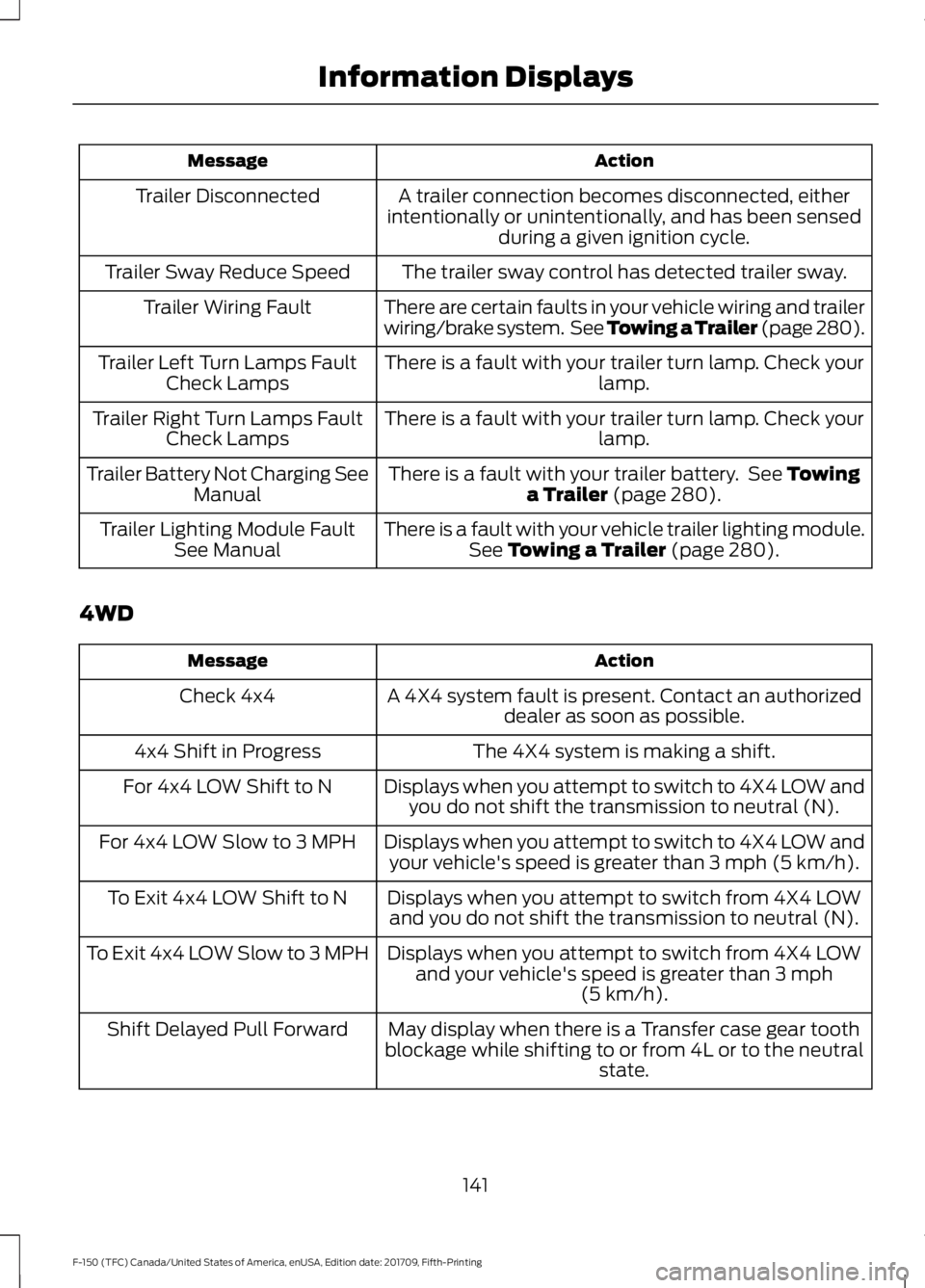
Action
Message
A trailer connection becomes disconnected, either
intentionally or unintentionally, and has been sensed during a given ignition cycle.
Trailer Disconnected
The trailer sway control has detected trailer sway.
Trailer Sway Reduce Speed
There are certain faults in your vehicle wiring and trailer
wiring/brake system. See Towing a Trailer (page 280).
Trailer Wiring Fault
There is a fault with your trailer turn lamp. Check yourlamp.
Trailer Left Turn Lamps Fault
Check Lamps
There is a fault with your trailer turn lamp. Check yourlamp.
Trailer Right Turn Lamps Fault
Check Lamps
There is a fault with your trailer battery. See
Towing
a Trailer (page 280).
Trailer Battery Not Charging See
Manual
There is a fault with your vehicle trailer lighting module.See
Towing a Trailer (page 280).
Trailer Lighting Module Fault
See Manual
4WD Action
Message
A 4X4 system fault is present. Contact an authorizeddealer as soon as possible.
Check 4x4
The 4X4 system is making a shift.
4x4 Shift in Progress
Displays when you attempt to switch to 4X4 LOW andyou do not shift the transmission to neutral (N).
For 4x4 LOW Shift to N
Displays when you attempt to switch to 4X4 LOW andyour vehicle's speed is greater than
3 mph (5 km/h).
For 4x4 LOW Slow to 3 MPH
Displays when you attempt to switch from 4X4 LOWand you do not shift the transmission to neutral (N).
To Exit 4x4 LOW Shift to N
Displays when you attempt to switch from 4X4 LOWand your vehicle's speed is greater than
3 mph
(5 km/h).
To Exit 4x4 LOW Slow to 3 MPH
May display when there is a Transfer case gear tooth
blockage while shifting to or from 4L or to the neutral state.
Shift Delayed Pull Forward
141
F-150 (TFC) Canada/United States of America, enUSA, Edition date: 201709, Fifth-Printing Information Displays